改裝 2080 Ti 22G · part 29
[Benchmark] Qwen3.8-27B on One RTX 5090 With QEngine: 359 tok/s on Code, and Why It Won't Build for a 2080 Ti
❯ cat --toc
- Why I tested QEngine
- One RTX 5090 runs Qwen3.8-27B at 358.5 tok/s on code, 109.1 on Chinese
- Code runs 3x faster than Chinese because more drafted tokens get accepted
- Four streams deliver 592.8 tok/s on code and nearly quadruple Chinese throughput
- Running it on a Windows 5090: WSL2 plus files pulled from the Docker image
- nvidia-smi shows 31.9 GB because QEngine takes all free VRAM for its KV pool
- The 2080 Ti build fails: the kernels need BF16 tensor-core instructions from sm_80
- Deep dive: exact test conditions, ranges, and the full 2080 Ti build log
- Test conditions
- Run-to-run ranges
- Where the engine itself is fast, apart from drafting
- What this comparison cannot tell you
- Four-stream detail
- The author's own published numbers
- Full 2080 Ti build log
TL;DR
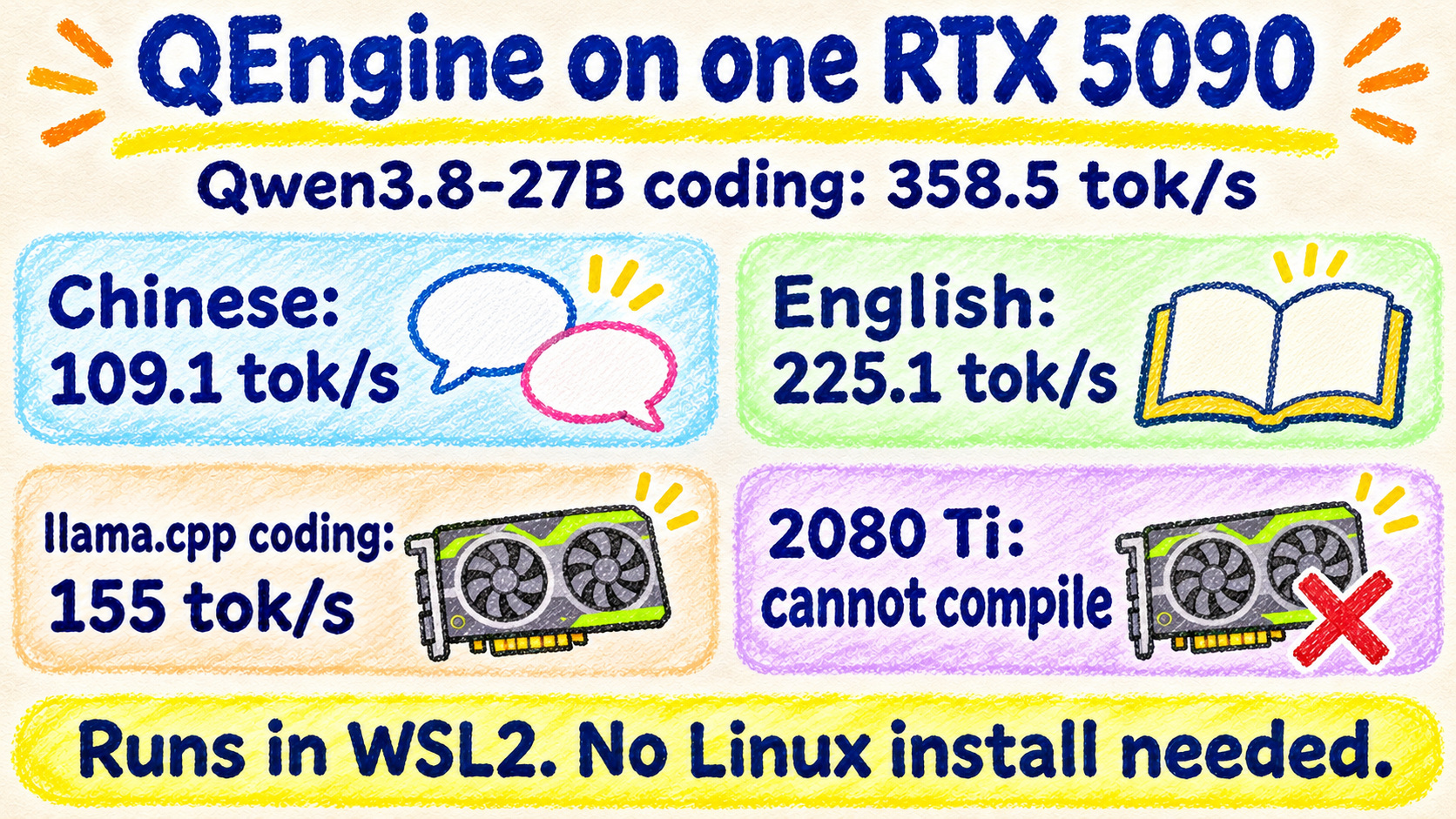
QEngine runs Qwen3.8-27B on one RTX 5090 under WSL2. Single stream it writes code at 358.5 tok/s, English at 225.1 and Chinese at 109.1. llama.cpp on the same card does about 69 on all three with no drafting, and 155 on code with a DFlash2 drafter. Four streams at once total 592.8 on code. The spread is speculative decoding: code advances 4.22 tokens per step, Chinese 1.27. The quantization differs, so this is not like-for-like. It does not compile for a 2080 Ti. The kernels need BF16 tensor-core instructions that start at sm_80.
Why I tested QEngine
QEngine is a custom C++/CUDA inference engine that only runs Qwen3.8 models. It is MIT licensed and has one author. His headline claim is three RTX 3090s serving eight agents at over 1,000 tok/s total on Qwen3.8-27B.
The README says Linux only, and "Windows, including Docker Desktop / WSL2, is untested". Supported GPUs are the RTX 3000, 4000 and 5000 series. Qwen3.8-27B on one card is marked experimental. Everything I have falls outside what he tested: one RTX 5090 in a Windows 11 box, and the three modded RTX 2080 Ti 22GB cards this series is about.
So I had two questions. Does it run on a single 5090 under Windows, and how fast? Can the 2080 Ti use it? The 5090 runs it under WSL2, and Qwen3.8-27B writes code at 358.5 tok/s. The 2080 Ti build fails.
One RTX 5090 runs Qwen3.8-27B at 358.5 tok/s on code, 109.1 on Chinese
Setup: QEngine 1.3.6 on one RTX 5090 inside WSL2. The model is Qwen3.8-27B with the RedHatAI/Qwen3.8-27B-INT4 weights, W4A16 (4-bit weights, 16-bit activations).
I used three prompts: a Chinese story, an English story, and "thread-safe LRU cache in Python". Each run produced 512 output tokens with thinking disabled. I discarded one warm-up and took the median of three runs.
Look at the QEngine single stream column first. The caveats on the two llama.cpp columns follow the chart.
| Prompt | QEngine, single stream | llama.cpp, no drafting | llama.cpp + DFlash2 | QEngine, 4 streams total |
|---|---|---|---|---|
| Chinese story | 109.1 tok/s | 69.3 tok/s | 81.9 tok/s | 406.7 tok/s |
| English story | 225.1 tok/s | 69.3 tok/s | 119.3 tok/s | 571.5 tok/s |
| Python LRU cache | 358.5 tok/s | 69.1 tok/s | 155.0 tok/s | 592.8 tok/s |
QEngine's time to first token was about 50 ms. llama.cpp's was about 75 ms.
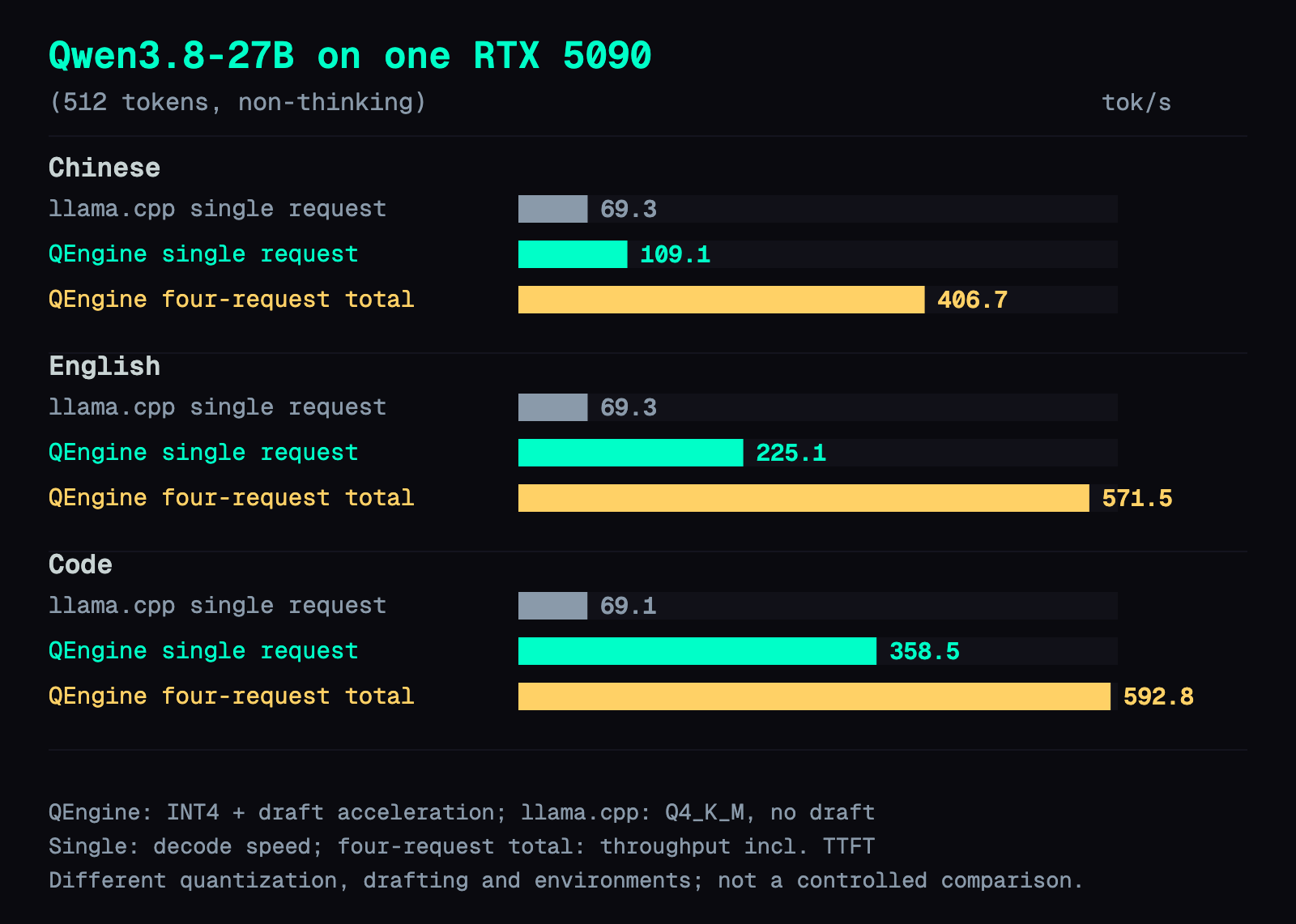
The chart shows only the no-drafting llama.cpp numbers. This is not an apples-to-apples engine comparison. Three things differ. The quantization is INT4 for QEngine and Q4_K_M GGUF for llama.cpp. QEngine ran in WSL2, and llama.cpp ran natively on Windows. The draft settings differ too: llama.cpp drafts 3 tokens per step by default, and raising that to 7 to match QEngine gives 168.5 tok/s on code.
So the table answers "what do I get on the same 5090 with this engine at its defaults". It does not answer "how much faster is the engine itself".
Code runs 3x faster than Chinese because more drafted tokens get accepted
QEngine's 27B uses speculative decoding. A cheap guesser drafts several tokens ahead, the big model checks them all in one pass, and generation jumps ahead by every token it accepts. QEngine has two guessers and picks one. With one or two conversations decoding on one card and enough free VRAM, it uses DFlash2, a separately loaded draft model that proposes 7 tokens per step. With three or more it uses the model's MTP head, a small extra layer that predicts 1 to 7 tokens ahead. Both were loaded in my runs.
The server log reports how many tokens each verify step advances on average (the accepted drafts plus the one token the model produces itself), and how many steps it took to produce 512 tokens.
| Prompt | Tokens advanced per step | Steps for 512 tokens | Single stream speed |
|---|---|---|---|
| Chinese story | 1.27 | 403 | 109.1 tok/s |
| English story | 2.62 | 195 | 225.1 tok/s |
| Python LRU cache | 4.22 | 121 | 358.5 tok/s |
Steps divided by time comes out at about 85 steps per second for all three. So speed is roughly 85 times the tokens advanced per step.
Code is predictable. Brackets, indentation and identifiers are easy to guess. On Chinese prose the drafter lands less than half a token per step on average.
Four streams deliver 592.8 tok/s on code and nearly quadruple Chinese throughput
With QE_MAX_SEQS=4 and four conversations running together, the totals were 406.7 tok/s on Chinese, 571.5 on English and 592.8 on code. Per stream that is 104.4, 154.5 and 162.4. Time to first token rose to about 125 ms.
The prompts scale differently. Chinese per-stream speed only dropped from 109.1 to 104.4, so the total is nearly 4x the single stream. Code per-stream speed dropped from 358.5 to 162.4, so the total is only 65% higher than one stream. Four conversations is past the DFlash2 limit, so these steps drafted with MTP. My logs show it: single-stream steps drafted about 7 tokens each, and four-stream steps drafted about 1 to 4 on average. That may be part of the drop on code. I did not isolate it.
Running it on a Windows 5090: WSL2 plus files pulled from the Docker image
There is no Windows build. The release page ships no binaries. The official routes are Docker or building from source.
My machine: Windows 11 Pro 10.0.26300, NVIDIA driver 621.14, WSL2 Ubuntu 26.04.1, kernel 6.18.33.2-microsoft-standard-WSL2. The driver already supports CUDA 13.1, so I did not upgrade it for this. The weights need about 16 GB of disk.
If your WSL2 has Docker, the README's Docker route is probably the simplest. I did not test it. Mine had no Docker, so I pulled the prebuilt libqengine.so and the CUDA 13.1 runtime out of the official image ghcr.io/bpx03/qengine:1.3.6, and ran them with the v1.3.6 source (commit 444b2e4).
Source and weights:
git clone --depth 1 --branch v1.3.6 https://github.com/bpx03/QEngine.git source
uv venv --python 3.12 .venv
uv pip install --python .venv/bin/python huggingface_hub
.venv/bin/hf download RedHatAI/Qwen3.8-27B-INT4 --local-dir source/models/Qwen3.8-27B-INT4
Then I copied the container's app/build into source/build. The first load failed:
OSError: libcudart.so.13: cannot open shared object file: No such file or directory
The fix is to point the loader at the CUDA 13.1 runtime taken from the image, plus WSL's GPU driver libraries:
export LD_LIBRARY_PATH="$PWD/prebuilt/usr/local/cuda-13.1/targets/x86_64-linux/lib:/usr/lib/wsl/lib:${LD_LIBRARY_PATH:-}"
Launch with the README's single-card command. I set the context to 8192:
cd source
QE_DEVICES=0 QE_MAX_SEQS=1 server/run.sh 8080 --max-ctx 8192
It warns that the engines are tested on 2 and 3 GPUs, then loads in 13.2 s. The API is OpenAI-compatible:
curl -s http://127.0.0.1:8080/v1/chat/completions -H 'Content-Type: application/json' -d '{
  "messages": [{"role": "user", "content": "Introduce yourself in one sentence."}],
  "chat_template_kwargs": {"enable_thinking": false}
}'
enable_thinking: false matters. The 27B defaults to thinking on. My first pass left it on, and all 512 tokens were reasoning with no visible text.
Chinese output had no mojibake. A request with tools returned standard tool_calls with parseable JSON arguments.
nvidia-smi shows 31.9 GB because QEngine takes all free VRAM for its KV pool
nvidia-smi showed 31.9 GB used on the 5090, the whole-card peak. llama.cpp with the same model and no drafting used 20.6 GB.
That is not what the 27B needs. The startup log says where the memory went:
KV pool: 380928 tokens shared by 1 sequence slots (max context 8192)
GPU0: weights 14.74 GB, cache+act 15.57 GB
The KV cache is the per-token attention state the model keeps for everything it has read and written. A KV pool is one block of VRAM reserved for that cache up front and shared between conversations.
The weights are 14.74 GB. By default QEngine takes all free VRAM as its KV pool, which on the 5090 is 380,928 tokens. The author's docs say QE_POOL_TOKENS sets the pool size, and that the pool shrinks when another program takes VRAM. I did not test either.
The 2080 Ti build fails: the kernels need BF16 tensor-core instructions from sm_80
The README lists only RTX 3000, 4000 and 5000. I wanted to know whether QEngine really needs newer hardware, or whether nobody had tried building it for a 2080 Ti.
Some background. NVIDIA numbers each GPU generation's instruction set with a compute capability: the 2080 Ti is sm_75, and RTX 3000 cards are sm_86. Tensor cores are the matrix-multiply units on these cards. BF16 is a 16-bit float format with the exponent range of FP32 and less precision.
On the box with three 2080 Tis, I put the CUDA 13.1 compiler pieces in an isolated directory, left the system CUDA untouched, and targeted sm_75. $D is that isolated directory:
cmake -S source -B build-sm75 -G "Unix Makefiles" \
  -DCMAKE_CUDA_ARCHITECTURES=75 \
  -DCMAKE_CXX_COMPILER=/usr/bin/g++-13 \
  -DCMAKE_CUDA_HOST_COMPILER=/usr/bin/g++-13 \
  -DCMAKE_CUDA_COMPILER="$D/cuda-13.1/bin/nvcc" \
  -DCMAKE_BUILD_TYPE=Release
cmake --build build-sm75 --target qengine --parallel 4
nvcc 13.1 still accepts sm_75, and configure passed. The build stops here:
ptxas .../dn_ab.ptx, line 213; error   : Feature '.bf16' requires .target sm_80 or higher
ptxas .../dn_ab.ptx, line 213; error   : Feature '.m16n8k16' requires .target sm_80 or higher
The error comes from src/kernels/dn_ab.cu line 13: an inline-assembly tensor-core matrix-multiply instruction with BF16 operands. Eight files under src use this BF16 instruction directly.
So it really does need newer hardware. The missing piece is a hardware instruction, and a driver upgrade does not add it. Running on a 2080 Ti would mean rewriting the compute kernels in another format.
For Qwen3.8-27B on 2080 Ti, this series already has two routes. One card with llama.cpp at 30 tok/s. Two cards with FastLLM + DFlash2 at 153.8 tok/s on code.
Deep dive: exact test conditions, ranges, and the full 2080 Ti build log
You can skip this section if you only want to run the engine. It holds the exact settings, run-to-run ranges, the limits of the comparison, and the full 2080 Ti build log.
Test conditions
| Item | Setting |
|---|---|
| Machine | Windows 11 Pro 10.0.26300, NVIDIA driver 621.14, WSL2 Ubuntu 26.04.1, kernel 6.18.33.2-microsoft-standard-WSL2, one RTX 5090 |
| QEngine | 1.3.6, commit 444b2e4, libqengine.so from ghcr.io/bpx03/qengine:1.3.6 |
| Weights | RedHatAI/Qwen3.8-27B-INT4, plus the author's tuned MTP head and DFlash2 drafter (auto-downloaded) |
| QEngine launch | QE_DEVICES=0 QE_MAX_SEQS=1 (4 for the four-stream run), --max-ctx 8192, KV default FP8, vision off |
| llama.cpp | Official Windows CUDA 13.5 build b12445, Q4_K_M GGUF, -ngl 999 -c 8192 -np 1 --jinja --seed 42 --spec-type none |
| llama.cpp with drafting | Same, with --spec-type draft-dflash2 --spec-draft-model, draft model z-lab/Qwen3.8-27B-DFlash2-GGUF at Q4_K_M; --spec-draft-n-max default 3, plus one code run at 7 |
| Request | max_tokens=512, seed=42, temperature=0.7, top_p=0.8, presence_penalty=1.5, ignore_eos=true, stream=true, enable_thinking=false |
| Sampling difference | QEngine top_k=20, llama.cpp top_k=40 (each engine's default) |
| Speed formula | 512 / (full stream time − time to first token), measured client-side through an SSH port-forward |
| VRAM | Sampled from nvidia-smi about every 0.5 s, whole-card peak including about 1.9 GB of desktop use |
Run-to-run ranges
QEngine single stream: Chinese 108.59 to 109.17, English 224.40 to 225.17, code 357.31 to 361.23 tok/s. llama.cpp with no drafting: all three between 69.1 and 69.4 tok/s. llama.cpp with DFlash2: Chinese 81.84 to 81.95, English 119.07 to 119.42, code 154.73 to 155.08, and code 167.65 to 169.09 at 7 drafts per step.
Where the engine itself is fast, apart from drafting
Split speed into two parts: steps per second, and tokens advanced per step.
QEngine ran about 85 steps per second on all three prompts, or about 11.7 ms per step, and in my logs each of those steps verified close to 7 drafted tokens on average. llama.cpp without drafting produces one token per step, so 69 tok/s is about 14.5 ms per step. With DFlash2 on, dividing its speed by tokens advanced per step gives 51 to 53 steps per second, or 19 to 20 ms per step. llama.cpp's steps get slower once they verify drafts. A QEngine step verifies about 7 tokens and still finishes faster than a llama.cpp step with no drafting. The quantization and runtime differ, so the engine doesn't account for the entire gap.
The author's docs and source comments describe several techniques. I did not switch them off one at a time, so I can't say how much each contributes.
- The compute kernels are hand-written for the Qwen3.8 architecture instead of calling a general matrix library.
- INT4 weights are repacked at load time into the layout tensor cores consume, and the math runs on the BF16 tensor-core instruction that the 2080 Ti build fails on.
- The main computation of each decode step is captured as a CUDA graph and replayed, which avoids launching kernels one at a time.
- For the next-token logits, an INT4 copy of the output layer screens the full vocabulary, and only the top candidates are rescored with the BF16 weights: 16 for greedy decoding, 64 when sampling.
- When recent output repeats earlier context, drafts are copied from that context.
- The MTP head is a version the author fine-tuned on the engine's own answers, downloaded automatically on first startup.
What this comparison cannot tell you
- The draft settings differ. At llama.cpp's default 3 drafts per step, each step advanced 1.55 tokens on Chinese, 2.31 on English and 3.06 on code. At 7 drafts, code advanced 3.48 per step.
- llama.cpp's
draft-mtpwas not measured. This Q4_K_M GGUF has no embedded MTP head, and the server exits withcontext type MTP requested but model doesn't contain MTP layers. I did not try a separate MTP file. - Only one context length (8192) and one output length (512 tokens) were tested.
- Thinking-mode speed is not reported.
- There is one prompt per category, and acceptance depends heavily on content.
Four-stream detail
Total throughput is 2048 / wall time of the group. Per-stream numbers are the median of 12 samples.
| Prompt | Total | Per-stream median | Per-stream range | TTFT |
|---|---|---|---|---|
| Chinese story | 406.7 tok/s | 104.4 tok/s | 102.19 to 110.01 | 125.2 ms |
| English story | 571.5 tok/s | 154.5 tok/s | 144.80 to 156.39 | 127.7 ms |
| Python LRU cache | 592.8 tok/s | 162.4 tok/s | 151.87 to 174.53 | 123.2 ms |
The four slots shared a 352,256-token KV pool.
The author's own published numbers
These ran on different hardware and prompts, so treat them as context, not as a comparison.
- Three RTX 3090s, single stream: story 279, code 516 tok/s.
- Three RTX 3090s, eight agents with random 500-token prompts: 1,129 tok/s total.
- One RTX 3090, short replies (385 tokens, greedy): code 212, story 150, proof 196 tok/s.
Full 2080 Ti build log
The box: three RTX 2080 Ti 22 GB, driver 580.173.02. The system nvcc 12.4 was left alone. I used isolated NVIDIA 13.1.0 redistributables: nvcc, cudart, cccl and libnvvm, no driver.
The first error had nothing to do with the GPU. CUDA 13.1's headers clash with glibc 2.43:
/usr/include/x86_64-linux-gnu/bits/mathcalls.h(206): error: exception
specification is incompatible with that of previous function "rsqrt"
glibc declares it noexcept, and CUDA's header does not. Adding noexcept (true) to the rsqrt and rsqrtf declarations in the isolated include/crt/math_functions.h got past it. The QEngine source was not modified.
The next stop was the .bf16 and .m16n8k16 ptxas errors shown above. NVIDIA's PTX documentation states that BF16 m16n8k16 mma needs sm_80 or higher, which matches the compiler error.
No libqengine.so was produced. So I could not verify whether the existing driver (580, which reports CUDA 13.0) can initialize QEngine.
FAQ
- Does QEngine run on Windows?
- Not natively. There is no Windows build, the release page ships no binaries, and the README says Windows, including Docker Desktop and WSL2, is untested. It does run under WSL2. On Windows 11 with an RTX 5090 and WSL2 Ubuntu 26.04.1, I pulled the prebuilt libqengine.so and the CUDA 13.1 runtime out of the official image ghcr.io/bpx03/qengine:1.3.6, ran them with the v1.3.6 source, and pointed LD_LIBRARY_PATH at that runtime plus /usr/lib/wsl/lib. The server loaded Qwen3.8-27B in 13.2 s and served an OpenAI-compatible API.
- How fast is Qwen3.8-27B on one RTX 5090 with QEngine?
- Single stream, 512 output tokens, thinking off, median of three runs: 358.5 tok/s on a Python coding prompt, 225.1 on an English story and 109.1 on a Chinese story, with about 50 ms to first token. Four conversations at once totaled 592.8, 571.5 and 406.7 tok/s. On the same card, llama.cpp with a Q4_K_M GGUF and no speculative decoding did 69.1 to 69.3 tok/s on all three. With a DFlash2 draft model it did 155.0 on code, 119.3 on English and 81.9 on Chinese. The quantization and runtime differ, so this is not a pure engine comparison.
- How much VRAM does QEngine need for Qwen3.8-27B?
- The INT4 weights take 14.74 GB. nvidia-smi showed 31.9 GB used on the 5090 (whole-card peak, including about 1.9 GB of desktop use) because QEngine by default takes all free VRAM as its KV pool, 380,928 tokens here with an 8192 context. llama.cpp with the same model and no drafting used 20.6 GB. The author's docs say QE_POOL_TOKENS sets the pool size and that the pool shrinks when another program takes VRAM. I did not test either.
- Can QEngine run on an RTX 2080 Ti?
- No. Targeting sm_75 with CUDA 13.1, configure passes but ptxas stops with 'Feature .bf16 requires .target sm_80 or higher'. The kernels use BF16 m16n8k16 tensor-core instructions, which need sm_80 or higher (RTX 3000 cards are sm_86), and 8 files under src contain that instruction directly. A driver upgrade cannot add a hardware instruction. For Qwen3.8-27B on 2080 Ti, llama.cpp on one card gives 30 tok/s and FastLLM with DFlash2 on two cards gives 153.8 tok/s on code.
- Why is Chinese so much slower than code on the same model in QEngine?
- Speculative decoding. QEngine guesses tokens ahead with either a DFlash2 draft model or the model's MTP head, and the 27B model verifies several of them per step. The server ran at about 85 verify steps per second on every prompt, so speed is roughly 85 times the tokens each step advances. Code advanced 4.22 tokens per step, English 2.62 and Chinese prose 1.27. Code is predictable. Chinese prose barely gets past one token per step.
Read next
- 2026-08-21[Benchmark] Free 15% Speedup on a 2080 Ti: One Broken Chat Template, One Starving MTP Head
A frozen GGUF chat template was killing my KV cache; a community fix plus MTP draft depth 4 took Qwen3.8-27B from 41.6 to 47.6 tok/s on a 2080 Ti 22GB.
- 2026-11-04[Benchmark] Idol Image-to-3D on a Modded RTX 2080 Ti: Fix the cuDNN Crash, 84.8 s → 72.7 s
Idol turns one image into a 3D Gaussian splat. On a modded 2080 Ti 22GB the default run crashes; a one-line patch fixes it: 84.8 s → 72.7 s per image.
- 2026-10-28[Benchmark] turing-unlock on an RTX 2080 Ti: Full-Rate FP16 Tensor Cores, 50.6 → 69.9 TFLOPS
A kernel module lifts the half-rate FP16 tensor-core cap on GeForce Turing. Three modded 2080 Ti 22G cards: 69.9 TFLOPS GEMM, what speeds up, the dracut fix.
- 2026-10-16MiniCPM-V 4.7 35B-A3B on One RTX 2080 Ti: 111.5 tok/s with Vision, Replacing a Two-GPU 27B
MiniCPM-V 4.7 35B-A3B on a single modded RTX 2080 Ti 22G with llama.cpp: 111.5 tok/s, 262K context in 20.8 GB, 127/140 vs 128 for a two-GPU Qwen3.8-27B. Setup, benchmarks, and why its DSpark draft model makes it slower.
Don't miss the next one
Subscribe, and you won't.
One-click unsubscribe anytime.