改裝 2080 Ti 22G · part 1
[Just for Fun — Advanced] I Scored a 22GB-Modded 2080 Ti for ~$340 All-In — Just Enough to Keep a 27B Agent Running at Home
❯ cat --toc
- The short version
- Picking up where the GTX 970 left off
- Same box, one new card
- What the 22GB mod actually changes
- The price: sticker and landed are not the same number (and that's the gotcha)
- "Always-on" is real: making the brain a boot-time service
- The real bottleneck isn't the GPU — it's the cheap CPU
- What's next
TL;DR
My GTX 970 series ended on a thought: the same sliding-window trick that makes 64K context nearly free on that 2014 card was big enough that I half-seriously wanted to run a Hermes agent on an eleven-year-old GPU — with the honest caveat, "don't, E2B is too small." This post follows that thread. The old card can't carry a real agent, so I went second-hand and dug up a 22GB-modded RTX 2080 Ti (¥2079 sticker, ~$340 / NT$11k all-in with shipping). It's the same cheap old desktop — a six-core Ryzen 5 3500X with 16GB RAM, nothing else swapped. Add one new card and drop WSL for native Windows, and the brain jumps from "barely runs a 4B" to "hosts a resident 27B agent." The odd 22 (not 24) is the giveaway: 352-bit = 11 channels, each 1GB chip swapped for 2GB = 22GB. It doubles capacity, not bandwidth (still ~616 GB/s), so you're buying room, not speed. This isn't a dream fulfilled or a steal-of-a-card — it's the plain satisfaction of finding cheap parts that turn out to be exactly enough, plus a counterintuitive lesson about running an agent on a home box.
The short version
What does it take to run an always-on, do-things-for-me agent on the old desktop in the closet? New cards big enough for a sizeable model are pricey. The 2014 GTX 970 from my last series was too small — I said so myself: I wanted an agent on it, but I didn't recommend it.
This is the route in between. The second-hand market has these "22GB-modded" RTX 2080 Tis — a 2018-era card with its memory capacity doubled. One card runs ¥2079, about NT$11k by the time it reaches you. That lands on a sweet threshold: enough to fit a 27B model plus long context, so the same untouched cheap old desktop can suddenly keep a resident agent brain alive.
And it's not some obscure pick — it's actually in demand. With both VRAM and system RAM prices through the roof in 2026, new cards and memory both hurt, so an affordable card with a lot of VRAM for running local models has quietly become a go-to — and a modded 22G 2080 Ti sits right on that sweet spot. This isn't digging up something nobody wanted; it's the popular answer a brutal price environment forced.
Below: what it is, how it's modded, and a counterintuitive bottleneck I hit turning it into something that actually stays up 24/7.
Picking up where the GTX 970 left off
The GTX 970 series ran four parts and ended, in Part 3, on a line I was a little fond of: the same sliding-window mechanism that made q8 KV pointless also lets that card hold 64K context for almost no memory — and 64K is big enough that I half-seriously wanted to run a Hermes agent on a 2014 GPU. Then I added the honest part: don't, really — E2B is too small, the SWA window is what it is, it's fine as a lightweight helper but it'll choke as a real agent brain.
That "don't" is where this post starts.
An old card can't carry a real agent, and there are two ways out. One is a new card — but anything big enough to hold a sizeable model plus long context costs enough to talk you out of it. The other is to go hunting for value on the second-hand market. I took the second route and came back with a 22GB-modded RTX 2080 Ti.
Same box, one new card
Here's the part I like most: apart from the GPU, nothing on this box (I call it forge) changed.
| GTX 970 (old brain) | 2080 Ti 22G (current brain) | |
|---|---|---|
| Architecture | Maxwell sm_52 (2014) | Turing sm_75 (2018) |
| Tensor cores | None | Yes (Turing's enhanced Volta-gen cores) |
| VRAM | 4GB (~3.5GB usable) | 22528 MiB (modded 22G) |
| Memory bandwidth | ~224 GB/s | ~616 GB/s |
| Brain it can host | ~1–4B Q4 (squeezed) | resident 27B Q4_K @128K |
The motherboard, CPU, RAM, and case all stayed: still that six-core Ryzen 5 3500X, still 16GB RAM (15.93 GB measured). The whole upgrade is two moves — swap one card, and retire the WSL2 setup for native Windows 11.
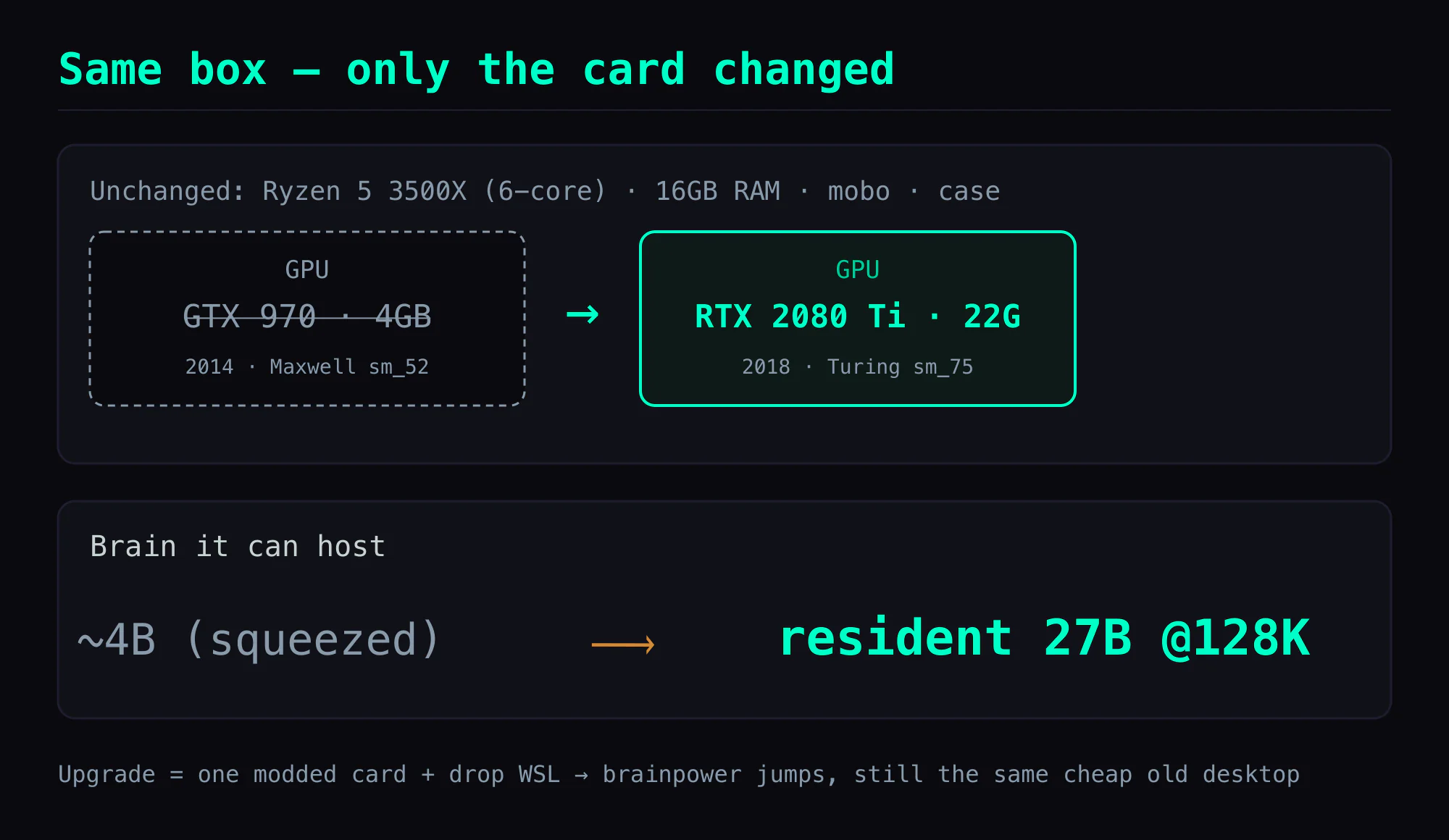
That's what makes this card fun: the brainpower jumps, but underneath it's still the same cheap old desktop. No "rebuilt a rig for AI" — just a new socket big enough to hold a bigger brain.
What the 22GB mod actually changes
To be clear up front: a stock RTX 2080 Ti is 11GB. nvidia-smi on this one reports 22528 MiB, roughly 22GB — capacity doubled. It's not an NVIDIA SKU; it's a third-party mod.
Here's what they change:
- The 2080 Ti has a 352-bit memory bus = 11 × 32-bit channels. Stock, each channel carries one 1GB (8 Gbit) GDDR6 chip, so 11 × 1GB = 11GB.
- The mod swaps all eleven for 2GB (16 Gbit) chips, so 11 × 2GB = 22GB.
- That's why it's 22, not a round 24 — the odd number is itself the fingerprint of a real 2080 Ti die. A 24GB card is usually a 384-bit (12-channel) part; only 11 channels × 2GB lands on 22.
The work is the hard part: BGA rework — hot-air or IR to lift each stock package off, reball, and solder the higher-density chip back down — plus a modified VBIOS flash so the card recognizes the new capacity and its timings. Get the VBIOS wrong and the card won't see the extra memory, or won't post at all.
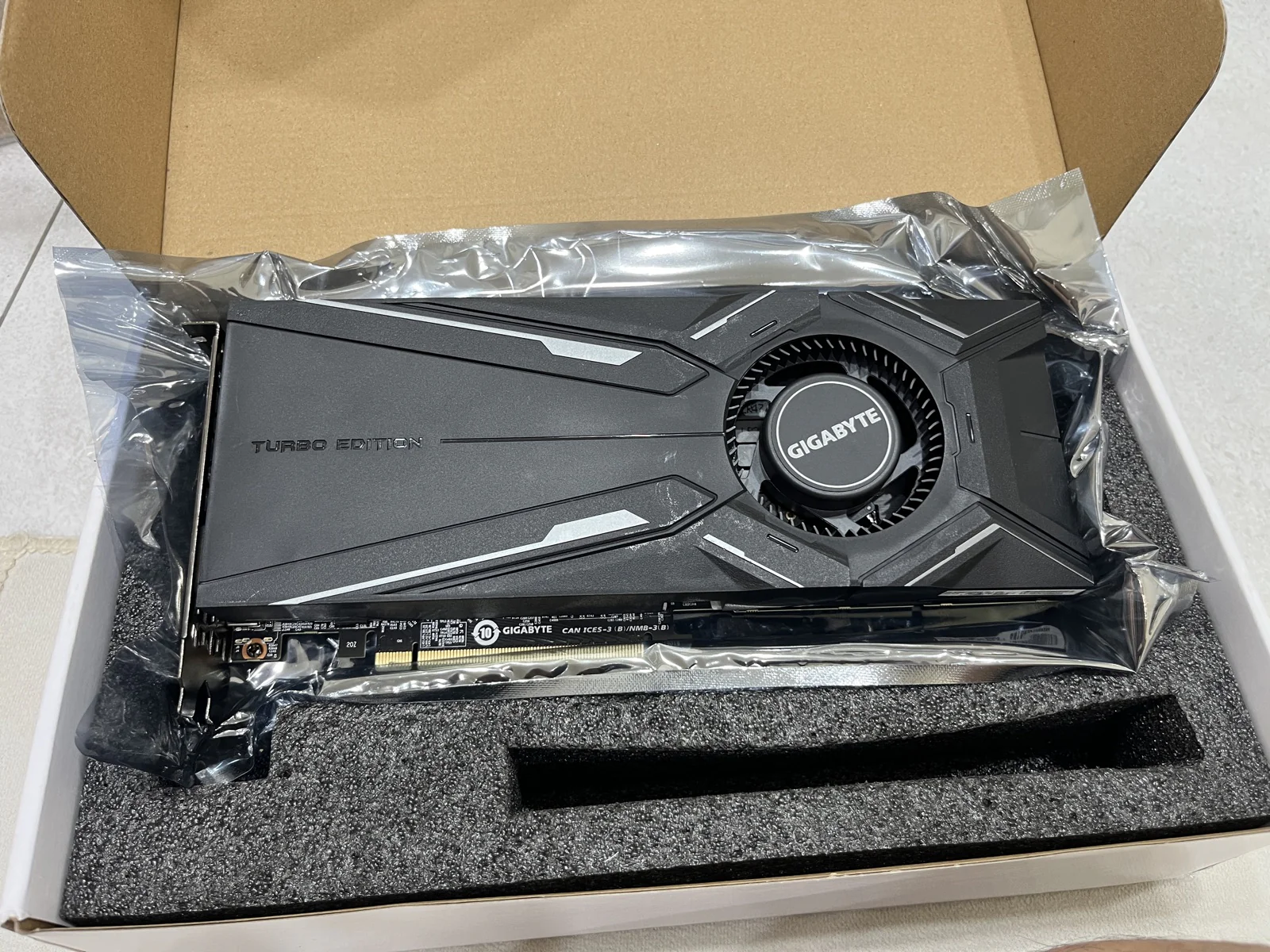
The listing for mine spec'd a GIGABYTE Turbo cooler and the usual mod tags — "core 300A, full-spec, full power delivery, rear power, Type-C." In plain terms:
- Core 300A = the TU102-300A bin (a SKU/bin label, not the complete die). To be precise: the 2080 Ti doesn't use the complete TU102 die — the full die has 4608 CUDA cores and a 384-bit interface, while the 2080 Ti is a cut-down version with 4352 CUDA cores and the 352-bit (11-channel) bus. "Full-spec" here means this is the proper retail 2080 Ti config, not a further-cut-down variant — not that it's the complete die.
- Full power delivery / rear power = full VRM phase count, power connector moved to the card's rear.
- Type-C = the VirtualLink USB-C port.
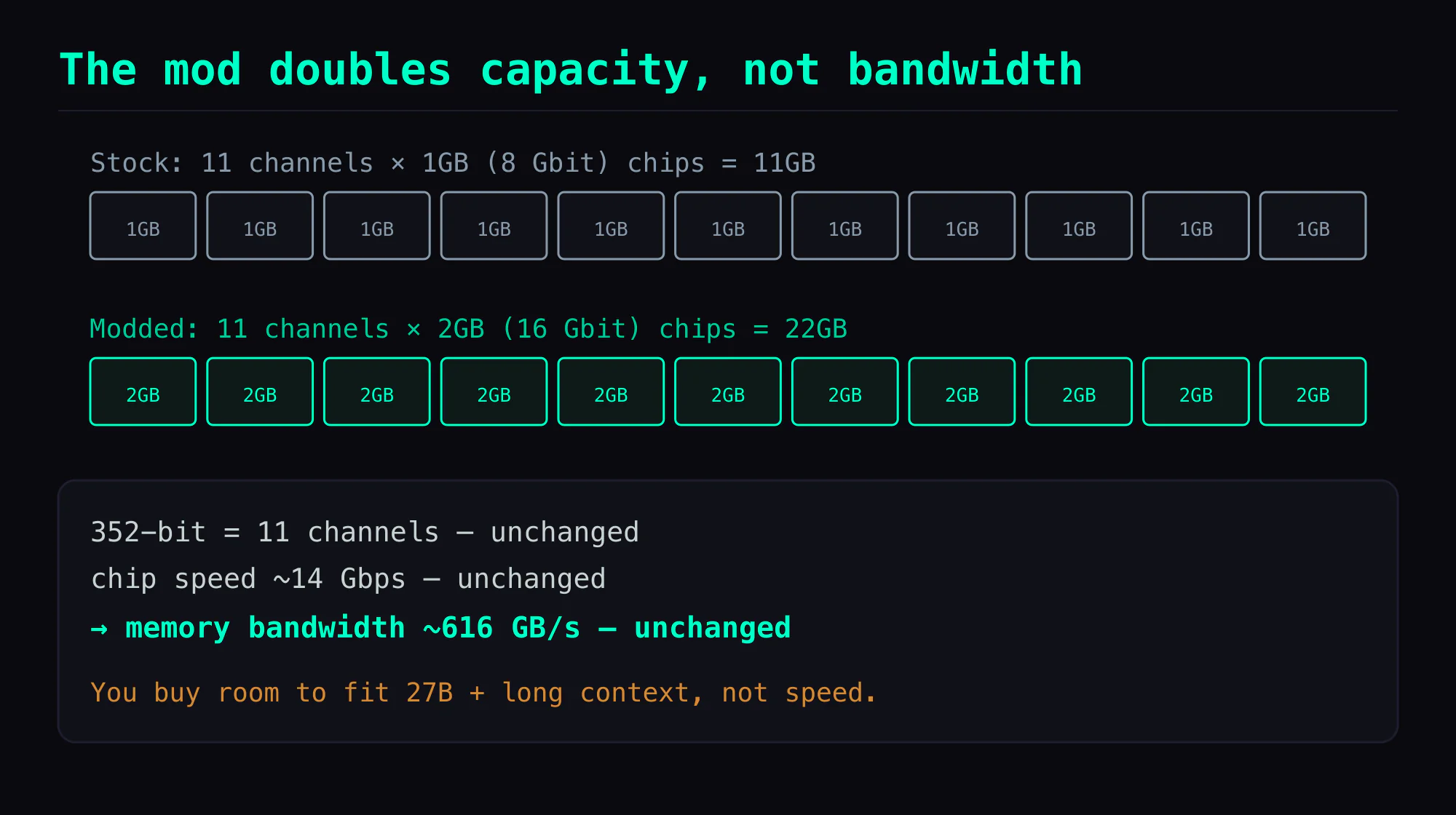
The key thing to understand about this card is that the mod doubles capacity only. The bus width doesn't change, and the chips keep the same speed grade (~14 Gbps), so memory bandwidth stays ~616 GB/s. It does not get faster. What you're buying is room to fit a 27B model plus long context, not speed.
For "host a big model at home," that's a good trade, because you run out of VRAM before bandwidth becomes the bottleneck. But don't picture a faster card. It isn't one.
The price: sticker and landed are not the same number (and that's the gotcha)
The listing is easy to spot: "RTX2080TI modded 22G, non-mining, pro AI training / rendering / CUDA (used)," at a ¥2079 RMB sticker.
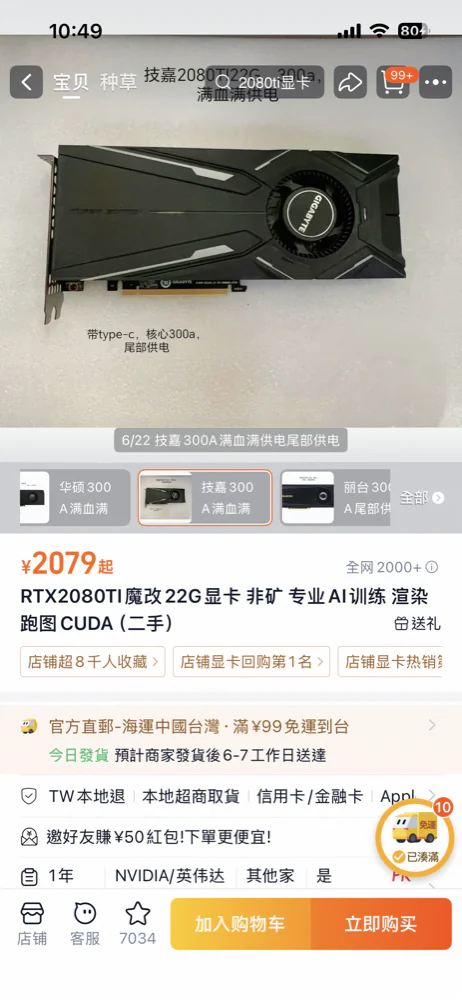
Don't read the sticker as the landed price. Anyone who buys cross-border knows the trap: add shipping, handling, and local pickup and it's ~NT$11,000 by the time it arrives (about US$340). The gap between sticker and landed is the hidden cost of bargain-hunting across a border — ¥2079 is the sticker, NT$11k is what actually leaves your account. Book the all-in number; don't kid yourself with the sticker.
Whether it's worth it depends on the comparison. Against a new card big enough for a sizeable model, it's far cheaper. Against a card with a manufacturer warranty and transparent specs, you're trading certainty and warranty for the price gap. It's a bargain hunter's trade, not a no-brainer.
The listing itself looks reasonably legitimate: a one-year store warranty, direct sea shipping to Taiwan, convenience-store pickup / credit card / Apple Pay, and "#1 in card buybacks / 2000+ sold" on the page — a small but real mass-mod market, not some basement hobbyist's one-off rework. But a store warranty is not a manufacturer warranty, and "non-mining" is just the seller's word, unverifiable.
"Always-on" is real: making the brain a boot-time service
Scoring the card is step one. Making it a real agent means keeping the brain up 24/7.
The current brain is Hina = Qwen3.6-27B Q4_K (qwen36-27b-Q4_K.gguf, ~15.7GB), abliterated, served by llama.cpp on an OpenAI-compatible :8080. Why 27B and not bigger? The box has only 16GB RAM + 22G VRAM: at 27B Q4_K (~15.7GB) the weights plus a quantized (q4) 128K KV cache fit inside 22G with ~2GB free — measured at ~20.1 / 22.5 GB used. Go bigger and it spills.
It's brought up by a boot-time service that auto-starts and self-restarts, so it comes back on its own after a reboot — no manual launch. It's logged over two days of real conversation, not a demo run.
The real bottleneck isn't the GPU — it's the cheap CPU
One last counterintuitive lesson — and one I only learned by getting burned, the first time I ran llama.cpp on Windows.
The first weird thing I hit: the same brain, the same card, and the speed I measured was way off the speed it should have been hitting. It took me a while to trace — llama-server was running at too low a process priority. The moment anything else stirred on the system, Windows' scheduler shoved it to the back, and my numbers looked terrible. Bumping it to High priority lined the measured speed back up with reality. On Windows, process priority is a hidden knob nobody warns you about: leave it default and you'll think the card is slow, when really it just never won the CPU.
You'd assume a box running 27B is GPU-bound. On this one it isn't. Hina decodes at ~30–40 tok/s warm (MTP acceptance 0.5–0.75) — but the moment I run Claude Code or Codex directly on forge to get work done, decode drops to low-teens tok/s — which is also the other reason my speed numbers jumped around.
And here's the easy-to-miss part: what gets eaten isn't just CPU, it's system RAM too — but the culprit isn't the model. The model itself barely touches system RAM (weights are all in VRAM via -ngl 99 + mmap; with forge idle I measured just ~5.6GB used of 16GB, ~10GB free). What actually eats the RAM and CPU — and skews the benchmarks — is the extra tooling I run on the box (that Claude Code). The Ryzen 5 3500X has only 6 cores and 16GB RAM, so one resource-hungry process alongside it leaves the GPU starved.
The fix is simple: treat forge as a pure inference box — drive the agent and tools remotely from another machine, and don't do work on the box itself. (Also: --no-mmap would pour all 15.7GB into 16GB of RAM and OOM, so mmap stays on.)
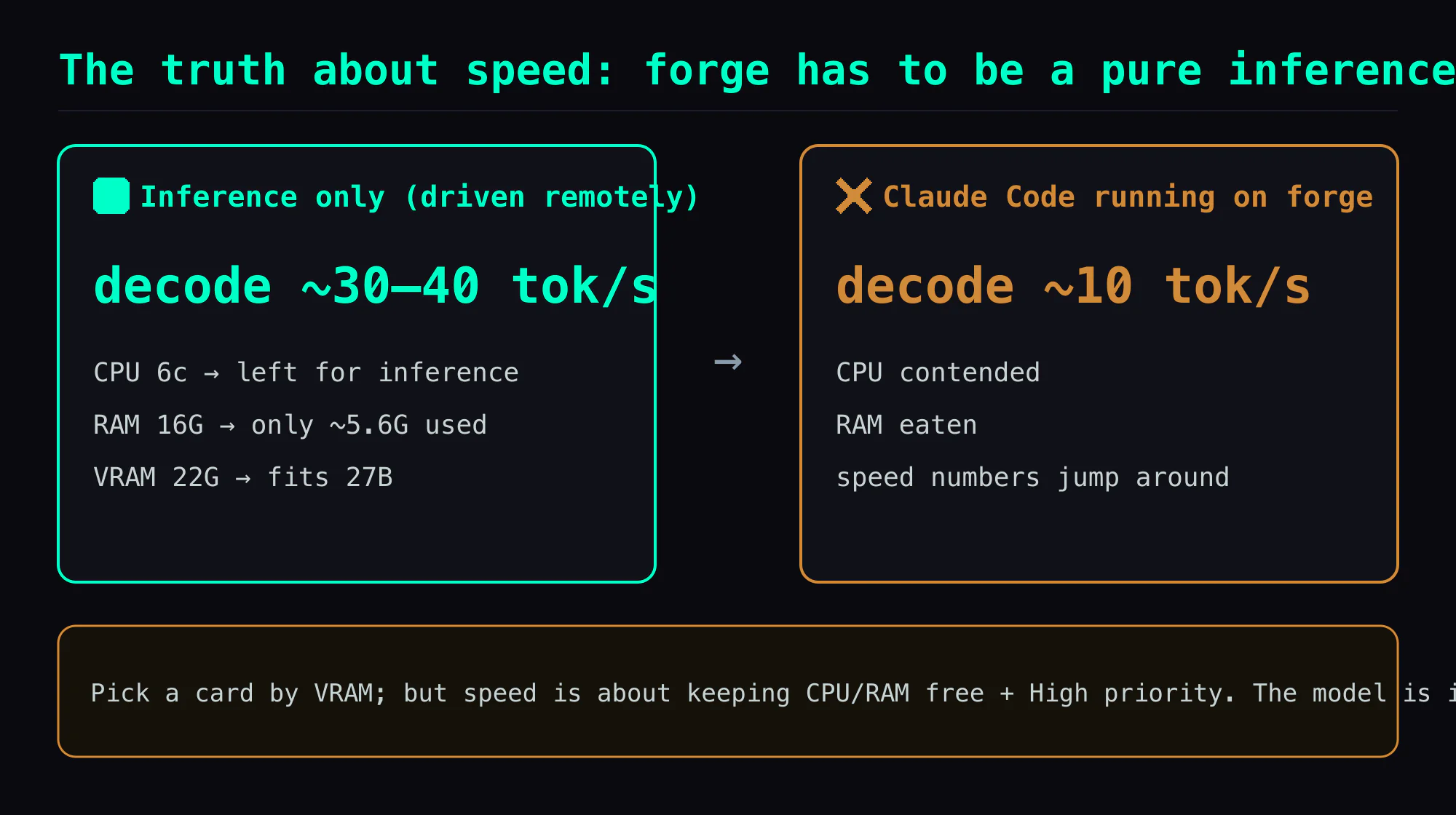
The counterintuitive takeaway for hosting an agent at home: you fixate on VRAM and bandwidth when picking a GPU, but what quietly ruins the experience is usually the cheap CPU — and, on Windows, that priority setting nobody mentions.
What's next
This post is "how the brain got here." It's not flawless — 27B at 30 tok/s is genuinely slow, it crash-reloads when context blows up (the client eats a 503), and TTFT can stretch into the minutes on a cache miss. Those are the subjects of the next few posts; here I'm just flagging them.
Next is a more provocative choice: why I gave up 100 tok/s on Gemma 12B for 30 tok/s on Qwen 27B. Fast isn't the same as useful — when the brain has to hold a procedure across long context (do the work → close it out → mark the state) instead of just returning a nice paragraph, speed isn't the number to watch.
After that comes the hard-core track: the detective story of pushing context to 256K and crashing (the 503 above), how MTP wrings out 30 tok/s, why 30 tok/s feels slower than 14 on another box (TTFT), and the 17K-token tool-definition tax recomputed every turn.
This thread is one half of the same thesis as the GTX 970 series: there, "a retired old card gets a second life"; here, "one second-hand modded card is just enough to host a real agent." Both are experiments, not sales pitches. Modded cards carry risk, and I'll keep saying so. But turning up cheap parts that are exactly enough — that satisfaction is real.
Also in this series:
- (next) Gemma 12B vs Qwen 27B: why I gave up 100 tok/s for 30
- (hard-core) Pushing context to 256K and crashing: the VRAM-vs-context math
Prequel:
- GTX 970 series, Part 3: on an old card, Flash Attention nearly doubles long-context decode (the closing "I wanted an agent but don't recommend it" line is where this post begins)
FAQ
- What exactly does the 22GB mod change, and why 22 instead of a round 24?
- The 2080 Ti has a 352-bit memory bus = 11 × 32-bit channels. Stock, each channel carries one 1GB (8 Gbit) GDDR6 chip, so 11 × 1GB = 11GB. The mod swaps all eleven for 2GB (16 Gbit) chips, so 11 × 2GB = 22GB. That odd 22 — not 24 — is the fingerprint of a real 2080 Ti die: only 11 channels × 2GB lands on 22. A 24GB card is usually a 384-bit (12-channel) part. The work is BGA rework (hot-air reball-and-replace of the memory packages) plus a modified VBIOS so the card recognizes the new density.
- If the mod only doubles capacity, does it make the card faster?
- No. The mod changes chip capacity, not bus width, and keeps the same ~14 Gbps speed grade, so memory bandwidth stays ~616 GB/s. You're buying room to fit a 27B model plus long context, not speed. For fitting a big model at home that's the trade that matters — you run out of VRAM before bandwidth becomes the bottleneck — but don't expect a faster card.
- Can a cheap old desktop with 16GB RAM and a 6-core CPU really host an agent brain 24/7?
- It can, but the bottleneck isn't the obvious one. The GPU fits it: Qwen3.6-27B Q4_K (~15.7GB) plus 128K KV lands inside 22G with ~2GB to spare, kept resident by a Windows SYSTEM task that grabs port 8080 at boot. The real limiter is the cheap 6-core CPU — anything CPU-heavy running on the box drops decode from ~40 to low-teens tok/s, so you drive the brain remotely from another machine and keep the box for inference only.
- Is this a recommendation to go buy a modded GPU?
- No. Modded cards carry real risk: third-party rework quality varies, the custom VBIOS may be flaky, denser chips run hotter, and there's no manufacturer warranty (store warranty only). This is one cheap route I explored, not a buy recommendation. Stress-test the VRAM on arrival and don't treat it as a magic card.
Read next
- 2026-07-03[Just for Fun — Advanced] I Doubled My Agent's Decode Speed and It Got Slower: TTFT Is the Number You Actually Feel
I swapped my home agent's brain for one that decodes 30-40 tok/s instead of 14, and it felt slower. The number I'd stared at for a year — tok/s — only measures how fast tokens come out, not how long before they start. On a hybrid model, a single cache miss re-prefills the entire prompt: same box, same brain, 2.6s warm vs 216s cold. Here's the live log.
- 2026-06-27[Just for Fun — Advanced] The Tool-Definition Tax: 17K Tokens Before I Say a Word, Re-Billed on Every Cache Miss
I added up what my home agent pays before it reads a single word from me: ~23K tokens of overhead, and 17K of that is just the instruction manuals for its tools. Worse, it runs a hybrid model — on a cache miss it re-processes all 17K from scratch, and a single user turn can do that a dozen-plus times. This is context economics, badly underestimated. The fix isn't cutting tools; it's loading them on demand, the way skills already do.
- 2026-06-23[Just for Fun — Advanced] I Gave Up 100 tok/s for 30 — Fast Isn't the Same as Useful
Picking a local model, I looked at tok/s first too. Gemma 12B does 90-100 and it's great — until you put it on a kanban board, where it finishes the work and just walks away, never marking the card done. A Qwen 27B that's three times slower actually closes the loop. Why throughput is the wrong number for an agent — plus how grep almost lied to me about it.
- 2026-07-02[Just for Fun — Advanced] Progressive Streaming on a Slow Model Got My Bot Rate-Limited by Telegram
To ease the wait on a pokey local agent, I turned on Telegram streaming — which, the way this bot did it, means rewriting the same message every fraction of a second. On a 14 tok/s brain, a single 175-second reply works out to an estimated couple hundred edit requests, which slammed into Telegram's flood control and got the whole bot benched for four minutes — final answer included. The short, ugly lesson: slow models should not fake streaming with edits. Send the finished answer once. Live logs inside.
Don't miss the next one
Subscribe, and you won't.
One-click unsubscribe anytime.