洋垃圾跑大模型 · part 5
[Junk-Tier Big Models #5] Qwen3.8-27B on a 2018 22GB card: 30 tok/s, and it one-shot a 3D scene
❯ cat --toc
- One sentence, 430 seconds, a voxel pagoda that runs
- What you need
- Step one: get the weights
- Step two: start the server
- Step three: verify what is actually loaded
- What each flag does
- 30-31 tok/s, with less than 1 tok/s of spread
- The most important parameter is not in the launch command
- It worked once in three runs

Old hardware gets demoted quietly. A card that was a flagship in 2018 becomes the card you run batch jobs on, then the card you keep meaning to sell. Mine is a modded RTX 2080 Ti with 22GB on it, and for most of this year its job has been making thumbnails.
Then Qwen3.8-27B fit on it. The full 27B, at a quantization that holds up, with 128K of context and about 30 tokens per second.
The first thing I asked it to do is the reason this article exists.
One sentence, 430 seconds, a voxel pagoda that runs
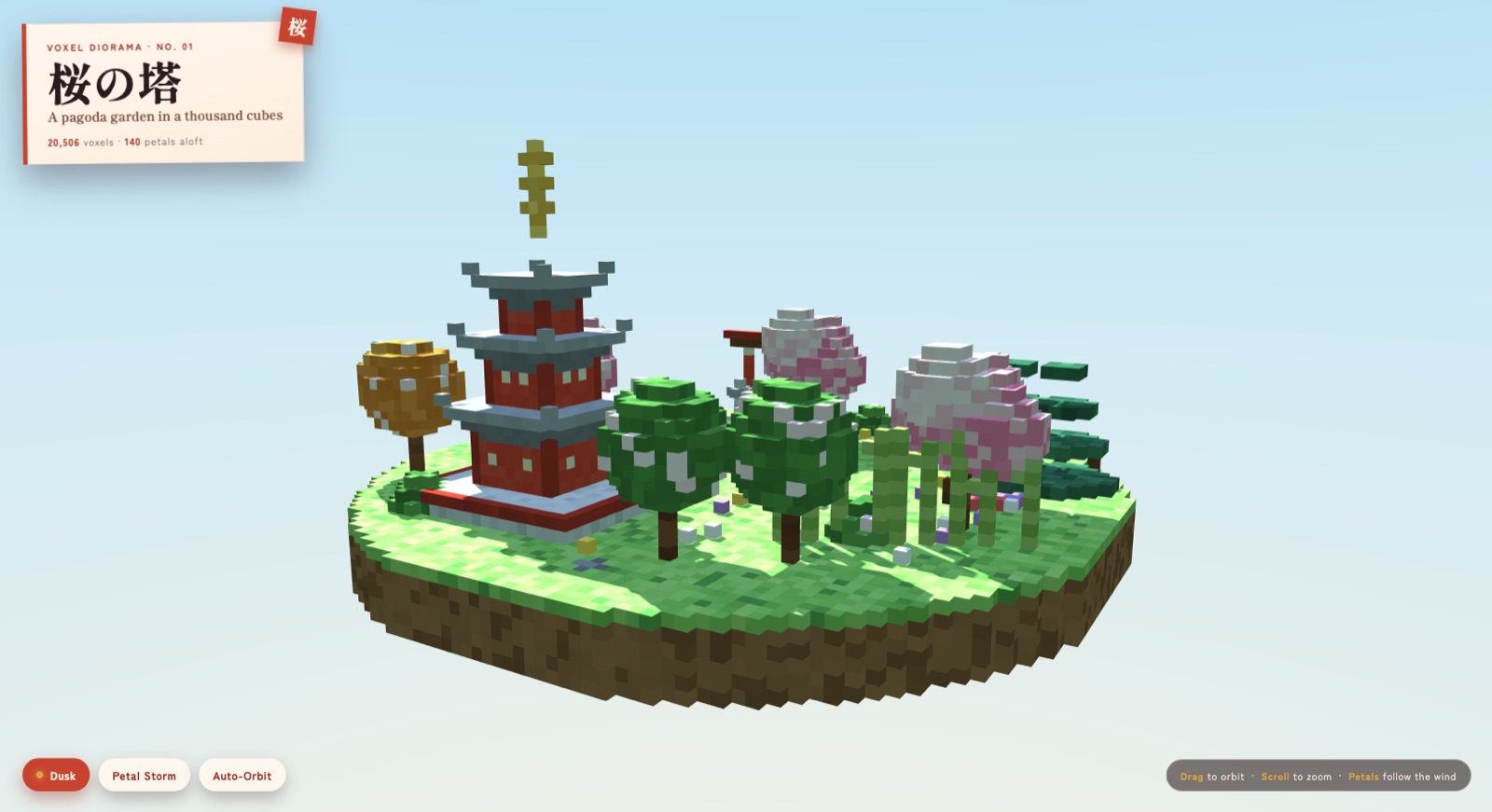
👉 Open it and have a play — drag to orbit, scroll to zoom.
That is a floating island: three-tier red pagoda, grey tiled eaves, a spire on top, a torii gate, cherry trees. 20,506 blocks. It came back as one HTML file, generated in a single shot, and I did not edit a line of it.
The prompt was 55 words and named no library:
Design and create a very creative, elaborate, and detailed voxel art scene of a pagoda in a beautiful garden with trees, including some cherry blossoms. Make the scene impressive and varied and use colorful voxels. Use whatever libraries to get this done but make sure I can paste it all into a single HTML file.
It chose Three.js itself. It decided to make the island float. The day/night toggle and the petal-storm button were not requested. 430 seconds, 13,513 tokens.
What you need
- A 22GB or larger GPU. Mine is a modded RTX 2080 Ti 22G — Turing, compute capability sm_75, 22,528 MiB. A 24GB card gives you more headroom.
- A CUDA build of llama.cpp. I used
b10064. No rebuild is needed for this model — the stock binary just runs it. ⚠️ One gotcha worth ten minutes of your life: the metadata keys inside this GGUF are prefixedqwen35., notqwen38, so grepping the header forqwen38turns up nothing. - 17 GB of disk.
Step one: get the weights
Take the UD-Q4_K_XL build from unsloth's GGUF repo. It is a dynamic quant, meaning the precision is not uniform across the model — layers that hurt quality when squeezed keep more bits, the rest get fewer. At the same file size it beats a flat Q4_K.
huggingface-cli download unsloth/Qwen3.8-27B-GGUF \
  Qwen3.8-27B-UD-Q4_K_XL.gguf \
  --local-dir ~/models/qwen38-27b-ud
You get 16.7 GiB (17,923,394,624 bytes). The same repo also has mmproj-F16.gguf at 884 MiB — that is the vision projector, which you only need if you want to feed it images. Skip it for text.
Step two: start the server
CUDA_VISIBLE_DEVICES=0 \
llama-server -m ~/models/qwen38-27b-ud/Qwen3.8-27B-UD-Q4_K_XL.gguf \
  --alias qwen38-27b-ud --host 0.0.0.0 --port 8082 \
  -ngl 99 -c 131072 -ctk q4_0 -ctv q4_0 \
  --parallel 1 --jinja -fa on --metrics \
  --spec-type draft-mtp --spec-draft-n-max 2 \
  --chat-template-kwargs '{"enable_thinking":false}' \
  --temp 0.7 --top-p 0.80 --top-k 20 --min-p 0.0 \
  --presence-penalty 1.5 --repeat-penalty 1.0
Loaded, VRAM sits at 20,788 / 22,528 MiB. That leaves 1.7 GB spare.
Step three: verify what is actually loaded
curl -s http://127.0.0.1:8082/props | python3 -c \
  "import json,sys; d=json.load(sys.stdin); \
   print(d['model_path'].split('/')[-1], d['default_generation_settings']['n_ctx'])"
You want the filename you downloaded and 131072.
⚠️ Trust the file -m points at, never the service description string. My systemd unit description still names a model from three months ago, while the -m path underneath it has been swapped twice since. When someone asks what a machine is running, the description is the least trustworthy field on it.
What each flag does
| flag | why |
|---|---|
-ngl 99 | all layers onto the card. The whole 27B fits, so there is none of the arithmetic about how many layers to offload that MoE models force on you |
-c 131072 | 128K context. 192K also fits, but 128K is plenty for normal use |
-ctk q4_0 -ctv q4_0 | store the KV cache — the running memory of the conversation — at 4-bit. A 128K KV cache does not fit uncompressed |
-fa on | Flash Attention. Turing gets it too |
--spec-type draft-mtp / --spec-draft-n-max 2 | the model ships its own MTP head, a small extra layer that guesses the next couple of tokens so the big model can verify them in one pass instead of generating them one at a time. n=2 is the measured sweet spot — n=3 came out slower |
--parallel 1 | one request at a time. The card is already saturated, so concurrency just makes everyone queue |
--temp 0.7 --top-p 0.80 --presence-penalty 1.5 | the official non-thinking sampling values, copied as-is |
--metrics | exposes /metrics, which is where the tok/s numbers below come from |
30-31 tok/s, with less than 1 tok/s of spread
Same prompt, three runs:
| run | seconds | completion tokens | tok/s |
|---|---|---|---|
| 1 | 430.5 | 13,513 | 31.4 |
| 2 | 382.8 | 11,630 | 30.4 |
| 3 | 421.6 | 13,156 | 31.2 |
The consistency matters more to me than the number. On this card, almost all the variance I measure comes from the prompt, not from the machine.
The most important parameter is not in the launch command
The command above carries --chat-template-kwargs '{"enable_thinking":false}', so thinking is off by default. That default exists for short agent loops: a 150-word task pulled off a task board cannot afford five minutes of deliberation before it starts.
Leave that default in place for a big job, though, and it cannot one-shot 20,000+ characters of working code. It will still write, still write at length, and then quietly come apart somewhere — a variable name that stops matching, a loop condition that turns to garbage, or a scene that builds correctly with the camera parked where none of it is visible.
The fix is to turn thinking back on per request, with a ceiling:
curl -s http://127.0.0.1:8082/v1/chat/completions \
  -H 'Content-Type: application/json' \
  -d '{
    "model": "qwen38-27b-ud",
    "messages": [{"role": "user", "content": "…"}],
    "max_tokens": 40960,
    "chat_template_kwargs": {"enable_thinking": true},
    "thinking_budget_tokens": 2048
  }'
thinking_budget_tokens hard-stops the reasoning at 2048 tokens and lets the answer finish. Without the ceiling it will spend the whole budget reasoning and hand you an empty answer. One run burned past 30,000 tokens and came back with finish_reason: length and not a word of content. The pagoda used roughly 2,000 tokens of reasoning and 13,513 of answer.
It worked once in three runs
Same config, same prompt, three tries today: one scene that runs, two that do not.
The two failures both produced code that loads and throws no syntax error, and then sits on its own loading screen forever, because one line inside the animation loop throws on every frame. So one-shotting a working 3D scene at this size is a dice roll, not a capability you can schedule around. What you see above is what it can do, not what it does every time. In practice: run it a few times and pick one, or treat the output as a draft and walk the last mile yourself.
Which is also why acceptance has to mean opening a browser. Both failures passed every static check I threw at them, node --check included. The code is perfectly legal JavaScript. The only way to find out it does not move is to run it.
Also in this series:
FAQ
- Do I need to rebuild llama.cpp to run Qwen3.8-27B?
- No. A stock CUDA build works — I used b10064, with no patch, no branch and no recompile. One gotcha worth ten minutes of your life: the metadata keys inside this GGUF are prefixed qwen35, not qwen38, so grepping the header for qwen38 finds nothing.
- Does Qwen3.8-27B fit on a 22GB card with a 128K context?
- Yes, with room left. The UD-Q4_K_XL weights are 16.7 GiB, and with all layers on the GPU, a 131,072-token context and the KV cache quantized to 4-bit, VRAM settles at 20,788 of 22,528 MiB. 192K also fits.
- Why does the model return an empty answer when I turn thinking on?
- Because it spends the entire token budget reasoning and never reaches the answer. One of my runs burned past 30,000 tokens and came back with finish_reason length and no content at all. Pass thinking_budget_tokens (2048 works) to hard-stop the reasoning so the answer still has room to finish.
- Can a 27B model one-shot a working 3D scene reliably?
- Not reliably. Same config and same prompt, I got one working scene out of three runs. The other two produced code that parses fine and then hangs on its own loading screen. Run it a few times and pick one, or treat the output as a draft.
Read next
- 2026-07-29[Junk-Tier Big Models #3] A 284B MoE on ONE 2080 Ti — and it beats my DGX Spark
DeepSeek-V4-Flash is 284B. It decodes at 17.4 tok/s on a single modded 22GB 2080 Ti — faster than the DGX Spark I serve it on. Card count barely matters, and MTP speculative decoding dies on unimplemented runtime, not a missing GPU.
- 2026-08-02[Junk-Tier Big Models #4] A frontier-class open model on hardware you already own: DeepSeek-V4-Flash-0731 on one 22GB 2080 Ti
How to run DeepSeek-V4-Flash-0731 (91GB, 284B MoE) on a single modded 22GB 2080 Ti at 16.5 tok/s and 1M context — including a formula for picking -ncmoe.
- 2026-07-22[Junk-Tier Big Models #2] Running Poolside Laguna S 2.1, a 118B Coding MoE, on ONE 22GB 2080 Ti
Poolside Laguna S 2.1, a 118B-A8B coding MoE, on one 22GB 2080 Ti via CPU/GPU hybrid offload plus a companion DFlash speculative-decoding draft at ~29 tok/s; attention-Q8 saves ~2.45 GiB, +7% decode.
- 2026-07-21[Junk-Tier Big Models #1] Running a 119B MoE at 74 tok/s on Three 2080 Tis
A US$1.6k junk EPYC + 3× 2080 Ti 22G box (66G VRAM) runs a quantized 119B MoE at 74 tok/s. Expert offload to RAM costs about 2.4× decode — plus a multi-card OOM gotcha.
Don't miss the next one
Subscribe, and you won't.
One-click unsubscribe anytime.