洋垃圾跑大模型 · part 1
[Junk-Tier Big Models #1] Running a 119B MoE at 74 tok/s on Three 2080 Tis
❯ cat --toc
- The short version: most of a big model is asleep
- I bought a junk server to see what it could hold
- Goal: run a 100B+ model on 66G of VRAM, and actually use it
- The payoff: a local big model that costs only electricity to run
- The 119B just fits: 55G into 66G VRAM, 74 tok/s
- When it doesn't fit: offload the experts that are asleep
- The gotcha: same offload command, fine on 1 card, OOMs on 3
- Takeaways
- The checklist: fitting an oversized MoE on undersized cards
TL;DR
A US$1.6k junk box — a used EPYC and three modded 2080 Ti cards, 66G of VRAM — runs a quantized 119B MoE (Mistral Small 4) at 74 tok/s. The trick: MoE experts mostly sit idle, so llama.cpp's -ot flag offloads the sleeping ones to system RAM for the CPU to run — about 2.4× slower decode. One gotcha ate an evening: the same offload command runs on 1 card but OOMs on 3, because layer-split already pins each card's layers and I was only lightening one of them.
The short version: most of a big model is asleep
Here's the idea, for a friend who doesn't do this for a living. A modern "Mixture-of-Experts" model is a big committee of specialists, but it doesn't wake the whole committee for every word — the model I tested wakes 4 of its 128 specialists per word and lets the rest nap. So even though the model is huge on paper, only a small slice is actually working at any moment. That's the loophole: the sleeping specialists don't need to sit in the expensive fast memory (VRAM) — you can park them in cheap regular RAM and only pay when they're called. This post is me exploiting that loophole on a pile of used hardware, plus the one bug that cost me an evening.
I bought a junk server to see what it could hold
It started with a modded GPU: a workshop had soldered 22G onto an old 2080 Ti and was selling it cheap, which got me wondering whether junk-tier parts — a generation or two behind, cheap because nobody wants to babysit them — could stack into an expandable AI lab. This particular pile is a US$1.6k (about NT$50k) server: a used EPYC 7402 (24 cores), 128G of 8-channel DDR4 ECC, and three 2080 Ti cards that some workshop soldered 22G of memory onto — 66G of VRAM total, on plain PCIe 3.0. It stays powered off until I wake it remotely.
The natural next question, once you own 66G of VRAM you paid junk prices for, is: how big a model can I actually run on this? Not "load and demo for a screenshot" — run, as in use it daily.
This is part 1 of a short series on running oversized models on undersized junk. This part is about fitting the model; the next part is about choosing which one to keep resident.
Goal: run a 100B+ model on 66G of VRAM, and actually use it
The target was concrete: get a 100B-plus quantized model running on this box and have it be usable — decent tokens per second, always available, no per-token API bill. Loading something huge just to say it loaded is easy and pointless. I wanted it fast enough to sit in front of, on hardware that cost less than a single new GPU.
The payoff: a local big model that costs only electricity to run
Why bother when the API exists? Because a big model running at home costs me electricity, not per-token API fees, and I can wire it straight into my own agent tooling. Nothing leaves the building — no prompts, no code, no documents going out to someone else's servers. The model stays in my hands, and the marginal cost of using it hard is a slightly warmer room.
The 119B just fits: 55G into 66G VRAM, 74 tok/s
The first pleasant surprise is that the ambitious case needs no cleverness at all. The model I leaned on is Mistral Small 4 — an MoE Mistral shipped in March 2026: 119B total parameters, but only 4 of its 128 experts fire per token, so about 6.5B actually computes. Quantized down to Q3 (roughly 3 bits per weight) it's about 55G on disk, which drops into 66G of VRAM with room to spare.
llama.cpp handles the three-card spread with layer-split — -sm layer, which hands each card a contiguous block of the model's layers rather than slicing every layer across all three. Everything stays in VRAM, the cards pass activations down the line, and it decodes at 74 tok/s. The fact that a 119B model only computes about 6.5B per step is exactly why three eight-year-old cards can keep up. No offload, no RAM streaming, no flags to agonize over — at Q3 the model simply fits.
Which is the boring, happy case. The interesting engineering starts the moment it doesn't fit — when the model is bigger than the VRAM you own, or when you want to give one of the cards back for something else.
When it doesn't fit: offload the experts that are asleep
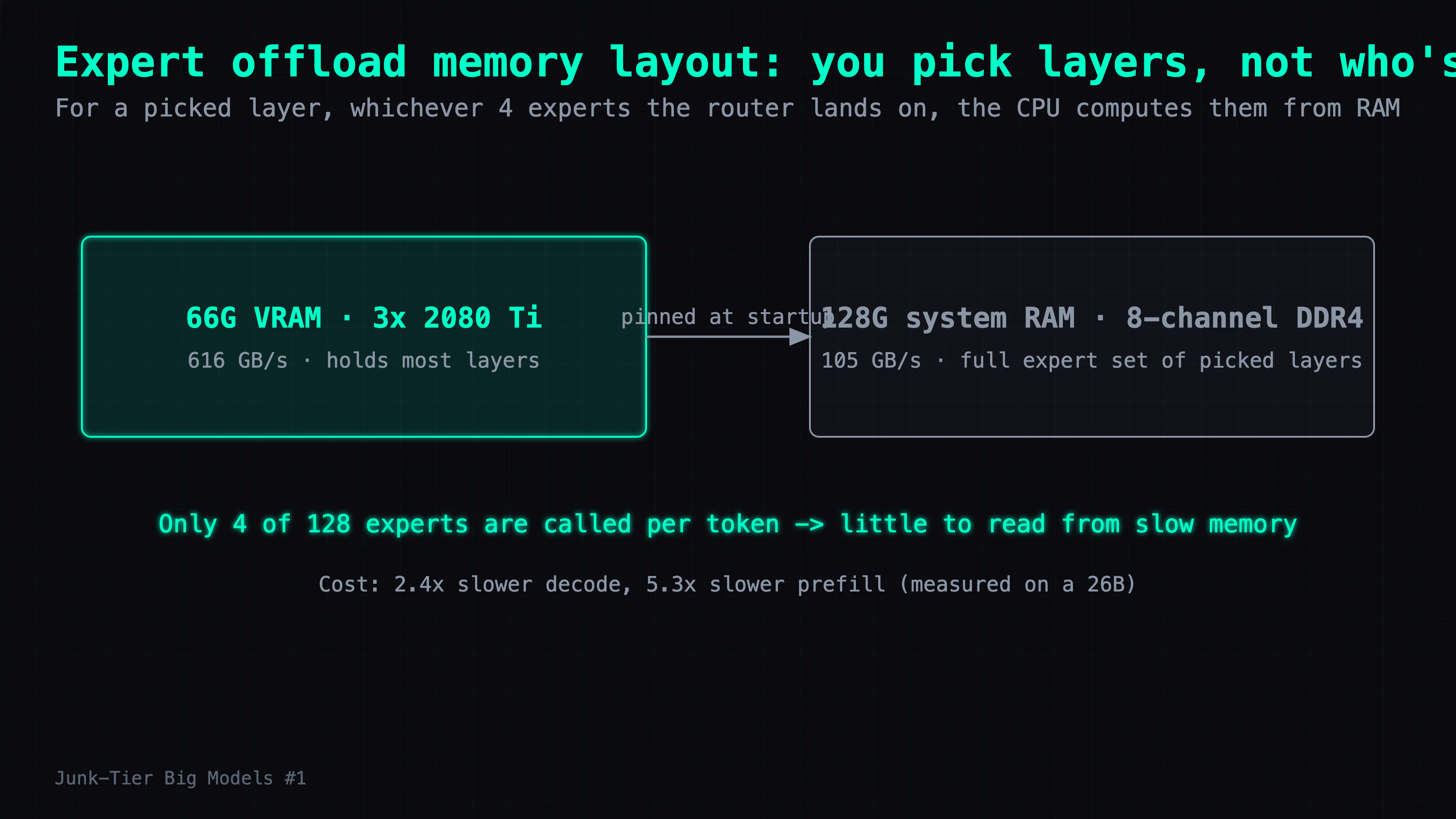
When a model won't fit in VRAM, the usual move is to spill some of it into system RAM and eat the slowdown. For an MoE model there's a much smarter version of that spill, because of how MoE works: only a few experts fire per token and the rest are idle, so the idle ones don't need to be in fast memory at all.
llama.cpp exposes exactly this with --override-tensor (-ot). You name a set of layers, and the entire routed-expert tensor block for those layers is assigned to a CPU buffer at load time and stays on the CPU side, while VRAM holds everything else. The unit you pick is the layer, not "whichever expert is idle right now" — for one of those layers, whichever 4 experts the router lands on, the CPU handles them. The experts stream from RAM to the CPU on demand. The question is whether the RAM can feed the CPU fast enough to keep up — and this is where the 8-channel memory earns its place. 8-channel DDR4-2133 gives about 105 GB/s effective (≈136 GB/s on paper), enough to sustain the streaming. For contrast, the 2080 Ti's own VRAM runs at roughly 616 GB/s — so an offloaded expert comes down a pipe several times narrower (about 5×) than a resident one. That gap is the whole story of the slowdown.
Measure the slowdown, don't guess it. Before pointing this at a 100B+ model, I measured the slowdown on a small 26B MoE — cheap to run, same mechanism. Reading the table below: the middle column is the cost of putting all routed experts on the CPU.
| Config | decode | vs all-VRAM |
|---|---|---|
| all-VRAM | 113 tok/s | 1.0× |
| half the layers offloaded | 69.1 tok/s | 1.6× |
| all routed experts on CPU | 47.6 tok/s | 2.4× |
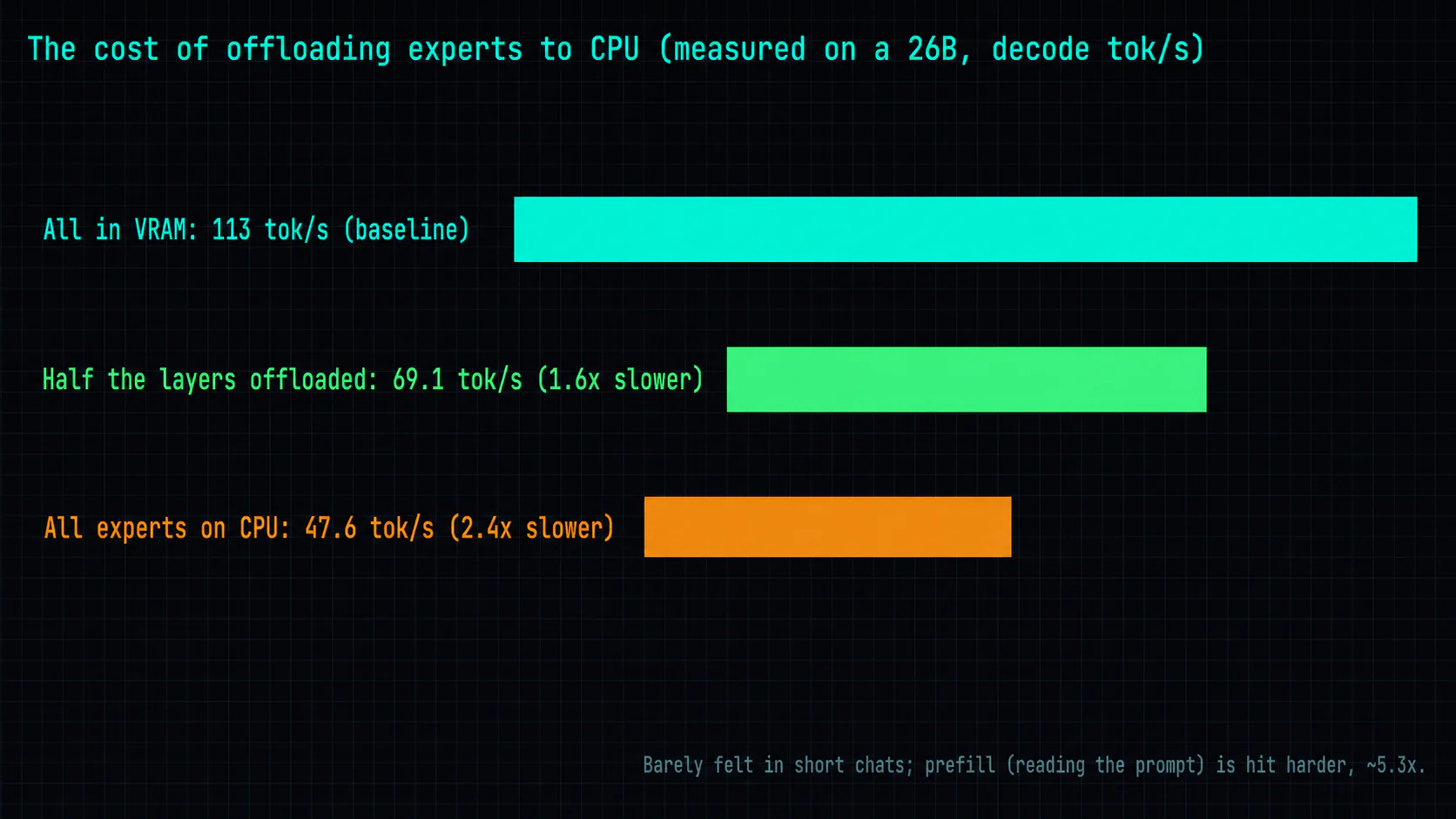
Two things worth stating plainly, because both bite if you assume the obvious:
- Prefill takes a bigger hit than decode. Prefill is the model reading your prompt before it emits the first token, and it's one big batched matmul — exactly the workload where the CPU loses hardest. On the 26B it ran about 5.3× slower with experts on CPU, against 2.4× for decode. So offload suits short back-and-forth — chat, agent turns — and is a bad fit for feeding in long documents.
- Half-offload is not half-speed. The half-layers config landed at 69.1 tok/s, not the midpoint of 113 and 47.6. The cost curve is non-linear, so don't extrapolate "more offload = proportionally slower" — you'll mis-plan every time.
The gotcha: same offload command, fine on 1 card, OOMs on 3
Now the evening I lost. I wanted to move the 119B off its "three cards, full speed" setup and onto two cards — running the model on two and freeing the third card for image generation. Two cards can't hold the whole 119B, so I needed to offload some experts to the CPU. Easy, I thought: use the same -ot pattern that had worked before, targeting the front layers.
-ot "blk\.(front layers)\.ffn_.*_exps.*=CPU"
I offloaded 8 layers. OOM on load. Bumped it to 9. OOM. 10, 11 — every one OOM'd, on a command shape that was fine when I'd tested it on a single card.
The tell: I watched the per-card allocation while sweeping the layer count, and the buffer llama.cpp tried to reserve on GPU1 stayed pinned at 24,835 MiB — more than the card's 22.5 GiB, so of course it OOM'd — no matter how many layers I moved to the CPU. A number that flat-out refuses to move tells you more than a dozen that wiggle: whatever I'm changing isn't touching the thing that's overflowing.
The root cause: layer-split. With -sm layer, llama.cpp had already divided the model's layers across the three cards before any offload happened. My "front N layers" all lived in GPU0's slice. So offloading them made GPU0 lighter — and GPU1 and GPU2, which held the middle and back layers, never got touched and kept overflowing. The error just said OOM. It did not say "the layers you offloaded aren't on the card that's out of memory."
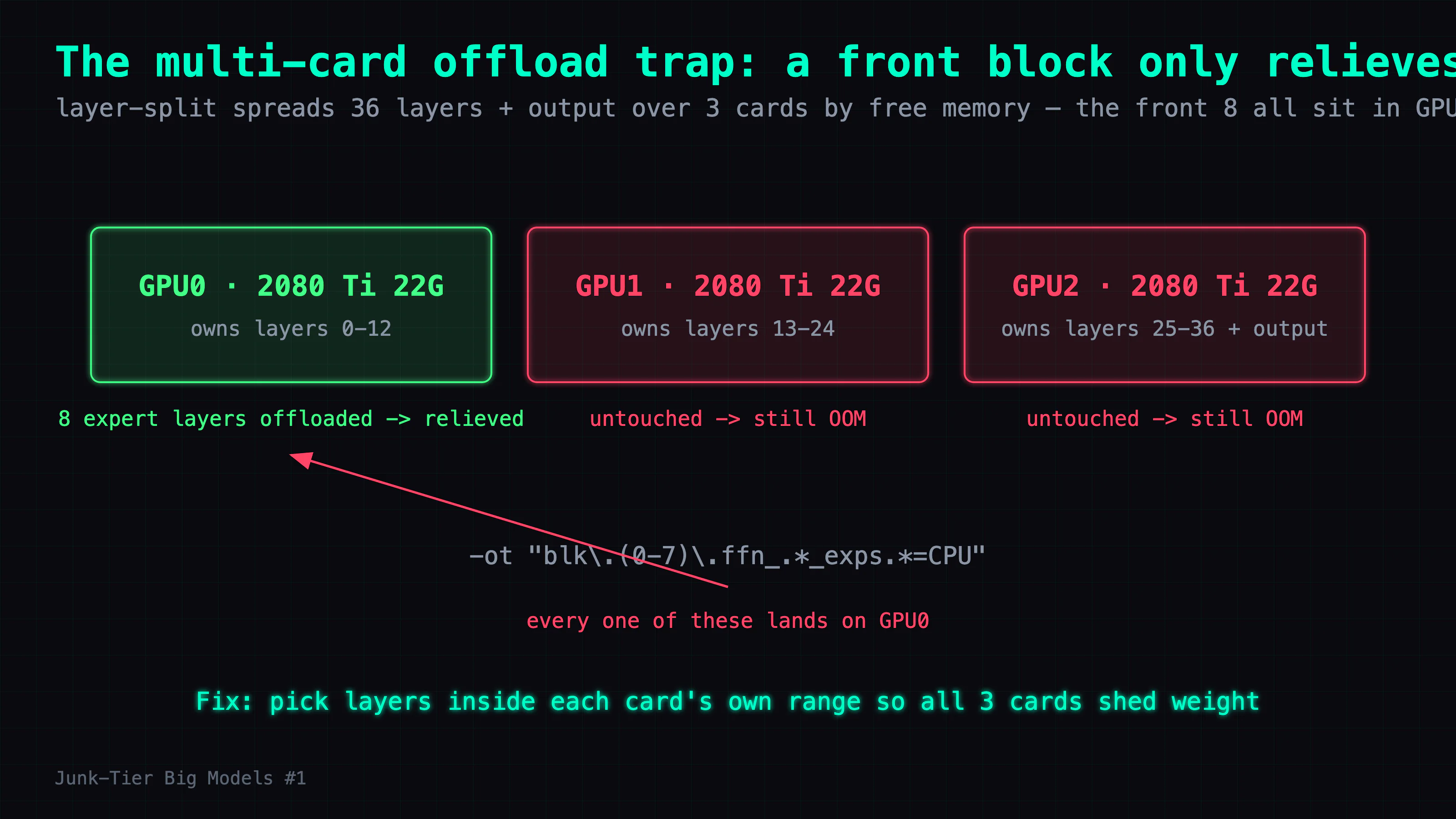
The fix: stop offloading a contiguous front block. Instead, spread the offloaded layers across each card's own layer range, so every card sheds some of its experts to the CPU. Once each card was actually being relieved, the two-card setup loaded and ran at 43.88 tok/s. The box had enough memory in aggregate; I was offloading from the wrong GPU, so the one that actually OOMed never got any relief.
Takeaways
Where the time went. Not on "how do I offload" — that's one flag. It went on "which card." My mental model was single-card: offload some layers, VRAM drops. On multiple cards with layer-split, the layers are pre-assigned to specific cards, and offloading the wrong ones relieves a card that wasn't the problem. The OOM error is no help because it names the symptom, not the mismatch. What actually cracked the case was noticing a number that wouldn't move.
Reusable diagnostics. Measure the cost on a small model first, then extrapolate to the bigger ones. I measured the 2.4× decode and 5.3× prefill penalties on a 26B MoE before touching anything in the 100B-plus range, which turned "run the big one and see" into "I already know roughly what offload will cost." That's hours of blind trial and error saved. And when something refuses to fit, watch the per-device numbers, not the total — the flat one is pointing at your bug.
The general principle. Running big models on cheap hardware isn't really about having enough VRAM. It's about knowing which weights never need to be in VRAM in the first place. MoE experts spend most of their time idle, and idle weights don't need to sit in the most expensive memory. Get that one fact right and a 66G junk box punches a long way above its price.
The checklist: fitting an oversized MoE on undersized cards
- Try the plain fit first. Quantize hard (Q3 got a 119B to about 55G) and let layer-split (
-sm layer) spread it across the cards. If it fits in VRAM, you're done at full speed — 74 tok/s here, no offload. - When it doesn't fit, offload the sleeping experts, not random layers.
--override-tensor(-ot) keeps idle routed-expert weights in system RAM for the CPU. Fast multi-channel RAM matters — 8-channel DDR4 at about 105 GB/s kept up. - Calibrate the cost on a small MoE before the big one. Expect roughly 2.4× slower decode with all experts on CPU, 1.6× for half, and a steeper 5.3× on prefill. Don't linearly extrapolate.
- Reserve offload for short interactions. The heavy prefill penalty makes long-document input the wrong workload.
- On multiple cards, spread the offloaded layers across every card's range. Offloading a front block only relieves the first card; the others still OOM. A per-card VRAM number that won't move is your sign you're relieving the wrong card.
That's part 1 — getting the model to fit and run. Part 2 is the bake-off: I put a 119B, a 230B, and a 295B on this same box to decide which one earns a permanent seat, and explain why the smaller one won.
The offload machinery here is all llama.cpp — -sm layer and -ot are the two flags doing the heavy lifting.
FAQ
- Can three modded 2080 Ti cards actually run a 119B model?
- Yes. A Mistral-family 119B quantized to Q3 is about 55G, which fits inside 66G of total VRAM across three 2080 Ti 22G cards. llama.cpp splits the model's layers across the cards (`-sm layer`), everything stays in VRAM, and it decodes at 74 tok/s. No offloading trick needed — at Q3 it just fits.
- What is MoE expert offload, and how much does it cost?
- A Mixture-of-Experts (MoE) model only activates a few of its experts per token; the rest are idle. llama.cpp's `--override-tensor` (`-ot`) flag lets you name a set of layers at load time and keep their whole routed-expert block on the CPU side, computed from system RAM; VRAM holds everything else. I measured the cost on a small 26B MoE first: all-VRAM decoded at 113 tok/s, all experts on CPU at 47.6 tok/s — 2.4× slower. Offloading half the layers landed at 69.1 tok/s (1.6×). Prefill — reading the prompt before the first token — is hit harder, about 5.3×.
- Why does the same `-ot` offload command OOM on 3 cards but not on 1?
- With layer-split, llama.cpp has already divided the model's layers across the cards before you offload anything. If you offload the 'front N layers' to CPU, all of those live in the first card's slice — so that card gets lighter while the others are untouched and still overflow. On one card there's nowhere else for the layers to be, so the same command fits. The fix is to spread the offloaded layers across each card's own layer range so every card sheds some experts.
- Is expert offload a good idea for long documents?
- No. Prefill (reading the prompt) takes a bigger hit from CPU offload than decode does — about 5.3× vs 2.4× on my 26B test — because the CPU loses badly on the large batched matmul that prefill does. That makes offload a good fit for short back-and-forth chat and agent turns, and a poor fit for feeding in long documents.
Read next
- 2026-08-02[Junk-Tier Big Models #4] A frontier-class open model on hardware you already own: DeepSeek-V4-Flash-0731 on one 22GB 2080 Ti
How to run DeepSeek-V4-Flash-0731 (91GB, 284B MoE) on a single modded 22GB 2080 Ti at 16.5 tok/s and 1M context — including a formula for picking -ncmoe.
- 2026-07-29[Junk-Tier Big Models #3] A 284B MoE on ONE 2080 Ti — and it beats my DGX Spark
DeepSeek-V4-Flash is 284B. It decodes at 17.4 tok/s on a single modded 22GB 2080 Ti — faster than the DGX Spark I serve it on. Card count barely matters, and MTP speculative decoding dies on unimplemented runtime, not a missing GPU.
- 2026-07-22[Junk-Tier Big Models #2] Running Poolside Laguna S 2.1, a 118B Coding MoE, on ONE 22GB 2080 Ti
Poolside Laguna S 2.1, a 118B-A8B coding MoE, on one 22GB 2080 Ti via CPU/GPU hybrid offload plus a companion DFlash speculative-decoding draft at ~29 tok/s; attention-Q8 saves ~2.45 GiB, +7% decode.
- 2026-08-18[Junk-Tier Big Models #5] Qwen3.8-27B on a 2018 22GB card: 30 tok/s, and it one-shot a 3D scene
A modded 22GB RTX 2080 Ti runs Qwen3.8-27B at 30-31 tok/s with 128K context. The full llama.cpp command, the MTP flags, and the thinking-budget trap.
Don't miss the next one
Subscribe, and you won't.
One-click unsubscribe anytime.