洋垃圾跑大模型 · part 2
[Junk-Tier Big Models #2] Running Poolside Laguna S 2.1, a 118B Coding MoE, on ONE 22GB 2080 Ti
❯ cat --toc
- In plain English: two tricks fit 118B on one old card
- What it is: Poolside Laguna S 2.1, a 118B-A8B coding MoE
- The goal: a resident 118B coding brain on one card, no API bills
- How to run it: Poolside's llama.cpp fork, hybrid offload, and DFlash
- Save space and go faster: three settings, +7% decode and ~29 tok/s
- Debug: three gotchas that cost me time
- Takeaways
TL;DR
Poolside's Laguna S 2.1 is a 118B coding MoE, but only about 8B fires per token — so the whole model runs on ONE modded 22GB 2080 Ti. The sleeping experts sit in system RAM (hybrid offload), and a companion DFlash draft Poolside ships alongside lets a tiny model guess several tokens the big one verifies at once. That gets me about 29 tok/s daily on an eight-year-old card. Two settings earn their keep: quantizing only the 240 F16 attention tensors to Q8_0 (−2.45 GiB, +7% decode), and setting the DFlash draft to n=4, the sweet spot for this Turing card.

In plain English: two tricks fit 118B on one old card
Here's the idea for a friend who doesn't do this for a living. A 118B "Mixture-of-Experts" model sounds like it needs a rack of GPUs. It doesn't, because of two tricks.
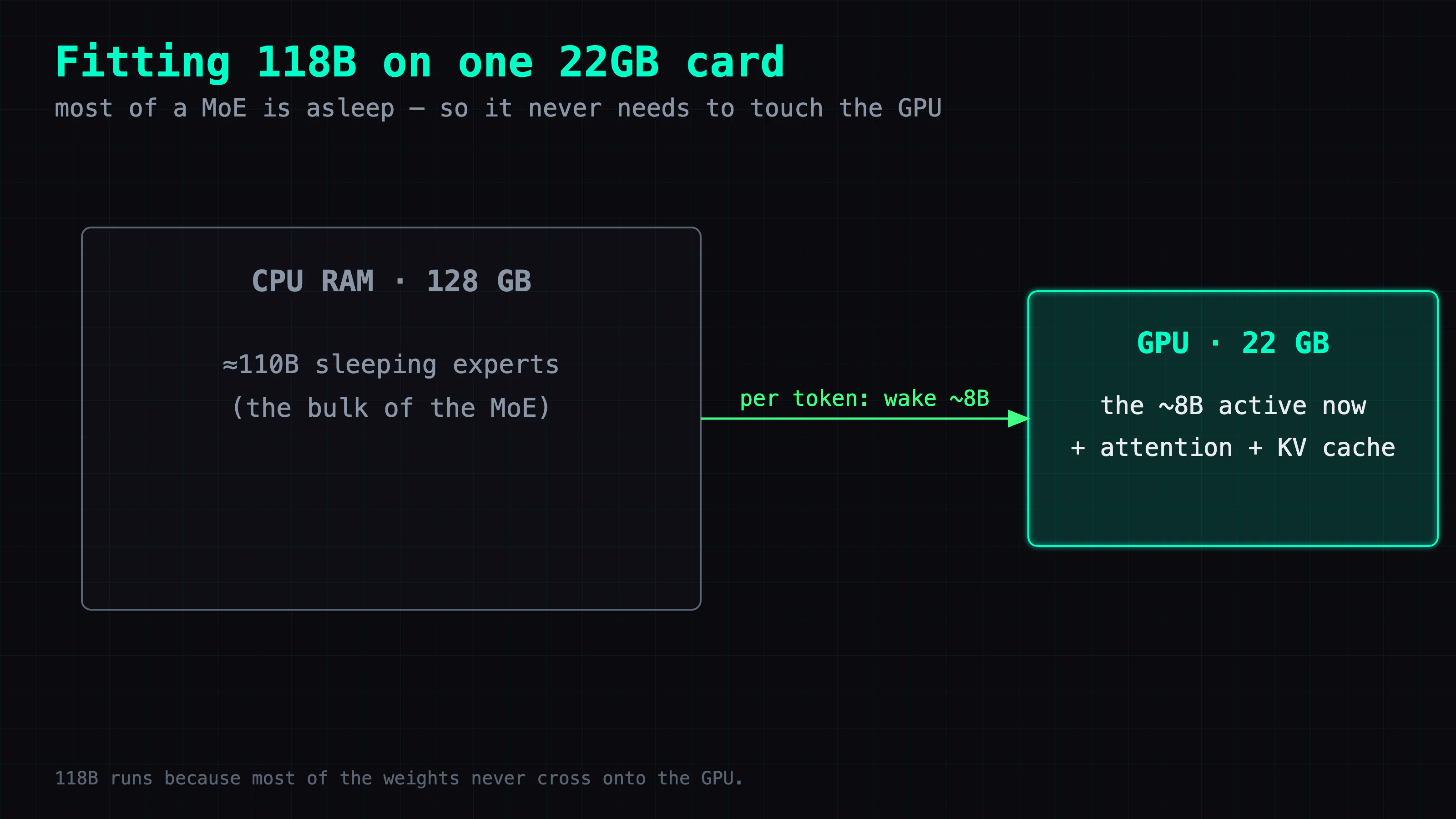
The first is that a Mixture-of-Experts model is a big committee of specialists that only wakes a few members per word. Laguna wakes about 8B of its 118B parameters for any given token and lets the rest nap. Sleeping specialists don't need to sit in the expensive fast memory (VRAM) — you can park them in ordinary system RAM and only pay when they're called. That's "hybrid offload": most of the model lives in cheap RAM, and only the parts that run on every token stay on the GPU.
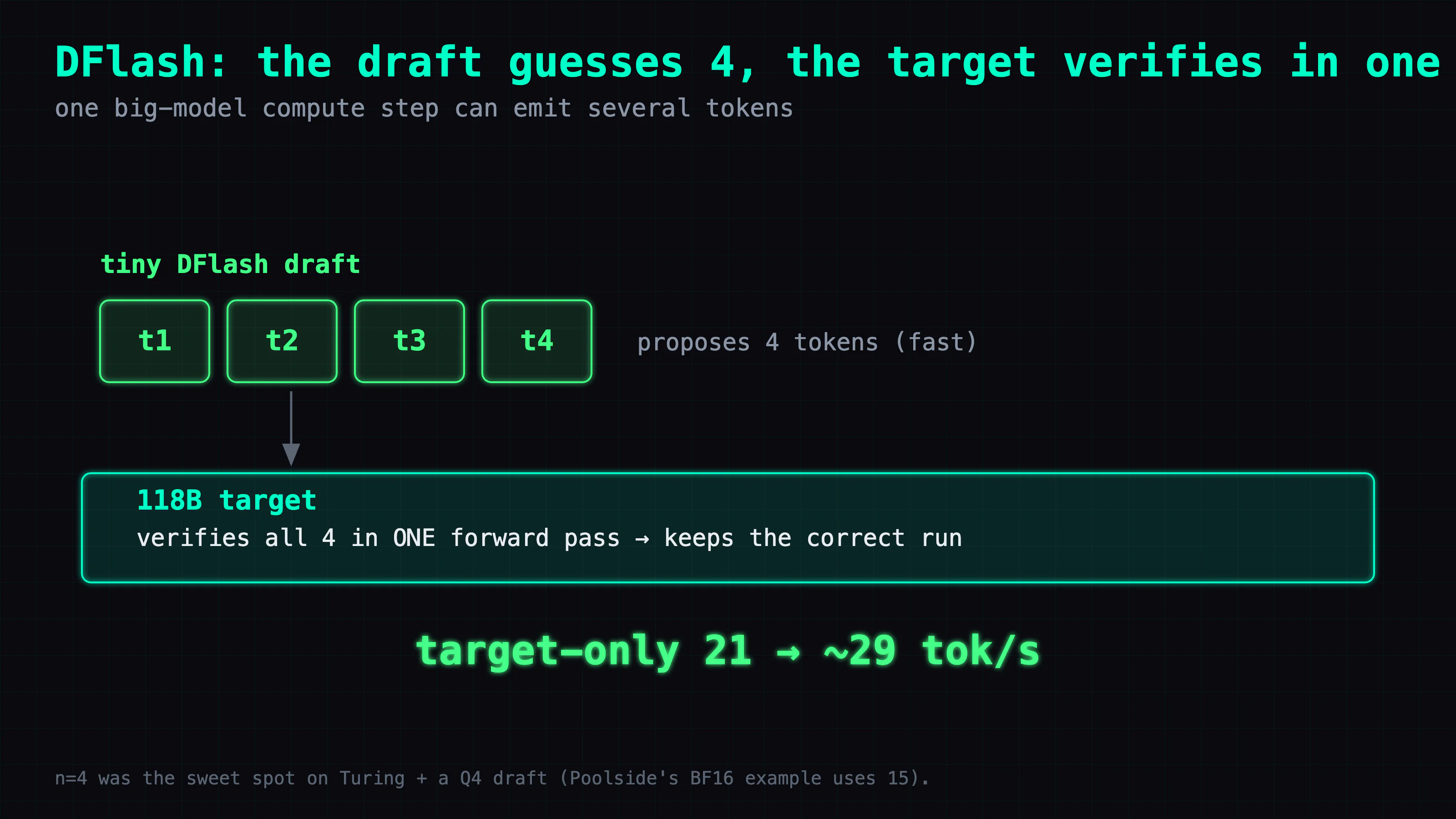
The second is a trick called speculative decoding. Generating text one token at a time is slow because each token needs a full pass through the big model. Laguna ships a tiny "draft" model called DFlash that guesses the next several tokens cheaply; the big model then checks all of those guesses in a single pass and keeps the ones it agrees with. When the draft guesses well, you get several tokens for the price of one big step.
Put together, those two tricks let one used 2080 Ti run a model that has no business fitting on it — at a speed I actually use every day.
What it is: Poolside Laguna S 2.1, a 118B-A8B coding MoE
Laguna S 2.1 is a coding and agentic model from Poolside, a coding-focused AI company. It's a Mixture-of-Experts model: 118B total parameters, about 8B active per token (118B-A8B). Poolside open-weighted it in July 2026 under the OpenMDW-1.1 license.
Two things make it awkward to run and interesting to run. First, it uses a custom architecture — the model's Hugging Face model_type is laguna and it needs custom code. Base Laguna support just landed in upstream llama.cpp (July 2026), but this DFlash speculative-decoding pair still needs Poolside's fork, the laguna branch. Second, it's a reasoning model — it thinks before it answers — and Poolside ships a tiny companion DFlash speculative-decoding draft model alongside the main weights.
It advertises a native 1M-token context window. I validated it out to 262K, which is as far as I need on this box.
The goal: a resident 118B coding brain on one card, no API bills
The target was concrete: a 118B coding model, resident on a single junk-tier card, available all day, with no per-token API bill and nothing leaving the building. Not "load it once for a screenshot" — run it, as in wire it into my own agent tooling and lean on it.
The rig is the same junk lab from Part 1, minus two of the cards: one modded RTX 2080 Ti 22G, an EPYC 7402, and 128GB of eight-channel DDR4. The target (main) weights live mostly in CPU RAM; only the bandwidth-heavy parts stay on the GPU. 262K context, DFlash on, Poolside's fork. Part 1 spread a 119B across three cards that all stayed in VRAM. This time the model doesn't fit in one card's VRAM at all — the whole point is running it anyway, on hybrid offload.
How to run it: Poolside's llama.cpp fork, hybrid offload, and DFlash
This is the exact llama-server command I run daily. Build Poolside's laguna branch first, then swap in your own model paths and IP:
llama-server \
  -m laguna-s-2.1-attnQ8.gguf \
  -md laguna-s-2.1-DFlash-Q4_K_M.gguf \
  --spec-type draft-dflash --spec-draft-n-max 4 \
  -ngld 99 \
  -c 262144 \
  -ctk q4_0 -ctv q4_0 -ctkd f16 -ctvd f16 \
  -t 24 -tb 24 -td 12 -tbd 12 \
  -fa on \
  -fit on -fitt 7680 -fitc 262144 \
  --parallel 1 --jinja \
  --reasoning on --reasoning-format deepseek \
  --host 0.0.0.0 --port 8095
The flags that took tuning:
--spec-draft-n-max 4— draft length, the sweet spot here. Poolside's BF16 example uses 15; on a Turing card with a Q4 draft, push it higher and acceptance drops.-ctk q4_0 -ctv q4_0quantize the target KV to save VRAM.-ctkd f16 -ctvd f16keep the draft KV in F16 — quantizing it collapses acceptance (see debug #2).-t 24 … -td 12— CPU threads, 24 for the target and 12 for the draft.-fit on -fitt 7680auto-fits more of the target onto the GPU (~9 GiB CUDA buffer).
If you don't want to quantize the weights yourself, I published the pre-quantized attnQ8 target plus the Q4_K_M draft at coolthor/Laguna-S-2.1-attnQ8-DFlash-Q4-GGUF — download both and run the command above as-is.
Save space and go faster: three settings, +7% decode and ~29 tok/s
On a hybrid-offload box, "smaller file" and "faster" turn out to be the same lever, and three settings control it. Here's what each one does.
1. Attention F16 → Q8_0 (−2.45 GiB, +7% decode). Poolside's official Q4_K_M GGUF is not uniform Q4. It deliberately keeps attention in F16, the experts in Q4_K/Q6_K, and the router, norms, and biases in F32 — a mixed-precision recipe, not uniform quantization. I converted only the 240 F16 attention tensors to Q8_0 and byte-copied everything else, so nothing that was already quantized gets re-quantized (re-quantizing already-compressed tensors just stacks error on error). The file drops by ~2.45 GiB (2.63 GB) to 67.6 GiB. Why smaller means faster here: because the target weights live mostly in system RAM, shrinking the attention tensors lets llama.cpp keep more of the target on the GPU, reducing CPU-to-GPU transfers per token. Measured target-only decode (DFlash off): English 19.64 → 21.05 tok/s (+7.2%), Traditional Chinese 19.73 → 21.26 tok/s (+7.8%).
2. -fit with -fitt 7680. This auto-fits more target layers onto the GPU — about a 9 GiB CUDA buffer — the same principle as above: pull more of the hot path off the RAM-fed CPU and onto the card.
3. DFlash draft length n=4. Turning the draft on is the big one. With DFlash, English decode goes from target-only 21 → about 29 tok/s. Poolside's BF16 example sets the draft length to n=15, but on this Turing card with a Q4 draft, n=4 is the measured sweet spot — increasing it further lowers acceptance and wipes out the gains. And the quantization didn't cost quality: my gates — strict JSON output, native tool-call safety, and an executable min_window coding task — all still passed with the attnQ8 target and the Q4 draft.
Debug: three gotchas that cost me time
You can skip this section if you just want it running — nothing here changes the command above. This is the part that bit me.
1. The base type quantizes everything, not just the tensors you name. llama-quantize's final positional argument is the base type — the default for every quantizable tensor — and --tensor-type only adds overrides on top of it. Set the base to Q8_0 to convert attention and you also drag every Q4_K/Q6_K expert up to Q8_0, ballooning the file (and a real run aborts without --allow-requantize). The fix is to keep Q8_0 as the base but pin every already-quantized family back to its current type, so only the F16 attention actually converts. Run --dry-run first and count the converted tensors before committing to a multi-minute conversion. (A deeper how-to on the actual quantization is coming as its own article in this series — no link yet.)
2. Keep the DFlash draft KV in F16. This is the one that cost real time. I quantized the draft's KV cache to Q4_0 to save a little more VRAM, and acceptance collapsed below 1% — decode fell to 5–6 tok/s, worse than running with no draft at all. The reason: the draft's Q4 weight error and a Q4_0 KV error are two independent approximations that don't cancel, so a draft that was already borderline stops agreeing with the target entirely. Quantizing the target KV to Q4_0 is fine (that's -ctk/-ctv in the command); the warning is specific to the draft (-ctkd/-ctvd), which must stay F16.
3. It can burn through its entire token budget just thinking and return nothing. Laguna is a reasoning model, so a small max_tokens can be consumed entirely inside reasoning_content with no final answer emitted — you get an empty completion and a full think block. For tool-calling and coding lanes, either disable thinking or add an empty-final repair at the agent layer so a burned budget retries instead of returning nothing.
Takeaways
Where the time went. I went in assuming "smaller file = faster" as a general truth, and on this box it happened to be right — but for a reason that doesn't always hold. The win isn't the smaller file; it's that on a hybrid-offload box less data has to move between the CPU and GPU per token. The very same attention-Q8 trick would likely do nothing on a box where the model already fits entirely in VRAM, because there's no bus to relieve. The speedup is a property of the offload topology, not the quantization.
Reusable diagnostics. When a big MoE needs hybrid offload, quantize the tensors that are both high-precision and frequently moved — here, the F16 attention that rides every token — and leave the already-compressed experts alone. Re-quantizing tensors already at Q4/Q6 compounds quantization error while reclaiming almost no space. Pick the tensors on the hot path, pin every other family back to its own type, and --dry-run the count before you commit.
The general principle. A big MoE's speed on cheap hardware is mostly about how much data never has to cross the CPU bus, not about the parameter count. 118B on one eight-year-old card isn't a story about fitting 118B — it's a story about how little of it moves.
Also in this series — Junk-Tier Big Models
- Part 1: Running a 119B MoE at 74 tok/s on Three 2080 Tis — fitting an oversized MoE across three cards, and the multi-card offload gotcha.
- Coming next: a quantization deep-dive on the attnQ8 recipe — how to convert only the tensors that matter and leave the rest byte-for-byte untouched.
FAQ
- Can a single 22GB 2080 Ti run a 118B model like Laguna S 2.1?
- Yes. Laguna S 2.1 is a 118B-A8B Mixture-of-Experts model, so only about 8B of its parameters fire per token. With llama.cpp hybrid offload, the target weights live mostly in system RAM and only the bandwidth-heavy parts stay on the GPU, so a single modded 2080 Ti 22G is enough. With Laguna's companion DFlash speculative-decoder on, it decodes at about 29 tok/s at 262K context.
- What is DFlash speculative decoding in Laguna?
- DFlash is a tiny draft model Poolside ships alongside Laguna. Speculative decoding means the small fast draft guesses the next several tokens and the big model verifies them all in one pass, so you get more accepted tokens per expensive forward step. It took my English decode from about 21 tok/s (big model alone) to about 29 tok/s. On this Turing card with a Q4 draft, a draft length of n=4 was the measured sweet spot — Poolside's own BF16 example uses n=15, but longer drafts reduce acceptance on this setup.
- How do you make Laguna faster on an old card — what is the attention-Q8 trick?
- Poolside's official Q4_K_M GGUF deliberately keeps attention in F16. I converted only the 240 F16 attention tensors to Q8_0 and byte-copied everything else, so nothing already-quantized gets re-quantized. The file drops by ~2.45 GiB to 67.6 GiB. Because the target weights mostly live in system RAM, less attention data means llama.cpp fits more of the model on the GPU and crosses the CPU-to-GPU bus less often — measured target-only decode went from 19.6 to 21.0 tok/s, about +7%.
Read next
- 2026-07-29[Junk-Tier Big Models #3] A 284B MoE on ONE 2080 Ti — and it beats my DGX Spark
DeepSeek-V4-Flash is 284B. It decodes at 17.4 tok/s on a single modded 22GB 2080 Ti — faster than the DGX Spark I serve it on. Card count barely matters, and MTP speculative decoding dies on unimplemented runtime, not a missing GPU.
- 2026-08-02[Junk-Tier Big Models #4] A frontier-class open model on hardware you already own: DeepSeek-V4-Flash-0731 on one 22GB 2080 Ti
How to run DeepSeek-V4-Flash-0731 (91GB, 284B MoE) on a single modded 22GB 2080 Ti at 16.5 tok/s and 1M context — including a formula for picking -ncmoe.
- 2026-07-21[Junk-Tier Big Models #1] Running a 119B MoE at 74 tok/s on Three 2080 Tis
A US$1.6k junk EPYC + 3× 2080 Ti 22G box (66G VRAM) runs a quantized 119B MoE at 74 tok/s. Expert offload to RAM costs about 2.4× decode — plus a multi-card OOM gotcha.
- 2026-08-18[Junk-Tier Big Models #5] Qwen3.8-27B on a 2018 22GB card: 30 tok/s, and it one-shot a 3D scene
A modded 22GB RTX 2080 Ti runs Qwen3.8-27B at 30-31 tok/s with 128K context. The full llama.cpp command, the MTP flags, and the thinking-budget trap.
Don't miss the next one
Subscribe, and you won't.
One-click unsubscribe anytime.