改裝 2080 Ti 22G · part 13
[Benchmark] Free 15% Speedup on a 2080 Ti: One Broken Chat Template, One Starving MTP Head
❯ cat --toc
- Your GGUF ships a frozen chat template — mine was broken
- A template that re-renders history differently kills the KV cache
- The fix is one drop-in jinja file and three flags
- The MTP head is underfed at the default draft depth
- The full flag set
- Deep dive
- Depth 6 doesn't lose the benchmark — it never boots
- A port that answers is not a server that works
- Why is depth 6 logging acceptance 0.76 if it never booted?
TL;DR
Two free llama.cpp changes: 41.6 → 47.6 tok/s (+15%) decoding Qwen3.8-27B Q4_K on a modded 2080 Ti 22GB. The GGUF's embedded chat template was a broken snapshot that re-rendered history differently every turn, so the KV cache missed and every turn re-prefilled from scratch (worst case, measured: 163 seconds per turn on a 64K-token chat). A community template file restores 94.5% cache hits. Separately, Qwen3.8's built-in MTP head drafts up to seven tokens but my config had --spec-draft-n-max pinned at 2; raising it to 4 is the sweet spot. Caveat: depth 6 OOMs at boot on a full card, and clean-probe acceptance (0.99) is about 20% higher than acceptance on real traffic.
My daily-driver LLM rig is a modded RTX 2080 Ti with 22GB of VRAM, serving Huihui-Qwen3.8-27B-abliterated as a Q4_K GGUF: 16.8 GB, fully on GPU, llama.cpp 2026-08 build. (How this seat came to exist is its own story.)
Part 12 ended in a negative result: on Turing, swapping quantization formats buys you nothing. This part is the opposite. Two changes, no new weights, no quality trade-off: decode went from 41.6 to 47.6 tok/s, and multi-turn conversations stopped re-reading themselves from the top.
Your GGUF ships a frozen chat template — mine was broken
A chat template is the jinja layer that renders a conversation — system prompt, turns, tool calls — into the literal token stream the model sees. Every GGUF embeds a copy, frozen at conversion time. It never tracks upstream fixes. If the template had a bug the day someone ran the converter, you are running that bug forever.
Don't trust the file on Hugging Face. Ask the running server what it's actually using:
curl -s http://localhost:8082/props \
  | python3 -c "import json,sys; print(json.load(sys.stdin)['chat_template'])"
Mine turned out to be the old official Qwen template, with three telltale signs. All three were present:
- Line 47:
reasoning_effort|default('xhigh'). Reasoning effort defaults to maximum. Every request that doesn't explicitly dial it down burns thinking tokens at the highest setting. - Line 48:
raise_exception('Unexpected reasoning effort ...'). A whitelist that rejects values it doesn't know — including OpenAI-style"high", which is what half the client libraries send. - The word
thinkappears 8 times. In the fixed template it appears 98 times. The entire machinery for handling<think>blocks in conversation history simply isn't there.
A template that re-renders history differently kills the KV cache
llama.cpp keeps a prefix cache: the attention keys and values for tokens it has already processed. If your new prompt starts with the same tokens as the last one, those tokens cost nothing. Multi-turn chat should be the ideal case — each request is the previous request plus one exchange.
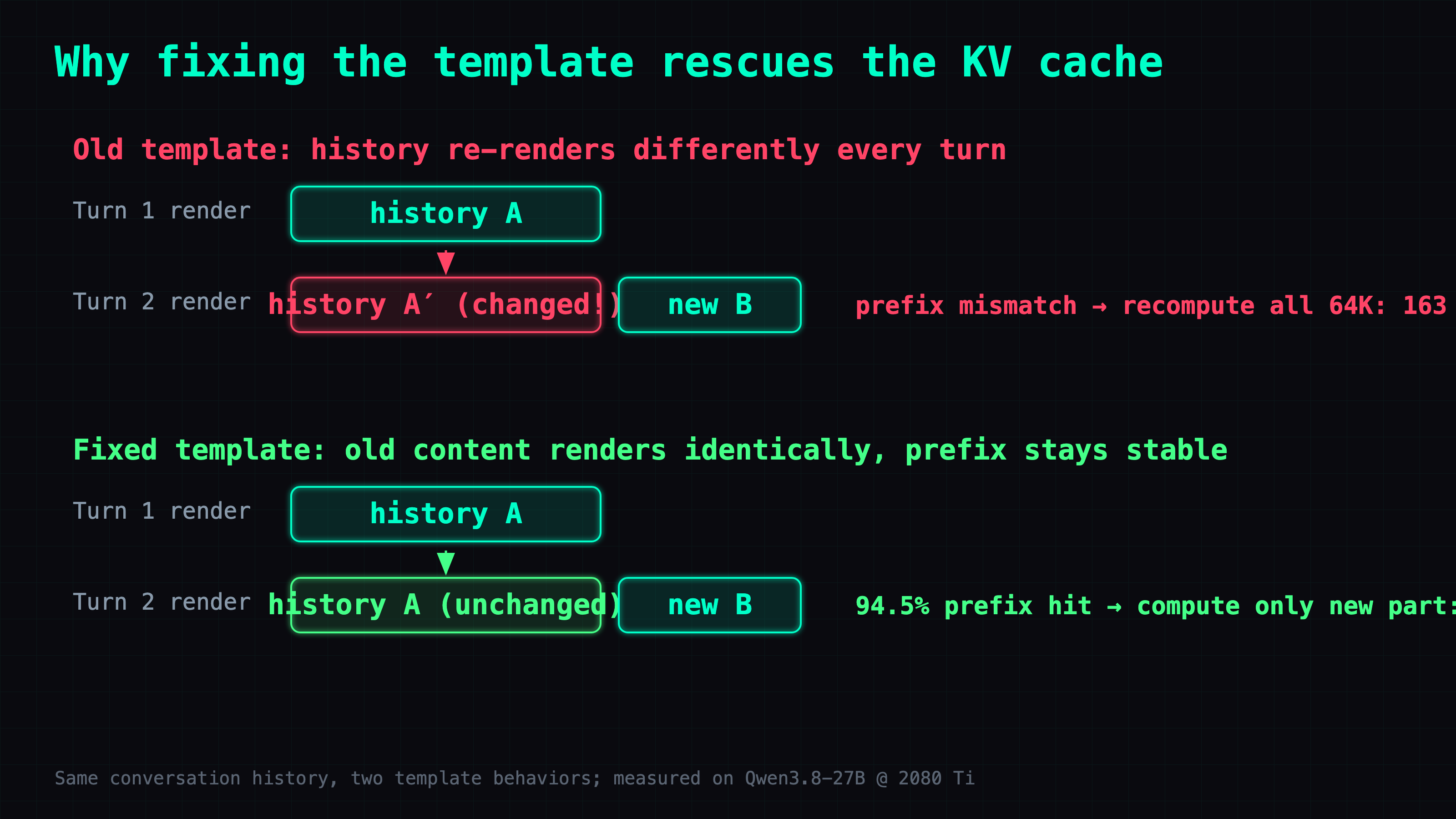
Except each request re-renders the full history through the template. If the template handles <think> blocks inconsistently, the rendered history changes between turns. Different tokens, different prefix, cache miss, full re-prefill.
My worst observed case: a 64K-token conversation re-prefilled on every single turn. At this card's 394 tok/s prefill, that came out to a measured 163 seconds of waiting per turn before the first new token. The model wasn't slow. It was rereading the entire conversation each time I spoke.
The fix is one drop-in jinja file and three flags
froggeric's Qwen-Fixed-Chat-Templates is a community-maintained repo with one drop-in template covering Qwen 3.5, 3.6, and 3.8. Apache-2.0. Download the file, then:
--jinja \
--chat-template-file ./chat_template.jinja \
--reasoning-format deepseek
One naming trap: --reasoning-format deepseek names the think-tag dialect — <think>...</think> as popularized by DeepSeek R1 — not the model brand. Qwen uses the same tags. There is no qwen value. I looked.
Verify the cache actually holds now. Send the same two-turn conversation twice; the second response carries the receipt:
"prompt_tokens_details": { "cached_tokens": 69 }
against prompt_tokens: 73. That's a 94.5% hit rate, and the 4 misses are the genuinely new turn content — the cacheable part hit 100%.
The MTP head is underfed at the default draft depth
Second change, unrelated mechanism. Qwen3.8 ships with an MTP head — a multi-token prediction head baked into the model, acting as its own draft generator for speculative decoding (guess a few tokens ahead, verify them in one forward pass; accepted guesses are nearly free). llama.cpp enables it with --spec-type draft-mtp.
My config had the draft depth, --spec-draft-n-max, pinned at 2 — and today's llama.cpp default of 3 is barely better. z-lab's DFlash2 model card mentions in passing that Qwen3.8's built-in head is a seven-token head. I was asking a seven-token head for two tokens.
The tell was in my stats before I ever read that card: at depth 2, acceptance was 1.00. Constantly. Every draft accepted sounds like winning. It actually means the head is being asked for far less than it was trained to give.
--spec-draft-n-max | decode tok/s | acceptance | mean tokens/step |
|---|---|---|---|
| 2 (my old setting) | 41.6 | 1.00 | 3.0 |
| 4 | 47.6 | 0.99 | 4.95 |
| 5 | 47.0 | 0.95 | 5.8 |
| 6, 7 | server won't boot | — | — |
The sweet spot is depth 4 at 47.6 tok/s: beyond it, acceptance decays faster than draft length grows, and beyond 5 the server refuses to start at all (see the deep dive).
The full flag set
--jinja
--chat-template-file ./chat_template.jinja   # froggeric's fixed template
--reasoning-format deepseek
--spec-type draft-mtp
--spec-draft-n-max 4                         # was 2 in my config; llama.cpp default is 3
Decode 41.6 → 47.6 tok/s. Multi-turn cache hits sit at 94.5%; before the fix, a long conversation could stall for 163 seconds per turn. The money was on the table the whole time, hidden in a jinja file and a config value nobody had touched in months.
It's like a friend who makes you repeat the entire conversation from the beginning every time you talk — the problem isn't his memory. His note format keeps changing.
Deep dive
Skippable. Act 1 above is the whole tutorial; this is the log of what went wrong while measuring it.
Depth 6 doesn't lose the benchmark — it never boots
I assumed the depth sweep would trace a performance curve, with depth 6 and 7 simply landing slower than 4. So I set --spec-draft-n-max 6 and restarted the service. The journal, verbatim:
E ggml_backend_cuda_buffer_type_alloc_buffer: allocating 260.02 MiB on device 0: cudaMalloc failed: out of memory
E common_speculative_init_result: failed to create MTP context
E srv    load_model: failed to create MTP context
E srv  llama_server: exiting due to model loading error
The MTP context buffer is allocated at boot and grows with depth. Depth 6 wanted an extra 260 MB; the card had 481 MB free, fragmented; cudaMalloc failed; the server exited. That broke my mental model of the sweep: on a maxed-out card, VRAM at boot — not the performance curve — sets the ceiling for many knobs. You never get to measure "slower". You get "won't start".
A port that answers is not a server that works
I assumed my readiness check — curl the server, get a response — meant the new config was live. After the depth-6 OOM, systemd crash-looped the service, and each short-lived instance bound the port and happily answered /v1/models and even tokenize (neither touches the GPU) before dying on the first real generation request.
The check had to evolve three times. Version 1, "curl responds": fooled by the old instance still answering during graceful shutdown. Version 2, "curl responds and the PID changed": fooled by the crash loop's parade of short-lived new PIDs. Version 3, "actually completes a generation": finally honest, because generation is the first thing that touches the GPU. Ask the server to do work, not to say hello.
Why is depth 6 logging acceptance 0.76 if it never booted?
Mid-sweep, a batch of acceptance-0.76 lines showed up in the journal and I read them as depth-6 results limping along before a crash — confusing, since the boot had failed. I checked the PID on those lines. Same PID as the old instance. The server had never restarted; those numbers were another session's live agent traffic landing inside my measurement window.
That exposed a useful split: clean probes accepted at 0.99, while real agent coding traffic over the same period accepted at 0.67–0.78, with mean accepted length 3.7–4.1. Probes are great for A/B-ing configs against each other. For real-world throughput, knock about 20% off the probe number. And before crediting any result to a config, verify the process that produced it was actually running that config.
FAQ
- Why does llama.cpp re-prefill my whole conversation every turn?
- Most likely your chat template renders the conversation history differently on each request, so the token prefix changes and the prefix cache can't match it. Dump the live template from the /props endpoint and compare it against a known-good copy. Replacing my GGUF's embedded template with a community-fixed one took multi-turn cache hits to 94.5%.
- How do I see which chat template llama.cpp is actually using?
- Query the running server, not the file: curl the /props endpoint and print the chat_template field. The GGUF embeds a copy frozen at conversion time, so the template you find on Hugging Face today may not be the one your server is rendering with.
- What is a good --spec-draft-n-max for Qwen3.8's built-in MTP head?
- 4, on my 2080 Ti 22GB. The built-in head is a seven-token head and a draft depth of 2 underfeeds it — acceptance pinned at 1.00 is the tell. Depth 5 gained nothing over 4, and depth 6 failed to allocate its MTP buffer at boot.
- Why is the flag --reasoning-format deepseek if I'm running a Qwen model?
- The value names the think-tag dialect, not the model brand. The <think>...</think> convention was popularized by DeepSeek R1, and Qwen uses the same tags. There is no qwen value.
Read next
- 2026-09-21Ternary Bonsai 2 on One RTX 2080 Ti: Qwen3.8-27B in 7.2 GB Scores 130 of 140
Ternary Bonsai 2 27B scored 130/140 on one modded 2080 Ti vs 131 for Qwen3.8-27B Q8_0 on two cards. Build steps, the flag that matters, why smaller is slower.
- 2026-08-22[Benchmark] Two Modded 2080 Tis Reach 59.6 tok/s on Qwen3.8-27B With llama.cpp Tensor Parallel
Two modded 22GB RTX 2080 Tis hit 59.6 tok/s on Qwen3.8-27B using llama.cpp's -sm tensor split mode plus MTP, after -sm row was deleted upstream. Config, gotchas and the failed routes included.
- 2026-06-25[Just for Fun — Advanced] Quantizing the Draft Cache Backfired — A Counterintuitive Look at Qwen MTP (f16 ran 34% faster than q4)
Quantizing the main KV cache to q4 to save memory is fine. So I quantized the MTP draft cache too — it's just a little draft, surely a free win. It wasn't: q4 draft cache ran 29.6 tok/s, the un-quantized f16 ran 39.7, and f16 used less VRAM on top of that. The draft cache is one of the few places where quantizing is a net loss — here's the triple penalty.
- 2026-09-28NVFP4 Without FP4 Hardware: Qwen3.8-27B on Two RTX 2080 Tis at 151.7 tok/s
No FP4 hardware, still faster: a self-converted NVFP4 Qwen3.8-27B on two 2080 Tis runs code at 151.7 tok/s (was 116.1) and serves 4 requests at once.
Don't miss the next one
Subscribe, and you won't.
One-click unsubscribe anytime.