改裝 2080 Ti 22G · part 20
Two Modded RTX 2080 Tis Hit 153.8 tok/s on Qwen3.8-27B With FastLLM + DFlash2
❯ cat --toc
- Preface
- FastLLM and DFlash2: a C++ server and a 3.6 GB draft that guesses 7 tokens per step
- FastLLM alone runs 33.7 tok/s; DFlash2 takes it to 152.3
- 156 tok/s on code, 134.9 on math, 53.1 on prose
- Why speculation pays here: decode already uses 79% of 1,232 GB/s
- What you need: two 22 GB 2080 Tis, ftllm 0.1.8.2, a 29 GB model and a 3.6 GB draft
- How to install and launch FastLLM with DFlash2 on two 2080 Tis
- Four things that break when you copy the Bilibili recipe onto 2080 Tis
- Prefix cache: an 8,747-token shared prefix drops from 8.2 s to about 1 s
- 262K context really fits: a needle at 199,787 tokens came back correct
- The catch: prose about 20% slower, and 3 fewer questions right out of 140
- Deep dive: the Bilibili sources, the four traps, reasoning effort, and every config measured
- Where the recipe came from: two Bilibili videos, two different frameworks
- Trap 1: ncclAllReduce failed because the NCCL that FastLLM loads has no sm_75
- Trap 2: DFlash2 crashes with cudaErrorIllegalAddress unless CUDA Graph is off
- Trap 3: fitting 262K with fp4 KV, no --cuda_embedding and gpu_mem_ratio 0.95
- Trap 4: MuSR runs into the token limit, and a flag that did nothing
- Draft tokens: 8 is the sweet spot, 12 won't start
- Every config, measured the same way
- Version pinning: a verify.sh that checks 10 fingerprints before every start
- Still unmeasured
TL;DR
FastLLM plus the DFlash2 draft model runs Qwen3.8-27B FP8 on two modded 2080 Ti 22G at 153.8 tok/s on code and 134.9 on math. My previous llama.cpp setup ran at about 66. FastLLM alone does 33.7; the whole gain is the draft. It works because decode here is memory-bound: one read of the weights checks all 7 drafted tokens. 262K context fits with an fp4 KV cache. The cost: prose drops to 53.1, and my 140-question eval scores 128 against 131.
Preface
A delivery van costs about the same to run whether it carries one parcel or twenty. The driver and the fuel are paid per trip, so the cheapest parcel is the one that rides in a full van.
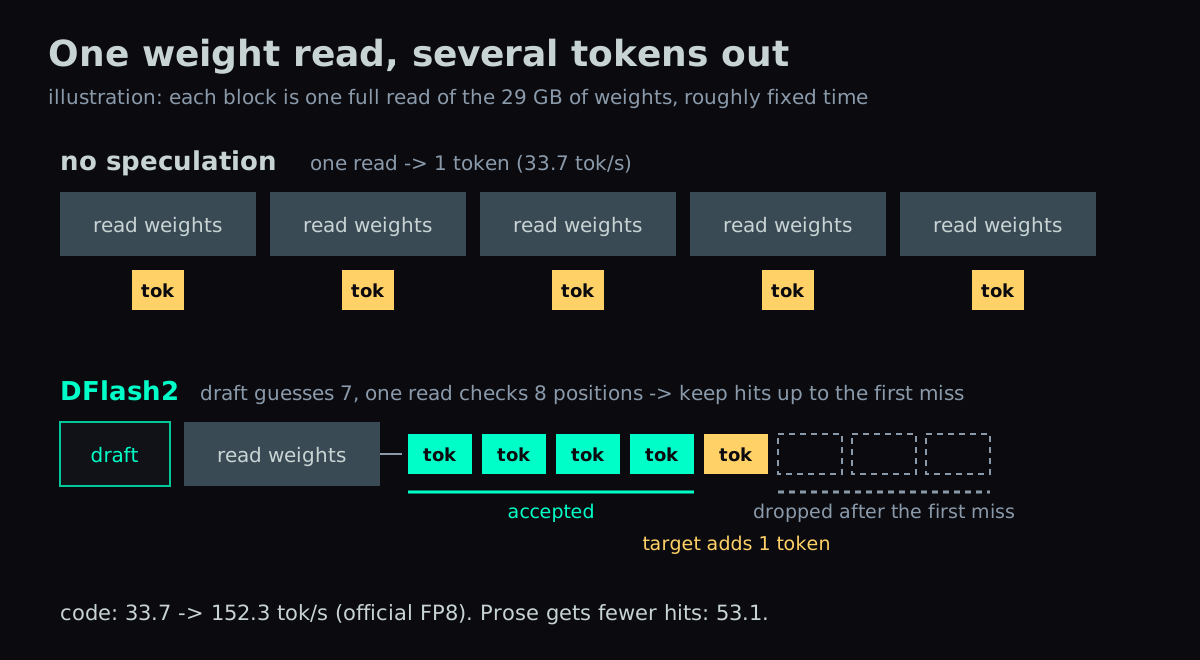
Generating text with a 27B model has the same economics. Every token the model produces requires reading all of its weights out of VRAM. Speculative decoding fills the trip: a small draft model guesses several tokens ahead, the big model checks all of those positions in one pass over its weights, and every correct guess is kept.
Someone on Bilibili, the Chinese video site, used this to push two modded 2080 Ti 22G cards past 150 tok/s. Part 14 put the same model on the same two cards with llama.cpp, and after later tuning it ran at 66 tok/s as this machine's main model server. This part rebuilds the Bilibili recipe, FastLLM plus the DFlash2 draft model, and gets 153.8 tok/s on code. It has replaced the llama.cpp setup as the main model server.
FastLLM and DFlash2: a C++ server and a 3.6 GB draft that guesses 7 tokens per step
FastLLM is a C++ inference framework. It installs from pip as ftllm, and ftllm server exposes an OpenAI-compatible API. The 2080 Ti is Turing (sm_75) and has no FP8 hardware. FastLLM stores FP8 weights as FP8 and converts them to FP16 inside the kernel for the math, Marlin-style W8A16. On this card, FP8 saves bytes read, not compute.
DFlash2 is a draft model from z-lab built for Qwen3.8-27B: 5 layers, 3.6 GB. It's a block-diffusion drafter. Instead of guessing one token at a time, it predicts a whole block of tokens in one pass, and a selector picks one coherent path through that block for the main model to verify. With --speculative_num_draft_tokens 8 it drafts 7 tokens per step.
FastLLM alone runs 33.7 tok/s; DFlash2 takes it to 152.3
Measured separately:
- FastLLM with no speculation: 33.7 tok/s. That's half of the 66 from llama.cpp Q8_0 + MTP (MTP is Qwen3.8's built-in draft head).
- FastLLM plus DFlash2: 152.3 tok/s, on the official FP8 weights with a code prompt.
The 4.5× comes entirely from the draft.
156 tok/s on code, 134.9 on math, 53.1 on prose
Method: real chat requests, temperature 0, up to 512 output tokens, three prompt types (code, math, prose), 3 runs each, median, timed by wall clock on the client. Both cards run with tensor parallel 2 (TP=2). The last row is the config that went into production.
| config (two 2080 Ti, TP=2) | code | math | prose |
|---|---|---|---|
| no speculation (official FP8) | 33.7 | 33.3 | 33.2 |
| built-in MTP 8 (uncensored FP8) | 62.1 | 53.3 | 24.0 |
| DFlash2, 262K (uncensored FP8) | 156.0 | 134.9 | 53.1 |
That last row runs a 262K context with an fp4 KV cache. The official and uncensored weights run at about the same speed; the full comparison is in the deep dive. Before going live I also dropped --cuda_embedding (trap 3 explains why) and re-measured code: 153.8 tok/s, against 154.1 with the flag on. That's noise. The 153.8 in the TL;DR is the go-live measurement.
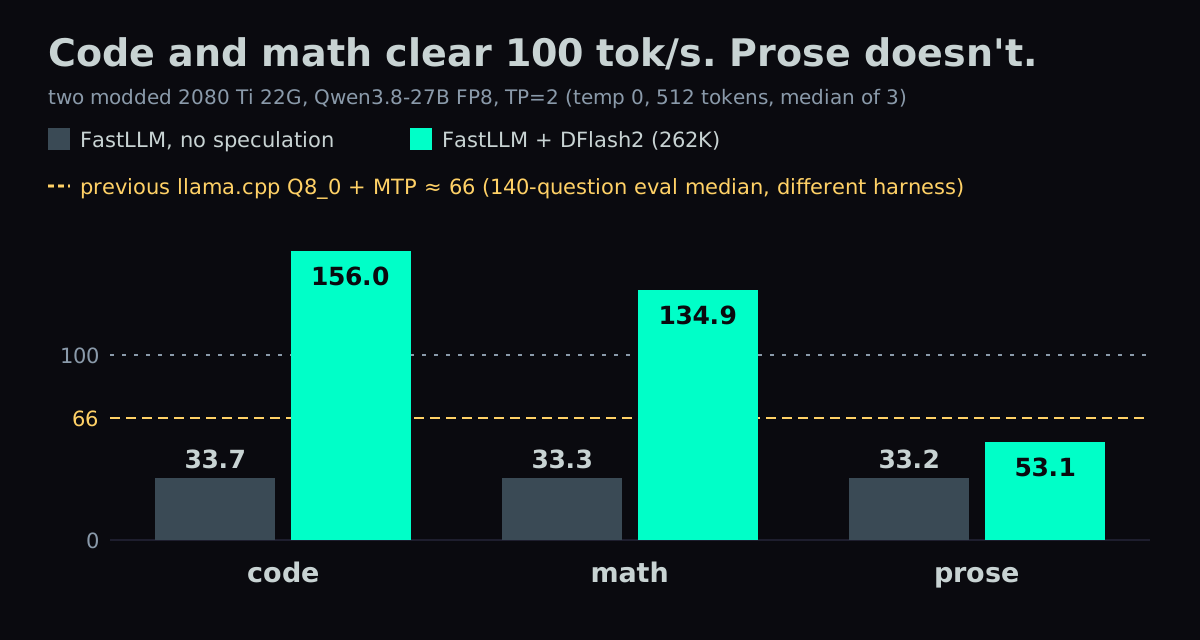
The old llama.cpp setup (Q8_0 + MTP, two cards) ran at 66 tok/s. That 66 is the median decode speed from a 140-question capability eval, with temperature 1.0 and thinking on. It's a different harness from the three prompts above, so treat it as a reference point. A Bilibili commenter with the same hardware ran one identical API test on both (a snake-game prompt, 256 tokens): llama.cpp 58, FastLLM + DFlash about 100–110., pointing the same way.
So "past 100 tok/s" only holds for code and math. Prose got slower than the old setup.
Why speculation pays here: decode already uses 79% of 1,232 GB/s
Each generated token reads every weight once, so decode tok/s × weight size gives the bytes read from VRAM per second. Two 2080 Tis have 1,232 GB/s of combined theoretical bandwidth.
| config | weights | decode | bytes/s | % of peak |
|---|---|---|---|---|
| FastLLM FP8, no speculation | 29 GB | 33.7 | 977 GB/s | 79% |
| FastLLM FP8 + DFlash2 | 29 GB | 152.3 | 4,417 GB/s | 358% |
Without speculation, the model already uses 79% of the bandwidth. Decode is memory-bound, and the compute units sit mostly idle. The 358% in the second row isn't overclocking. It shows the weights are no longer read once per token: one read verifies several positions, so the real traffic is under a third of the naive number. Speculation spends idle compute to avoid repeated weight reads.
That only works when the main model is memory-bound. Part 19 is the counter-example. Ternary Bonsai 2's ternary weights are only 7.2 GB and use 46% of the card's bandwidth, and the limit there is the arithmetic of unpacking them. A DFlash2-family draft on that model beats built-in MTP by only 3–8%, and gets slower the more it drafts.
What you need: two 22 GB 2080 Tis, ftllm 0.1.8.2, a 29 GB model and a 3.6 GB draft
- Two modded 2080 Ti 22G. Mine are connected with NVLink (NV2). The Bilibili reproductions all had NVLink too. FastLLM's own 5090 benchmark ran over PCIe, so NVLink isn't strictly required, but I haven't tested 2080 Tis without it.
- A Python 3.14 venv with
ftllm0.1.8.2. - Main model: orcarouter/Qwen3.8-27B-Uncensored-FP8, about 29 GB on disk, uncensored. The official
Qwen/Qwen3.8-27B-FP8also works at about the same speed. - Draft: z-lab/Qwen3.8-27B-DFlash2, 3.6 GB.
- An NCCL build that includes sm_75. I used the 2.31.2 I compiled in part 16.
How to install and launch FastLLM with DFlash2 on two 2080 Tis
Create the venv and download both models:
python3.14 -m venv ~/venvs/ftllm
~/venvs/ftllm/bin/pip install ftllm==0.1.8.2
hf download orcarouter/Qwen3.8-27B-Uncensored-FP8 --local-dir /mnt/nvme1t/models/qwen38-27b-uncensored-fp8
hf download z-lab/Qwen3.8-27B-DFlash2 --local-dir /mnt/nvme1t/models/dflash2-qwen38-zlab
The chat template is the community-fixed one from part 13, froggeric/Qwen-Fixed-Chat-Templates. I used v22.3 (the URL below is pinned to that commit; main is now v22.5, where this sed pattern doesn't match) with one change: the default reasoning effort goes from medium to low. The deep dive explains why.
mkdir -p /mnt/nvme1t/models/qwen-fastllm-low
wget -O /mnt/nvme1t/models/qwen-fastllm-low/chat_template.jinja \
  https://huggingface.co/froggeric/Qwen-Fixed-Chat-Templates/resolve/492315ea6d7343bcfb32598d6a898c34e0d69ed8/chat_template.jinja
sed -i "s/is not none else 'medium' %}/is not none else 'low' %}/" \
  /mnt/nvme1t/models/qwen-fastllm-low/chat_template.jinja
This is the exact launch line running in production:
export LD_PRELOAD=/home/<user>/nccl-install/lib/libnccl.so.2   # NCCL with sm_75
export CUDA_VISIBLE_DEVICES=0,1
export FASTLLM_CUDA_GRAPH=0                                       # must be 0 with DFlash2

~/venvs/ftllm/bin/ftllm server \
  -p /mnt/nvme1t/models/qwen38-27b-uncensored-fp8 --model_name qwen38-27b-ud \
  --tp 2 --max_batch 1 --tokens 262144 --gpu_mem_ratio 0.95 --kv_cache_dtype fp4 \
  --speculative_algorithm dflash \
  --speculative_draft_model_path /mnt/nvme1t/models/dflash2-qwen38-zlab \
  --speculative_num_draft_tokens 8 \
  --prefix_cache true \
  --chat_template /mnt/nvme1t/models/qwen-fastllm-low/chat_template.jinja \
  --host 0.0.0.0 --port 8082
--model_name reuses the model name the old service exposed, so no client had to change a line.
Four things that break when you copy the Bilibili recipe onto 2080 Tis
The deep dive has the full error output for each.
- NCCL without sm_75. Speculative decoding on two cards fails with
ncclAllReduce failed: unhandled cuda error; I hit it with MTP. FastLLM actually loads Ubuntu's NCCL 2.22.3, and the one pip pulls in lacks sm_75 too. TheLD_PRELOADline in the launch block fixes it. - DFlash2 with CUDA Graph always crashes, with
cudaErrorIllegalAddress. It needsFASTLLM_CUDA_GRAPH=0. FastLLM's docs say the opposite, that on sm_75 you turn it on with 1. That advice only applies without speculation. - 262K needs three settings together.
--kv_cache_dtype fp4, because with fp8 KV the draft weights don't fit. No--cuda_embedding: upstream recommends it, but it parks 2.4 GB on GPU0. And--gpu_mem_ratio 0.95: 0.97 crashes on long prompts, and 0.90 is worse. - Requests that turn thinking on get the reasoning inside
content. Because the launch passes--chat_template, FastLLM disables Qwen's reasoning split. Withenable_thinking: true, the whole reasoning plus a stray</think>lands incontent, andreasoning_contentis empty. Clients that sendenable_thinking: falseget a clean answer. Clients that want thinking have to strip everything before</think>themselves.
Prefix cache: an 8,747-token shared prefix drops from 8.2 s to about 1 s
Agent and RAG requests often open with the same long block (a system prompt, tool docs, the same document) and differ only at the end. I tested an 8,747-token shared prefix over 6 rounds, each with a different ending. The middle column shows the cache at work.
| first round | median after | cached per round | |
|---|---|---|---|
--prefix_cache true | 8.2 s | 1.0–1.2 s | 8,192 tokens |
The go-live acceptance check used a 14K prefix: 14.2 s cold, 2.0 s warm, 14,336 tokens cached. The prefix cache keeps working with DFlash2 on.
262K context really fits: a needle at 199,787 tokens came back correct
I buried one sentence, "The secret access code for building 7 is MAPLE-4416.", in the middle of a long document and asked for the code. Four of the six lengths are in the table. Prefill slows as the prompt grows.
| actual prompt tokens | prefill | time | needle |
|---|---|---|---|
| 22,647 | 1,109 tok/s | 20 s | found |
| 91,478 | 855 tok/s | 107 s | found |
| 140,022 | 734 tok/s | 191 s | found |
| 199,787 | 652 tok/s | 306 s | found |
All six lengths passed with zero restarts. Prefill slows steadily as the prompt grows, with no cliff.
Don't mix up two numbers here. 262,144 is the total KV pool. The limit for a single prompt comes from this log line, AddPrefill Pages limit: 1638 pages (80% of 2048), which works out to about 209K tokens.
Vision still works. This FP8 checkpoint includes the vision tower, so there's no separate mmproj file. I sent a 448×448 image with three shapes, and the reply was "red circle top left / blue square top right / green triangle bottom center". Shapes, colors and positions were all correct.
The catch: prose about 20% slower, and 3 fewer questions right out of 140
Prose runs at 53.1 tok/s against 66 for the old llama.cpp setup.
Both setups got the same 140 questions: GSM8K 50, MATH-500 30, MuSR 20, HumanEval+ 40. Look at the total, then MuSR:
| GSM8K | MATH-500 | MuSR | HumanEval+ | total | |
|---|---|---|---|---|---|
| FastLLM, thinking off | 49 | 29 | 15 | 35 | 128 |
| FastLLM, thinking on + effort low | 50 | 30 | 9 | 36 | 125 |
| llama.cpp Q8_0, thinking on | 50 | 30 | 13 | 38 | 131 |
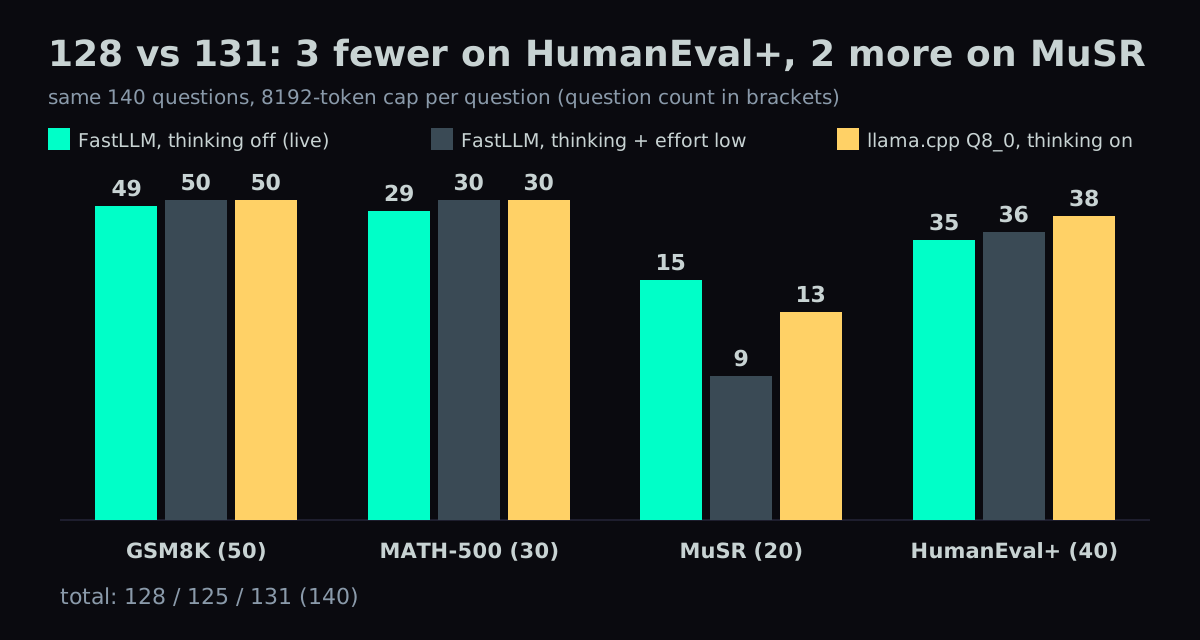
128 is the production config with requests that carry no extra parameters, so the model doesn't think. The llama.cpp setup had thinking on. On FastLLM, thinking on and off differ almost entirely in MuSR, 15 against 9; every other benchmark differs by one question. In the thinking-off run, no question hit the 8,192-token limit. In the thinking-on run, one did. My own services already send enable_thinking: false, so 128 is what they actually get.
My own requests to this box aren't that hard. Three questions for more than 2× code speed was an easy trade. The old llama.cpp setup is still installed intact, and two systemctl commands switch back.
Deep dive: the Bilibili sources, the four traps, reasoning effort, and every config measured
You can skip this section. Everything above is enough to run the setup; what follows is the full data, the verbatim errors and the source reading behind each claim.
Where the recipe came from: two Bilibili videos, two different frameworks
Two videos pointed me here, and they use different frameworks.
- BV13vbK6yEhp (uploader _黄歪歪, 2026-09-07) is the FastLLM route:
pip install ftllm, FP8 weights, DFlash2. Its title says 150+ TPS, and a commenter relays the video's claim of an FP8 average above 100 tok/s. - BV1Ader61ETR (uploader SPOTLITE, 2026-09-18) has a pinned comment pointing to weicj/vLLM-2080Ti-Definitive, an sm_75 fork of vLLM. It has nothing to do with FastLLM, and it needs CUDA 13, PyTorch 2.13 and Python 3.12. I didn't take that route.
Bilibili has no subtitles on these videos, so I couldn't verify what's on screen. Everything here comes from the video descriptions, the comments and the official repos.
A commenter under the first video, 听我贤扯, reproduced it on the same dual-22G + NVLink setup: 33.0 tok/s for FP8 without speculation, and 191.8 for FP8 + DFlash B8 on a fixed synthetic output stream. My 33.7 without speculation matches that 33.0, so the environments are comparable. The gap between 191.8 and my 152.3 is methodology: a fixed synthetic stream against real chat requests.
Trap 1: ncclAllReduce failed because the NCCL that FastLLM loads has no sm_75
The first run with built-in MTP failed with:
Error: ncclAllReduce failed on device 0: unhandled cuda error
Error: ncclAllReduce failed on device 1: unhandled cuda error
Decode came in at 19.9 tok/s, slower than no speculation, and then the server died. TP=2 without speculation had run fine, which puts the problem in an AllReduce that only the speculative path reaches.
The machine had three copies of libnccl:
- Ubuntu's package, 2.22.3
nvidia-nccl-cu122.31.2, pulled in by pip along with ftllm- the 2.31.2 I compiled myself in part 16
ldd on FastLLM's libfastllm_tools.so shows it loads the system 2.22.3. To see which GPU architectures each build contains:
cuobjdump --list-elf <libnccl.so.2> | grep -oE 'sm_[0-9]+' | sort -u
Only the self-built one has sm_75. Pointing LD_PRELOAD at it fixes the error, with no FastLLM rebuild.
The error never mentions architecture, which is what makes this one hard to trace. On a 2080 Ti I treat any third-party NCCL build as broken until that command says otherwise.
Trap 2: DFlash2 crashes with cudaErrorIllegalAddress unless CUDA Graph is off
With FASTLLM_CUDA_GRAPH=1 and DFlash2, the first request after loading crashes with cudaErrorIllegalAddress. It crashed that way more than a dozen times in a row, and the server died each time.
What didn't help: other ways of writing --tp 2, --dtype float16, --atype float16. BF16 isn't the cause either. The log shows the BF16 weights are already converted to FP16:
[Qwen3.5 DFlash2] converted 18 BF16 linear weights to FP16 for the pre-Ampere mixed GEMM path
FASTLLM_CUDA_GRAPH=0 worked on the first try, and decode went from 33.7 to 152.3 tok/s.
FastLLM's docs say sm_75 and older default to CUDA Graph off, and that you turn it on with FASTLLM_CUDA_GRAPH=1. My no-speculation run used 1 and got 33.7. With DFlash2, following that advice breaks the server. Built-in MTP runs either way: 61.5 tok/s on code with the graph on, 62.1 with it off, which is noise.
Trap 3: fitting 262K with fp4 KV, no --cuda_embedding and gpu_mem_ratio 0.95
My first attempt used an fp8 KV cache. At 262K it ran out of memory while loading the draft weights:
| KV type | 262,144 | 196,608 |
|---|---|---|
| fp8_e4m3 + DFlash2 | OOM (loading dflash.layers.4.mlp.gateup_proj) | loads |
| fp8_e4m3 + built-in MTP | loads |
The KV pool itself allocates fine (KV Cache Token limit: 262144 tokens, totalPages=2048). It's the draft that doesn't fit.
Switching the KV cache to fp4 gets out of that bind. Qwen3.8-27B has only 16 full-attention layers out of 64, and the log's tokenGrowingLayers=16 agrees. KV per token is 16 layers × 2 × 4 heads × 256 dims = 32,768 elements. At 262K that's 8 GiB in fp8 (4 per card) or 4 GiB in fp4 (2 per card), so fp4 saves 2 GiB on each card. Speed barely changes:
| config | code | math | prose | peak VRAM (GPU0 / GPU1) |
|---|---|---|---|---|
| 192K + fp8 KV | 161.3 | 134.7 | 55.4 | 21,956 / 21,272 MiB |
| 262K + fp4 KV | 156.0 | 134.9 | 53.1 | 21,652 / 20,540 MiB |
At that point, though, 262K was only on paper. FastLLM's AutoWarmup log:
GPU 0: availForKV=1.41 GB
GPU 1: availForKV=2.49 GB
KV Cache Token limit: 262144 (totalPages=2048, pageLen=128), localKVPerPage=1.18 MB
The pool needs 2,048 pages × 1.18 MB = 2.36 GB per card. GPU0 can only give 1.41 GB, so it's overcommitted by about 1 GB. Pages are allocated lazily, so short prompts work fine. Actually filling the pool would crash GPU0; the real capacity was about 156K. GPU0 is the tighter card because the DFlash2 draft runs only on the first card, a known FastLLM limitation.
Dropping --cuda_embedding fixes it. With the flag on, the embedding table (vocab 248,320 × hidden 5,120) sits on GPU0 in FP16, about 2.4 GB.
--cuda_embedding on | off | |
|---|---|---|
| GPU0 availForKV | 1.41 GB | 3.96 GB |
| GPU1 availForKV | 2.49 GB | 5.04 GB |
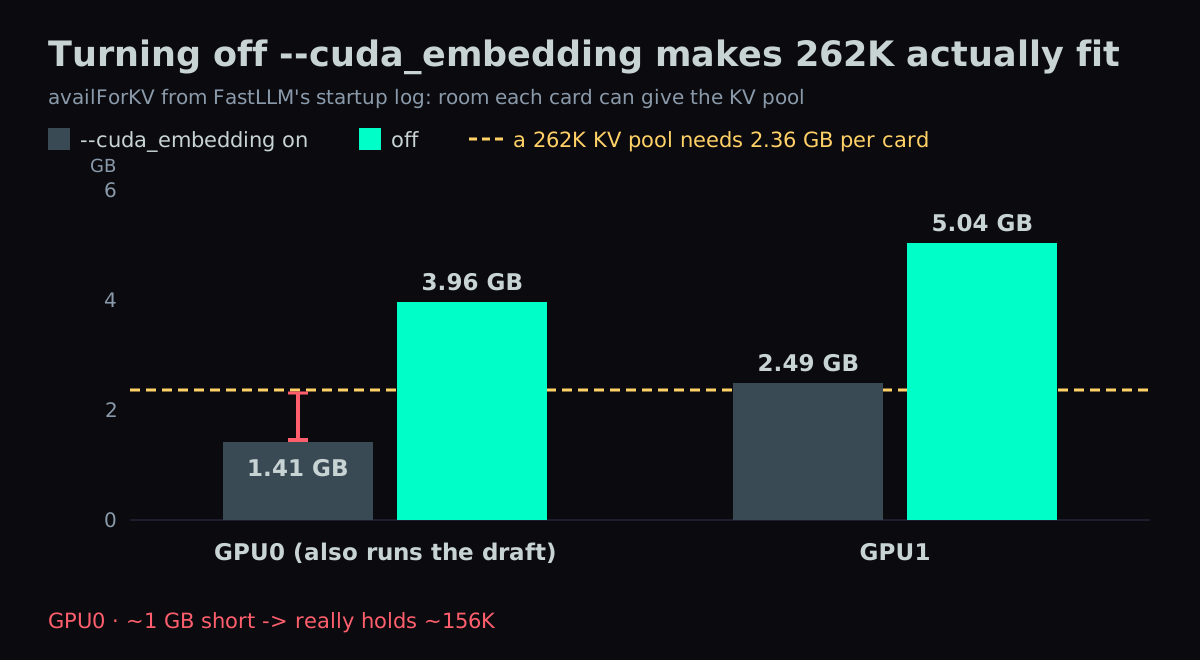
Both cards now have at least 1.6 GB of headroom over the 2.36 GB the pool needs. Code runs at 153.8 against 154.1. FastLLM's report recommends --cuda_embedding with DFlash2; on these two cards, that doesn't hold.
--gpu_mem_ratio is 0.95. At 0.97, long prompts crash:
CUDA error when allocating 12 MB on device 0! gpuFree: 2 MB / 22000 MB
cublas error in ChunkGatedDeltaRule batched matmul
That's 2 MB left on the card. At 0.95 the same 8,747-token test passes 6 of 6.
Going lower for more headroom is the obvious next move. 0.90 is worse. It raises the reserve for transient allocations from 1.15 GB to 2.31 GB, and availForKV drops to 0.26 GB. The ratio sets the model's share of the card, not the transient reserve.
Trap 4: MuSR runs into the token limit, and a flag that did nothing
My first run used the model's built-in template. By question 93, all 13 MuSR questions it had reached ended with finish_reason=length: empty content, up to 36,628 characters of reasoning. On one of those questions, the llama.cpp setup answers correctly in 1,259 tokens. Same model, so the problem is on the serving side. The fix came in two layers.
Layer 1, the template. The model's built-in chat_template.jinja (9 KB) does have reasoning-effort control, but it defaults to xhigh, so a request that doesn't set effort gets the longest thinking. I switched to froggeric's v22.3 (26 KB), which defaults to medium. GSM8K went from 49 to 50. MuSR was still 1/20, with 19 of 20 hitting the limit.
Layer 2, froggeric's medium injects nothing. Only xhigh and low add instruction text; the medium branch is empty. With no brevity constraint, the model wrote until it hit 8,192 tokens without emitting </think>. The reasoning shows it had already found the answer. The end was a loop of "Need final. Ensure final includes boxed. Let's compose final answer:".
Same question, sent with chat_template_kwargs: {"enable_thinking": true, "reasoning_effort": "low"}, against medium:
| effort | output tokens | finish | has </think> | result |
|---|---|---|---|---|
| medium | 8,192 | length | no | no answer |
| low | 1,929 | stop | yes | correct |
Over all 140 questions, limit hits went from 23 to 1, MuSR from 1/20 to 9/20, and the score from 110/133 (the medium run only completed 133 questions) to 125/140.
I also tried adding my own line to the medium branch: "Keep your thinking under about 2000 words". MuSR rose to 12/20, but MATH-500 and HumanEval+ each dropped a little, and limit hits went from 1 to 5. The total was still 125. Effort is a global knob, and a gain on one benchmark didn't add to the total. I dropped it.
--think changed nothing. I once believed --think true kept the model from closing its reasoning. After I switched it to false, a spot check had MuSR jump from 9/20 to 16/20, and I wrote "use --think false" into my notes as a setting. Reading the source showed the attribution was wrong:
--thinkdefaults to"false"(ftllm/util.py). Writing--think falseis the same as leaving it out, so I removed it from the unit file.- All it does is prepend
<think>\nto the text returned to the client (openai_server/fastllm_completion.py:result = "" if emit_reasoning_content else ("<think>\n" if think else "")). It never goes back into the model's input, so it can't change what the model answers. - The 16/20 spot check sent no
chat_template_kwargs, so the model answered in non-thinking mode. The 9/20 group had thinking on with effort low. The request changed, not the flag. I later ran all 140 questions the same way, with no parameters: 128/140, MuSR 15/20.
The </think> in content comes from --chat_template. Passing a custom template sets force_chat_template to true (llm.py), and Qwen reasoning splitting is disabled when the template is forced (_is_qwen3_5_reasoning_response). So thinking-on requests get the reasoning plus a </think> inside content, while thinking-off requests come back clean. My own two services, a multi-model aggregator and a RAG server, send enable_thinking: false and get clean answers. The Pi agent runs with thinking on, and that's where the stray </think> shows up.
Draft tokens: 8 is the sweet spot, 12 won't start
Same method as the main table.
--speculative_num_draft_tokens | actual drafts per step | code | math | prose |
|---|---|---|---|---|
| 4 | 3 | 90.2 | 85.0 | 52.3 |
| 8 | 7 | 156.0 | 134.9 | 53.1 |
| 12 | — | server won't start |
The value includes the anchor token, so N drafts N−1. 8 matches the block size of 8 on the DFlash2 model card, which is 7 draft tokens per verification.
Every config, measured the same way
Temperature 0, 512 tokens, median of 3, in tok/s.
| config | code | math | prose |
|---|---|---|---|
| official FP8, no speculation | 33.7 | 33.3 | 33.2 |
| uncensored FP8, no speculation | 32.9 | 32.6 | 32.4 |
| official FP8 + MTP 8 | 59.0 | 51.3 | 23.2 |
| uncensored FP8 + MTP 8 (graph=1) | 61.5 | 51.2 | 23.2 |
| uncensored FP8 + MTP 8 (graph=0) | 62.1 | 53.3 | 24.0 |
| official FP8 + DFlash2 | 152.3 | 136.8 | 57.6 |
| uncensored FP8 + DFlash2, 192K fp8 KV | 161.3 | 134.7 | 55.4 |
| uncensored FP8 + DFlash2, 262K fp4 KV | 156.0 | 134.9 | 53.1 |
The uncensored weights aren't slower. Built-in MTP on prose runs at 24, slower than no speculation, and DFlash2 on prose reaches only about 55.
Version pinning: a verify.sh that checks 10 fingerprints before every start
This setup works because of version-specific behavior: --chat_template disabling the reasoning split, DFlash2 needing CUDA Graph off, NCCL loaded through LD_PRELOAD, and 262K needing --cuda_embedding off. Any pip install -U could break it without an error.
What I pinned:
requirements.lock(76 packages) and 76 wheels, includingftllm-0.1.8.2itself- a tarball of the whole venv
- the unit file, the chat template and the self-built NCCL
- a
verify.shhooked in as the systemdExecStartPre. Before every start it checks 10 fingerprints: ftllm version, Python, thelibfastllm_tools.sohash, the unit file, the template, NCCL, and the configs and weight sizes of the model and the draft. If anything changed, it refuses to start and names what changed.
I checked the restore path too. The .so hash inside the tarball matches the running one, and rebuilding with pip install --no-index from the local wheels produces a byte-identical .so. Even if PyPI pulls 0.1.8.2, the same build can be recreated.
Still unmeasured
- DFlash2 acceptance rate. FastLLM's usage fields don't report draft stats.
- The NVFP4 route. The Bilibili commenter measured NVFP4 + DFlash B8 at 246.9 tok/s on a fixed output stream. I didn't download those weights.
- The GPU0/GPU1 asymmetry, with DFlash2 running only on GPU0. It isn't a bottleneck now. I'll come back to it if I push context further.
Also in this series:
FAQ
- How fast does Qwen3.8-27B run on two RTX 2080 Ti cards with FastLLM and DFlash2?
- On two modded 2080 Ti 22G with tensor parallel 2, FP8 weights, a 262K context and an fp4 KV cache, FastLLM plus the DFlash2 draft model decoded at 156.0 tok/s on code, 134.9 on math and 53.1 on prose. That is temperature 0, 512 output tokens, median of 3 real chat requests. The production config, with --cuda_embedding removed, measured 153.8 tok/s on code.
- Is FastLLM faster than llama.cpp on a 2080 Ti without speculative decoding?
- No. FastLLM alone ran Qwen3.8-27B FP8 at 33.7 tok/s on two 2080 Tis, about half of the 66 tok/s from my llama.cpp Q8_0 + MTP setup (that 66 comes from a different harness, a 140-question eval). Adding the DFlash2 draft took FastLLM to 152.3 tok/s, so the 4.5x gain comes from the draft, not the server.
- Why does speculative decoding help so much on two 2080 Tis with Qwen3.8-27B FP8?
- Decode is memory-bound. Without speculation, 29 GB of FP8 weights at 33.7 tok/s is 977 GB/s, 79% of the two cards' combined 1,232 GB/s. With DFlash2 the naive figure is 4,417 GB/s, 358% of peak, which is only possible because one weight read verifies several drafted tokens. On Ternary Bonsai 2, whose 7.2 GB weights use 46% of bandwidth, a DFlash2-family draft beat built-in MTP by only 3-8%.
- Why does FastLLM crash with cudaErrorIllegalAddress when DFlash2 is enabled?
- CUDA Graph. With FASTLLM_CUDA_GRAPH=1 and DFlash2, the first request after loading crashed with cudaErrorIllegalAddress every time, more than a dozen times in a row. FASTLLM_CUDA_GRAPH=0 fixed it on the first try. FastLLM's docs suggest turning CUDA Graph on for sm_75, but that only holds without speculation. Built-in MTP runs either way.
- How do I fix 'ncclAllReduce failed: unhandled cuda error' with FastLLM on a 2080 Ti?
- The NCCL library being loaded has no sm_75 code. FastLLM loads Ubuntu's NCCL 2.22.3, and the nvidia-nccl-cu12 2.31.2 that pip installs with ftllm also lacks sm_75. Check each build with cuobjdump --list-elf and grep for sm_ numbers, then LD_PRELOAD a build that includes sm_75. I used an NCCL 2.31.2 I compiled myself; FastLLM did not need a rebuild.
- How do I fit a 262K context for Qwen3.8-27B plus DFlash2 on two 22 GB 2080 Tis?
- Three settings together: --kv_cache_dtype fp4 (with an fp8 KV cache the draft weights fail to load at 262K), no --cuda_embedding (it keeps a 2.4 GB FP16 embedding table on GPU0, where the draft also runs), and --gpu_mem_ratio 0.95 (0.97 crashes on long prompts, 0.90 leaves only 0.26 GB for KV). A needle test passed at 199,787 prompt tokens. 262,144 is the total KV pool; the single-prompt limit is about 209K tokens.
- Why does FastLLM put the reasoning and a closing think tag in content instead of reasoning_content?
- Passing --chat_template sets force_chat_template to true, and FastLLM disables Qwen's reasoning split when the template is forced. Requests with enable_thinking true get all the reasoning plus a stray closing think tag in content, and reasoning_content is empty. Requests with enable_thinking false get a clean answer. Clients that want thinking have to strip everything up to the closing tag themselves.
- What should --speculative_num_draft_tokens be for DFlash2 on Qwen3.8-27B?
- 8. The value includes the anchor token, so 8 drafts 7 tokens per step, matching the block size of 8 on the DFlash2 model card. At 8 I measured 156.0, 134.9 and 53.1 tok/s on code, math and prose. At 4 it was 90.2, 85.0 and 52.3. At 12 the server would not start.
- How much accuracy does the FastLLM + DFlash2 setup give up compared with llama.cpp?
- On the same 140 questions (GSM8K 50, MATH-500 30, MuSR 20, HumanEval+ 40), FastLLM with thinking off scored 128 and llama.cpp Q8_0 with thinking on scored 131. FastLLM with thinking on and reasoning effort low scored 125, losing mostly on MuSR: 9 of 20, against 15 with thinking off. The other cost is prose speed: 53.1 tok/s against 66.
- Is the uncensored Qwen3.8-27B FP8 checkpoint slower than the official one?
- No. Without speculation, the official Qwen3.8-27B-FP8 ran 33.7, 33.3 and 33.2 tok/s on code, math and prose, and orcarouter's uncensored FP8 ran 32.9, 32.6 and 32.4. With DFlash2, the official weights ran 152.3 on code, and the uncensored weights ran 161.3 at 192K context and 156.0 at 262K.
- Does prefix caching still work in FastLLM with DFlash2 enabled?
- Yes. With --prefix_cache true, an 8,747-token shared prefix took 8.2 s on the first round and 1.0-1.2 s on the rounds after, with 8,192 tokens cached per round. In the go-live check, a 14K prefix took 14.2 s cold and 2.0 s warm, with 14,336 tokens cached.
- Does FastLLM's --think flag change the model's answers?
- No. --think defaults to false, and all it does is prepend an opening think tag to the text returned to the client. It never reaches the model's input. A MuSR jump from 9/20 to 16/20 that I first credited to --think false came from the request itself: it sent no chat_template_kwargs, so the model answered in non-thinking mode.
- Do two 2080 Tis need NVLink for FastLLM tensor parallel with DFlash2?
- Probably not, but I have not tested it. My two cards have NVLink (NV2), and the Bilibili reproductions I found all had NVLink. FastLLM's own benchmark on the 5090 ran over PCIe.
- Does vision work with the Qwen3.8-27B FP8 checkpoint in FastLLM?
- Yes. The FP8 checkpoint includes the vision tower, so no separate mmproj file is needed. Given a 448x448 image with three shapes, the model replied red circle top left, blue square top right, green triangle bottom center. Shapes, colors and positions were all correct.
Read next
- 2026-09-28NVFP4 Without FP4 Hardware: Qwen3.8-27B on Two RTX 2080 Tis at 151.7 tok/s
No FP4 hardware, still faster: a self-converted NVFP4 Qwen3.8-27B on two 2080 Tis runs code at 151.7 tok/s (was 116.1) and serves 4 requests at once.
- 2026-09-28Dual RTX 2080 Ti FastLLM: 16% Faster Decoding and No More Head-of-Line Blocking
Qwen3.8-27B FP8 + DFlash2 on two modded 2080 Tis: code 100.3 → 116.1 tok/s, two requests at once, and a scheduler patch that stops long prompts blocking.
- 2026-08-21[Benchmark] Free 15% Speedup on a 2080 Ti: One Broken Chat Template, One Starving MTP Head
A frozen GGUF chat template was killing my KV cache; a community fix plus MTP draft depth 4 took Qwen3.8-27B from 41.6 to 47.6 tok/s on a 2080 Ti 22GB.
- 2026-10-16MiniCPM-V 4.7 35B-A3B on One RTX 2080 Ti: 111.5 tok/s with Vision, Replacing a Two-GPU 27B
MiniCPM-V 4.7 35B-A3B on a single modded RTX 2080 Ti 22G with llama.cpp: 111.5 tok/s, 262K context in 20.8 GB, 127/140 vs 128 for a two-GPU Qwen3.8-27B. Setup, benchmarks, and why its DSpark draft model makes it slower.
Don't miss the next one
Subscribe, and you won't.
One-click unsubscribe anytime.