改裝 2080 Ti 22G · part 27
[Benchmark] turing-unlock on an RTX 2080 Ti: Full-Rate FP16 Tensor Cores, 50.6 → 69.9 TFLOPS
❯ cat --toc
- GeForce Turing ships with its FP16 tensor cores at half rate
- How it works: two speed selectors at boot, no firmware flash
- Install: build, add one kernel parameter, reboot
- On Ubuntu 26.04 the module misses the initramfs and fails with EBUSY
- GEMM at 200 W: 47.0 → 56.6 and 50.6 → 69.9 TFLOPS
- Sustained load hits the power cap, so the image card gets 220 W
- Only work that runs on FP16 tensor cores gets faster
- Forcing FP16 took z-image from 54.2 s to 16.9 s, and turned mage-flow black
- Deep dive: finding the dracut gap, kernel log, raw GEMM, sustained runs, image test details
- Three initramfs configs, and Ubuntu 26.04 uses the one that isn't shipped
- What the kernel log says when it works
- Unsigned module and Secure Boot
- Raw GEMM numbers
- Sustained runs: each window drops as the card heats up
- Power caps
- Video runs
- The ComfyUI cache trap
- FP16 image test setup
- sage-attention on sm_75 falls back to PyTorch attention
TL;DR
turing-unlock is a Linux kernel module that lifts the half-rate cap GeForce Turing cards put on FP16 tensor-core matmul. No VBIOS flash, no driver patch: it runs at every boot and nothing is written to the card. On my three modded 2080 Ti 22G cards at 200 W, an 8192³ FP16 GEMM went from 47.0 to 56.6 and from 50.6 to 69.9 TFLOPS. Only FP16 tensor-core work gains: quantized LLMs move about 5% at most, LTX video steps run about 20% faster than an older record, and BF16 image models gain nothing until forced to FP16 (z-image 54.2 s → 16.9 s). On Ubuntu 26.04 it needs a dracut config or it fails with EBUSY.
GeForce Turing ships with its FP16 tensor cores at half rate
A GeForce 2080 Ti has tensor cores, but it runs one of their modes at half rate: FP16 inputs with FP32 accumulation.
turing-unlock removes that limit. It's a Linux kernel module, a port of Zagitta's gpu-unlock to Turing (TU102, TU104, TU106), licensed GPL-2.0-only. The README reports a 2080 Ti 22G at 250 W going from 52.8 to 77.9 TFLOPS on an 8192³ matmul, and someone in the issues reported +84% across two cards.
I run three modded 2080 Ti 22G cards in an EPYC box: one for image and video generation, two for LLMs. All three unlocked. The raw matmul number goes up a lot. What you actually run decides whether you see any of it.
How it works: two speed selectors at boot, no firmware flash
The module loads before the nvidia driver, writes two speed selectors on the card, and steps aside. The driver then binds a card that runs FP16 tensor-core matmul at full rate.
What it doesn't do:
- No VBIOS flash.
- No patched driver. I ran it on the stock 580.173.02 driver.
- Nothing persists on the card. It's active for one boot; remove the kernel parameter and reboot, and the card is stock again.
What you need:
- A GeForce Turing card (TU102/TU104/TU106). Mine report PCI ID
10de:1e07, the same as the author's card. - Linux with the nvidia driver. I used kernel 7.0.0-38 and driver 580.173.02; all three cards unlocked.
- The ability to edit GRUB and reboot.
NVLink between my two LLM cards measured 25.781 GB/s before and after, so the link isn't affected.
Install: build, add one kernel parameter, reboot
git clone https://github.com/nlzy/turing-unlock
cd turing-unlock
make install
make install downloads two pinned NVIDIA files and checks their SHA-256 before building. On my machine it built a .deb and registered the module with DKMS.
Then add turing_unlock.targets=all to the kernel command line. Open /etc/default/grub and append it to the existing GRUB_CMDLINE_LINUX_DEFAULT:
GRUB_CMDLINE_LINUX_DEFAULT="... turing_unlock.targets=all"
Keep whatever was already inside the quotes. Then:
sudo update-grub
sudo reboot
After the reboot, check the kernel log:
journalctl -k -b | grep turing_unlock
You want to see TU102 FEAT UNLOCKED (TU102 is the 2080 Ti's chip). If you see EBUSY instead, read the next section.
On Ubuntu 26.04 the module misses the initramfs and fails with EBUSY
The initramfs is the small filesystem the kernel loads at boot, before the real disk is mounted. It carries the drivers that need to load early. turing-unlock has to be in it, because it must reach the card before nvidia does.
On Ubuntu 26.04, update-initramfs is actually dracut. The package only ships a config for initramfs-tools, so dracut never picks the module up. nvidia grabs the card first and the unlock fails with EBUSY.
The repo includes a dracut config. Install it, rebuild the initramfs, and check that the module made it in:
sudo install -Dm644 packaging/boot/dracut.conf /etc/dracut.conf.d/turing-unlock.conf
sudo dracut -f
lsinitramfs /boot/initrd.img-$(uname -r) | grep turing
sudo reboot
If lsinitramfs prints nothing, the module still isn't in the initramfs and rebooting won't help. How I tracked this down is in the deep dive.
GEMM at 200 W: 47.0 → 56.6 and 50.6 → 69.9 TFLOPS
GEMM is a plain matrix multiply, the core operation of most neural nets. I timed an FP16 8192³ GEMM with FP32 accumulation in PyTorch 2.6.0+cu124 and took the median. All cards were capped at 200 W.
| Card | Before | After | Max error before / after |
|---|---|---|---|
| A (LLM card) | 47.0 TFLOPS | 56.6 TFLOPS | 0.128 / 0.129 |
| C (image/video card) | 50.6 TFLOPS | 69.9 TFLOPS | 0.127 / 0.128 |
Card B isn't in the table: a live service was holding its VRAM, so the benchmark ran out of memory.
My gains are smaller than the README's because my cards are capped at 200 W and the author's ran at 250 W. With the tensor cores running twice as fast, power becomes the limit, which the next section shows.
To check your own card, this is the core of the script I used:
import torch, time, statistics
torch.backends.cuda.matmul.allow_fp16_reduced_precision_reduction = False
n = 8192
a = torch.randn(n, n, device="cuda", dtype=torch.float16)
b = torch.randn(n, n, device="cuda", dtype=torch.float16)
for _ in range(3): a @ b
torch.cuda.synchronize()
res = []
for _ in range(7):
    t = time.perf_counter()
    for _ in range(5): c = a @ b
    torch.cuda.synchronize()
    res.append(2 * n**3 * 5 / (time.perf_counter() - t) / 1e12)
print(f"median {statistics.median(res):.1f} TFLOPS")
Sustained load hits the power cap, so the image card gets 220 W
A few seconds of GEMM doesn't tell you what happens in a long job. I ran each card for 120 seconds and averaged the last three windows. At 200 W the power cap pushed the clocks down to 870 MHz on card A and 1068 MHz on card C.
Read card C across both rows: at 220 W it sustains more than its 200 W burst figure of 69.9.
| Power cap | Card A | Card C |
|---|---|---|
| 200 W | 51.5 TFLOPS | 64.1 TFLOPS |
| 220 W | 59.8 TFLOPS | 71.6 TFLOPS |
Going to 220 W raised peak temperature by 3–4 °C; card C went from 75 to 78 °C.
Only the image/video card got 220 W. The two LLM cards stay at 200 W, because, as the next section shows, LLM work barely uses this path.
Only work that runs on FP16 tensor cores gets faster
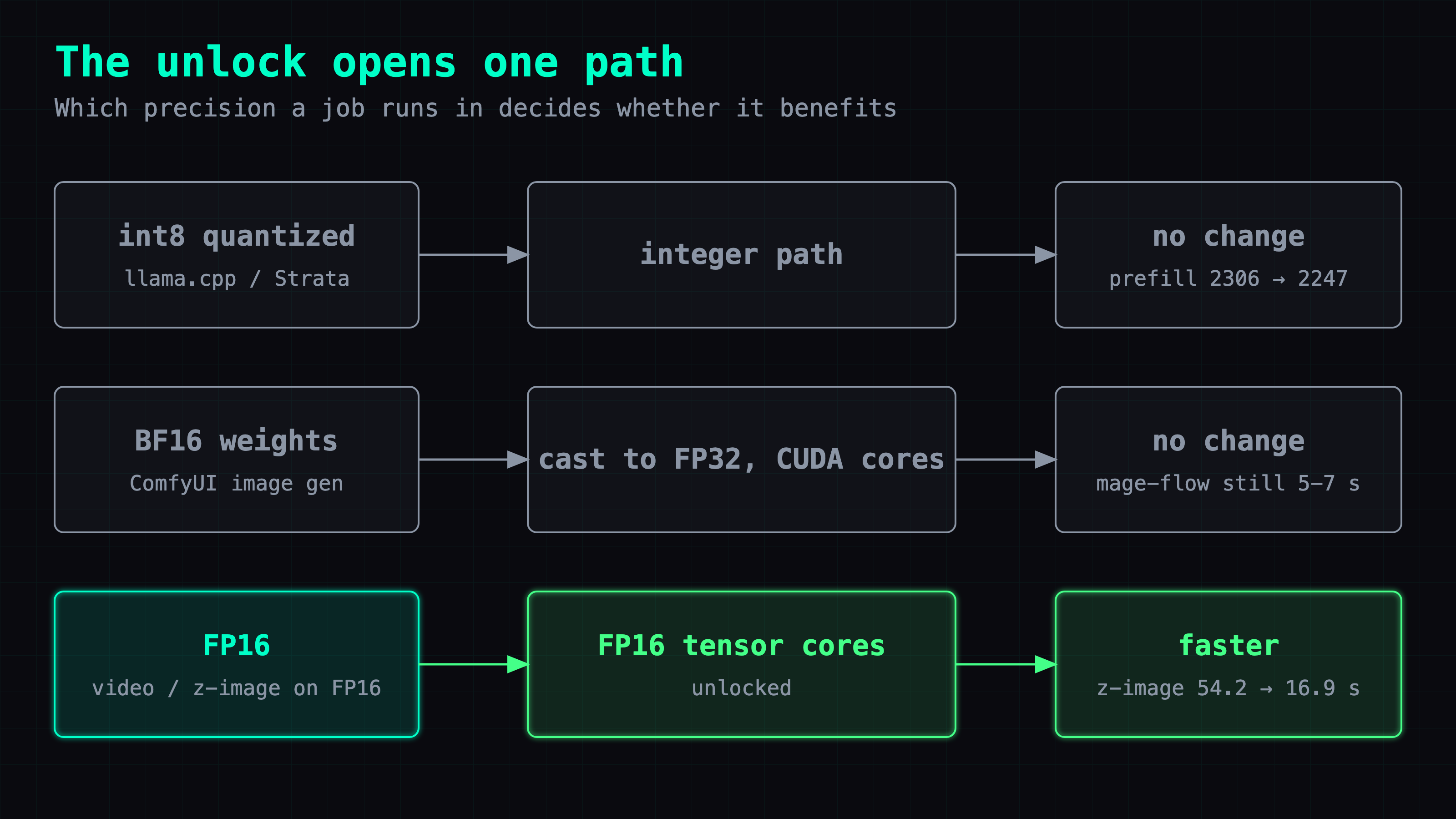
LLMs: almost nothing. Prefill is the phase where the model reads your prompt; decode is generating the answer one token at a time. With these quantized models, llama.cpp mostly runs the matmuls in integer (int8) kernels rather than on FP16 tensor cores, which matches the flat prefill numbers.
- llama.cpp, Q3_K model, 5128-token prompt: prefill 2306 tok/s before, 2256 at 200 W, 2247 at 220 W. No gain.
- Strata engine, IQ3_S model: prefill 1238 tok/s before, 1281 at 200 W (+3.5%), 1304 at 220 W (+5%).
- Decode: 95.8 tok/s before, 95 after. Decode is limited by memory bandwidth, not compute.
Video: faster, with a soft baseline. The LTX video model runs in FP16. At 704×400, 8 steps × 2 passes, unlocked at 220 W, it ran 4.79–4.85 s per step and 64.2–66.8 s per clip across three runs. An earlier logged run from before the unlock took 6.08 s per step and 91.6 s per clip, so each step now takes about 20% less time. That run didn't note the resolution, so treat 20% as a ballpark, not a controlled A/B.
Image generation: no change. mage-flow still took 5–7 s, and z-image didn't move either. The ComfyUI log explained it:
model weight dtype torch.bfloat16, manual cast: torch.float32
Turing has no BF16 hardware, and for these two models ComfyUI casts the BF16 weights to FP32 and runs them on regular CUDA cores, which the unlock doesn't touch. It's the same trap that made one of my machines 3.4× slower in part 10.
Forcing FP16 took z-image from 54.2 s to 16.9 s, and turned mage-flow black
For image generation to use the unlock, the model has to run in FP16. I started a separate ComfyUI instance with --fp16-unet and ran 1024×1024 images with the same prompt and the same 5 seeds, taking the median after warm-up.
| Model | Default | --fp16-unet |
|---|---|---|
| z-image, 8 steps | 54.2 s (FP32) | 16.9 s (FP16) |
| mage-flow | 2.6 s | 2.6 s |
The 2.6 s comes from ComfyUI's own timer on the test instance (described in the deep dive); the earlier 5–7 s is end-to-end request time on my regular setup.
z-image: 3.2× faster, same picture. The log changed to torch.float16, manual cast: None. The mean per-pixel difference was 3.7/255, and the images look the same.
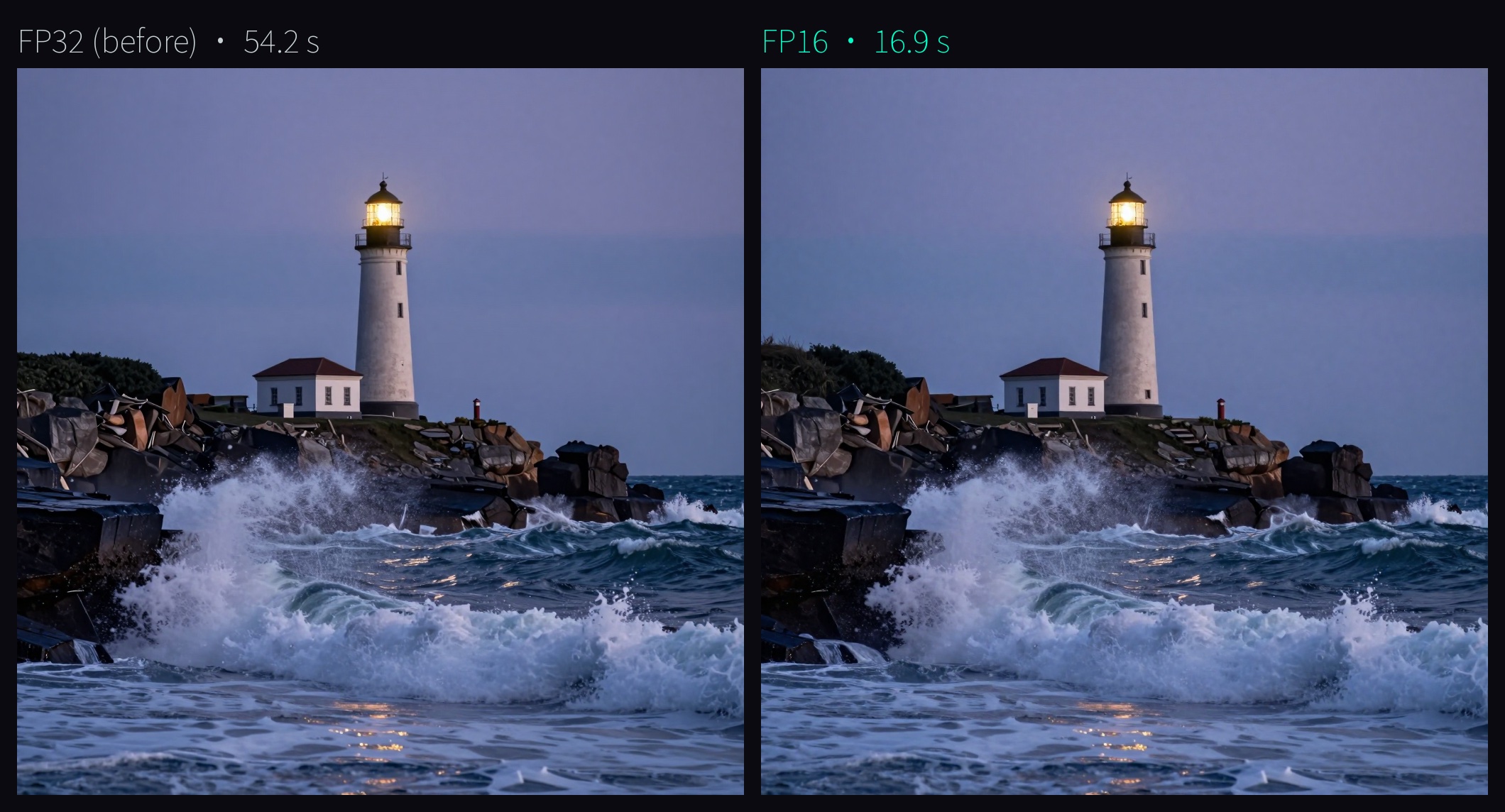
That 3.2× covers the whole jump from FP32 on CUDA cores to FP16 on unlocked tensor cores. I never ran z-image in FP16 with the card locked, so I can't credit all of it to the unlock.
mage-flow: no change, and forcing it breaks it. With the flag, the log still said manual cast: torch.float32, and both runs took 2.6 s. When I forced it into real FP16 it finished in 1.0 s, but all 6 images were black: NaN. It's an INT8 mixed-quant model and doesn't survive FP16. I left it as it was.
The flag applies to every model on that ComfyUI instance, so before enabling it in production I ran all six image and video workflows I actually use in FP16. None came out black. Only z-image and its high-quality variant changed precision; the other four produced pixel-identical output. Production now runs with --fp16-unet: end to end, a z-image render went from about 60 s to 25–30 s, and mage-flow still takes about 7 s.
Deep dive: finding the dracut gap, kernel log, raw GEMM, sustained runs, image test details
You can skip this section. It covers how I found the initramfs problem, what a successful kernel log looks like, the full GEMM and sustained-load numbers, power-cap settings, the video runs, and how the FP16 image test was set up.
Three initramfs configs, and Ubuntu 26.04 uses the one that isn't shipped
The repo carries configs for three initramfs builders:
- mkinitcpio:
/etc/mkinitcpio.conf.d/zz-turing-unlock.conf - initramfs-tools:
/usr/share/initramfs-tools/modules.d/turing-unlock.conf - dracut:
/usr/lib/dracut/dracut.conf.d/turing-unlock.conf
The deb installed the initramfs-tools one. After the first reboot the unlock failed with EBUSY, which means the nvidia driver already owned the card. So I checked which tool update-initramfs really is:
dpkg -S $(which update-initramfs)
It belongs to dracut. Then I listed the initramfs contents: nvidia.ko was there, turing_unlock was not. That's the whole story: nvidia loads early from the initramfs, the unlock module loads later from disk, and by then the card is taken.
The dracut config is one line:
force_drivers+=" turing_unlock "
Installing it to /etc/dracut.conf.d/turing-unlock.conf, running sudo dracut -f, and checking lsinitramfs again showed the module inside. All three cards unlocked on the next boot.
What the kernel log says when it works
booter geometry ok: image=59136 sig=16 patch_loc=0x8700
unlock result ss0=0x88888888 ss1=0x8 readout=0x0
TU102 FEAT UNLOCKED
The last line is the one to grep for after every kernel or driver update.
Unsigned module and Secure Boot
turing-unlock is an out-of-tree module. Loading it unsigned taints the kernel. If Secure Boot is on, the module has to be signed or it won't load.
Raw GEMM numbers
PyTorch 2.6.0+cu124, FP16 inputs, FP32 accumulation, allow_fp16_reduced_precision_reduction = False. 3 warm-up matmuls, then 7 timed rounds (20 matmuls per round at 4096³, 5 at 8192³). Max error is measured against an FP32 reference on a 256×256 corner. Power cap 200 W.
| Card | State | 4096³ median / max | 8192³ median / max | 8192³ max error |
|---|---|---|---|---|
| GPU0 (card A) | locked | 45.2 / 48.0 | 47.0 / 47.5 | 0.1280 |
| GPU2 (card C) | locked | 43.8 / 51.9 | 50.6 / 51.1 | 0.1274 |
| GPU0 (card A) | unlocked | 64.1 / 78.1 | 56.6 / 57.0 | 0.1293 |
| GPU2 (card C) | unlocked | 72.9 / 79.3 | 69.9 / 70.4 | 0.1275 |
GPU1 ran out of memory at both sizes because a service was using its VRAM.
The unlocked 4096³ maximums (78.1 and 79.3) land near the README's 77.9 at 250 W; the medians are what I quote in the first part.
Sustained runs: each window drops as the card heats up
Both cards ran the GEMM for 120 seconds at the same time, with 1-second telemetry from nvidia-smi. The reported number is the average of the last three windows (TFLOPS).
- GPU2, 200 W: [66.2, 65.9, 66.5, 65.8, 65.6, 64.9, 64.8, 64.8, 64.8, 64.4, 64.2, 63.8] → 64.1
- GPU2, 220 W: 75.5 at the start, 71.3 at the end → 71.6
- GPU0, 200 W: 57.1 at the start, 51.3 at the end → 51.5
- GPU0, 220 W: 64.7 at the start, 59.3 at the end → 59.8
Each series drifts down as temperature rises. The last-three average is what a long job sees, not the first window.
Power caps
The caps are set by a systemd unit at boot:
nvidia-smi -pm 1
nvidia-smi -pl 200
nvidia-smi -i 2 -pl 220
The first line enables persistence mode. The second caps all cards at 200 W, and the third raises GPU2 (the image/video card) to 220 W.
Video runs
LTX, FP16, 704×400, 8 steps × 2 passes, unlocked, 220 W cap:
| Run | Time | Power | SM clock | Temp |
|---|---|---|---|---|
| run0 | 66.8 s | 180 W | 1584 MHz | 72 °C |
| run1 | 66.2 s | 183 W | 1568 MHz | 75 °C |
| run2 | 64.2 s | 187 W | 1573 MHz | 76 °C |
Sampling ran at 4.79–4.85 s/it. Video averages about 180 W, under both caps, so the extra 20 W only helps on peaks. The 6.08 s/step and 91.6 s/clip baseline is from an earlier logged run that didn't note the resolution; I didn't rerun it locked.
The ComfyUI cache trap
Sending an identical request to ComfyUI twice returns in 0.05 s. It's a cache hit, not a generation. For timing runs I added a random nonce to the prompt text and kept the seed fixed, so every request forced a real recompute.
FP16 image test setup
UNETLoader only offers default and fp8 for weight dtype, so I couldn't switch to FP16 per node. Instead I started a second ComfyUI on a separate port, same code, with --fp16-unet added.
I ran mage-flow, z-image, z-image HQ, flux Q8, LTX text-to-video, and LTX image-to-video twice each on the test instance. Both z-image workflows moved from torch.bfloat16, manual cast: torch.float32 to torch.float16, manual cast: None. The other four kept the same dtype line and matched production at MAE 0 on the same seed. No sampled latent had a NaN or Inf.
Timing is ComfyUI's execution_start to execution_success, which includes sampling, VAE decode, and PNG save. 1024×1024, same prompt, 5 seeds, median after warm-up.
- z-image FP16: 16.74, 16.72, 16.97, 16.95, 16.87 s
- z-image FP32: 54.20–54.29 s
Black images were judged by pixel statistics: mean 0 and std 0. All 6 forced-FP16 mage-flow images matched that.
sage-attention on sm_75 falls back to PyTorch attention
The log also shows sage-attention falling back to PyTorch attention on sm_75 because its kernel needs 67584 bytes of shared memory and Turing allows 65536. That was already the case before the unlock and has nothing to do with it.
Also in this series: #26 LFM2.5 24B-A2B on one RTX 2080 Ti · #24 177B on 44 GB of VRAM: two 2080 Tis run Strata at 98.7 tok/s · #10 Two identical 2080 Tis, one 3.4× slower
FAQ
- What does turing-unlock do, and can I undo it?
- turing-unlock is a GPL-2.0 Linux kernel module, the Turing (TU102/TU104/TU106) port of Zagitta's gpu-unlock. GeForce Turing cards run FP16-input, FP32-accumulate tensor-core matmul at half rate; the module writes two speed selectors before the nvidia driver binds the card. There is no VBIOS flash and no driver patch. It applies per boot, so removing the turing_unlock.targets kernel parameter and rebooting puts the card back to stock.
- How much faster is FP16 matrix multiplication on an RTX 2080 Ti with turing-unlock?
- On my modded 2080 Ti 22G cards at a 200 W power cap, an 8192 cubed FP16 GEMM in PyTorch 2.6.0 (FP32 accumulate, median) went from 47.0 to 56.6 TFLOPS on one card and from 50.6 to 69.9 TFLOPS on another, with the same max error as before. The project README reports 52.8 to 77.9 TFLOPS at 250 W. Over a 120-second sustained run the power cap pulls clocks down: 64.1 TFLOPS at 200 W and 71.6 TFLOPS at 220 W on the faster card.
- Does turing-unlock speed up llama.cpp or other LLM inference?
- Barely. On a 5128-token prompt, a llama.cpp Q3_K model went from 2306 to 2256 tok/s prefill at 200 W (2247 at 220 W), and the Strata engine with an IQ3_S model went from 1238 to 1281 tok/s at 200 W (1304 at 220 W). With these quantized models, llama.cpp mostly does the matmuls in integer kernels rather than on FP16 tensor cores. Decode stayed at about 95 tok/s because it is limited by memory bandwidth, not compute.
- Why didn't ComfyUI image generation get faster after turing-unlock?
- Because the models never touched the FP16 tensor cores. The ComfyUI log reads model weight dtype torch.bfloat16, manual cast: torch.float32. Turing has no BF16 hardware, and for the two models I use, ComfyUI casts the BF16 weights to FP32 and runs them on regular CUDA cores, which the unlock does not affect. Starting a ComfyUI instance with --fp16-unet took z-image from 54.2 s to 16.9 s per 1024x1024 image, but that number includes the switch from FP32 to FP16, and an INT8 mixed-quant model produced black images when forced to FP16.
- Why does turing-unlock fail with EBUSY on Ubuntu 26.04?
- On Ubuntu 26.04 update-initramfs is actually dracut, and the package only ships an initramfs-tools config, so the module never lands in the initramfs. The nvidia driver claims the card first and the unlock fails with EBUSY. Install the shipped dracut config to /etc/dracut.conf.d/turing-unlock.conf, run sudo dracut -f, confirm with lsinitramfs that turing_unlock is inside, and reboot.
Read next
- 2026-08-06[Just for Fun — Advanced] Wait, a 2080 Ti Can Run MiniMax-H3? 1080p With Audio on a 2018 Card
The four files are 38 GiB on disk; the card has 22. A modded 2080 Ti 22G still renders 15s of 1080p with audio in 23 minutes. Full config, measured speed and quality, then how it got there.
- 2026-07-18[Just for Fun — Advanced] Two Identical 2080 Tis, One 3.4× Slower — the Culprit Was a Single dtype Log Line
The same modded 2080 Ti 22G ran Z-Image 3.4× slower on one machine than another. Not the hardware, not the OS, not a missing package — a Turing bf16→fp32 fallback hiding in one log line. One flag fixed it.
- 2026-09-14[Benchmark] Two-stage MiniMax-H3 + LTX-2.5 on a 2080 Ti: 1344x768 with audio in 165s
A modded RTX 2080 Ti 22G renders 1344x768 with audio in 165 s using MiniMax-H3 to draft and LTX-2.5 to refine. Six departures from the Blackwell workflow.
- 2026-08-20[Just for Fun — Advanced] Why Isn't Your 4-Bit Quant Faster on a 2080 Ti? I Tore Open the CUDA Backend to Find Out
Quantized weights are half the file size on a 2080 Ti but the speed doesn't move. Dumping the CUDA backend's .so with nm -D shows why, and which quant format is actually accelerated.
Don't miss the next one
Subscribe, and you won't.
One-click unsubscribe anytime.