MiniMax-H3 on RTX 5090 · part 3
[Benchmark] MiniMax-H3 1080p Isn't Unsupported, It's Three and a Half Hours
❯ cat --toc
- A 502 that wasn't a rejection, blur that upscaling can't undo, and a prompt that described a face instead of naming one
- Finding 1: the 502 was the shim giving up, not the backend saying no
- Finding 2: a blurry face at 480p isn't something the upscaler can rescue
- Finding 3: describing a look is not the same as naming a face
- Deep dive
- Don't over-index on the 16-second difference
- The full run table
- Known gaps in the data
- The pattern across all three
TL;DR
First time using MiniMax-H3 for a scene with named characters, and I got three things wrong in one afternoon. A 1080p request came back 502 — I assumed the shim rejected the resolution; the backend had accepted it and was still rendering three and a half hours later. A wide shot came out with a blurry face — upscaling only enlarges blur, so I reshot as a close-up. And a prompt describing "greying temples, coarse robes" — the character's canonical look — produced the wrong person, because text has no way to say this trait belongs to this face. Fix: reference portraits from a still-image model, then text-to-video → reference-to-video.

🔊 Sound on. The opening wide shot — 864×480, native resolution, no reference images. The composition is right. The face is not.
A 502 that wasn't a rejection, blur that upscaling can't undo, and a prompt that described a face instead of naming one
Part 1 of this series got MiniMax-H3 running on one RTX 5090. Part 2 made it faster. Neither one put an actual character in front of the camera. This part does: a reunion scene between Yang Guo and Xiaolongnü, two leads from the wuxia novel The Return of the Condor Heroes.
Three things went wrong. Each time, I fixed the wrong thing first, because the symptom showed up somewhere other than the cause.
I'm generating through a shim in front of ComfyUI — a small translation layer that takes a plain HTTP request and turns it into the node graph ComfyUI actually runs. ComfyUI's own interface is a node graph you edit in a browser, not something you can curl, so a script that wants to drive it needs something in between. My shim takes OpenAI-style JSON in and speaks ComfyUI's graph format to the backend.
Finding 1: the 502 was the shim giving up, not the backend saying no
I built this pipeline around generating at a resolution where time and quality are both acceptable, then handing the result to VSR to enlarge. That's what Part 2 is about. So "render small, upscale after" wasn't a workaround I discovered here — it was the premise.
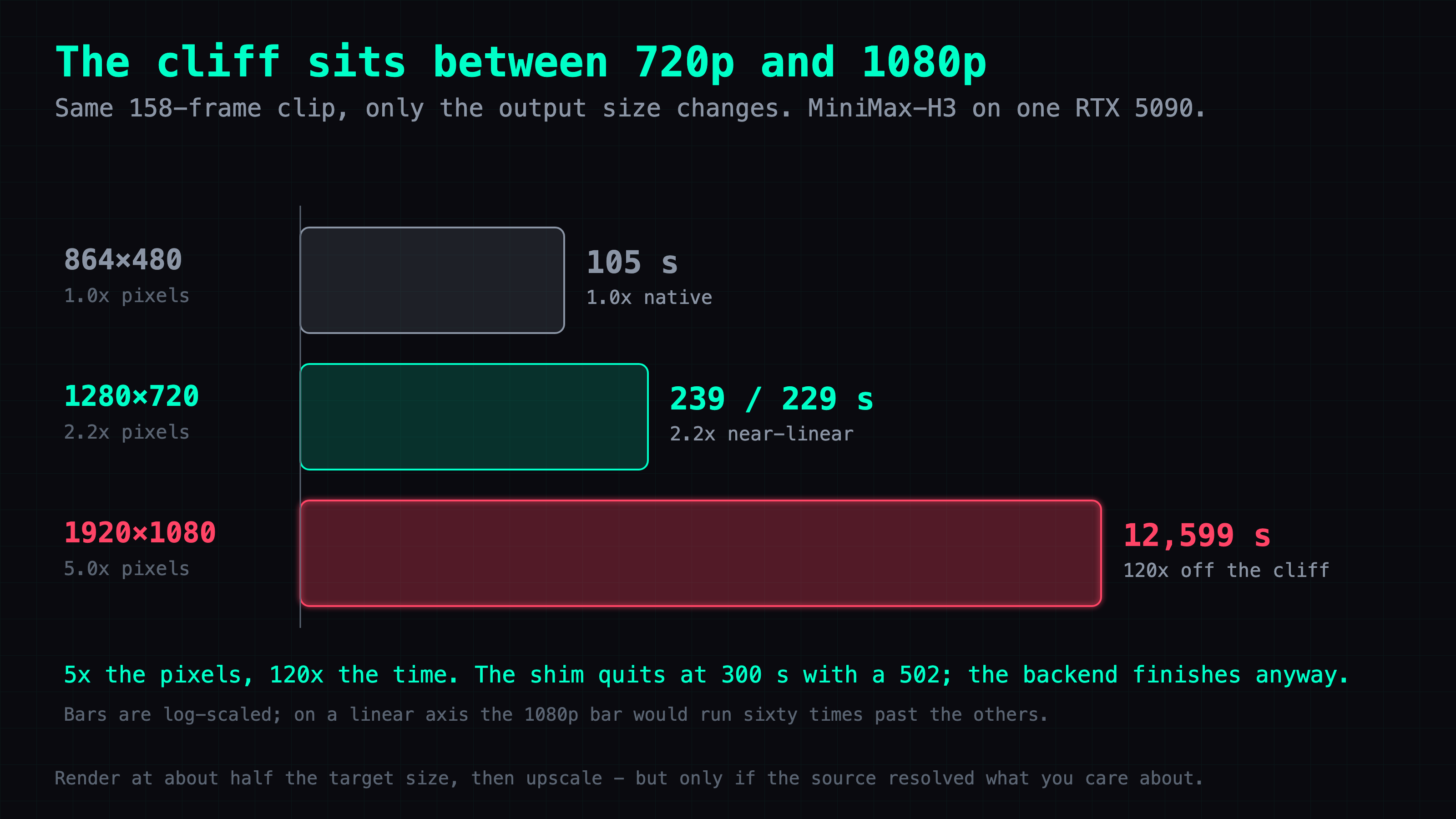
What I had never done is measure what skipping it costs. So I sent a 1920×1080 request. It came back 502 after a few minutes. I sent 1280×720. Also 502. Two data points, same error, obvious conclusion: this pipeline only accepts the native 864×480 resolution and rejects anything larger.
That conclusion was wrong, and I only found out by going and checking ComfyUI's own /history on the backend after the fact. Every one of those requests had reached the backend, been accepted, and produced an output file. Nothing was rejected. The 502 comes from the shim's own polling loop — it waits up to a fixed timeout (video_history_timeout, 300 seconds by default, overridable by an environment variable) for the job to show up as finished, and when that timer runs out it throws in the towel and returns 502 to the caller. The backend doesn't know or care. It keeps rendering in the background regardless of what the shim just told me.
So the 1080p request really did take longer than any reasonable timeout — 12,599 seconds, which is three and a half hours, against a 300-second budget. The 502 there is accurate in spirit even if the message is wrong: this is going to time out. But the two 720p attempts took 239 and 229 seconds. Both are under 300. Both should have returned 200. I don't have a clean record of what actually happened on the wire for those two — most likely I generalized from the 1080p failure and assumed the same error applied, without separately confirming it. That's a gap in my own logging, not a fact about the system.
So the original design holds — it just has a number behind it now. Render at native resolution and upscale afterward, not because the model refuses larger sizes, but because asking it to render 1080p directly costs three and a half hours and the upscale costs seconds. The rough rule I use is to generate at about half the target dimensions and enlarge from there. (The backend's VSR pass already does a 2x enlargement; the ffmpeg line below only takes that 1728x960 result the rest of the way to an exact 1920×1080.)
That only works under one condition, and the next section is where it fails. VSR does invent detail — Part 2 covered that; the texture you see after the upscale wasn't in the source frames. What it invents is plausible texture. What it can't recover is information the source never resolved.
So the dividing line isn't subject matter, it's whether the thing you care about got enough pixels in the source. Mist in the valley, fabric in motion, texture on a cliff face — the source has the shape, and the upscale just sharpens it. A face occupying a few dozen pixels never had its features resolved at all, so VSR gives you something face-shaped rather than that specific person's face.
ffmpeg -i in.mp4 -vf "scale=1920:1080:flags=lanczos" out.mp4
Finding 2: a blurry face at 480p isn't something the upscaler can rescue
The opening wide shot rendered fine and fast — 105 seconds at 864×480, the model's native resolution — but the faces were mush. I expected the output-side upscale (the pipeline runs a 2x video super-resolution pass, VSR for short, before delivering anything) to sharpen that up. It didn't, and thinking about it for five seconds explains why: VSR sharpens detail that exists; it can't invent detail that was never rendered. A face standing at the bottom of an 864×480 frame gets maybe a few dozen pixels across the eyes. There's no information there to recover — upscaling a blurry region just makes a bigger blurry region.
The fix is framing, not another parameter. I reshot the same scene as a close-up instead of a wide shot, so the face occupies far more of the 864×480 canvas to begin with. 98.5 seconds, and the face came out clean. Character work at this native resolution has a strict framing requirement: push the camera in before you touch any setting.
🔊 Sound on. Same setup, close-up framing instead of a wide shot. Same 864×480 canvas, same VSR pass — the difference is entirely composition.
Finding 3: describing a look is not the same as naming a face
This is the one that took the longest to see, because my prompt wasn't vague. I wrote "greying temples at the sideburns, coarse cloth robes" — which, in the source novel, is exactly this character's canonical appearance. I assumed that description would identify him.
It didn't. The model read those words as literal age and condition descriptors and, entirely reasonably, drew a white-haired man in rough clothing who looked about sixty. It isn't that the model doesn't have some notion of who this character is — a lot of text-to-video models have seen plenty of text about famous wuxia characters during training. It's that a text prompt contains no mechanism for tagging a trait as belonging to one specific face rather than describing a type of person in general. "Greying temples" doesn't point at a person; it points at a category, and the model drew the category.
Adjectives don't add up to an identity. The fix was to stop trying to describe a face into existence and instead show one. I generated two static reference portraits with z-image — a still-image model, which only has to draw one clean face and doesn't need to handle motion or camera work — and switched the video generation from t2v (text-to-video, generate from a prompt alone) to r2v (reference-to-video, generate conditioned on one or more reference images). I passed both portraits in an images array. The render took 121.4 seconds, and the character finally looked like the right person.
🔊 Sound on. The final version: reference-to-video (r2v), conditioned on the two portraits below.


That gave me a clean division of labor: static faces go to a still-image model, motion goes to H3. Trying to make one model do both, at least for a face you actually need to be a specific person, doesn't work at this resolution with a text prompt alone.
Deep dive
Skip this section if you only wanted the three findings above. This section has the full run table, the sampler settings held constant across all six generations, one performance difference I deliberately don't attribute, and the remaining gaps in the data.
Don't over-index on the 16-second difference
The final r2v run (121.4 s) was 16 seconds slower than the opening t2v run (105 s). It would be easy to write that off as "reference images cost 16 seconds." I'm not making that claim, and you shouldn't infer it from this post either. The r2v path loads a different weights file (ref2va_pruned_nvfp4 instead of fl2va_pruned_nvfp4) and a different text encoder than t2v does. Alternating between the two checkpoints in the same session forces an unload-and-reload of well over ten gigabytes of weights. Some portion of those 16 seconds is genuinely the cost of processing two reference images; some portion is model-swap overhead from testing t2v and r2v back to back. I never isolated the two, so I'm reporting this as an open question, not a finding.
The full run table
All six generations below share the same sampler configuration: sampler res_multistep, scheduler simple, 14 steps, denoise 1.0, noise seed 42, blend weight 0.5, degree 4, ridge lambda 0.1, window size 2.0, flex window 0.75, warmup steps 5, tail actual steps 1, max history 8. Every clip is 158 frames at 24 fps, which is 6.58 seconds of output before any resizing. cfg (classifier-free guidance scale) is not listed because it's a linked input in the BasicGuider node and the backend doesn't persist its value anywhere I can retrieve after the fact.
| Run | Size | Backend time | Weights | Reference images |
|---|---|---|---|---|
| Opening wide shot | 864×480 | 105 s | fl2va_pruned_nvfp4 | none |
| 1080p attempt | 1920×1080 | 12,599 s | fl2va_pruned_nvfp4 | none |
 | ||||
| 720p attempt 1 | 1280×720 | 239 s | fl2va_pruned_nvfp4 | none |
| 720p attempt 2 | 1280×720 | 229 s | fl2va_pruned_nvfp4 | none |
| Close-up rework | 864×480 | 98.5 s | fl2va_pruned_nvfp4 | none |
| Final r2v | 864×480 | 121.4 s | ref2va_pruned_nvfp4 | 2 |
Pixel count relative to the native 864×480 canvas: 720p is 2.2x the pixels, 1080p is 5.0x. Backend time scaled very differently: 720p came in at roughly 2.2-2.3x the native time — close to linear with pixel count — while 1080p was 120x, wildly out of proportion to a 5x pixel increase. Something other than raw pixel count is driving that 1080p number, and I don't have an isolated measurement of what. One terminology note: the 864×480 run was delivered at 1728x960, because the backend applies a 2x VSR upscale on the way out. Throughout this article "native resolution" means the model's input resolution, not the size of the file you get back.
Known gaps in the data
cfgvalue: unrecoverable. It's a linkedBasicGuiderinput and the backend's/historydoesn't store it.- Output filenames:
/historystores the prompt definition that was submitted, not the filename the render eventually produced. - Output resolution:
/historyonly records the 864×480 input size for each job. The 2x VSR upscale happens further down the backend pipeline and leaves no trace in that history — I know it happened because the delivered file's dimensions don't match the input, not because anything logged it. - Step count discrepancy: my own earlier notes on this pipeline say the r2v path runs 20 steps. All six runs pulled from the backend for this post show 14. I can't reconcile the two records: either my notes describe an older shim configuration, or the shim's default step count changed after I wrote them. Unresolved.
- 720p 502s: as noted above, I don't have direct confirmation that both 239 s and 229 s runs actually returned a clean 200. I'm inferring it from the fact that both durations are under the 300 s timeout, not from a captured response.
The pattern across all three
Every mistake here had the same shape: I fixed something at the location where the symptom showed up, instead of the location where the cause actually lived. The 502 showed up at the shim, so I assumed the limit was in the shim — it was actually a timeout racing an unrelated backend job that was never going to fail on its own. The blur showed up in the delivered frame, so I reached for the delivery-side fix (upscaling) — the missing information was baked in three steps earlier, at generation time, by the framing. The wrong face showed up in the video output, so I kept rewriting the video prompt — the actual gap was upstream of video generation entirely, in the fact that text has no slot for "this exact face" and a reference image does.
None of these were hard problems once I looked in the right place. All three cost real time because the right place wasn't the place making the noise.
Built on ComfyUI. Resolution upscaling in this post uses FFmpeg.
FAQ
- Why does MiniMax-H3 return a 502 error at 1080p?
- It isn't a rejection. The backend accepts the job and keeps rendering — a 1920×1080 request took 12,599 seconds (about 3.5 hours) in my case. The shim in front of it gives up after a polling timeout and returns 502 while the render keeps going — I believe that timeout was the 300 s default, though I could not find a config that proves it either way. Check the backend's own job history and you'll likely find a finished file.
- Does upscaling fix a blurry face in AI video generation?
- No. If the source resolution doesn't have enough pixels on the face to begin with, a 2x upscale enlarges the blur rather than resolving it. The fix is composition, not post-processing: shoot closer so the face occupies more of the frame at generation time.
- Why does a text-to-video model draw the wrong face for a named character?
- A text prompt has no anchor for a specific face. Words like 'greying temples' or 'coarse robes' get read as generic descriptors — age, clothing, condition — not as an identity, even if those are the character's canonical traits in source material the model may know about. The model has no way to tell 'this trait belongs to this one person' from 'apply this trait generally.'
- What is reference-to-video (r2v) and how is it different from text-to-video (t2v)?
- t2v takes a text prompt and generates a video from nothing. r2v additionally accepts reference images and conditions the generation on them throughout, so a specific face carries through the clip. On this setup, switching from the t2v checkpoint to the r2v checkpoint plus two static reference portraits fixed a face-identity problem that no amount of prompt engineering solved in t2v.
- What is a shim in front of ComfyUI, and why use one?
- ComfyUI's native interface is a node graph edited in a browser, not something you can curl. A shim is a small translation layer that accepts a plain HTTP request (in my case, OpenAI-style JSON) and converts it into the node graph ComfyUI actually expects, then polls for the result. It lets scripts and other services drive ComfyUI without building node graphs themselves.
Read next
- 2026-09-13[Benchmark] Roll cheap, then enhance the keeper: NVIDIA's two-stage MiniMax-H3 + LTX-2.5 pipeline explained
NVIDIA's Sol-H3 two-stage recipe on an RTX 5090: MiniMax-H3 drafts at 672×384 in 25.5 s, LTX-2.5 refines only the take you keep. Downloadable ComfyUI workflow.
- 2026-09-11[Benchmark] LTX-2.5 vs MiniMax-H3 on one RTX 5090: 29s vs 81s for the same Chinese dialogue clip
LTX-2.5 and MiniMax-H3 on one RTX 5090, same Simplified Chinese line: 28.67s vs 81.22s end to end, both at CER 0%. Files, params, VRAM ceiling.
- 2026-09-06[Benchmark] Two characters in one shot: MiniMax-H3 Ref2VA takes multiple reference images
Ref2VA is the only MiniMax-H3 mode that takes several reference images. Two characters, 243 frames, 437 s on one RTX 5090, and CER 6.8% on the dialogue.
- 2026-09-03[Benchmark] From OOM to 8.6 minutes: a MiniMax-H3 config stack for one RTX 5090
MiniMax-H3 at native 1344x768 on a single RTX 5090: 15 seconds of video in 518 s. What KJNodes chunking, torch cu130 and the NVFP4 kernels are each worth.
Don't miss the next one
Subscribe, and you won't.
One-click unsubscribe anytime.