MiniMax-H3 on RTX 5090 · part 1
[Benchmark] Running MiniMax-H3 on one RTX 5090: four files, 31.7 GB, 175s per talking clip
❯ cat --toc
- In plain terms: the picture and the sound arrive together
- Preface
- What you end up with
- Check your card first: four files, 31.7 GB
- FL2VA or Ref2VA? Start with FL2VA
- Download: what goes where
- First run: change these three values
- The prompt is the real barrier, and there is a reason
- The prompt has two parts, and text-only generation uses just the second
- Shots and camera motion
- Dialogue: identity outside, words inside
- On-screen text
- Geometry beats vocabulary: the model cannot draw what is not there
- NVFP4 only counts on Blackwell
- Change the quant format and the same seed gives a different clip
- The license restricts by territory, and not the way you would guess
- Deep dive: two mechanisms you can skip
- "Pruned" does not mean dumbed down — and it was MiniMax's idea
- NVFP4 beats INT8 by 5%, and the 5% is clock
- Dropping 600W to 500W made it faster
- Three things to confirm before your first run
TL;DR
MiniMax-H3 is a 33B model that emits video and stereo audio from one forward pass — dialogue, room tone and score arrive with the picture, so lip-sync is structural rather than fixed up afterwards. The official deploy example asks for four GPUs and full-precision weights come to 115 GB. Pruned and quantized, four files totalling 31.7 GB run on one RTX 5090: 175 s for a 864×480 ten-second clip, 26,914 MiB peak VRAM. Weights on HuggingFace.
🔊 Turn the sound on for every clip in this post. Browsers force autoplay to be muted, but half of what this model does is audible. Picture, dialogue, wind and score all came out of one generation.
In plain terms: the picture and the sound arrive together
Making a short clip of someone talking has normally been a relay. One model draws the frames. A second model speaks the line. Then you spend your evening nudging the mouth to match the audio, because those two models never met.
H3 collapses the relay. Feed it text and one pass produces the frames and the soundtrack — the spoken line, the wind, the score. The mouth matches because the mouth and the voice are two views of the same computation. There is no seam for them to drift apart at.
The catch is size. This post is about shrinking it until a consumer card can hold it, and then getting a first clip out.
Preface
There are two ways to record a band. Track by track — drums first, bass on top, vocals last — which lets you fix any single part but leaves you spending days making the parts sound like they happened in one room. Or you put everyone in the room and hit record once.
Most video models today are the first kind. H3, which MiniMax released on 2 August 2026, is the second.
This is the beginner path on one RTX 5090: which files to download, where they go, and how to write a prompt it will actually follow. The other machines I tried and the detours are not in here.
What you end up with
A local setup that can:
- Generate 4 to 15 seconds of 24fps video with 32 kHz stereo audio, from text alone
- Sync lips to dialogue automatically, in any of 11 well-supported languages
- Cut between multiple shots inside a single prompt, at cut points you choose
- Put specific text on screen, character for character
What it cannot do: 2K. That needs H3-Regenerate-2K, which was not open-sourced — MiniMax exposes it through their API instead. Locally you get the 768p stage only.
Easier to show than describe. Fifteen seconds, generated locally, no post, no lip-sync pass:
🔊 Sound on. The mouth tracks the Mandarin dialogue and nobody aligned it — picture and audio are two outputs of the same forward pass.
Check your card first: four files, 31.7 GB
This is where beginners get caught, because "33B model" badly undersells the download.
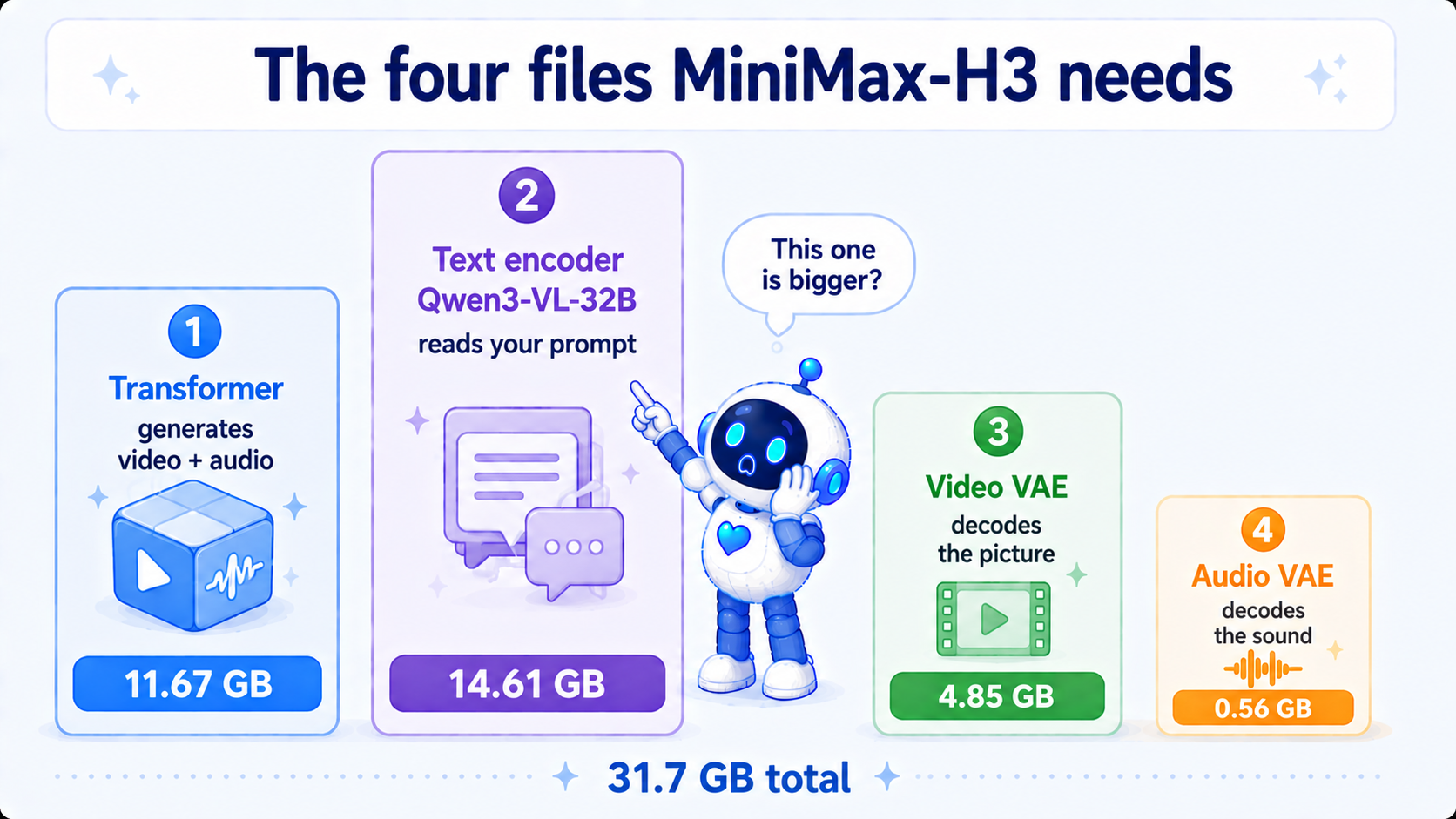
H3 needs four files:
| File | Job | Full precision | Quantized build I used |
|---|---|---|---|
| Transformer | Generates the video and audio | 61.73 GiB | 11.67 GiB (NVFP4) |
| Text encoder | Reads your prompt | 47.97 GiB | 14.61 GiB (NVFP4-AWQ) |
| Video VAE | Decodes latents into frames | 4.85 GiB | same |
| Audio VAE | Decodes latents into sound | 0.56 GiB | same |
| 115 GiB | 31.69 GiB |
⚠️ Those are disk numbers, not VRAM numbers, and I conflated the two in my first draft. Actual peak VRAM is 26,914 MiB, because only the transformer and the text encoder are resident at once:
11.67 GiB (transformer) + 14.61 GiB (text encoder) = 26.28 GiB = 26,911 MiB
measured peak                                                    26,914 MiB
The two VAEs only come in at the end, to turn latents into frames and samples. So "will it fit" is a question about the transformer plus the text encoder, not about the sum of all four files.
Three things that stop you on first read:
The text encoder is bigger than the video model. That encoder is Qwen3-VL-32B — a 32B vision-language model whose entire job here is reading your prompt. Quantized it is 14.61 GiB against the transformer's 11.67. "33B model" describes the transformer only; you are feeding two large models.
There are two VAEs, one for picture and one for sound. Which is the clearest evidence that audio is a first-class output here rather than a bolt-on: video goes out through the video VAE, audio through the audio VAE, both from the same transformer.
There are two transformers and you only ever use one, which the next section is about.
FL2VA or Ref2VA? Start with FL2VA
The two transformers differ by task, not by precision:
| checkpoint | Accepts | Use when |
|---|---|---|
| FL2VA | 0 to 2 images | General generation, including plain text-to-video |
| Ref2VA | ≤9 images, ≤3 video clips, ≤3 audio clips (≤15 s total, 12 files max) | You need the model to reference a specific character, place or voice |
Here is the part that trips everyone up: the checkpoint names and the task names are two different sets. The FL2VA checkpoint covers four tasks, and the official docs split them like this.
| Task | Images you supply |
|---|---|
| T2VA | none — plain text to video |
| I2VA | one, used as the first frame |
| FL2VA | two, first and last |
| L2VA | one, used as the last frame |
Put differently: you download the FL2VA file, but when you run it with no image the task you are running is T2VA. The prompt section below shows why that distinction costs you an entire line.
Start with the FL2VA checkpoint running the T2VA task. No assets to prepare, and every number in this post was measured that way.
The two transformers are never loaded together — they are separate paths for separate tasks, so switching task means switching file. Downloading both costs another 11.67 GiB of disk and changes peak VRAM not at all. Keep both if you have the space; get one working first.
Download: what goes where
The quantized pieces live in two repos, which is the one genuinely annoying part.
# 1. Transformer (NVFP4, mine)
hf download coolthor/MiniMax-H3-pruned-NVFP4 \
  --include "diffusion_models/minimax_h3_fl2va_pruned_nvfp4.safetensors" \
  --local-dir ComfyUI/models

# 2. Text encoder + both VAEs (Comfy-Org's repo)
hf download Comfy-Org/MiniMax-H3 \
  --include "text_encoders/qwen3vl_32b_minimax_h3_nvfp4_awq.safetensors" \
             "vae/minimax_h3_video_vae_fp16.safetensors" \
             "vae/minimax_h3_audio_vae_fp32.safetensors" \
  --local-dir ComfyUI/models
Both repos mirror ComfyUI's models/ layout, so --local-dir ComfyUI/models drops everything where it belongs:
ComfyUI/models/
├── diffusion_models/minimax_h3_fl2va_pruned_nvfp4.safetensors      11.67 GiB
├── text_encoders/qwen3vl_32b_minimax_h3_nvfp4_awq.safetensors      14.61 GiB
└── vae/
    ├── minimax_h3_video_vae_fp16.safetensors                        4.85 GiB
    └── minimax_h3_audio_vae_fp32.safetensors                        0.56 GiB
⚠️ My repo is gated but on auto-approve — tick two boxes and you are through, no human in the loop. Those boxes exist because the license requires them; the license section explains why.
First run: change these three values
The official ComfyUI template runs as-is, but three values are worth changing before you start.
① Set steps to 10, not the template's 20.
The template says 20. I ran it: 324 seconds a clip. Then I read MiniMax's own reproducibility script, reproducible-768p-t2va-request.sh, and there is no step field in it — it carries task, prompt, target{short_edge, aspect_ratio, duration_seconds}, seed and conditions, and no step count anywhere. Step count is an SGLang server-side default that was never published.
So the 20 is a number a template author picked. Measured, 20 down to 10: 324 s → 172 s, 47% off, no visible quality difference. The weights are CFG-distilled and were never going to need many steps.
② Start at 864×480.
H3 defaults to a 768-pixel short side. Get the chain working at 864×480 before you push higher — resolution is the expensive knob here.
③ Set the length explicitly, in seconds.
Frame counts have to land on a 17k + 5 grid; ten seconds is 243 frames (10.125 s at 24fps). Leaving the field empty silently falls back to the template default. No error, just a clip of the wrong length and no obvious reason why.
One clip then looks like this:
| Resolution × length | 864×480, 243 frames (10.125 s) |
| Steps | 10 |
| Time | 175 s |
| Peak VRAM | 26,914 MiB |
Environment: ComfyUI 0.30.1, torch 2.11.0+cu128, res_multistep + simple, 500W power cap, SageAttention off.
The prompt is the real barrier, and there is a reason
Once the chain runs, the hard part turns out to be writing for it. That is architectural.
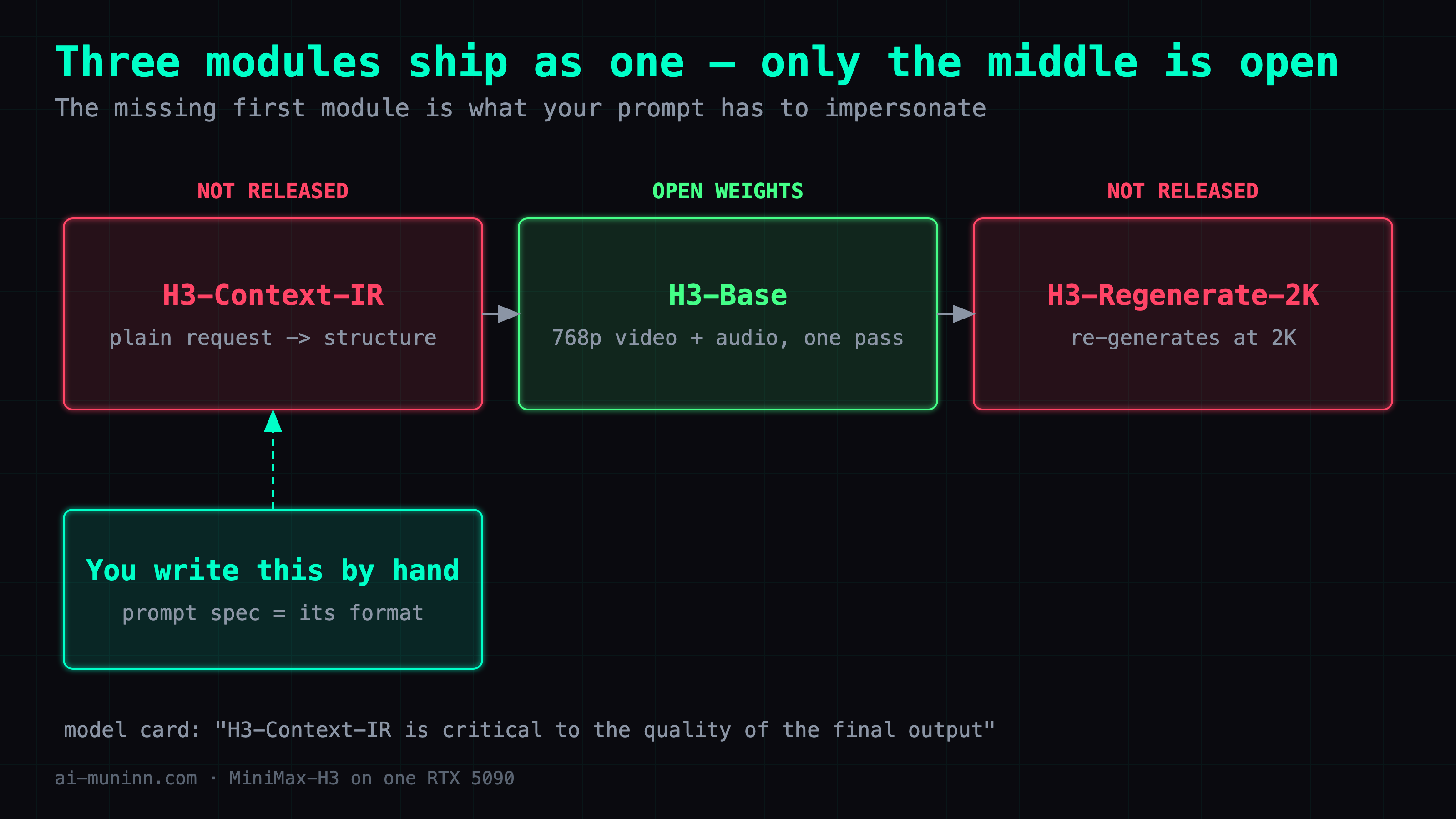
The full H3 system has three modules and only the middle one shipped:
| Module | Job | Open? |
|---|---|---|
| H3-Context-IR | Compiles a plain request into structured context | ❌ |
| H3-Base | Generates 768p video and audio | ✅ this one only |
| H3-Regenerate-2K | Re-generates at 2K with the original context | ❌ |
The model card is direct about it:
H3-Context-IR is critical to the quality of the final output, so we strongly recommend incorporating it into your generation pipeline or following the "Prompting Guidance" to build your own context-processing system.
So that "prompt writing guide" is not a tips document. It is the output format of the module you did not get, and MiniMax is telling you to hand-assemble what it would have emitted.
The prompt has two parts, and text-only generation uses just the second
The spec splits a prompt into an alignment instruction, then three core fields.
The instruction only exists when you supply images, and it has to state which picture maps to which second of the target video. It must be the very first line, followed by a blank line before the fields:
For the target video, at 0.00 seconds into the target video, <Picture 1> (from [Shot 1]) is fully referenced.
Plain text-to-video (T2VA) has no such line and starts straight at the fields. One less thing to get wrong, which is why beginners should start there.
The three fields:
integrated_multimodal_description: [Shot 1] <style>, <framing>, <what happens>…
[Shot 2] At 00:06.000, the camera cuts to …

overall_soundscape: <ambience, action sounds, non-verbal human sound>

non_diegetic_music: <instruments, tempo, rhythm, dynamics>
All three fields are always present. What is mutually exclusive is which kind of sound belongs in which field, and mixing that up is the most common beginner mistake:
| This sound | Goes in |
|---|---|
| Dialogue, singing, music the characters can hear (radio, TV, phone) | integrated_multimodal_description |
| Ambience, action sounds, breathing and laughter | overall_soundscape (1–4 sentences) |
| Score only the audience hears | non_diegetic_music (1–3 sentences) |
When there is none, write N/A. Do not invent your own wording — I wrote No music. on my first try and that is not in the spec. ⚠️ The bar differs per field: non_diegetic_music takes N/A whenever there is no score, but overall_soundscape takes it only when total silence was explicitly asked for.
Shots and camera motion
Shot 1 carries no timestamp. Later shots get increasing numbers and strictly increasing cut times that fall inside the clip length:
[Shot 2] At 00:03.500, the camera cuts to...
Cut phrasing comes from a closed set: the camera cuts to, the shot cuts to, the shot transitions to, the shot changes to, the shot switches to. Dissolves, fades and wipes only when you explicitly want them.
The spec also hands you a rule worth stealing: a cut should introduce new information — subject, space, state, viewpoint or time. If only distance or a slight angle needs to change, use camera motion instead of a cut.
Camera motion has three dimensions: motion type + amplitude + speed. Medium amplitude and normal speed are usually left off.
| Dimension | Vocabulary |
|---|---|
| Motion type | Zoom In/Out, Push In / Pull Out, Pan Left/Right, Truck Left/Right, Tilt Up/Down, Pedestal Up/Down, Arc Shot, Tracking Shot, Static Shot, Shake Slightly/Strongly, POV, Roll Clockwise/Counterclockwise |
| Amplitude | with small amplitude / with large amplitude |
| Speed | at slow speed / at fast speed |
And it has to read as a natural action inside the sentence, not as labels stacked at the end:
The camera pushes in with small amplitude at slow speed toward the folded letter in her hands.
The camera holds a static shot as the runner exits the frame.
The clip below tests whether the cut lands where you asked. The prompt said [Shot 2] At 00:07.000.
🔊 Sound on. It cuts from the rooftop wide to the railing close-up at 7 seconds and the line carries across the cut unbroken. I measured frame-to-frame difference second by second: only the 7→8s window spikes (45.5 against 2–7 everywhere else).
Dialogue: identity outside, words inside
Anyone who speaks, sings or supplies an off-screen voice gets a stable ID — (S1), (S2), or (S1,S2) for people speaking together. The same character keeps the same ID across shots, and characters who never make a sound get no ID at all.
Identity, tone, timbre and action all go outside <d>. Inside there is only a language tag and the words themselves — punctuation preserved, no translation, no rewriting.
The young woman with a quiet, breathy voice (S1) says: <d>[English] I get off at the next station.</d>
Two details that are easy to miss:
- Voiceover needs the exact phrase
says in an off-screen voiceover, and immediately after that<d>block you must state the on-screen character's lips stay shut (while his lips remain completely closed). Skip it and the model has them mouth the line. - A line crossing a cut needs
<scenetrans>at both connecting points plus an explicit statement that the audio continues. Use<cutoff>when the clip ends mid-sentence.
On-screen text
Any banner, sign, label, subtitle or neon text actually visible in frame goes in double quotes, verbatim, untranslated:
A red neon sign reading "营业中" glows above the doorway.
Here it is with five Chinese characters:
The characters are cut into the stone rather than laid over it — the raking light follows the grooves of each stroke.
⚠️ I regenerated this one. My first attempt asked for an extreme close-up with a macro push-in, and the text ended up too close to read — the same failure as the empty-sleeve problem further down, inverted: one too far, one too near. Get the shot size wrong and prompt precision cannot save you.
Geometry beats vocabulary: the model cannot draw what is not there
The most portable thing I took away, and I only got it by getting it wrong.
My demo clip is Yang Guo on the cliff at Passionless Valley. The character has one defining feature: his right arm was cut off.
My first draft said His left hand enters the frame. The model drew the right hand.
The instinct is to lean on the adjective — say it louder, repeat "left". That does nothing. What works is converting an abstract property into something visible in frame:
| What I wanted | ❌ Dead | ✅ Works |
|---|---|---|
| Left hand | his left hand | enters from the left edge of the frame |
| Missing arm | his right sleeve hangs empty | put the empty sleeve in frame: flat and collapsed with no arm inside it |
Why the difference? "Left hand" asks the model to reason about anatomy. "Enters from the left edge of the frame" is a coordinate. Diffusion models follow geometry far more reliably than they follow left-right words.
The prompt for the clip below says only A bare human hand enters slowly from the left edge of the frame — neither "left hand" nor "right hand" appears:
The hand enters from the left edge, first try. A coordinate beats a left-right word.
The missing arm is the same idea one step on. You cannot ask for an arm that is not there — absence has no pixels. You can only ask for something that is there: a sleeve that is flat, collapsed and empty.
One thing I did not solve: in a wide shot the empty sleeve still does not read. That is a shot-size problem and the prompt cannot fix it. Expecting a viewer to notice one empty sleeve from that distance was never reasonable. Board it as a medium shot instead of stacking adjectives.
NVFP4 only counts on Blackwell
This one bites quietly. ComfyUI prints it at startup:
Native ops:   ...
emulated ops: mxfp8, nvfp4, float8_e5m2, float8_e4m3fn   ← on pre-Blackwell
emulated means the file loads, the graph runs, and the weights are expanded back to high precision before the matmul. You get an 11.67 GiB file and exactly zero speed.
A quantization format is not a leaderboard of who compresses hardest — it is a compatibility table for what your card recognizes. Check that Native ops line first. Not on Blackwell? Take Comfy-Org's pruned_int8_convrot at 19.53 GiB instead.
Change the quant format and the same seed gives a different clip
Almost no quantization repo mentions this, and it decides whether users think they broke something.
Same seed, same prompt, NVFP4 and INT8 do not produce the same clip. The framing changes and the condor stands somewhere else. A different number of the carved characters comes out legible.
Both are fine and neither is broken. Quantization changes the numbers, so the denoising trajectory diverges. A fixed seed guarantees the same starting point, not the same destination.
Same seed, same prompt, two quantization formats.
That is why the side-by-side ships in the repo. When you switch formats, hold off on assuming a bad install — you are talking to a slightly different model now.
The license restricts by territory, and not the way you would guess
This clause spooks people, so here it is straight.
The MiniMax H3 Community License is geographic, and it excludes rather than limits:
"Applicable Territory" means worldwide, excluding the Excluded Territories.
"Excluded Territories" means the European Union, the United Kingdom,
the Republic of Korea and the United States of America.
Read that carefully if you are reading this in English, because those four are where most of you are. If you are in the US, the UK, the EU or South Korea, the open-weight grant does not cover you — the carve-out is the four jurisdictions with the strictest AI, likeness and copyright regimes. Everywhere else is covered, Taiwan included.
⚠️ The summary page reads backwards. Its heading asks why the license is "limited to the EU, UK, South Korea, and US", which scans as "only those four are allowed"; the body then says open weights are "temporarily limited in certain regions". When the summary and the clause disagree, the clause wins. Organizations inside the excluded regions can apply for a formal license separately.
Distribution obligations live in §III: ship a copy of the license, mark modified files prominently, include a NOTICE with fixed wording. §V.2 also requires that before you give anyone access you bind them to enforceable terms at least as protective as the use restrictions in Section V and Exhibit A, and that you tell them those restrictions apply. Note the scope: at-least-as-protective use restrictions, not the whole agreement copied across. That is the actual reason my repo is gated.
The part I enjoyed is §III.3, third bullet in the encouragements:
publish at least one technical blog post or a public statement describing your experience using MiniMax H3 Works
The license is encouraging this post.
Deep dive: two mechanisms you can skip
Nothing here changes how you use it. If you just want clips, you are done above.
"Pruned" does not mean dumbed down — and it was MiniMax's idea
Comfy-Org's pruned build is not lossy pruning, and this is documented upstream rather than discovered downstream. The model card:
H3-Omni-Transformer is a 33B-parameter dense, single-stream Transformer, with approximately 13B parameters residing in AdaLN-related branches. Because the AdaLN modulation outputs can be precomputed and cached, these parameters do not need to be loaded for inference-only deployment.
In plain terms: those 13B parameters compute how each layer gets modulated, and the modulation depends only on the timestep. Depend only on the timestep and you can precompute the whole thing into a lookup table — no need to load 13B of projection at inference.
Comfy-Org's pruned build is that idea shipped as a file: most of adaln_proj's 13.04B becomes an 8-dimensional timestep table, adaln_t_table [1025, 8] — 13,039,369,728 parameters down to 43,642,368, roughly 299×, with reduced adaln_proj tensors still present rather than removed outright. Total goes 33.12B → 20.11B, mathematically equivalent, not a quality cut.
It also decides where quantization error can hurt. The scale and shift AdaLN emits multiply into every residual stream, so error compounds across 50 blocks and again on every sampling step. On the original you either protect that 39% — ending up larger than INT8 — or quantize it and hope. The pruned build makes the dilemma vanish, because the tensor is gone.
What the resulting file holds, read from our own NVFP4 header:
200 linear layers quantized, four tensors each:
  weight          U8       [5376, 3584]   packed FP4
  weight_scale    F8_E4M3  [5376, 448]    per-block scale
  weight_scale_2  F32      []             per-tensor global scale
  comfy_quant     U8       [19]           format marker
Untouched: BF16 219 · F16 51 · F32 4 (norm / embedding / bias / adaln_t_table)
Exactly what should stay untouched: normalization, embeddings, biases, and that lookup table.
NVFP4 beats INT8 by 5%, and the 5% is clock
Same conditions, two formats:
| NVFP4 | INT8-ConvRot | |
|---|---|---|
| File | 11.67 GiB | 19.53 GiB |
| Time | 175 s | 185 s |
| Peak VRAM | 26,914 MiB | 28,581 MiB |
| Avg SM clock | 2,696 MHz | 2,585 MHz |
| Peak temp | 82 °C | 80 °C |
The time row invites the wrong reading. We ran the same comparison on a DGX Spark: NVFP4 cut the video model by a third and bought no speed at all, because video diffusion is compute-bound, not bandwidth-bound. Weight-only quantization shrinks weights; every multiply still happens. That result predicts roughly no difference here.
Roughly no difference is what we get. Two ratios:
- Time: 185 s → 175 s = 5.4% less elapsed (5.7% expressed as a throughput ratio)
- Clock: 2,696 / 2,585 = 4.3% higher
The clock accounts for nearly all of it. Both runs are pinned by heat and power; the NVFP4 run simply held a higher clock. Plausible chain: 40% smaller weights cost less power to move, so more of the same 500W lands on the SMs — which is also why it ran hotter and faster.
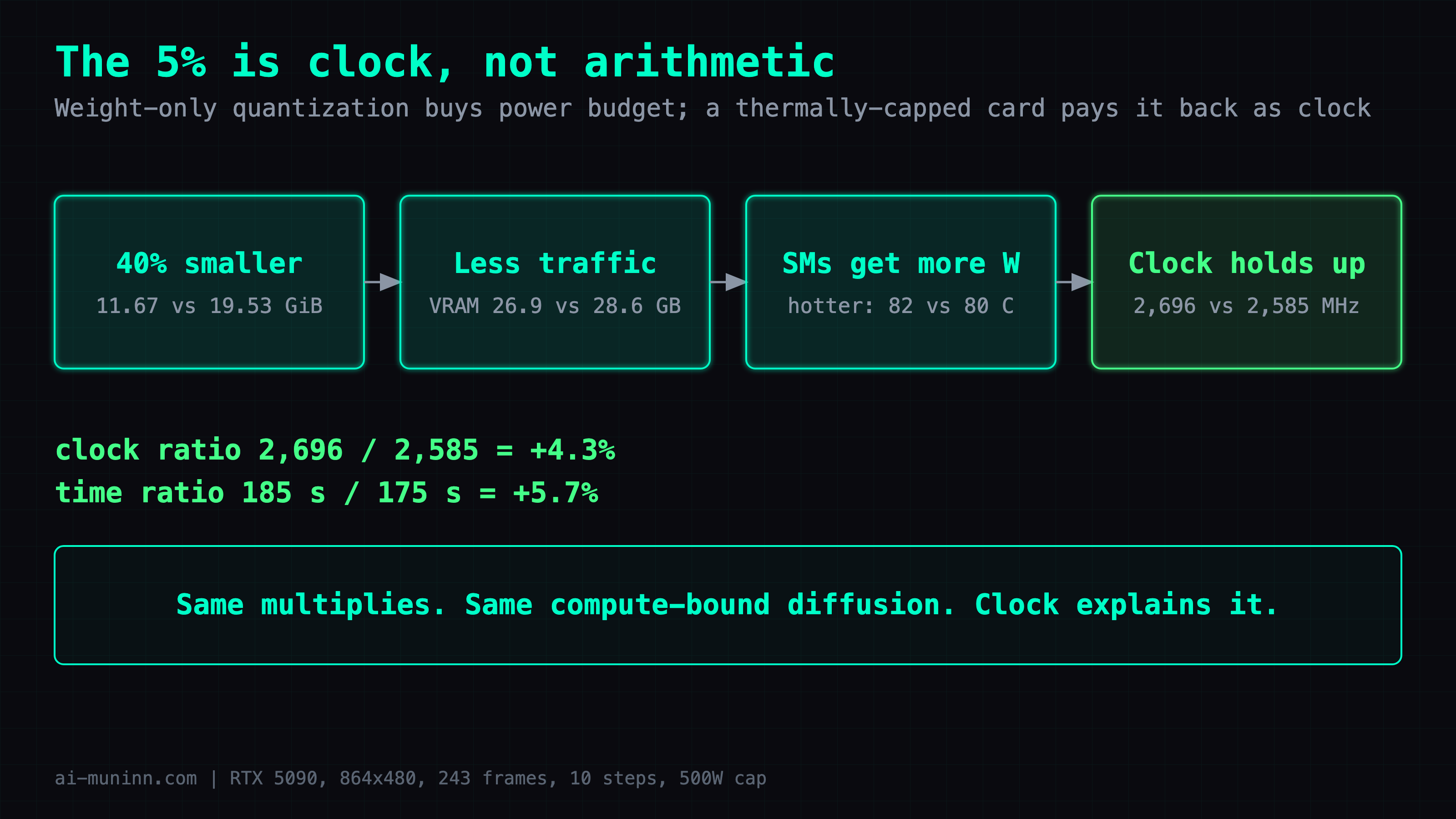
Nothing here overturns the earlier result. Weight-only quantization buys power budget, not arithmetic throughput. On a thermally pinned card, that budget comes back denominated in clock.
Dropping 600W to 500W made it faster
Lower the cap from 600W to 500W and the clip goes 185 s → 175 s. Seventeen percent less power, five percent quicker. That should not happen.
First assumption was a bad measurement. Ran it again, same answer.
The telemetry is unambiguous: at 500W the peak is 82 °C and the 5090 throttles around 84 °C, with the clock only reaching 84–87% of clocks.max.sm (3,090 MHz). Not power-limited — thermally limited. More power just reaches the wall sooner, then loses more in the throttle oscillation than it gained.
⚠️ One caveat travels with these numbers: the room was 35 °C. What matters is ΔT: 82 − 35 = 47 °C. In a 25 °C room the same ΔT lands at 72 °C — 12 °C of headroom instead of 2, and the result may not hold at all.
The absolute seconds belong to this machine on this day; the ratio is what travels. The ordering holds everywhere though: find out whether you are thermally limited before you decide to add power.
Three things to confirm before your first run
- Your card is Blackwell — otherwise take
pruned_int8_convrot, since NVFP4 will only save you disk - ComfyUI's startup banner lists
nvfp4underNative ops - Steps are set to 10, not the template's 20
If only one line survives, make it the geometry one. "Left hand" asks the model to understand a body; "enters from the left edge of the frame" hands it a coordinate. An empty sleeve can be drawn; a missing arm cannot.
Next time a prompt fights you, ask what the thing you want looks like on screen.
FAQ
- Can MiniMax-H3 run on a single GPU?
- Yes, if you pick the right build. The official deploy example asks for four GPUs and the full-precision weights come to 115 GB. The pruned-and-quantized route is four files totalling 31.7 GB, and one 32GB RTX 5090 generates a 864×480 ten-second clip with audio in about 175 seconds.
- Which files does MiniMax-H3 need?
- Four: one transformer (FL2VA or Ref2VA, pick one), a Qwen3-VL-32B text encoder, a video VAE and an audio VAE. Audio and video get separate VAEs because they are two independent output streams from the same transformer.
- FL2VA or Ref2VA — which one should I download?
- FL2VA. It takes zero to two images, and with no image at all you are running the T2VA task, which is plain text-to-video. Ref2VA is the omni-reference checkpoint that accepts up to 9 images, 3 video clips and 3 audio clips. The two are never loaded at the same time.
- Is NVFP4 worth anything on a non-Blackwell card?
- It saves disk and nothing else. ComfyUI lists nvfp4 under emulated ops on pre-Blackwell hardware, meaning the weights are expanded back to high precision before the matmul. Use the pruned INT8-ConvRot build instead.
Read next
- 2026-09-03[Benchmark] From OOM to 8.6 minutes: a MiniMax-H3 config stack for one RTX 5090
MiniMax-H3 at native 1344x768 on a single RTX 5090: 15 seconds of video in 518 s. What KJNodes chunking, torch cu130 and the NVFP4 kernels are each worth.
- 2026-10-30[MiniMax-H3] Open-H3-Regenerate-2K on an RTX 5090: more detail than VSR at 133 s a clip
NVlabs' Open-H3-Regenerate-2K on one RTX 5090: 133 s per clip vs 19 s for RTX VSR, real eyelash detail, and the cost: faces drift and small sign text turns into fake characters.
- 2026-10-25[MiniMax-H3] A storyboard image isn't a prompt: getting local H3 to hit 13 of 16 shots
A 4x4 storyboard plus a character sheet into MiniMax-H3 Ref2VA on an RTX 5090: one sentence hit 3/16 panels, an official-format shot timeline hit 13/16.
- 2026-10-19Turn a real dance into a depth video and have MiniMax-H3 restage it in a palace: native 768 on one RTX 5090
Real dance to grey depth video to MiniMax-H3 Ref2VA with a first-frame guide: a new character dances the routine in a palace, native 768x1376 on one RTX 5090.
Don't miss the next one
Subscribe, and you won't.
One-click unsubscribe anytime.