MiniMax-H3 on RTX 5090 · part 12
Turn a real dance into a depth video and have MiniMax-H3 restage it in a palace: native 768 on one RTX 5090
❯ cat --toc
- Preface
- The pipeline: depth video in, restaged dance out, five steps in ComfyUI
- Step 1: Video Depth Anything makes the grey depth video in about 11 seconds
- Step 2: Trousers instead of a long skirt, and a palace first frame from three images
- Step 3: Depth goes to ref_videos, only the first frame goes to ref_images
- Step 4: Generate at 768×1376 from the start, because upscaling cannot add a face
- Step 5: Frame generation to 48 fps, then encode with ffmpeg and not SaveVideo
- What's not working yet
- Deep dive: four rounds of trial and error
- Round 1: depth, source RGB and ControlNet all showed white or drift
- Round 2 (D): palace first frame, trousers, no source mention, and the white studio stayed
- Round 3 (F): drop the character image from ref_images, and the palace holds
- Round 4: the 768 run
- Related
TL;DR
I turned an 8.7-second real dance into a grey depth video and had MiniMax-H3 restage it with a new character in a palace, natively at 768×1376 on one RTX 5090. The motion roughly follows: knee bends, arm openings and a side turn with a knee lift line up in time. The key rule: ref_images holds only the first frame. A second, white-background character image turned 1.5 to 5.25 s into a white studio. A 768 run takes about 12 minutes. Caveat: arm angles are still off, and one seed went black, so watch the whole clip.
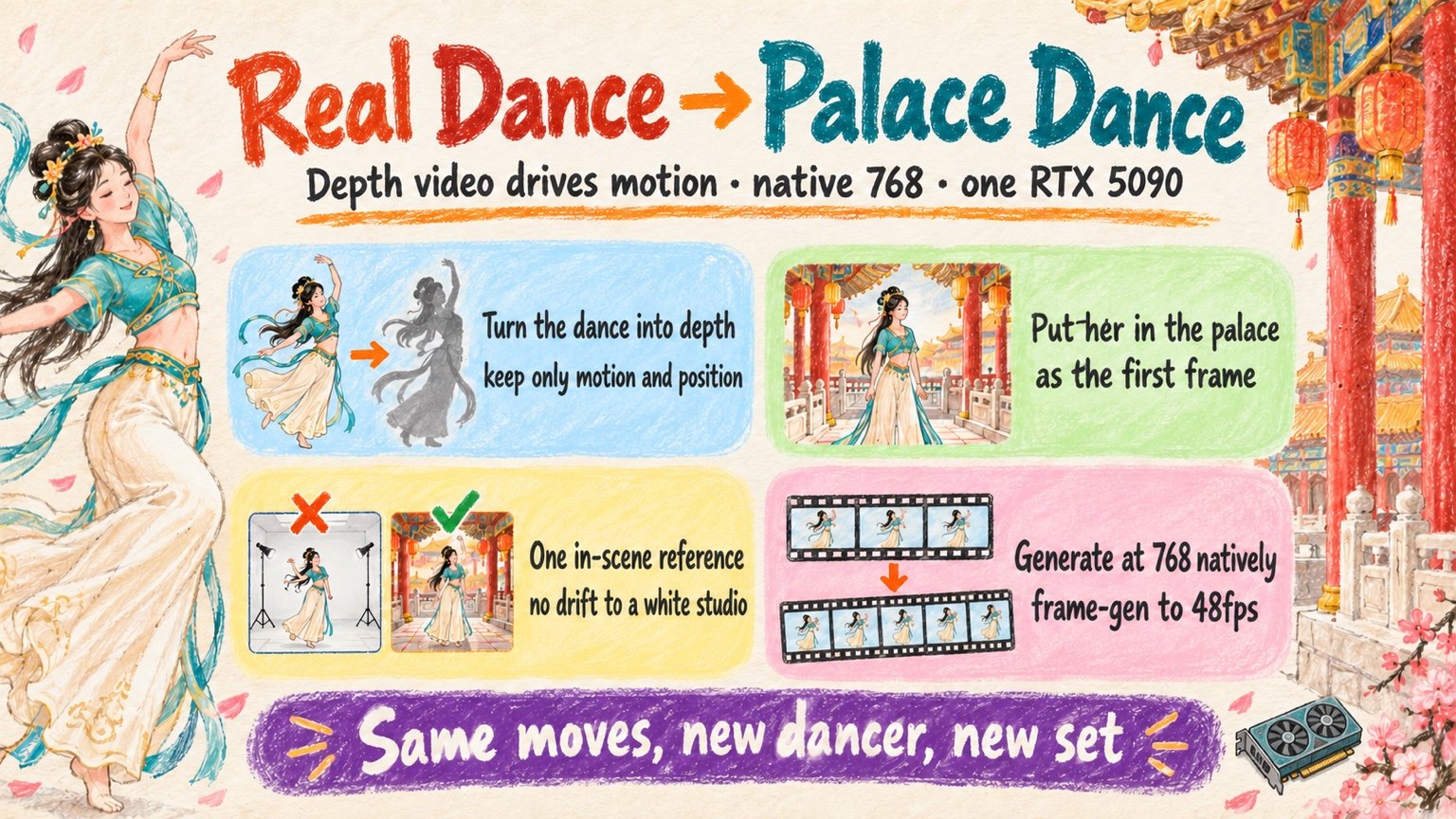
An 8.7-second dance restaged in a palace by MiniMax-H3 from a grey depth video of a real dancer. Native 768×1376, frame-generated to 48 fps, on one RTX 5090. The music is my own ACE-Step track
Preface
I saw people take a real dance video and have a different character dance the same routine in a new setting. I wanted to see whether MiniMax-H3 could do it too. My approach was to turn the dance into a depth video first. The depth video records only how far each point is from the camera and drops everything about appearance. Face, clothes and background are stripped. Motion and position stay.
I ran it locally, on one RTX 5090, with MiniMax-H3 Ref2VA. In Part 9 the reference video was a Blender blockout. Here I swap in a depth video of a real dance.
It works. The background drifted to a white studio twice, and one run went black. The new dancer roughly follows the original choreography, but not frame for frame. Below is the full workflow first, then what is still off, then a deep dive with the four rounds of trial and error behind it.
The pipeline: depth video in, restaged dance out, five steps in ComfyUI
All five steps run in ComfyUI on the 5090. I installed one extra node pack, for the depth step.
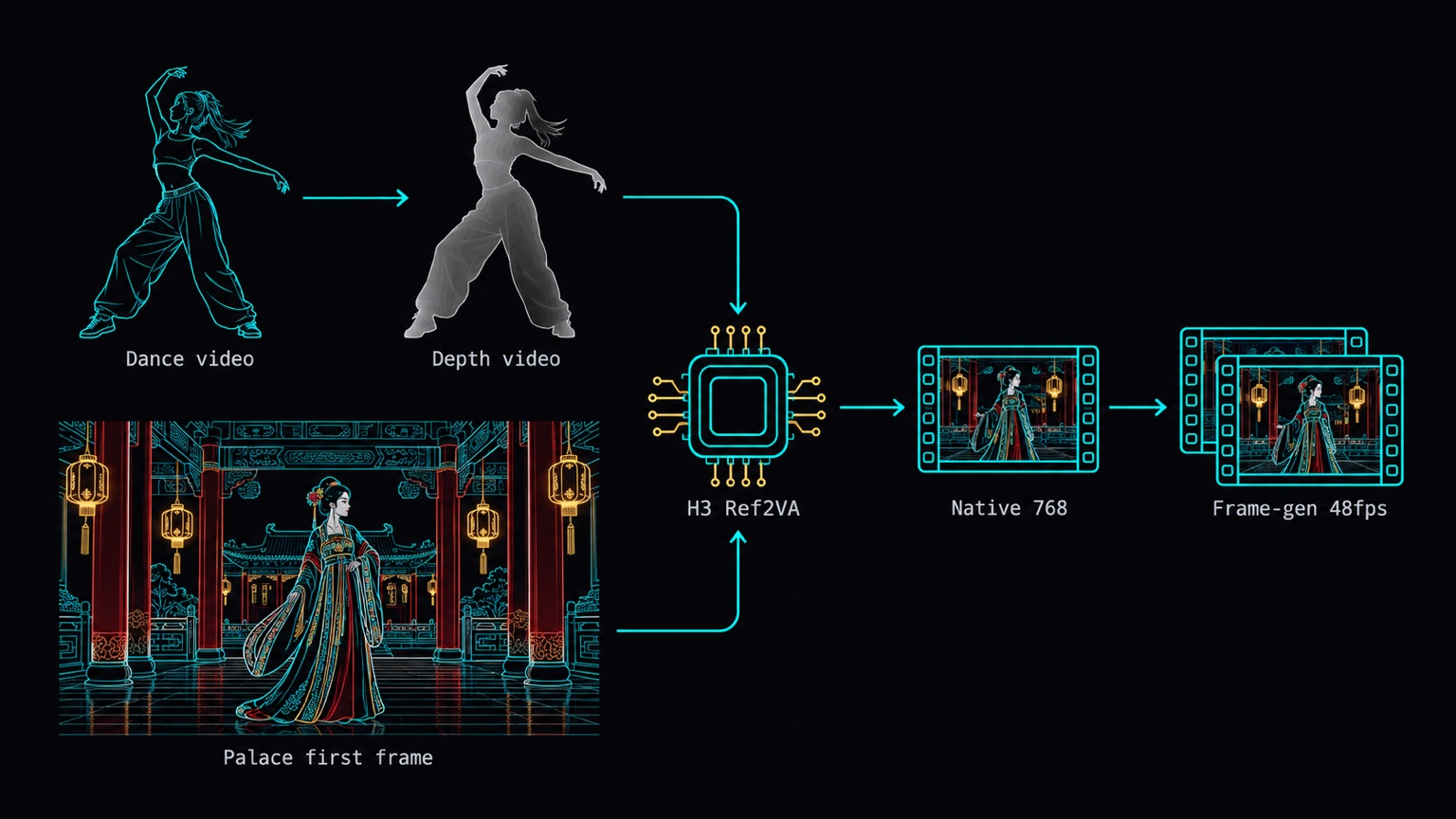
- Cut a clip. Video Depth Anything turns it into a grey depth video.
- Qwen-Image makes a character, then places her in a palace with her pose matching frame 0 of the depth video. That image is the first frame.
- H3 Ref2VA gets the depth video as
ref_videosand only the first frame asref_images. MiniMaxH3AddGuidepins the first frame atframe_idx=0.- Generate natively at 768×1376, then use RTX frame generation to reach 48 fps.
The source clip matters. I used a single dancer, full body including the feet, with a mostly static camera. It is 8.7 s, 209 frames at 24 fps, from a TikTok dance compilation on YouTube. The compilation has three panels, so I cropped the right panel (the single dancer) and letterboxed it to 480×864 without stretching.
Step 1: Video Depth Anything makes the grey depth video in about 11 seconds
The depth node is yuvraj108c/ComfyUI-Video-Depth-Anything, which wraps the official Video-Depth-Anything. Before installing, I ran pip install --dry-run to check it would not touch torch, torchvision or numpy. It did not. The install added only easydict, imageio-ffmpeg, imath, opencv-python and OpenEXR.
Three nodes do the work:
| Node | Setting |
|---|---|
LoadVideoDepthAnythingModel | video_depth_anything_vits.pth (Small) |
VideoDepthAnythingProcess | input_size 518, max_res 864, fp16 |
VideoDepthAnythingOutput | colormap gray |
Depth is normalized with one range for the whole clip, so frames don't jump in brightness the way per-frame normalization would. All 209 frames took about 11 s.
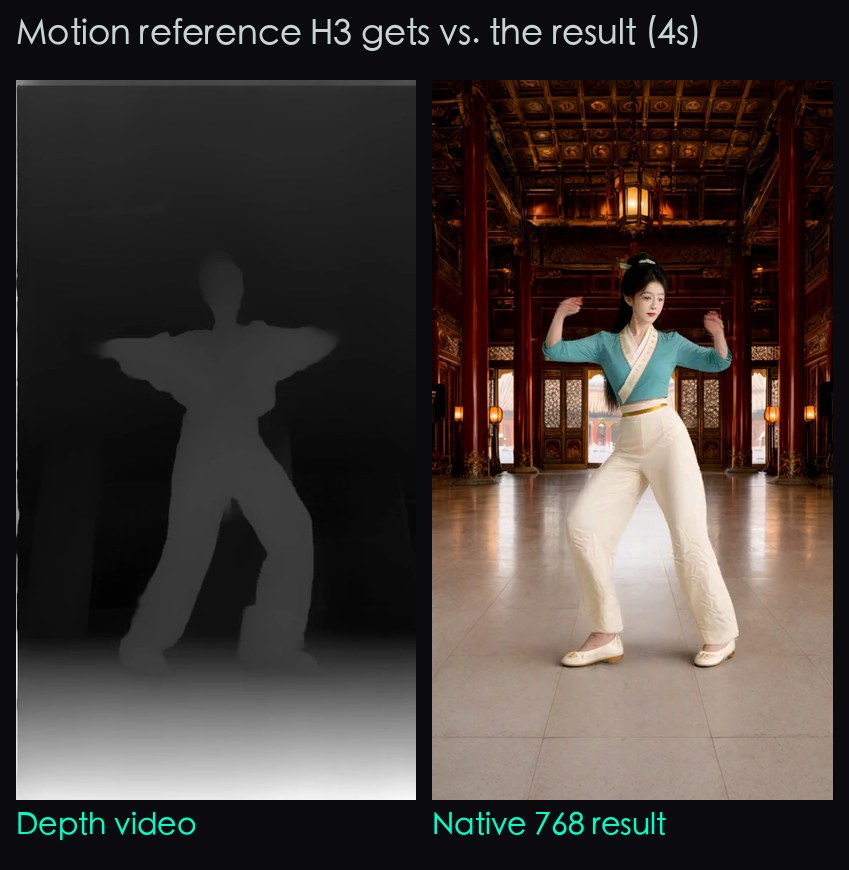
Here is a frame at 4 s, depth on the left and the final result on the right:
And the full clip, depth left and result right, in sync:
Left to right: the source dance, the grey depth video H3 receives, and the MiniMax-H3 result, all in sync for 8.7 seconds
Step 2: Trousers instead of a long skirt, and a palace first frame from three images
My first Qwen-Image 2.1 character wore a long skirt, which hid the knees. Knee bends and weight shifts were invisible in the output. I switched to a short top and wide trousers, and the legs became readable.
The first frame comes from Qwen-Image multi-reference with three input images: the palace background, the character, and depth frame 0. The prompt says Picture 1 is the background and camera, Picture 2 is the woman, Picture 3 is the pose. It then describes a centered figure, head and shoe heights, hands at the hips and staggered feet. I used CFG 4 and 40 steps.
In this workflow I never fed the source RGB video to Qwen-Image or to H3 (one control run in round 1 did, on purpose; see the deep dive). I only used it to check alignment by eye. The head and shoe positions in my first frame were off by about 10 to 16 px, which was close enough for H3.
Step 3: Depth goes to ref_videos, only the first frame goes to ref_images
This is the step that decides whether you get a palace. MiniMaxH3ReferenceToVideo (Ref2VA) takes ref images and ref videos, but it has no first-frame input. MiniMaxH3AddGuide fills that gap: it VAE-encodes an image and attaches it as a keyframe at frame_idx, and it keeps any existing references.
The wiring:
depth video   -> MiniMaxH3ReferenceToVideo.ref_videos
first frame   -> MiniMaxH3ReferenceToVideo.ref_images   (only this one image)
MiniMaxH3ReferenceToVideo.positive
              -> MiniMaxH3AddGuide(image = first frame, frame_idx = 0)
              -> BasicGuider
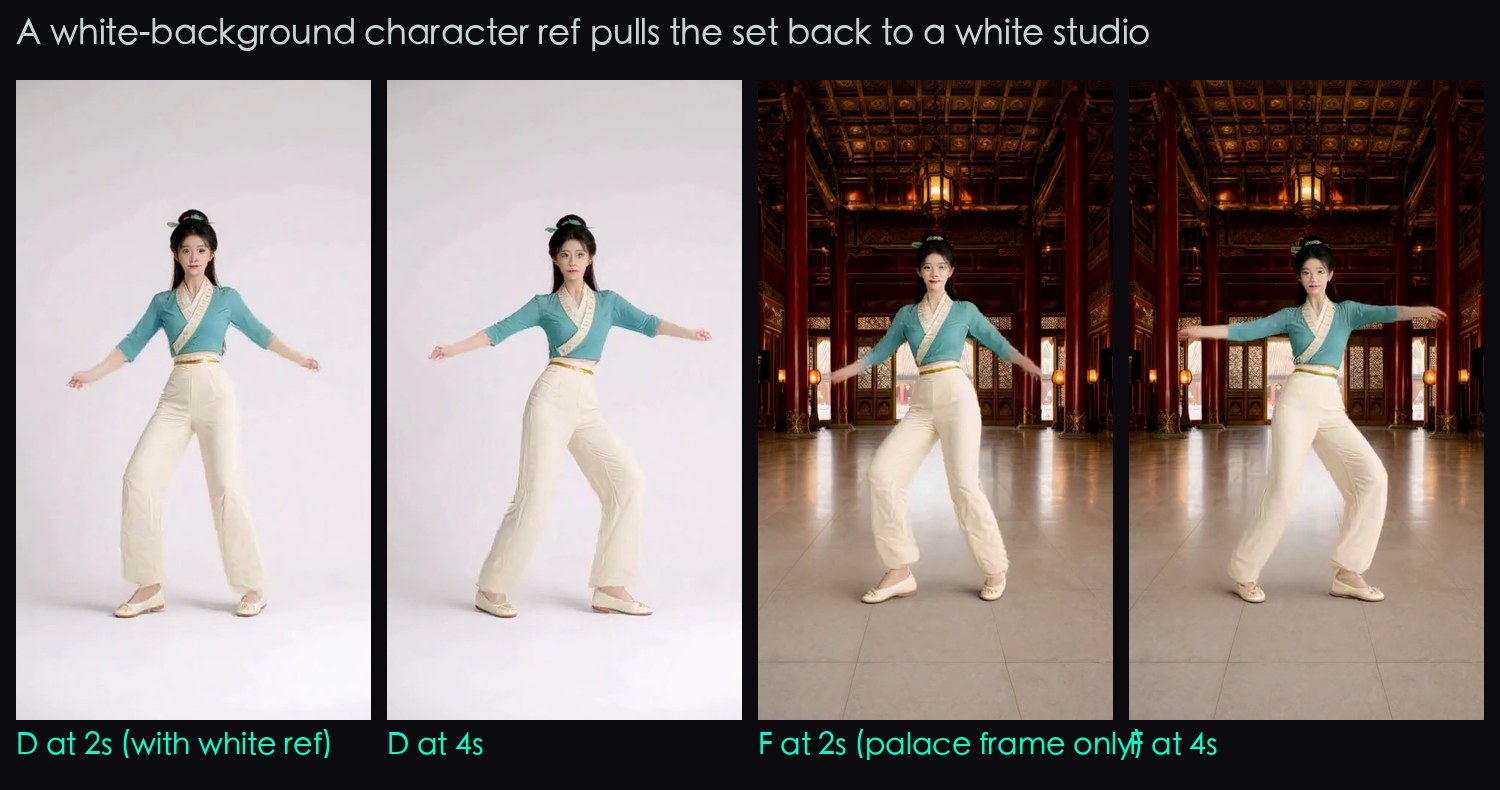
The rule: ref_images is the first frame and nothing else. When I also added a white-background character image, 1.5 to 5.25 s became a white studio and the palace came back only at 5.5 s. I removed that image and its line in the prompt. With the same seed, the palace held throughout, and the face and outfit held too.
The prompt follows H3's six-part format. Describe only what you want: Picture 1 is the frame-0 palace, Video 1 gives motion and timing, the same palace throughout, a fixed camera, visible knee bends and arm openings. Do not mention the source dancer or her clothes, not even in a negative prompt. In my first round the negative mentioned the original clothes, and one run produced a green cropped jacket like the source.
Other settings: 209 frames, 14 steps, res_multistep / simple, fixed seed.
Step 4: Generate at 768×1376 from the start, because upscaling cannot add a face
My first delivery was 480×864 run through RTX Video Super Resolution to 1080×1944. The edges were cleaner and the picture was bigger, but the face was still mushy. It got sent back with a simple request: generate at 768 from the start.
At 768 wide, keeping the aspect ratio gives a height of 1382.4. H3's canvas must be a multiple of 32, so the height is 1376. Same seed, 480 upscaled on the left and native 768 on the right:
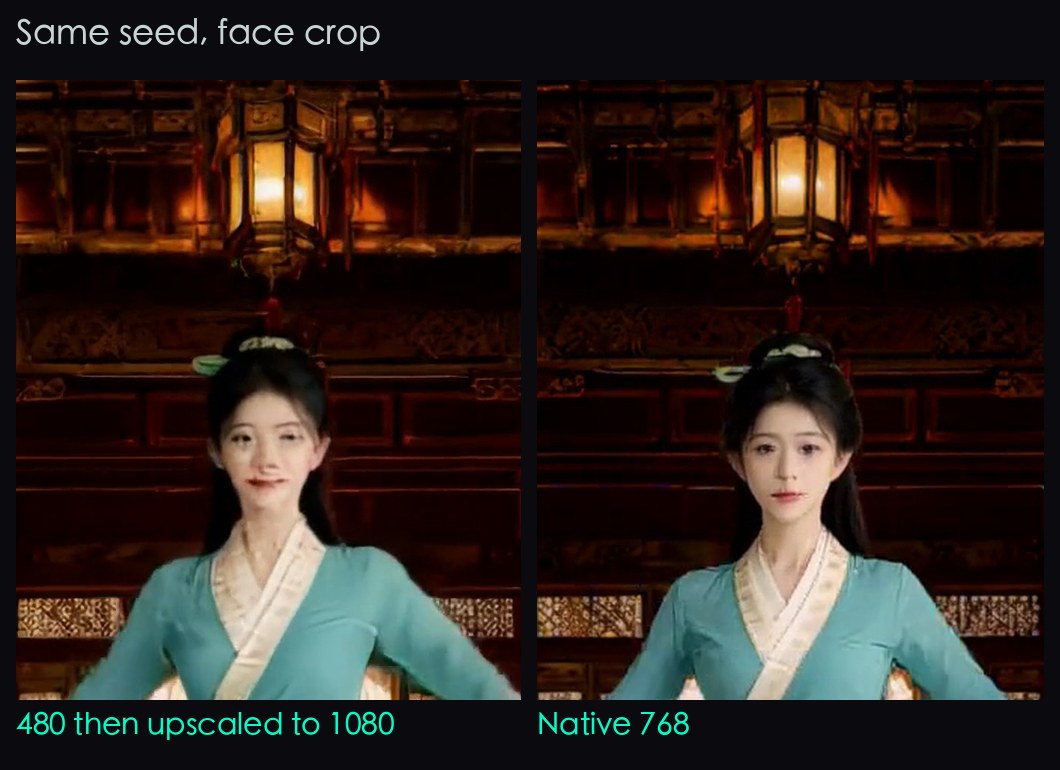
The cost: a 480×864 run took about 172 s. A native 768×1376 run takes about 12 minutes (sampling alone is 648.81 s), and VRAM peaks at 31,731 MiB of 32,607 MiB. That is close to the ceiling, but it never ran out of memory.
My first 768 run also went dark. The background darkened after 3 s and was nearly black at 5 to 7 s. The black was already in the raw H3 output, so frame generation and the encode were not the cause. I changed only the seed, from 2026101801 to 2026101902, and the palace held throughout.
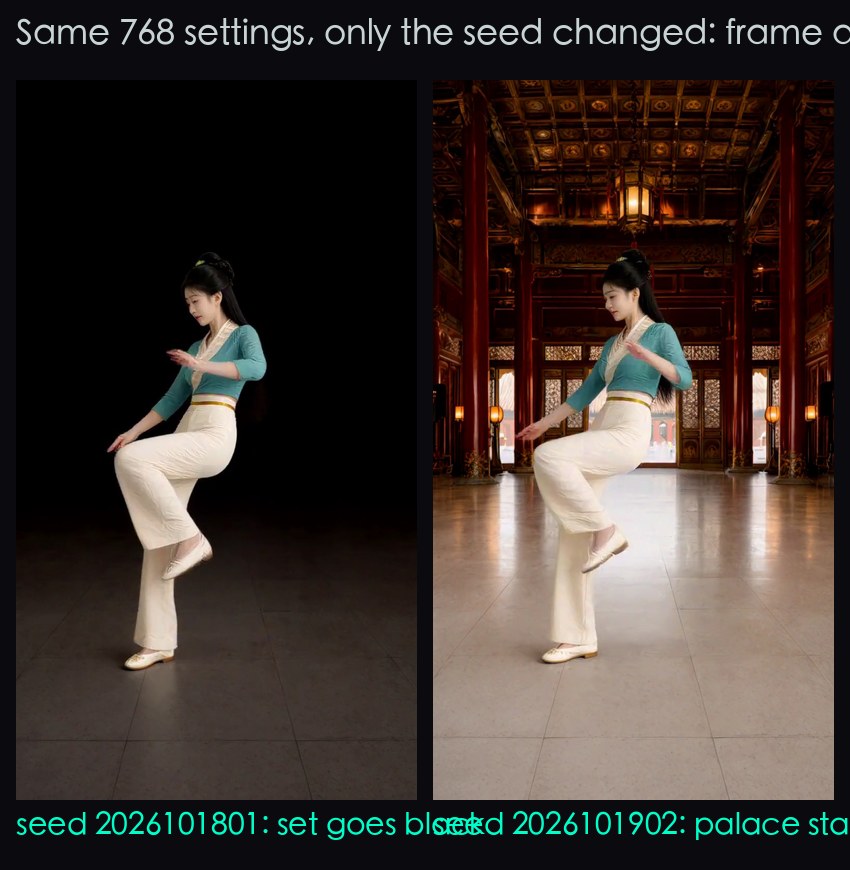
I tried only one extra seed, so I cannot tell you how often this happens.
Step 5: Frame generation to 48 fps, then encode with ffmpeg and not SaveVideo
For frame generation I used Comfy-Org/ComfyUI_Nvidia_VFX_Nodes: RTXVideoFrameGeneration with multiplier 2 and mode MEDIUM. It outputs 2n−1 frames, so 209 frames become 417, which is 8.69 s at 48 fps.
Do not use the default ComfyUI SaveVideo. At 1080×1944 it came out at about 3.9 Mbps with blocky shadows. Save the 417 frames as PNGs with SaveImage, then encode with ffmpeg:
ffmpeg -framerate 48 -i frames48/%05d.png -i music.m4a \
  -c:v libx264 -preset slow -crf 15 -pix_fmt yuv420p \
  -c:a aac -shortest out.mp4
H3 generates its own ambient audio track. I replaced it with music. The music in the video above is my own ACE-Step track.
What's not working yet
- Motion follows roughly, not exactly. Knee bends, arm openings, and the side turn with a knee lift line up in time. Arm angle and amplitude are still off.
- 768 costs 12 minutes per run, and one seed went black. You may need a second run just for the seed.
- One clip only. I tried a single 8.7 s dance with a fixed camera. I do not know how it behaves with camera moves or multiple dancers.
- One seed per condition in the deep dive below, so the causes I name are the best explanation I have, not controlled proof.
Deep dive: four rounds of trial and error
You do not need this section to use the workflow. It holds the runs behind the rules above: what I changed, what I measured and what it ruled out, for anyone (or any AI) adapting the setup.
All rounds below use the same 209-frame clip, seed 2026101801, 14 steps and n=1 per condition, unless noted.
Round 1: depth, source RGB and ControlNet all showed white or drift
I ran three conditions to see which reference route gives the best restaging.
| Run | Reference route | What I saw | H3 time |
|---|---|---|---|
| A | depth video as ref | 0 to 5.5 s white studio from the character image, palace from 6 s. Long skirt hides the knees. Arms mostly down | 179 s |
| B | source RGB as ref | Almost the same as A: white early, palace fades in around 5.5 s | 172 s |
| C | depth as FunControl ControlNet (strength 0.7, end 0.8) | Extra spins, olive jacket and black bottoms at 2 to 4.5 s, a white industrial structure in the background | 99 s |
H3 times are server-side full execution.
I used B to check whether the source dancer's look leaks into the result. I sampled 18 half-second frames and found no jacket, no glasses and no industrial set. So depth is not shown to be better than source RGB at blocking leakage, because neither leaked. I still use depth because it never contains the dancer's face.
C's green jacket resembles the source clothes, but C never received the source RGB. That round's negative prompts mentioned the original clothes, so the cause is not isolated. This is why Step 3 says not to mention the source, even in negatives.
Round 2 (D): palace first frame, trousers, no source mention, and the white studio stayed
I changed three things at once: trousers instead of the skirt, a palace first frame, and no mention of the source. The wiring was Ref2VA with depth and ref_images=[first frame, white character], then AddGuide with the first frame at frame_idx=0.
To check what the nodes actually do, I read the live nodes_minimax_h3.py on the 5090 to see what the nodes really do:
- Ref2VA, lines 242 to 364: no first-frame input.
- AddGuide, lines 165 to 239: writes
minimax_keyframeswithout touching the refs. model_base.py, lines 2188 to 2219: reads both keyframes and refs.
So the keyframe and the refs are separate inputs that both reach the model. The result:
- Palace at 0, 0.25 and 0.5 s.
- Fades to white from 0.75 s. White at 1.5 to 5.25 s. Palace again at 5.5 s.
- Motion much clearer than A: a knee bend with crossed arms at 1.5 s, arms near horizontal at 4 s, a side turn with a knee lift at 6 s that matches the source.
AddGuide is guidance, not a pixel paste. At frame 0 the mean RGB difference from the first frame was about 8.3 out of 255, with the same composition.
Motion got clearer after these three changes, but I did not isolate which one did it.
Round 3 (F): drop the character image from ref_images, and the palace holds
The only change: remove the character image from ref_images and delete its prompt sentence.
I checked every 0.25 s from 1 to 6 s plus 121 consecutive frames. All of them show the palace. To put a number on it, I counted the share of bright pixels (RGB all above 180) in the top building area:
| Run | Bright-pixel ratio, top area |
|---|---|
| F (no character image) | 0.068 to 0.099% |
| D (with character image) | up to 98.3% |
Face and outfit held, and the motion was no worse. H3 took 168.658 s. That points to the white reference competing with the set, but it is one seed.
Round 4: the 768 run
The 480 F output was upscaled with RTXVideoSuperResolution (ULTRA, target 1080×1944), then frame-generated to 48 fps, and sent back.
Canvas size: nodes_minimax_h3.py sets CANVAS_MULTIPLE=32, and Ref2VA builds the latent at the size you give it. adapt_canvas has a 768×1344 area cap, but it applies only to reference-video preprocessing, not to the output size. For the 768 run I resized the depth video with lanczos to 768×1376 before uploading, and ran the first frame through RTX Super Resolution to 768×1376.
| Measure | Value |
|---|---|
| Latent | [1, 24, 62, 86, 48] |
| Sampling | 648.81 s |
| Conditioning + sampling + decode | 717.65 s |
| Including 209 PNGs, frame generation and 417 PNGs | 747.76 s |
| VRAM peak | 31,731 / 32,607 MiB |
VRAM was sampled with nvidia-smi every 2 s and includes the desktop.
The first 768 run went dark, so I measured it. The metric is the mean RGB of the top 300 rows (0 to 255):
| Time | F at 480 | 768, seed 2026101801 | 768, seed 2026101902 |
|---|---|---|---|
| 4 s | 17.42 | 2.71 | 19.01 |
| 6 s | 17.42 | 0.00 | 19.11 |
| 8 s | 17.47 | 0.28 | 19.02 |
For the new seed I measured all 417 frame-generated PNGs. The minimum was 18.78, at 3.04 s. This is a plain RGB mean. It is evidence that the first run went black, not a quality score.
Related
FAQ
- How do you make MiniMax-H3 restage a real dance with a different character and set?
- Turn the dance clip into a grey depth video with Video Depth Anything, then feed it to H3 Ref2VA as ref_videos. Pass only a first frame (your character already standing in the new set) as ref_images, and pin the same frame at frame_idx 0 with MiniMaxH3AddGuide. The depth video keeps near and far, so the motion and position carry over while the dancer's face, clothes and background do not.
- Why did my MiniMax-H3 Ref2VA background turn into a white studio?
- In my runs the cause was an extra character image with a white background in ref_images. With it, 1.5 to 5.25 s of the clip became a white studio and the palace only came back at 5.5 s. Removing that image and its prompt line, with the same seed, gave a palace for the whole clip. This is one seed, so treat it as strong evidence for my setup and not a proof.
- Why generate MiniMax-H3 video at 768 instead of upscaling a 480 render?
- I tried the upscale first: 480x864 run through RTX Video Super Resolution to 1080x1944 had cleaner edges, but the face was still mushy. Upscaling cannot add detail that was never generated, so I generated at 768x1376 natively. It costs about 12 minutes per run instead of about 172 seconds.
- Why did my 768 H3 run turn black after a few seconds?
- In my first 768 run the background darkened after 3 s and was nearly black from 5 to 7 s, and the black was already there in the raw H3 output, not introduced by frame generation or encoding. Changing only the seed from 2026101801 to 2026101902 fixed it. Watch the whole clip and keep a spare seed.
- Why not use the default ComfyUI SaveVideo node for the final encode?
- At 1080x1944 the default SaveVideo output came out at about 3.9 Mbps with blocky shadows. I save the frame-generated frames as PNGs with SaveImage and encode with ffmpeg using libx264, preset slow and crf 15 instead.
Read next
- 2026-10-16A 22-second Taiwan FPV flight without a drone: Blender blockout + MiniMax-H3 on one RTX 5090
A 22.7-second FPV flight that reads as one take, over Yushan, Taroko Gorge, Taipei 101 and Sun Moon Lake, built from a gray Blender blockout and MiniMax-H3 Ref2VA on one RTX 5090.
- 2026-10-18A 25-second no-fog FPV one-take with MiniMax-H3 and ComfyUI-H3-Continuum on one RTX 5090
A 25-second FPV one-take over Taiwan with no fog: MiniMax-H3 Ref2VA and ComfyUI-H3-Continuum on one RTX 5090, each splice hidden in a turn through the sky.
- 2026-10-12[AI Workflow] Block a scene in Blender, let MiniMax-H3 film it: local Ref2VA on an RTX 5090
Block out a shot with capsules and boxes in Blender, feed it to MiniMax-H3 Ref2VA with two reference photos, and get a live-action clip that keeps left/right order and occlusion. 89.9 s on one RTX 5090.
- 2026-09-06[Benchmark] Two characters in one shot: MiniMax-H3 Ref2VA takes multiple reference images
Ref2VA is the only MiniMax-H3 mode that takes several reference images. Two characters, 243 frames, 437 s on one RTX 5090, and CER 6.8% on the dialogue.
Don't miss the next one
Subscribe, and you won't.
One-click unsubscribe anytime.