MiniMax-H3 on RTX 5090 · part 9
[AI Workflow] Block a scene in Blender, let MiniMax-H3 film it: local Ref2VA on an RTX 5090
❯ cat --toc
- How it works: the blockout sets the motion, the photos set the faces
- Step 1: Have Claude write the Blender script
- Step 2: Make two reference images that look nothing alike
- Step 3: Wire MiniMaxH3ReferenceToVideo in ComfyUI
- Step 4: Map each person to a photo and a stand-in
- Step 5: Render at 14 steps, then check who stands where
- Get readable faces with a medium shot, not 720p
- What the blockout controls, and what it doesn't
- Deep dive: models, settings, and the rest of the prompt
- Models and sampler
- The blockout scene
- Frame count: match the output, or lose the ending
- The remaining four prompt sections
TL;DR
I blocked a two-person shot in Blender with a red capsule and a blue box, then handed it to MiniMax-H3 Ref2VA together with two reference photos. The clip came out live-action: the two identities never swapped, left/right order held at all 5 sampled frames, and the woman crossed in front of the man exactly as the blockout did. 89.9 s on one RTX 5090 for 124 frames at 864×480. The blockout goes in as ref_videos, the photos as ref_images, and the prompt tells the model to take only the motion from the video. Caveat: exact distances and small gestures drift.
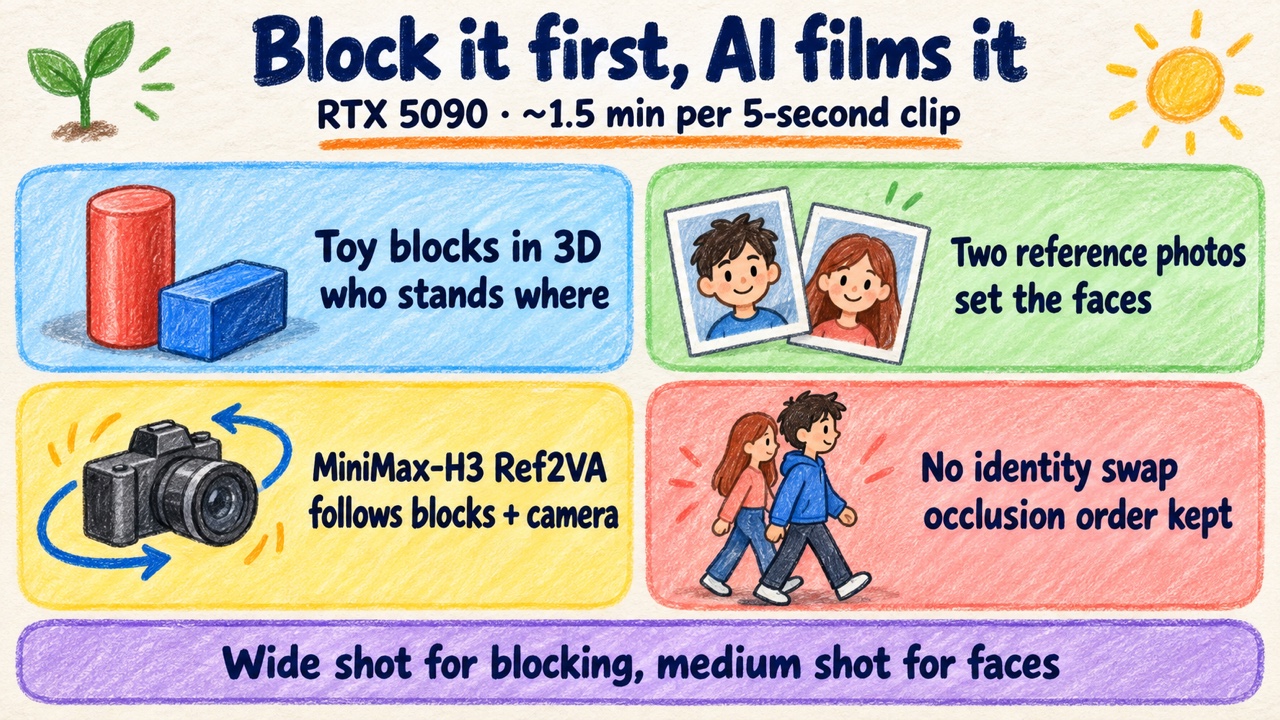
The short version: toy shapes in a 3D app, two reference photos, one live-action clip that follows where the shapes stood.
I saw Higgsfield's Blender plugin: you block the scene in Blender and send it to Seedance. It runs in the cloud and costs credits. I wanted the same thing running locally on an RTX 5090.
The real reason is control. Text prompts like "orbit right" or "the two swap places" drift. The camera goes the wrong way, the wrong person ends up on the wrong side, and you reroll until you give up. A blockout replaces those sentences with positions. You put toy shapes where the people should stand, move the camera the way you want, and the AI follows the shapes and swaps in the two people from your reference photos.
Five steps below, then the limits, then the full config.
How it works: the blockout sets the motion, the photos set the faces
The trick is splitting the job between two inputs. The blockout is a rough proxy scene: capsules and boxes standing in for people. It carries only position, blocking and camera. The reference images carry what the people look like.
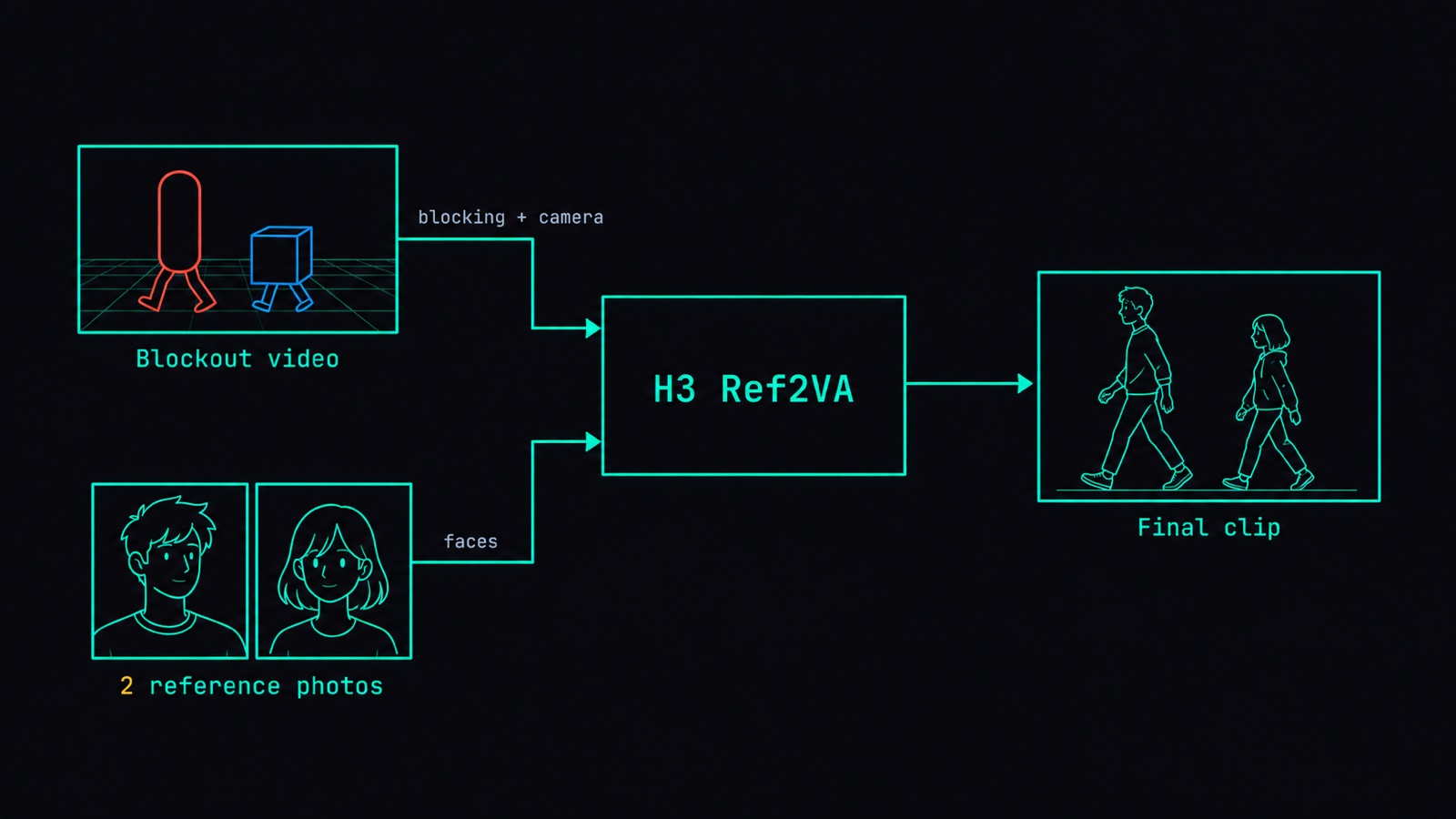
MiniMax-H3's Ref2VA mode takes the blockout through ref_videos and the character images through ref_images. It generates a new clip from scratch rather than continuing the blockout clip, and it keeps checking the blockout for how things move. The blockout itself doesn't show up in the output: none of my clips had a capsule, a box, or grey material. The model does get every frame of the blockout clip, though, so the prompt still has to tell it to leave out the stand-ins.
I'm not the only one treating reference video this way. The Seedance 2.5 API guide lists clay pre-vis to finished shot as a standard use of reference video, and says plainly that reference video is a motion signal, not content.
If you haven't used Ref2VA before, Part 6 covers its six-section prompt format. You'll need it in step 4.
Step 1: Have Claude write the Blender script
I don't hand-build the scene. I describe it to Claude and ask for a Blender Python script. The prompt I used, roughly:
Write a Blender Python script for a blockout shot.
A tall red capsule walks from left to right, passing in front of a short blue box.
The blue box stays in place and makes a small turn.
A landmark arch made of 3 boxes stands at the left rear.
Slow camera push-in.
864x480, 24 fps, 124 frames, render to mp4.
The rules that matter:
- Stand-ins are only capsules and boxes. No fingers, no props.
- At least one asymmetric landmark in the scene, like that arch at the left rear.
- Same frame size as your output. Here 864×480.
- Same frame count as your output, on the 17k+5 grid that H3 frame counts follow. 124 is on it. Max 15 s.
The red and blue are for you, not the model. The model learns who is who from the prompt in step 4.
Blender doesn't need a GPU. I rendered on a separate Linux box, on CPU:
blender -b -t 4 --python build_blocking.py -- --out blocking
ffmpeg -framerate 24 -i blocking/frames/frame_%04d.png -c:v libx264 -pix_fmt yuv420p blocking/previs.mp4
Here's the script I used, ready to edit: build_blocking.py. It only writes a PNG sequence; the ffmpeg line turns that into the mp4.
Step 2: Make two reference images that look nothing alike
Full body, front view, clean background, head to feet. Make the two people as different as you can, so if one bleeds into the other you'll see it right away.
I used a tall woman with long white hair and a white robe, and a short stocky man with short black hair and a navy work jacket. I generated both with Qwen-Image 2.1 at 768×1024. Real photos work too.
Step 3: Wire MiniMaxH3ReferenceToVideo in ComfyUI
The node is MiniMaxH3ReferenceToVideo. This is the wiring:
LoadVideo(previs.mp4) → GetVideoComponents.images → ref_videos.ref_video_0
LoadImage(character-1.png)                        → ref_images.ref_image_0
LoadImage(character-2.png)                        → ref_images.ref_image_1
VAELoader(minimax_h3_video_vae_fp16)              → vae
VAELoader(minimax_h3_audio_vae_fp32)              → audio_vae
width 864 · height 480 · length 124 · ref_image_size match
One thing to get right: vae must be the video VAE. It encodes both the reference video and the reference images. The CONDITIONING and LATENT outputs wire up like any normal H3 graph. The exact workflow I ran, in API format (you can POST it straight to ComfyUI's /prompt): h3-ref2va-blocking.api.json.
Step 4: Map each person to a photo and a stand-in
The prompt has to spell out, for each person, where the looks come from and where the movement comes from. Subject 1 gets the face and outfit from Picture 1 and follows the tall red capsule in Video 1. Subject 2 gets Picture 2 and follows the short blue box. Then say that Video 1 supplies only camera, relative positions, blocking and occlusion, and explicitly forbid drawing the stand-ins or the grey material.
Here are the first two sections of the six I used:
subject_definitions:
<Subject 1> is the tall adult woman from <Picture 1>. Preserve her face, very long white hair, slender tall stature and flowing white robe. Her screen position and walking path come from the RED TALL CAPSULE in <Video 1>.
<Subject 2> is the short adult man from <Picture 2>. Preserve his face, short black hair, short stocky stature, dark navy work jacket and dark trousers. His screen position and small in-place turn come from the BLUE SHORT BOX in <Video 1>.
<Video 1> supplies camera movement, relative spatial positions, blocking, motion timing and foreground occlusion for both subjects. The colored primitives are spatial guides only and must be replaced completely by the two realistic people.

summary:
[reference generation] One continuous realistic live-action full-body shot of two adults in a stone-paved old-town alley. <Subject 1> begins on screen LEFT and <Subject 2> begins on screen RIGHT. The white-haired woman walks rightward in FRONT of the stationary dark-haired man, briefly occluding him and exchanging their screen-left/right order. At the end the man is on screen LEFT and the woman is on screen RIGHT. Appearance comes only from <Picture 1> and <Picture 2>; motion and positions come from <Video 1>.
You don't have to copy this word for word. Just say clearly what you want. You can also describe your blockout and your two images to Claude and have it write all six sections. The other four are in the deep dive.
Step 5: Render at 14 steps, then check who stands where
I ran 14 steps, res_multistep + simple, Spectrum on. On one RTX 5090 the wide shot took 89.9 s of execution for 864×480, 124 frames, about 5.2 s of video.
Wide shot. Left: the Blender blockout. Right: what MiniMax-H3 Ref2VA made from it with the two reference images.
Here's what it followed. The identities didn't swap. Left/right order was correct at all 5 frames I sampled. They swapped sides mid-shot, as blocked. The woman passed in front of the man with the same occlusion order as the blockout. The man came out shorter, as he was in the blockout.
The problem was faces. At 864×480 in a full-body wide shot, each head is only tens of pixels across, and the faces were blurry.
Get readable faces with a medium shot, not 720p
I didn't go to 720p. I blocked a second, closer scene instead: the two stand still facing each other and talk, with the blockout camera framing them from roughly the waist or chest up. That run also changed the action and the prompt, so it's a separate shot, not the same scene zoomed in. Head crops went from about 48–69 px wide to about 135–156 px. Eyes, brows, nose and mouth became readable. The woman stayed on the left, the man on the right, and he was still shorter. Execution time: 81.7 s.
Medium shot: a separate blockout with the camera at waist-to-chest height. Faces are readable at the same 864×480, 124 frames, 14 steps; 81.7 s on an RTX 5090.
So I split the work: wide shots for blocking, medium shots for faces.
What the blockout controls, and what it doesn't
The blockout is good at relative placement: who's on the left, who's in front, who's taller, which way someone walks.
Exact values get softened. Both people drifted toward the center of the frame. The height gap shrank somewhat; the man was still shorter, just less so. And the man's small in-place turn wasn't followed at all.
One more caveat: each test ran once. I didn't sweep seeds.
Deep dive: models, settings, and the rest of the prompt
Skip this if you just want to run it; everything you need is above. This is the full config, for anyone (or any AI) reproducing it.
Models and sampler
model:         minimax_h3_ref2va_pruned_nvfp4.safetensors
text encoder:  qwen3vl_32b_minimax_h3_nvfp4_awq.safetensors
sampler:       res_multistep · scheduler simple · 14 steps · denoise 1
seed:          2026101201
Spectrum:      SpectrumApplyMiniMaxH3  blend_weight=0.5  degree=4  window_size=2.0  warmup_steps=5
The blockout scene
The capsule stand-in is 2.4 m tall and the box is 1.6 m. The camera uses a 44 mm lens and pushes in 0.3 m over the shot.
Frame count: match the output, or lose the ending
Ref2VA trims the reference video to no longer than the output length, then aligns it down to the 17k+5 grid. A 120-frame blockout became 107 usable frames, so the last frames of the shot had no blocking to follow. Render the blockout at exactly the output frame count, on the grid.
The remaining four prompt sections
retention_analysis:
<Subject 1> (appears in [Shot 1]): fully_preserved - retain the woman of <Picture 1>; transfer the red tall capsule's positions and walk from <Video 1>.
<Subject 2> (appears in [Shot 1]): fully_preserved - retain the man of <Picture 2>; transfer the blue short box's positions and subtle in-place turn from <Video 1>.
<Video 1> (camera movement and blocking): fully_preserved - match gentle push-in, framing, relative placement, rightward crossing, timing and woman-in-front occlusion. Never transfer proxy appearance, colors or grey material.

detailed_description:
[Shot 1] Natural soft daylight in a real stone-paved alley with weathered sandstone walls. A stone arch with an upright pillar stands at the LEFT REAR where the asymmetric grey arch landmark is in <Video 1>. Keep that landmark fixed. Both people are fully visible from head to feet. The tall woman <Subject 1> stands in the red capsule's starting location on screen left. The shorter man <Subject 2> stands in the blue box's location on screen right, slightly farther from the camera. After a short hold, the woman walks steadily rightward along the red capsule's path, with natural steps and robe motion. Around the midpoint her body passes IN FRONT OF the man and occludes part of his torso. The man stays rooted to his initial ground position and makes only a small turn to watch her pass. He never walks sideways or trades identities with her. Continue the woman's movement past him to the right; she stops in the red capsule's final location. End with the man left and the woman right. Preserve this physical crossing rather than cutting or dissolving between positions. The camera makes only the small smooth forward push shown by <Video 1>. No camera orbit, jump or reversal. The woman remains the same white-haired white-robed woman before, during and after the crossing; the man remains the same short-haired navy-clad man. Keep human anatomy and realistic fabric throughout. Do not show grey models, clay shading, capsules, blocks, cubes, red proxy surfaces, blue proxy surfaces, wireframes, plastic primitives or untextured geometry. The real stone walls may have natural stone colors but never a uniform grey-model material.

overall_soundscape:
Quiet alley ambience and light footsteps. No dialogue or singing.

non_diegetic_music:
N/A
The official spec for this format is in the MiniMax-H3 repo: ref-en.txt.
Also in this series: Part 6 — Two characters in one shot with Ref2VA · Official H3 Ref2VA prompt spec
FAQ
- What is a blockout, and why use boxes and capsules instead of real 3D characters?
- A blockout is a rough stand-in scene: plain capsules and boxes placed where the people will be, plus a camera. In this workflow it only has to carry position, blocking and camera movement. The looks come from separate reference images. Keeping the stand-ins to capsules and boxes, with no fingers or props, keeps the blockout about where things are and nothing else, and the prompt tells MiniMax-H3 Ref2VA not to draw them.
- How long does a Blender blockout to MiniMax-H3 Ref2VA render take on an RTX 5090?
- 89.9 s for the wide shot and 81.7 s for the medium shot, both at 864x480, 124 frames (about 5.2 s of video), 14 steps, Spectrum on. Those are the execution times ComfyUI reported, on one RTX 5090.
- Do faces come out blurry at 864x480?
- In a full-body wide shot, yes: each head is only tens of pixels across. A separate waist-up blockout fixed it without going to 720p. Head crops went from about 48 to 69 px wide to about 135 to 156 px, and the eyes, brows, nose and mouth became readable.
- How many frames should the blockout video have?
- The same number as the output, on the 17k+5 grid that MiniMax-H3 frame counts follow (124 is on it). Ref2VA trims the reference video to no longer than the output and then aligns it down to the grid. A 120-frame blockout became 107 usable frames, so the last frames of the shot had no blocking to follow.
Read next
- 2026-09-06[Benchmark] Two characters in one shot: MiniMax-H3 Ref2VA takes multiple reference images
Ref2VA is the only MiniMax-H3 mode that takes several reference images. Two characters, 243 frames, 437 s on one RTX 5090, and CER 6.8% on the dialogue.
- 2026-09-13[Benchmark] Roll cheap, then enhance the keeper: NVIDIA's two-stage MiniMax-H3 + LTX-2.5 pipeline explained
NVIDIA's Sol-H3 two-stage recipe on an RTX 5090: MiniMax-H3 drafts at 672×384 in 25.5 s, LTX-2.5 refines only the take you keep. Downloadable ComfyUI workflow.
- 2026-09-11[Benchmark] LTX-2.5 vs MiniMax-H3 on one RTX 5090: 29s vs 81s for the same Chinese dialogue clip
LTX-2.5 and MiniMax-H3 on one RTX 5090, same Simplified Chinese line: 28.67s vs 81.22s end to end, both at CER 0%. Files, params, VRAM ceiling.
- 2026-09-03[Benchmark] From OOM to 8.6 minutes: a MiniMax-H3 config stack for one RTX 5090
MiniMax-H3 at native 1344x768 on a single RTX 5090: 15 seconds of video in 518 s. What KJNodes chunking, torch cu130 and the NVFP4 kernels are each worth.
Don't miss the next one
Subscribe, and you won't.
One-click unsubscribe anytime.