MiniMax-H3 on RTX 5090 · part 8
[Benchmark] Roll cheap, then enhance the keeper: NVIDIA's two-stage MiniMax-H3 + LTX-2.5 pipeline explained
❯ cat --toc
- H3 never runs at 1344×768 — LTX-2.5 does
- Three nodes carry the handoff, and nine files sit behind them
- Download the whole workflow
- 1344×768 is forced: both latent grids have to come out 42×24
- The one number you have to change from NVIDIA's config is the stage-2 sigma
- The upscaler can't invent detail, so it belongs last
- One draft, many finishes: the saving is in the takes you throw away
- Bonus: VSR after the refine buys 2688×1536 for 9.4 s
- Deep dive: most of the hybrid's cost is loading, not sampling
- Gemma is 15.37 GiB of one constant string, and removing it saves 7.85 s
- 4× the pixels costs 2× the time, not 4×
- Two stacks need 56.2 GiB and the card has 31.84 GiB
- Three deliberate departures from NVIDIA's recipe
- Every second came from ComfyUI /history, and I ignore gaps under 4 s
TL;DR
MiniMax-H3 drafts the clip at 672×384, a quarter of the pixels, and LTX-2.5 spends 3 steps refining it to 1344×768. Cold, single shot: 40.3 s against 51.5 s for H3 running native at full size. The bigger gain is that every finishing option reuses one draft, so the face stays the same person — native re-rolls the latent at each resolution and hands you someone else. Audio comes out of H3's draft pass and never enters stage 2. One thing to change: NVIDIA's stage-2 sigma of 0.909375 repaints faces on the ComfyUI path. Use 0.78.
Sound on. 672×384 draft from MiniMax-H3, refined to 1344×768 by LTX-2.5 in 3 steps; all audio is H3's. 40.3 s from submit to file.
A photographer shoots a contact sheet, looks at it, and prints one frame. Nobody prints all thirty-six, and nobody shoots the whole roll at print quality either.
Part 2 of this series replaced Real-ESRGAN (109 s) with RTX VSR (11.2 s) and got the upscale down to something you stop noticing. Part 7 put LTX-2.5 and MiniMax-H3 head to head on the same card. On 2026-09-11 NVIDIA Research's Efficient AI team published Sol-H3-Spark, whose claim is one sentence long: don't run the generator at its most expensive resolution. The ComfyUI implementation that makes it reachable without writing code is T8mars's node pack.
This is what that costs and buys on one RTX 5090, with the one setting you have to change from the official recipe.
H3 never runs at 1344×768 — LTX-2.5 does
Both paths end in the same place: 1344×768, 5 seconds, with audio. The native path is one model at one resolution — MiniMax-H3 runs 4 steps at 1344×768, decodes, done. The hybrid path splits the job: H3 runs its 4 steps at 672×384, then LTX-2.5 runs 3 refinement steps at full resolution.
The handoff is the whole trick. H3's latent (the compressed tensor the sampler actually works on, before anything becomes pixels) comes out at 672×384, gets decoded to RGB, gets re-encoded with LTX's own VAE, goes through LTX's ×2 latent upsampler to land at 1344×768, takes 3 refine steps, and is decoded by the LTX VAE.
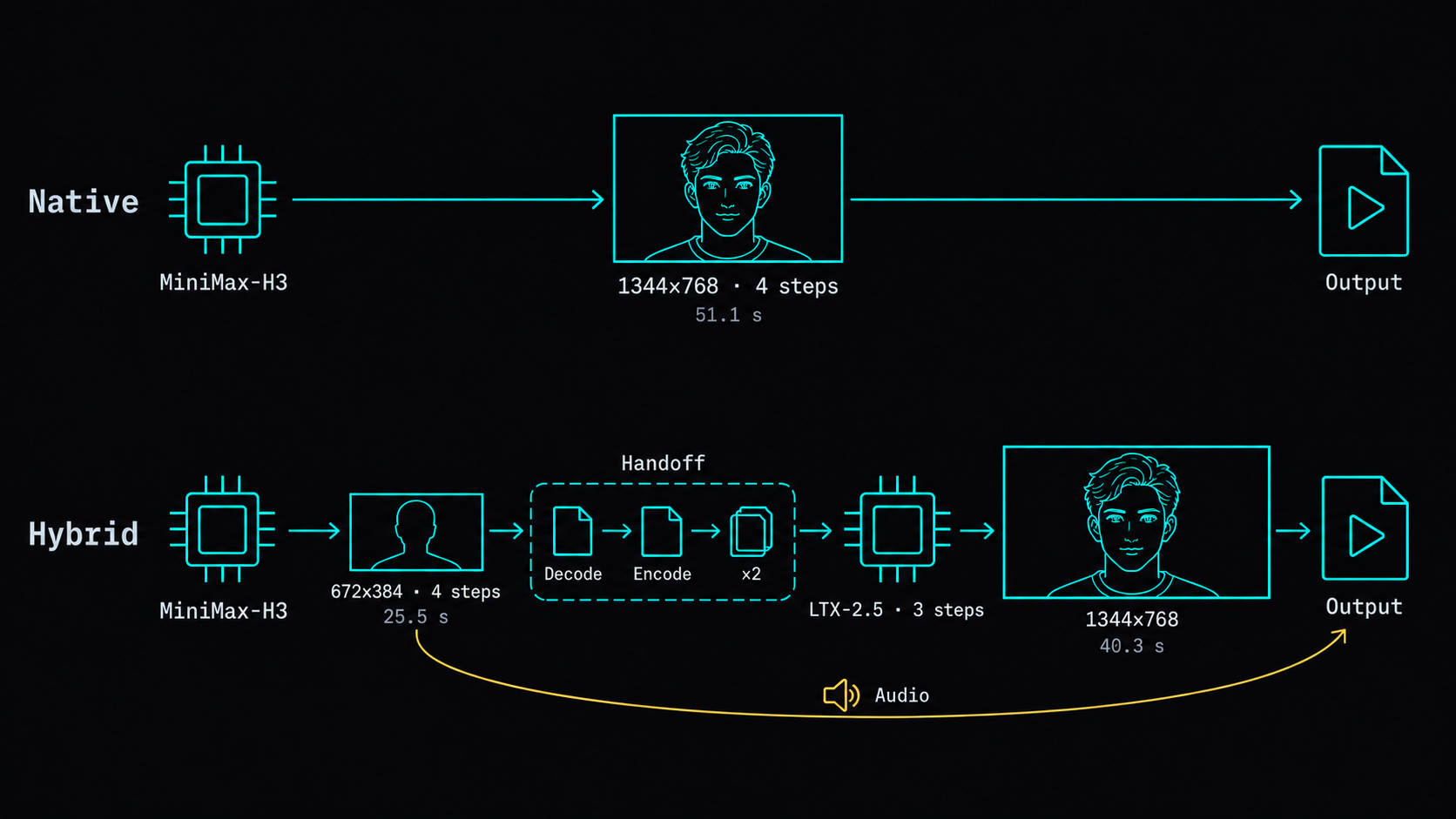
Three things about that diagram are not obvious.
Resolution only changes after the handoff. H3 never touches 1344×768 in the hybrid path — the upscale happens in LTX's latent space, on LTX's terms.
Audio never enters stage 2. H3 generates video and audio in one forward pass, so the track is done at draft stage and is muxed into the MP4 at the end. Simplified Chinese dialogue quality is H3's, and refinement cannot help or hurt it.
The two stages are two independent model stacks. Nothing is shared — not the transformer, not the VAE, not the text encoder. That matters for VRAM, and the memory numbers are in the deep dive.
Three nodes carry the handoff, and nine files sit behind them
The path adds three nodes to a working H3 workflow. MiniMaxH3SolEngineDraftToLTXT8Advanced trims H3's decoded frames to LTX's 8n+1 frame grid and centre-crops them to half the requested output size. MiniMaxH3SolEngineLTXIdentityRefinerSetupT8Advanced returns the model, sampler and sigmas for stage 2. LTXVLatentUpsampler is the official ×2 latent upsampler, unmodified.
The weights, by side:
H3 side
  minimax_h3_fl2va_pruned_nvfp4                 11.67 GiB
  qwen3vl_32b_heretic_minimax_h3_nvfp4          14.61 GiB
  minimax_h3_video_vae_fp16                      4.85 GiB
  minimax_h3_audio_vae_fp32                      0.56 GiB
  minimax_h3_fl2v_turbo_4step_v0.1_768p_sla      1.82 GiB

LTX side
  ltx-2.5-22b-distilled-transformer-int8        20.03 GiB
  ltx-2.5-video-vae-conv-bf16                    1.35 GiB
  ltx-2.5-audio-vae-bf16                         0.34 GiB
  ltx-2.5-latent-spatial-upscaler-x2-bf16        0.93 GiB
The 4-step turbo LoRA on the H3 side is lightx2v's, not the FastVideo one NVIDIA used. That substitution and two others are in the deep dive.
Download the whole workflow
You don't have to wire any of this by hand. Here is the exact graph every number in this post came from — 33 nodes, renumbered, no internal paths in it:
⬇︎ minimax-h3-ltx-hybrid-refine.json
Drag it into ComfyUI and it expands. The prompt baked in is the one from the clip above; swap it for yours. ComfyUI flags any missing weight in red — look the filename up in the list above.
⚠️ This is the basic build: zero code, and without the text-encoder removal from the deep dive.
📌 The same pipeline on a DGX Spark goes from 1.28x to 1.89x over native, because its 121 GiB of unified memory holds both stages and stops the per-run reload: Two-stage on a DGX Spark.
The H3 half of the weights is packaged in one repo — both transformers, the text encoder, both VAEs and the 4-step turbo LoRAs, laid out as ComfyUI's models/ tree so one download gets you running: coolthor/MiniMax-H3-pruned-NVFP4. Both graphs live there too, under workflows/ — this one and the no-text-encoder variant from the deep dive. LTX-2.5 is not mirrored there; different license, so you fetch it from Lightricks.
1344×768 is forced: both latent grids have to come out 42×24
Two constraints pin the size. Output width and height must both be divisible by 32, which is a hard requirement of the LTX latent, and the draft must be exactly half the output in each dimension.
Work it through at 1344×768: 1344/32 = 42 and 768/32 = 24 on the LTX side, while the H3 side divides by 16, giving 672/16 = 42 and 384/16 = 24. Both latent grids are 42×24, which is what the handoff needs.
One consequence worth stating out loud: 1344×768 is 7:4, not 16:9. True 16:9 at height 768 would be 1365.33 px wide, which is not an integer and certainly not a multiple of 32.
The one number you have to change from NVIDIA's config is the stage-2 sigma
The sigma schedule tells the sampler how much noise it should assume is still in the latent. A high first sigma means "treat this as mostly noise", which gives the refiner licence to repaint rather than sharpen. NVIDIA's configs/default.json hardcodes the stage-2 schedule at [0.909375, 0.725, 0.421875, 0], and on the ComfyUI decode-then-re-encode path that breaks.
To measure it I picked a window in the background — pure background, nothing in the scene moves it, so any shift is an artifact — and counted the frames where that region scaled by 1 px or more, out of 120 frame transitions. Read the right-hand column as "how often the geometry twitched":
| First sigma | Frames the background moved |
|---|---|
| no refine | 0 |
| 0.5 (official identity preset) | 1 |
| 0.78 | 2 |
| 0.85 | 6 |
| 0.909 | 11 |
0.65 also came in at 1, so the usable range is wider than the table suggests. What the table shows is that degradation is not linear — it is a cliff between 0.78 and 0.85.
The frame count is the machine-readable symptom; the visible one is worse. At 0.909 the refiner swaps the face outright, repainting the features into a different person and dropping the necklace entirely. At 0.85 it starts leaking: the necklace changes from a square pendant to a heart. 0.78 kills both problems, and it was the fastest of the six settings I ran.
T8mars's identity refiner node has a manual_exp mode. Enter:
0.78, 0.643, 0.546, 0
The upscaler can't invent detail, so it belongs last
Here is the same 672×384 draft with two different finishes. This is the draft, as it comes out of H3 in 25.5 s:
The 672×384 draft on its own, 25.5 s. Everything below starts from this file.
Send it through VSR and the canvas reaches 1344×768. The face goes from 175×161 to 350×323 effective pixels, which sounds like the job is done. It isn't: not one eyelash is new. Interpolation spreads the pixels that already exist over a larger grid, and that is all it can do.
LTX's 3 refinement steps run the generator again at full resolution, with the draft as the starting point rather than noise. Hair strands, tooth edges, skin texture — none of that is in the draft, and after the refine it is there. The difference isn't learned versus not learned. It's whether a generator gets a second pass.
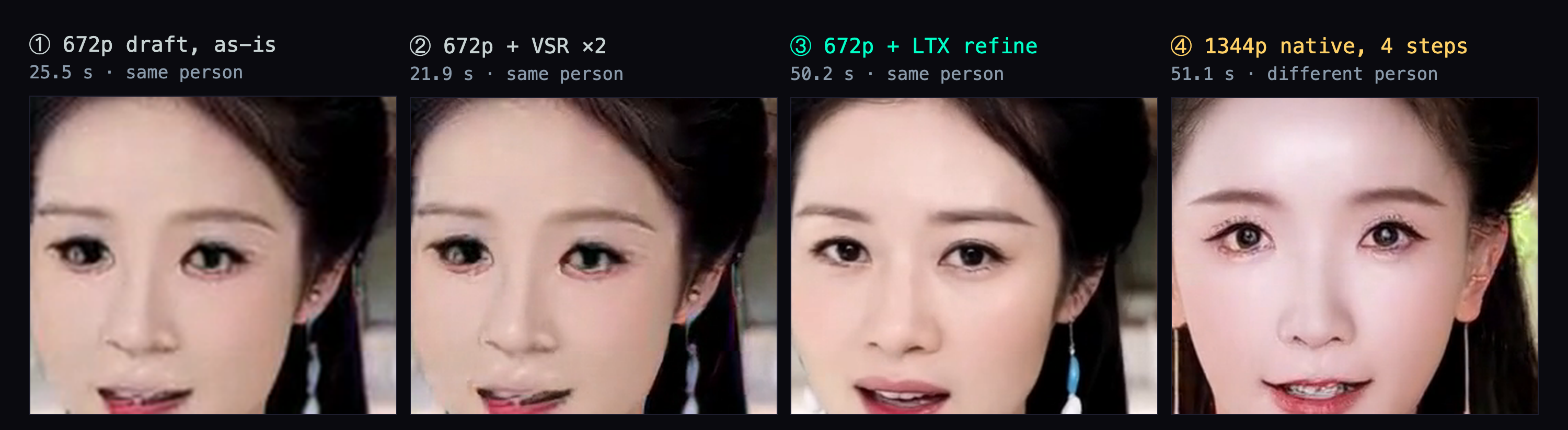
And that is the placement argument, not an argument against VSR. It is a cheap, driver-level upscaler that cannot add information; run it where there is information to spread, which is after the refine, not instead of it.
One draft, many finishes: the saving is in the takes you throw away
The single-shot comparison is the least interesting number here. Cold — models unloaded before each run — the hybrid path takes 40.3 s and native 4-step H3 at 1344×768 takes 51.5 s. An 11 s gap on one clip is not a reason to rewire a workflow.
The reason is that nobody ships the first take. The draft on its own costs 25.5 s, which means you can roll ten of them and only pay full price on the one you keep:
hybrid:  10 × 25.5 (roll drafts) + 50.2 (refine the keeper)  ≈ 305 s
native:  10 × 51.1                                            ≈ 511 s
That is arithmetic, not a measurement. I measured the three components separately and added them; I did not sit through a ten-take session on either arm.
The part that is not arithmetic is identity. Every finishing option in the hybrid path reads the same draft file, so they are necessarily the same person — that is why panels 1, 2 and 3 of Figure 3 match. Native has no such guarantee: changing the resolution changes the latent shape, which changes the noise, which gives you a different face for the same seed. The person you approved at 672p is not the person you get at 1344p.
Native MiniMax-H3, 4 steps at 1344×768, 51.1 s. Same scene as the draft above, and a different woman — this is panel 4 of Figure 3.
So the hybrid path splits "which person" and "how detailed" into two decisions you make separately. Native welds them into one dice roll, and you re-roll both every time you change your mind about either.
Bonus: VSR after the refine buys 2688×1536 for 9.4 s
This is not part of the core path — the method above is complete without it. But since VSR is sitting right there, and it now has real detail to work with:
Hybrid output run through VSR afterwards: 2688×1536, 49.7 s total.
49.7 s for 2688×1536, which is 9.4 s over the 40.3 s hybrid for 4× the pixels.
Deep dive: most of the hybrid's cost is loading, not sampling
You can run the workflow without reading this section; everything above stands on its own. What follows is where the seconds go, what I cut, and the three places I deliberately diverged from NVIDIA's recipe.
Gemma is 15.37 GiB of one constant string, and removing it saves 7.85 s
Stage 2 takes conditioning from a text encoder, which on a normal LTX workflow is reasonable. On this one it is not, because the stage-2 conditioning is a single constant string:
4K, refined, high quality, cinematic detail, clean textures, natural motion.
Positive and negative are both wired to the same node output. Nothing varies per scene, per prompt or per seed — and loading gemma4-12b-with-proj-ltx-2.5-comfy-int8-convrot to produce it costs 15.37 GiB of residency on every single run.
NVIDIA never had this problem. Their config carries "online_text_encoder": false, because their pipeline precomputes the stage-2 conditioning once. The ComfyUI implementation has no such layer, so I added the cheap version of one: a small save/load-conditioning node pair that writes the tensor to disk once and reads it back thereafter.
| Cold run | |
|---|---|
| with Gemma | 48.114 s |
| without Gemma | 40.260 s |
| saved | 7.854 s (16.3%) |
Generating the cache costs 55.185 s, once, ever.
The output is not merely similar. Frame by frame, 121 of 121 frames are identical. The comparison was sanity-checked both ways. Baseline against itself returned "identical", so it can report a match; a different seed against the baseline returned "all 121 frames differ", so it catches one when there is one.
4× the pixels costs 2× the time, not 4×
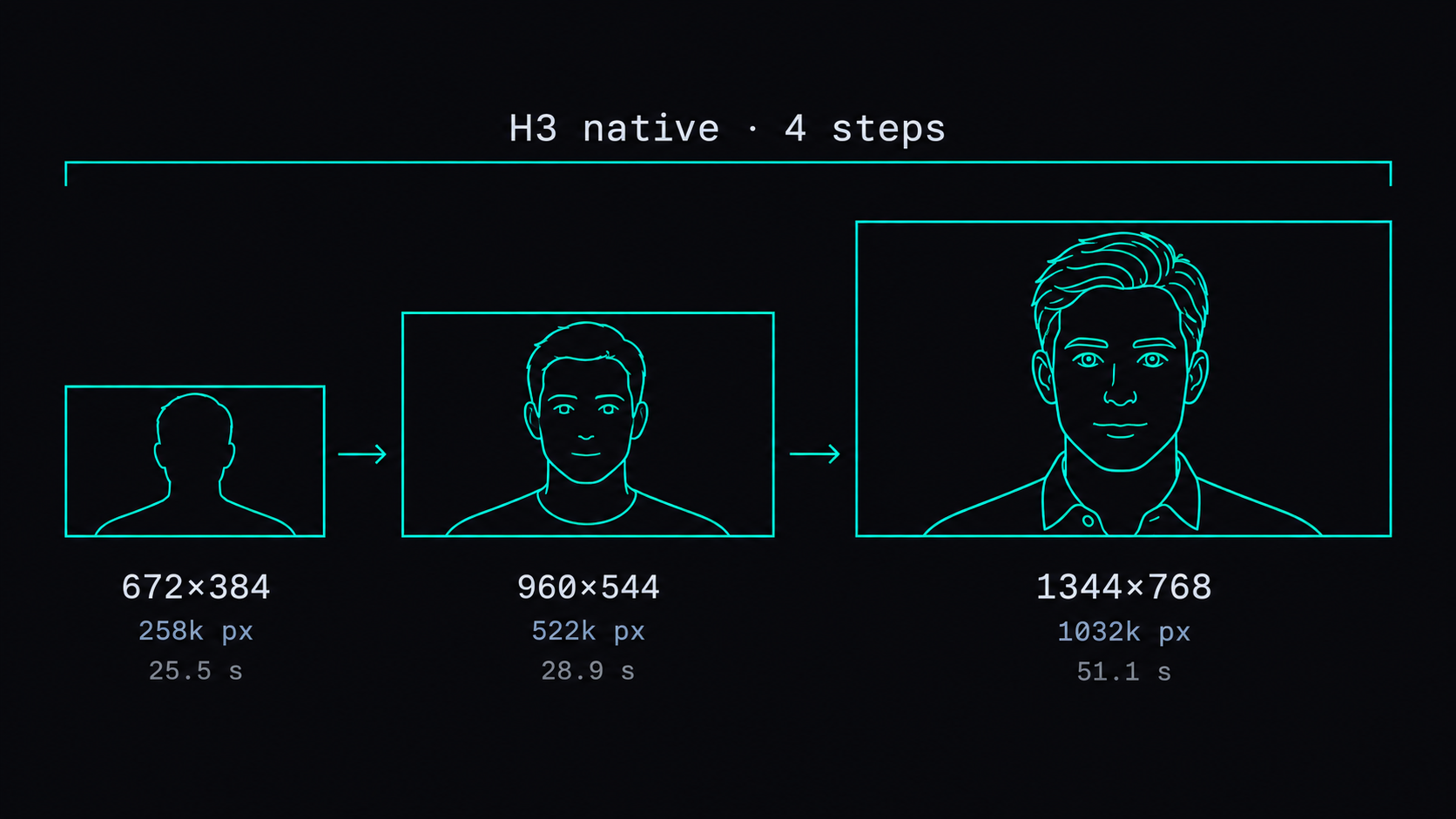
Pure H3 generation, no upscale, 4 steps, three resolutions:
| Resolution | Pixels | 4 steps |
|---|---|---|
| 672×384 | 258k | 25.5 s |
| 960×544 | 522k | 28.9 s |
| 1344×768 | 1032k | 51.1 s |
Attention is quadratic in sequence length, so the naive expectation is that 4× the pixels costs a lot more than 4× the time. It costs 2×. In this size range the fixed costs — model loading, VAE, encode — are still large enough relative to sampling to flatten the curve.
That cuts against the hybrid path as much as for it. Drafting at a quarter of the pixels saves half the time, not three quarters, which is exactly why the single-shot gap is 11 s rather than the 30 s you would guess from the pixel counts.
Two stacks need 56.2 GiB and the card has 31.84 GiB
Add up what has to be resident and the hybrid path wants 71.5 GiB with Gemma, 56.2 GiB without. A 32 GB RTX 5090 offers 31.84 GiB usable. That is 2.25× over with Gemma and 1.76× over without.
Stage 1 alone is 33.5 GiB, which does not fit either — so ComfyUI is already swapping the text encoder out within the H3 stage before stage 2 is even in the picture. Adding a second stack does not introduce swapping; it adds another round of it.
The cost shows up when you compare cold runs (models freed beforehand) against warm ones (nothing freed, only the seed changed):
| Cold | Warm | Loading | |
|---|---|---|---|
| hybrid, with Gemma | 48.1 s | 32.2 s | 15.9 s |
| native, 4 steps | 51.5 s | 41.5 s | 10.0 s |
The hybrid path loses 5.9 s more to loading than native does, because it loads two stacks instead of one. Take loading out of both and hybrid is 27% faster than native, against the 6.6% it manages cold.
⚠️ The warm numbers are optimistic and the two arms are not strictly comparable: the warm runs reported execution_cached node counts of 18 and 10, so they skipped different amounts of work. Only the relative comparison — hybrid pays more for loading — survives that. Treat the absolute warm figures as a ceiling on what a persistent-model setup would give you, not as a measurement of one.
Three deliberate departures from NVIDIA's recipe
Stage 2 runs the distilled int8 checkpoint, not the official dev BF16. 22B in BF16 is roughly 44 GB and does not fit on this card. ltx-2.5-22b-distilled-transformer-int8-convrot is equivalent to dev with the distill LoRA merged in, which means it is effectively strength 1.0 where the official recipe uses 0.8.
The draft LoRA is lightx2v's minimax_h3_fl2v_turbo_4step_v0.1_768p_sla, not the official FastVideo VSA DataFree one. The FastVideo LoRA is meant to pair with VSA sparse attention, and there is no VSA path on a 5090.
There is no H3→LTX latent adapter in my chain. NVIDIA has a learned one, H3-to-LTX-Latent-Adapter, 389 MB, which maps H3 latents straight into LTX space and skips both a decode and an encode. I wrapped it as a ComfyUI node and ran it: every tensor shape lined up and the conversion itself takes 0.177 s. Total time on the 5090 did not improve, because the VAE round trip it removes is offset by the H3 latent upsampler it adds. It is a real win for memory — one fewer VAE encoder resident — just not on a card that swaps models every run anyway.
Every second came from ComfyUI /history, and I ignore gaps under 4 s
All timings are execution_success minus execution_start from the ComfyUI /history endpoint, divided by 1000. Every run was checked for execution_cached.nodes being empty (cold) or had its length recorded (warm). Cold runs were preceded by:
curl -X POST http://<your-comfy-host>:8188/free \
  -H 'Content-Type: application/json' \
  -d '{"unload_models":true,"free_memory":true}'
Run-to-run jitter in the same batch measured at about 4 s. The clearest evidence is a pair that should have gone the other way: the 672p native run took 25.5 s while the same run with VSR added took 21.9 s, and VSR can only add time. So I don't draw conclusions from gaps under 4 s. That is also why I read the 51.5 s native figure in the single-shot comparison and the 51.1 s in the resolution table as the same measurement.
Also in this series: Part 2 — Real-ESRGAN 109 s to RTX VSR 11.2 s · Part 7 — LTX-2.5 vs MiniMax-H3 on one card
FAQ
- What sigma schedule should the LTX-2.5 refinement stage use in ComfyUI?
- 0.78, 0.643, 0.546, 0 — entered through manual_exp on T8mars's identity refiner node. NVIDIA's configs/default.json hardcodes 0.909375, 0.725, 0.421875, 0, which assumes the H3 latent is handed to LTX directly. On the ComfyUI path the latent is decoded to RGB and re-encoded with LTX's VAE first, and at 0.909 the refiner repaints the face into a different person. Measured on a pure-background window region across 120 frame transitions: 0.909 moved it in 11 frames, 0.85 in 6, 0.78 in 2, the official 0.5 identity preset in 1. 0.78 was also the fastest of the six settings I tried.
- Why does the face change when I raise MiniMax-H3's output resolution?
- Changing resolution changes the latent shape, which changes the noise tensor, which gives you a different person for the same seed and prompt. That is the structural argument for drafting once and refining afterwards: every finishing option — as-is, upscaled, refined — reads the same 672×384 draft, so they are necessarily the same person. Running H3 natively at 1344×768 rolls the dice again, and the face you approved at 672p is gone.
- Does the LTX-2.5 refinement stage damage the Chinese dialogue or the audio?
- No, because the audio never enters stage 2. MiniMax-H3 generates video and audio in one forward pass, so the track is finished at draft stage and is muxed into the MP4 at the end. Whatever H3 gives you for Simplified Chinese dialogue at 672×384 is exactly what ships. Only the picture goes through LTX.
- Can I use RTX VSR instead of the LTX-2.5 refine step?
- Not as a replacement. VSR is a learned upscaler, not a resampler, but everything it produces has to be inferred from the low-res input. In my clip it took the 672×384 draft to 1344×768 — the face went from 175×161 to 350×323 effective pixels — and no new detail showed up. LTX's 3 refinement steps run the generator again at full resolution with the draft as a starting point, so hair strands, tooth edges and skin texture that were never in the draft can appear. VSR is still useful after the refine, where it has real detail to enlarge: 2688×1536 costs 49.7 s, only 9.4 s more than the 40.3 s hybrid.
- Which output sizes work for the H3 draft plus LTX refine path?
- Output width and height must both be divisible by 32, and the draft must be exactly half the output. 1344×768 satisfies both: 1344/32 = 42 and 768/32 = 24 on the LTX side, 672/16 = 42 and 384/16 = 24 on the H3 side, so both latent grids come out 42×24. Note that 1344×768 is 7:4, not 16:9 — true 16:9 at height 768 would be 1365.33 px wide, which is not an integer, let alone a multiple of 32.
Read next
- 2026-09-11[Benchmark] LTX-2.5 vs MiniMax-H3 on one RTX 5090: 29s vs 81s for the same Chinese dialogue clip
LTX-2.5 and MiniMax-H3 on one RTX 5090, same Simplified Chinese line: 28.67s vs 81.22s end to end, both at CER 0%. Files, params, VRAM ceiling.
- 2026-10-25[MiniMax-H3] A storyboard image isn't a prompt: getting local H3 to hit 13 of 16 shots
A 4x4 storyboard plus a character sheet into MiniMax-H3 Ref2VA on an RTX 5090: one sentence hit 3/16 panels, an official-format shot timeline hit 13/16.
- 2026-10-19Turn a real dance into a depth video and have MiniMax-H3 restage it in a palace: native 768 on one RTX 5090
Real dance to grey depth video to MiniMax-H3 Ref2VA with a first-frame guide: a new character dances the routine in a palace, native 768x1376 on one RTX 5090.
- 2026-10-18A 25-second no-fog FPV one-take with MiniMax-H3 and ComfyUI-H3-Continuum on one RTX 5090
A 25-second FPV one-take over Taiwan with no fog: MiniMax-H3 Ref2VA and ComfyUI-H3-Continuum on one RTX 5090, each splice hidden in a turn through the sky.
Don't miss the next one
Subscribe, and you won't.
One-click unsubscribe anytime.