MiniMax-H3 on RTX 5090 · part 13
[MiniMax-H3] A storyboard image isn't a prompt: getting local H3 to hit 13 of 16 shots
❯ cat --toc
- Intro: the Seedance storyboard trick, tried on a local model
- What you need: a storyboard, a character sheet and a text timeline
- Step 1: Generate a storyboard with notes on every panel
- Step 2: Make the character sheet from the storyboard so it's the same person
- Step 3: Rewrite the board as a per-panel timeline in MiniMax's shot-table format
- Step 4: Wire Ref2VA with the board as Picture 1 and the sheet as Picture 2
- What doesn't work: one sentence, and relying on the board's text
- Deep dive: seven runs, the reasoning behind the recipe, and two gotchas
- Full results: the timeline decides the score, the board decides the look
- Why one sentence fails: H3 has no way to split a grid into 16 moments
- S2 and S4: a written timeline gets most of the way there
- S6 vs S4: the official format fixed the crouch, the order and the sword state
- S5c: cutting panels out and feeding them per chunk with Continuum
- Two gotchas that cost me runs
- Limits of this test
TL;DR
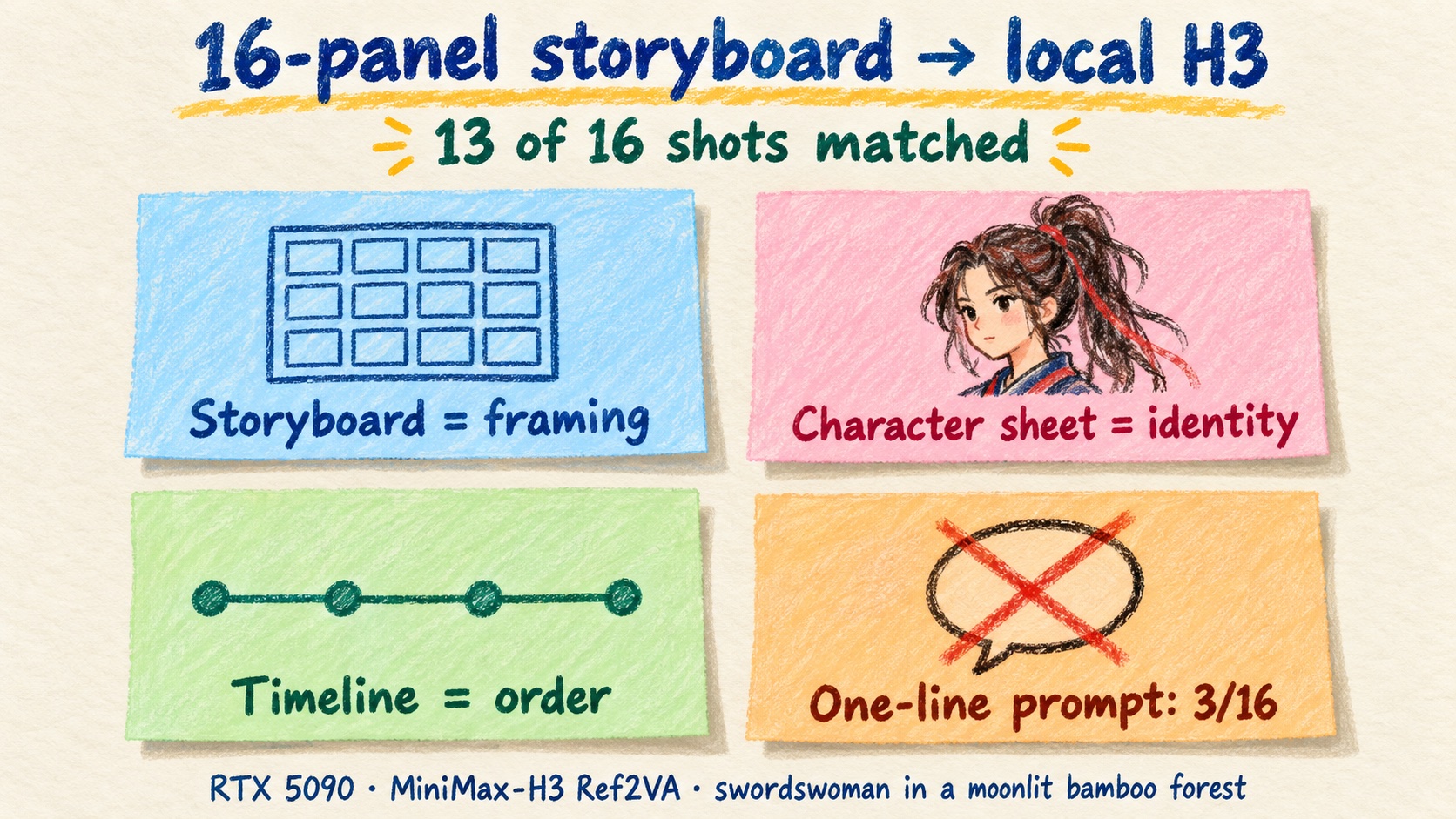
A 4×4 storyboard can drive local MiniMax-H3 Ref2VA on one RTX 5090. Board as Picture 1, character sheet as Picture 2, and a per-panel timeline in MiniMax's official shot-table format: the 10-second video matched 13/16 panels in about 340 s. The one-sentence prompt that works on Seedance scored 2–3/16. H3 reads the whole grid as one reference image. It takes face, wardrobe and palette from it, not timing, so the text has to set the order. Caveat: one seed, one story.
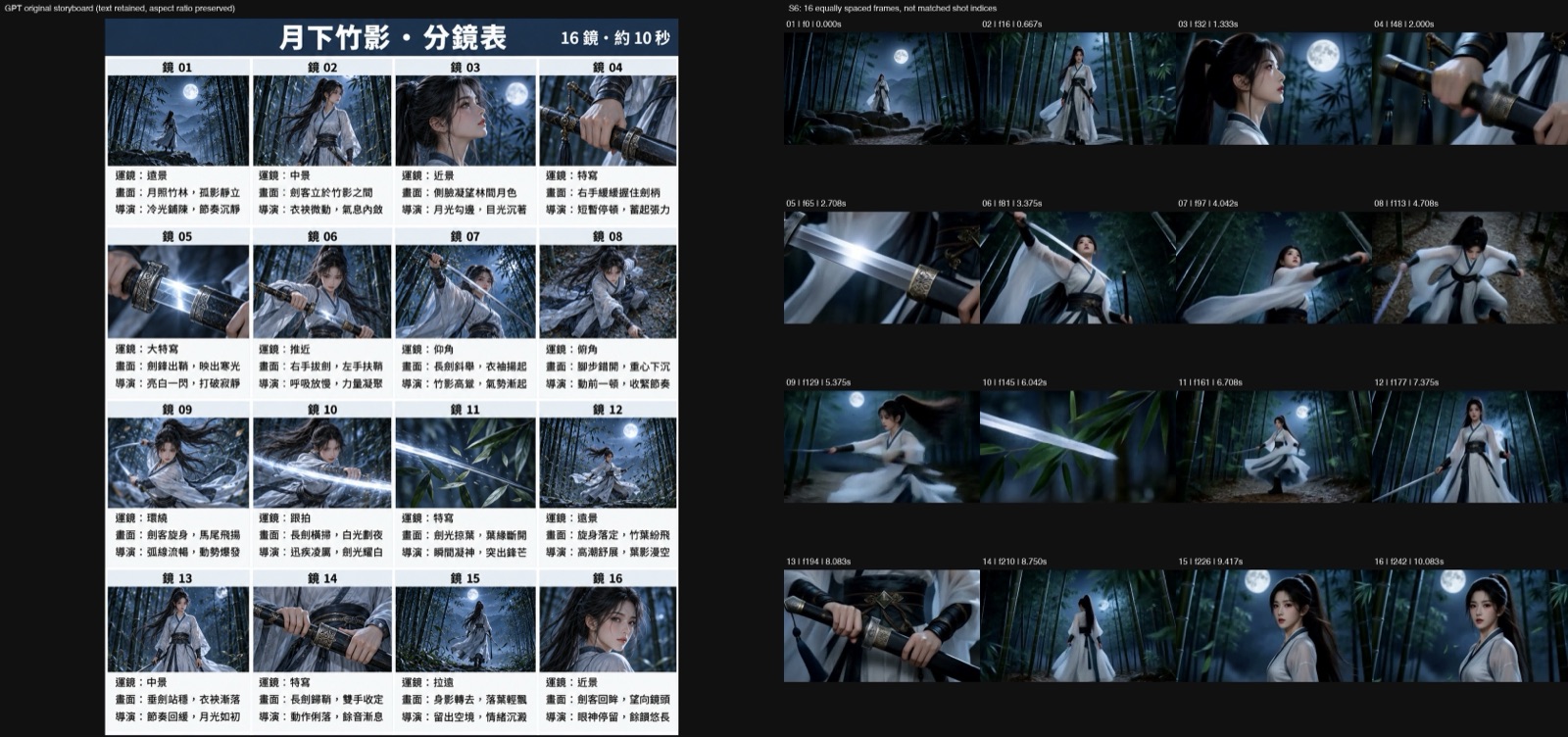
Run S6: a 16-panel ChatGPT storyboard, a character sheet and a per-panel timeline in MiniMax's shot-table format. 1344×768, 24 fps, 10.125 s with H3's own audio, one RTX 5090. 13 of 16 panels match
Intro: the Seedance storyboard trick, tried on a local model
An Instagram creator posted a workflow I wanted to copy. He had GPT Image 2 draw a 16-panel storyboard, and every panel had a camera move, a shot description and a director's note. Then he wrote a one-sentence video prompt and fed the board to Seedance 2.0's "omni reference" mode online. The video followed the storyboard. He added two tips: give the character its own reference image, because the panels are too small, and don't pick the first/last-frame mode.
My question was simple. Can MiniMax-H3 Ref2VA, running on my own RTX 5090, do the same thing for free? In Part 6 I fed Ref2VA two reference images to get two characters in one shot. Here one of the two images is a whole storyboard.
My guess going in was that omni reference probably turns the storyboard into a text description on the server. If so, writing that description myself, in the format MiniMax documents for H3, should do at least as well. I never tested Seedance itself, so that part stays a guess. On H3, one sentence got 2 or 3 panels out of 16. The written-out timeline got 13.
Below is the workflow first, then what doesn't work. The deep dive after that has all seven runs.
What you need: a storyboard, a character sheet and a text timeline
Each input has one job:
- Storyboard image → framing and poses for each shot.
- Character sheet → the face and costume, kept the same in every shot.
- Text timeline → the order, the timing and what state the props are in (sword drawn or sheathed).
The test story: an adult swordswoman in a moonlit bamboo forest, 16 shots in 10 seconds. She stands still, draws her sword, spins, sweeps the glowing blade through the bamboo leaves, sheathes it and looks back.
Every run used the same setup (S5c, the chunked run, differs: Continuum, 288 frames, 12.0 s, 378.5 s): ComfyUI on the RTX 5090, the H3 Ref2VA nvfp4 checkpoint, the qwen3vl 32B nvfp4 AWQ text encoder, 14 steps of res_multistep / simple, video/audio shift 12/3, seed 20261025, 1344×768 at 24 fps, 243 frames. That's 10.125 s with audio. One run takes about 300 to 340 s in ComfyUI.
Step 1: Generate a storyboard with notes on every panel
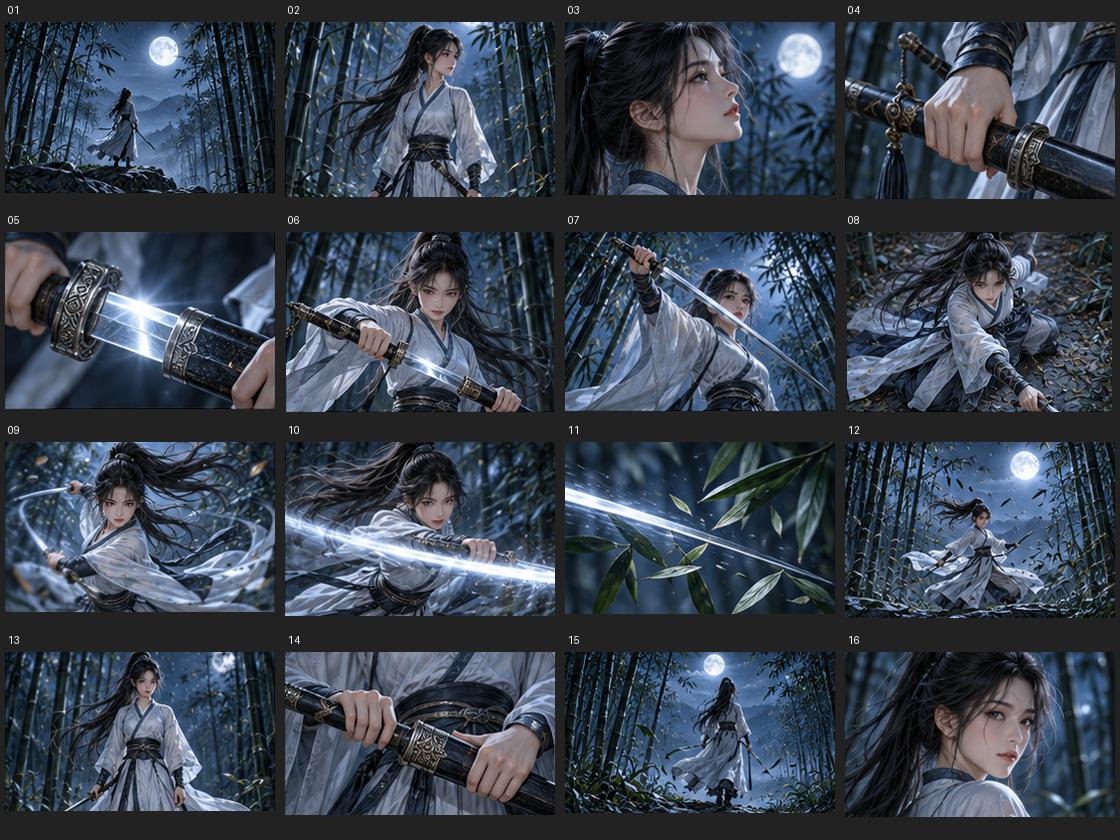
I made the board with ChatGPT's image model. It's a 4×4 grid at 1122×1402. Each panel has a number on top and three lines of Traditional Chinese underneath: camera, shot and director's note. All of it came out readable.
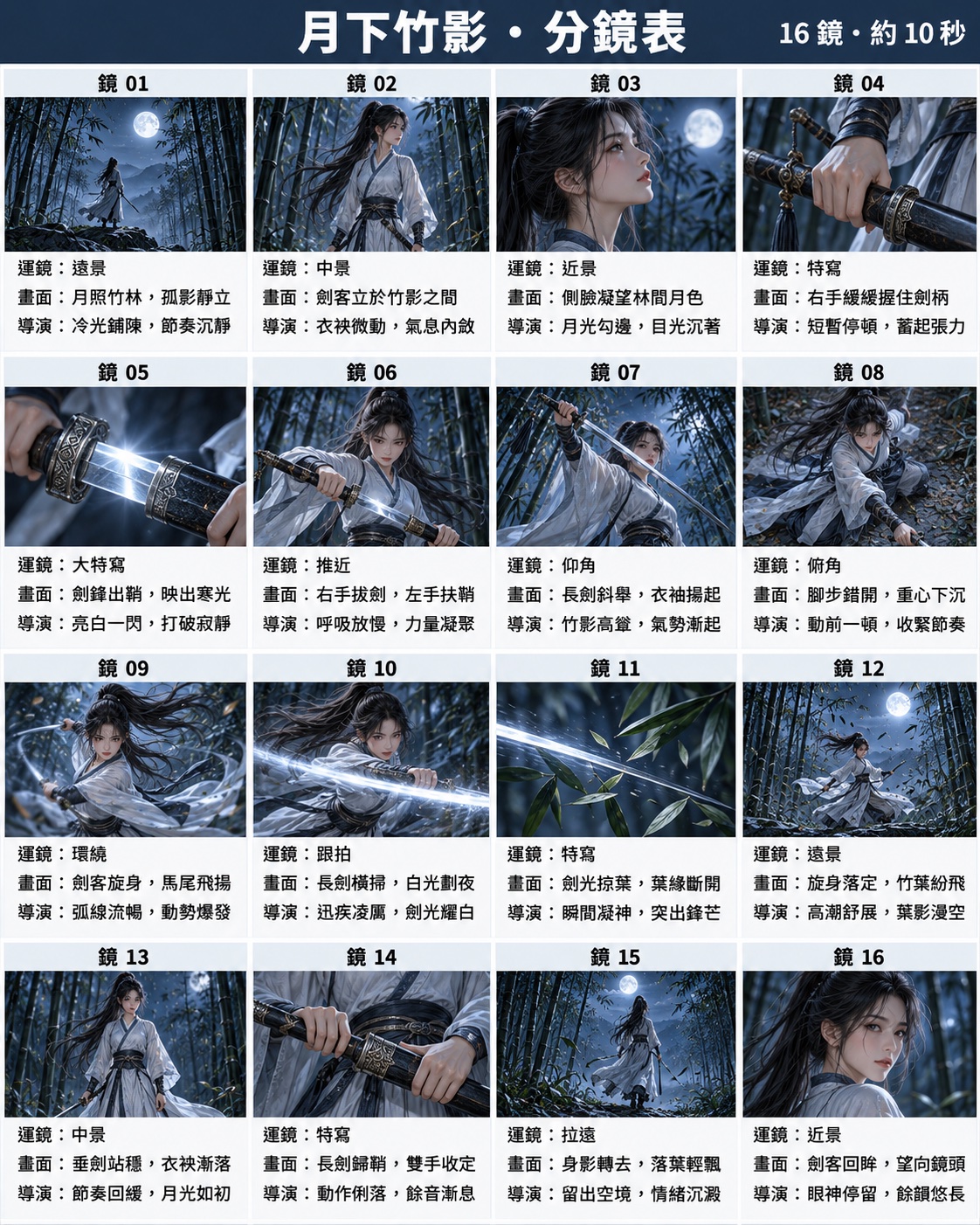
My prompt was in Chinese. In English it asked for:
- A portrait storyboard sheet, 4 rows × 4 columns, 16 panels, each panel 16:9, thin white gutters.
- "Shot 01" to "Shot 16" above each panel, and three lines below:
Camera:with one term (wide, medium, close-up, push in, orbit, low angle, tracking and so on),Shot:with one sentence of action,Director:with one note on pacing, light or mood. - A story arc: panels 1–4 establish the scene, 5–8 the draw, 9–12 the spin and blade-light climax, 13–16 sheathing and the look back. No three panels in a row at the same shot size.
- The same face and outfit in every panel, and no text inside the picture areas.
You don't need to copy any of my prompts word for word. Any board with clear framing in each panel works. I also made a board with Qwen-Image 2.1 locally (2048×2048, only panel numbers and one camera word each). It worked as well in the right setup, as the deep dive shows.
Step 2: Make the character sheet from the storyboard so it's the same person
H3 resizes reference images with ref_image_size=match. A square board shrinks to about 1024×1024, so each panel ends up around 256×256. A face that small doesn't hold up. The character needs her own image.
I generated the sheet with the storyboard as the reference image, so it's the same woman: front, three-quarter and back views, a face close-up, the props (sword and scabbard, sash, hair tie) and a color palette. It's 1672×941.
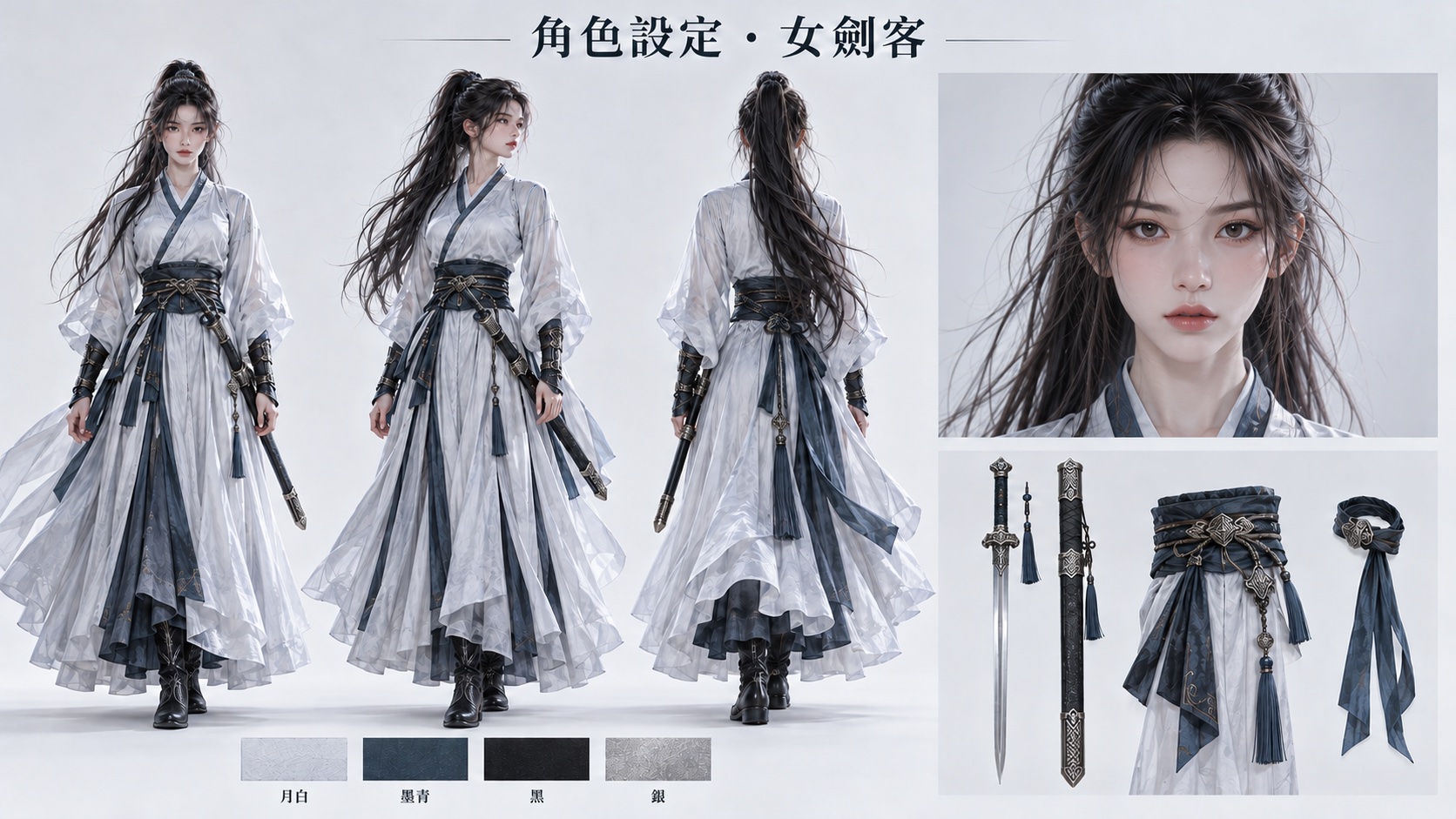
In every run with a character sheet, her overall look and costume held, with some variation in facial detail. The run with no reference images changed her face and hair.
Step 3: Rewrite the board as a per-panel timeline in MiniMax's shot-table format
This is the step that matters most. MiniMax's own H3 repo has a skill for short animations, and its shot-table spec says the text storyboard is the authoritative one. Storyboard images there are one per shot, one panel per second, and they're mainly for a human to review.
So the board stays as a reference, and the text carries the plan. Per the spec, each shot gets:
- Five per-second directives: action, pose and expression; camera move; spatial position; audio cue; and the handoff to the next second.
- A continuity handoff: what carries over from the previous shot and into the next one.
- Reference anchors: fixed landmarks, character positions and facing, and the lighting baseline.
The prompt that went to H3 starts with sections that tie the images to roles, then one timestamped line per panel. An excerpt from the S6 prompt (again, you don't need to copy the exact wording):
<Picture 1> is the original four-by-four storyboard sheet: its sixteen panels,
read row by row, map in order to [Shot 1] through [Shot 16], specifying
composition, action, camera viewpoint and shot order. <Picture 2> supplies
only the identity reference of <Subject 1>.

[Shot 1] Wide static shot of <Subject 1>, the adult ponytailed swordswoman in
moon-white robes, standing still on a rocky outcrop amidst <Subject 2>, the
bamboo forest, under a full moon. The camera holds a static shot. Figure
centered on rocks, bamboo forest surrounds, moon above. At the handoff, the
woman remains still with her sheathed sword at her waist.
[Shot 2] At 00:00.633, the camera cuts to Medium shot of <Subject 1> standing
between bamboo stalks, her robes slightly moving in the breeze. ...
Note the handoff at the end of each line. It says what the prop state is going into the next shot. In S6, the sampled frames after the sheathing panel kept the sword in its scabbard.
I didn't write all 16 by hand. A local vision model on my ai-lab box read the ChatGPT board, plus four enlarged crops of the rows, and drafted the directives, handoffs and anchors. The first pass took 79.8 s, but it translated the Chinese notes into English and skipped fields. A second pass fixed that. Then I edited by hand: left/right-hand wording, a front medium shot for panel 6, the crouch in panel 8, "sheathed or lowered" in panel 13 changed to a lowered bare blade, and "disappears" in panel 15 changed to her back still in frame. So this step is not fully automatic. Set aside a few minutes to read it over.
Step 4: Wire Ref2VA with the board as Picture 1 and the sheet as Picture 2
The graph is the standard H3 Ref2VA graph with two LoadImage nodes. The board goes into the first reference slot, the character sheet into the second. In the prompt, the first slot is <Picture 1> and the second is <Picture 2>.
If you submit through the API, use top-level dotted keys for the references. This is the relevant node from my S6 workflow:
"6": {
  "class_type": "MiniMaxH3ReferenceToVideo",
  "inputs": {
    "width": 1344, "height": 768, "length": 243,
    "ref_image_size": "match",
    "ref_images.ref_image_0": ["20", 0],
    "ref_images.ref_image_1": ["21", 0]
  }
}
Node 20 loads the storyboard, node 21 loads the character sheet. A nested ref_images dict is silently ignored. The deep dive has the details.
On the RTX 5090 the S6 run took 339.9 s.
What doesn't work: one sentence, and relying on the board's text
The one-sentence prompt fails on H3. I used the same sentence for both boards. In English it says: follow the 16 shots of storyboard Picture 1, left to right and top to bottom, with their camera moves, and film one continuous short of the swordswoman drawing, spinning, sweeping blade light through the leaves, sheathing and looking back, with her look taken from Picture 2.
A panel counts below only if its main framing and action appear in a compatible order. Partial matches don't count. Look at the bottom row: same board, same sheet, same seed. Only the text changes.
| Run | Text prompt | Panels matched |
|---|---|---|
| S3 | One sentence | 3/16 |
| S4 | Per-panel timeline copied from the board | 12/16 |
| S6 | Per-panel timeline in the official shot-table format | 13/16 |
With the one-sentence prompt, she keeps spinning while the framing barely changes. There's no opening wide shot, and she never sheathes or looks back. The readable text on the ChatGPT board didn't help either. The Qwen board, with almost no text, scored 2/16 with the same sentence.
Same storyboard, character sheet and seed. Left: S3, one sentence (3/16). Right: S6, per-panel timeline in MiniMax's official format (13/16). Silent
Two more limits:
- Panel 12, the leaf-storm climax, was missing in every run except S5c. Only the chunked run got leaves drifting around her.
- 16 panels in 10.125 s is 0.63 s per panel. MiniMax's music-video skill stitches shots of 2 to 5 s. I squeezed it on purpose. With fewer panels you have more room.
Deep dive: seven runs, the reasoning behind the recipe, and two gotchas
You don't need this section to use the workflow. It has the full data, per-panel notes and the mistakes that cost me runs, for anyone (or any AI) adapting the setup.
All runs use the setup in "What you need" above. Seed 20261025, n=1 per condition.
Full results: the timeline decides the score, the board decides the look
| Run | Inputs | Panels matched | ComfyUI time |
|---|---|---|---|
| S0 | Text timeline only, no reference images | 12/16 | 301.5 s |
| S1 | Qwen board + Qwen character sheet, one sentence | 2/16 | 326.3 s |
| S2 | Qwen board + sheet + full timeline | 14/16 | 332.7 s |
| S3 | ChatGPT board + ChatGPT sheet, one sentence (same as S1) | 3/16 | 324.3 s |
| S4 | ChatGPT board + sheet + per-panel timeline copied from the board | 12/16 | 325.7 s |
| S5c | 8 key panels cut out + sheet, Continuum 3 × 4 s chunks, "Per chunk" | 13/16 | 378.5 s (12.0 s video) |
| S6 | Same inputs as S4, prompt rewritten to the official shot-table spec | 13/16 | 339.9 s |
S0 to S2 use the Qwen board's 16 panels, and S3 to S6 use the ChatGPT board's 16 panels. They're different shot lists, so this isn't a strict ranking across the two groups. That's why the headline number is S6's 13/16, compared against S3 and S4 on the same board.
The character sheets were 1536×1536 (Qwen) and 1672×941 (ChatGPT). The ChatGPT sheet shows black boots. On the board the feet are mostly hidden by the robe.
S0 matters as a control. With no images at all, a good timeline already got 12/16. What it lost was identity: a different face and hair. So in this setup the board adds framing and look, the sheet adds identity, and most of the shot order comes from the text.
Why one sentence fails: H3 has no way to split a grid into 16 moments
H3 Ref2VA treats the whole storyboard as one reference image. In both one-sentence runs, it did not follow the 16-panel order. From the board it took the woman, the costume, the palette and a set of poses, and then it improvised the order.
In S1 and S3 the video circles through spins at a similar shot size. There's no establishing wide shot and no sheathe-and-look-back ending.
One thing H3 did get right in every run: it never copied the grid. No gutters, panel numbers or note text leaked into any frame, for either board.
Readable text on the board didn't help H3. S3, with the fully annotated ChatGPT board, scored 3/16. S1, with the Qwen board's numbers and single words, scored 2/16. The text did help one reader: the vision model that turned the ChatGPT board into the S6 timeline.
S2 and S4: a written timeline gets most of the way there
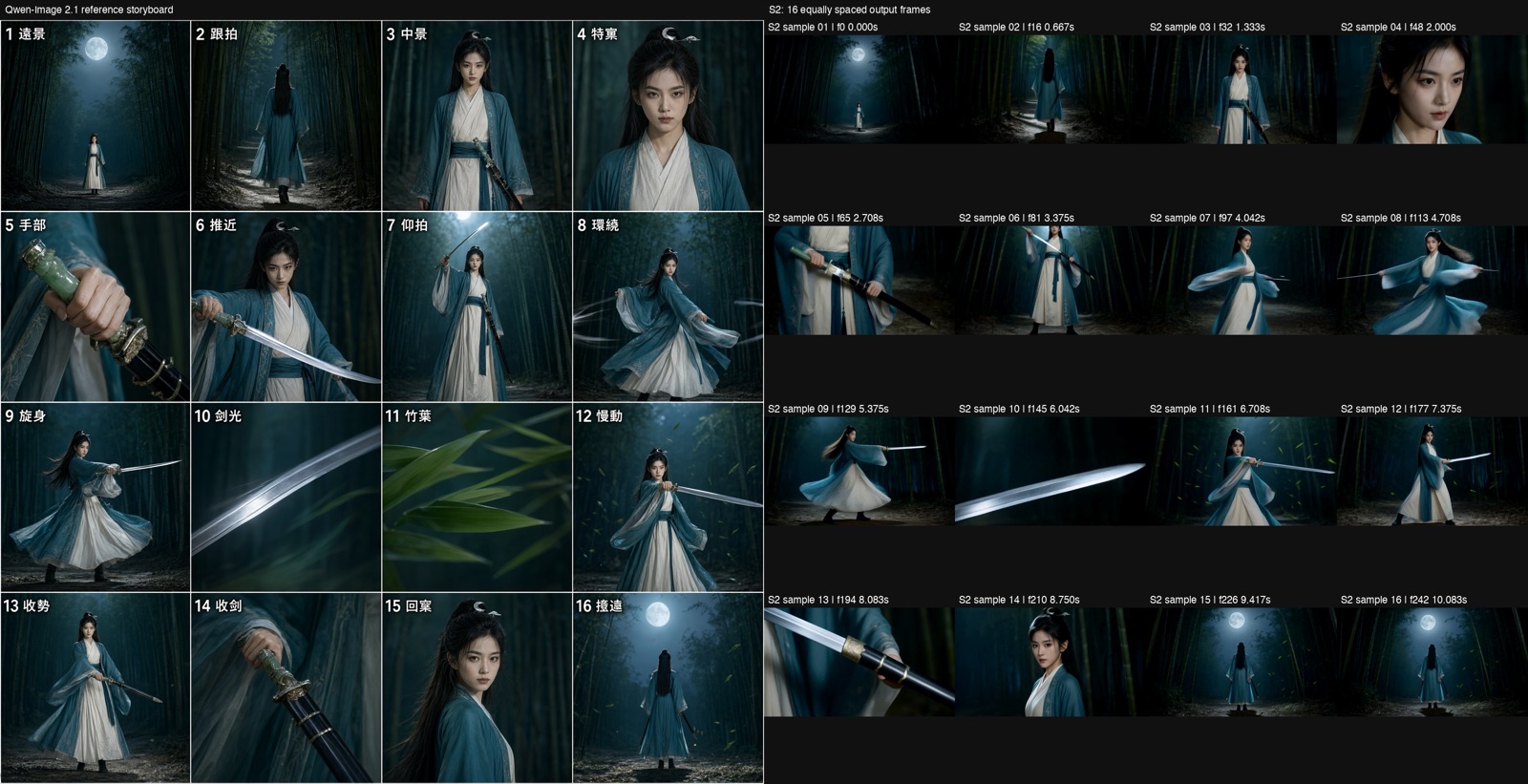
S2 (Qwen board + sheet + full timeline) got 14/16. In order, it hit the wide shot, the back-view tracking shot, the medium shot holding the scabbard, the face close-up, the hand on the hilt, the low-angle raised sword, the spin, the highlight on the blade, the macro on the bamboo leaves, the settle, the over-the-shoulder look back and the wide shot from behind. It missed panel 6 (side medium shot, half-drawn) and panel 14 (sheathing). In panel 14 the dark scabbard is there, but the bare blade gets longer, which reads as drawing, not sheathing.
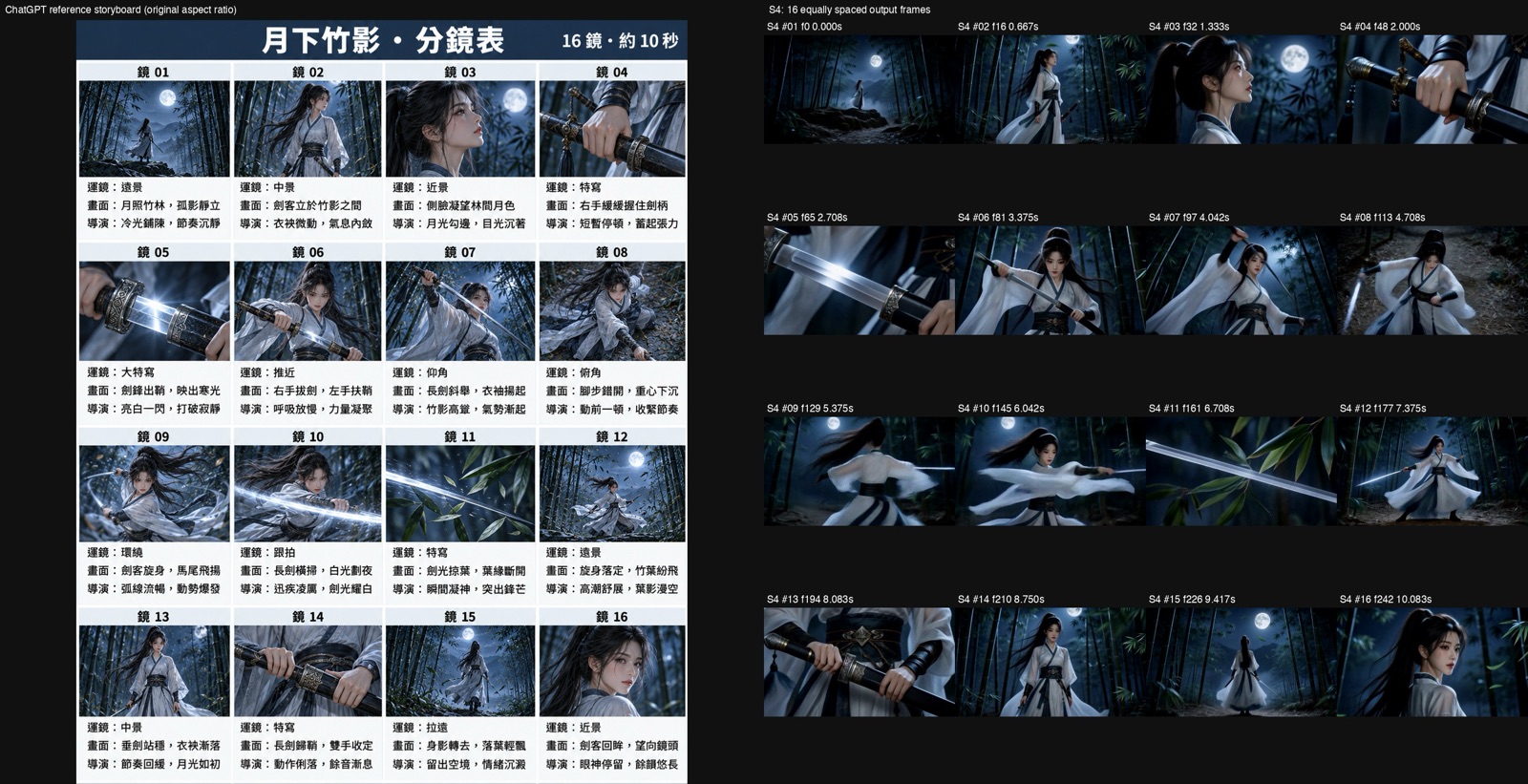
S4 (ChatGPT board + sheet + a per-panel timeline copied from the board's camera and shot lines) got 12/16. The first five panels all landed: wide shot, standing, profile, hand on hilt, extreme close-up of the blade leaving the scabbard. It missed:
- Panel 6: a front draw with the left hand on the scabbard.
- Panel 8: a high-angle shot of her lowering into a crouch.
- Panel 12: the leaf-storm climax.
- Panel 13: standing still with the blade lowered. It appeared after the sheathing shot, so the order was wrong.
S6 vs S4: the official format fixed the crouch, the order and the sword state
S6 used exactly S4's inputs. Only the prompt changed, from a copied timeline to the shot-table format with five-element directives, handoffs and anchors. Panel by panel:
- Panel 8, better. She crouches low with her legs staggered, and the boots are visible.
- Panel 13, better. She stands with the blade lowered before she sheathes. In S4 this came after.
- After sheathing, better. The bare blade doesn't come back. In panel 15 she's holding the dark scabbard.
- Panel 2, worse. The medium shot became a full-body wide shot.
- Panel 6, partly better, not counted. The head is cut off.
- Panel 12, still missing. No leaf storm.
Net: plus 2 and minus 1, for 13/16. One seed can't tell me how much of that is the format and how much is noise. The fixes landed on exactly the things the handoff lines spell out, though: pose going into the next shot and whether the sword is drawn.
S5c: cutting panels out and feeding them per chunk with Continuum
The other approach is to give H3 separate images per segment, so it doesn't have to work out which part of the grid comes when. I cut the panels out of the board and used ComfyUI-H3-Continuum, which renders a long video in chunks.
Continuum V3.9 has two limits that shaped the layout:
- Each chunk must be at least 4 s. My first plan used 2 s chunks, and the API rejected it with HTTP 400:
Value 2.0 smaller than min of 4.0
- Reference Images has 9 slots for the whole video. "Per chunk" doesn't give each chunk its own nine. It only picks which of the nine slots are active in each chunk.
So I used 3 chunks × 4 s, for 12.0 s total:
| Chunk | Active reference slots |
|---|---|
| 1 (0–4 s) | panels 01, 05 + character sheet |
| 2 (4–8 s) | panels 07, 09, 10 + character sheet |
| 3 (8–12 s) | panels 11, 14, 16 + character sheet |
The character sheet sat in slot 9, active in all three chunks.
My own slip: one ticket said "8 key panels" but listed 9 panels plus the sheet. That's 10 slots, and it was rejected.
S5c scored 13/16, and its panel 14 sheathing was the most complete (S4 had a partial one). At 9.25 s a long length of blade is showing. By 10.17 s it's very short. At 10.33 s the guard is locked against the scabbard mouth, both hands holding it. The 13→14 order was also right. Then at 10.79 s the next shot shows a bare blade again.
The seam between chunk 2 and chunk 3, at 8.0 s (frame 192), is a hard cut, and the sweep motion repeats across it. The mean absolute frame difference there was 52.3, which is 8.28× the clip's median. Panel 11 was missed even though it had its own reference slot.
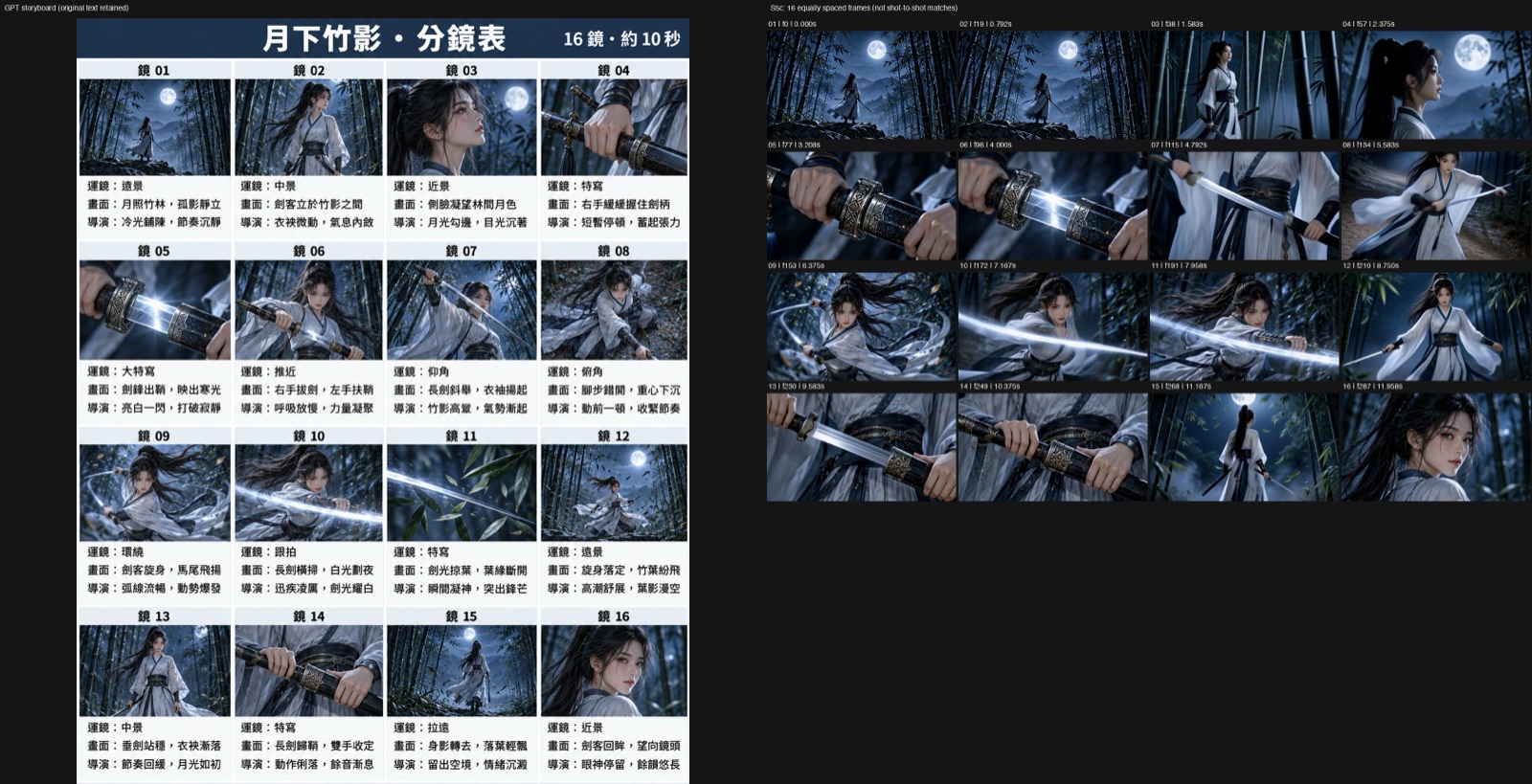
S5c is worth it when one exact beat matters more than a smooth cut. It took 378.5 s and it leaves a visible seam.
Two gotchas that cost me runs
ComfyUI v3 Autogrow inputs ignore a nested dict. MiniMaxH3ReferenceToVideo builds its reference inputs dynamically. In API JSON, a nested "ref_images": {"ref_image_0": ...} is silently dropped by the dynamic schema. You still get a video, just with no references. My first S1 run was like that. The fix is top-level dotted keys, "ref_images.ref_image_0", as in Step 4. The S1 score in the table is from the rerun.
codex exec -i eats the prompt as a second image. I generated the ChatGPT board and sheet through the Codex CLI's image generation (codex exec --enable image_generation). With codex exec -i board.png "prompt", the prompt string gets parsed as another image path and Codex reports no prompt was provided via stdin. Pass the prompt on stdin instead:
codex exec --enable image_generation --skip-git-repo-check \
  -i storyboard-gpt.png - < char.txt
--skip-git-repo-check is needed when you run it outside a git repo.
Limits of this test
- One seed, one story. Seed 20261025 for everything, one swordswoman, one bamboo forest. I don't know how far another seed would move a one-panel difference.
- Two boards, two groups. S0–S2 and S3–S6 score against different shot lists.
- Scoring is mine, by eye. A panel counts only if its main framing and action appear in a compatible order. Partial matches count as misses.
- The pacing is deliberately extreme. 0.63 s per panel, against the 2 to 5 s shots MiniMax's music-video skill stitches.
- S6 is not hands-off. The vision model's draft needed a second pass and five hand edits before it went to H3.
- I didn't test Seedance. The comparison is between H3 prompts, not between H3 and Seedance 2.0.
FAQ
- Can MiniMax-H3 follow a 16-panel storyboard image with a one-sentence prompt, the way Seedance 2.0 omni reference does?
- Not in my runs. With a 4x4 storyboard as Picture 1, a character sheet as Picture 2 and one sentence, H3 Ref2VA matched 2 of 16 panels with a Qwen-Image board and 3 of 16 with a ChatGPT board. H3 treats the whole grid as one reference image. It takes the face, wardrobe, palette and poses from it, but nothing splits the grid into 16 moments in time. The order has to come from the text.
- How should I write the prompt so H3 follows the storyboard order?
- Write one entry per panel with a timestamp, following MiniMax's shot-table spec: action and pose, camera move, spatial position, audio cue and a handoff to the next shot, plus fixed landmarks, character position and facing, and lighting. Same board and sheet, same seed: a per-panel timeline copied from the board got 12 of 16, and the official-format version got 13 of 16.
- Does readable text on the storyboard help MiniMax-H3?
- No. A ChatGPT board with three readable lines per panel (camera, shot, director note) scored 3 of 16 with one sentence. A Qwen-Image board with only panel numbers and one camera word scored 2 of 16. In these runs the text did not replace an explicit timeline; I use it as something a person or a vision model transcribes into one.
- Why are my MiniMax-H3 Ref2VA reference images ignored when I submit through the ComfyUI API?
- The reference inputs use ComfyUI v3 Autogrow. A nested ref_images dict in the API JSON is silently ignored. Use top-level dotted keys such as ref_images.ref_image_0 and ref_images.ref_image_1. My first run with a nested dict had no references applied and still produced a video.
- Does a character sheet keep the face consistent across a storyboard video?
- In every run where I passed a character sheet, her overall look and costume carried through, though facial details varied from run to run. The one run with no reference images, text timeline only, changed the face and hair. Each storyboard panel is only about 256x256 after H3 resizes the board, too small to carry identity on its own.
Read next
- 2026-10-19Turn a real dance into a depth video and have MiniMax-H3 restage it in a palace: native 768 on one RTX 5090
Real dance to grey depth video to MiniMax-H3 Ref2VA with a first-frame guide: a new character dances the routine in a palace, native 768x1376 on one RTX 5090.
- 2026-10-18A 25-second no-fog FPV one-take with MiniMax-H3 and ComfyUI-H3-Continuum on one RTX 5090
A 25-second FPV one-take over Taiwan with no fog: MiniMax-H3 Ref2VA and ComfyUI-H3-Continuum on one RTX 5090, each splice hidden in a turn through the sky.
- 2026-10-16A 22-second Taiwan FPV flight without a drone: Blender blockout + MiniMax-H3 on one RTX 5090
A 22.7-second FPV flight that reads as one take, over Yushan, Taroko Gorge, Taipei 101 and Sun Moon Lake, built from a gray Blender blockout and MiniMax-H3 Ref2VA on one RTX 5090.
- 2026-10-12[AI Workflow] Block a scene in Blender, let MiniMax-H3 film it: local Ref2VA on an RTX 5090
Block out a shot with capsules and boxes in Blender, feed it to MiniMax-H3 Ref2VA with two reference photos, and get a live-action clip that keeps left/right order and occlusion. 89.9 s on one RTX 5090.
Don't miss the next one
Subscribe, and you won't.
One-click unsubscribe anytime.