MiniMax-H3 on RTX 5090 · part 10
A 22-second Taiwan FPV flight without a drone: Blender blockout + MiniMax-H3 on one RTX 5090
❯ cat --toc
- The pipeline: gray shapes for the path, images for the look, fog for the seams
- Step 1: Make one panorama and one image per landmark
- Step 2: Block the flight in Blender as three gray segments
- Step 3: Feed each segment to H3 Ref2VA with three reference images
- Step 4: Crossfade the segments inside the fog
- Step 5: Upscale with RTX VSR, then double the frame rate
- What still breaks
- Deep dive: what didn't work, and why the pipeline looks like this
- Red line on a photo: the order works, the 3D doesn't
- Blockout plus one reference image: better structure, but crude proxies still warp
- One 15-second take through every landmark: hard cuts
- A/B on references: ask about composition and texture separately
- 864×480 first, to check the route
- Troubleshooting: H3 crashed while loading the text encoder
TL;DR
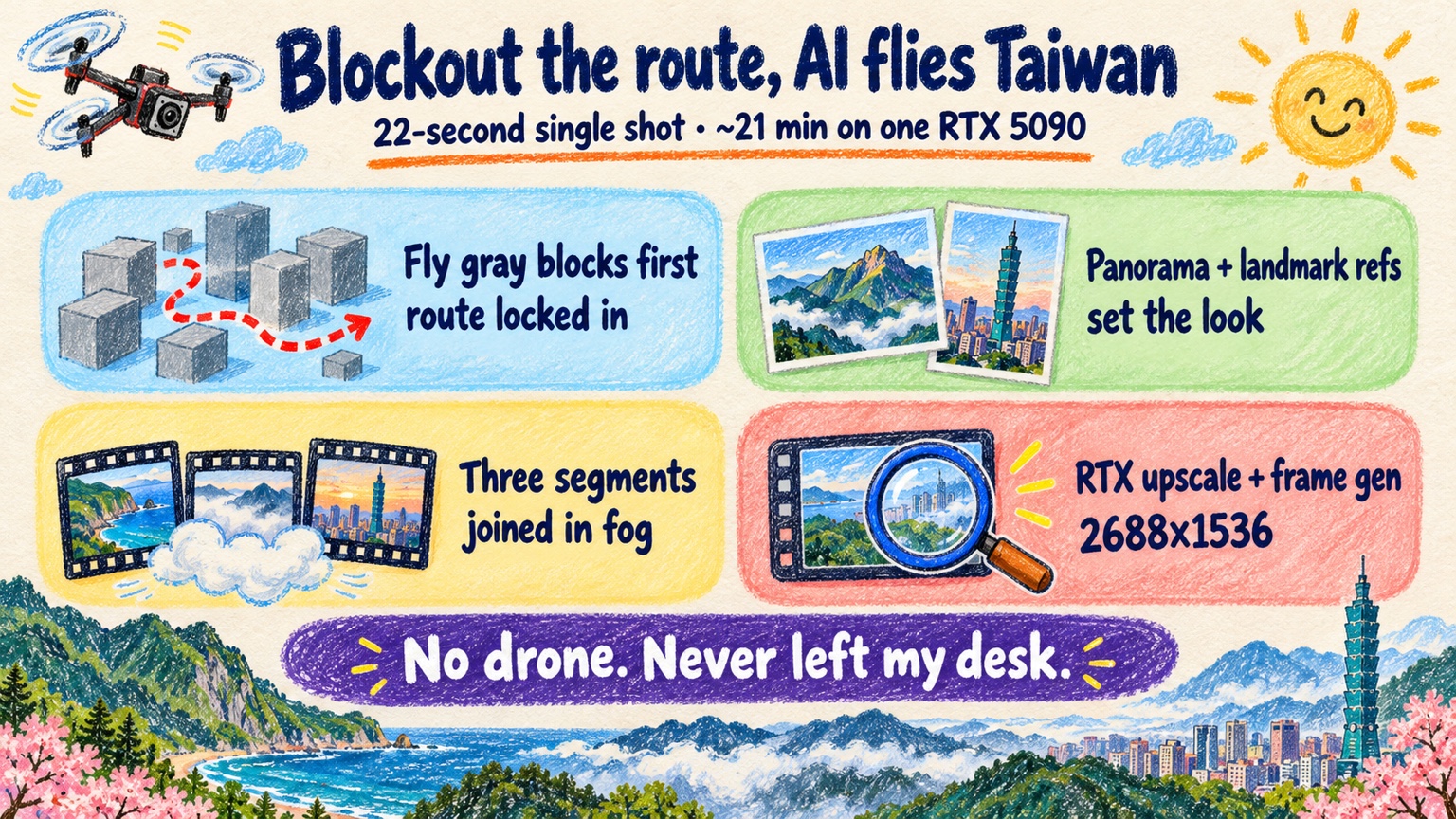
I made a 22-second FPV drone flight over Taiwan (Yushan, Taroko Gorge, Taipei 101, Sun Moon Lake) on one RTX 5090, with no hard cuts. A gray Blender blockout sets the flight path and building shapes, Qwen-Image 2.1 makes reference images, and MiniMax-H3 Ref2VA renders three segments that hand off inside fog banks. About 18 minutes of generation at 1344×768, then RTX upscaling to 2688×1536 at 48 fps. Caveat: the fog seams still look like soft dissolves, and a few spots warp.
Jade Mountain, Taroko Gorge, Taipei 101, Sun Moon Lake: three generated segments joined in fog into 22.7 seconds. Source footage from MiniMax-H3 on a single RTX 5090, then RTX upscaling and frame generation; this web copy is scaled to 1680×960
I saw an Instagram post where someone drew a red flight path on a still photo and asked an AI video model to fly along the line and erase it. The result looked like an FPV drone shot. I wanted to do the same thing locally, on one RTX 5090, over Taiwan: Yushan (Jade Mountain), then Taroko Gorge, Taipei 101, Sun Moon Lake, and a pull-up reveal at the end.
The red line on a photo almost works, and the deep dive shows where it breaks. What I ended up with is the workflow from Part 9, stretched to a long camera move: block the flight in Blender with gray shapes, give MiniMax-H3 reference images for what each place should look like, and let it film the blockout.
The master is 22.7 seconds, 2688×1536, 48 fps, and it plays like one take. Five steps below, then what still doesn't work, then the experiments that led here.
The pipeline: gray shapes for the path, images for the look, fog for the seams
The shot has three jobs, and each input does one of them:
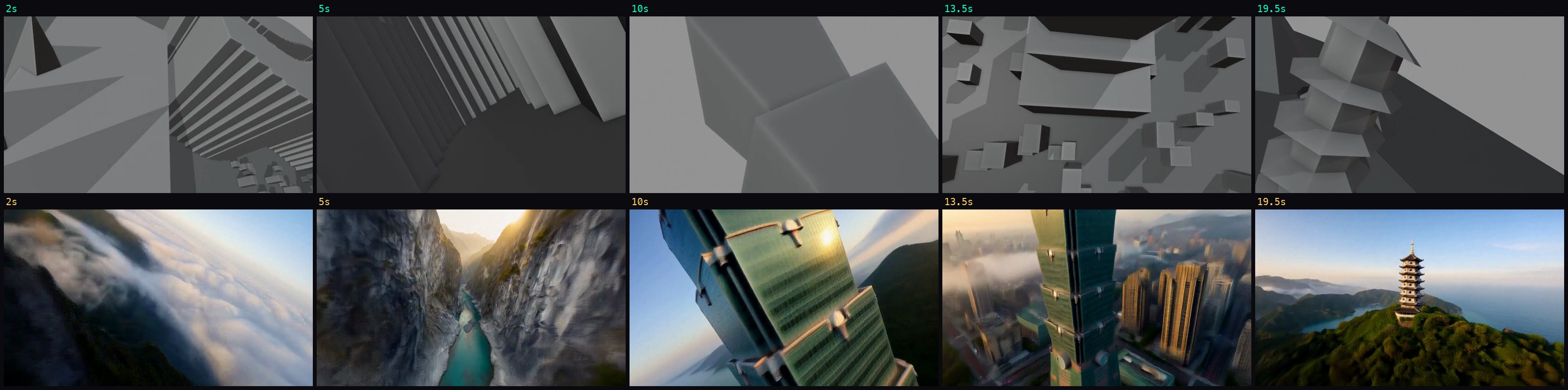
- The Blender blockout carries the flight path and the 3D shape of each landmark.
- Reference images set what each landmark looks like.
- Fog banks hide the places where one generation ends and the next begins.
The fog is there because one long generation doesn't hold together (more on that in the deep dive). So I render three segments of 7 to 8 seconds each. Every segment ends by flying into fog, and the next one starts by flying out of it.
| Step | Tool | Output |
|---|---|---|
| 1. References | Qwen-Image 2.1 | 1 panorama + 4 landmark images |
| 2. Blockout | headless Blender | 3 gray segment videos |
| 3. Generate | MiniMax-H3 Ref2VA | 3 segments at 1344×768 |
| 4–5. Stitch, upscale | ffmpeg, RTX VSR + Frame Gen | 2688×1536, 48 fps |
Step 1: Make one panorama and one image per landmark
I used Qwen-Image 2.1 (int8, 40 steps, 1344×768) for two kinds of images.
The first is a fantasy panorama with all four landmarks compressed into one view. It doesn't match real geography, and it doesn't need to. Its job is to give the model one consistent palette and light for the whole flight.
The second is one image per landmark. I ran 2 seeds each and kept the better one. Taipei 101 came out right, with its eight bamboo-like segments. Yushan came out as a generic rocky peak. That's acceptable here, because the blockout sets the mountain's shape and the image mostly supplies the rock and snow.
Step 2: Block the flight in Blender as three gray segments
The blockout is gray proxies plus a camera, rendered headless with the Workbench engine. Nothing has to look good. Each landmark only needs the shape you want H3 to keep:
- Yushan: jagged cones.
- Taroko Gorge: two tall walls set close together.
- Taipei 101: eight stacked square frustums, each flaring outward toward the top, plus a spire.
- Sun Moon Lake: a water plane, a small dome for the island, and a thin pagoda on a hill.
I split the camera path into three segments:
| Segment | Frames | Length | Camera |
|---|---|---|---|
| S1 Yushan + Taroko | 192 | 8 s | over the summit, down into the gorge |
| S2 Taipei 101 | 192 | 8 s | tight spiral climb, pause over the spire, vertical dive |
| S3 Sun Moon Lake + reveal | 175 | 7.3 s | skim the water, half-orbit the island, climb past the pagoda, wide reveal |
Each segment ends inside a fog bank, and the next starts inside one. 192 and 175 are both on the 17k+5 frame grid from Part 9.
Before generating anything, I check the blockout for sudden jumps. A big jump in the blockout tends to become a hard cut in the output. My rule: shrink every frame to 96×54 grayscale, take the mean absolute difference between neighbors, and keep it under 3× that segment's median, except in the fog. The check:
import cv2, numpy as np

cap = cv2.VideoCapture("s2_blockout.mp4")
prev, diffs = None, []
while True:
    ok, frame = cap.read()
    if not ok:
        break
    small = cv2.resize(frame, (96, 54), interpolation=cv2.INTER_AREA)
    gray = cv2.cvtColor(small, cv2.COLOR_BGR2GRAY).astype(np.float32)
    if prev is not None:
        diffs.append(np.abs(gray - prev).mean())
    prev = gray

diffs = np.array(diffs)
med = np.median(diffs)
for i, d in enumerate(diffs):
    if d > 3 * med:
        print(f"frame {i + 1}: diff {d:.1f} vs median {med:.1f}")
Any flagged frame outside the fog means I smooth that part of the camera path and render the blockout again.
Step 3: Feed each segment to H3 Ref2VA with three reference images
This runs in ComfyUI on the RTX 5090, with the same MiniMaxH3ReferenceToVideo node as Part 9 (model and node: MiniMax-H3 on GitHub). Each segment gets:
ref_videos.ref_video_0  ← that segment's gray blockout
ref_images.ref_image_0  ← the panorama
ref_images.ref_image_1  ← that segment's landmark image (S1 gets two: Yushan and Taroko)
ref_images.ref_image_2  ← the last generated frame of the previous segment (S2, S3)
The third image matters. The Ref2VA node has no first-frame input, so I can't tell it "start exactly here." Giving it the previous segment's last frame as a reference, and starting the segment inside fog, is how I get continuity anyway.
The prompt is a single [Shot 1]. It asks for one continuous shot with no cuts and no gray clay material. Without that second instruction, the model has every frame of a gray video in front of it and no reason not to copy the look.
14 steps, 1344×768. Times on one RTX 5090:
| Segment | Time |
|---|---|
| S1 | 363.32 s |
| S2 | 373.57 s |
| S3 | 324.14 s |
| Total | 1061 s (about 17 min 41 s) |
All three worked on the first try, with no out-of-memory errors. I checked each one for hard cuts with ffmpeg's scene score:
ffmpeg -i s1.mp4 -vf "select='gt(scene,0.18)',showinfo" -f null - 2>&1 | grep pts_time
Zero candidates in all three segments.
Step 4: Crossfade the segments inside the fog
The segments overlap by 7 frames, and the crossfade sits inside the fog, so you see fog thinning out rather than one scene fading into another. Audio is crossfaded the same way. At 24 fps, 7 frames is 0.2917 s. S1 and S2 are 8 s each, so the first fade starts at 8 − 0.2917 and the second at 16 − 2 × 0.2917. Each input gets its frame rate and timestamps normalized first, because xfade refuses inputs whose timebases differ:
ffmpeg -i s1.mp4 -i s2.mp4 -i s3.mp4 -filter_complex \
"[0:v]fps=24,format=yuv420p,setsar=1,settb=1/24,setpts=PTS-STARTPTS[v0];\
[1:v]fps=24,format=yuv420p,setsar=1,settb=1/24,setpts=PTS-STARTPTS[v1];\
[2:v]fps=24,format=yuv420p,setsar=1,settb=1/24,setpts=PTS-STARTPTS[v2];\
[v0][v1]xfade=transition=fade:duration=0.291667:offset=7.708333[v01];\
[v01][v2]xfade=transition=fade:duration=0.291667:offset=15.416667[v];\
[0:a][1:a]acrossfade=d=0.291667:c1=tri:c2=tri[a01];\
[a01][2:a]acrossfade=d=0.291667:c1=tri:c2=tri[a]" \
-map "[v]" -map "[a]" -c:v libx264 -crf 17 -pix_fmt yuv420p -c:a aac -b:a 192k taiwan_fpv_hd.mp4
559 frames minus two 7-frame overlaps gives 545 frames, or 22.7 seconds.

Step 5: Upscale with RTX VSR, then double the frame rate
Two NVIDIA nodes finish the clip:
RTXVideoSuperResolution, scale 2.0, quality ULTRA: 1344×768 → 2688×1536 in 43.5 s.- RTX Frame Generation, 24 → 48 fps, in 150 s.
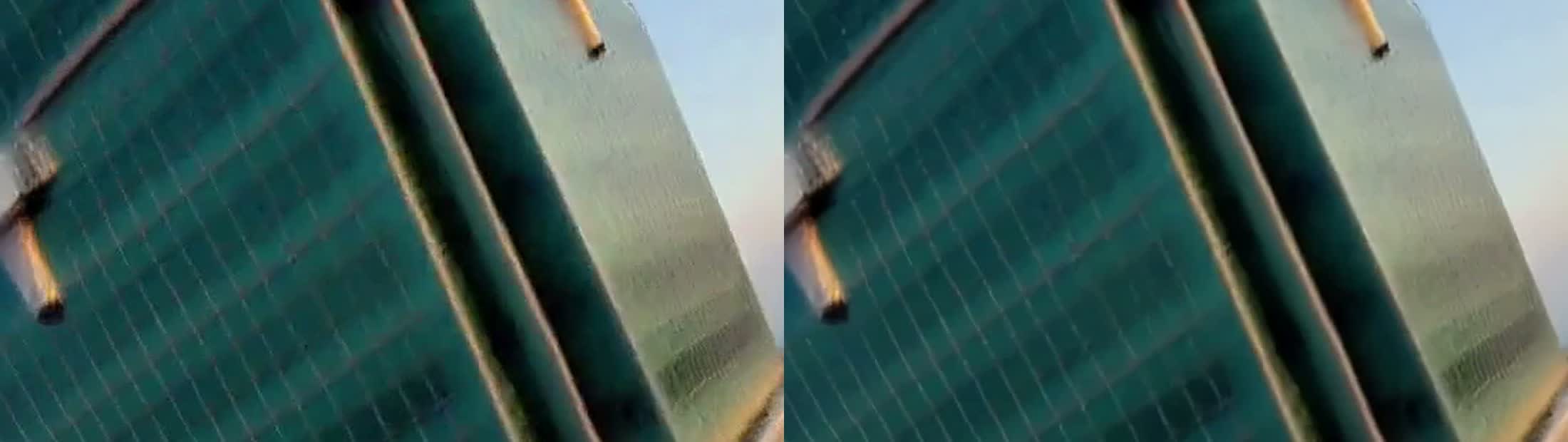
The gain is real but small. Taipei 101's window frames got slightly crisper. Motion blur in the fast sections stays blurry, because upscaling can't recover detail that was never generated. I didn't see any new ringing or flicker. That's 3 more minutes on top of 18, which I'd pay for a final export but skip for test runs.
What still breaks
The blockout asked for more than H3 delivered:
- Taipei 101 (checked on the 864×480 run): no full 360° spiral, and no real half-second hold above the spire.
- Sun Moon Lake (same run): the skim flies higher than the 2 m I blocked.
- Seams: both fog transitions still read as a soft dissolve. You can tell where they are.
- Local warping: the gorge walls around 5 to 6.5 s, and Taipei 101's segments twisting around 10 s and 14 s.
- At 1344×768 specifically: the gorge fog gets thicker around 4 s, and the island and the pagoda hill seem to merge around 18 to 19 s.
So the blockout reliably holds the sequence of landmarks, the direction of travel and the rough shape of each landmark. Exact camera moves like a full orbit or a timed hold get softened, the same way exact distances drifted in Part 9.
Deep dive: what didn't work, and why the pipeline looks like this
You don't need this section to use the workflow. It's the experiments behind each step above, for anyone (or any AI) adapting the workflow.
Red line on a photo: the order works, the 3D doesn't
This was the original idea. I took one still image with a red flight path drawn on it and used it as the first frame for H3 image-to-video (I2VA): 1344×768, 345 frames (14.4 s), 112.4 s to generate.
H3 followed the order of the landmarks, and the red line was gone within 0.5 s. But when the camera reached the side of a building, the building melted. A Colosseum turned into concentric spirals. A tower stretched. A single image tells the model what the front of a scene looks like and nothing about the sides, so it has to guess the 3D shape, and the guesses fall apart once the camera moves around something.
Blockout plus one reference image: better structure, but crude proxies still warp
Next I blocked the same idea in Blender and ran Ref2VA with one reference image, at 864×480 (378.8 s). The Colosseum spiral went away. Two problems remained:
- Segments arrived 0.5 to 1.5 s earlier than they did in the blockout.
- A crude opera house made of five shells still warped.
If the proxy is too crude to describe the building, H3 doesn't fill in the rest correctly. That's why Taipei 101 in the final version is eight separate flared frustums and not one tall box.
One 15-second take through every landmark: hard cuts
I first tried the whole flight as one generation: 362 frames, four landmarks plus the closing panorama. In both A/B runs, H3 hard-cut 2 to 3 times, even with a single-shot prompt.
One cut lined up with a real problem in the blockout. At frame 138, the adjacent-frame difference was 35.4 against a median of 7.9, so the camera itself jumped. The other cuts happened where the blockout was smooth. My best guess is that one generation was asked to hold too many very different scenes, and the model fell back to editing between them.
Both fixes went into the final pipeline. The 3×-median check catches the first kind of cut before generation. Splitting into three segments, each with only one or two landmarks, removed the second kind.
A/B on references: ask about composition and texture separately
I compared two reference sets on the same blockout: the panorama alone, against the panorama plus four landmark images. I watched them side by side, blind.
For composition, I preferred the panorama-only run. For texture, I preferred the run with the extra landmark images, which looked less plastic. The final pipeline uses the panorama plus one landmark image per segment.
864×480 first, to check the route
Before spending 18 minutes at 1344×768, I ran the three-segment version at 864×480. Segments took 161.3, 161.3 and 141.2 s, 463.8 s in total. The largest adjacent-frame difference in the output was 25.5, at the summit roll, against a median of 7.7. That's about 3.3× the median, right where the camera rolls hard over the summit, and the scene detector still found zero cuts.
Changing the resolution changes the composition. The 1344×768 run is a new generation, not a sharper copy of the 864×480 one. That's why the 1344×768 version has its own problems (the thicker gorge fog around 4 s, the merged island and hill around 18 to 19 s) that the low-res test didn't show.
Troubleshooting: H3 crashed while loading the text encoder
At one point H3 crashed while loading its 15.7 GB text encoder. The ComfyUI log stopped here:
Requested to load MiniMaxH3TEModel_
The process exited with code 0xC0000005. It happened with both text-encoder variants, so a single bad file seemed unlikely.
System RAM was the likely cause. An idle WSL instance (vmmemWSL) was holding 20.4 GB. Free RAM was 27 GB out of 61.6 GB, and commit charge was 38.4 of 71.1 GB. After running
wsl --shutdown
free RAM was 47.6 GB, commit was 17.5 GB, and the same job ran. If H3 dies at that log line on Windows, check RAM and commit charge before suspecting the model files or VRAM.
Also in this series: Part 9 — Block a scene in Blender, let MiniMax-H3 film it · Part 6 — Two characters in one shot with Ref2VA
FAQ
- Can I just draw a flight path on a photo and have MiniMax-H3 fly along it?
- Partly. With the red-line photo as the first frame (I2VA, 1344x768, 14.4 s of video, 112.4 s to generate), H3 visited the landmarks in the right order and the red line disappeared within 0.5 s. But buildings melted once the camera reached their sides: a Colosseum turned into concentric spirals and a tower stretched. One photo gives the model no 3D information, so it guesses. A gray Blender blockout fixes most of that.
- Why split a 22-second FPV shot into three segments instead of one long generation?
- A single 15-second take covering four landmarks and a closing panorama hard-cut 2 to 3 times in both runs, even with a single-shot prompt. Splitting into three segments of 7 to 8 seconds, each ending in a fog bank, gave zero scene-cut candidates. The segments are stitched with a 7-frame crossfade inside the fog.
- How long does the whole FPV shot take to render on one RTX 5090?
- At 1344x768 the three H3 Ref2VA segments took 363.32 s, 373.57 s and 324.14 s, about 17 min 41 s in total, all on the first try with no out-of-memory errors. RTX Video Super Resolution to 2688x1536 took another 43.5 s, and RTX Frame Generation from 24 to 48 fps took 150 s.
- How does continuity work if the Ref2VA node has no first-frame input?
- Each segment gets the previous segment's last generated frame as one of its reference images, and every segment boundary sits inside a fog bank. The fog hides the handoff, and the reference frame keeps colors and lighting close. Both seams still read as a soft dissolve rather than a single continuous take.
- Does RTX Video Super Resolution plus frame generation actually improve H3 output?
- Modestly. Taipei 101's window frames got slightly crisper and motion is smoother at 48 fps. Motion blur in fast sections is not recovered. I saw no new ringing or flicker.
- Why does MiniMax-H3 crash in ComfyUI while loading the text encoder?
- In my case it looked like system RAM, not VRAM. The log stopped at 'Requested to load MiniMaxH3TEModel_' with exit code 0xC0000005, for both text-encoder variants. An idle WSL instance was holding 20.4 GB. After 'wsl --shutdown', free RAM went from 27 GB to 47.6 GB and the same job ran.
Read next
- 2026-10-12[AI Workflow] Block a scene in Blender, let MiniMax-H3 film it: local Ref2VA on an RTX 5090
Block out a shot with capsules and boxes in Blender, feed it to MiniMax-H3 Ref2VA with two reference photos, and get a live-action clip that keeps left/right order and occlusion. 89.9 s on one RTX 5090.
- 2026-09-06[Benchmark] Two characters in one shot: MiniMax-H3 Ref2VA takes multiple reference images
Ref2VA is the only MiniMax-H3 mode that takes several reference images. Two characters, 243 frames, 437 s on one RTX 5090, and CER 6.8% on the dialogue.
- 2026-09-13[Benchmark] Roll cheap, then enhance the keeper: NVIDIA's two-stage MiniMax-H3 + LTX-2.5 pipeline explained
NVIDIA's Sol-H3 two-stage recipe on an RTX 5090: MiniMax-H3 drafts at 672×384 in 25.5 s, LTX-2.5 refines only the take you keep. Downloadable ComfyUI workflow.
- 2026-09-11[Benchmark] LTX-2.5 vs MiniMax-H3 on one RTX 5090: 29s vs 81s for the same Chinese dialogue clip
LTX-2.5 and MiniMax-H3 on one RTX 5090, same Simplified Chinese line: 28.67s vs 81.22s end to end, both at CER 0%. Files, params, VRAM ceiling.
Don't miss the next one
Subscribe, and you won't.
One-click unsubscribe anytime.