MiniMax-H3 on RTX 5090 · part 9
[AI Workflow] 用 Blender 白模排走位,MiniMax-H3 照著拍成真人影片:RTX 5090 一支 90 秒
❯ cat --toc
TL;DR
白模是用方塊和膠囊當替身的 3D 草稿,只帶位置、走位和鏡頭,不帶長相。我在 Blender 排好兩個替身,輸出 864×480 的 5 秒白模影片,跟兩張角色參考圖一起餵進 MiniMax-H3 的 Ref2VA,RTX 5090 一支約 82–90 秒。兩人身分沒搞混,左右順序、中段交換、誰從誰前面走過都跟到,男生比較矮也跟到;小轉身沒跟到,精確距離會被拉近。遠景排走位、中景拍臉,480p 就看得清楚五官。

這篇做的事,37 秒看完
前言
前陣子看到 Higgsfield 的 Blender 外掛影片:先在 Blender 把場景和鏡頭排好,再整包送去 Seedance 生成。生成在雲端跑、要花 credits,我想在自己的 RTX 5090 上做一個本地版。
我真正想要的是控制。叫 AI「鏡頭往右繞」「兩個人交換位置」,常常拍歪、角色走錯邊,只能一直重抽。誰站哪、誰從誰前面走過,用文字講不準。
跟朋友講的版本是:先在 3D 軟體用積木把戲排好,AI 照著積木的位置和鏡頭演,再換上照片裡那兩個人的臉。
原理:參考影片給動作,參考圖給長相
白模負責走位和鏡頭,參考圖負責長相。H3 的 Ref2VA(參考生成模式:丟參考圖和參考影片進去,生出一支新的有聲影片)剛好把兩者分開收:ref_videos 吃白模影片,ref_images 吃角色圖。它不是從白模那支片接著改,而是從零生成一支新片,生成時一路參考白模怎麼動。成品裡不會出現白模,我這幾支都沒看到膠囊、方塊或灰色材質。不過整段畫面其實都送進模型了,所以 prompt 裡還是要明講不准畫出替身。
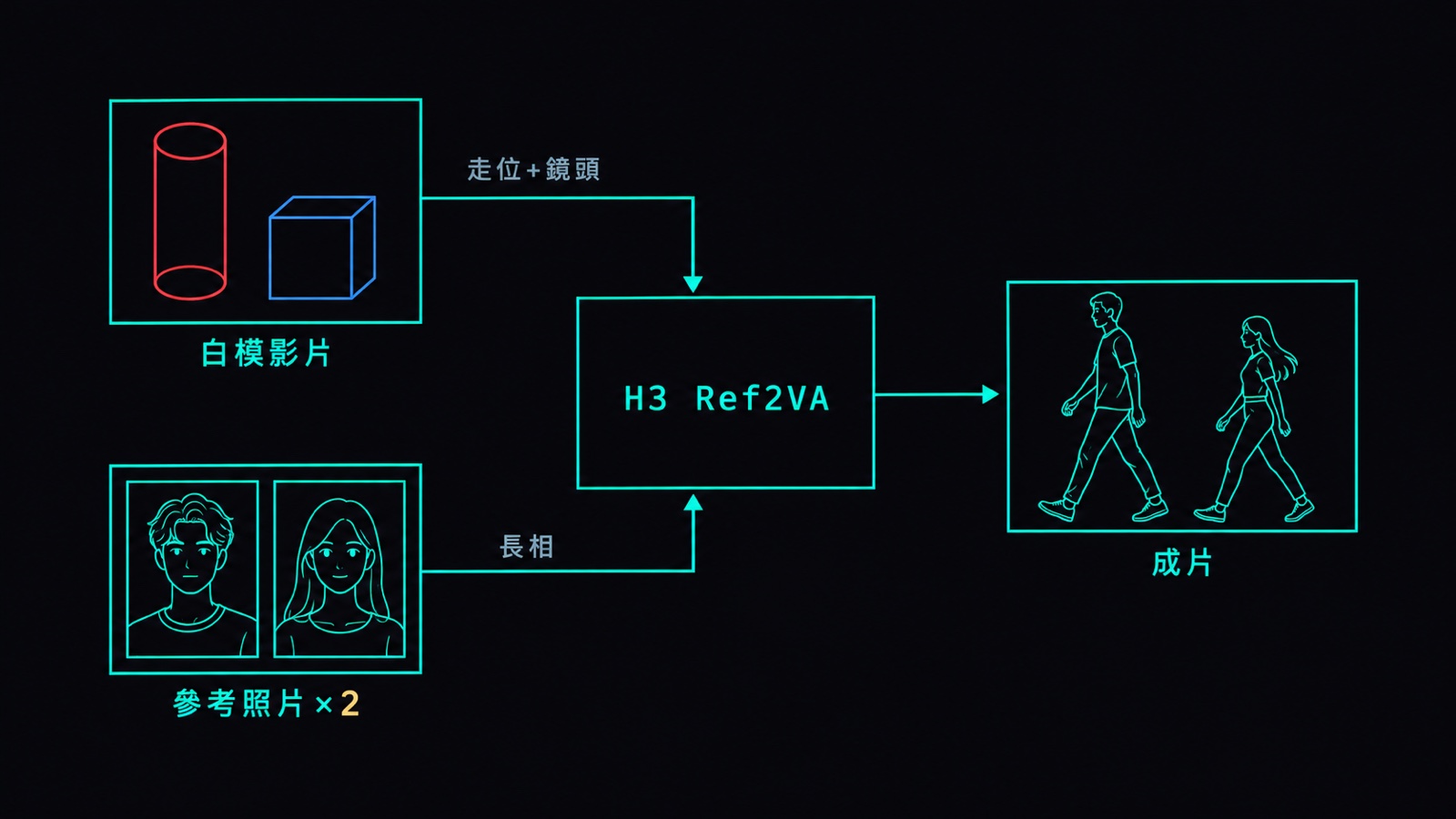
這不是偏方。Seedance 2.5 的 API 指南把 clay pre-vis → finished shot 列為參考影片的正規用法,也寫明參考影片提供的是動作,不是畫面內容:
https://runware.ai/docs/models/bytedance-seedance-2-5/guides/motion-control
同系列 Part 6 講過 Ref2VA 的六段 prompt 格式,這篇只多接一支參考影片。
步驟一:叫 Claude 寫 Blender 白模腳本
腳本不用自己寫,跟 Claude 講要什麼就好:
幫我寫一支 Blender 腳本,用 blender -b --python 跑。
兩個替身:一個高的紅色膠囊、一個矮的藍色方塊。紅膠囊從左走到右,中途從藍方塊前面經過;藍方塊站原地,小轉一下身。
左後方用三個方塊搭一個拱門當地標,鏡頭慢慢往前推一點。
輸出 864×480、24fps、124 幀,最後合成 mp4。
寫腳本時有幾條規矩要叫它照做:替身只用膠囊、方塊,不做手指和道具;至少放一個不對稱的地標,不然看不出鏡頭轉了多少;畫面尺寸跟成品一樣;幀數跟成品一樣、符合 H3 的幀數規格(17 的倍數再加 5,124 = 17×7+5),最長 15 秒。紅藍配色是給人對照用的,模型認誰是誰靠 prompt。
Blender 不需要顯卡,我放在另一台 Linux 機器用 CPU 算圖:
blender -b -t 4 --python build_blocking.py -- --out blocking
ffmpeg -framerate 24 -i blocking/frames/frame_%04d.png -c:v libx264 -pix_fmt yuv420p blocking/previs.mp4
我用的腳本在這裡,可以直接拿去改:build_blocking.py。它只輸出 PNG 序列,第二行的 ffmpeg 負責合成 mp4。
步驟二:準備兩張角色參考圖
全身、正面、背景乾淨,頭和腳都在畫面裡。兩個人長得越不像越好,萬一兩人的長相混在一起,一眼就看得出來。我這次是長白髮白袍的高個子女生,和短黑髮深藍工作服的矮壯男生,用 Qwen-Image 2.1 生的 768×1024。用真人照片也行。
步驟三:ComfyUI 接 Ref2VA
ComfyUI 是把一個個功能方塊用線連起來組成流程的軟體。拿你平常跑 H3 的流程,換成 Ref2VA 節點,要動的只有三件事:白模影片接到「參考影片」插槽,兩張角色圖接到「參考圖」插槽,VAE 選影片用的那顆。VAE 是把影片和圖片轉成模型讀得懂格式的編碼器,選錯的話參考影片送不進去。其餘照舊。
節點是 MiniMaxH3ReferenceToVideo,接線對照:
LoadVideo(previs.mp4) → GetVideoComponents.images → ref_videos.ref_video_0
LoadImage(character-1.png)                         → ref_images.ref_image_0
LoadImage(character-2.png)                         → ref_images.ref_image_1
VAELoader(minimax_h3_video_vae_fp16)               → vae
VAELoader(minimax_h3_audio_vae_fp32)               → audio_vae
width 864 · height 480 · length 124 · ref_image_size match
輸出的 CONDITIONING、LATENT 接法跟平常的 H3 一樣,取樣鏈原樣沿用。我實際跑的整份 workflow(API 格式,可直接送進 ComfyUI 的 /prompt):h3-ref2va-blocking.api.json。
步驟四:寫 prompt,把替身對到參考圖
重點是一句話講清楚誰對誰:<Subject 1> 長得像 <Picture 1>,位置和走位來自 <Video 1> 裡的紅色高膠囊;<Subject 2> 對 <Picture 2> 和藍色矮方塊。再交代 <Video 1> 只提供鏡頭、相對位置、走位和遮擋,最後明講不准把替身和灰色材質畫出來。我實際送出的開頭兩段:
subject_definitions:
<Subject 1> is the tall adult woman from <Picture 1>. Preserve her face, very long white hair, slender tall stature and flowing white robe. Her screen position and walking path come from the RED TALL CAPSULE in <Video 1>.
<Subject 2> is the short adult man from <Picture 2>. Preserve his face, short black hair, short stocky stature, dark navy work jacket and dark trousers. His screen position and small in-place turn come from the BLUE SHORT BOX in <Video 1>.
<Video 1> supplies camera movement, relative spatial positions, blocking, motion timing and foreground occlusion for both subjects. The colored primitives are spatial guides only and must be replaced completely by the two realistic people.

summary:
[reference generation] One continuous realistic live-action full-body shot of two adults in a stone-paved old-town alley. <Subject 1> begins on screen LEFT and <Subject 2> begins on screen RIGHT. The white-haired woman walks rightward in FRONT of the stationary dark-haired man, briefly occluding him and exchanging their screen-left/right order. At the end the man is on screen LEFT and the woman is on screen RIGHT. Appearance comes only from <Picture 1> and <Picture 2>; motion and positions come from <Video 1>.
不用照抄,講清楚要什麼就好。其餘四段放在文末進階。也可以把白模裡發生什麼、兩張圖是誰告訴 Claude,叫它照六段格式寫。
步驟五:出片
14 步、res_multistep + simple、Spectrum 開著。左邊白模、右邊成品:
左:Blender 白模;右:MiniMax-H3 Ref2VA 成品。864×480、124 幀(5.2 秒)、14 步、RTX 5090 執行 89.9 秒
兩人身分沒搞混,左右順序五個取樣點全對,中段交換也跟到,女生從男生前面走過的遮擋順序跟白模一樣,男生比較矮也有跟到。
全身遠景的問題是臉糊:864×480 下一顆頭只有幾十個像素。我沒有改上 720p,而是另外排了一場中景:兩人站在原地面對面講話,白模鏡頭拉到胸口到腰部以上。這支同時換了動作和 prompt,不是只把同一場戲拉近:
中景:左白模、右成品。864×480、124 幀、14 步,RTX 5090 執行 81.7 秒
頭部從 48–69 像素寬變成 135–156 像素,五官都看得清楚,女左男右、男生較矮也都保留。我現在的分工是遠景排走位、中景拍臉。
限制
白模控制得住的是相對關係:誰在左、誰在前、誰比較高、誰從哪走到哪。兩人的位置會往畫面中間靠,高度差也縮小了一些(男生還是比較矮,只是沒矮那麼多),男生原地的小轉身也沒跟到。每一輪都只跑一次,沒有換 seed 測穩定度。
進階:完整 prompt 與關鍵參數
不讀這節不影響使用。
模型:minimax_h3_ref2va_pruned_nvfp4.safetensors、文字編碼器 qwen3vl_32b_minimax_h3_nvfp4_awq.safetensors。取樣 res_multistep / simple / 14 步 / denoise 1、seed 2026101201,Spectrum(SpectrumApplyMiniMaxH3)blend_weight=0.5 degree=4 window_size=2.0 warmup_steps=5。白模腳本裡替身是 2.4 公尺高的膠囊和 1.6 公尺高的方塊,鏡頭焦距 44mm、往前推 0.3 公尺。
雙替身那支的完整 prompt 後四段:
retention_analysis:
<Subject 1> (appears in [Shot 1]): fully_preserved - retain the woman of <Picture 1>; transfer the red tall capsule's positions and walk from <Video 1>.
<Subject 2> (appears in [Shot 1]): fully_preserved - retain the man of <Picture 2>; transfer the blue short box's positions and subtle in-place turn from <Video 1>.
<Video 1> (camera movement and blocking): fully_preserved - match gentle push-in, framing, relative placement, rightward crossing, timing and woman-in-front occlusion. Never transfer proxy appearance, colors or grey material.

detailed_description:
[Shot 1] Natural soft daylight in a real stone-paved alley with weathered sandstone walls. A stone arch with an upright pillar stands at the LEFT REAR where the asymmetric grey arch landmark is in <Video 1>. Keep that landmark fixed. Both people are fully visible from head to feet. The tall woman <Subject 1> stands in the red capsule's starting location on screen left. The shorter man <Subject 2> stands in the blue box's location on screen right, slightly farther from the camera. After a short hold, the woman walks steadily rightward along the red capsule's path, with natural steps and robe motion. Around the midpoint her body passes IN FRONT OF the man and occludes part of his torso. The man stays rooted to his initial ground position and makes only a small turn to watch her pass. He never walks sideways or trades identities with her. Continue the woman's movement past him to the right; she stops in the red capsule's final location. End with the man left and the woman right. Preserve this physical crossing rather than cutting or dissolving between positions. The camera makes only the small smooth forward push shown by <Video 1>. No camera orbit, jump or reversal. The woman remains the same white-haired white-robed woman before, during and after the crossing; the man remains the same short-haired navy-clad man. Keep human anatomy and realistic fabric throughout. Do not show grey models, clay shading, capsules, blocks, cubes, red proxy surfaces, blue proxy surfaces, wireframes, plastic primitives or untextured geometry. The real stone walls may have natural stone colors but never a uniform grey-model material.

overall_soundscape:
Quiet alley ambience and light footsteps. No dialogue or singing.

non_diegetic_music:
N/A
相關
- 同系列 Part 6:兩張人設圖同框,Ref2VA 入門
- MiniMax-H3 官方 Ref2VA 提示詞規格:ref-en.txt
常見問題
- 白模是什麼?為什麼替身要用方塊和膠囊?
- 白模是只用方塊、膠囊這種粗形狀排出來的 3D 草稿,只決定誰站哪、怎麼走、鏡頭怎麼動,不管長相。替身做粗,模型才只讀位置不抄外觀;長相交給角色參考圖。
- 在 RTX 5090 上生一支白模轉成品的影片要多久?
- 864×480、124 幀(約 5.2 秒)、14 步、Spectrum 開著,兩張參考圖加一支白模影片,我量到的兩支是 89.9 秒和 81.7 秒(ComfyUI 回報的執行時間)。
- 864×480 的解析度,臉會不會糊?
- 全身遠景時臉會糊。另外排一場鏡頭在腰部以上的中景,同樣 864×480 就看得清楚眼睛、眉毛、鼻子和嘴形,不用上 720p。我的做法是遠景排走位、中景拍臉。
- 白模影片要做幾幀?
- 跟成品一樣,而且符合 H3 的幀數規格(17 的倍數再加 5),例如 124 幀。Ref2VA 會把參考影片截到不超過輸出長度再往下對齊;我有一次白模做 120 幀,參考影片只剩 107 幀,最後幾格沒有走位可跟。
接著讀
- 2026-09-06[Benchmark] 兩張人設圖餵進去,讓小販跟書生自己演完自相矛盾:MiniMax-H3 Ref2VA 入門
Ref2VA 是 H3 唯一吃得下多張參考圖的模式。用兩張 z-image 人設圖生一段 10.1 秒的雙角色對話,台詞 ASR 逐字比對 CER 6.8%,三個錯字全是同音字。含六段格式全文與節點接線。
- 2026-09-11[Benchmark] 同一句中文台詞,LTX-2.5 用 29 秒、MiniMax-H3 用 81 秒:一張 5090 的實測
同一張 RTX 5090、同一句簡體台詞、同一段雙人對白,兩個會講話的開源影片模型對打。LTX-2.5 出片 28.67 秒,H3 81.22 秒,ASR 逐字比對都是 CER 0%。兩邊峰值 VRAM 都落在 31,7xx MiB,只剩不到 900 MiB。
- 2026-09-13[Benchmark] 先抽到好的再強化:詳解 NVIDIA 的 H3 + LTX-2.5 兩段式影片產線
NVIDIA Sol-H3 的兩段式做法搬到 RTX 5090:H3 只生 672×384 草稿(25.5 秒一支),挑中的那支才交給 LTX-2.5 三步精修。附可下載的 ComfyUI workflow。
- 2026-09-03[Benchmark] MiniMax-H3 在 RTX 5090 上的加速組態:換成 cu130 省 32%,注意力 kernel 只值 3%
同一張 5090、同樣 14 步、同樣品質設定,六個加速組態各值幾 %。原生 768p 的 15 秒片從 OOM 變成 8.6 分鐘。chunk 參數切越細越快、torch 換成 cu130 省 32%,而 SageAttention 跟 Sol-Attn 這兩個單看 kernel 快 4 倍的東西,端到端只值 2-3%。
不想錯過新文章?
訂閱我確保不漏接!
隨時一鍵退訂。