MiniMax-H3 on RTX 5090 · part 14
[MiniMax-H3] Open-H3-Regenerate-2K on an RTX 5090: more detail than VSR at 133 s a clip
❯ cat --toc
- Open-H3-Regenerate-2K is frozen H3 plus one LoRA that redraws the draft
- It fits in 32 GB through a community rank-128 conversion
- Decode is almost half the time
- The workflow
- Regenerate takes about 133 s per clip, RTX VSR takes 19 s
- Regenerate draws detail the draft never had, and changes things along the way
- Why sign text breaks: 91% noise turns small characters into look-alikes
- Which one to pick
- Swap in the int8 VAE: decode drops from 42.7 s to 19.6 s
- Deep dive: strength sweep, speed-ups that didn't pay off, and a conversion check
- Strength sweep: one step from 0.667 keeps the face closest
- Speed-ups: only the int8 VAE was worth keeping
- Why B200's 1.6 s fast decoder doesn't carry over
- SwiGLU half-order check: the conversion isn't what breaks the text
- Text-heavy shots: let MOSS-Image write the signs, then feed the first frame back in
- Limits of this test
- Related
TL;DR
NVlabs' Open-H3-Regenerate-2K redraws a 1344×768 MiniMax-H3 draft at 2560×1440. On one RTX 5090, through a community rank-128 conversion, the official 3 steps take about 133 s, against 19 s for RTX VSR. It draws real lashes, eye highlights and embroidery that VSR can't. It starts from 91% noise, so faces get slimmer and small sign text turns into fake characters; shots with text should stay on VSR. For face close-ups, one step from sigma 0.667 takes 81 s and stays closest to the draft. Caveat: one run per scene per method.
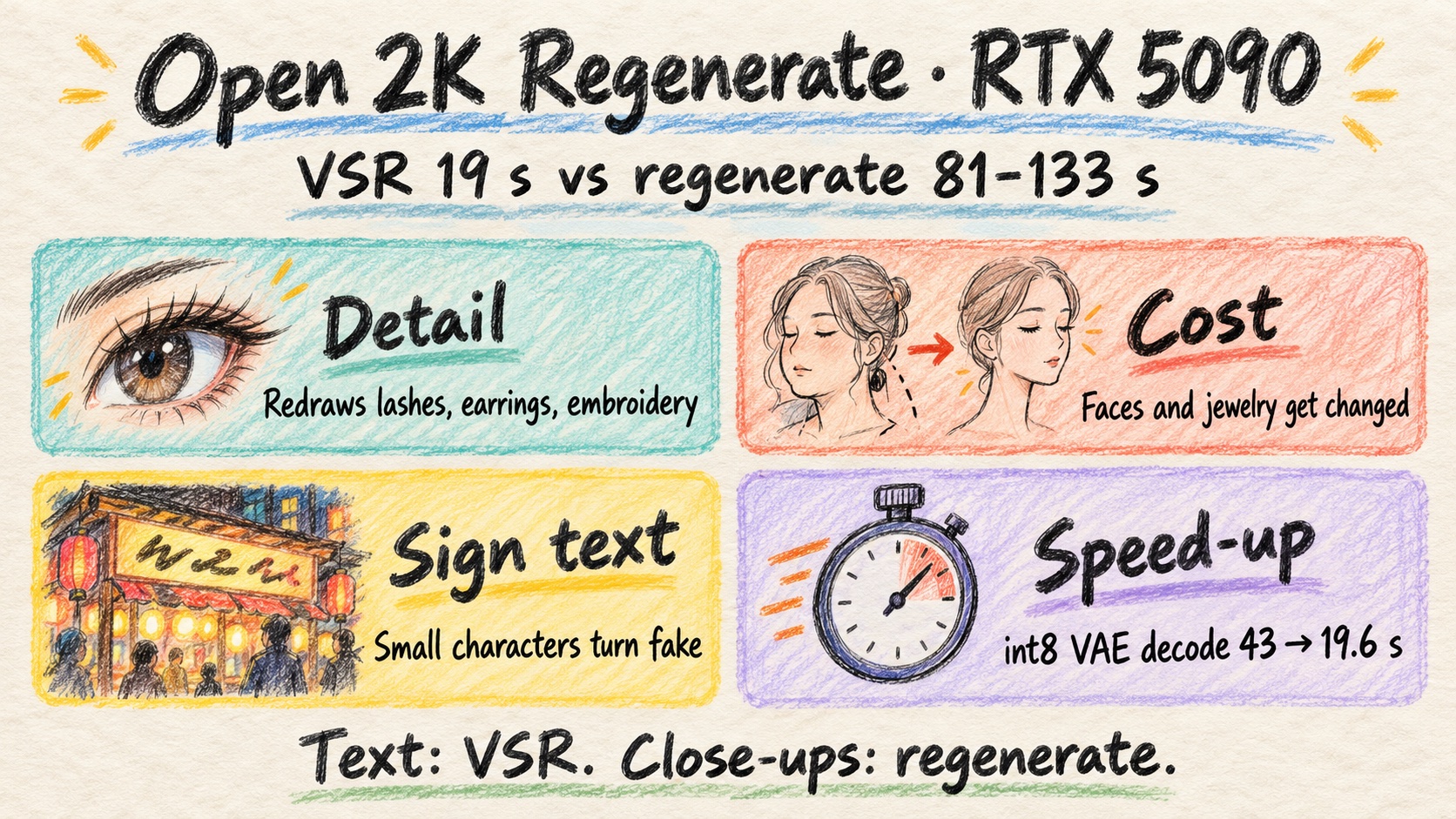
Scene S1, face close-up cropped 1:1. Left: RTX VSR 2K. Right: Open-H3-Regenerate-2K, official 3 steps. Same 1344×768 draft, 5 s with audio, one RTX 5090
My local MiniMax-H3 setup outputs 1344×768. In Part 2 I moved the upscale step to RTX VSR. It's fast, but upscaled faces looked mushy. An upscaler can only sharpen what's already in the frame. If the draft never drew eyelashes, no upscaler will find them.
I saw on X that NVlabs had just released Open-H3-Regenerate-2K, billed as an open alternative to MiniMax's paid H3 2K refine API. It doesn't upscale. It redraws the clip at 2K with H3 itself.
I had two questions. How much more detail does it give than VSR, and how much more time does it cost? Short answer: a lot more detail on faces and fabric, about seven times the time, and it wrecks small text unless you give it a first frame to hold on to.
Open-H3-Regenerate-2K is frozen H3 plus one LoRA that redraws the draft
The release is the MiniMax-H3 model, frozen, plus one refiner LoRA. That LoRA is three adapters merged into one, rank 576, 12.4 GB in FP32.
The pipeline:
- Take the draft's latent (the compressed representation H3 works in), 1344×768, 121 frames.
- Run it through a 3D-conv latent upscaler.
- Sample 3 Euler steps with sigmas 0.909375 → 0.857143 → 0.666667 → 0, CFG 1.
- Decode to 2560×1440.
The first sigma is the important number. Sampling starts from 9% upscaled draft and 91% noise. So the model really redraws the frame. The draft only pins down composition and color.
NVlabs compares it to the paid API on RefinerBench-150, both at 2560×1440. VBench average was 0.814 for the open version and 0.802 for the paid one. In a blind test of 50 cases and 200 judgments, 87% (174/200) preferred the open version. Besides a plain resize, they didn't compare against a dedicated upscaler like RTX VSR, and there's no face-specific evaluation. That gap is what I wanted to fill.
License: the MiniMax H3 Community License, which has region and use terms. The upscaler and the merged LoRAs carry their own licenses.
Weights are on Hugging Face, and the project page has their samples.
It fits in 32 GB through a community rank-128 conversion
The official code won't run on a 5090. Its README says sol_engine_fwd needs about 150 GB on one card, which means B200 or GB200.
I used a community conversion instead: father558/H3-Open-Regenerate-2K-ComfyUI-r128. It renames the keys for ComfyUI and compresses the LoRA with SVD down to rank 128. The result is 1.96 GB in BF16, and it loads with LoraLoaderModelOnly at strength 1.0. It is not official and not from the original authors. Its compression error averages about 4.5%, and blocks 19 to 24 mlp.fc2 sit around 12 to 15%.
My stack, on ComfyUI 0.37 with Sol-Attn sparse attention turned on (an attention kernel that skips low-weight blocks):
| Part | File |
|---|---|
| Base model | minimax_h3_fl2va_pruned_int8_convrot |
| Text encoder | qwen3vl_32b_minimax_h3_nvfp4_awq |
| Refiner LoRA | father558 r128 |
| Latent upscaler | minimax_h3_latent_upscaler_3d_fp16 |
| VAE | original fp16, or minimax_h3_video_vae_int8_convrot |
The draft is 1344×768, 121 frames at 24 fps with audio, 20 steps. Each draft took about 103 to 123 s. That time isn't counted in any number below.
One gotcha: H3's native grid outputs 124 frames. Keep the full latent going into the refiner and crop to the first 121 frames on output.
Decode is almost half the time
Here's where the time goes in the 3-step run on scene S1, with the original VAE:
| Stage | Time |
|---|---|
| Latent upscale | 2.1 s |
| 3 sampling steps | 76.0 s |
| VAE decode (original) | 42.7 s |
| Save | 6.0 s |
Peak VRAM was 31.7 GB. Decode alone is more than half of what the three sampling steps take, which is why the VAE swap further down matters so much.
The workflow
⬇︎ open-h3-regenerate-2k-rtx5090.json
It goes from a text prompt all the way to a 2K mp4. It defaults to 1 step plus the int8 VAE, and you can switch it to the official 3 steps. The first-frame input is already wired. Download links for every weight are in a Note node inside the graph. Beyond core ComfyUI nodes, you need one public node pack, comfyui-minimax-h3-audio-T8. I ran it as shipped on the 5090: 173.8 s from prompt to 2K mp4, draft included, with a 32.0 GB peak.
There's also a 1080p option. Latent dimensions must divide by 32, so it renders 1920×1088 and crops to 1080. S1 took 65 s at 1080p, but the face drifted more than at 2K: the lip color faded and the smile was gone. I don't recommend it.
Regenerate takes about 133 s per clip, RTX VSR takes 19 s
I timed both from the draft latent to a saved 2560×1440 mp4, decode and save included. Regenerate here is the official 3 steps with the original VAE.
| Scene | RTX VSR 2K | Regenerate 2K |
|---|---|---|
| S1: period-drama woman, close-up | 18.3 s | 132.8 s |
| S2: night market with Traditional Chinese signs | 19.1 s | 132.6 s |
| S3: two fighters clashing in the rain | 19.1 s | 134.4 s |
VSR itself takes 1.5 to 1.7 s. The rest of its time is decode and save. VSR peaked at about 20 GB.
Regenerate draws detail the draft never had, and changes things along the way
On S1, regenerate separates individual eyelashes and adds highlights in the eyes. It draws in the earrings' bead and metal chains, plus finer stray hairs and embroidery. VSR only sharpens what the draft already had. The hero video at the top shows the face side by side.
The cost is that it's a new drawing. The face came out slightly slimmer. The earring and hair ornament shapes changed. The embroidery pattern got rearranged.
S3 shows the same tradeoff. Faces, the backs of the hands, fabric, rain streaks and roof tiles all came out clearer and more cinematic. But the left fighter's hand changed to an open palm, the big water splash was regenerated with a different shape, and the sword and cuffs shifted in places.
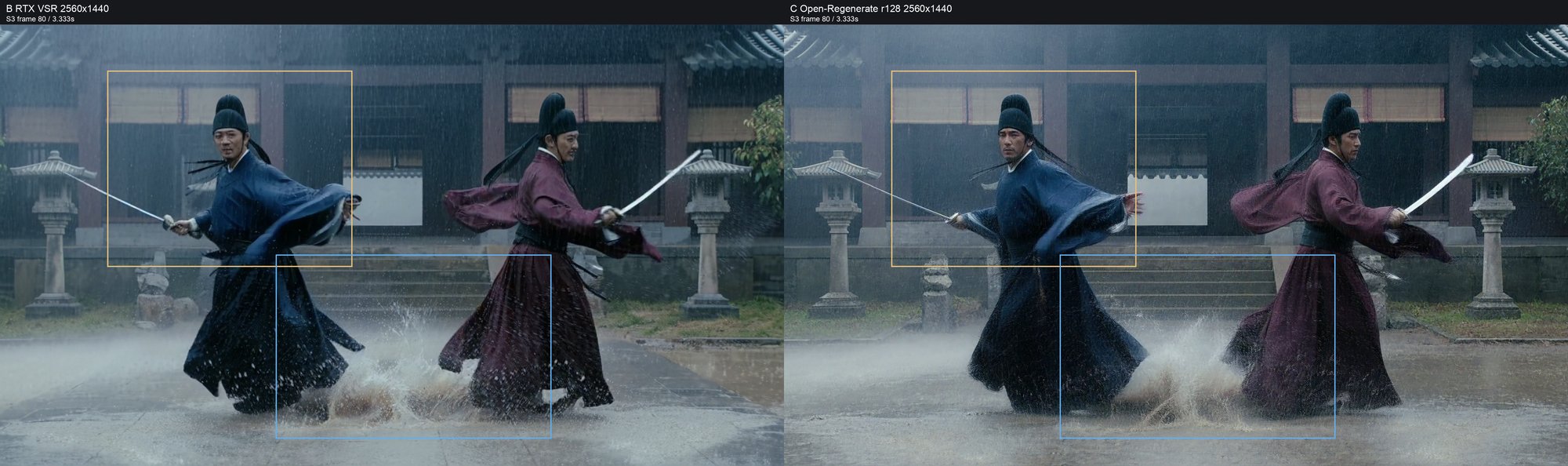
VSR's splash is coarser, but its outline matches the draft. That matters when a shot has to cut cleanly with its neighbors.
Why sign text breaks: 91% noise turns small characters into look-alikes
S2 is a night market made with plain H3 text-to-video. The draft already had typos: 鹽酥酥雞 (a doubled character in 鹽酥雞, popcorn chicken) and 鹽珠奶 (a garbled 珍珠奶茶, bubble milk tea).
VSR kept 珍珠奶茶, 鹽酥雞, 雞排 80 and 35 元 readable.
Regenerate kept only big text, like the 台灣夜市 ("Taiwan night market") banner. Mid-size and small signs came back as characters that look Chinese and don't exist:
- The first two characters of 珍珠奶茶 became unreadable.
- 雞排 80元 (fried chicken cutlet, 80 NT dollars) became two fake characters and 31.
- 35元 disappeared.
- 50 turned into something like 59.
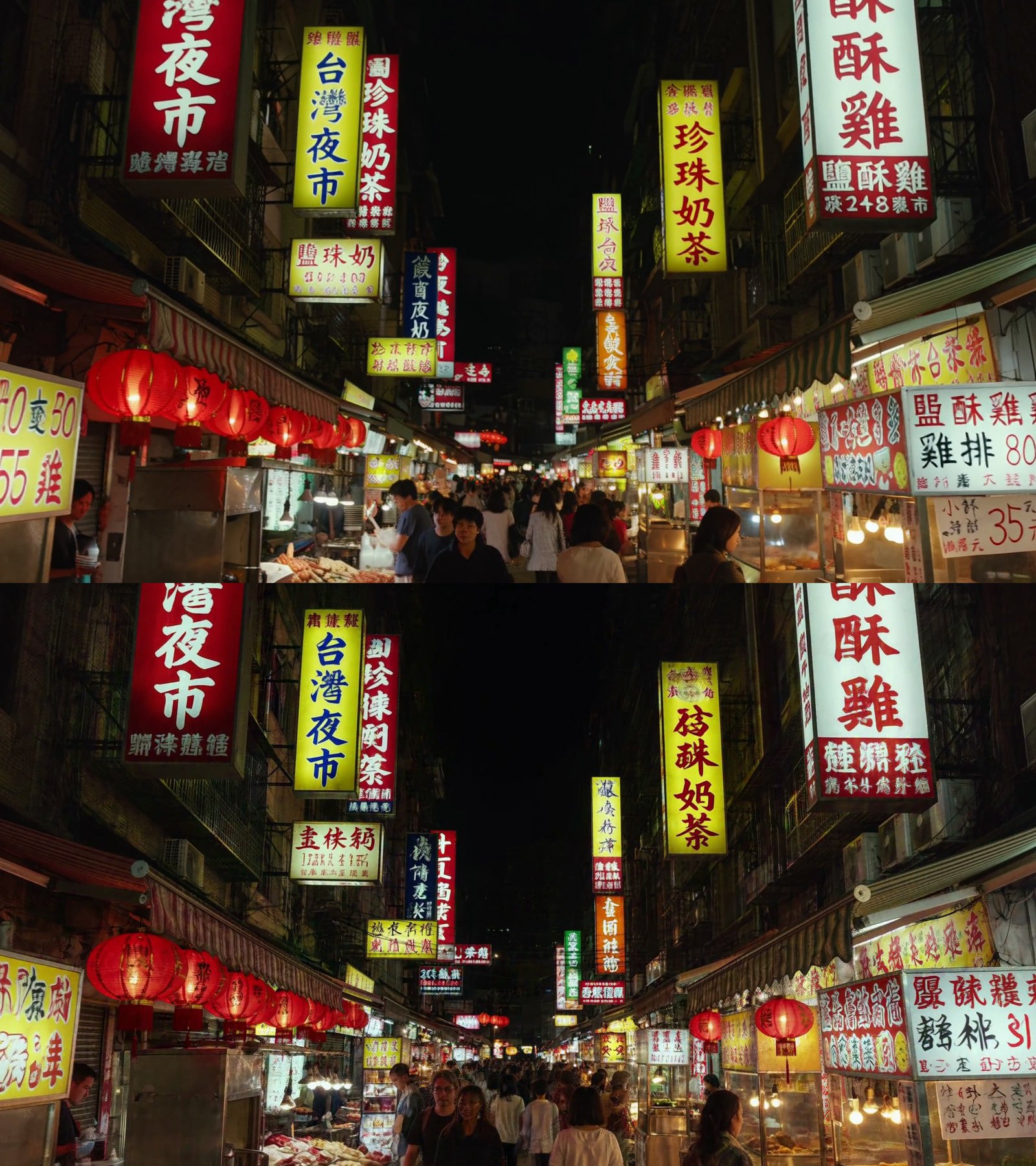
Starting from 91% noise means the lettering gets redrawn too. A big glyph's shape survives that much noise. A small one doesn't, and the model fills it in with something that looks right at a glance. If you really want regenerate on a text-heavy shot, there's a first-frame workaround in the deep dive.
Which one to pick
| Shot | Method | Time |
|---|---|---|
| Text, lip-sync, or must cut with neighboring shots | RTX VSR 2K | 19 s |
| Face or material close-up | 1-step regenerate (start sigma 0.667) | 81 s |
| Face must not change at all | RTX VSR 2K | 19 s |
The 1-step setting starts from less noise, so it stays closer to the draft. The deep dive has the sweep behind it.
Swap in the int8 VAE: decode drops from 42.7 s to 19.6 s
minimax_h3_video_vae_int8_convrot decoded S1 in 19.6 s, against 42.7 s for the original fp16 VAE. Peak VRAM for the decode was 7 GB.
PSNR (a pixel-difference score in dB, higher is closer) against the original decoder was 58.2 dB on S1 and 51.0 dB on S2. SSIM was 0.9995 and 0.9991. I couldn't see a difference, so I kept it.
I didn't measure the full pipeline with it end to end. By subtraction (133 − 43 + 19.6), 3 steps plus the int8 VAE should come to about 110 s. One step plus the int8 VAE should come to about 58 s. That's the workflow's default, and the whole thing measured 173.8 s from prompt to mp4; take away the 103 to 123 s draft and it lines up.
Deep dive: strength sweep, speed-ups that didn't pay off, and a conversion check
You don't need this section to use the workflow. It holds the full sweep, the speed-up attempts and one check on the community conversion, for anyone (or any AI) adapting the setup.
Strength sweep: one step from 0.667 keeps the face closest
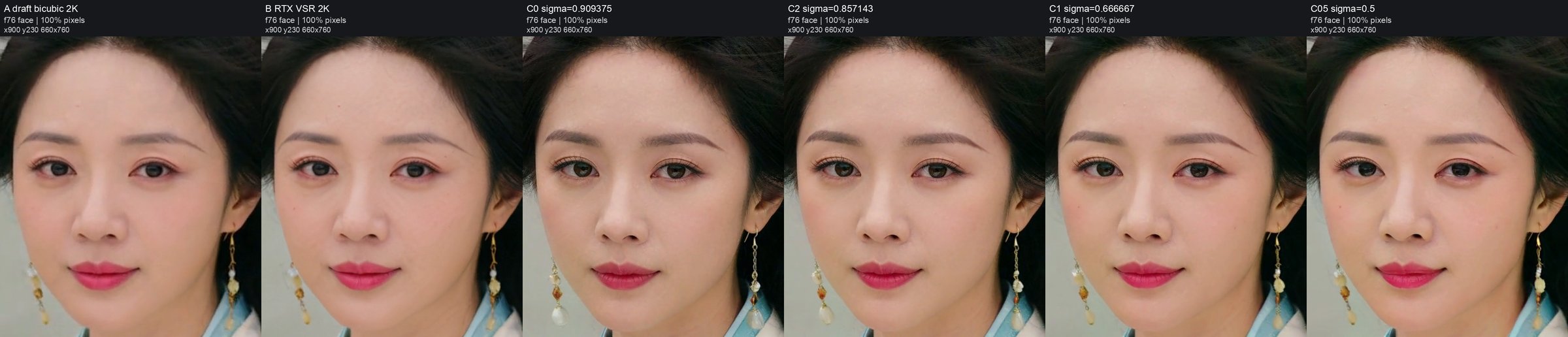
S1 at 2K, same noise seed for every row. SSIM measures pixel similarity between each output and the draft, on the face, at two frames. It's a proxy, not an identity check.
| Start sigma | Steps | Time | Face SSIM vs draft |
|---|---|---|---|
| 0.909 (official) | 3 | 133 s | 0.846 / 0.859 |
| 0.857 | 2 | 114.8 s | 0.872 / 0.877 |
| 0.667 | 1 | 80.7 s | 0.895 / 0.894 |
| 0.5 (0.5 → 0.25 → 0) | 2 | 104.0 s | 0.893 / 0.891 |
| RTX VSR | n/a | 18.3 s | 0.956 / 0.955 |
The 1-step run was closest to the draft in the cheeks, lip color and smile. Its lashes and skin were still finer than VSR's.
Starting at 0.5 adds a step over the 0.667 run. SSIM came out about the same, with less detail, and it was slower.
Speed-ups: only the int8 VAE was worth keeping
| Change | Speed | Quality | Verdict |
|---|---|---|---|
| int8 VAE | decode 42.7 → 19.6 s, peak 7 GB | PSNR 58.2 / 51.0 dB, SSIM 0.9995 / 0.9991 | Adopted |
| TensorRT VAE engine | decode 35.0 s, 18 GB | PSNR 61.6 / 54.9 dB | Slower than int8 |
NVFP4 base (minimax_h3_fl2va_pruned_nvfp4) | 3 steps 76.0 → 65.2 s (−14%) | PSNR vs int8 base 25.8 / 18.5 dB | Unusable |
| NVFP4 base + int8 VAE | full run 98.8 s | same as NVFP4 base | Fastest, unusable |
PSNR pairs are S1 / S2.
The NVFP4 base did load the LoRA properly. It applied at 208 of 208 sites. The output still broke. On S1, eyelids got double edges, skin went flat, and the gold and embroidery were rewritten. On S2, lanterns, buildings and people picked up multiple outlines.
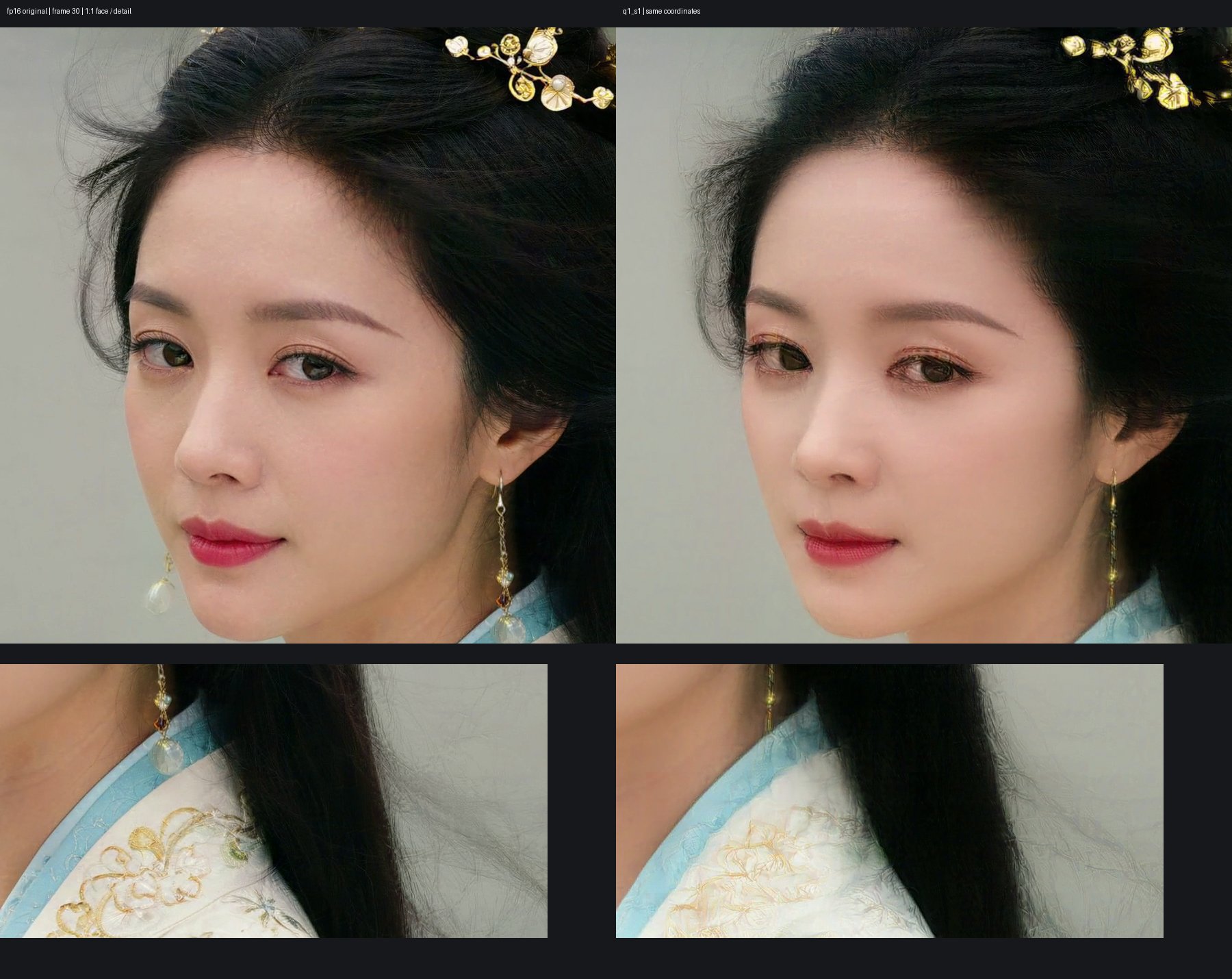
A note on that image: its labels are misleading. "fp16 original" is actually the int8 base output, and "q1_s1" is the NVFP4 base.
Why B200's 1.6 s fast decoder doesn't carry over
NVlabs' official B200 numbers, for a 5 s 2K clip, warm, median of 3:
| Setup | Time |
|---|---|
| Dense BF16 | 87.26 s |
| Sol-Attn + MXFP8 + CUDA graphs | 37.39 s |
| + fast VAE decoder | 22.45 s (3.89×) |
That fast decoder is fast_h3_vae_noncausal_24l: 6.47 GB, 24 layers, 1.62B parameters. On B200 it decodes in 1.6 s against 15 s for the original. The official docs say it needs FlashAttention-4 and quack.
FA4 isn't actually required. The official code has a pure PyTorch SDPA reference path. Upstream FA4 has had SM120 (RTX 50-series) forward support since March, and its October beta release notes list SM120 updates. I didn't install it.
The real blocker is memory. An unchunked 2K decode is estimated to need more than 42 GiB. So I tried chunking:
- CPU streaming: 154.4 s, against 41.2 s for the original decoder.
- All-GPU chunks: 24.8 s on S1 and 27.3 s on S2, peak 18.7 GB. PSNR was 36.2 dB and 28.2 dB. Pores, lashes, fine hair and small sign text were smeared.
I kept the int8 VAE.
SwiGLU half-order check: the conversion isn't what breaks the text
H3's FFN uses SwiGLU, so the first linear layer's output is split into two halves. Diffusers orders them [up | gate]. ComfyUI's _swiglu_eager orders them [gate | up]. The community conversion maps the weights directly without swapping, and its own README calls this "unverified". If the order is wrong, the fc1 LoRA lands on the wrong half.
To check, I swapped the two halves of every fc1 lora_B and reran S2. Ghosting on the foreground crowd dropped slightly. The text damage didn't change: 珍珠奶茶, 雞排 80元 and 35元 were still rewritten, and 50 still became 59.

The text damage comes from the 91% redraw, not from the conversion.
Text-heavy shots: let MOSS-Image write the signs, then feed the first frame back in
This one is off the main question. For text-heavy shots, generate the first frame with MOSS-Image and reuse it during regenerate.
The idea is to let an image model that can actually write handle the text, and use H3 only for motion.
- First frame. MOSS-Image (
moss_image_sft_int8_convrot, a Qwen3.5 9B text encoder and a 4-step LoRA) generated three night-market first frames at 1344×768, 1.2 to 5.4 s each. I picked #3, which took 1.3 s. All six signs and all 26 characters were correct: 台灣夜市, 珍珠奶茶, 鹽酥雞, 雞排 80元, 大杯 55元 (large cup, 55) and 小杯 35元 (small cup, 35). - Draft. H3 image-to-video from that frame took 122.7 s. At frames 0 and 30, all six signs were still correct.
- Regenerate with the first frame. During the regenerate pass I also fed the same first frame into the keyframe input of ComfyUI's
MiniMaxH3ImageToVideonode. I'm calling this first-frame conditioning.
The official refine code builds its layout with build_t2va_layout and has no first-frame input. This is my own ComfyUI workaround. The workflow above has it wired.
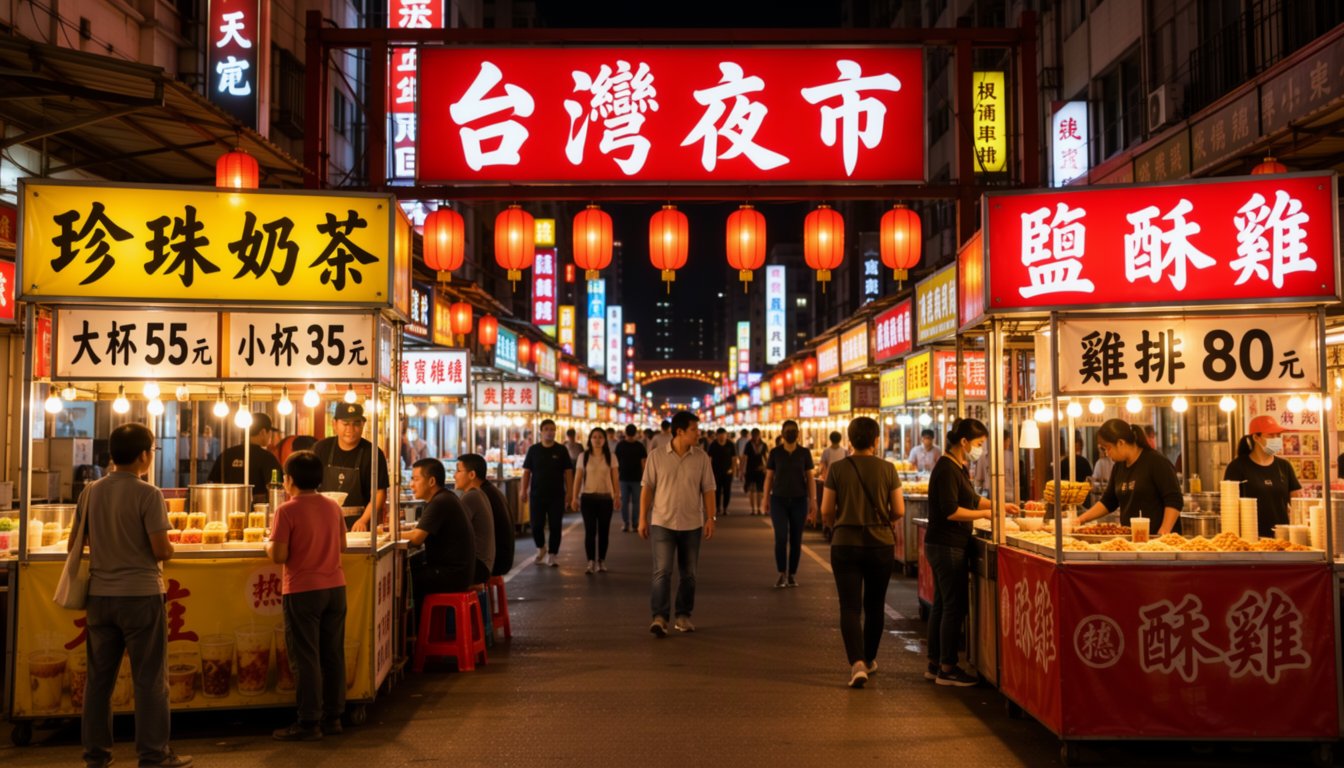
Results at frames 0 and 30: 6/6 with first-frame conditioning
A sign counts only if it's fully correct.
| Method | Signs correct | Time |
|---|---|---|
| RTX VSR 2K | 6/6 | 19.0 s |
| Regenerate | 2/6 | 133.6 s |
| Regenerate + first frame | 6/6 | 152.0 s |
First-frame conditioning adds 18.4 s, and its strokes came out sharper than VSR's.
Plain regenerate failed even with the clean I2V draft. 灣 became a fake character. The first and last characters of 鹽酥雞 were fake. The 雞 in 雞排 was fake. And 小杯 turned into 个杯, with a character that isn't on the original sign.


Night-market signs at 2K. Left: RTX VSR. Middle: plain regenerate. Right: regenerate with MOSS first-frame conditioning
There's a limit to this. By frame 94 the camera has pushed in and most signs are out of frame or behind people. Only two can be checked there: VSR got 2/6, regenerate with the first frame 2/6, plain regenerate 0/6. So I'm only claiming frames 0 and 30, not all 121.
Limits of this test
- Community weights. The r128 conversion isn't official, and I can't run the official version on a 5090 for a baseline.
- N=1. One run per scene per method.
- First-frame conditioning is my own workaround. The official refine code has no first-frame input.
- Signs checked at frames 0 and 30 only. By frame 94 most signs are out of frame.
- SSIM is a proxy. It measures pixel similarity, not whether the face is the same person.
- One number is an estimate. About 110 s for 3 steps plus the int8 VAE. For 1 step plus the int8 VAE I only have the 173.8 s measured with the draft included.
Related
FAQ
- Can Open-H3-Regenerate-2K run on a 32 GB RTX 5090?
- Not with the official code, which the README says needs about 150 GB on one card (B200 or GB200). It runs in ComfyUI with a community conversion of the refiner LoRA (father558/H3-Open-Regenerate-2K-ComfyUI-r128): ComfyUI keys, SVD-compressed to rank 128, 1.96 GB in BF16, loaded with LoraLoaderModelOnly at strength 1.0. With the int8 H3 base and the original fp16 VAE, the official 3-step pass peaked at 31.7 GB. The conversion is not official and not from the original authors.
- How does Open-H3-Regenerate-2K compare to RTX VSR for 2K upscaling?
- From the same 1344x768 H3 draft latent to a saved 2560x1440 mp4, RTX VSR took 18.3 to 19.1 s and the official 3-step regenerate took 132.6 to 134.4 s across three scenes. Regenerate draws detail the draft never had: separate eyelashes, eye highlights, earring chains, embroidery. It also changes things: a slightly slimmer face, a different hand gesture, a re-shaped water splash. VSR only sharpens what is already there, so its output stays matched to the draft.
- Why does Open-H3-Regenerate-2K turn Chinese sign text into fake characters?
- It starts from 9% upscaled draft and 91% noise, so it redraws the frame and the draft only fixes composition and color. Large glyphs like 台灣夜市 survive. Mid-size and small ones come back as Chinese-looking characters that do not exist. In my night-market test, 雞排 80元 became two fake characters plus 31, and 35元 disappeared.
- How do I keep sign text readable with Open-H3-Regenerate-2K?
- Let an image model that can write handle the text. I generated the first frame with MOSS-Image (all 26 characters on six signs correct), made the H3 draft with image-to-video, and fed the same first frame into the keyframe input of ComfyUI's MiniMaxH3ImageToVideo node during regenerate. At frames 0 and 30, plain regenerate got 2 of 6 signs right and regenerate with first-frame conditioning got 6 of 6, in 152.0 s. The official refine code has no first-frame input; this is my own ComfyUI workaround.
- How can I reduce face drift with Open-H3-Regenerate-2K?
- Use one step from sigma 0.667 instead of the official three steps from 0.909. On a close-up with a fixed noise seed, face SSIM against the draft went from 0.846/0.859 (3 steps, 133 s) to 0.895/0.894 (1 step, 80.7 s), with cheeks, lip color and the smile closer to the draft. Lashes and skin were still finer than RTX VSR. If the face must not change at all, use VSR (0.956/0.955).
- How do I make Open-H3-Regenerate-2K faster on an RTX 5090?
- Swap the VAE for minimax_h3_video_vae_int8_convrot. Decode went from 42.7 s to 19.6 s with a 7 GB peak, and PSNR against the original decoder was 58.2 dB and 51.0 dB on two scenes, which I could not tell apart by eye. A TensorRT VAE engine was slower (35.0 s), and an NVFP4 base cut sampling 14% but visibly broke the image. Estimated totals with the int8 VAE are about 110 s for 3 steps and about 58 s for 1 step; I did not measure those end to end.
Read next
- 2026-10-25[MiniMax-H3] A storyboard image isn't a prompt: getting local H3 to hit 13 of 16 shots
A 4x4 storyboard plus a character sheet into MiniMax-H3 Ref2VA on an RTX 5090: one sentence hit 3/16 panels, an official-format shot timeline hit 13/16.
- 2026-10-19Turn a real dance into a depth video and have MiniMax-H3 restage it in a palace: native 768 on one RTX 5090
Real dance to grey depth video to MiniMax-H3 Ref2VA with a first-frame guide: a new character dances the routine in a palace, native 768x1376 on one RTX 5090.
- 2026-10-18A 25-second no-fog FPV one-take with MiniMax-H3 and ComfyUI-H3-Continuum on one RTX 5090
A 25-second FPV one-take over Taiwan with no fog: MiniMax-H3 Ref2VA and ComfyUI-H3-Continuum on one RTX 5090, each splice hidden in a turn through the sky.
- 2026-10-16A 22-second Taiwan FPV flight without a drone: Blender blockout + MiniMax-H3 on one RTX 5090
A 22.7-second FPV flight that reads as one take, over Yushan, Taroko Gorge, Taipei 101 and Sun Moon Lake, built from a gray Blender blockout and MiniMax-H3 Ref2VA on one RTX 5090.
Don't miss the next one
Subscribe, and you won't.
One-click unsubscribe anytime.