MiniMax-H3 on RTX 5090 · part 4
[Benchmark] Ten effect embeddings for MiniMax-H3 — 10 MB that buys you bullet time, fire breath and a full year of seasons
❯ cat --toc
- Preface
- The 768p baseline is the thing that makes any of this worth looking at
- Put the marker mid-sentence, not at the front of the prompt
- Why I pulled my first explanation
- An effect embedding is a paragraph somebody else wrote, not a keyword
- Camera moves: three embeddings that only change how the shot is framed
- Events: four embeddings that make something happen
- Time passing: the two that genuinely surprised me
- `kiss_camera` locks a camera move and an action together
- Cheat sheet: what to feed each embedding
- Deep dive: full parameters and the accelerations that did not earn their place
- The exact generation config
- Match the sampler to the LoRA family
- Speedups I tested and rejected
- What the ten files actually are
TL;DR
Ten community effect embeddings for MiniMax-H3, all ten verified working at native 1344x768 on a single RTX 5090. They split into camera moves (bullet_time, spiral_ascent), events (fire_breath, art_is_explosion) and — the surprising group — time passing: four_seasons takes one tree from autumn leaves to bare branches to snow inside 5.17 seconds. Total download 10.7 MB. One catch: put embedding: mid-sentence. At the very start of the prompt the effect simply does not appear — no warning, and the output still changes, so a different file is not evidence that it worked.
All ten effects, two seconds each. Every clip is 1344x768, 124 frames, generated in one pass with audio.
Preface
A stage magician does not carry a bag of ten different tricks. They carry ten different setups — the box, the table, the assistant standing just there — and each setup makes one trick possible. Take away the setup and the trick has nowhere to happen.
Effect embeddings work the same way, which is the part that took me longest to see. Part 1 got MiniMax-H3 running on a single RTX 5090, Part 2 halved the generation time, and Part 3 locked a character's identity with a reference image. This one is about ten small files that add camera work and visual events to a shot — and about the shape a prompt has to be in for them to land.
The 768p baseline is the thing that makes any of this worth looking at
All the clips below use one configuration, so here it is first. H3's native canvas is a 768-pixel short edge — Comfy's own documentation puts it as 1344x768 at 16:9, with both dimensions rounded to a multiple of 32.
| Setting | Value |
|---|---|
| Resolution | 1344 x 768 (native, no upscaling) |
| Frames | 124 = 17x7+5, at 24 fps → 5.167 s |
| Steps | 14 |
| Sampler / scheduler | res_multistep + simple |
| Spectrum solver | ON (shift 12 / 3) |
| Weights | pruned_int8_convrot, 20.97 GB |
| Time per clip | 206–260 s |
Two of those rows carry most of the weight. The frame count is not free-form: the duration snaps to a 17k+5 grid, so 124 frames is legal and 120 is not. And the resolution is not a quality dial you can turn down and make up for later. I spent a chunk of an evening trying to generate at 864x480 and repair the result afterwards — the faces come back wrong in a way that upscaling cannot fix, because they were never resolved in the first place. Native 768p is roughly four times the pixels and roughly four times the wait, and it is the difference between a face and a smear.
The Spectrum solver is the one acceleration worth having here, and notably it earns more at this resolution than at the old 480p baseline. That is unusual — most speed tricks give back less as you scale up.
Put the marker mid-sentence, not at the front of the prompt
The first time I attached fire_breath I put the marker at the very start of the prompt. The dragon came out beautifully. No fire.
I assumed the effect was too weak, so I shortened the prompt and specified the dragon's posture more tightly. Still no fire.
Three arms, same seed, same scene, 14 steps, 1344x768. The only variable is where the marker sits:
| Start of the prompt | Fire? |
|---|---|
embedding:minimaxh3_fire_breath [Shot 1] A dragon... | no |
embedding:minimaxh3_fire_breath [Shot 1] A dragon... (leading space) | no |
[Shot 1] embedding:minimaxh3_fire_breath A dragon... | yes |
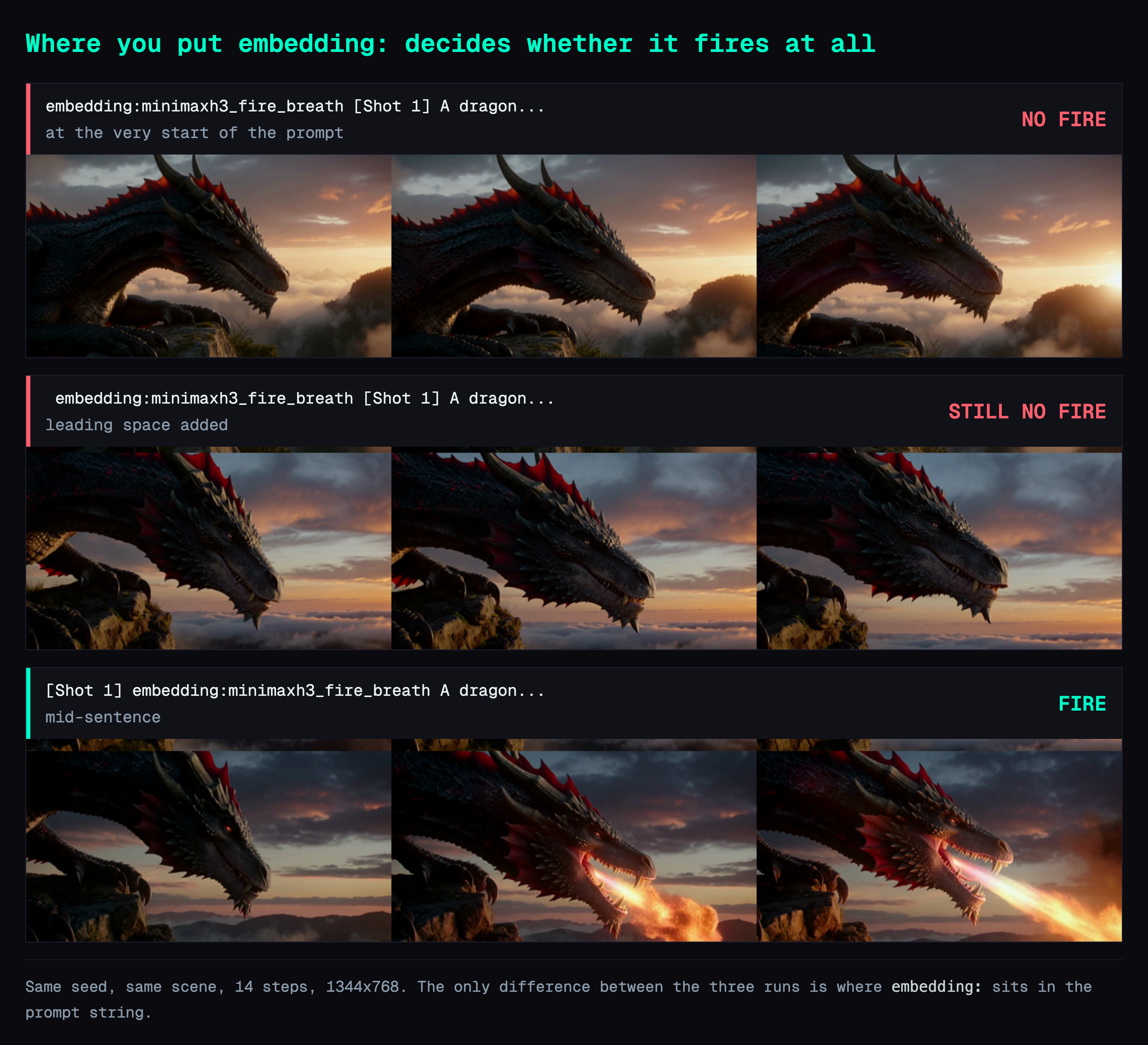
Row two was my first guess — if position is the problem, pad the front with a space. It still produced nothing.
So the rule is "put it mid-sentence", not "make sure there is a space before it." In practice you never have to remember it: the H3 prompt format already opens with integrated_multimodal_description: [Shot 1], so dropping the marker after [Shot 1] satisfies it for free.
Why I pulled my first explanation
My original explanation was that ComfyUI splits the prompt in comfy/sd1_clip.py line 594 (pinned to commit 6c62ca0 — line numbers on master drift) with re.split(r'(?<=\s)embedding:', ...), that the (?<=\s) lookbehind demands preceding whitespace, and that a marker at position zero therefore falls through as plain text.
The regex is real and does read that way. It is not enough to explain the measurement. Line 602, a few lines further down:
to_tokenize = [split[0]]
# ...
for word in to_tokenize:
    if word.startswith(self.embedding_identifier) and self.embedding_directory is not None:
When the split does not fire, the first segment is still tested with startswith. On that code path alone, an embedding: at position zero should still be recognised.
The measurement holds; my account of it does not. I have not pinned down where the real cause lives. The tensor inside these files is named qwen3vl_32b, so H3's text encoder is not the SD1 path, and the difference may sit there. I have no evidence for that, so it stays a guess rather than a conclusion.
Whatever the cause turns out to be, two practical takeaways still hold.
Nothing warns you. The logging.warning in that file fires when a named embedding file is missing, which is a different situation. Your console stays clean throughout.
The output still changes. The runs where nothing happened still have a different md5 from the control, because the literal text is real tokens and real tokens move the conditioning. Checking "did my change do something" by comparing files gives you a yes, and it is the wrong yes.
An effect embedding is a paragraph somebody else wrote, not a keyword
The second thing to understand before writing prompts is that these are not trigger words.
Each file is a tensor of shape [N, 5120], where N runs from 50 for art_is_explosion to 142 for four_seasons. ComfyUI expands a multi-row embedding into one conditioning token per row — the loop is right there in the same function. So embedding:minimaxh3_fire_breath does not look anything up. It splices 118 pre-encoded vectors into your prompt, and those vectors were somebody's description of what fire breath looks like, run through the text encoder once and frozen.
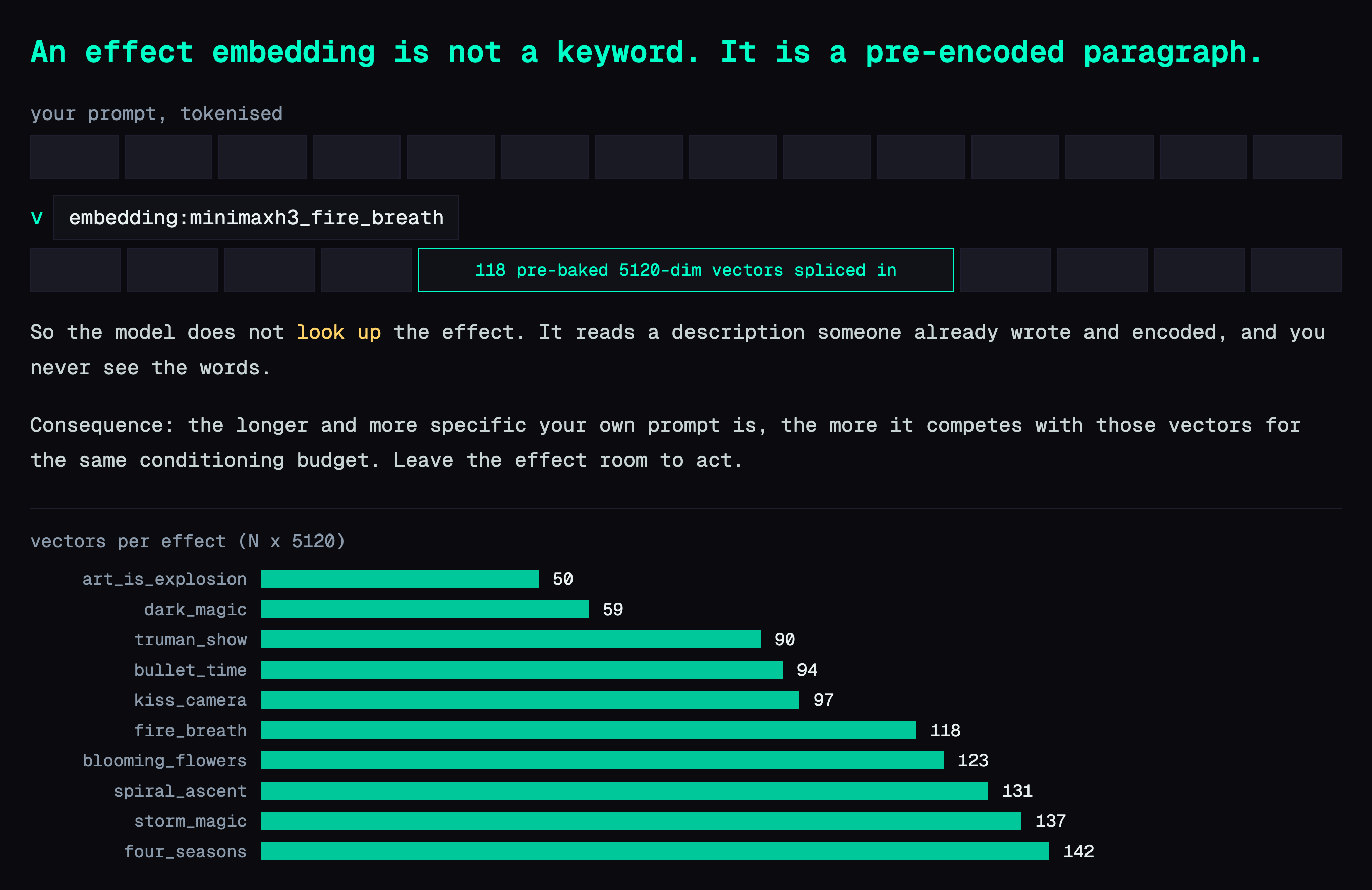
That has a direct consequence for how you write the rest of the prompt: the more specific your own words are, the harder they compete with those vectors. A long, tightly specified scene description does not reinforce the effect. It competes with it.
The prompt shape that works is a subject with room around it:
- Give the effect something to act on — a dragon for
fire_breath, a spinning kick forbullet_time, one lone tree forfour_seasons, an empty flower bed forblooming_flowers. - Do not describe the effect yourself. You are paying for those 118 vectors; do not overwrite them.
- Do not pin down what you want the effect to change. Writing "stands still, facing the camera" in front of a camera-move embedding cancels the thing you asked for.
Camera moves: three embeddings that only change how the shot is framed
The first group leaves the content alone and rewrites the camera.
bullet_time — a spinning kick in the rain. The camera orbits: the background sweeps across while the figure holds the centre of frame.
bullet_time is the clearest demonstration of the "give it room" rule. The subject needs to be doing something worth freezing, and the shot needs to be wide enough that an orbit has somewhere to travel. A tight close-up gives the effect nothing to work with.
spiral_ascent — the figure rises and the horizon rotates with it. 131 vectors, the third-largest of the ten.
truman_show — a suburban street, a man looking up, and a wide reveal pulling back. This one carries atmosphere as well as framing.
truman_show is the odd member of the group: it changes the camera, but it also brings a whole aesthetic with it — the manicured lawns, the flat daylight, the sense of being watched. That is the 90 vectors doing scene-setting work, not just camera work.
Events: four embeddings that make something happen
The second group adds an occurrence to the shot.
fire_breath — the dragon builds up and lets go. Unmute this one; the audio track is generated in the same pass.
dark_magic — a hooded figure in a stone archway, red energy gathering in both hands by the end of the clip.
storm_magic — hands raised, sky pressing down. The most atmospheric of the four; the event is the weather, not an object.
art_is_explosion — a still life of fruit with fire erupting behind it. At 50 vectors this is the smallest embedding of the ten.
art_is_explosion being the smallest file is a useful hint about how these were made. Fifty vectors is a short description — roughly "there is an explosion in this composition" — which is why it composes so cheerfully with a subject as ordinary as three pieces of fruit on a table. The bigger embeddings are more opinionated and will fight a strong scene description harder.
Time passing: the two that genuinely surprised me
The third group is the reason this article exists. These two do not move the camera or add an object. They move time.
four_seasons — one tree, one shot: autumn foliage, then bare branches, then snow on the ground. 142 vectors, the largest of the ten.
blooming_flowers — bare soil, then sprouts, then a bed in full colour. The whole growth cycle in 5.17 seconds.
A 5.17-second clip has 124 frames to work with, and both of these spend that budget on a transformation rather than on motion. four_seasons at 142 vectors is the largest embedding in the set, which makes sense: a season change is a lot more to specify than an orbit.
The subject choice matters more here than anywhere else. One tree in an open field. One empty flower bed. A busy scene has too much that would have to change together, and the model spends its frames trying to keep everything consistent instead of transforming anything.
kiss_camera locks a camera move and an action together
kiss_camera — the camera pushes in between two faces while the two people move together. Camera move and event in one embedding.
This one gets its own section because it shows the pattern you would use to build your own: 97 vectors that specify a camera move and the thing that happens at the end of it. The two are locked together, which is exactly what you want for a beat like this and exactly what you do not want if you only wanted the push-in.
Cheat sheet: what to feed each embedding
| Embedding | Vectors | Give it | Type |
|---|---|---|---|
art_is_explosion | 50 | any still subject | event |
dark_magic | 59 | a figure with visible hands | event |
truman_show | 90 | a person in an open outdoor space | camera + mood |
bullet_time | 94 | a body mid-action, wide framing | camera |
kiss_camera | 97 | two faces | camera + event |
fire_breath | 118 | a creature with a mouth | event |
blooming_flowers | 123 | bare soil, empty bed | time |
spiral_ascent | 131 | a figure with sky above | camera |
storm_magic | 137 | a figure, big sky | event + mood |
four_seasons | 142 | one tree, open ground | time |
Installing them is a copy job. Drop the ten .safetensors from Comfy-Org/MiniMax-H3 into ComfyUI/models/embeddings/ and restart. You need ComfyUI 0.34.0 or later. Comfy's documentation says to reference them from a CLIPTextEncode node; the prompt field on MiniMaxH3ImageToVideo reads them just as well, so an existing H3 workflow needs no rewiring.
Deep dive: full parameters and the accelerations that did not earn their place
You can stop here if you only want to use the embeddings; everything you need is above. The rest is methodology and measurements.
The exact generation config
Every clip in this article came out of the same graph, one variable changed at a time:
model      MiniMax-H3, pruned_int8_convrot (20.97 GB)
resolution 1344 x 768          # native short edge 768, both dims %32 == 0
frames     124                 # 17*7+5, the only nearby legal value
fps        24                  # → 5.167 s
steps      14
sampler    res_multistep
scheduler  simple
spectrum   enabled, shift 12 / 3
seed       fixed per comparison, varied across effects
Wall time landed between 206 and 260 seconds per clip on one RTX 5090. The spread is mostly scene complexity, not the embeddings — bullet_time measured 212.0 s against a 206.4 s control with the same seed and prompt, a gap that sits inside run-to-run noise. In other words, the embedding adds no measurable overhead — it is conditioning, not extra compute.
Match the sampler to the LoRA family
One parameter that is easy to get wrong when adapting a workflow from elsewhere: res_multistep is correct for the lightx2v-family distillation LoRAs, and euler is correct for PDD. Mixing them will not throw an error. It just quietly produces worse frames. If you copy a graph from a tutorial that used a different acceleration LoRA and keep its sampler, this is where the quality goes.
Speedups I tested and rejected
BlockCache (T8mars/comfyui-minimax-h3-blockcache-T8): the author's own numbers are 485.8 s → 443.8 s on an RTX 4060 Ti with INT8 ConvRot, a 1.09x speedup, best case 403.2 s for 1.20x. It is mutually exclusive with the Spectrum solver, and Spectrum is worth more than that at 768p. Straightforward no.
Step-count reduction below 14: covered in Part 2 — 20 steps to 14 was free, and going further was not.
Generate at low resolution and repair afterwards: this is the one I most wanted to work, because 864x480 generates in about a quarter of the time. The face-repair path in the T8 node pack runs cleanly and measurably improves facial detail — the audit reports 124/124 frames detected, zero rejected, and the repaired faces have formed eyes and glasses where the 480p originals had smears. It is still unusable: the repair crops a region, regenerates it and pastes it back, and the paste boundary is visible as an ellipse against the compressed background around it. I swept the blend parameters — feather from 12 to 128 source pixels, colour match to 1.0, elliptical against full-crop regions, blend down to 0.7 — and the edge survives all of them. The boundary is inherent to cut-repaint-paste, not a tuning problem. Native 768p is the answer.
What the ten files actually are
Ten .safetensors, 10.7 MB total. silveroxides opened PR #50 and Lexius merged it into the Comfy-Org repository. Comfy's documentation lists them and gives the embedding:name syntax, but no usage examples and no guidance on prompt shape — which is the gap this article is trying to fill.
Shapes, read off the files:
minimaxh3_art_is_explosion    [ 50, 5120]    512 kB
minimaxh3_dark_magic          [ 59, 5120]    604 kB
minimaxh3_truman_show         [ 90, 5120]    922 kB
minimaxh3_bullet_time         [ 94, 5120]    963 kB
minimaxh3_kiss_camera         [ 97, 5120]    993 kB
minimaxh3_fire_breath         [118, 5120]   1.21 MB
minimaxh3_blooming_flowers    [123, 5120]   1.26 MB
minimaxh3_spiral_ascent       [131, 5120]   1.34 MB
minimaxh3_storm_magic         [137, 5120]   1.40 MB
minimaxh3_four_seasons        [142, 5120]   1.45 MB
H3's conditioning width is 5120, so these tensors work anywhere the graph accepts text conditioning. That includes the MiniMaxH3ImageToVideo prompt field, with no CLIPTextEncode in the path.
Also in this series: Part 1 — first clip on one RTX 5090 · Part 2 — the three switches that halve generation time · Part 3 — locking a character with a reference image
FAQ
- Why does my ComfyUI embedding do nothing at all — no error, no warning?
- Nine times out of ten the marker is in the wrong place. Measured across three runs with the same seed and scene: at the very start of the prompt the effect does not appear, and moving it mid-sentence — after `[Shot 1]`, say — makes it appear. Padding the front with a space does not help. Nothing is logged either way, and the output still changes, so a different file is not proof that it worked.
- Are the MiniMax-H3 effect embeddings official?
- No. They are community-contributed, uploaded by Lexius and silveroxides to the Comfy-Org/MiniMax-H3 repository. Comfy's own documentation lists them and labels them as community work. There are ten of them and they total about 10.7 MB.
- What resolution should I run MiniMax-H3 at?
- H3's native canvas is a 768-pixel short edge, which is 1344x768 at 16:9, and dimensions round to a multiple of 32. Running below that and upscaling afterwards costs you faces in particular. Avoid the 1.0-megapixel preset, which produces 1376x768 and exceeds the model's pixel-area cap.
Read next
- 2026-09-03[Benchmark] From OOM to 8.6 minutes: a MiniMax-H3 config stack for one RTX 5090
MiniMax-H3 at native 1344x768 on a single RTX 5090: 15 seconds of video in 518 s. What KJNodes chunking, torch cu130 and the NVFP4 kernels are each worth.
- 2026-10-12[AI Workflow] Block a scene in Blender, let MiniMax-H3 film it: local Ref2VA on an RTX 5090
Block out a shot with capsules and boxes in Blender, feed it to MiniMax-H3 Ref2VA with two reference photos, and get a live-action clip that keeps left/right order and occlusion. 89.9 s on one RTX 5090.
- 2026-09-13[Benchmark] Roll cheap, then enhance the keeper: NVIDIA's two-stage MiniMax-H3 + LTX-2.5 pipeline explained
NVIDIA's Sol-H3 two-stage recipe on an RTX 5090: MiniMax-H3 drafts at 672×384 in 25.5 s, LTX-2.5 refines only the take you keep. Downloadable ComfyUI workflow.
- 2026-09-11[Benchmark] LTX-2.5 vs MiniMax-H3 on one RTX 5090: 29s vs 81s for the same Chinese dialogue clip
LTX-2.5 and MiniMax-H3 on one RTX 5090, same Simplified Chinese line: 28.67s vs 81.22s end to end, both at CER 0%. Files, params, VRAM ceiling.
Don't miss the next one
Subscribe, and you won't.
One-click unsubscribe anytime.