MiniMax-H3 on RTX 5090 · part 15
Making a character do parkour with NVIDIA MotionBricks on one RTX 5090: 1.66 ms per generation
❯ cat --toc
- What MotionBricks does: you place target poses, it fills in the motion
- It's kinematic, not physics: expect clipping and foot sliding
- 1.66 ms per generation on an RTX 5090, about 19× real time for a full run
- Building the parkour run: obstacles in a line, each one a Smart Primitive
- Round 1: official primitives only, 7/7 triggered in every take
- Round 2: faster, more jumps, closer together
- Handing the grey-box to MiniMax-H3: the look held, the jumps didn't
- Jumps can't sit on a chunk boundary
- Depth previs won the test clips
- Where it stands: real motion for placed obstacles, not yet a reliable skeleton for AI video
- Reproduce it yourself: two demos, then a headless script
- Deep dive: full measurements, the jump re-cuts, and the boundary search
- Architecture, training data and license
- Speed sweep: feet start sliding at 6.5 m/s, outliers appear at 7 m/s
- Per-take checks for both rounds
- FastJumpBehavior: skip the approach target
- Re-cutting two new jumps from the sample motions
- Blender render: CPU 440.5 s, 5090 OptiX 180.3 s
- Why evenly spaced jumps can't clear the 5 s boundaries
- The second previs: 9 jumps as 3/3/2/1, 497 automatic iterations
- H3 chunks: settings, time and retries
- Boundary MAD: all three boundaries are about 1.0 to 1.2× a normal frame
- What this test does not show
- Related
TL;DR
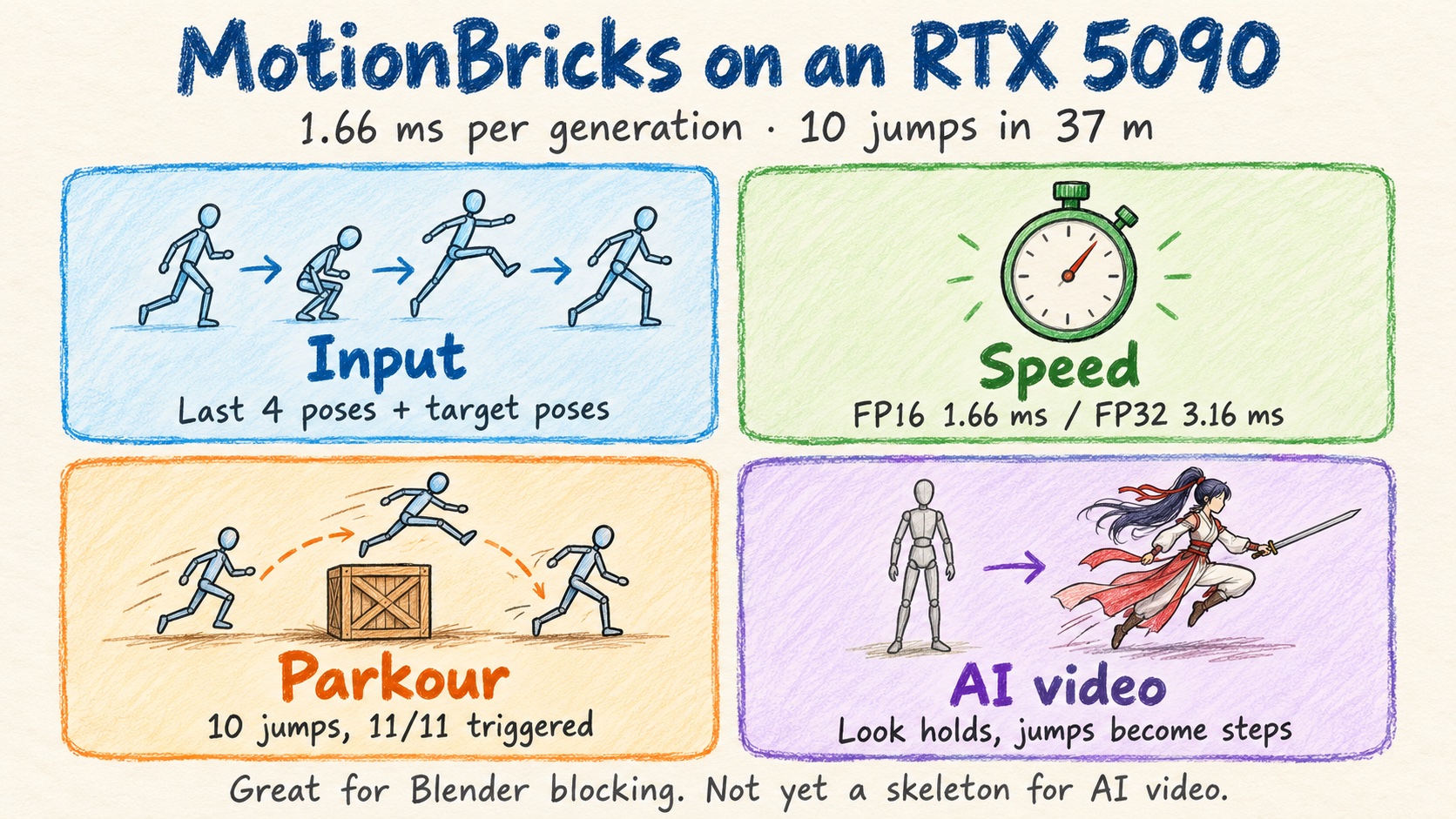
NVIDIA MotionBricks runs on one RTX 5090 at 1.66 ms median per generation (FP16, TensorRT). I built a 37.2 m parkour track with 10 obstacles 3.3 m apart: all 11/11 interactions fired, including the final sit, in 20.27 s. You give it the last 4 poses plus 1 to 4 target poses and it fills in the motion; each obstacle is a Smart Primitive that supplies those targets. Then I used the grey-box run as the skeleton for a 20 s MiniMax-H3 video: the look and the street held, the jump count and timing didn't. Caveat: it's kinematic only, and feet sank up to 11.44 cm into boxes.
20 seconds of MiniMax-H3 Ref2VA, four 5-second chunks chained with ComfyUI-H3-Continuum on one RTX 5090. The motion skeleton is a MotionBricks parkour run rendered as a depth previs in Blender
I saw NVIDIA Research's MotionBricks announcement on X. The claims were big: 350k+ motions in one model, 15,000 FPS, 2 ms latency, a SIGGRAPH 2026 paper. The UE5 demo said it was fully neural, with no foot-lock, no blending, no collision detection and no hand-authored transitions. A secondhand post also mentioned a Japanese developer driving a VRM anime model in the browser with WebGPU and arrow keys. I couldn't find the original link, so treat that one as hearsay.
Why it caught my eye: classic game animation is a library of pre-recorded clips (walk, run, jump, turn) stitched together by hand-written rules. When the stitching is bad you get foot sliding and jerky turns. AI video models go the other way. They look great, but you can't tell them how many times to jump, or when.
So I had two questions. Is the official claim real? And can it make a character do parkour? I had an RTX 5090 on hand, so I tried both, and then handed the result to MiniMax-H3 to see if it could serve as the skeleton for an AI video.
What MotionBricks does: you place target poses, it fills in the motion
MotionBricks generates character motion from poses, not from words.
- Input: the character's last 4 poses as context (30 Hz), plus 1 to 4 target poses. One target says where to end up. Several also say how to move on the way.
- Output per generation: 6 to 16 tokens, 4 frames each. After the runtime trims 3 frames off each end, that's about 0.6 to 1.9 s of motion. The model decides how long the transition takes.
- Long motion: play the generated chunk, take its last 4 frames as the next context, generate again.
- No text, image, video or scene geometry. The model card says so. You can't type "jump over that box", and it can't see the box.
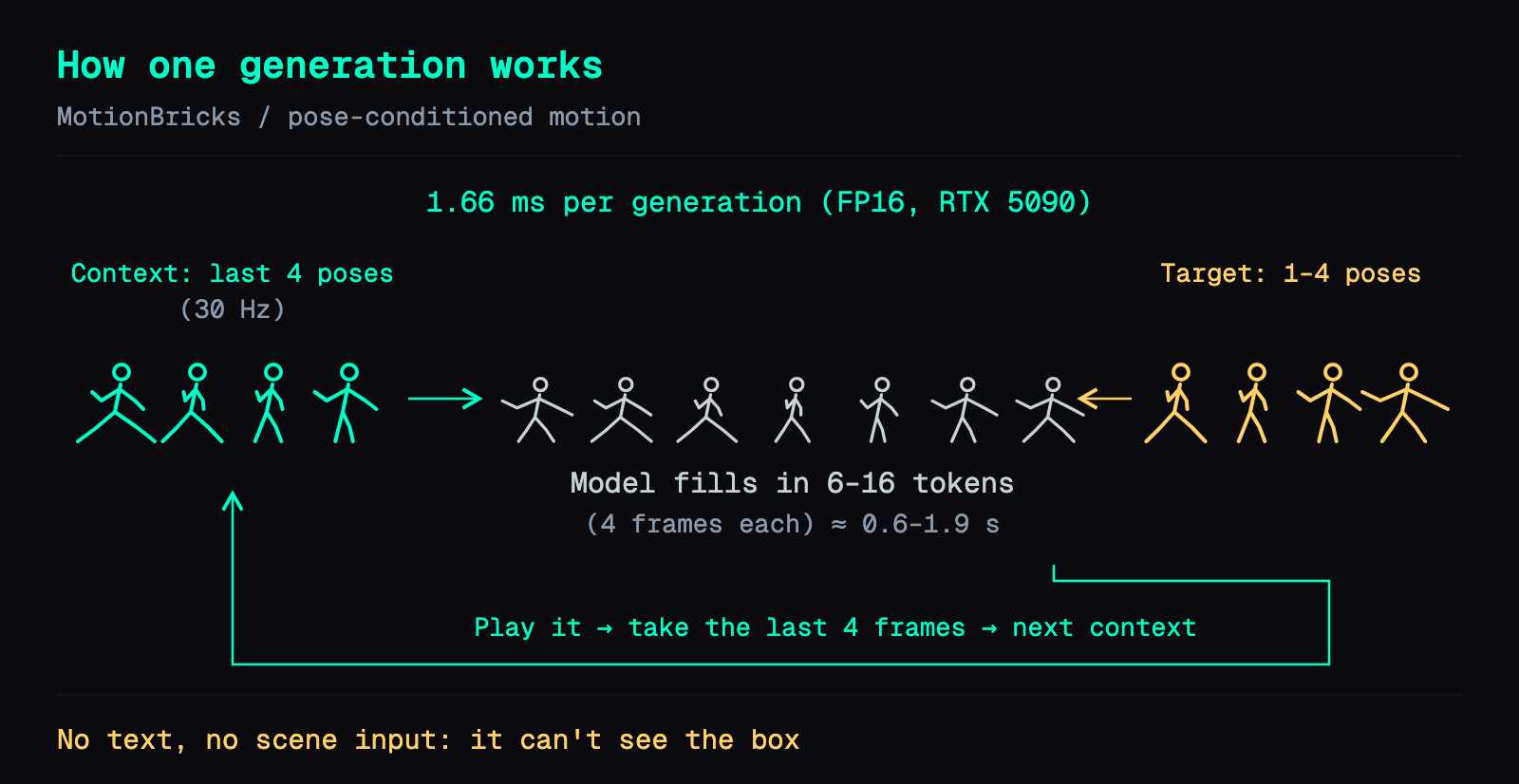
So how does it ever jump a box? Through Smart Primitives. An action like "vault a 0.5 m box" or "sit on a chair" is packaged as a set of mocap-derived target poses placed around an object, plus an interaction volume. When the character enters the volume, those targets are fed to the model in order. No retraining.
The repo ships these primitives:
jump_0_5m: jump a 0.5 m boxjump_0_75m: get over a 0.75 m wallavoidance: duck under or dodge an overhead obstaclesit- a locomotion set, plus walking styles Skipping, Zombie and Combat
The license is friendly: the weights are under the NVIDIA Open Model Agreement (commercial use OK, modified versions distributable), and the code is Apache 2.0. One exception matters later in this post: the 38 BONES sample motions in the repo are for internal evaluation only.
It's kinematic, not physics: expect clipping and foot sliding
MotionBricks is kinematic only. Boxes in a scene only decide whether the character has entered an interaction zone; there is no collision response, and the model card says outputs aren't guaranteed to be physically feasible. Newton and Warp are in the repo, but they're there for rendering and the runtime. A real robot would still need a tracking controller.
In practice that means two artifacts: feet and pelvis sink into boxes, and feet slide. Across my runs, max penetration was 11.44 cm, and a planted foot still traveled 35 to 47 cm horizontally over a contact segment. Fine for animation previs. Not fine for a game character that needs reliable collision.
1.66 ms per generation on an RTX 5090, about 19× real time for a full run
The abstract's 15,000 FPS / 2 ms doesn't name the hardware. Section 7.4 of the paper does: a desktop with an RTX 5090. (The repo's Python demos were tested on an RTX 4090.) That's the card I have, so I measured it myself. The official TensorRT 10.8 path, with the repo unmodified, builds a plan on Blackwell without trouble.
Method: 10 warmups, then 50 synchronized generate calls, timing a single generation only (no playback, no saving). Look at the FP16 row; that's the one to use.
| Precision | Median | p95 | 9 s of motion (14 generations) |
|---|---|---|---|
| FP16 (official mixed) | 1.6581 ms | 2.0701 ms | 0.024677 s |
| FP32 (TF32 off) | 3.1565 ms | 3.3127 ms | 0.044821 s |
| FP32 (official default, TF32 allowed) | 3.0115 ms | 3.1420 ms | 0.043008 s |
Whole-card VRAM peaked around 3 GB, desktop included.
A full parkour take is more than generation: per-frame stepping, interaction dispatch and pose recording. A 19.4 s take took 1.015 s of wall clock, about 19× real time. The slow part of the whole pipeline is the Blender render afterward.
Building the parkour run: obstacles in a line, each one a Smart Primitive
The Scene Preview demo has an Auto Interact mode: walk the character at an object and it jumps, vaults, ducks or sits on its own. That gave me the recipe:
- Put obstacles in a straight line, each with a Smart Primitive.
- Make the character run forward the whole time.
- Entering a volume triggers that obstacle's action.
- Put a chair at the finish line, so it sits.
I wrote a headless script that reuses Scene Preview's character, state machine and interaction dispatch, with a fixed RNG seed. It saves the poses, and Blender renders them as a grey mannequin.
Round 1: official primitives only, 7/7 triggered in every take
The first track was 31 m with an obstacle every 4.5 m: two 0.5 m boxes, two 0.75 m thin walls, two overhead duck obstacles (avoidance), and a chair at the end.
I ran four takes: run, Skipping style, jog, and run with a different start input. All four triggered 7/7 and sat down at the end, with zero joint-speed outliers (my threshold was 20 m/s). The worst penetration, 11.44 cm, was Skipping over the 0.75 m wall. Changing the start input moved the joints by 20.9 cm RMS. That only shows a different input gives different motion; it says nothing about randomness for the same input.
Round 1 was rendered on CPU (Cycles) on a Linux server with three 2080 Ti cards.
Round 2: faster, more jumps, closer together
Round 1 worked, but it didn't look like parkour. I wanted it faster, with more jumps, packed tighter. Three things stood in the way.
1. Speed has a ceiling. I ran a 12 s straight line with the same seed and commanded 4.5 up to 14 m/s. I set two thresholds: planted-foot horizontal speed p95 had to stay within 2× the 4.5 m/s baseline, and no joint could go over 20 m/s. At 6.5 m/s the foot p95 hit 1.528, past the limit. At 7 m/s outliers started. From 9 m/s up, the model couldn't predict foot contact at all. I picked 6.0 m/s (actual median 5.945).
2. Too few jump samples. Only 5 of the 38 official sample motions are jumps. I re-cut two new jumps in Smart Primitive format: jump_compact_0_35m, a compact hop over a low rail, and jump_nohands_0_75m, a no-hands vault over a 0.75 m rail. This is not new mocap. Platform jumps and gap jumps aren't in the sample library, so I didn't do those.
3. Dense obstacles slow it down. The official jumps send an approach target first. With short spacing, that forces the character to slow down again before every jump. I added a FastJumpBehavior: when obstacles are dense, skip the approach and send only the Action and Exit targets. On the same route the run went from 26.3 s to 20.3 s (−23%).
The final track: 37.2 m, four jump types alternating, 10 obstacles 3.3 m apart, sit at the end. It triggered 11/11 in 20.27 s. Max penetration was 10.93 cm, again on the 0.75 m wall.
The round 2 track rendered as a grey mannequin: 10 obstacles 3.3 m apart, four jump types alternating, and a sit at the end. 20 seconds, no audio
For this round I installed Blender on the 5090 with OptiX. The same 583-frame clip took 440.5 s on the CPU server and 180.3 s on the 5090, 2.44× faster.
Handing the grey-box to MiniMax-H3: the look held, the jumps didn't
A grey mannequin is ugly. The idea was to use the motion as a skeleton for an AI video: a wuxia swordswoman doing the same parkour.
The method is the one from Part 9: a Blender blockout plus reference images go into H3 Ref2VA (you give it reference images and a reference video, it gives back a new video with audio). 20 seconds is too long for one pass, so I chained it with ComfyUI-H3-Continuum, 5 s per chunk, four chunks, as in Part 11.
The reference images came from a local image model: the swordswoman (dark green cross-collar outfit, high ponytail with a red ribbon, sword on her back) and a Jiangnan water-town street.
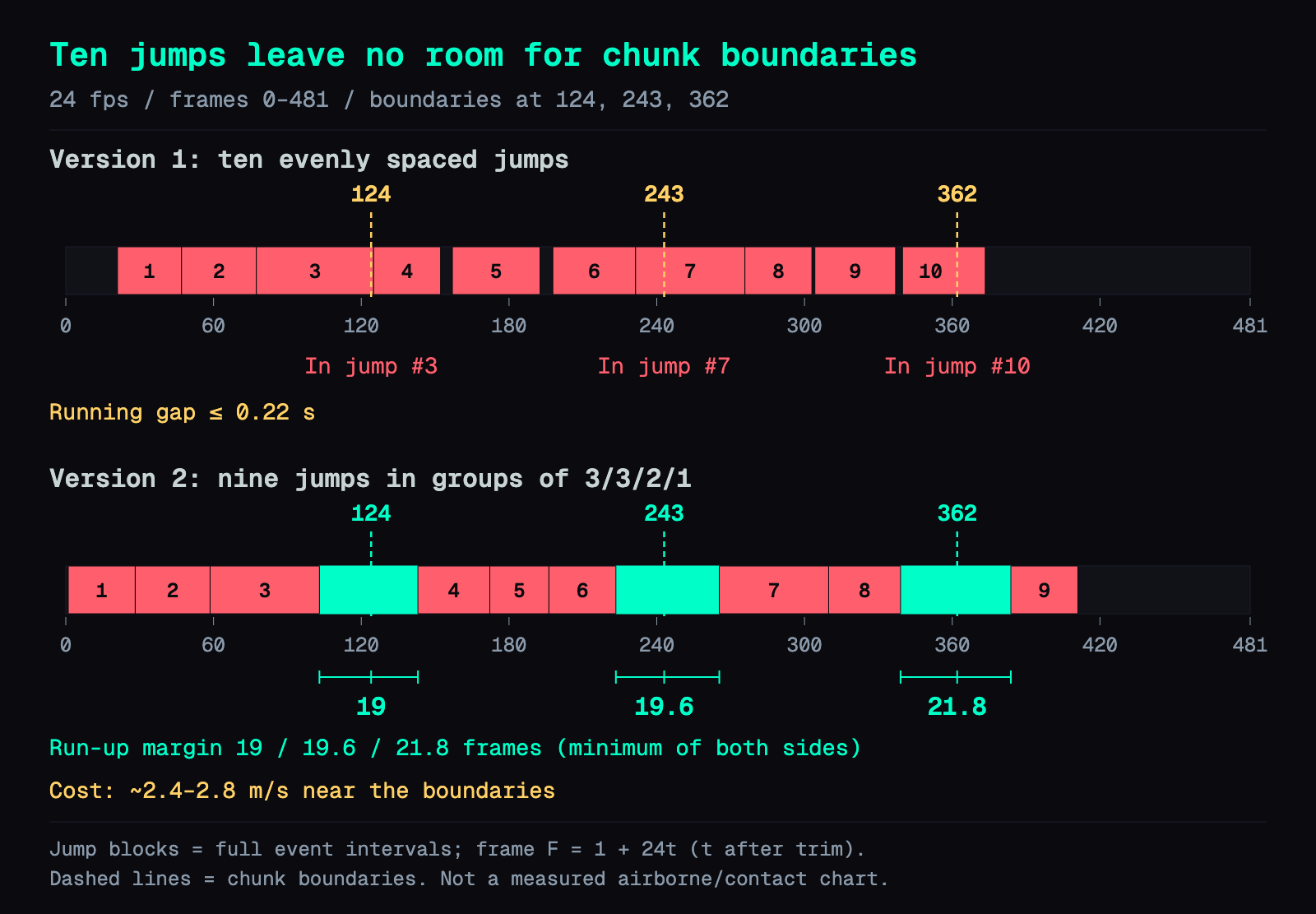
For the previs I resampled the motion to 24 fps: 481 frames, four 5 s chunks, with chunk boundaries at frames 124, 243 and 362. The scene became an old-town street with buildings on both sides and an arched bridge at the end. The obstacles became wooden crates, bamboo rails, stone walls and wooden railings, and the chair became a stone stool. The camera tracks from the side. I rendered two versions: a grey render and a depth render (nearer is brighter, as in Part 12).
Jumps can't sit on a chunk boundary
This was the hardest part. Continuum generates one chunk after another, each continuing from the previous chunk's end. If a boundary lands while she's in the air, H3 tends to botch the jump or draw it twice. Each boundary needs running frames on both sides.
With 10 jumps 3.3 m apart, the longest stretch of running between two jumps was 0.22 s. Wherever the three boundaries go, one of them lands mid-jump. Other uniform chunk lengths don't fix it either.
So I made a second previs with the obstacles grouped per 5 s chunk: 9 jumps in groups of 3/3/2/1, with extra running between groups. The running margins around the three boundaries came out to 19, 19.6 and 21.8 frames. The cost: she slows down near each boundary, to an actual speed of about 2.4 to 2.8 m/s.
Depth previs won the test clips
Before the full run I made two test clips with the same seed, differing only in the reference video: grey vs depth. Both kept the look and the street. The depth version's jump timing was closer to the previs, so I went with depth. At 1344×768 each 5 s chunk took about 5 to 7 minutes.
The finished video runs 20 s and took 8 submissions: 2 test clips, 4 chunks, and one retry each for chunks 2 and 4.
Top: the depth previs from the MotionBricks run. Bottom: the MiniMax-H3 result. Time-aligned, no audio, so you can see where the jumps match and where they drift
What worked:
- Her outfit, the red ribbon, the sword and the street held for all 20 s, with no mannequin leaking through.
- The chunk boundaries are invisible. Scene-change detection (
scene>0.18) found 0 hard cuts. - The broad phases followed the previs: she starts running, clears groups of obstacles, slows, turns, and sits on the stone stool.
What didn't:
- Jumps often became stepping up onto a crate and then down.
- The jump count and timing don't match the previs.
- There's an extra small hop at the end.
- The shop signs have fake text.
The slowdowns near the boundaries make the run feel slow. Still, it was pretty fun to watch.
Where it stands: real motion for placed obstacles, not yet a reliable skeleton for AI video
MotionBricks really does produce fitting, plausible motion for the obstacles you place. On a Blender character, walking and clearing obstacles both work, and a generation takes 1.66 ms (median) on the 5090. As a skeleton for H3 AI video, the look and the scene hold, but the jump count and timing don't match yet.
Reproduce it yourself: two demos, then a headless script
git clone https://github.com/NVlabs/motionbricks
cd motionbricks
git lfs pull
uv sync
Let git lfs pull finish. The ONNX files live in LFS, and without them you get "file not found". The first launch for each model and precision builds a TensorRT plan, which takes a few minutes and is cached in .trt-cache/.
Demo 1 shows the core idea: place poses and let it fill in the motion.
uv run python -m app.inbetweener_demo
Demo 2 is Scene Preview, with Auto Interact on by default. Add --model-precision fp16 to get the 1.66 ms mixed FP16 path; the default is FP32.
uv run python -m app.scene_preview --scene assets/scenes/soma_gym.scene.json --model-precision fp16
If you're driving a Windows machine remotely, run GPU programs inside a logged-in desktop session. An ssh session may not get CUDA. I launch through Task Scheduler with "run only when user is logged on" and use ssh only to read results.
For a parkour run you need a headless script. The shape of mine:
- Build the scene in Scene Editor (
uv run python -m app.scene_editor) or write the scene JSON by hand. - Build the SOMA character, state machine and Smart Primitive pool the way Scene Preview does. Detect volume entry and dispatch the interaction. No window.
- Feed "run forward" every frame, with a fixed seed.
- Record world-space joint poses and export BVH or GLB for Blender.
One Blender tip: the GLB is 30 Hz. Set the scene to 30 fps before importing so each Blender frame lines up with one pose and the rendered frame count matches the motion file.
I had Claude write these scripts. These were my prompts. You don't need to copy them verbatim; just say clearly what you want.
I cloned NVlabs/motionbricks. Write me a headless script that reuses the character, state machine, and interaction dispatch from app.scene_preview, so the SOMA character keeps running forward through my scene JSON, auto-triggers Smart Primitives at obstacles, and sits on the chair at the end. Save every frame's joint poses and export a file Blender can read. When it's done, tell me whether each obstacle triggered.

In Blender, render this motion as a video with a grey mannequin, camera tracking from behind and to the side, obstacles in different colors. Use OptiX if there's an RTX card.
Afterward, check penetration and foot sliding yourself. The model doesn't handle those.
Deep dive: full measurements, the jump re-cuts, and the boundary search
You don't need this section to reproduce anything above. It's the full data and the debugging notes, for anyone (or any AI) adapting this setup.
Architecture, training data and license
- Root module: predicts the transition length and the pelvis path.
- Pose module: a masked token transformer that predicts motion tokens along that path.
- Decoder: a VQ-VAE with multiple codebook heads.
- Size: the SOMA version is about 200M parameters (VQ-VAE 23.4M, pose 136.5M, root 40.4M) on a 30-joint SOMA skeleton. A second model family drives the Unitree G1 robot with the same runtime.
- Training data: Bones RigPlay 1, 313,526 clips selected (from about 350k clips / 700 h of source). Licensed, not released.
- License: weights under the NVIDIA Open Model Agreement, code under Apache 2.0. The 38 BONES sample motions are internal-evaluation only, which matters because my two new jumps were re-cut from them.
Speed sweep: feet start sliding at 6.5 m/s, outliers appear at 7 m/s
Setup: a 12 s straight line, no obstacles, seed 11, fixed 60 Hz stepping. Speed and foot stats exclude the first 3 s. Max joint speed and outlier counts cover the whole clip. The baseline foot p95 at 4.5 m/s is 0.535, so the limit is 1.070.
| Commanded m/s | Actual median | Actual p95 | Planted-foot speed p95 | Max foot path per contact (cm) | Max joint speed m/s | Joint-frames >20 m/s |
|---|---|---|---|---|---|---|
| 4.5 | 4.576 | 4.856 | 0.535 | 2.392 | 11.738 | 0 |
| 5 | 5.058 | 5.402 | 0.630 | 4.005 | 12.549 | 0 |
| 5.5 | 5.368 | 5.971 | 0.785 | 4.769 | 14.196 | 0 |
| 6 | 5.945 | 6.562 | 1.015 | 4.688 | 15.507 | 0 |
| 6.5 | 6.548 | 7.146 | 1.528 | 5.271 | 17.826 | 0 |
| 7 | 7.005 | 7.704 | 1.569 | 6.033 | 20.412 | 4 |
| 7.5 | 7.472 | 8.187 | 1.283 | 3.450 | 41.364 | 127 |
| 8 | 7.986 | 8.731 | 1.221 | 3.483 | 30.670 | 187 |
| 9 | 8.955 | 9.767 | no foot contact | — | 30.372 | 151 |
| 10 | 9.757 | 10.817 | no foot contact | — | 26.305 | 137 |
| 11 | 10.745 | 11.790 | no foot contact | — | 35.055 | 275 |
| 14 | 11.575 | 13.118 | no foot contact | — | 44.584 | 602 |
How to read it:
- At 7.5 and 8 m/s the foot p95 is lower than at 6.5 only because the outliers break up the contact segments and shorten them. It isn't better motion.
- From 9 m/s, "no foot contact" means the set of contact frames is empty. A dash in that column means no data, not zero sliding.
- The limit holds for this run (12 s, seed 11, 60 Hz). It is not a universal number.
- I only raised the SOMA linear-mode
max_speed(default 4.5). Skipping has its own cap of 1.45 m/s, and I didn't force it to 6.
Per-take checks for both rounds
| Take | Route m | Jumps | Motion s | Triggered (incl. sit) | Max penetration cm | Max foot path per contact cm | Max joint speed m/s | Joint-frames >20 m/s |
|---|---|---|---|---|---|---|---|---|
| Round 1 run | 31 | 4 | 19.417 | 7/7 | 0.645 | 37.593 | 9.660 | 0 |
| Round 1 skipping | 31 | 4 | 28.967 | 7/7 | 11.440 | 46.852 | 12.299 | 0 |
| Round 1 jog | 31 | 4 | 21.933 | 7/7 | 5.982 | 36.907 | 9.628 | 0 |
| Round 1 run-repeat | 31 | 4 | 19.883 | 7/7 | 8.545 | 35.394 | 10.137 | 0 |
| Round 2 fast-6 | 37.2 | 10 | 20.267 | 11/11 | 10.928 | 40.059 | 14.810 | 0 |
| Round 2 skipping-fast | 37.2 | 10 | 23.250 | 11/11 | 11.945 | 27.368 | 9.796 | 0 |
How each column was measured:
- Penetration: the 4 foot-contact joints and the pelvis center, as points, against axis-aligned boxes, measuring depth to the nearest surface. This is not full mesh collision.
- Slide: a contact value of 0.5 or more counts as planted. I sum the horizontal path over each planted segment. Model jitter is not subtracted.
- Outliers: 60 Hz finite-difference speed against a threshold of max(20, median + 20×MAD). Every batch landed at 20 m/s.
- Round 1 "4 jumps" = 2 boxes + 2 walls. The duck obstacles aren't counted.
The first jog version had 15 joint-frames above 20 m/s during the sit transition (max 67.69 m/s). I fixed the init seed and clamped the input to 0.35 past x = 25.5 m so it slows down first, then regenerated all four takes. All four came back with zero. No smoothing was applied to the recorded joints.
FastJumpBehavior: skip the approach target
My first 10-jump run used the original three-target sequence, approach included. Raising the speed cap from 4.5 to 14 m/s only gave 26.033 to 28.400 s, barely faster. The obstacles were too dense to leave room to accelerate.
FastJumpBehavior reads each jump primitive's sequence, skips the approach Entry, and sends Action then Exit, with a token limit of 6 to 10. The model, the recorded poses and the tracking files are untouched.
On the same route, the original sequence at 4.5 m/s took 26.317 s. With the new behavior, 4.5 / 6 / 6.5 m/s took 20.767 / 20.267 / 20.417 s, all 11/11 with zero outliers. I chose 6.0. The round 1 route is different, so going from 19.417 to 20.267 s is not "the same route, faster".
Re-cutting two new jumps from the sample motions
The Smart Primitive edit format lets you pick timestamps in a sample motion, take a window of four consecutive 30 Hz poses as a target, and set hierarchy transforms, pivot, volume, IK pins, token range and target order. Targets and token range condition the model; IK pins are applied at playback, pulling hands or feet to the target position. At no point does it just play back the original BVH.
jump_compact_0_35m: re-cut from sample A437 at entry 1.75 s, action 2.16 s, exit 2.55 s, with a 0.35 m volume, tokens 6 to 10 and a 4-frame transition. The airborne pose reuses the 0.5 m sample, since there's no 0.35 m mocap.jump_nohands_0_75m: keeps only the NoHandsJump sequence, max token 12, with up to 4 frames of early transition.
Track order: official jump_0_5m at #1, #5 and #9; official jump_0_75m at #4 and #8; no-hands at #3 and #7; compact at #2, #6 and #10. Obstacle i sits at x = 4 + 3.3 × i, and the sit is at 37.2 m.
Blender render: CPU 440.5 s, 5090 OptiX 180.3 s
Settings: Cycles, 8 samples, 1280×720, 30 fps, H.264. Timing runs from the render loop to the encoded video plus a contact sheet, excluding Blender startup and scene build.
| Render | Frames | Video s | Render + encode s | s/frame |
|---|---|---|---|---|
| Round 1, Linux server CPU / run | 583 | 19.433333 | 440.470 | 0.7555 |
| Round 1, Linux server CPU / skipping | 869 | 28.966667 | 621.720 | 0.7154 |
| Round 2, 5090 OptiX / fast-6 | 608 | 20.266667 | 191.246 | 0.3145 |
| Round 2, 5090 OptiX / skipping-fast | 698 | 23.266667 | 220.772 | 0.3163 |
| Round 2, 5090 OptiX / round 1 run re-rendered | 583 | 19.433333 | 180.294 | 0.3093 |
The last row re-renders the same motion file, scene, mannequin and camera, so 440.470 → 180.294 s (2.44×) is a direct comparison. The OS and encoder versions differ, though, so this compares whole pipelines, not GPUs in isolation.
Why evenly spaced jumps can't clear the 5 s boundaries
In fast-6 the first jump starts at 0.83333 s and the last one ends at 15.51667 s. The longest gap between two jumps is 0.21667 s (5.2 frames).
I subtracted every jump interval, padded by ±0.25 s, from the timeline. The 481-frame window can only start at an offset of 0 to 0.25 s in the source, and no offset in that range keeps all three boundaries (124, 243, 362) clear. Other uniform chunk lengths fail too.
The second previs: 9 jumps as 3/3/2/1, 497 automatic iterations
I wrote a search script that moved only the obstacle x positions in my scene, re-ran the generation every iteration, and checked the running margins. The safety threshold was 18 frames, using closed event intervals. Any iteration with a missed trigger, no sit, or too little margin was rejected. It ran 497 iterations.
- I tried 10 jumps as 3/3/3/1 first. There was no fully safe window early on, and the sit timed out, so I dropped to 9 jumps.
- I kept the four jump types alternating and varied the cycle start and in-group spacing. I also tried different seeds and a longer run-up.
- One iteration passed the margins, but group 3's spacing was 5.4 m, well over the roughly 3.3 m I wanted. Rejected.
- The chosen one: seed 11, start offset 1.0 s, in-group spacing 2.5667 to 3.4014 m.
| Boundary frame | Film time s | After previous jump ends | Before next jump starts | Minimum margin |
|---|---|---|---|---|
| 124 | 5.125000 | 21.0 frames | 19.0 frames | 19.0 frames |
| 243 | 10.083333 | 19.6 frames | 22.4 frames | 19.6 frames |
| 362 | 15.041667 | 23.0 frames | 21.8 frames | 21.8 frames |
What it cost:
- Near the boundaries the actual speed has a median of about 2.4 to 2.8 m/s, even though the cap is still 6.
- A fixed 20 m/s check finds 70 joint-frames over the limit (8 pose frames at 60 Hz), with a max of 37.6069 m/s at the left middle fingertip. fast-6 had 0.
- The adaptive threshold here is 38.4459 m/s, which gives 0 adaptive outliers. That's not the same as "zero spikes". I didn't smooth or delete frames; it's a quality limit of this previs.
H3 chunks: settings, time and retries
Continuum with Ref2VA nvfp4, the Qwen3VL 32B nvfp4 AWQ text encoder, 20 steps, 1344×768, the same two reference images on every chunk, per-chunk [Chunk N] prompts, and Review Each Chunk on. Each continuation chunk is 141 frames including 22 context frames, so it adds 119 new ones. Cumulative frames: 124 / 243 / 362 / 481.
| Submission | Content | End-to-end s (incl. polling) | Sampling s | Observed peak GiB |
|---|---|---|---|---|
| 1 | Test A, grey previs | 332.0 | 267.7 | 28.116 |
| 2 | Test B, depth previs | 317.1 | 267.6 | 31.008 |
| 3 | Final chunk 1 | 301.8 | 267.5 | 30.993 |
| 4 | Chunk 2, first try | 377.9 | 317.4 | 29.596 |
| 5 | Chunk 2, retry | 377.6 | 318.9 | 31.046 |
| 6 | Chunk 3 | 393.1 | 318.8 | 30.952 |
| 7 | Chunk 4, first try | 423.2 | 319.2 | 31.005 |
| 8 | Chunk 4, retry | 408.2 | 319.7 | 31.030 |
- Chunk 1 used the same seed and input as test B, which I'd chosen. Its decoded frames were MD5-identical, frame by frame.
- Chunk 2, first try: the first jump came about 0.5 s late, and the three clears were hard to make out. For the retry I wrote local time windows into the prompt (0.75–1.97 / 1.97–2.97 / 2.97–4.10 s). After the retry you can clearly see her cross the crate, the bamboo rail and the low stone wall.
- Chunk 4, first try: she sat down fine, but the last jump was late and unclear. The retry moved that jump to about 16.3–16.8 s but added a railing step at about 17.3–17.6 s. That's the extra hop at the end.
- I allowed one retry per chunk, then stopped.
- Peak VRAM was sampled every 3 s from ComfyUI's
/system_stats. It's the whole card, not per process.
Boundary MAD: all three boundaries are about 1.0 to 1.2× a normal frame
Method: adjacent-frame luminance difference on 96×54 greyscale (0 to 255, mean absolute difference). The in-chunk baseline excludes ±0.5 s around each boundary, and its median is 10.516589. A ratio near 1 means the boundary changes the picture about as much as any normal frame step.
| Boundary | MAD of the pairs before / at / after | At-boundary / in-chunk median | Max ratio within ±0.5 s |
|---|---|---|---|
| 124→125 | 8.7515 / 11.4302 / 12.9805 | 1.087× | 1.461× |
| 243→244 | 10.5226 / 12.6470 / 9.2022 | 1.203× | 1.258× |
| 362→363 | 9.1962 / 10.6092 / 11.3823 | 1.009× | 1.138× |
scene>0.18 found 0 hard cuts. On both sides of each boundary she keeps running down the same street, with no restart of the action.
What this test does not show
- Each setting ran once. The speed table is 50 samples, but the parkour takes and the H3 film are single runs.
- Penetration and slide are simplified checks (points against AABBs, not the full body mesh). Triggering every interaction is not the same as being physically correct.
- The H3 motion only broadly matches. Frame-level takeoff and landing, the nine-jump count and the obstacle geometry don't all pass. The character is larger in frame than in the previs, the scene isn't a pixel copy, and I didn't listen to the audio chunk by chunk.
- The conclusion that TensorRT builds a plan on the 5090 holds for this Windows driver, Warp and TensorRT combination only.
Related
- Paper: MotionBricks on arXiv
- Project page: nvlabs.github.io/motionbricks
- Code: NVlabs/motionbricks on GitHub
- Weights: nvidia/MotionBricks on Hugging Face
- Part 9: Block a scene in Blender, let MiniMax-H3 film it
- Part 11: A 25-second no-fog FPV one-take with MiniMax-H3 and ComfyUI-H3-Continuum
- Part 12: Turn a real dance into a depth video and have MiniMax-H3 restage it in a palace
FAQ
- How fast is NVIDIA MotionBricks on an RTX 5090?
- With the official TensorRT 10.8 path and the official mixed FP16 precision, one generation took a median of 1.6581 ms (p95 2.0701 ms) over 50 synchronized calls after 10 warmups. FP32 with TF32 allowed, the repo default, took 3.0115 ms. A 9-second motion needed 14 generations, 0.024677 s in total at FP16. The whole card peaked around 3 GB of VRAM, desktop included.
- Can MotionBricks take a text prompt or see the obstacles in a scene?
- No. It takes no text, image, video or scene geometry. Its input is the character's last 4 poses plus 1 to 4 target poses. To make it jump a box, you wrap the action as a Smart Primitive: mocap-derived target poses placed around the object plus an interaction volume. When the character enters the volume, those targets are fed to the model in order.
- Does MotionBricks handle collisions or physics?
- No. It is kinematic only. The runtime only checks whether the character entered an interaction zone; there is no collision response, and the model card says outputs are not guaranteed to be physically feasible. In my runs, feet and pelvis sank up to 11.44 cm into a 0.75 m wall, and a planted foot still traveled 35 to 47 cm horizontally. That is fine for previs, not for a game character that needs reliable collision.
- How fast can a MotionBricks character run before the motion breaks?
- In a 12-second straight run with seed 11 and 60 Hz stepping, 6.0 m/s was the highest commanded speed that passed my two checks. At 6.5 m/s planted-foot speed p95 hit 1.528, over the 1.070 limit; at 7 m/s joint-speed outliers above 20 m/s appeared; from 9 m/s the model stopped predicting foot contact. That limit holds for this run, not universally.
- Can a MotionBricks run drive an AI video in MiniMax-H3?
- Partly. Using the grey-box run as a depth reference video for MiniMax-H3 Ref2VA, chained into four 5-second chunks with ComfyUI-H3-Continuum, the swordswoman's outfit, ribbon, sword and the street held for all 20 seconds, and no chunk boundary showed as a cut. But jumps often turned into stepping up onto a crate and down, and the jump count and timing did not match the previs.
- Why do jumps need to stay away from Continuum chunk boundaries?
- Each chunk continues from the end of the previous one. If a boundary lands while the character is in the air, H3 tends to botch the jump or draw it twice. With 10 jumps 3.3 m apart the longest running gap was 0.21667 s, so one of the boundaries at frames 124, 243 and 362 always landed mid-jump. Grouping 9 jumps as 3/3/2/1 left 19, 19.6 and 21.8 frames of running around the boundaries.
Read next
- 2026-10-18A 25-second no-fog FPV one-take with MiniMax-H3 and ComfyUI-H3-Continuum on one RTX 5090
A 25-second FPV one-take over Taiwan with no fog: MiniMax-H3 Ref2VA and ComfyUI-H3-Continuum on one RTX 5090, each splice hidden in a turn through the sky.
- 2026-10-25[MiniMax-H3] A storyboard image isn't a prompt: getting local H3 to hit 13 of 16 shots
A 4x4 storyboard plus a character sheet into MiniMax-H3 Ref2VA on an RTX 5090: one sentence hit 3/16 panels, an official-format shot timeline hit 13/16.
- 2026-10-16A 22-second Taiwan FPV flight without a drone: Blender blockout + MiniMax-H3 on one RTX 5090
A 22.7-second FPV flight that reads as one take, over Yushan, Taroko Gorge, Taipei 101 and Sun Moon Lake, built from a gray Blender blockout and MiniMax-H3 Ref2VA on one RTX 5090.
- 2026-10-12[AI Workflow] Block a scene in Blender, let MiniMax-H3 film it: local Ref2VA on an RTX 5090
Block out a shot with capsules and boxes in Blender, feed it to MiniMax-H3 Ref2VA with two reference photos, and get a live-action clip that keeps left/right order and occlusion. 89.9 s on one RTX 5090.
Don't miss the next one
Subscribe, and you won't.
One-click unsubscribe anytime.