MiniMax-H3 on RTX 5090 · part 17
[Benchmark] No GPU? Run MiniMax-H3 on a Colab G4: 66 s per clip, ~49 clips an hour
❯ cat --toc
- How fast is MiniMax-H3 on a Colab G4? 66.1 s per clip vs 82–88 s on an RTX 5090
- How many clips per hour? About 49 for roughly 10 compute units
- Does the quality hold? Same characters and street in all 10 clips
- What Colab and compute units are, and what you need first
- How to run H3 Ref2VA on a Colab G4: 7 steps, each one you can hand to Claude Code
- Step 1: Install the Colab CLI and check your balance
- Step 2: Create a G4 session
- Step 3: Install ComfyUI and the pinned custom nodes
- Step 4: Send your Hugging Face token once, through a file
- Step 5: Download the 4 weights from pinned revisions and verify SHA256
- Step 6: Upload the workflow, start ComfyUI, queue the clips
- Step 7: Stop the VM, even if something failed
- My runner does all 7 steps with a spending guard
- Deep dive: versions, per-seed numbers, WorldForge, Sol-H3 and the prompt
- Exact versions and weight hashes
- Every clip: time and peak VRAM
- Why I didn't keep WorldForge
- Sol-H3 on L4 vs G4: 241.63 s vs 20.00 s
- The full prompt
- How I measured
- Also in this series
TL;DR
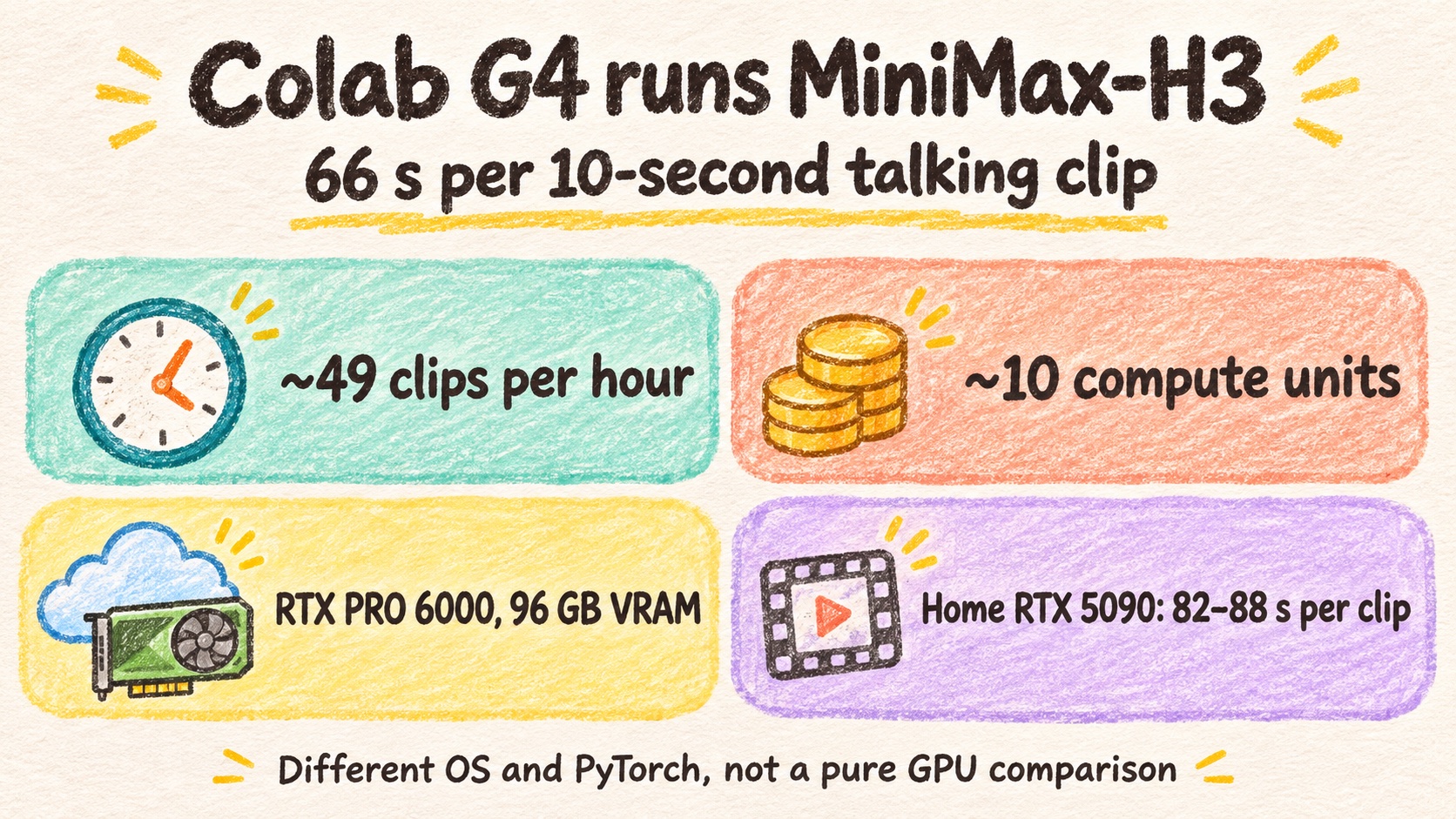
A Colab G4 (NVIDIA RTX PRO 6000 Blackwell Server Edition, 97,887 MiB) ran my production MiniMax-H3 Ref2VA dialogue recipe at 66.1 s per 10-second clip on warm runs. My home RTX 5090 takes 82–88 s for the same recipe. One VM, pinned ComfyUI and nodes, SHA256-checked weights, 10 seeds. About 49 clips an hour for roughly 10 compute units. Caveat: OS, PyTorch and attention differ between the two machines, and the warm runs reuse the same prompt and reference images.
Seed 807 on a Colab G4, warm run, 66.133 s. A night street corner under lanterns: a constable in a white uniform speaks to Liao Tianding in an indigo shirt. 864×480, 10.125 s, with dialogue audio
I saw a WorldForge post on X. It's an open-source project that uses Colab GPUs as a remote workbench. I tried it, and the interesting part wasn't the project. My Google AI Pro account could get a Colab G4: an NVIDIA RTX PRO 6000 Blackwell Server Edition with 97,887 MiB of VRAM and about 176.88 GiB of VM RAM.
That matters for two reasons. My one RTX 5090 at home makes one H3 clip at a time, so batches queue. And anyone without a big GPU can't run H3 at all. A rented card fixes both, if it's fast enough and the bill stays sane.
So I took my production MiniMax-H3 Ref2VA dialogue recipe, changed nothing but the seed, and ran 10 clips on a G4. Short answer: 66.1 s per clip, faster than my 5090. I didn't keep WorldForge (reasons in the deep dive); I wrote my own runner.
How fast is MiniMax-H3 on a Colab G4? 66.1 s per clip vs 82–88 s on an RTX 5090
The recipe is the one I already use for two-character dialogue: 864×480, 243 frames at 24 fps, 14 steps, res_multistep / simple, shift video 12 / audio 3, Spectrum on. Three reference images (first frame, the constable, Liao Tianding), a prompt with two Mandarin lines, no LoRA, no reference audio. The 10 graphs were identical except for the seed (801–810) and the output filename.
Read the first row for the headline. The second row is what you pay once per VM.
| Colab G4 | Home RTX 5090 | |
|---|---|---|
| Warm clip (clips 2–10) | 66.1 s median, 65.4–66.7 s | 82–88 s |
| First clip (cold) | 73.3 s | not measured here |
| Peak VRAM | 45.38 GiB | not measured here |
That's about 1.24–1.33x faster, or 19.4–24.8% less time per clip. The G4 used less than half its memory.
This is not a pure GPU comparison. The 5090 runs Windows, PyTorch 2.13.0+cu130 and --use-sage-attention. The G4 ran Linux, PyTorch 2.11.0+cu130 and default attention. What I did match: ComfyUI v0.37.0 core, the revisions of all 3 custom nodes, and the SHA256 of all 4 weight files. The 82–88 s is my existing production record, not a side-by-side rerun.
One caveat on that warm number: ComfyUI caches the conditioning, the image encodes and the models when the prompt and reference images don't change. So 66 s means "same recipe, new seed". I didn't measure what happens if every clip gets a different prompt.
How many clips per hour? About 49 for roughly 10 compute units
Before the first clip, the VM needs about 288.7 s of prep: allocate the VM, install ComfyUI with pinned versions, download and verify 42.47 GB of weights. Then one cold clip, then warm clips.
1 + floor((3600 - 288.7 - 73.287) / 66.133) = 49 clips per hour
That's extrapolated from 10 clips. I didn't run a full hour. It also leaves out the final download and stopping the VM. If you only count warm clips, the theoretical ceiling is about 54.4 an hour.
At 10.05 compute units per hour, an hour costs about 10 units. For this 10-clip batch I have two cost figures that don't agree:
- Balance before and after: 392.57 → 390.41, or 2.16 units.
- VM wall clock × rate: 1006.389 s × 10.05 per hour ≈ 2.81 units.
I'm not sure the balance had fully settled when I read it, so don't treat the gap as a discount. Plan with the wall-clock figure. Both stayed under the 6-unit cap I'd set.
Does the quality hold? Same characters and street in all 10 clips
Here are all 10 clips, three frames each, at 0.2 s, 5.06 s and 9.93 s:
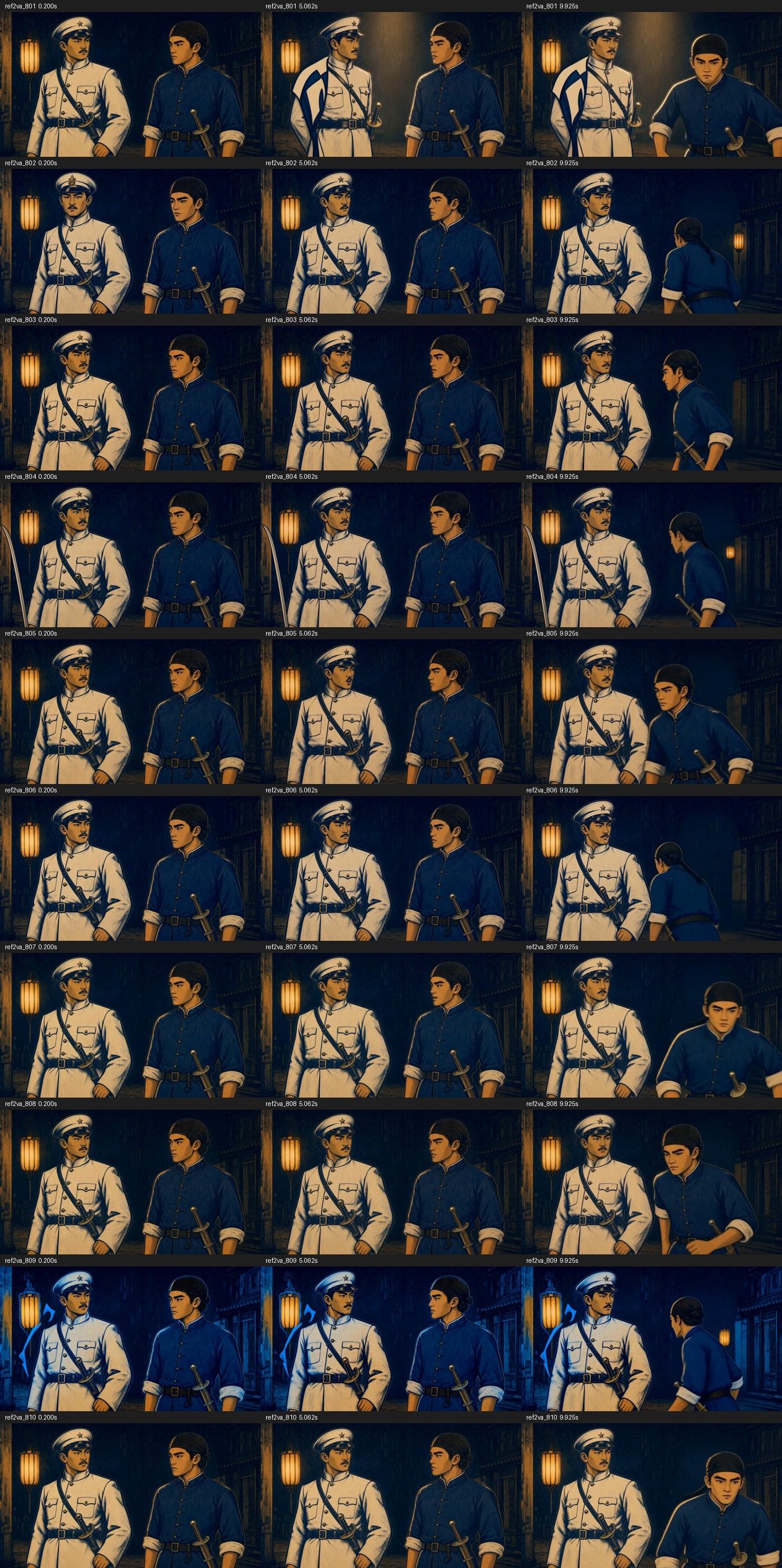
Both characters, the lantern street and the woodcut style stay mostly consistent. Seed 809 skews blue. In seeds 801 and 804, a flag- or blade-shaped object shows up at the edge of the frame, even though the prompt bans new props. The turn-around at the end differs from clip to clip.
All 10 files pass the format check: H.264 + AAC, 864×480, 243 frames, 24 fps, a full ffmpeg decode with no errors, and no black segments from blackdetect.
For the speech, I ran CPU speech-to-text on two clips, 801 and 810. Both came back with the same text:
站住!你就是廖天丁。是又怎樣?你追得上我嗎?
Right lines, right order. ("Stop! You're Liao Tianding. So what? Can you catch me?") The transcript has 天丁 instead of 添丁 for the name; the two sound the same. The second line ends around 8.6 s, though the prompt asked for all dialogue to finish by 7.0 s. I didn't check lip sync or frame-level quality.
What Colab and compute units are, and what you need first
Google Colab is Google's hosted notebook service. You get a Linux VM with a GPU attached, and you pay by time. The unit of payment is the compute unit: each GPU type burns units at its own hourly rate, and your balance goes down while a VM is assigned to you, whether it's working or idle. The G4 is the RTX PRO 6000 Blackwell tier; it cost 10.05 units an hour for me.
You don't need the notebook UI. Google ships an official command-line tool, and every step below runs from a terminal on your own machine.
Before you start, you need three things:
- A working H3 Ref2VA workflow in ComfyUI API JSON. This post moves an existing workflow to Colab; it doesn't build one. Part 9 builds one from scratch.
- A Hugging Face token that can download the weights.
- Five minutes with the license. The MiniMax-H3 community license excludes use and output in the US, UK, EU and South Korea.
colab newpicks a GPU, not a region, and the VM metadata didn't reveal the zone. Read it before you use any of this in production.
How to run H3 Ref2VA on a Colab G4: 7 steps, each one you can hand to Claude Code
Billing starts at step 2 and stops at step 7. Every step is something Claude Code can do for you. I list what to ask it for after each one.
Step 1: Install the Colab CLI and check your balance
Install the official Google Colab CLI, sign in, then:
colab usage
It shows your balance, the hourly rate and your active assignments. Active assignments must be 0 before you go on.
Hand to Claude Code: "Install the Colab CLI from the official repo, sign me in, and show me colab usage."
Step 2: Create a G4 session
colab new -s h3 --gpu G4
colab sessions
From here on, the clock is running.
Hand to Claude Code: "Create a G4 session named h3 and confirm it's listed."
Step 3: Install ComfyUI and the pinned custom nodes
Pin everything. This is what I installed:
- ComfyUI v0.37.0
- PyTorch 2.11.0+cu130, torchvision 0.26.0, torchaudio 2.11.0, from the cu130 index
comfyui-minimax-h3-audio-T8@6490906(keeps the audio-video latent separate)ComfyUI-KJNodes@e8e88f7(forModelMemoryUsageFactorOverride)ComfyUI-Spectrum-MiniMax-H3@5161f04
Put the install in a script and run it on the VM:
colab exec -s h3 --timeout 900 -f setup.py
One trap: colab exec can exit 0 even when your Python script raised an exception. Make the script print its own success marker on the last line (mine prints REF2VA_SETUP_OK) and check for that marker, not the exit code.
Hand to Claude Code: "Write setup.py that installs these exact versions on the VM, prints REF2VA_SETUP_OK at the end, and fails loudly otherwise. Run it with colab exec."
Step 4: Send your Hugging Face token once, through a file
Never pass the token through colab exec --env or on the command line. Write it to a private temp file, upload it, delete the local copy:
tok=$(mktemp); chmod 600 "$tok"; printf '%s' "$HF_TOKEN" > "$tok"
colab upload -s h3 "$tok" /content/.hf_token
rm -f "$tok"
The VM script deletes /content/.hf_token after the download in step 5 and confirms it's gone.
Hand to Claude Code: "Upload my HF token to the VM as a 0600 file, delete the local copy, and make the download script remove it afterward."
Step 5: Download the 4 weights from pinned revisions and verify SHA256
| Repo @ revision | File | Goes in |
|---|---|---|
Comfy-Org/MiniMax-H3 @ 5447222 | minimax_h3_ref2va_pruned_int8_convrot.safetensors | diffusion_models/ |
Comfy-Org/MiniMax-H3 @ 5447222 | minimax_h3_video_vae_fp16.safetensors, minimax_h3_audio_vae_fp32.safetensors | vae/ |
Momoking/Qwen3-VL-32B-Heretic-MiniMax-H3-NVFP4 @ 0a9486d | qwen3vl_32b_heretic_minimax_h3_nvfp4.safetensors | text_encoders/ |
Pass the full revision hash, not a branch name:
from huggingface_hub import hf_hub_download

token = open("/content/.hf_token").read().strip()
hf_hub_download(
    repo_id="Comfy-Org/MiniMax-H3",
    filename="diffusion_models/minimax_h3_ref2va_pruned_int8_convrot.safetensors",
    revision="54472221d27c695fca9621b0c3ed52f06c4af707",
    local_dir="/content/ComfyUI/models",
    token=token,
)
Then hash each file and compare against the SHA256 list in the deep dive. Download plus verify took 126.154 s for 42.47 GB.
Hand to Claude Code: "Download these four files at these exact revisions into the right ComfyUI model folders, check every SHA256, then delete the token file and prove it's gone."
Step 6: Upload the workflow, start ComfyUI, queue the clips
Upload your API-format workflow JSON and the reference images with colab upload. Start ComfyUI on localhost only. There's no public tunnel:
python main.py --listen 127.0.0.1 --port 8188 --reserve-vram 2
A script on the VM POSTs each graph to /prompt and reads /history for the result. Clips land in /content/ComfyUI/output/. Pull them back to your machine:
colab download -s h3 /content/ComfyUI/output/clip_801.mp4 ./clip_801.mp4
Take the generation time from the timestamps in /history, not from how long your polling loop waited.
Hand to Claude Code: "Upload my workflow and refs, start ComfyUI on 127.0.0.1, queue seeds 801 to 810, record each clip's time from /history, and download the MP4s."
Step 7: Stop the VM, even if something failed
colab stop -s h3
colab sessions   # expect: No active sessions found on server.
colab usage      # expect: Active assignments: 0
Do this after failures too. A VM you forgot keeps billing, and if the run died before step 5 cleaned up, your token may still be on it.
Hand to Claude Code: "Stop the session and show me that sessions is empty and active assignments is 0."
My runner does all 7 steps with a spending guard
I wrapped the steps in one script. A dry run touches no Colab resources; it only checks the workflow, the refs and the weight list:
python3 run_colab_ref2va.py --gpu G4 --dry-run
python3 run_colab_ref2va.py --gpu G4 --allow-token-upload
The real run refuses to start if the balance is under 5 units, a session already exists, or the rate is above 10.05 units an hour. It creates one VM and never re-creates it on its own. It pins the install, sends the token once, checks every weight's SHA256 and deletes the token. It runs seeds 801–810, samples VRAM every second, records exact /history times and validates each MP4. A 1950 s work limit plus a separate 2050 s stop watchdog cap the bill. On failure it saves the finished clips, deletes the token and stops the VM.
It's tied to my local paths, so it won't run on your machine as is. Give this article to Claude and ask for your own version.
Deep dive: versions, per-seed numbers, WorldForge, Sol-H3 and the prompt
You can skip this section; everything you need to reproduce the run is above. It holds the full versions, every clip's numbers and the original prompt, for anyone (or any AI) adapting the setup.
Exact versions and weight hashes
- ComfyUI commit
73c9bad4d21e7addbe1d13bc92eee0f1431b017d(v0.37.0 core) comfyui-minimax-h3-audio-T8649090681aa11b2082c2beeb09000d8ae939df1dComfyUI-KJNodese8e88f7c88e3f6205b122f5de87e69a09fbce5acComfyUI-Spectrum-MiniMax-H35161f0457bc8c52535212d6783eee73f439e1537
The four weights, by revision and SHA256:
| Repo / revision | File | SHA256 |
|---|---|---|
Momoking/Qwen3-VL-32B-Heretic-MiniMax-H3-NVFP4 / 0a9486d17cfb20c1a7abc97118c4d95910b9b1f4 | qwen3vl_32b_heretic_minimax_h3_nvfp4.safetensors | a166c7bbbe66a22065159e478335fee4a633c4a3e3bb34c8e8ac4cc91bf4996f |
Comfy-Org/MiniMax-H3 / 54472221d27c695fca9621b0c3ed52f06c4af707 | diffusion_models/minimax_h3_ref2va_pruned_int8_convrot.safetensors | 9255f52b6677845ad238f20dfaafa94727053694127ab7f255c048f0f9365779 |
Comfy-Org/MiniMax-H3 / 54472221d27c695fca9621b0c3ed52f06c4af707 | vae/minimax_h3_audio_vae_fp32.safetensors | 8e505d95dd1561d47abd43d4238fd40d9bb1ae9e147ed0a4cba778d76ae4db48 |
Comfy-Org/MiniMax-H3 / 54472221d27c695fca9621b0c3ed52f06c4af707 | vae/minimax_h3_video_vae_fp16.safetensors | 7c1f131492e7eddacaac9069a61b81bdd39de5cc96561e677c5eab1cdce5e522 |
Every clip: time and peak VRAM
Seed 801 is the cold first clip. The rest reuse the cache.
| Seed | Time (s) | Peak VRAM (MiB) |
|---|---|---|
| 801 | 73.287 | 42,243 |
| 802 | 66.372 | 46,435 |
| 803 | 66.663 | 46,467 |
| 804 | 66.351 | 46,467 |
| 805 | 65.539 | 46,467 |
| 806 | 66.297 | 46,467 |
| 807 | 66.133 | 46,467 |
| 808 | 65.861 | 46,467 |
| 809 | 65.400 | 46,467 |
| 810 | 65.893 | 46,435 |
Warm median (802–810) is 66.133 s.
Prep before the first clip, about 288.7 s in total:
| Stage | Time |
|---|---|
| VM allocation | 3.98 s |
| Install ComfyUI, dependencies, pinned versions | 119.16 s |
| Download 42.47 GB of weights + SHA256 verify | 126.154 s |
Why I didn't keep WorldForge
WorldForge is what showed me the G4 was available, and that's the part I kept. Three things made me write my own runner instead:
- It copies your Colab credentials to the VM.
forge_local/app.pywrites the OAuth refresh token and client secret from your local~/.config/colab-cli/token.jsoninto the VM's rclone config. It triggers when the token has thedrive.filescope, and mine did. I disabled it with an earlyreturnin my local clone and confirmed there was no rclone config on the VM. - It rewrites your prompt.
remote/diffusers_worker.pyappends a style suffix (ARRI, 85mm, golden hour, porcelain skin, bokeh) to ordinary prompts. It skips the suffix only if you setraw_lensordisable_cinema_lens, or your prompt already contains one of the lens or style keywords it recognizes. My night woodcut prompt came out as a bright, photo-style image. - It re-downloads weights on every boot if you don't connect Google Drive. That was about half of my trial time.
Sol-H3 on L4 vs G4: 241.63 s vs 20.00 s
Sol-H3 is my two-stage pipeline: an H3 4-step draft at 672×384, then a 3-step LTX-2.5 refine to 1344×768. A 2-second clip took 241.63 s on a Colab L4 (2026-09-29) and 20.00 s on a Colab G4 (2026-11-09), about 12.08x.
I ran it once on each GPU. The G4 run used current upstream node revisions, and I didn't rebuild the September L4 software environment, so not all of that gap is the GPU.
The full prompt
All 10 clips share this prompt (B_en). The two lines of dialogue are written in Simplified Chinese inside the prompt:
subject_definitions:
<Subject 1> is the middle-aged Japanese constable in <Picture 2>, wearing a white uniform and white peaked cap, with a short moustache and a Western-style police sabre at his waist.
<Subject 2> is young Liao Tianding in <Picture 3>, with his braid coiled inside a black headscarf, wearing a short indigo shirt, black waistband and black leg wraps, with a Western-style police sabre with a brass D-shaped guard at his waist.
<Subject 3> is the nighttime Dadaocheng street corner and lanterns in <Picture 1>, serving as the environment and spatial-layout reference. All characters and objects throughout the film are limited to those specified above; do not add, move or touch any other objects at any time.
<Picture 1> controls the opening composition, character positions and scene state, and must be followed exactly at 0.00 seconds. Reference images lock identity, clothing and environment only; do not inherit their expressions. Fully preserve the identities, clothing and sabres of <Subject 1> and <Subject 2>, and the environment and spatial layout of <Subject 3>; re-perform expressions and actions as specified below.

Voice settings: (S1) corresponds to <Subject 1>, the constable in <Picture 2>: an adult male, medium-low voice, Mandarin, clearly audible, moderate speaking pace, clipped articulation; (S2) corresponds to <Subject 2>, Liao Tianding in <Picture 3>: a young male, medium voice, Mandarin, clearly audible, moderate speaking pace. Keep each character's voice consistent throughout the film. No reference audio.

detailed_description:
【Shot 1 | 0.0–10.125 seconds | Medium shot, two people facing each other】
【Subjects】<Subject 1>, <Subject 2>, <Subject 3>. Taiwanese woodcut print style, indigo, vermilion, ochre, black carved lines and aged paper texture. Beneath lanterns at a nighttime Dadaocheng street corner during Japanese colonial rule, the constable stands in the left third of the frame and Liao Tianding in the right third, facing each other in a medium shot; both faces are visible in three-quarter profile, with empty hands hanging naturally at their sides. Warm lantern light and indigo night tones.
【Camera】Static camera, no cuts, no zoom. Ref2VA, a 10.125-second Mandarin dialogue between two people.
【Actions】
(0.0–0.5 seconds) Both keep their mouths closed and look at each other.
(0.5–3.0 seconds) <Subject 1> (S1) looks at <Subject 2>, juts his jaw slightly forward, and asks in a clipped manner using the voice specified above: <d>[中文] 站住!你就是廖添丁?</d>; <Subject 2> watches the constable with his mouth closed.
(3.0–4.0 seconds) Both keep their mouths closed and maintain eye contact.
(4.0–7.0 seconds) <Subject 2> (S2) first waits until the constable finishes speaking, raises his chin, slightly lifts the corners of his mouth, and answers using the voice specified above: <d>[中文] 是又怎样,你追得上我吗?</d>; <Subject 1> watches Liao Tianding with his mouth closed.
(7.0–10.125 seconds) <Subject 2> closes his mouth, turns around and leans forward preparing to run, without yet leaving his original position; <Subject 1> keeps his mouth closed and stays in place watching him.
【Sound effects】Light night wind throughout, one distant dog bark; no music.
【Constraints】Stable facial features, no facial distortion, lip movements synchronized with dialogue, no visual jumps; consistent character appearance, clothing and lighting throughout. Only the two specified lines: only the current speaker's lips open and close, while the other person's mouth remains closed; do not add, repeat or rewrite dialogue, and do not include narration, humming or any other human vocal sounds; no subtitles, text, garbled characters or speech bubbles in the image; no new characters or props, no drawing of sabres, no swapping positions. All dialogue ends by 7.0 seconds, and there is no dialogue during the final 1 second.
How I measured
- Per-clip time is
execution_successminusexecution_startfrom ComfyUI's/history. It includes text encoding, sampling, decoding and saving, and excludes downloading the MP4. - Prep time runs from the UTC second the session was created to the first
execution_start, accurate to about ±1 s. - VRAM is the peak of per-second
memory.usedsamples from nvidia-smi. Spikes shorter than a second can be missed. - Speech was checked with CPU speech-to-text on clips 801 and 810 only. No full character error rate.
Also in this series
FAQ
- How fast is MiniMax-H3 Ref2VA on a Colab G4?
- A 10-second two-character dialogue clip (864x480, 243 frames, 14 steps, Spectrum on) took a median of 66.1 s on warm runs, range 65.4 to 66.7 s across 9 clips. The cold first clip took 73.3 s. My home RTX 5090 takes 82 to 88 s for the same recipe, but the two setups differ in OS, PyTorch version and attention, so this is not a pure GPU comparison.
- How many H3 clips can a Colab G4 make in an hour, and what does it cost?
- About 49, counting roughly 288.7 s of setup, a 73.3 s first clip and 66.1 s per clip after that. That figure is extrapolated from a 10-clip batch, not measured over a full hour. The G4 rate was 10.05 compute units per hour, so an hour costs about 10 compute units.
- How much VRAM does MiniMax-H3 Ref2VA use on a Colab G4?
- Peak was 45.38 GiB (46,467 MiB) from per-second nvidia-smi samples, less than half of the G4's 97,887 MiB. Per-second sampling can miss shorter spikes.
- Can I use MiniMax-H3 output generated on Colab in the US?
- The MiniMax-H3 community license excludes use and output in the US, UK, EU and South Korea. The colab new command lets you pick a GPU, not a region, and the VM metadata did not reveal the zone. Read the license before any production use.
- Does colab exec report failures correctly?
- Not always. colab exec can exit 0 even when the Python script raised an exception, so print your own success marker at the end of each script (I used REF2VA_SETUP_OK) and check for it instead of trusting the exit code.
Read next
- 2026-11-04Pika-H3-Flex on an RTX 5090: 2x faster MiniMax-H3, and a Blender blockout makes the camera obey
Pika-H3-Flex on an RTX 5090: 20.8 s per 5-second clip vs 38 s for MiniMax-H3. Text-only orbits drift; a Blender blockout got 6 of 6 clips around.
- 2026-10-25[MiniMax-H3] A storyboard image isn't a prompt: getting local H3 to hit 13 of 16 shots
A 4x4 storyboard plus a character sheet into MiniMax-H3 Ref2VA on an RTX 5090: one sentence hit 3/16 panels, an official-format shot timeline hit 13/16.
- 2026-10-19Turn a real dance into a depth video and have MiniMax-H3 restage it in a palace: native 768 on one RTX 5090
Real dance to grey depth video to MiniMax-H3 Ref2VA with a first-frame guide: a new character dances the routine in a palace, native 768x1376 on one RTX 5090.
- 2026-10-18A 25-second no-fog FPV one-take with MiniMax-H3 and ComfyUI-H3-Continuum on one RTX 5090
A 25-second FPV one-take over Taiwan with no fog: MiniMax-H3 Ref2VA and ComfyUI-H3-Continuum on one RTX 5090, each splice hidden in a turn through the sky.
Don't miss the next one
Subscribe, and you won't.
One-click unsubscribe anytime.