AI Agent Life, from Zero · part 11
[Agent 101 #11] Assistant gone haywire? Don't blame the engine — usually it's the car that broke, not the engine
❯ cat --toc
- The short version: don't blame the model the moment something breaks
- I blamed the model — turned out a tool was broken
- When the assistant goes haywire, don't blame the model first
- What's a harness? Engine vs car
- Real case 1: a broken tool forced it to improvise until it spiraled
- Real case 2: memory overflowed, and it started "forgetting" what you said
- Debugging order: check the harness first, suspect the model last
- Takeaways
- Make "check the harness first" your default
- Same brain — the environment decides how "smart" it looks
- Giving it good tools beats giving it a better brain
- Conclusion
TL;DR
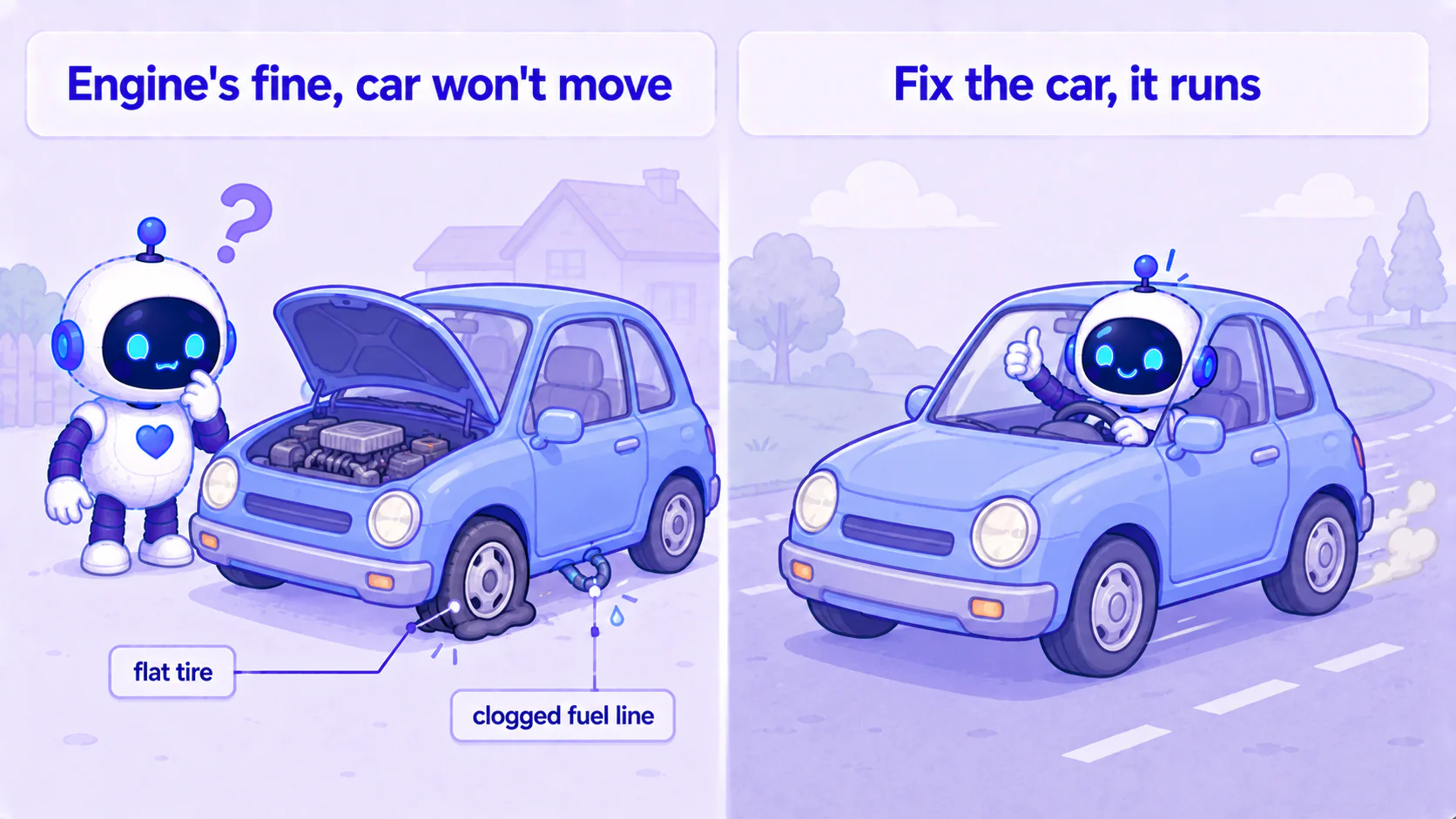
When your AI assistant starts looping, wandering, freezing, or answering the wrong question, your first instinct is "this model is dumb, should I swap it." Hold off on blaming it. From my own debugging, a haywire assistant is eight times out of ten not the model — it's the ring around it (tools, config, memory). The model is the engine; that ring (we call it the harness) is the rest of the car. A car that won't move usually doesn't have a broken engine — it has a flat tire or a clogged fuel line. This post gives you a debugging mindset that saves enormous time: check the car first, the engine last.
The short version: don't blame the model the moment something breaks
Say you've got your assistant up and running — the beginner series covered install, phone setup, and autonomous tasks. You use it for a while, and then one day it goes off the rails:
- doing the same thing over and over — looping;
- you ask one thing, it answers another — off-target;
- suddenly frozen, no response for ages;
- or inexplicably wandering, doing a pile of stuff you never asked for.
Most people have the same first thought here: "Did the AI get dumber? Should I switch to a smarter model?"
Here's the counterintuitive part I had to learn the hard way: a haywire assistant is, eight times out of ten, not a dumb model — it's the stuff around the model that broke. The problem usually isn't the engine. It's the car.
This isn't a step-by-step tutorial; it's a debugging mindset: when your assistant breaks, where to look and in what order.
I blamed the model — turned out a tool was broken
Let me start with a real case — every conclusion here comes from it.
I have two assistants running on the same framework (Hermes) with the same brain. One handles more of the "generate images, generate video" chores; the other rarely touches those.
After a while, the image/video one started clearly going haywire. Ask it for an image and it would try over and over, poke around, stop halfway to second-guess whether it had actually succeeded, then start the whole thing again. The one that rarely touched media looked "much more normal."
My first conclusion was probably the same as yours would be: "Is this brain just dumber?" I even seriously considered spending days retraining it to "behave."
Luckily I didn't rush in — I went and read its work log, line by line, to see what it was actually doing. The result floored me —
Both assistants used the exact same brain. The brain wasn't dumb. The real culprit was that one of them had a broken tool in its hands.
Below I'll break down what happened and give you a debugging order you can reuse.
When the assistant goes haywire, don't blame the model first
The most important line, up front:
When the assistant loops, wanders, freezes, or goes off-target, assume the model is fine and go check everything around it first.
Why is that assumption worth it? Because "the model is dumb" leads you down the most expensive, slowest road: swap the model, retrain, spend money trying bigger brains. The truth is usually some small thing that's fast and cheap to fix — a broken tool, a misconfigured setting, an overflowing memory.
Remember it this way: "the model is dumb" = the most expensive explanation. Since it's the most expensive, it should be the last thing you consider, not your first conclusion.
And a very practical observation: the same brain, in different environments doing different tasks, can perform wildly differently. My two assistants are proof — same brain, one normal, one haywire, the only difference being how good the tools each happened to grab were. It's never the model that's dumb — it's the junk tools someone shoved into its hands.
What's a harness? Engine vs car
To debug, you first have to see "the model" and "the ring around the model" as two different things. That outer ring is technically called the harness (you don't need the word, just the metaphor).
The clearest analogy:
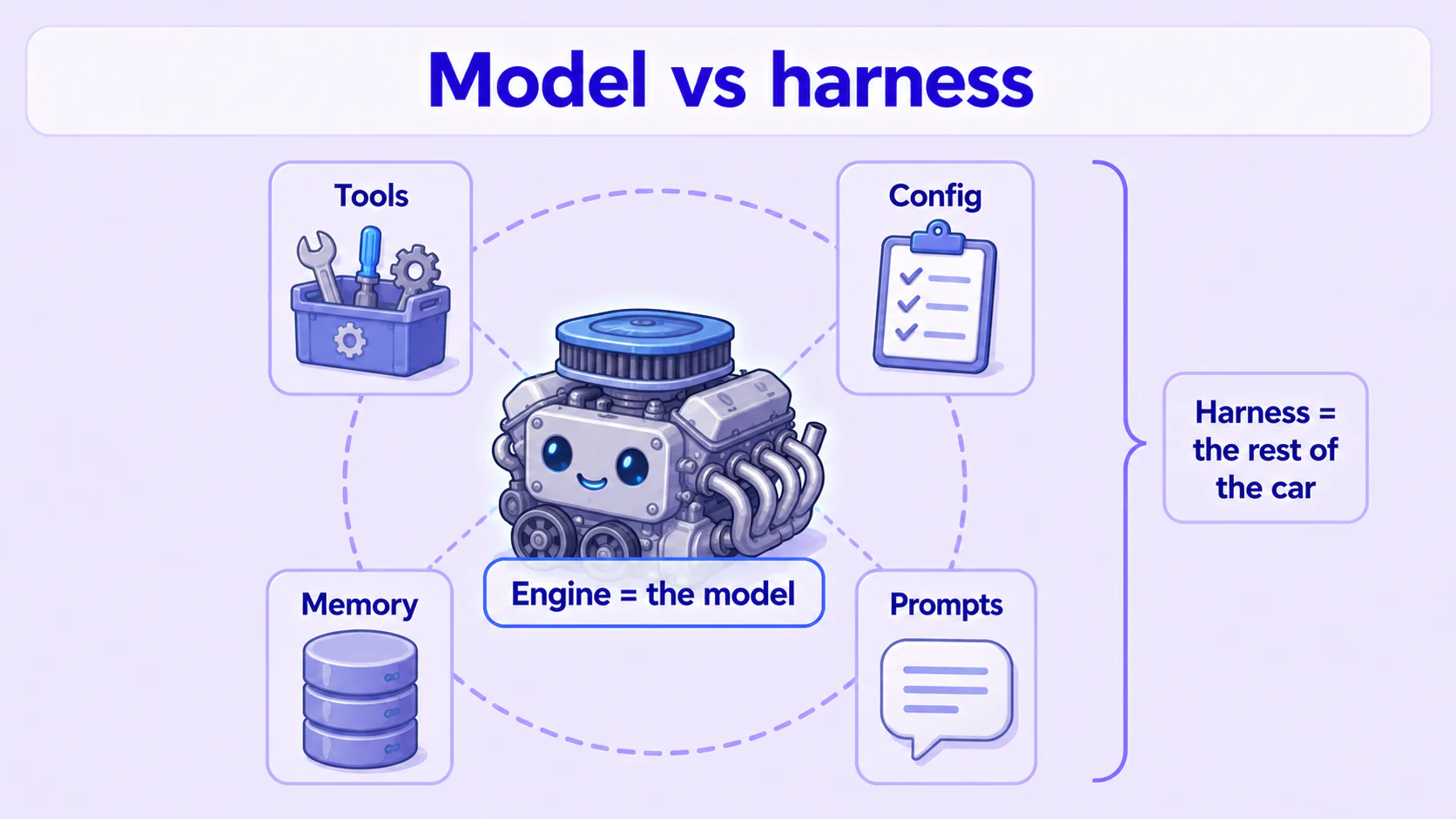
- Model = engine. The core that thinks and generates.
- Harness = the entire rest of the car. Steering wheel, tires, fuel line, tank, dashboard, mirrors — everything that turns an engine into a car you can actually drive.
For an AI assistant specifically, the harness is:
- Tools: the hands and feet it can use — web lookups, image generation, messaging, file reading. (= the car's tires and drivetrain)
- Config: what it connects to, which service it uses, how the various switches are set. (= how the fuel line is hooked up, how gauges are set)
- Memory / compression: how it remembers what was said, how it "condenses" when a conversation gets too long. (= the tank and fuel management)
- Prompts: the instructions you give it, the rules it's handed. (= how you work the gas and steering)
The key realization: the most common reason a car won't move isn't a broken engine — it's another part of the car. A flat tire, a clogged fuel line, a leaking tank — the engine can be perfectly fine and the car still won't move. It shudders, stalls, or spins in place.
Your assistant "going haywire" is usually exactly this — the engine is fine, the rest of the car broke.
Real case 1: a broken tool forced it to improvise until it spiraled
Back to that image assistant. I read its work log and saw this little drama:
- It wanted to generate an image, so it called the "image tool" by the book.
- The tool was broken. It retried, failed again, and kept failing — a dozen times in a row.
- It gave up on the tool and decided to brute-force it — bypass the tool and hand-assemble the whole image pipeline step by step (submit, wait, download, return…).
- This improvised pipeline was long and messy, and halfway through it lost track of where it was: did that last image finish? Did I download it? So it downloaded again, resubmitted, and kept asking itself "wait, is this a new one?"
- From outside, it looked like an assistant looping, wandering, endlessly restarting.
See the problem? It didn't get dumb. It was forced by a broken tool to do work it should never have been doing. A perfectly capable person whose power tool breaks, forced to hand-drive a hundred screws with a screwdriver, will of course fumble, miscount, restart — you wouldn't say "this person is dumb," you'd say "get them a working tool."
The media-light assistant looked normal for one reason: it rarely hit that broken tool. Same model, just luckier.
The fix confirmed it too: I didn't touch the brain. I did one thing — removed the broken tool and swapped in a clean one that gets it done in one shot (one call generates the image, tells it the result directly, no hand-assembly). After that, the assistant that used to poke twenty times to make one image got it in a single call. The brain didn't change at all — and it stopped being "dumb."
Mindset: when the assistant starts brute-forcing things, improvising, or turning something simple into a mess — check whether one of its tools is broken. It's not looking for trouble; the broken tool forced it there.
Real case 2: memory overflowed, and it started "forgetting" what you said
The second case is a different kind of haywire, and this time the culprit is memory.
Chat with an AI assistant long enough and the conversation gets longer and longer. Past a point, the framework has to "condense" the earlier conversation (technically, compress it) or it overflows the memory limit. That condensing step hands the old conversation to a smaller model and asks it to summarize everything down to a compact version.
One of my assistants had this "condense" step quietly failing every time. The reason was technical, but the result is easy to grasp: the role assigned to do the condensing was set up wrong. Each run took over six minutes, never finished, and finally timed out and gave up.
The consequence of giving up? The conversation never got condensed, so it piled up, got fatter and fatter, and finally overflowed. Once it overflowed, the assistant started "forgetting" earlier things, answering the wrong question, and losing the thread — a different flavor of haywire.
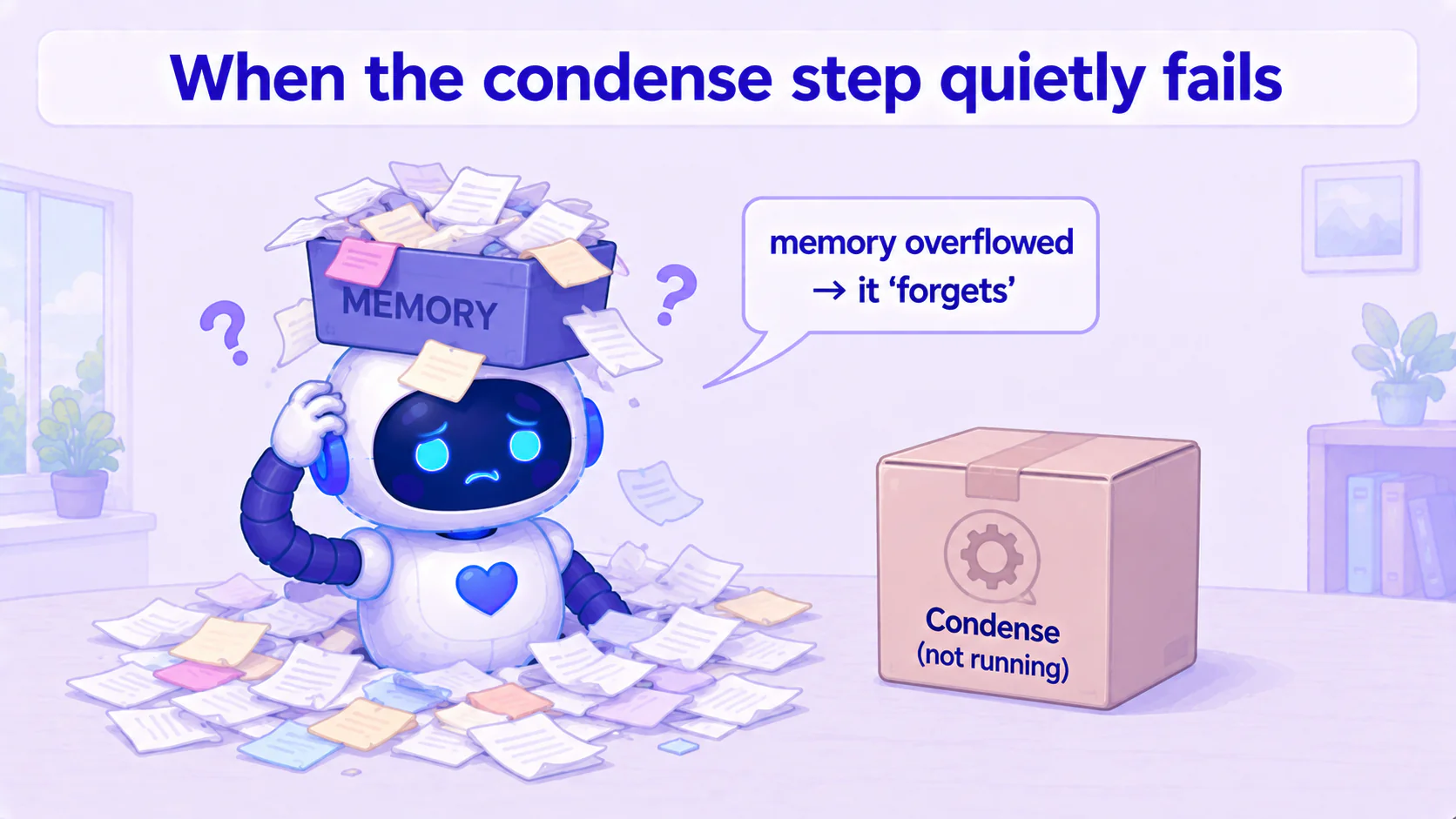
Note here — from start to finish, the brain was fine. It "forgot" not because it had a bad memory, but because the step that organizes memory had failed — so earlier context never got filed properly. This is a 100% "car" problem: the fuel gauge broke, the car thinks it's out of gas and stalls, but the gas was there all along.
Again, the fix never touched the model: I moved the "condense" job off the role that kept timing out and onto a fast, dedicated small model. After that, the condensing that used to take six-plus minutes and always fail got done in just over a minute — memory stopped overflowing, and the assistant stopped "forgetting."
Mindset: when the assistant starts forgetting earlier conversation, contradicting itself — go look at whether its memory overflowed, and whether the step in charge of condensing has been quietly failing.
Debugging order: check the harness first, suspect the model last
Let me boil those two cases down into an order you can apply directly. Next time your assistant goes haywire, work down this sequence and don't skip steps:
Step 1: Is a tool broken? Look at what tools it's been using and whether one keeps failing. A broken tool forces it to improvise and loop. This is the most common culprit I've hit, so it goes first.
Step 2: Is it misconfigured? Is the service it connects to actually running? Is it pointed at the right place? A lot of "freezing, no response" is really the assistant talking to something that isn't there — a fuel line hooked up to an empty tank.
Step 3: Did memory overflow? Has the conversation gotten too long? Is the condensing step quietly failing? Either one makes it "forget" and answer off-target.
Step 4 (only now): Is the model actually dumb? Only after the first three check out clean do you suspect the brain itself. And even here, "swap in a stronger model" is usually cheaper than "retrain" — but nine times out of ten you never get to this step.
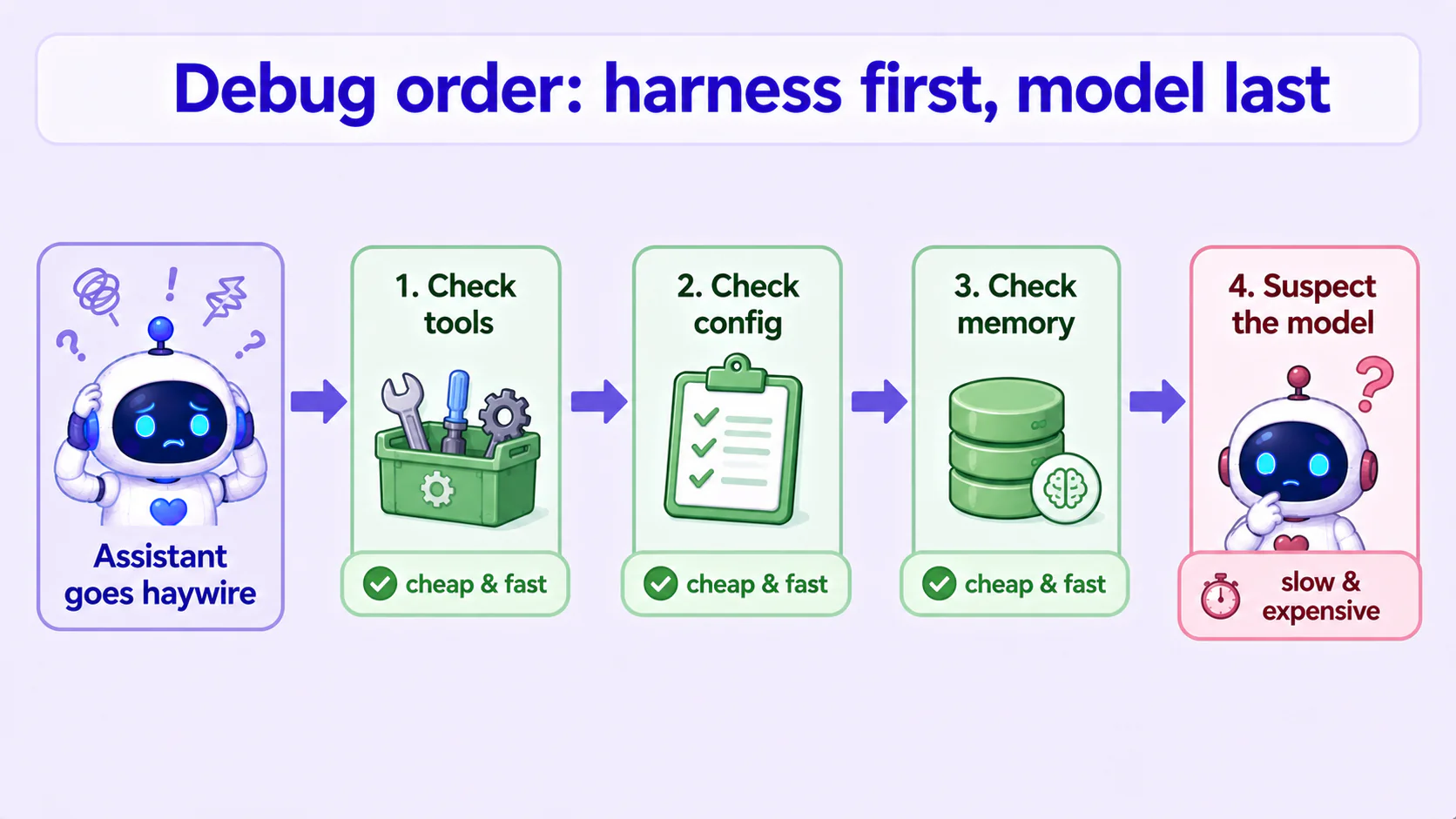
Why does the order matter so much? Because the first three steps are fast and cheap, the last is slow and expensive. Put the cheap fixes first and most of the time you solve it at step 1 or 2 — never walking down the "retrain a brain" road that costs you days and may not even help.
Neither of my two haywire cases was the brain. Both were fixed in the first three steps. That's not a coincidence, it's the norm.
Takeaways
Make "check the harness first" your default
Make "don't blame the model first" your reflex. When the assistant acts up, the first thought shouldn't be "get a smarter one," it should be "did the ring around it break?" Just flipping that order saves you a mountain of wasted model-swapping and retraining — because the most expensive explanation is almost never the real answer.
Same brain — the environment decides how "smart" it looks
My deepest takeaway: the same brain can look brilliant or look like an idiot, and the difference is often just what environment it's put in and what tools land in its hands. A perfectly capable person with broken tools and messy data fumbles too. So instead of obsessing over finding a smarter model, first make sure the environment you're handing it is clean and usable. That environment is usually the real lever.
Giving it good tools beats giving it a better brain
Both fixes were the same: I didn't touch the brain, just cleaned up the outer ring. Broken tool → a one-shot clean tool; timing-out memory step → a fast, dedicated helper. Give an ordinary brain a clean, usable environment and it looks "smart"; give a great brain a pile of junk tools and it'll go haywire anyway. The highest-leverage thing you control is the environment, not the model.
Conclusion
- Assistant looping, wandering, freezing, off-target — don't blame the model first; eight times out of ten it's the ring around it (tools, config, memory).
- The model is the engine, the harness is the rest of the car. A car that won't move usually doesn't have a broken engine — flat tire, clogged fuel line.
- Real case 1: a broken tool forced the assistant to improvise, lose track, go haywire. Swapped in a clean tool, one call did it.
- Real case 2: memory condensing quietly failed, the conversation overflowed, the assistant started "forgetting." A fast, dedicated helper for condensing fixed it.
- Debug order: ① tools → ② config → ③ memory → ④ only then suspect the model. The first three are fast and cheap, check them first; swapping/retraining the brain is the last resort, and nine times out of ten you never get there.
- ⚠️ Honest note: this is a debugging mindset, not a step-by-step guide — what I'm handing you is the order of operations: where to look first, and what to check next. Every setup is different, so match the actual fix to your own system; but "harness first, model second" holds broadly.
This series — AI Agent Life, from Zero:
- Part 1: AI assistant vs ChatGPT
- Part 2: What is an agent framework
- Part 3: The ChatGPT-brain + Hermes-body combo
- Part 4: Install Hermes Desktop
- Part 5: Connect Hermes to Telegram
- Part 6: Let your assistant run on its own
- Part 7: Give your AI assistant eyes and ears
- Part 8: One person, a whole team of assistants
- Part 9: Swap your assistant's brain for a local one
- Part 10: Give your assistant hands — connect your own tools
- Part 11: Don't blame the engine — check the car first (this post)
FAQ
- My AI assistant suddenly started looping and answering the wrong thing — did the model get dumber?
- Almost never. From real debugging, a haywire assistant is eight times out of ten a problem in the ring around it — a broken tool forcing it to improvise, config pointing at the wrong place, or memory overflowing so it 'forgets' what was said. The model (the engine) is fine; what broke is another part of the car. Check the outer ring first, suspect the model last — it saves you huge amounts of time.
- What's a harness, and how is it different from the model?
- The harness is the whole ring around the model: the tools it can use, the various settings, how memory is stored and compressed, the prompts it's given. Analogy: the model is the engine, the harness is the rest of the car — steering wheel, tires, fuel line, dashboard. A great engine still won't move on flat tires. Most 'this assistant is bad' feelings are actually harness problems.
- What order should I check things in when the assistant misbehaves?
- Harness first, model last. Order: (1) Tools — is a tool it recently used broken or constantly failing? (2) Config — is it pointed at the wrong place, at a service that isn't even up? (3) Memory — is the conversation too long and overflowing, so it 'forgets' earlier things? Only after all three check out do you suspect the model. Swapping in a stronger model is usually the last resort, not the first move.
Read next
- 2026-07-21[Agent 101 #16] Hermes config health check: 5 silent gotchas that make your assistant act weird
Part 11 said a haywire assistant is usually a broken car (tools, config, memory), not a dumb engine (the model). This is that checklist: a context_length set at the wrong level silently compresses early, Qwen thinking left on runs 10x slower, an MCP tool that connects but every call fails, and a sib running a different model than you think. Five real config gotchas, each with a check you can hand to your agent to run on itself, plus the fix.
- 2026-07-01[Agent 101 #15] Hermes /learn: I had a local 27B write its own reusable skill
Hermes has a /learn command that turns 'something you just did' into a reusable skill — a SKILL.md. I wired it into my own fleet: one Kanban card, a local 27B running on a modded 2080 Ti, and about 3 minutes later it handed back a clean, spec-compliant skill — plus two implementation details the docs don't spell out (slash command vs. dispatch, and where skills actually live). A plain-language walkthrough of what /learn does, how to use it, and where its limits are.
- 2026-06-17[Agent 101 #8] One person, a whole team of assistants: each with its own desk, brain, and memory
Comfortable with one assistant and want a second and third? Hermes gives each one its own home (config, memory, personality), each able to run a different model and handle different tasks. Plain-language: why split them, how, and the three I actually run. Honest: most people only need one — this is for when you want to tinker.
- 2026-06-29[Agent 101 #14] One spec, three assistants, three Tetris games: a Hermes Kanban dispatch test
After raising a fleet of assistants, I gave them the same one-line 'make a Tetris game' spec — no details at all — one card each, and let them each write a web Tetris in a single shot. I touched zero lines of game code; I only published the result. The surprise: from that one line, the Hermes harness plus a local model I tuned myself (on a modded 2080 Ti) filled in things I never asked for — a ghost piece and wall-kick — in one shot. You can play all three.
Don't miss the next one
Subscribe, and you won't.
One-click unsubscribe anytime.