AI Agent Life, from Zero · part 9
[Agent 101 #9] Swap your assistant's brain for one on your own machine: from cloud ChatGPT to a local model
❯ cat --toc
- The plain version: same assistant, brain moved home from the cloud
- Intro
- Why some people move the brain local
- Swap the brain, keep the body: how to connect it
- The cost: slower, and you need a capable machine
- Who this road is for
- Takeaways
- Swap the brain, keep the body — that's the payoff of the architecture
- Slow or not, judge by real use, not one number
- Autonomy is a choice, not a higher tier
- Conclusion
TL;DR
All series long, our assistant's brain has been cloud ChatGPT — handy, easy, great for starting out. This post does something more advanced: swaps that brain for a local model running on your own machine (I use ds4). One line sums it up — swap the brain, keep the body: Hermes (memory, messaging, scheduled tasks) doesn't change at all; only the brain behind it moves from the cloud to your house. What you get is full autonomy: zero cloud dependency, privacy on your side, no caps. The honest cost: local brains are usually slower (ds4 generates ~10 tokens/sec) and you need a capable machine. Not for everyone — it's for when you want to stand entirely on your own.
The plain version: same assistant, brain moved home from the cloud
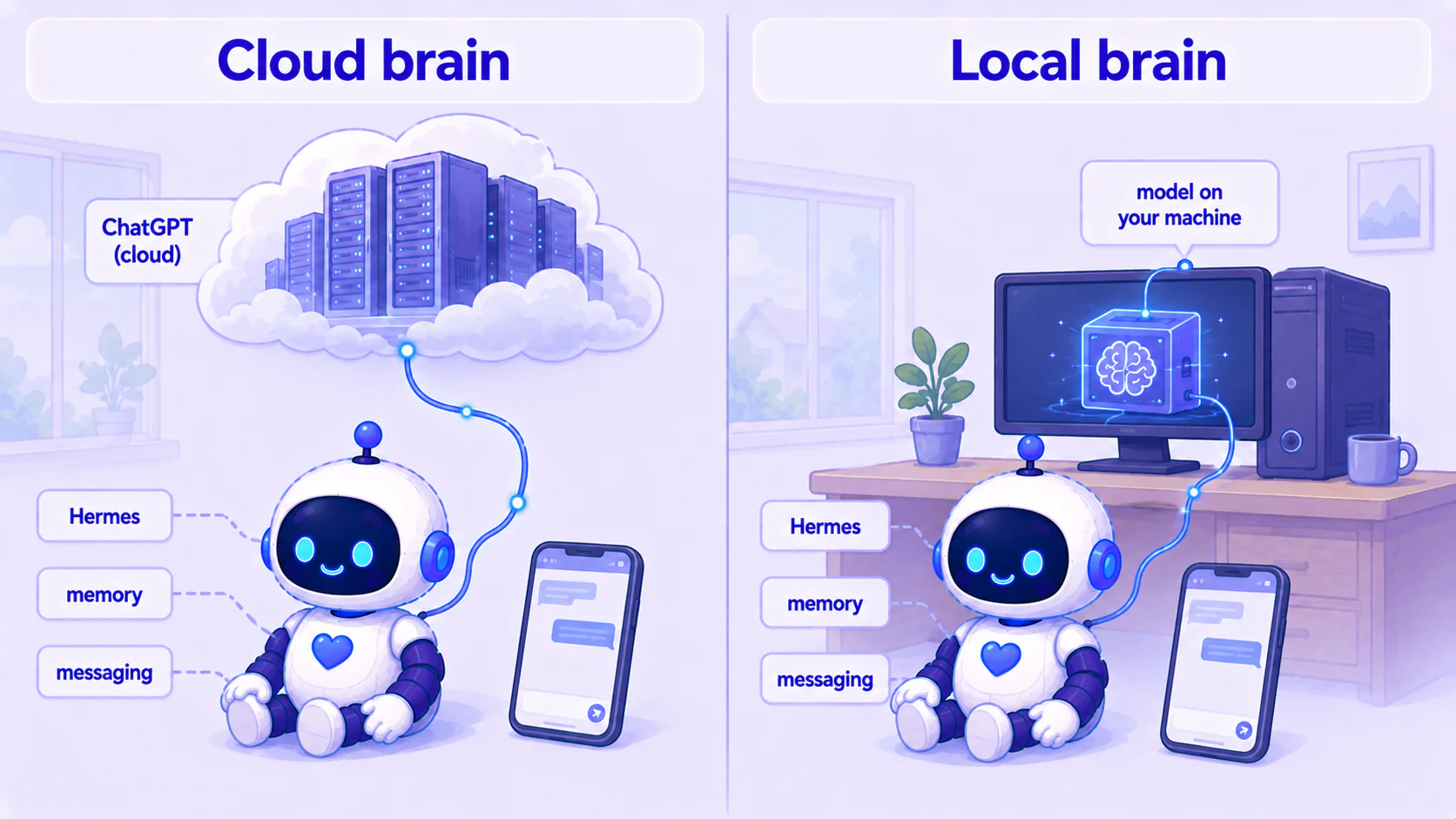
Remember #3? We split the assistant into two: a brain (the thinking AI model) and a body (Hermes, which wraps the brain and gives it memory and hands and feet). Back then we picked the easy combo — the brain was just your ChatGPT.
This post touches only the brain.
Picture your assistant as a person whose head has always been "phoning in" to some giant brain in the cloud to think for it. What we're doing now is swapping that brain for one you keep at home — not a single wire of the body (hands, memory, voice) comes loose, only the brain it dials into changes, from cloud ChatGPT to a model running on your own machine.
For you, day to day it feels almost identical: same messaging, same scheduled tasks. The difference is underneath — from this moment, the assistant's thinking no longer goes through the cloud: it reads your message, thinks, and replies entirely on your own machine. (Heads-up: if you still have LINE or web-lookup tools wired in, those parts still reach out — going local swaps the brain, it doesn't take the whole machine offline.)
Intro
The first seven posts raised the assistant, hooked it to your phone, and got it running tasks on its own; from #7 on, the advanced track gave it eyes and ears. This post is a different road — it adds no new ability; it swaps the most core piece: the brain.
And to be clear: this isn't because ChatGPT is bad. ChatGPT makes a fast, smart brain; I started that way and recommend you do too. This post is a different choice — making the whole thing fully autonomous: no cloud, data stays put, no usage ceiling. Only people who want that "all in my own hands" feeling go local. It has costs, and I'll be honest about them.
Why some people move the brain local
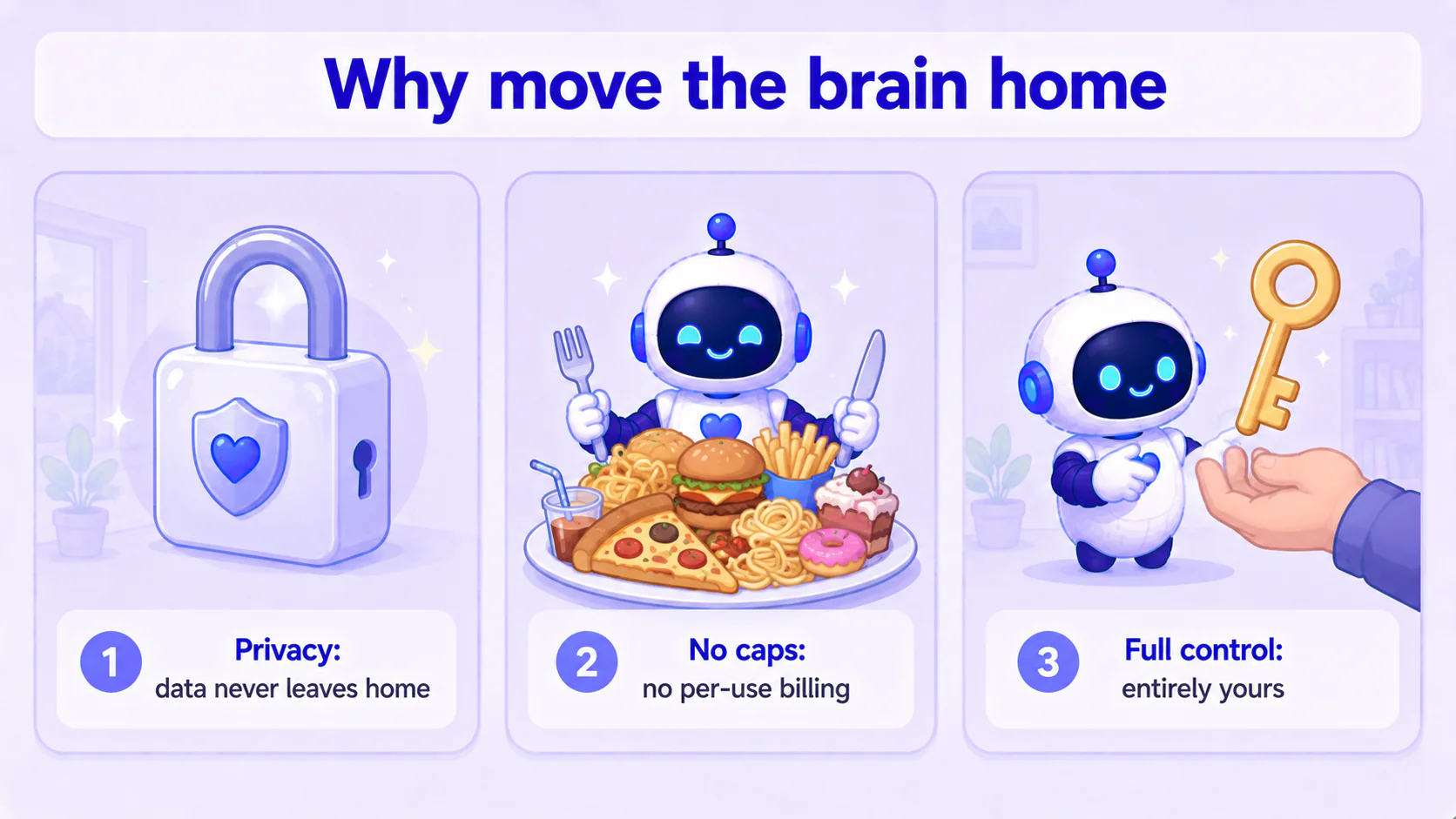
If cloud ChatGPT is fast and good, why bother? Three reasons:
1. Privacy — data never leaves your house. Every line you say to a cloud assistant goes to someone else's server to be processed. Usually fine, but if you let your assistant touch private notes, finances, or work secrets, you may want those to never leave your machine, start to finish. A local brain delivers that: your computer takes in the conversation, runs the model, and sends the reply back — what you feed the model never leaves the machine.
2. Long-term cost — no caps, no per-use billing. Cloud models usually have usage limits or charge by use. If your assistant is busy — lots of daily tasks, lots of messages — that adds up. A local brain runs on your own machine: nothing beyond electricity, and no "you've hit this month's quota." The harder you work it, the better the deal.
3. Control — it's truly yours. A cloud service's rules, prices, and availability aren't up to you. The day they change terms, raise prices, or restrict some use, you just comply. A local brain won't — it's on your drive, no one can switch it off or change it. For "I want to stand on my own" people, this matters most.
Swap the brain, keep the body: how to connect it
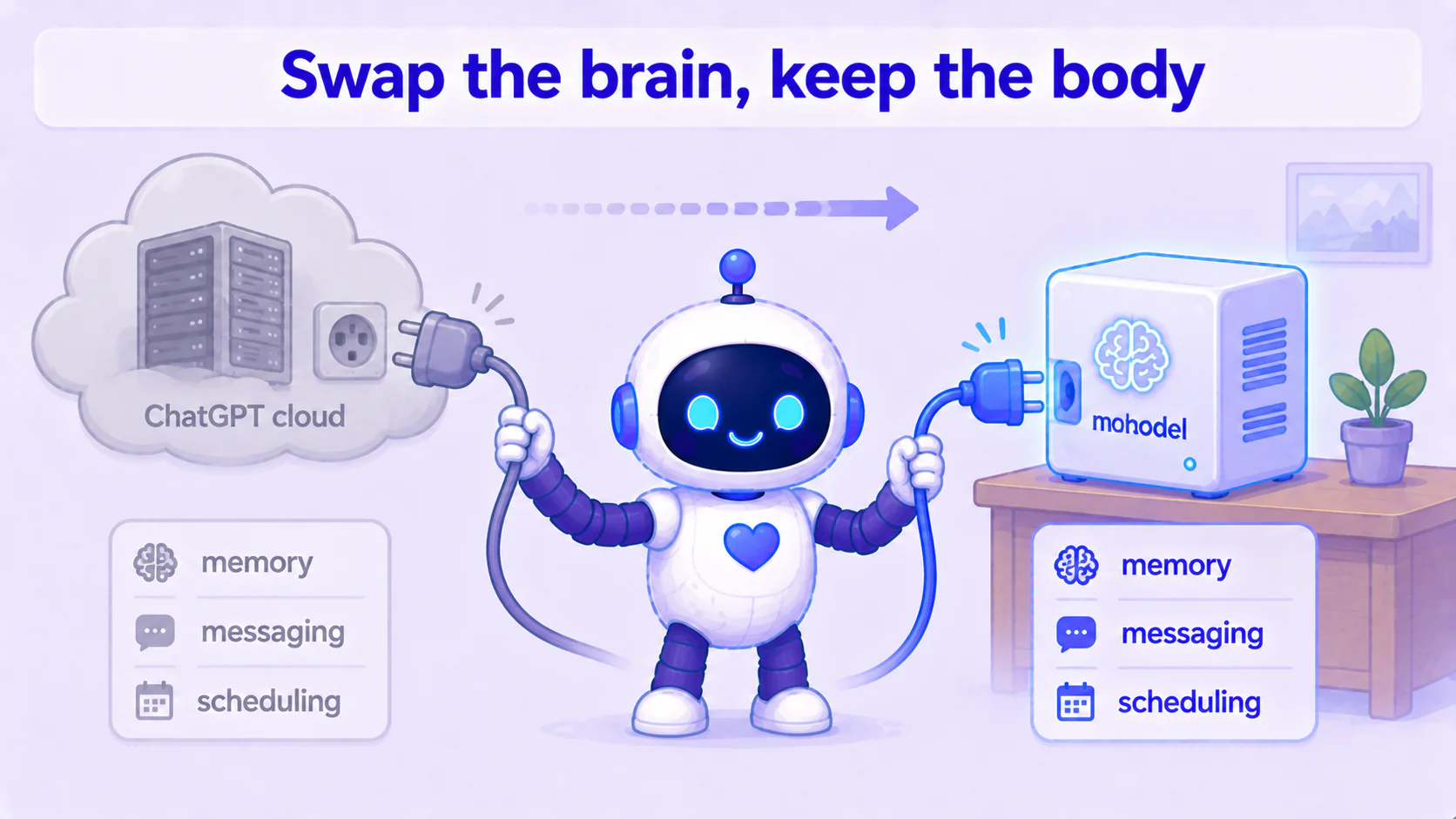
Here's the most important — and most reassuring — line of the whole post: the body doesn't change at all.
Recall #3 — Hermes is the body, and it never cared who the brain was. To Hermes, the brain is just "an address I can throw a question at and get an answer back from." Cloud ChatGPT is one address; a model on your machine is another address. Swapping the brain is changing that address from the cloud to your house.
In concept, three steps:
- Get a model running on your machine and expose it at a local address (like
your-computer:some-port). This step is where the real work of going local lives — you need a capable machine, the model loaded and standing by. I run ds4-class models locally. - Tell Hermes the new brain address: change the setting that pointed at the cloud to point at that window on your machine.
- Restart so it takes effect, and the brain is swapped.
The exact commands, config file location, and which fields to fill depend on your Hermes version and the provider you use — I won't hardcode them. Conceptually, just remember: in Hermes's "brain settings," you're swapping a cloud address for a local one. Everything else — memory, messaging, scheduled tasks — stays untouched.
After the swap, you message it, it runs its tasks — all as before. The only change: the brain is now in your house, not in the sky.
The cost: slower, and you need a capable machine
A local brain isn't a free lunch. Two costs to know up front.
Cost one: usually slower. Cloud ChatGPT runs on a full rack of top-tier datacenter GPUs; one home machine can't really compete. How slow? I measured my own local brain, ds4 — its raw text generation is about 10 characters/sec (technically 10 tok/s). That does sound slower than the cloud.
But that number is misleading in an important way: in actual assistant use, it's less laggy than you'd think. This brain is good at "remembering" what's been said — continuing a long conversation, it doesn't reread the previous tens of thousands of words before replying, it just picks up thinking. In practice, about half the turns come back in five to fifteen seconds and feel smooth. What's actually slow is "cold start" (the first line after boot, or a brand-new topic), which can occasionally take a minute or two. So the real experience is bimodal: smooth once warm, an occasional stall — not slow throughout.
In one line: the headline "10 characters/sec" sounds unusable, but in real assistant use it rarely has to recompute the earlier conversation, so most of the time it answers in seconds to a dozen seconds — slow, yes, but usable.
Cost two: you need a capable machine. To run a local brain, you need a machine that can hold a mid-to-large model — a decent GPU, or large unified memory like some newer machines have. A regular office laptop usually can't run a brain smart enough. That's the barrier, and why this road isn't for everyone.
So this post isn't telling you to switch. Cloud ChatGPT for getting started is completely fine and far easier. A local brain is for people who'll accept "a bit slower" for full autonomy and have a capable machine on hand.
Who this road is for
A simple call:
- Starting out, want convenience, ordinary machine → stick with cloud ChatGPT. Fast, easy; the #1–#7 setup is plenty.
- Care about privacy, a busy assistant where you want to cut long-term cost, want full control, and have a capable machine → consider a local brain. You trade "a bit slower + a good machine" for "full autonomy, zero cloud dependency."
No right or wrong — just whether you want that autonomy and can pay its cost.
Takeaways
Swap the brain, keep the body — that's the payoff of the architecture
Because #3 split the assistant into "brain + body" long ago, today you can swap only the brain with not one wire of the body coming loose. That's the reward of picking the right architecture early — the brain can be swapped, upgraded, moved home from the cloud; the body stays yours throughout.
Slow or not, judge by real use, not one number
"10 characters/sec" looks scary alone, but as an assistant it remembers context well and doesn't recompute, so most turns answer in seconds. Don't write it off over one headline number — look at how you actually use it.
Autonomy is a choice, not a higher tier
Moving the brain home buys privacy, no caps, full control; the cost is a bit slower and a good machine. It's a trade-off, not an upgrade. Decide whether you want "convenience" or "autonomy," then pick — both are valid.
Conclusion
- Going local = swapping the assistant's brain from cloud ChatGPT to a model on your own machine (ds4 and the like).
- Swap the brain, keep the body: Hermes's memory, messaging, scheduled tasks all stay; only the "brain address" goes from cloud to local. Exact steps depend on your Hermes config/provider.
- What you get is full autonomy: privacy (data stays home), no caps (cuts long-term cost), full control.
- Honest cost: a local brain is usually slower (ds4 ~10 chars/sec, but it remembers context so most turns answer in seconds to a dozen; cold start occasionally stalls) + needs a capable machine.
- ⚠️ Not for everyone: starting out and want easy, use the cloud; want to stand fully on your own and have a good machine, take this road.
This series — AI Agent Life, from Zero:
- Part 1: AI assistant vs ChatGPT
- Part 2: What is an agent framework
- Part 3: The ChatGPT-brain + Hermes-body combo
- Part 4: Install Hermes Desktop
- Part 5: Connect Hermes to Telegram
- Part 6: Let your assistant run on its own
- Part 7: Give your AI assistant eyes and ears
- Part 8: One person, a whole team of assistants
- Part 9: Swap your assistant's brain for a local one (this post)
FAQ
- Swapping the brain to a local model — is ChatGPT not good enough?
- It is. ChatGPT makes a great brain and the whole series leans on it. Going local is for something else — full autonomy: no cloud dependency, data never leaves your house, no usage caps, the whole thing in your hands. It's a trade-off, not an upgrade. Take it only if you want that autonomy.
- Will a local brain be slower?
- Usually yes. Cloud ChatGPT runs on top-tier datacenter GPUs your home machine can't match. My own local brain (ds4) generates text at roughly 10 tokens/sec, slower than the cloud. But in actual assistant use it's less laggy than that number suggests — it's good at 'remembering' earlier conversation, so it doesn't recompute everything each turn, and most turns come back in a few to a dozen seconds.
- What do I need to swap in a local brain?
- A capable machine (a decent GPU or large unified memory, enough to run a mid-to-large model) plus a local service that serves the model. On the Hermes side you just point the 'brain's address' from the cloud to that address on your machine — the body doesn't change. Exact steps depend on your Hermes version and provider config.
Read next
- 2026-07-01[Agent 101 #15] Hermes /learn: I had a local 27B write its own reusable skill
Hermes has a /learn command that turns 'something you just did' into a reusable skill — a SKILL.md. I wired it into my own fleet: one Kanban card, a local 27B running on a modded 2080 Ti, and about 3 minutes later it handed back a clean, spec-compliant skill — plus two implementation details the docs don't spell out (slash command vs. dispatch, and where skills actually live). A plain-language walkthrough of what /learn does, how to use it, and where its limits are.
- 2026-06-29[Agent 101 #14] One spec, three assistants, three Tetris games: a Hermes Kanban dispatch test
After raising a fleet of assistants, I gave them the same one-line 'make a Tetris game' spec — no details at all — one card each, and let them each write a web Tetris in a single shot. I touched zero lines of game code; I only published the result. The surprise: from that one line, the Hermes harness plus a local model I tuned myself (on a modded 2080 Ti) filled in things I never asked for — a ghost piece and wall-kick — in one shot. You can play all three.
- 2026-06-16[Agent 101 #7] Give your AI assistant eyes and ears: vision + voice for a text-only brain
Your AI assistant only reads text? Give it eyes and ears — send a photo it understands, send a voice clip it understands. Not by swapping in a pricier model, but by bolting on a small vision model as a perception side-car. Hermes's built-in auxiliary.vision + faster-whisper, measured end to end.
- 2026-07-21[Agent 101 #16] Hermes config health check: 5 silent gotchas that make your assistant act weird
Part 11 said a haywire assistant is usually a broken car (tools, config, memory), not a dumb engine (the model). This is that checklist: a context_length set at the wrong level silently compresses early, Qwen thinking left on runs 10x slower, an MCP tool that connects but every call fails, and a sib running a different model than you think. Five real config gotchas, each with a check you can hand to your agent to run on itself, plus the fix.
Don't miss the next one
Subscribe, and you won't.
One-click unsubscribe anytime.