AI Agent Life, from Zero · part 16
[Agent 101 #16] Hermes config health check: 5 silent gotchas that make your assistant act weird
❯ cat --toc
- Your assistant isn't dumb — its car needs a checkup
- Gotcha 1 — `context_length` one level too deep (newer Hermes already fixed this)
- Gotcha 2 — Qwen thinking left on (10.8x slower)
- Gotcha 3 — an MCP tool is configured but every call fails (shell-exported env vars filtered by the allowlist)
- Gotcha 4 — trust the endpoint, not the label
- Gotcha 5 — two ops traps: an incomplete plist PATH, and manual dashboard restarts
- Have Hermes run this health check
TL;DR
Part 11 said a haywire assistant is usually a broken car (tools, config, memory), not a dumb engine. This is that checklist — five config gotchas I've hit. While writing this I re-checked the current Hermes source and found two were off: nested context_length — newer Hermes already fixed it; MCP env vars — I'd solved that the wrong way, since config env: was right all along and my wrapper was unnecessary. Three still bite: Qwen thinking left on, a label out of sync with the endpoint, and two plist/dashboard ops traps. Each includes a check your agent can run — even my own gotchas go stale is the point: trust what's running now, not old memory.

Your assistant isn't dumb — its car needs a checkup
Part 11 made one argument: when your assistant goes haywire — loops, wanders, forgets, freezes — don't blame the model first. The model is the engine. Eight times out of ten the problem is the car around it: tools, config, memory. Suspect the engine last.
This post is the maintenance checklist.
The premise: you've already got a working Hermes running (the intro parts covered install and phone setup). It was fine. Then it started doing something off — slower than it should be, forgetting things it shouldn't, a tool that just won't connect. You go digging, and there's no error to grab onto.
That's the thread tying these five gotchas together: none of them throws an error that points at the root cause. A couple do throw something — an ECONNREFUSED here, a 401 there — but nothing that names the real problem. The assistant just acts weird, and you're left guessing. If you know where to look, each one is a five-minute fix. If you don't, any single one can eat a whole evening.
A quick caveat before the list: while writing this I went back and checked my config claims against the current Hermes source, and two of the five needed updating — one was fixed in a newer Hermes version (nested context_length); the other I'd been solving the wrong way all along (the MCP env vars — config env: was the right channel the whole time, so my wrapper was unnecessary). I'm keeping both in, clearly marked, because that's exactly the point: config traps go stale, and so does your understanding of them — for both, you go by what's actually running now (which is really what Gotcha 4 is about). So each gotcha below says whether it still bites on current Hermes, plus a check that holds regardless of version.
So here they are — the five I've actually hit — each with the symptom, the real cause, the current status, and a check you can hand straight to your agent to audit its own config.
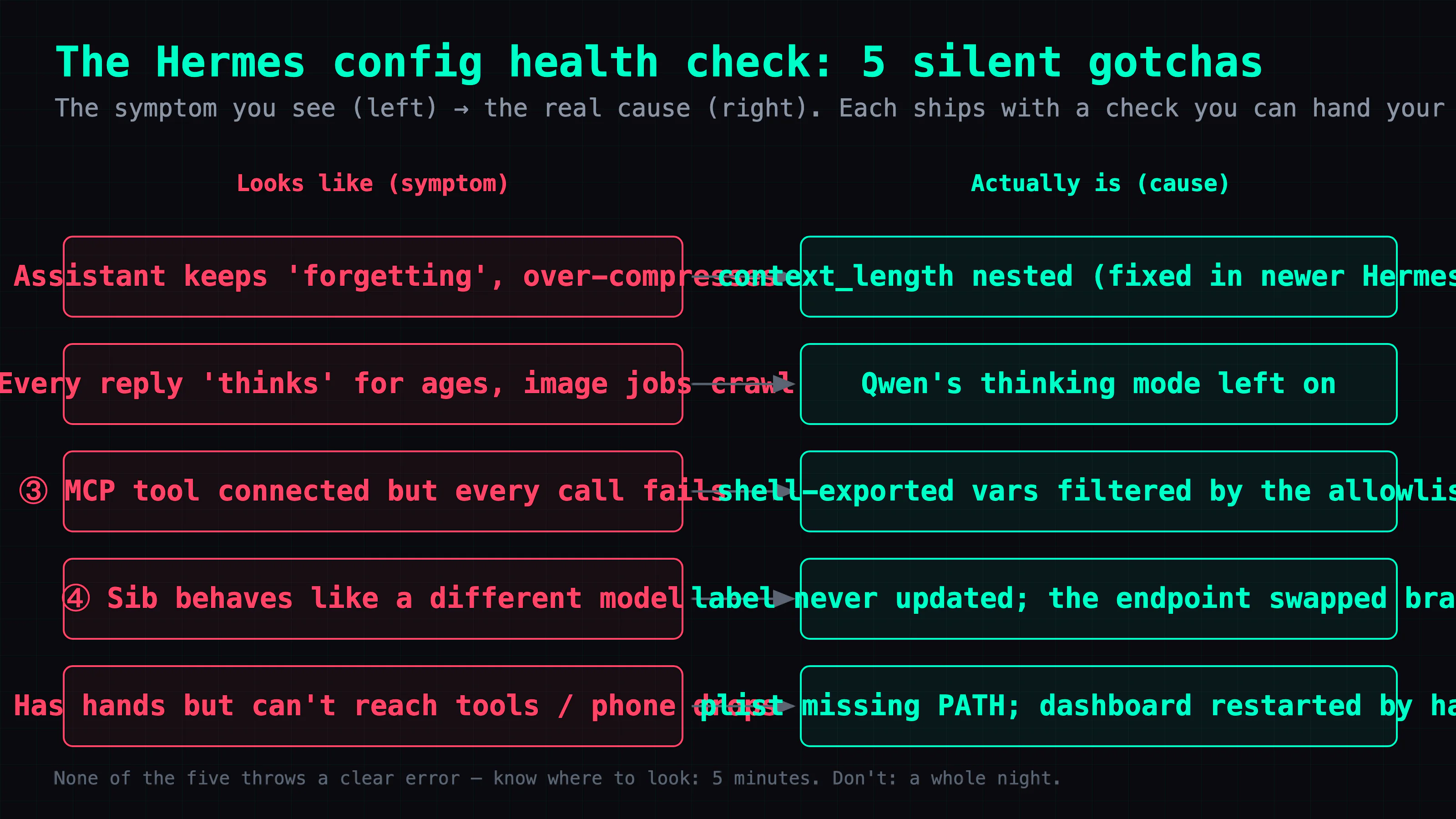
Gotcha 1 — context_length one level too deep (newer Hermes already fixed this)
Symptom. The assistant keeps "forgetting." It over-compresses mid-conversation, drops things you said a few turns ago, and feels like it has a much smaller memory than you configured. You set a big context; it acts small.
What bit me. Hermes needs to know how big the brain is to decide when to compress. The version I was running only read the top-level model.context_length. I had nested that value one level down — under providers.<x>.models.<model>.context_length — like a lot of people do:
# what I had: nested under the provider
providers:
  ds4:
    models:
      deepseek-chat:
        context_length: 262144
The old version never read that level. It fell through, took the model alias (deepseek-chat), looked it up in a public model database, and got back some public default, not my 256K. So my model was serving 256K while Hermes internally believed a much smaller number. It compressed at half of that wrong number — far earlier than half my real 256K — dropped earlier turns, and nothing in the logs explained it. Amnesia.
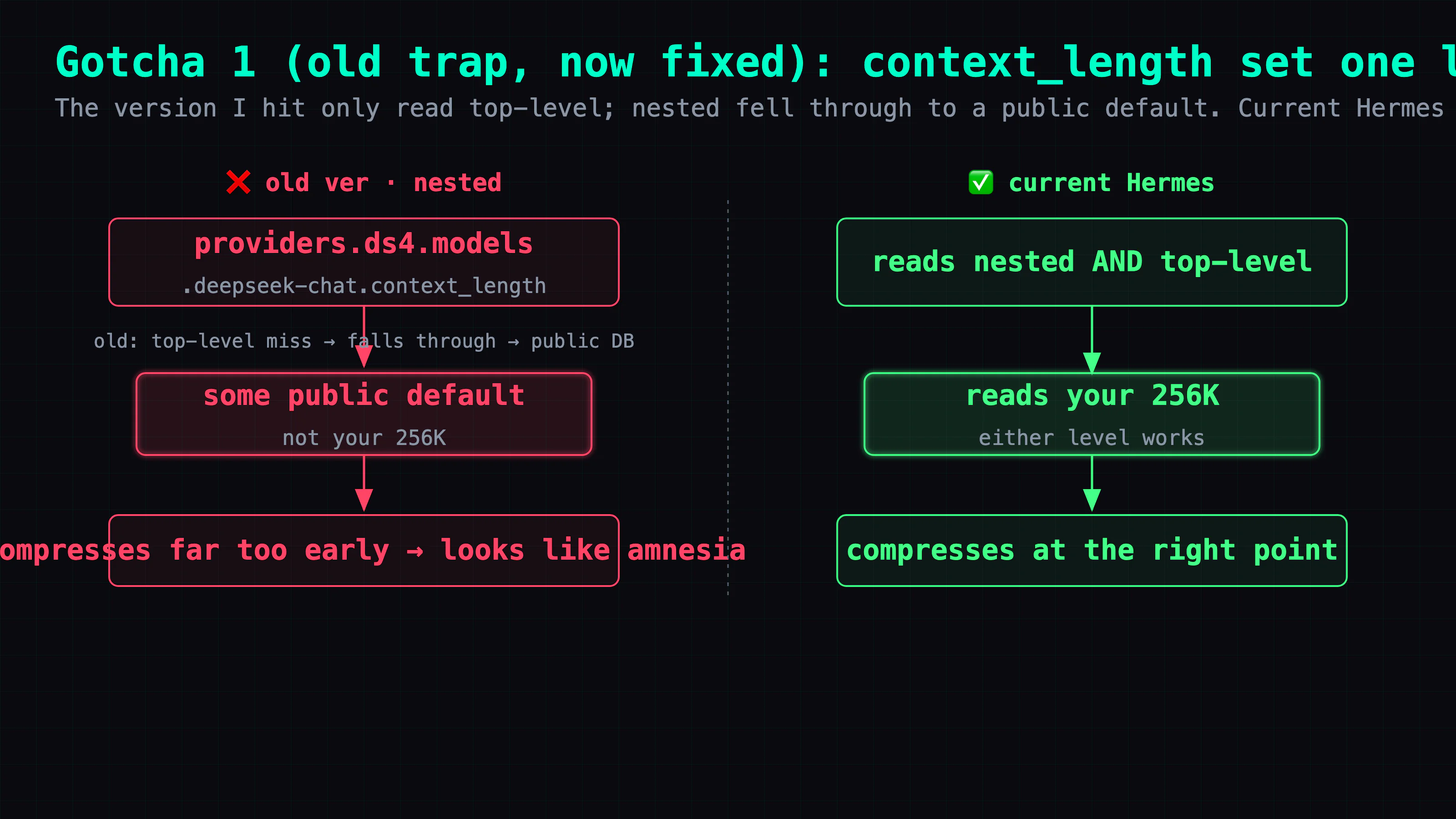
Current status (I re-checked the source while writing this). Newer versions of Hermes already fixed this — they now also resolve the provider-nested context_length (get_custom_provider_context_length), so setting it at either level works. If you're on a recent build, this trap won't bite you anymore. (Which is the whole motif of this post: even my own gotchas go stale, so always go by what's running now, not by the trap you hit last month.)
The takeaway, and how to check it. Whatever the version, Hermes uses the context_length it computes, so you want to confirm that value is what your backend actually serves — and don't just compare against the config file, read what Hermes actually resolved. Line up three values: the backend's /props n_ctx, your configured context_length, and the Context limit: Hermes prints at startup (non-quiet mode, or /info):
curl -s http://<your-backend-ip>:<port>/props   # backend n_ctx
# then compare against Hermes's startup "Context limit:" log line and your configured context_length — all three should agree
Have your agent do exactly that: read all three — the backend's /props n_ctx, your configured value, and Hermes's resolved Context limit: — and confirm they agree. If any disagree, you've found it.
If you want to tune compression harder: what actually caps "how much survives before compression" isn't just the main model's window — it's also the summarizer's window,
auxiliary.compression.context_length, which has to line up with that summarizer backend's ownn_ctx(curl <summarizer-ip>:<port>/propsto read it). And the compression trigger defaults to 50% of the main model's window; some models and routes auto-raise it — 85% on the GPT-5.4/5.5 Codex OAuth route, 70% on GPT-5.3 Codex Spark, and an unconditional 75% for Arcee Trinity Large Thinking (none of these lowers a higher value you set yourself). So if your main model is 256K but the summarizer is only 96K, what you can actually keep is still bottlenecked at the summarizer's 96K.
Gotcha 2 — Qwen thinking left on (10.8x slower)
Symptom. Everything is slow. Every reply visibly "thinks" first before it answers. Mechanical pipelines — chained image generation, multi-step tool-call sequences — become painful, and they fail more often than they should.
The real cause. Qwen 3 / 3.6 default to a thinking mode (the model emits a <think> block before answering). That's great for hard reasoning. It's pure waste for plain chat and for step-by-step pipelines where you just want the model to do the next action. On the same prompt, I measured: thinking on took 1058ms; thinking off took 98ms — 10.8x faster. Image jobs that dragged for 6–10 minutes dropped to 30–90 seconds, and the success rate jumped.
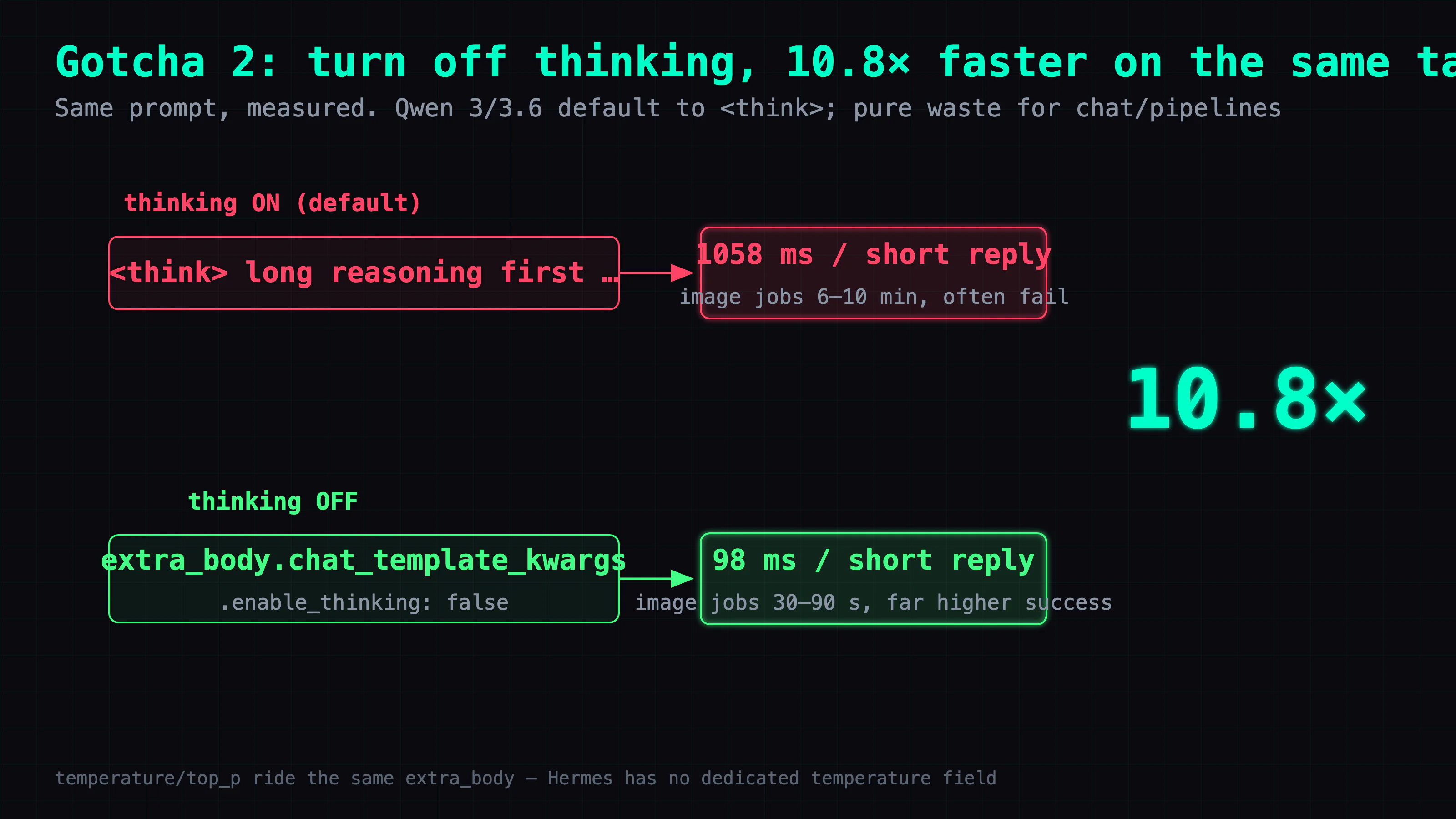
The fix. No code change. If your backend is a local OpenAI-compatible endpoint (vLLM / SGLang), turn it off with nested chat_template_kwargs in that provider's extra_body:
# in that provider's config
extra_body:
  chat_template_kwargs:
    enable_thinking: false
One warning: some tutorials tell you to patch run_agent.py or set an env var to kill thinking. That's an old, private patch — it silently breaks on the next version bump, and you can't share it. The config way survives upgrades and copy-pastes cleanly. (One caveat: the exact payload depends on the backend — vLLM / SGLang take the nested chat_template_kwargs above; Alibaba Cloud Model Studio wants a top-level enable_thinking: false instead.) Related detail: Hermes has no dedicated temperature: field. All the sampling params — temperature, top_p, top_k — ride the same extra_body, so that's where they go too.
A check your agent can run. Measure short-reply latency. If a one-line answer always stalls a second or two before it starts typing, confirm enable_thinking is false.
Gotcha 3 — an MCP tool is configured but every call fails (shell-exported env vars filtered by the allowlist)
Symptom. You wired up an MCP tool exactly like Part 10 showed. The config looks right. But every call fails — ECONNREFUSED, or it connects to localhost when it shouldn't, or just nothing. It reads like a network problem, so you go chase the network. It isn't the network.
What bit me. I'd exported the API key and service URL in my shell, and assumed the MCP tool's subprocess would inherit them the way a normal child process does. But when Hermes spawns a stdio subprocess, it applies an env-var allowlist (_SAFE_ENV_KEYS) that passes through only a tiny set of basics — PATH / HOME / USER / LANG / SHELL. My shell-exported vars weren't on the allowlist, so they got filtered out. The tool came up with no address, fell back to localhost, and every connection failed. And it never said "env var missing" — it threw something that looked like a network error, which is brutal to debug.
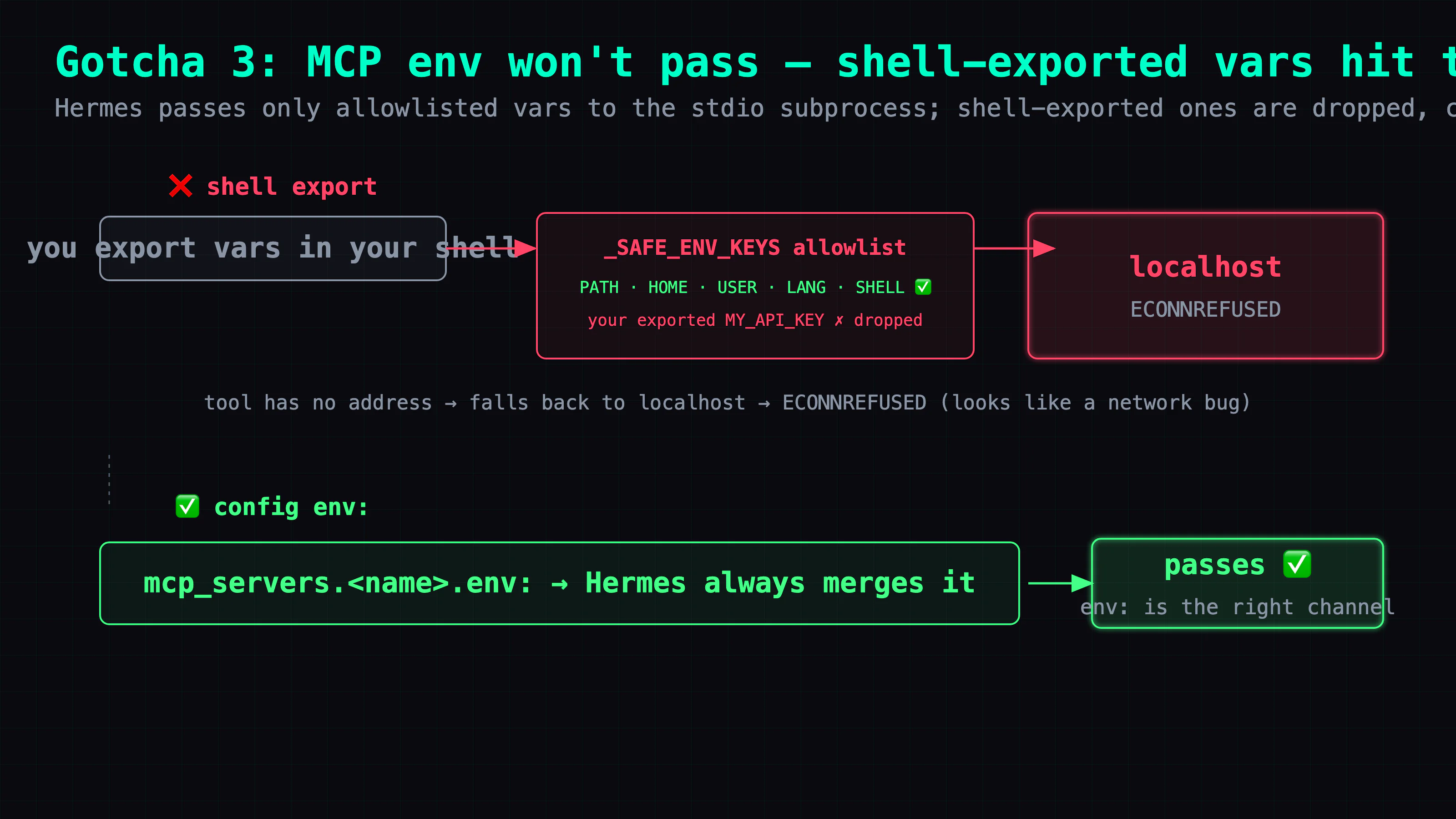
The fix — and it was the right one all along. Don't rely on shell export — put the vars in the config's mcp_servers.<name>.env: block. Hermes has always merged that block into the subprocess; it's where these vars belong:
mcp_servers:
  my-tool:
    command: my-real-mcp-server
    env:
      MY_API_KEY: "…"
      MY_SERVICE_URL: "http://<your-service-ip>:9000"
Full disclosure: my first instinct back then was to wrap it in a shell script that exported the vars and then execed the real tool — which was unnecessary. Config env: was the right channel the whole time; I just hadn't understood that, and hardcoding an API key into a wrapper script is actually less safe. That's the other half of this post: sometimes it isn't the code that's stale — it's your understanding of it.
A check that holds up. Whatever the version, the right instinct when an MCP tool won't connect is: confirm the env vars it needs actually reached the subprocess — that they're in the config env: — before you blame the network. Have your agent list every MCP tool, do one minimal call on each, and for the failing one, check its env first.
Gotcha 4 — trust the endpoint, not the label
Symptom. A sib behaves nothing like the model you expect. You open the config: provider name says gemma, default model says gemma. It all looks fine. It is not fine.
The real cause. The config label is just what you meant to run — it feeds some routing (like picking a provider's extra_body), but it's not proof of which weights the backend actually loaded, and it can go stale. I had a sib whose provider label stayed gemma, but its base_url endpoint — after I swapped the underlying model one day — was actually serving Qwen3.6-27B. Nobody ever changed the label. The config misled me for days: I thought I was running model A when I was actually running model B, so every "why is it acting like that" hour went to the wrong place.
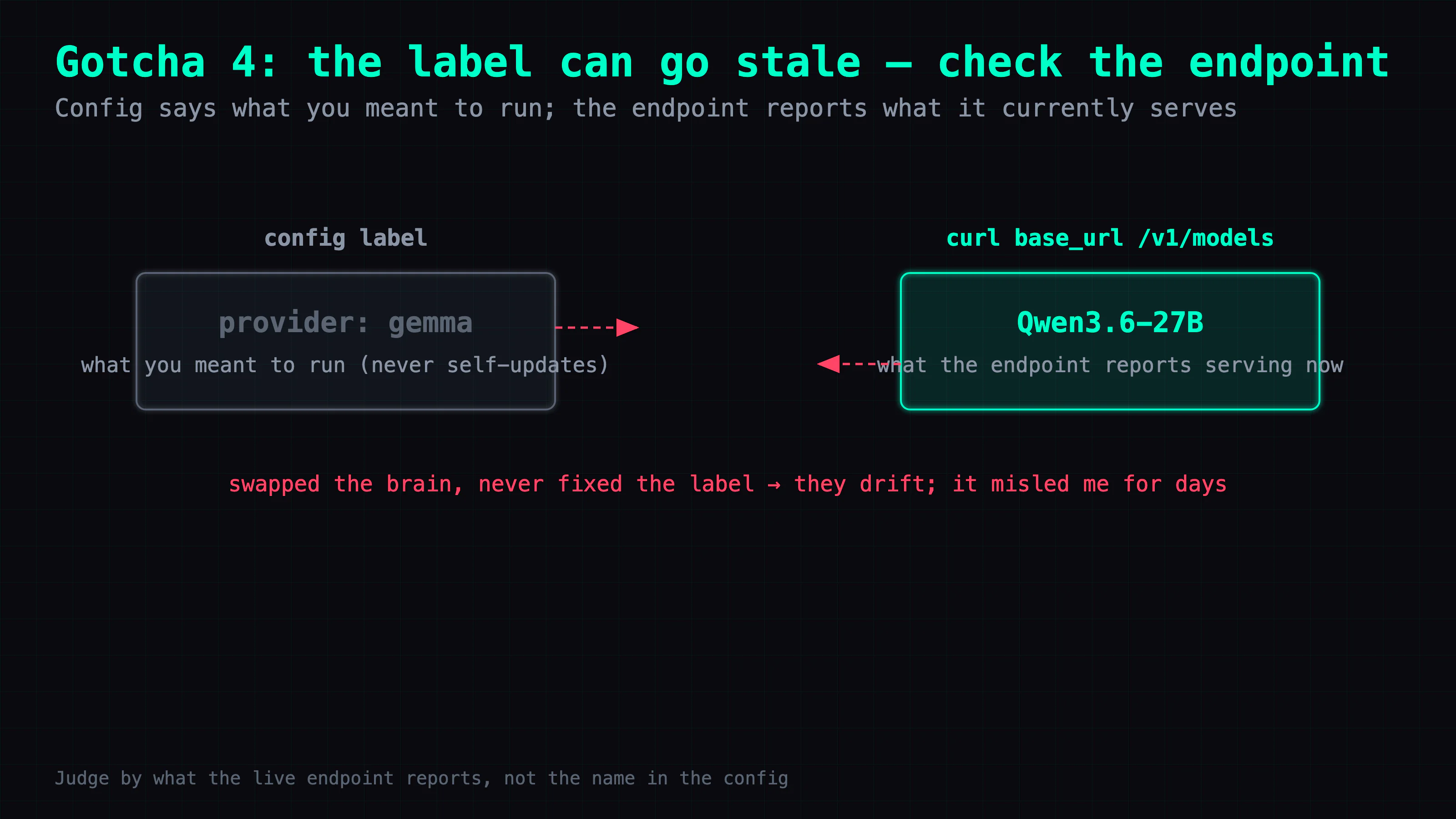
The fix — and it's a habit, not a config edit. To know what a sib really runs, curl its endpoint; don't go by the config's name:
curl -s http://<sib-ip>:<port>/v1/models | jq -r '.data[].id'
# what the endpoint declares it serves — for a single-model backend that's the model actually loaded; trust it over the config's provider name
This is the whole article's motif: config = what you meant to run; the endpoint = what it currently reports running; and they drift. The config doesn't lie so much as go stale while nobody updates it. When they disagree, trust the live endpoint over the label.
A check your agent can run. For each sib, hit base_url at /v1/models and confirm the reported model is the one you think you're running.
Gotcha 5 — two ops traps: an incomplete plist PATH, and manual dashboard restarts
These last two live outside the config file, which is exactly why they're easy to miss.
(a) The launchd plist is missing half its PATH. The Hermes gateway starts via launchd. If the plist's EnvironmentVariables hands it only a partial PATH, the gateway process can't find CLI tools you installed in ~/.local/bin or ~/bin — things like qmd or musubi. The assistant is configured to use those tools, but the gateway can't find their executables, and again, no clear error. Fix: add the full PATH using absolute paths (launchd doesn't expand ~, so write /Users/you/.local/bin), plus VIRTUAL_ENV if your child tools need it, to the plist's EnvironmentVariables; run plutil -lint to validate, then restart.
Restart it the right way — bootout, perform the maintenance, then bootstrap — and don't use a fixed sleep 3 to decide it stopped. In practice bootout returns before the process is actually down; it takes a few seconds, so a hard-coded sleep races it. Capture the old PID first, poll kill -0 on it until it's really gone (capped so you never hang), then confirm the new service came back with launchctl print:
old_pid=$(pgrep -f "hermes_cli.main gateway run")   # the real process — capture before bootout
launchctl bootout gui/$(id -u)/<gateway-label>       # returns before it's really down
for i in $(seq 1 50); do
  kill -0 "$old_pid" 2>/dev/null || break            # wait for THAT pid to exit, capped so it can't hang
  sleep 0.2
done
launchctl bootstrap gui/$(id -u) ~/Library/LaunchAgents/<gateway>.plist
launchctl print gui/$(id -u)/<gateway-label> >/dev/null && echo "back up"   # confirm, don't assume
(Why not pgrep -f gateway to check it stopped? That process's command line is hermes_cli.main gateway run, not your label, and other profiles' gateways can match too — so it both over- and under-matches. Poll the exact PID instead.)
(b) Don't manually restart the dashboard. The dashboard and the bridge trust each other through a shared session token. Manually restarting the dashboard desyncs that token, and then existing phone connections can throw 401 "bad response". If you must restart, grab the live token first and restore it afterward.
A check your agent can run. Confirm the gateway plist's PATH includes ~/.local/bin and ~/bin. Then leave the dashboard and bridge alone.
Have Hermes run this health check
The five share one trait: no error that points at the root cause, just "weird." So the best use of this post isn't to hand-check them one at a time — it's to hand the whole thing to your Hermes and let it run its own config health check. It can run the checks; you just point it at the list.
Copy-paste, with the pass criterion on the right so the agent knows whether it cleared each one:
- Backend
/propsreportsn_ctx== your configuredcontext_length? — curl the backend and confirm the served window matches your config. (Gotcha 1) - Short-reply latency low, no long "think" pause? — a one-liner comes back fast (compare to your own baseline; the exact ms depends on hardware). (Gotcha 2)
- Every MCP tool completes one minimal call? — each connected tool does a trivial call OK. (Gotcha 3)
- Each sib's
base_url/v1/modelsreports the model you expect? — the live endpoint matches the label you think you set. (Gotcha 4) - Gateway plist PATH includes
~/.local/binand~/bin? — the launchd environment can reach your CLI tools. (Gotcha 5a)
If all five pass, the car runs smooth. If any one fails, jump back to its section — the fix is there.
This part is the config-layer health check. To actually understand how the memory underneath works — why it compresses, when it forgets — read it alongside Part 11. Tune the config first, then dig into memory. Don't do it in the other order, or you'll be debugging the engine while the tire's flat.
Also in this series: Part 15 — teach Hermes to write its own skills · Part 11 — when your assistant flails, don't blame the model · Part 10 — connect your tools
FAQ
- My Hermes assistant keeps 'forgetting' what we just talked about. Is its memory broken?
- Often it's not the memory — it's that context_length isn't being read as the value you think. The older Hermes version I was running only read the top-level model.context_length; if you set it nested under providers, it couldn't see it and fell back to some public default, so it started compressing far too early and dropping earlier turns — which is exactly what amnesia feels like. Newer Hermes already fixed this: it now reads the nested level too. Either way, the reliable move is to line up three values — the backend's /props n_ctx, your configured context_length, and the Context limit: Hermes prints at (non-quiet) startup — rather than assume it read the value you meant.
- Why does an MCP tool I connected to Hermes keep saying it can't connect / everything fails?
- Usually it's the vars you exported in your shell not getting through. When Hermes spawns a stdio MCP subprocess, it applies a safe-env allowlist (_SAFE_ENV_KEYS) that passes only basics like PATH and HOME; the API key or service URL you exported in your shell isn't on the list, so it gets filtered out, the tool falls back to localhost, and every connection fails — throwing something that just looks like a network error. The fix isn't a wrapper — it's putting the vars in the config's mcp_servers env: block, which Hermes has always merged into the subprocess. When a tool won't connect, first confirm the vars actually reached the subprocess, then suspect the network.
- How do I know which model my sib is actually running?
- curl the endpoint its base_url points at — don't go by the provider name in the config. The label there is what you meant to run; if you swap the underlying model but forget to update the label, it keeps misleading you. To find out, hit the base_url's /v1/models or /props and see what model it reports — that's what the endpoint currently declares it's serving. Trust the endpoint over the label.
- Who is this for? Can I read it before I've set Hermes up?
- This is an advanced part; it assumes you've already followed the intro parts, installed Hermes, and have a working assistant. If you just want to stand one up and connect your phone, go back to the intro parts first. This one is for people already running Hermes who want to tune it — or who've already started hitting these traps.
Read next
- 2026-06-22[Agent 101 #11] Assistant gone haywire? Don't blame the engine — usually it's the car that broke, not the engine
When an AI assistant loops, wanders, freezes, or answers the wrong question, your first instinct is 'this model is dumb.' But from my own debugging, eight times out of ten it's not the model — it's the ring around it (tools, config, memory). The model is the engine; that ring is the car. A car that won't move usually doesn't have a broken engine — it has a flat tire or a clogged fuel line.
- 2026-07-01[Agent 101 #15] Hermes /learn: I had a local 27B write its own reusable skill
Hermes has a /learn command that turns 'something you just did' into a reusable skill — a SKILL.md. I wired it into my own fleet: one Kanban card, a local 27B running on a modded 2080 Ti, and about 3 minutes later it handed back a clean, spec-compliant skill — plus two implementation details the docs don't spell out (slash command vs. dispatch, and where skills actually live). A plain-language walkthrough of what /learn does, how to use it, and where its limits are.
- 2026-06-29[Agent 101 #14] One spec, three assistants, three Tetris games: a Hermes Kanban dispatch test
After raising a fleet of assistants, I gave them the same one-line 'make a Tetris game' spec — no details at all — one card each, and let them each write a web Tetris in a single shot. I touched zero lines of game code; I only published the result. The surprise: from that one line, the Hermes harness plus a local model I tuned myself (on a modded 2080 Ti) filled in things I never asked for — a ghost piece and wall-kick — in one shot. You can play all three.
- 2026-06-24[Agent 101 #13] See what your fleet of AI agents is doing — from your phone: Muninn adds a Kanban board
Hermes has a built-in Kanban, but on your phone all you get is Telegram's plain text. Muninn now pulls that board onto the phone: Running / Blocked / Done columns — who's working on what, which card got blocked — at a glance. Zero backend, pure P2P.
Don't miss the next one
Subscribe, and you won't.
One-click unsubscribe anytime.