AI Agent Life, from Zero · part 15
[Agent 101 #15] Hermes /learn: I had a local 27B write its own reusable skill
❯ cat --toc
- The plain version: `/learn` lets an assistant remember how it did something
- What `/learn` actually is (not cloud magic)
- My experiment: sending a 27B to "learn how to make a web game"
- Two things the docs don't spell out
- The ≤60-character gotcha
- What this means: a fleet that grows its own abilities
- Three takeaways
TL;DR
Hermes has a /learn command that turns something you just did into a reusable skill. I wired it into my own fleet: one Kanban card, a local 27B running on a modded 2080 Ti, and about 3 minutes later it handed back a clean, spec-compliant SKILL.md — game loop, fixed timestep, collision detection, all correct. The point isn't that it can write a game; it's that your fleet starts accumulating its own abilities. Plus two implementation details the docs don't spell out.

The plain version: /learn lets an assistant remember how it did something
Last time, I gave the same one-line "make a Tetris game" spec to three assistants and let each write its own — I touched zero lines of game code. Fun, but there's a blind spot: every run starts from scratch. The next time I want a different little game, the assistants have to rediscover the game loop, collision, and input handling all over again. That's not how people learn: you do a thing once, file away how you did it, and reuse that next time.
Hermes's /learn is meant to close that gap. It showed up in late June 2026 (Nous announced it on the 23rd, and people were playing with it the next day) — I only noticed because a tweet scrolled past: someone fed /learn a design and it turned into a reusable "design in this style" skill. My first reaction was: wait, doesn't my own fleet already have this?
I checked the machine running Hermes v0.17, and sure enough, /learn was sitting right there in the code. So I ran an experiment: I had a local assistant use /learn to "learn how to make a single-file web game" — to see whether it could take that one-off output from last time and distill it into something I can just reuse.
What /learn actually is (not cloud magic)
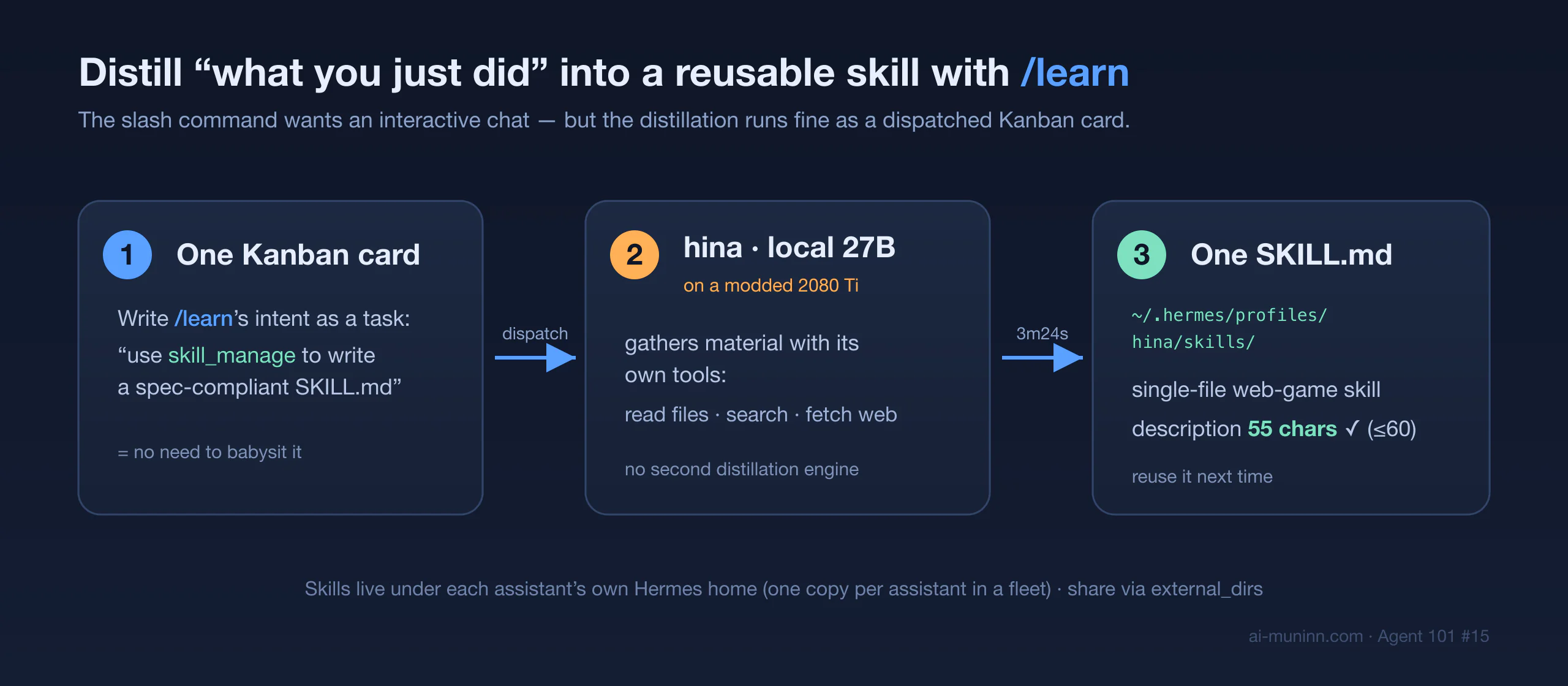
People hear "AI writes its own skill" and picture some mysterious model engine behind it. There isn't one. /learn is almost anticlimactically plain:
You give it one line describing the source (a folder, a URL, "what we just did," or pasted notes). It builds a "standards-guided instruction" and hands that to the running agent. The agent gathers the material with the tools it already has — read files, search, fetch web pages — and then writes one
SKILL.md.
The key phrase is "the tools it already has": there's no separate distillation engine, no second model or service bolted on. It's the agent doing the job in one normal turn — so yes, you still pay for one ordinary model turn, there just isn't a whole second engine. And because it's one shared instruction (build_learn_prompt), you get the same distillation whether you run /learn from the desktop chat box, the terminal, the mobile gateway, or the web dashboard — not a different implementation per surface.
And what it writes isn't a freeform note; it follows a strict spec: a lowercase-hyphenated name, a one-sentence description, and a fixed section order (when to use, steps, known pitfalls, how to verify… that shape). That spec is Hermes's own house style for maintaining skills, and /learn writes straight to it, so output stays consistent instead of every assistant inventing its own format.
My experiment: sending a 27B to "learn how to make a web game"
There's a small twist here — and it's the first thing you only find out by actually doing this.
/learn is a slash command, designed to be typed in an interactive chat session — it drops its instruction onto the current conversation's input queue. But I didn't want to babysit an assistant in a terminal. I wanted last post's pattern: drop one card, it does the work, it reports back.
So I wrote the card's body directly as /learn's intent — "use skill_manage to write a spec-compliant SKILL.md for how to build a single-file, top-down survivor game in one HTML file" — and dispatched it to hina (my local Qwen 27B running on a modded 2080 Ti 22GB, whom you met in the last post).
It just ran. 3 minutes 24 seconds, 25 turns, status: done. I never opened its chat window. The output landed at:
~/.hermes/profiles/hina/skills/single-file-web-game/SKILL.md (5538 bytes)
Its frontmatter:
name: single-file-web-game
description: Build a playable top-down arcade game in one HTML file.
That description is exactly 55 characters (I'll get to why that number matters). The body follows the spec, and — it's actually correct, not filler. An excerpt of its "Procedure" and "Pitfalls":
Procedure
- Skeleton: the minimal HTML5 structure (DOCTYPE, viewport, fullscreen canvas, inline CSS/JS).
- Resize: handle high-DPI screens and window resize with
setTransform(dpr,...).- Fixed-timestep game loop:
requestAnimationFrame, cap the per-frame delta at 50ms to avoid the "spiral of death."- State machine:
MENU / PLAYING / LEVELUP / GAMEOVER.- Entity pools: plain arrays, iterate backwards when removing.
- Input: keyboard, touch (virtual joystick), mouse click.
- Enemy spawning: from screen edges on a timer, scaling difficulty.
- Circle-based collision. …
Pitfalls
- Spiral of death: cap dt at 0.05s.
- Touch events:
{passive:false}+preventDefault().- Audio autoplay: init on first click/touch.
- Retina blur: DPR scaling + setTransform.
- Array mutation: iterate backwards when splicing.
These are the details only someone who's actually shipped a canvas game remembers to get right. A local 27B on a modded graphics card, with no cloud model in the loop, turned that into a reusable skill in three minutes — which is exactly what I wanted to test.

Two things the docs don't spell out
This is where the advanced track earns its keep: following the tutorial once is one thing; actually wiring it into your own fleet is where you hit the parts the docs leave out.
Gotcha #1: the slash command wants an interactive chat — but dispatch works too.
If you take "/learn is a chat command" literally, you'll assume a human has to be present. But the underlying "write a SKILL.md via skill_manage" is just a normal agent turn, so you can absolutely hand it off as a Kanban card. That means you can tell an assistant to "go learn a skill" and then walk away — no different from dispatching any other job.
Gotcha #2: skills follow each assistant's own "Hermes home."
Skills are always written under $HERMES_HOME/skills (in the source, get_skills_dir() returns get_hermes_home() / "skills"). For a single assistant, the default HERMES_HOME is ~/.hermes, so the docs saying "skill creation writes to ~/.hermes/skills/" are correct for that case. But in a fleet, each assistant runs under its own Hermes home (a profile), and hina's is ~/.hermes/profiles/hina, so its skill lands here:
~/.hermes/profiles/hina/skills/single-file-web-game/SKILL.md
                    ^^^^^^^^^^^ hina's own Hermes home, not the default ~/.hermes
The practical consequence: the skill hina learned is invisible to my other assistants by default — not because the docs are wrong, but because skills are isolated per Hermes home. To share across the whole fleet you don't have to copy anything by hand: the config has an external_dirs setting that mounts a shared skill directory for every assistant (note it's a "shared external directory," not a write-protection boundary — if you want it truly read-only, use filesystem permissions). The real trap is looking for one assistant's skill in the default ~/.hermes/skills/ and coming up empty — check which Hermes home that assistant runs under first.
The ≤60-character gotcha
Remember hina's description landed at exactly 55 characters? That's not luck — it's a spec requirement, and the reasoning is worth knowing:
The system prompt carries a "skill index" that's loaded every conversation, and it truncates each skill's description at character 60. Anything past 60 gets silently cut from the index — the skill still exists and you can still call it by name or slash command, but the agent is more likely to miss it when auto-selecting a skill.
To be precise: skill_manage itself allows descriptions up to 1024 characters — ≤60 isn't a hard validator, it's the authoring standard /learn enforces for you, because only a description that fits the always-loaded index gives the agent a fair shot at auto-picking the skill. So "one sentence, ≤60 chars, ends with a period, no marketing words" isn't fussiness — it directly affects whether this skill gets auto-discovered. /learn bakes that rule into its instruction and tells the agent to count the characters. hina counted: 55, passed. That "spec = discoverability" detail is exactly what makes a skill system scale.
What this means: a fleet that grows its own abilities
Line these posts up and the arc is clear:
- #8: one person, a whole team of assistants.
- #13: watch what they're doing on a Kanban board.
- #14: dispatch them to produce things, one-off.
- This one (#15): have them distill those outputs into reusable skills — faster and more consistent next time.
Going from "can do the task" to "remembers how it did it" turns the fleet from one-off executors into ones that build up their own abilities — and the whole thing runs on a local model on my own machine, with nothing sent to the cloud.
Honest limits, so this doesn't read as a sales pitch:
- Sharing across assistants needs setup: a skill one assistant learns is invisible to the others by default; sharing the whole fleet means mounting a shared directory via
external_dirs(make it read-only with filesystem permissions if you care), not automatic. - Skill quality tracks the model: hina did well here, but give it a weaker model or a trickier topic, and the output may need a human edit.
/learnis a starting point, not a finish line. - This is tinkerer territory: most people are fine with one assistant and never need it to self-author skills. This one's for people who want to push a fleet.
Three takeaways
/learnisn't cloud magic — it's the agent using its own tools to write experience into a spec-shapedSKILL.md; same distillation path across desktop / terminal / mobile / web.- It can be dispatched: you don't have to sit in a chat window — write the distillation intent as a Kanban card and hand it to a free, capable assistant.
- Skills follow each assistant's Hermes home (in a fleet,
~/.hermes/profiles/<name>/skills/, not the default~/.hermes/skills/); share across the fleet withexternal_dirs; keep the description ≤60 chars so it fits into the always-loaded skill index and can be auto-selected.
This is the "now that you have a fleet that gets things done, let it start leveling itself up" follow-on. Earlier parts:
FAQ
- What does Hermes's /learn command actually do?
- You point it at a source — a folder, a URL, the conversation you just had, or pasted notes — and the live agent uses the tools it already has (read files, search, fetch web pages) to gather the material, then writes one standards-compliant SKILL.md. There's no separate engine: it's the agent doing the work in a normal turn, distilling experience into a reusable skill.
- Do I have to sit in a Hermes chat window to run /learn?
- No. The slash command itself needs an interactive chat session, but the underlying mechanism (writing a SKILL.md via skill_manage) runs fine as a dispatched Kanban card. In this post I handed it to a local assistant as a job; it did the work and reported back while I did something else.
- Can other assistants use a skill one assistant learned?
- Not by default. Skills live under each assistant's own Hermes home (in a fleet, ~/.hermes/profiles/<name>/skills/), so it's one copy per assistant. To share across the fleet, point them at a shared skill directory via external_dirs in the config. Note that's a shared path, not a write-protection boundary — if you need it truly read-only, enforce that with filesystem permissions.
Read next
- 2026-06-29[Agent 101 #14] One spec, three assistants, three Tetris games: a Hermes Kanban dispatch test
After raising a fleet of assistants, I gave them the same one-line 'make a Tetris game' spec — no details at all — one card each, and let them each write a web Tetris in a single shot. I touched zero lines of game code; I only published the result. The surprise: from that one line, the Hermes harness plus a local model I tuned myself (on a modded 2080 Ti) filled in things I never asked for — a ghost piece and wall-kick — in one shot. You can play all three.
- 2026-06-24[Agent 101 #13] See what your fleet of AI agents is doing — from your phone: Muninn adds a Kanban board
Hermes has a built-in Kanban, but on your phone all you get is Telegram's plain text. Muninn now pulls that board onto the phone: Running / Blocked / Done columns — who's working on what, which card got blocked — at a glance. Zero backend, pure P2P.
- 2026-06-22[Agent 101 #11] Assistant gone haywire? Don't blame the engine — usually it's the car that broke, not the engine
When an AI assistant loops, wanders, freezes, or answers the wrong question, your first instinct is 'this model is dumb.' But from my own debugging, eight times out of ten it's not the model — it's the ring around it (tools, config, memory). The model is the engine; that ring is the car. A car that won't move usually doesn't have a broken engine — it has a flat tire or a clogged fuel line.
- 2026-06-19[Agent 101 #9] Swap your assistant's brain for one on your own machine: from cloud ChatGPT to a local model
We used ChatGPT as the assistant's brain. This post does something bolder — swaps that brain from the cloud to a local model running on your own machine (e.g. ds4). The payoff is an autonomous brain: no cloud model provider, your conversations stay on your machine, no usage caps. The honest cost: local brains are usually slower (~10 tok/s on my ds4) and need a capable machine. Swap the brain, keep the body — Hermes doesn't change at all.
Don't miss the next one
Subscribe, and you won't.
One-click unsubscribe anytime.