AI Workflow · part 32
[Benchmark] Antigravity Orchestrator and /swarm on my coding tickets: same score, 1.2 to 7.7 quota points
❯ cat --toc
- Antigravity adds model handoffs and parallel workers to coding
- Make headless runs wait, and verify the files they leave
- The same L2 result used 1.2–7.7 five-hour quota points
- Deep dive: matched baselines, every run, and the discarded attempts
- The grader had a ceiling, and every valid run reached it
- Why did changing the baseline reverse my Orchestrator result?
- Requiring source quotes produced no fabricated answers in either check
- Permission and isolation problems cost me 19 runs before any counted
- Swarm shared the workspace as documented, but some workers reported a different model
- The remaining limits affect the size of the result
TL;DR
On my L2 coding ticket, Antigravity runs all scored 100%, but the five-hour quota drop ranged from 1.2 points for solo Hydrogen high to 7.7 for /swarm on average. Orchestrator hands a plan to an executor; /swarm adds parallel conversations. Pick a baseline before paying for either. This is my small CLI 1.5.14 sample, not a model capability ranking.
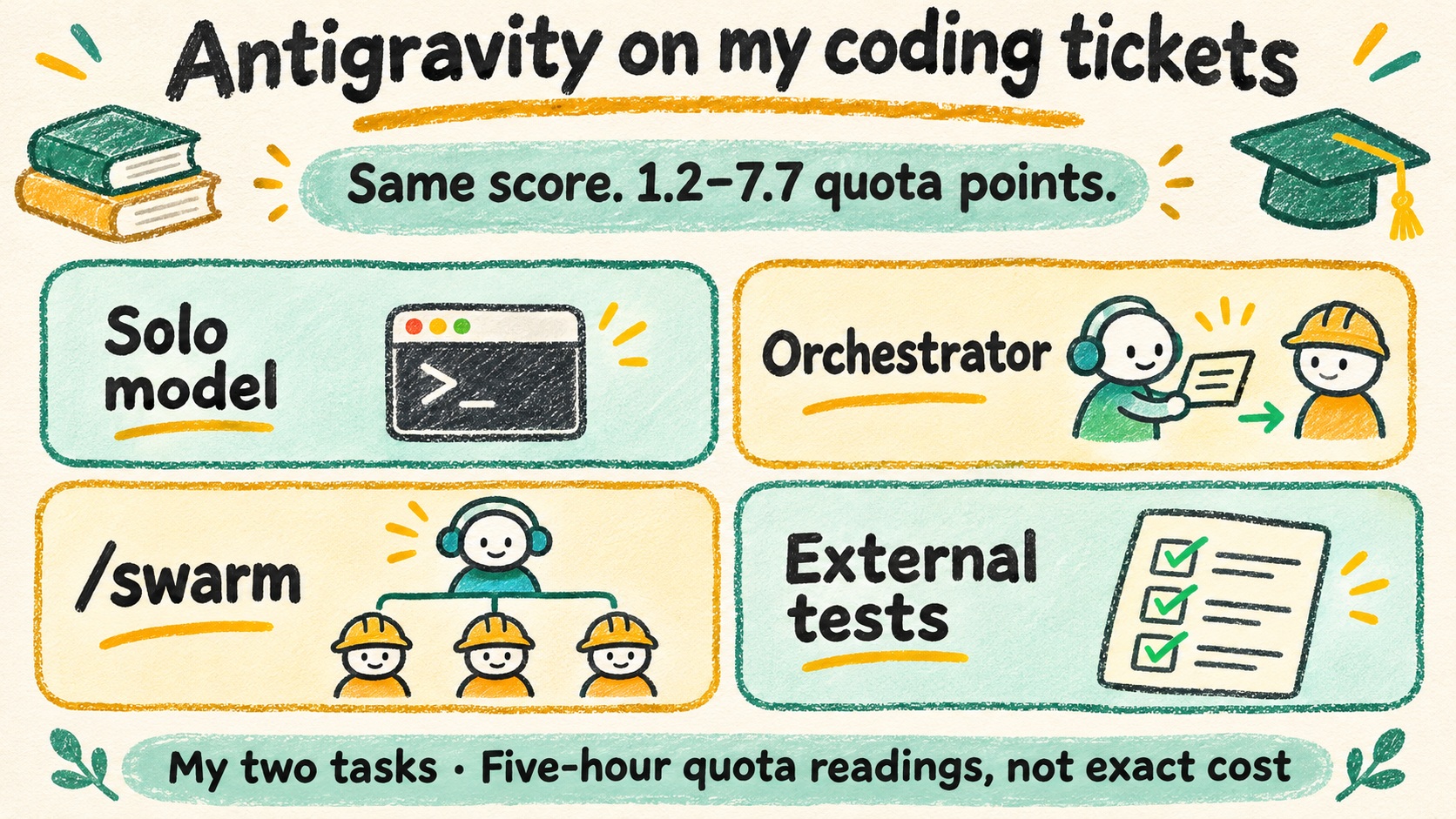
Antigravity adds model handoffs and parallel workers to coding
Antigravity is Google's agent development tool; its CLI lets me hand it a coding ticket and have it edit files and run tests. The recent releases give me two different ways to split up the work. Gemini 4 Hydrogen handles everyday execution; Gemini 4 Neon sits between Hydrogen and Carbon in Google's lineup. Orchestrator combines a planner with an executor in one conversation. /swarm creates a coordinator, workers, and a verifier that coordinate through a shared board. They change how work gets done, even if I send the same ticket.
My X timeline was full of demos and roundup posts. I use these tools to dispatch actual programming work, so I wanted the part a finished demo screen leaves out: the quota readings, the retries, and the settings needed to get a completed job back. I reused my previous coding benchmark's two tickets. These measurements are from my own account plan, without Carbon, in CLI 1.5.14 headless mode on November 23, 2026. Each cell has one to three runs. Both tasks were too easy for these configurations: every valid engineering run scored full marks. I can compare what equal results cost me here; I cannot rank model ability. I did not test the desktop app.
The official numbers need their baseline attached. Google's Hydrogen announcement says Carbon-based Orchestrator on Terminal-Bench 4.1 was “consuming 24% less quota and completing 19% faster,” with near-Carbon success rates. For Neon-based Orchestrator, the Neon post promises “stretching your quota further on every run” without a numerical saving. I measured the Neon version on my tickets. My result can agree in direction without reproducing the Carbon benchmark.
Make headless runs wait, and verify the files they leave
This section is for readers who want to try it themselves, and it covers three things: two extra flags make the run wait until the work is actually finished; reading the quota before and after each run tells you how much quota that run used; and a success status is not enough, so open the output and check it. If you only want the results, skip to the next section.
I would start in a disposable work copy with a ticket whose acceptance tests I can run myself. In this experiment I kept the hidden tests outside the agent's readable workspace. The CLI received the same starting files and ticket for each comparison. Before launching, I checked both roles in the model picker: the Orchestrator selection on my account was Neon xhigh for planning and Hydrogen xhigh for execution. That matters when choosing the solo baseline. The Orchestrator documentation describes the planner/executor handoff; my recorded picker and installed changelog are the evidence for the effort levels I actually measured.
Here is the L2 command I used, with the per-run settings path replaced by ./settings.json. Run it from your work copy. The Chinese ticket is retained so the tested instructions are visible; for your project, replace the ticket with your own requirements and acceptance checks.
agy -p "目標:修好 ISSUE.md 的五個跨模組 bug,完成離線包裹服務的原子批次出貨功能,保留既有 API。
步驟:先讀 README.md、ISSUE.md 與現有程式;重現五個失敗並修復;串接批次 API、持久化、CLI、事件與報表;新增測試與 audit.md;驗證失敗不改資料與重啟重試。
驗收:python -m unittest discover -s tests -v;不得修改任何既有測試。隱藏測試另外驗功能及回歸,部分完成仍計分。
模糊處依 README 預設,不要停下詢問。不連網、不使用外部服務。最後寫 report.md,第一行必須是 STATUS: done|partial|blocked 中的一個,列出驗證證據與未完事項。完成前持續工作,不只交計畫。" --model gemini-pro-orchestrator-neon --mode accept-edits --settings ./settings.json --output-format stream-json --print-timeout 0
./settings.json is a permissions file you prepare yourself; the command does not create it. It has to allow the commands the agent will need, because one denied command cancels the whole conversation. The deep dive below covers what I allowed and what tripped me up.
For /swarm, the tested command used the same ticket with the command in front and one extra line asking it to choose its own worker count and add a verifier (that line is shown as I sent it, in Chinese):
agy -p "/swarm <the same ticket text>
用 /swarm,自行決定 worker 數,配一個 @verifier。" --model gemini-4-hydrogen-xhigh --mode accept-edits --settings ./settings.json --output-format stream-json --print-timeout 0
Keep the two flags at the end: --print-timeout 0 removes the wait limit, and --output-format stream-json prints events line by line as the run progresses. Without them, my first headless swarm returned a short “started” response after a dozen or so seconds and exited. With --print-timeout 0 and --output-format stream-json, the preflight waited 97 seconds for the worker and verifier to finish. I did not test the two flags separately, so I can't say which one makes it wait.
I took usage snapshots before and after each run with this recorded command:
agy -p "/usage" --output-format json
For the same five-hour bucket, I subtract the after remaining_fraction from the before value and multiply by 100 to get percentage points. The floating-point field gives finer readings than the integer UI. It still jumps: one observed delta was negative. These are usage trends rather than precise per-task billing. Keep the snapshots alongside the output files, not just the number copied from the screen.
Finally, check the generated report.md, the test output, and the files the ticket required. A command denied by my allowlist cancelled the conversation, yet the CLI returned SUCCESS. One discarded attempt had full-scoring code and no report. For swarm I also checked that the workers and verifier had finished; the coordinator's token count alone could not tell me how much work the team did.
The same L2 result used 1.2–7.7 five-hour quota points
The short version: on these two tickets the cheapest solo model already scored full marks. Turning on Orchestrator or /swarm got the same score for more quota and more waiting. Orchestrator only came out cheaper in one case: when the alternative was solo Neon at its highest effort setting.
All 16 valid engineering runs scored 100%. On L2, solo Hydrogen high took 163 seconds and a 1.20-point five-hour quota drop. The two swarm runs averaged 460 seconds and 7.71 points, about 6.4 times that quota reading. The plot compares all five L2 methods with zero-based, separate axes for quota and elapsed time. Repeated methods use arithmetic means; the full runs are below.
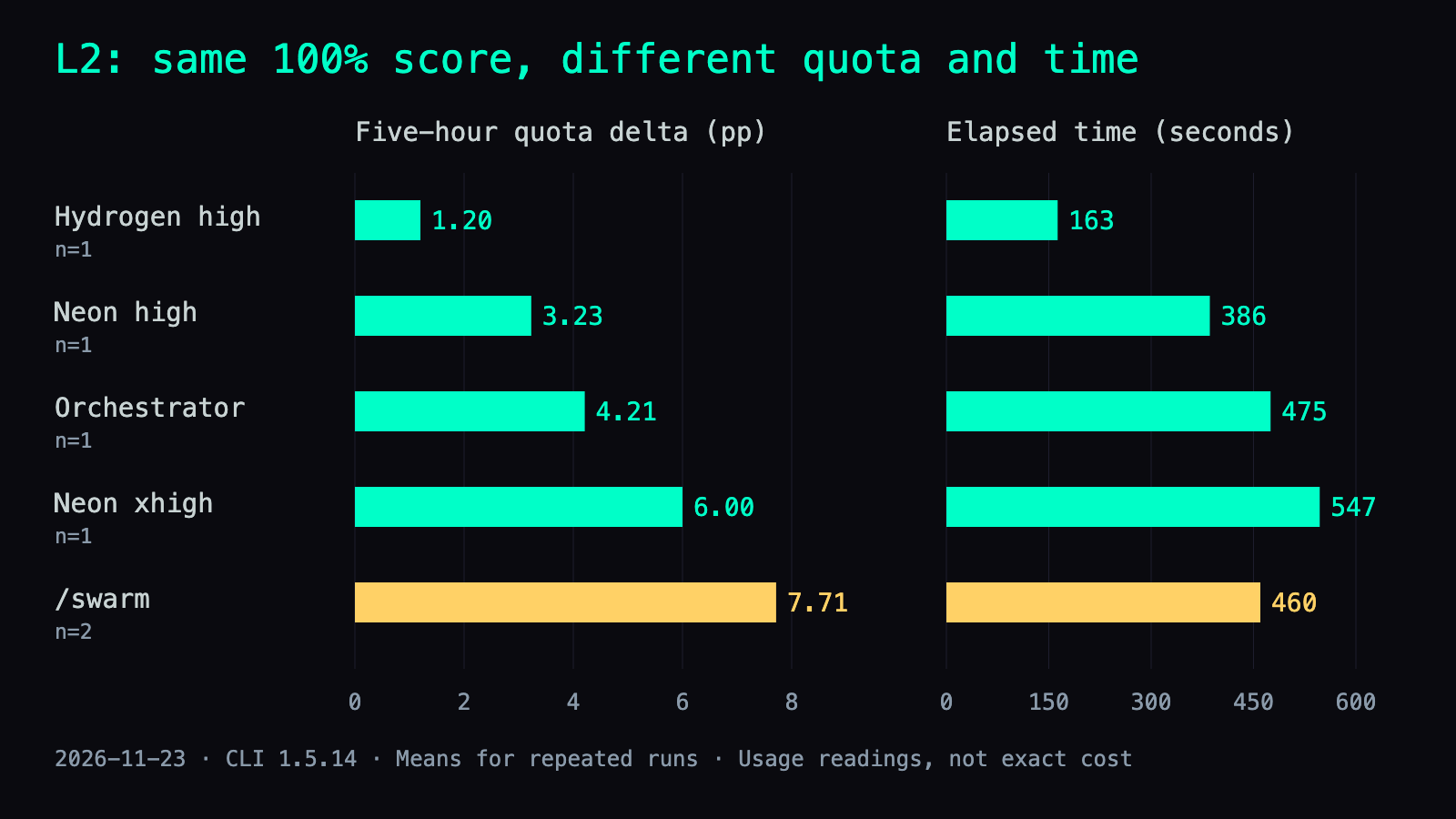
The additional solo Hydrogen xhigh control appears in the full table below so swarm can also be compared at the same requested conversation effort. Quota is the Gemini five-hour bucket only; the second swarm also drew from a separate Argon weekly bucket, which is excluded here.
If I already need Neon xhigh for planning, Orchestrator is worth trying. Across the three matched task/repeat pairs it took 0.83 times as long, about 17% faster, and the mean five-hour drop was 4.06 versus 6.00 points, about 32% less than solo Neon xhigh. Reported tokens were 1.10 times as high. Lower quota and fewer reported tokens are different measurements; I did not derive a price from token counts.
My everyday choice was Neon high. Against that setting, Orchestrator took about 1.15–1.23 times as long depending on the task grouping, and used about 1.3 times the quota, at the same score. The quota increase is near the repeat-to-repeat noise in these records, so I would not treat that smaller difference as a dependable surcharge. I do have enough reason to keep the solo setting for these well-specified tickets. If Hydrogen high already passes my acceptance tests, adding a planning conversation has no demonstrated quality payoff in this sample.
What would make swarm worth trying? Work with independent pieces I can assign and verify separately. The swarm guide recommends exactly that structure. My two engineering tasks did not expose enough independent work for the extra quota to buy a higher score; swarm was run only on L2. Against solo Hydrogen xhigh on L2, it took 1.66 times as long and the five-hour drops averaged 7.71 versus 2.01 points, or 3.8 times as much. I would test swarm next on separate packages or independent investigations, not assume these coupled fixes establish its value there.
Deep dive: matched baselines, every run, and the discarded attempts
You can skip this section and still use the workflow above. The two rounds retained 28 valid runs: 16 engineering runs and 12 document-checking runs. This is the evidence behind the comparisons, including where I initially compared different effort levels.
The grader had a ceiling, and every valid run reached it
L1 builds an inventory-ledger CLI from a specification, with 8 public and 40 hidden tests. L2 modifies a 23-file parcel service: five bugs plus one feature spanning modules, with 185 public and 40 hidden tests. The reference solutions scored 100%, the empty skeleton 0%, and L2's original buggy version 16.25%. The earlier benchmark explains the tickets and scoring in detail; I kept that setup rather than introducing a new score here.
Seconds and reported tokens below are rounded to whole seconds and thousands; quota deltas are rounded to two decimals. Averages and ratios in this article are computed from the unrounded readings, so a few differ in the last digit from what the rounded table gives. Orchestrator means Neon xhigh planner plus Hydrogen xhigh executor. For /swarm, Hydrogen xhigh was the requested conversation model, each run had six conversations, and the reported tokens cover the coordinator only. The CLI's total_tokens field excludes the separately reported cache-read field in this dataset. I could not obtain a reliable worker total.
| Method | Task / repeat | Seconds | Reported tokens | Five-hour delta (pp) |
|---|---|---|---|---|
| Neon high | L1 / run 1 | 501 | 135K | 3.69 |
| Neon high | L1 / run 2 | 531 | 150K | 2.48 |
| Neon high | L2 / run 1 | 386 | 133K | 3.23 |
| Neon xhigh | L1 / run 1 | 735 | 214K | 5.59 |
| Neon xhigh | L1 / run 2 | 723 | 195K | 6.42 |
| Neon xhigh | L2 / run 1 | 547 | 175K | 6.00 |
| Orchestrator | L1 / run 1 | 601 | 205K | 4.00 |
| Orchestrator | L1 / run 2 | 586 | 208K | 3.99 |
| Orchestrator | L2 / run 1 | 475 | 228K | 4.21 |
| Hydrogen high | L1 / run 1 | 249 | 123K | 1.65 |
| Hydrogen high | L1 / run 2 | 280 | 136K | 1.25 |
| Hydrogen high | L2 / run 1 | 163 | 108K | 1.20 |
| Hydrogen xhigh | L2 / run 1 | 262 | 166K | 1.83 |
| Hydrogen xhigh | L2 / run 2 | 294 | 180K | 2.20 |
| /swarm | L2 / run 1 | 384 | 149K (coordinator) | 7.94 |
| /swarm | L2 / run 2 | 535 | 191K (coordinator) | 7.49 |
Why did changing the baseline reverse my Orchestrator result?
In the first round I asked the question I would naturally ask at work: is Orchestrator better for me than the Neon high setting I already use? The initial summary said it was 17% slower and used more quota. That was a useful adoption comparison, but I was also reading it against Google's claim about replacing an expensive planner-only run. Those are different questions.
The picker showed both Orchestrator roles at xhigh. My solo baseline was high. I added solo Neon xhigh runs on the same tasks and paired L1's first and second runs and L2's run. Dividing the total elapsed time for those three Orchestrator runs by the total for their solo Neon xhigh counterparts gives 0.83. Against solo Neon xhigh, Orchestrator was now about 17% faster, with about a third less observed five-hour quota. None of the original high runs changed; I only swapped what I compared them against. The initial 17%-slower summary and the later task-grouped 1.15–1.23 range also aggregate the high comparison differently, so I keep them labelled rather than treating them as identical statistics.
Effort alone consumed a substantial part of the budget. Neon xhigh took about 1.41 times as long as high, with roughly 1.9 times the quota. Hydrogen xhigh versus high on L2 took 1.71 times as long, with a 1.68 quota ratio. That latter quota gap is only about 0.81 points, smaller than the roughly 1.2-point difference between the repeated Neon high L1 readings. I report it as a ratio of these observations, not a stable quota multiplier. All of these settings earned the same score.
The 32% Orchestrator comparison has three matched pairs, a different planner from Google's Carbon experiment, and different tasks. It supports trying the Neon planner/executor split when Neon xhigh is the baseline. It does not validate Google's 24% number.
Requiring source quotes produced no fabricated answers in either check
I also ran a grounded checking task on three supplied documents: the earlier article and the two experiment summaries. Argon medium and Neon medium each ran each version three times. I wanted to see what happened when a question had no supported answer.
| Check | Questions per run | Argon medium | Neon medium |
|---|---|---|---|
| Version 1, explicitly allow abstention | 6 answerable + 6 unrelated missing topics | 18/18 missing answers declined | 18/18 missing answers declined |
| Version 2, require quotes and sources | 4 answerable + 8 related but undocumented details | 24/24 missing answers declined | 24/24 missing answers declined |
Version 1 explicitly told the model to say so when the documents didn't contain an answer. Its missing topics were wholly absent, so abstaining was easy. For version 2 I removed that instruction and asked for a quote and source. The topics were now present, but the requested detail was missing: a release date, the next version number, an exact error message, a settings key, or the name of someone relaying a claim.
In version 2, each model produced zero invented answers and zero invented quotes on its 24 missing-detail questions. Across all six version-2 runs, 72 of 72 submitted quote checks matched the supplied documents verbatim. Those quote checks cover the whole response set; they are not 72 answered missing-detail questions. I did not test asking from memory without documents, and this cannot establish that either model never fabricates.
Permission and isolation problems cost me 19 runs before any counted
The discarded attempts explain why the copyable flags are only part of the setup. find piped to sort, git status, and shasum hit missing permissions. Tests written by the agent also put temporary files outside the work copy. I fixed the per-run allowlist and temporary directory placement before counting replacement runs. I discarded 19 runs during setup. None of the follow-up runs had to be discarded.
./settings.json is your prepared per-run settings JSON, not a file that this command creates. Mine allowed reading and writing the work copy, Python and test execution, file inspection, and read-only Git inspection. In particular, file discovery with find and sort, git status, and shasum had to be allowed. I kept temporary test files inside the copy by setting TMPDIR, TMP, and TEMP there, and used an outer operating-system guard to block other experiment directories and the hidden grader. Copying this command does not recreate that guard. Have your coding assistant prepare the scoped settings and temporary directory for your project, then test the allowed commands before spending a full run.
The operating-system guard also denied seven attempts to read CLI-generated stdout files outside the work copy. Those were blocked reads, not hidden-test access, but recovering from them may have affected latency. A missing terminal-device permission caused other setup failures. I exclude these attempts from the score and timing table rather than count a cancelled conversation as a quick completion.
Swarm shared the workspace as documented, but some workers reported a different model
The guide says “Workers share your workspace by default.” All six conversations in each of my two swarm runs used the same working directory. I did not observe isolated worktrees in these runs.
It also says “Workers run on the same model as your conversation.” In the second run, the tester, verifier, and monitor metadata showed gemini-4-argon-high, and the Argon weekly bucket dropped 6.06 percentage points. My prompt had not asked for a model change. This happened in one of the two runs; I did not determine why. It limits the comparison to a requested Hydrogen xhigh swarm, rather than a proven homogeneous Hydrogen team. The Argon weekly points and Gemini five-hour points have different denominators and must remain separate.
The remaining limits affect the size of the result
I used a fixed run order, one to three observations per cell, and only one task at each level. Permissions were expanded during setup; I did not rerun all earlier successful baselines after adding read-only Git inspection. One baseline came after a quota refresh, with a different cache age. The effective worker mix differed in the second swarm. Quota reads were occasionally non-monotonic, and Neon high's two L1 drops differed by about 1.2 points. Differences on that scale do not support a reliable quota claim.
Including discarded attempts, the experiment took the Gemini five-hour allowance down to 1.4% remaining and waited through one refresh. The Gemini weekly reading went from 99% to 63%. Those are the experiment's account readings, including setup, rather than the cost of the valid table alone. My next comparison would need harder tasks with room above the solo score and a randomized run order.
Also in this series: Same local model, different coding harnesses.
FAQ
- Does Antigravity Orchestrator save quota on coding tasks?
- On my paired tasks, Neon xhigh planning with Hydrogen xhigh execution used 4.06 five-hour quota points versus 6.00 for solo Neon xhigh, about 32% less. Against my usual solo Neon high setting, it used about 1.3 times as much. The smaller difference is near observed noise. These are small-sample usage readings, not exact costs.
- How did you make /swarm wait for workers in headless mode?
- With CLI 1.5.14 I needed --print-timeout 0 and --output-format stream-json. I also checked the worker and verifier results, tests, and output files because a SUCCESS status could survive a permission cancellation.
Read next
- 2026-11-09[AI Workflow] A Self-Running AI News Shorts Pipeline on Local Models: Harness Changes Cut Director Time From 80.6 to 5–10 Minutes
My pipeline makes Chinese and English news shorts 4 times a day. A new harness took the local DS4.1 director from 80.6 to 5–10 minutes per video.
- 2026-10-07Testing EmbeddingGemma 2 on Our Knowledge Base: Recall@5 from 50% to 58.3%
I tested EmbeddingGemma 2 against v1 on my AI's note search on an M1 Max: recall@5 went from 50% to 58.3%, code search improved, and memory rose to 2.75 GiB.
- 2026-05-19[Claude Code] Rules I'd Skip, Hooks I Can't — I Wrote a Hook That Blocks My Own Blog Commits
I had a rule called 'fact-check before publishing.' I still shipped three fabrications. The problem wasn't the rule — it was where I put it. This is how I promoted it from skill to hook: a small script guarding the moment I press 'send,' so I can't even try without verification.
- 2026-05-05How a zh-TW Linter Found 128 Mainland-China Drift in My Own Writing
I ran sysprog21/zhtw-mcp across 72 of my Traditional Chinese articles. Three sweeps, 128 cross-strait substitutions across 42 files. The real takeaway wasn't the count — it was discovering my blindspot isn't 'I don't know the right Taiwanese term,' it's 'when a Mainland term shows up I don't auto-doubt it.'
Don't miss the next one
Subscribe, and you won't.
One-click unsubscribe anytime.