AI Workflow · part 27
[Claude Code] My AI agents are a pixel-art JRPG party now. Codex took 212 tickets in a week
❯ cat --toc
- Why my resource dashboard became a JRPG party
- Install it: Muninn stands in for your Claude Code
- Build your own: what I told Claude at each step
- Characters first: one sheet, then 16-frame loops
- Put them in a camp scene and swap animations by status
- Give idle characters something to do
- A status window, and a stat sheet behind each click
- A quest board for multi-day projects
- Codex took 212 tickets in 7 days
- Deep dive: what broke while building it
- Terminal images scale to fit and center; they don't fill
- Resizing the dock by hand overrides the mod's requested width
- Rebuilding sprites without `--height` halved the resolution
- Clearing the scene cache blanked an open panel
- Magenta keying left fringes
- I measured Codex wrong three times
TL;DR
I turned my AI agents into a pixel-art JRPG party in a Claude Code side panel. Whoever is working plays a work animation, idle characters now and then act out a random bit, and clicking one opens a stat sheet with STR, INT, AGI, STA and MP. The first thing it showed me: in the last 7 days Codex took 212 tickets and worked 30.5 hours. The next busiest took 136. The reusable parts are open source, and if you have no art of your own, the default character, Muninn, stands in for your Claude Code.
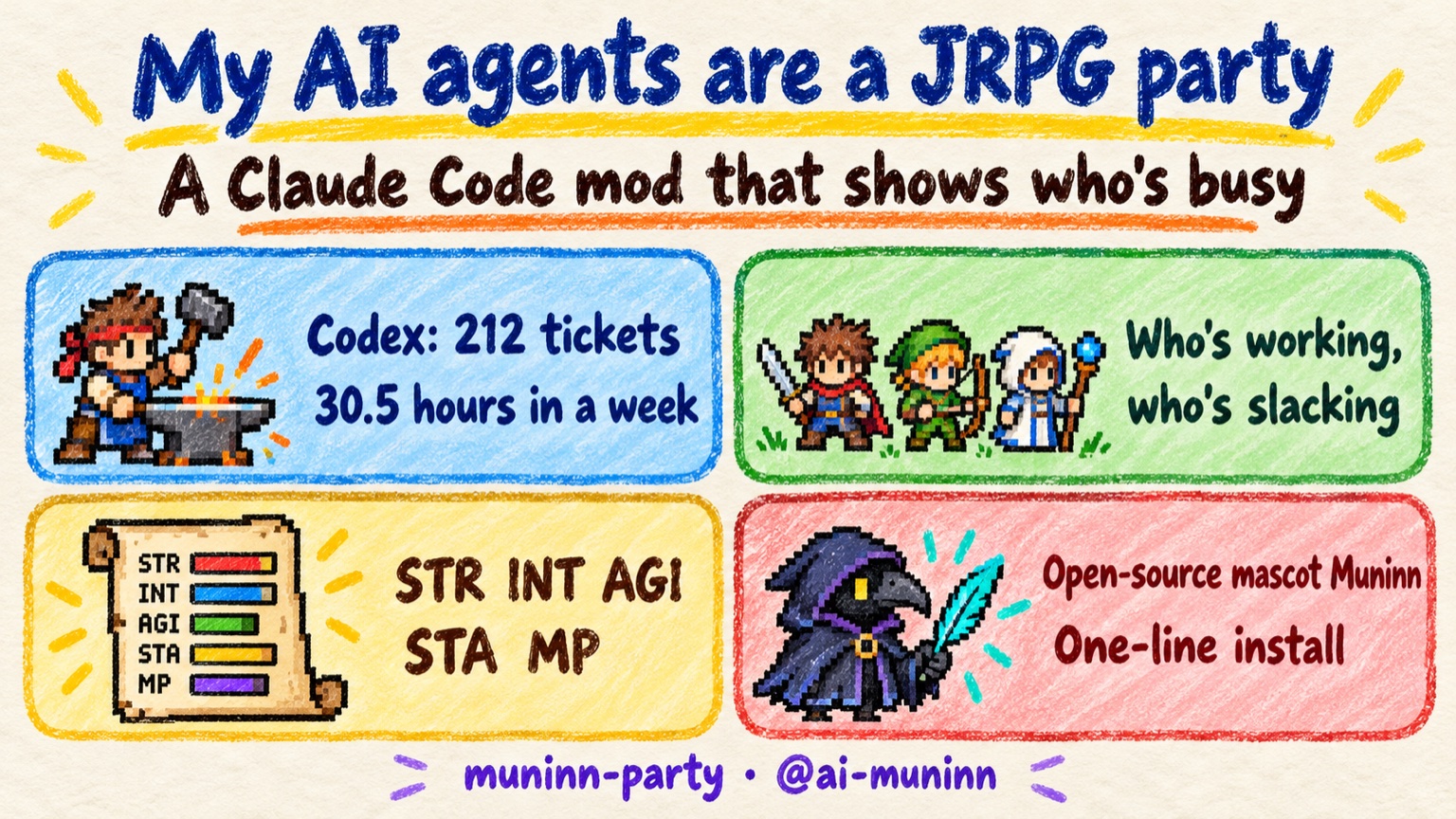
Why my resource dashboard became a JRPG party
In the previous post I built a resource dashboard with Claude Code mods: a side panel that shows which machines are free and which subscriptions have quota left before I dispatch work. It's useful. It's also just numbers and bars.
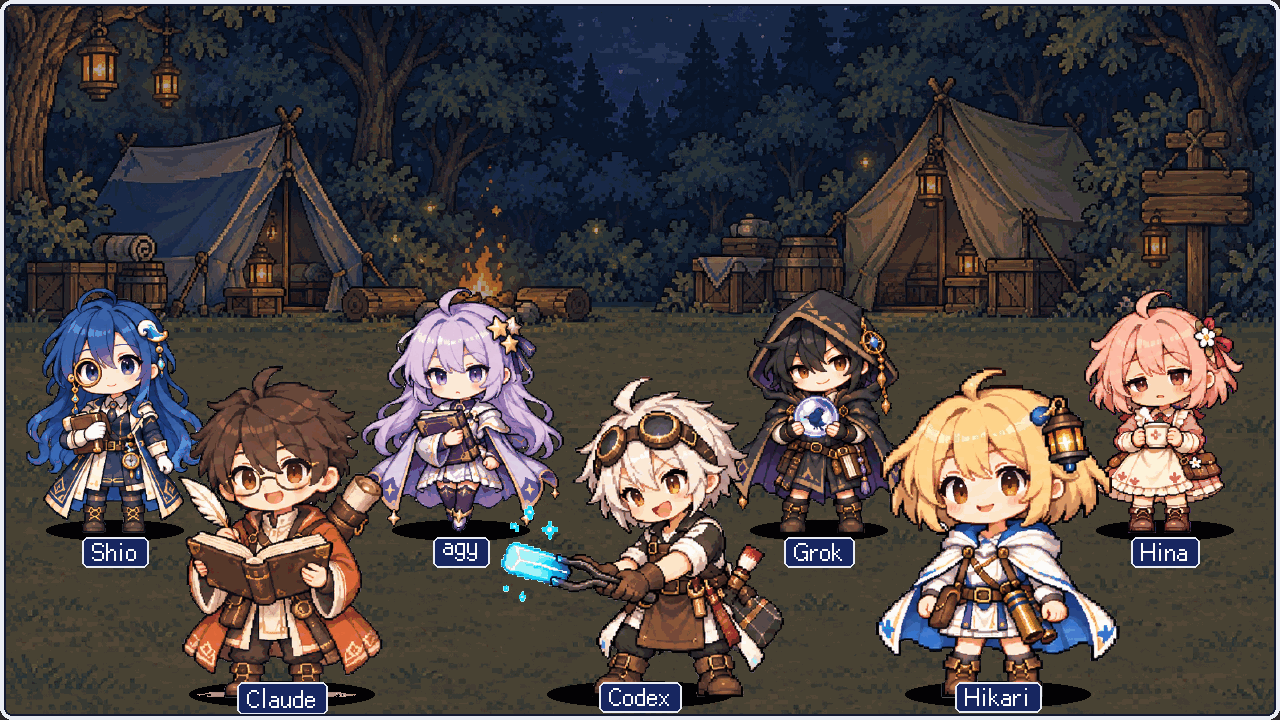
My AI agents already have names. Hikari, Shio and Hina are local models. Codex and agy are subscriptions. Claude is the session I talk to. Grok is in there too. They were already characters, so I gave them a party: levels, XP, stats, a work animation when they're busy, and a campsite to loiter in when they're not. Honestly, I spent tokens on something not very useful that makes me happy.
Then I watched it for an afternoon. Codex never stopped hammering the anvil.
Install it: Muninn stands in for your Claude Code
I split out the parts that don't depend on my setup and put them in a repo: scene compositing, the status window, the stat sheet, the quest board, and the sprite build. My seven characters and the adapter that reads my dispatch system are not included. They're wired to my machines.
Repo: github.com/coolthor/muninn-party
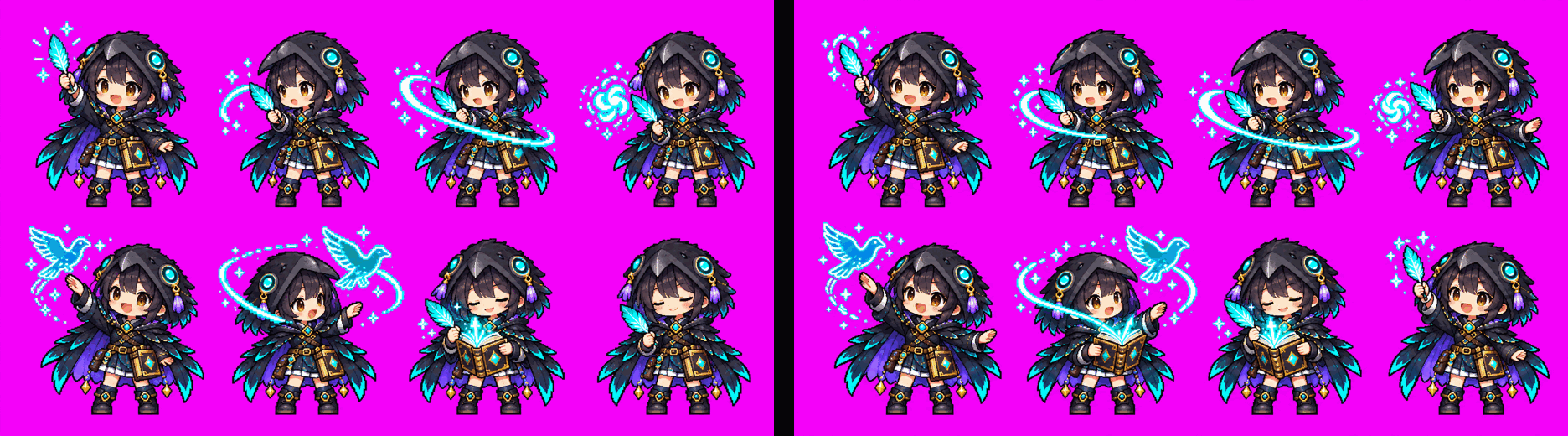
Out of the box the party has one member, Muninn, a mage in a raven hood with a glowing quill. She represents the Claude Code you're running. Her data comes from the Claude Code transcripts already on your machine, so there's nothing extra to set up. When Claude is working, she writes in the air and summons a raven made of light. When it stops, she idles.
To install it, paste one line into Claude Code:
/plugin install muninn-party --marketplace coolthor/muninn-party
Or just tell Claude Code: "Install this mod for me: https://github.com/coolthor/muninn-party".
To add Codex, a local model, or anything else, add a character to party.json (the file that lists who's in the party; Claude can edit it for you) and bring your own sprite art. The next section is how I made mine.
Build your own: what I told Claude at each step
This section is for people who want to build their own. If you just want Muninn on screen, the install above is all you need. Skip ahead to the Codex numbers.
I didn't write the code myself. I told Claude what I wanted, it wrote the code, and Codex drew the characters. Every prompt below is close to what I actually said while building this. You don't need to copy them word for word. Say what you want and let Claude work out the details.
Characters first: one sheet, then 16-frame loops
Codex drew all the art. Each character starts with a character sheet: 16-bit pixel art, two heads tall. Every animation after that uses the sheet as a reference, so the character stays on model.
For each animation, Codex draws 8 key frames in a 2×4 grid on pure magenta, #FF00FF, which the code keys out. Eight frames alone look choppy, so I had it draw 8 in-between frames using the keys as reference. That makes 16 frames at 200 ms each, a 3.2-second loop.
Put them in a camp scene and swap animations by status
With sprites in hand, the scene was one request:
Make a mod with a side panel. Draw a camp scene and put each AI character in it.
If a character is working, play its work animation; otherwise play idle.
Three per row, no white fringe around the sprites.
"Working" needs a data source. Mine started as: the dispatch system has a live ticket for that agent. Then I noticed agy didn't light up when I called it directly to review my English, because that never goes through dispatch. So I added a second rule: a running agy --print or codex exec on the machine also counts as working.
Give idle characters something to do
Seven characters breathing in sync looks like a screensaver. So I asked for this:
Give idle characters some little animations. For example, Grok almost drops
the crystal ball, agy uses her staff to conduct the stars on her hair
ornament, Shio wipes her monocle. Make several idles and play them at random.
Each character ended up with two idle animations. Every 3.2-second cycle there's a 40% chance one idle character plays one. I also added low-MP animations: dizzy when quota is nearly gone, asleep in bed when it runs out.
A status window, and a stat sheet behind each click
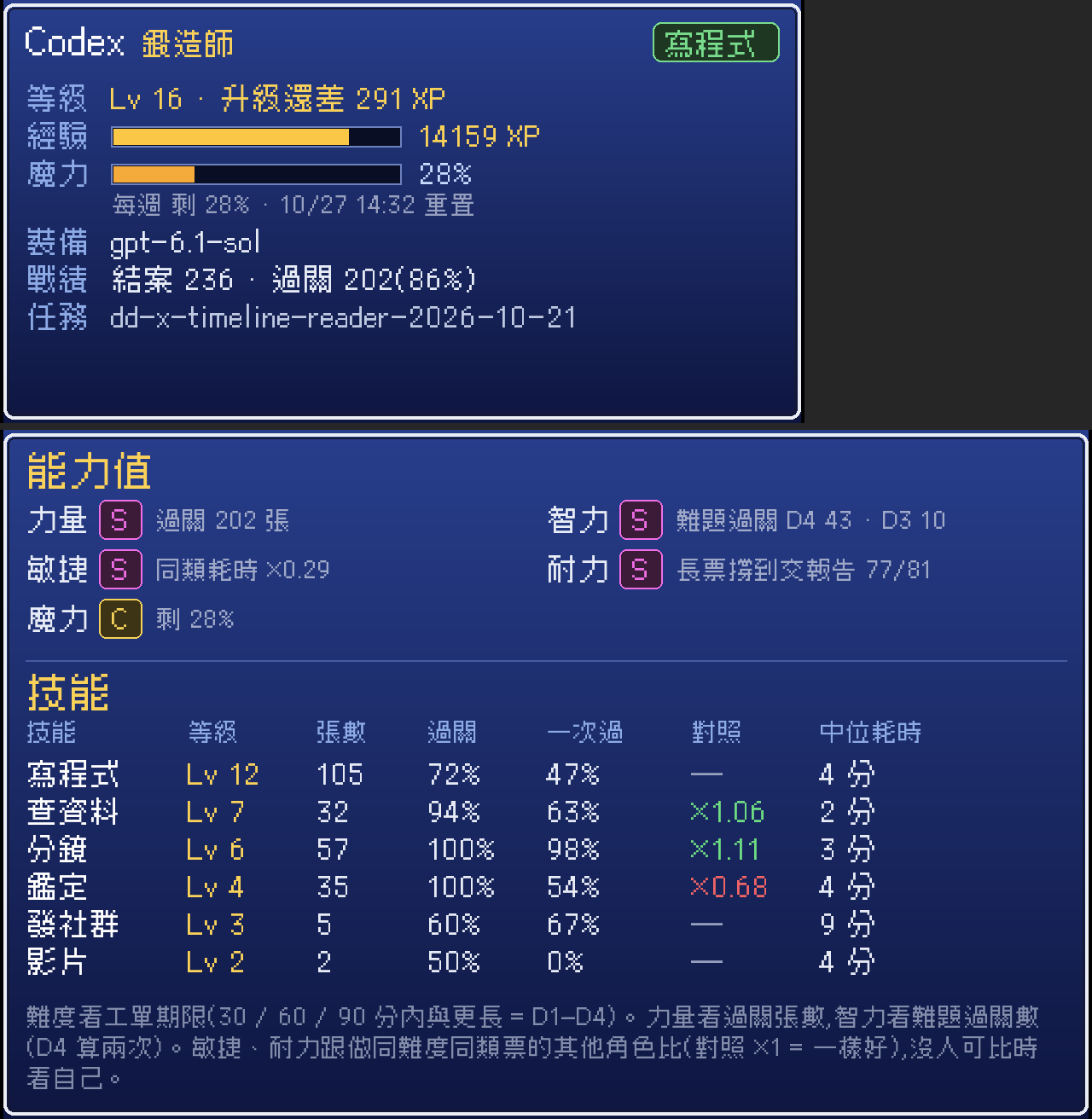
Under the scene sits a status window styled like the bottom of a JRPG battle screen. One box per character: name, Lv, MP bar, and what they're doing right now. Click a character to open their sheet: an animated portrait, gear (which model they run), their record, and five stats.
The stats were the part I changed most. The definitions went through five versions. Here's where they landed:
- STR: passed tickets. S at 150 or more, A at 80, B at 40, C at 10.
- INT: how well a character handles hard work. Difficulty comes from the ticket deadline: within 30, 60, 90 minutes, or longer, graded D1 to D4. INT score = D3 passes + 2 × D4 passes.
- AGI and STA: compared against other characters doing tickets of the same type and difficulty. Finishing faster earns more AGI; getting a long ticket all the way to a submitted report earns more STA. With no peers, a character is compared against itself.
- MP: remaining usage quota.
Claude doesn't take tickets, so it gets its own definitions. AGI is how fast it starts replying after I send a message: a 30-day median of 6.1 s. STA is its longest continuous work stretch: 34.1 h, mostly from /loop.
When there's no data, the stat shows a grey "?" and what's missing. agy's STA reads "hasn't taken a long ticket yet." All five stats always show, so a score appears as soon as the data does.
A quest board for multi-day projects
The space under the status window became a quest board for big projects that run for days: the blog, the director-desk app I'm building, video generation. Each quest shows a heat level (how often it came up in the last 3 days of work logs), portraits of the characters working on it, and the latest update. With no quests, it draws an empty board.
Codex took 212 tickets in 7 days
Once the party was on screen, I pulled the last 7 days of dispatch logs (measured 2026-10-21):
| Character | Tickets | Hours worked | Main ticket types |
|---|---|---|---|
| Codex | 212 | 30.5 h | code 87, scene 44, research 36, verification 21 |
| Hikari | 136 | 23.3 h | research 110, scene 15, code 10 |
| Shio | 74 | 13.3 h | verification 45, research 24 |
| agy | 50 | 8.1 h | verification 41, research 8 |
Codex carried most of the code and scene work, plus 36 research and 21 verification tickets. Hikari and Shio, both local, can handle those two types. agy runs on Gemini, has plenty of quota, and still got mostly verification.
So the plan is:
- Research goes to Hikari and agy first.
- Verification goes to Shio and agy.
- Small code fixes go to Hikari.
- From-scratch builds and image generation stay with Codex.
I could have computed this table back when all I had was the dashboard. I never did. It took watching Codex hammer the anvil nonstop to make me count.
Deep dive: what broke while building it
You can skip this section; the build above works without it. These are the debugging notes, with the numbers.
Terminal images scale to fit and center; they don't fill
There was a thick gap between the scene and the status window. kitty and Ghostty image placeholders scale an image to fit and center it. They don't stretch it to fill the box. The mod type docs say "fill"; in testing, it doesn't.
My box height assumed a cell is 2:1 tall to wide. Meslo LG M at 12pt is actually 2.26 (measured from the font's hhea table with fontTools). So the image sat in a box that was too tall, with 2+ blank rows above and below. The fix is CELL_ASPECT = 2.25.
My preview tool stretched images to fill, which hid the gap. It showed up only in the real terminal.
Resizing the dock by hand overrides the mod's requested width
I wanted a "reset size" button and couldn't make one work: $.ui.open({columns: 100}) lost to pluginPanes.dockColumns in ~/.claude.json, which I had dragged to 78 earlier, and that value is shared by every mod. The docs say a manual resize takes precedence. I settled on a fixed standard width of 76 columns, centered when the dock is wider.
Rebuilding sprites without --height halved the resolution
One rebuild left off --height and got the default 96 px instead of 192. The whole scene went blurry. The default is now 384, the scene is 1280×720, and front-row figures stand about 330 px tall.
A related bug: when a character raises its arms, its bounding box grows. Scaling each frame on its own made characters shrink mid-animation. Scale and foot position now come from idle frame 0 for every frame.
Clearing the scene cache blanked an open panel
I cleared the scene cache and the open panel went blank. The scene only rebuilt when someone's state changed. The fix is a self-heal: every 10 s, check whether the current set's done file exists, and rebuild if it's gone.
Magenta keying left fringes
The frame cutter only cleared magenta flood-filled from the frame borders. Magenta enclosed between hair strands stayed, and so did the purple fringe where magenta blended into the sprite. unkey() now clears key-colored pixels, then runs two passes over pixels next to transparent ones and clears spill, defined as red and blue well above green.
I measured Codex wrong three times
All three had the same root cause: nobody asked what kind of tickets the character takes.
- Success rate, ignoring difficulty. A character that takes the hard tickets looks worse than one that takes easy ones.
- STA from pass rate. Codex had 81 long tickets (deadline 90 min or more): 52 passed, 5 died midway, and 24 delivered a report but were blocked by external gates (review-rejection limit, push verification, size limit). Pass rate was 64%, a B. Switching to "got the ticket all the way to a submitted report" gave 77/81, an S.
- INT from first-try pass rate vs peers. Characters doing easy tickets got S. Codex got B. Switching to counting hard passes put Codex at 43 D4 and 10 D3 passes: S.
I also removed a sixth stat, "precision." It measured whether the dispatch system lost track of tickets, not anything about the character. I redefined it twice and still couldn't say what it meant, so I deleted it.
FAQ
- How do I install the JRPG party mod for Claude Code?
- Paste /plugin install muninn-party --marketplace coolthor/muninn-party into Claude Code, or ask Claude Code to install https://github.com/coolthor/muninn-party for you. You don't have to edit any config files yourself.
- Can I use the mod without my own character art?
- Yes. The repo ships with one character, Muninn, a mage in a raven hood holding a glowing quill. She stands in for your own Claude Code and reads the Claude Code transcripts already on your machine. When Claude is working she writes in the air and summons a raven made of light; otherwise she idles. To add other AIs, add an entry to party.json and supply your own sprite art.
- How are the character stats calculated?
- STR counts passed tickets. INT counts hard tickets passed, with difficulty set by ticket deadline (D1 to D4 for 30, 60, 90 minutes and longer); the score is D3 passes plus twice the D4 passes. AGI and STA compare a character against others doing tickets of the same type and difficulty, or against itself when there are no peers. MP is the remaining usage quota. Missing data shows as a grey question mark with what's missing.
- How were the pixel-art animations made?
- Codex generated a character sheet first (16-bit pixel art, two heads tall). For each animation it drew 8 key frames in a 2x4 grid on a pure magenta background for keying, then 8 in-between frames using the keys as reference. That gives 16 frames at 200 ms each, a 3.2-second loop.
- How does the mod know which AI is working?
- In my setup, a character counts as working when the dispatch system has a live ticket for it, or when a matching agy --print or codex exec process is running on the machine. The open-source default reads local Claude Code transcripts instead.
Read next
- 2026-10-04[Claude Code] Build a Resource Dashboard Inside Claude Code With Six Prompts
Claude Code mods let a plugin draw a live pane in your session. Six prompts, each run in a fresh session, build a GPU, disk, quota and local-model dashboard.
- 2026-08-21[AI Agent] From 41 Minutes to 73 Seconds: Why My Coding Agent's Small Tickets Were So Slow
Dissecting 41 Codex sessions turned up a wall-clock formula (tool calls x 14.3s) and cut a stuck ticket from 41 minutes down to 73 seconds.
- 2026-07-17[Dev Workflow] Your AI Agent's Skills Are a Context Budget: Cutting 193 to 7
One of my AI agents was auto-loading 193 skills into a 2% context budget, silently truncating every description. The fix was visibility governance, not deletion — an allowlist, thin-shell skills, and three layers that stop it re-bloating.
- 2026-07-16[Dev Workflow] The Two Axes That Let a Fleet of AIs Collaborate Without Re-Explaining
Six posts in, my AI setup is really two axes of one system: durable knowledge and live task state, both in plain files. Here's how they converge so different AIs hand off work without re-explaining it or losing it.
Don't miss the next one
Subscribe, and you won't.
One-click unsubscribe anytime.