AI Workflow · part 15
[Dev Workflow] Your AI Agent's Skills Are a Context Budget: Cutting 193 to 7
❯ cat --toc
- Plain-Language Version: More Tools Can Make an Assistant Worse, Not Better
- Preface
- A skill isn't free: it's a line item in a shared context budget
- Two levers: gate what loads, and make each one cheap to load
- Three layers that keep skill bloat from creeping back
- What you gain by slimming down
- How the cut actually went — and the ghost in my most-used skill
- The prequel: a "skill" my blog file had been calling for months didn't exist
- Stealing three patterns, passing on two
- A side note: don't dispatch a one-line edit
- Takeaways
- The skill-budget checklist
TL;DR
codex was auto-loading 193 skills into a 2% context budget, so it quietly truncated every description to fit — the handful I use drowning in ~190 I don't. A skill isn't free: its description is a line item in a shared, budgeted context, and the shared root had no gate. The fix was visibility governance, not deletion. A native allowlist cut codex's view from 193 to 7 (files kept); thin-shell skills keep each one cheap; and three layers — one gate, an audit, a retirement zone — stop it re-bloating. The warning's gone; a session dropped to ~10k tokens. Design first — why skills are a budget and how to gate them — then the messy cut, including a ghost skill broken in my most-used file for months.

Plain-Language Version: More Tools Can Make an Assistant Worse, Not Better
I give my AI assistants "skills" — small instruction files that teach them how to do specific jobs. Over time I'd written a lot of them: 193. I assumed more skills meant a more capable assistant. It didn't.
The catch is that the assistant has to know each skill exists to use it, and holding all those "here's what this does" blurbs in its head costs space — space that's capped. Once I had too many, it started cramming the list in by cutting each description short, until even the skills I use every day showed up half-described and got ignored. A crowded toolbox where you can't read any of the labels is worse than a small one where you can.
This post is about fixing that as a budget problem, not a hoarding problem: how to gate which skills the assistant sees, keep each one cheap to load, and stop the pile from quietly growing back. The messier part — including a "skill" my most-used file had been pointing at for months that didn't actually exist — is at the end, clearly marked.
Preface
One morning codex left a line in its log I'd been scrolling past for weeks: Skill descriptions were shortened to fit the 2% skills context budget. I finally read it. I had 193 skills in the shared root, and codex was loading all of them into a slice of context capped at 2% — so it was truncating every description to make them fit. The skills I reach for daily were being clipped to make room for ~190 I never touch.
This is Part 15 of the AI Workflow series. The earlier parts externalized knowledge and state into files. This one is about a different kind of externalization: capability visibility — deciding what an agent can even see. I'll lay out why skills are a budget and how to govern them first, then — at the end, skippable — the actual cut and the ghost I found while making it.
A skill isn't free: it's a line item in a shared context budget
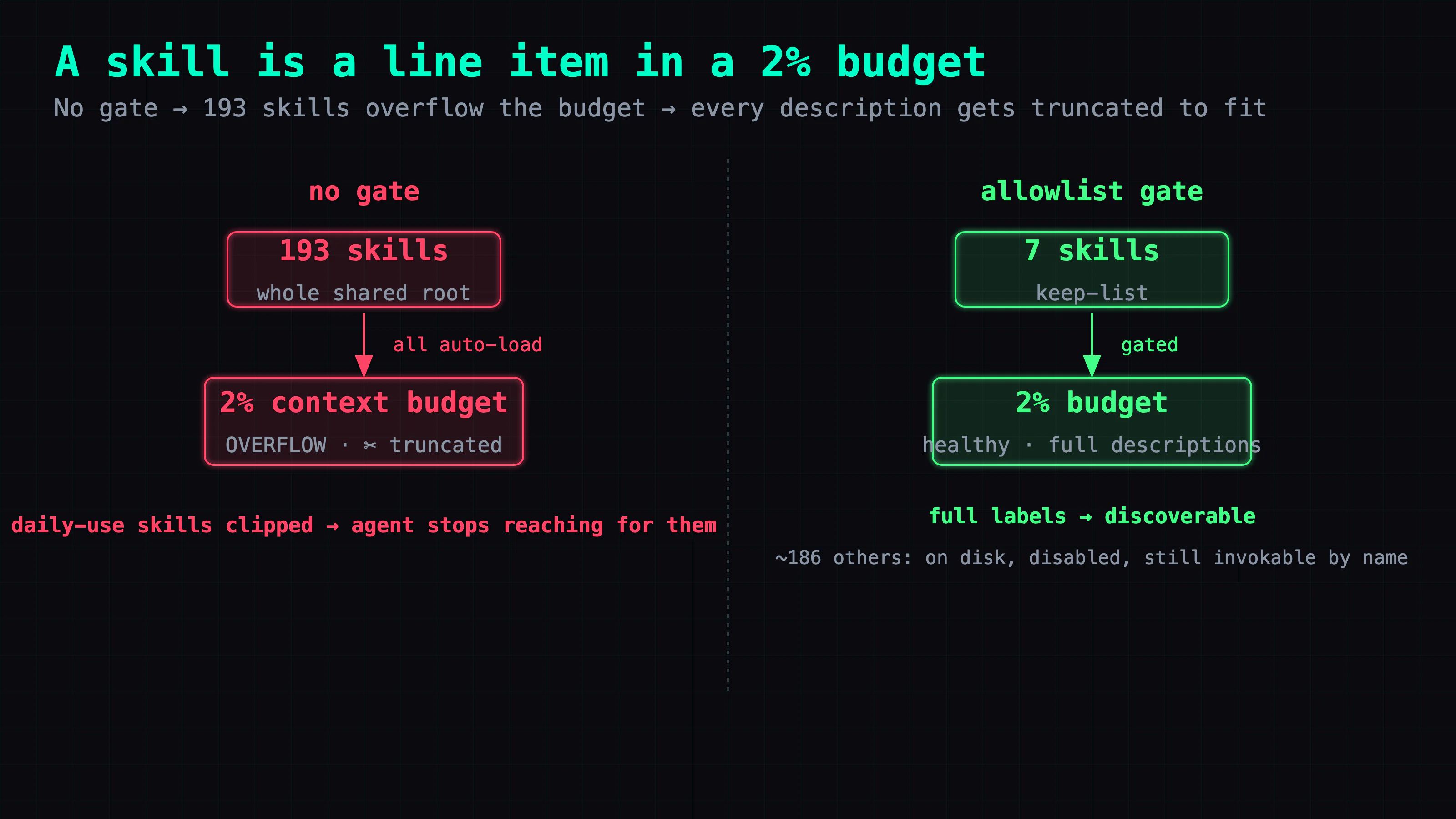
Here's the thing I'd never accounted for. A skill only works if the agent knows it exists, which means its name and description get loaded into context on every session — that's how the agent decides when to reach for it. Multiply by 193 and that "here's my toolset" list stops being free. My agent budgets it explicitly: skills get 2% of context, no more.
The failure mode past that budget is quietly awful. The agent doesn't drop skills or warn you loudly — it shortens the descriptions to make everything fit. So the skill you use every day now loads with a mangled half-sentence, the trigger words that would make the agent pick it get clipped, and it silently stops getting used. More skills produced worse discoverability. The toolbox got so full the labels became unreadable.
And the root cause wasn't the count — it was that there was no gate. The shared skill root was open: anything that landed in it got auto-loaded, no allowlist, no per-agent view. 193 wasn't a decision I'd made; it was 193 skills accumulated over months, all inheriting "load into every agent" by default.
Two levers: gate what loads, and make each one cheap to load
There are only two ways out of a budget overflow: put fewer things in, or make each thing smaller. I used both.
Lever one — an allowlist, not a delete. Codex has a native mechanism for exactly this: a [[skills.config]] block where you mark skills enabled = false. That doesn't delete anything — the file stays on disk and can still be invoked explicitly by name — it just stops the skill from consuming the always-loaded budget. I disabled the ~186 codex never needs and kept a keep-list of 7: the handful it actually reaches for on a normal ticket (handoff, record-learning, verify-citations, dev-loop-routing, and a few others). The 2% warning disappeared the same session; the skill surface went from 193 to 7.
The important word is view. I didn't decide those other skills are worthless — most are used constantly by my other agent. I decided this agent shouldn't see them. Visibility is per-consumer; the shared root was wrong to hand everyone the whole pile.
Lever two — thin shells over deep engines. The other way to keep a budget healthy is to make each skill cheap to load. The pattern I borrowed (from studying mattpocock's skills repo) is a thin shell + deep engine: the always-loaded skill file is a one-line shell that says what it is; the actual logic lives in a separate module that's pulled in only when the skill runs. It's John Ousterhout's deep module idea applied to skills — a simple interface hiding substantial functionality. A one-line shell costs almost nothing in the budget; a 300-line skill costs 300 lines on every session whether or not you use it. Same idea behind a shared CONTEXT.md glossary: define your recurring nouns once instead of re-explaining "handoff" and "ticket" in every skill's preamble.
Three layers that keep skill bloat from creeping back
Cutting 193 to 7 is a one-afternoon job. Keeping it there is the actual work, because the thing that got me to 193 — no gate — is still true unless you fix it. So the cut came with three governance layers:
- One gate. The shared skill root now has a single writer — a sync process — so skills can't just appear in it. Adding a skill is a deliberate act through one door, not a file drop anyone can do.
- An audit that watches the surface. A periodic health check now includes the agent's skill-visibility surface: it compiles the config, confirms the agent sees exactly the keep-list, and flags any stranger — a skill that showed up unaccounted-for — into a to-do list. Drift becomes visible instead of silent.
- A retirement zone. When I trimmed the other agent's skill directories from 47 to 16, the 31 I removed didn't get deleted — they went to a parked
_retired_directory for an observation window. Every cut is reversible; nothing's gone until weeks of nobody-missed-it have passed.
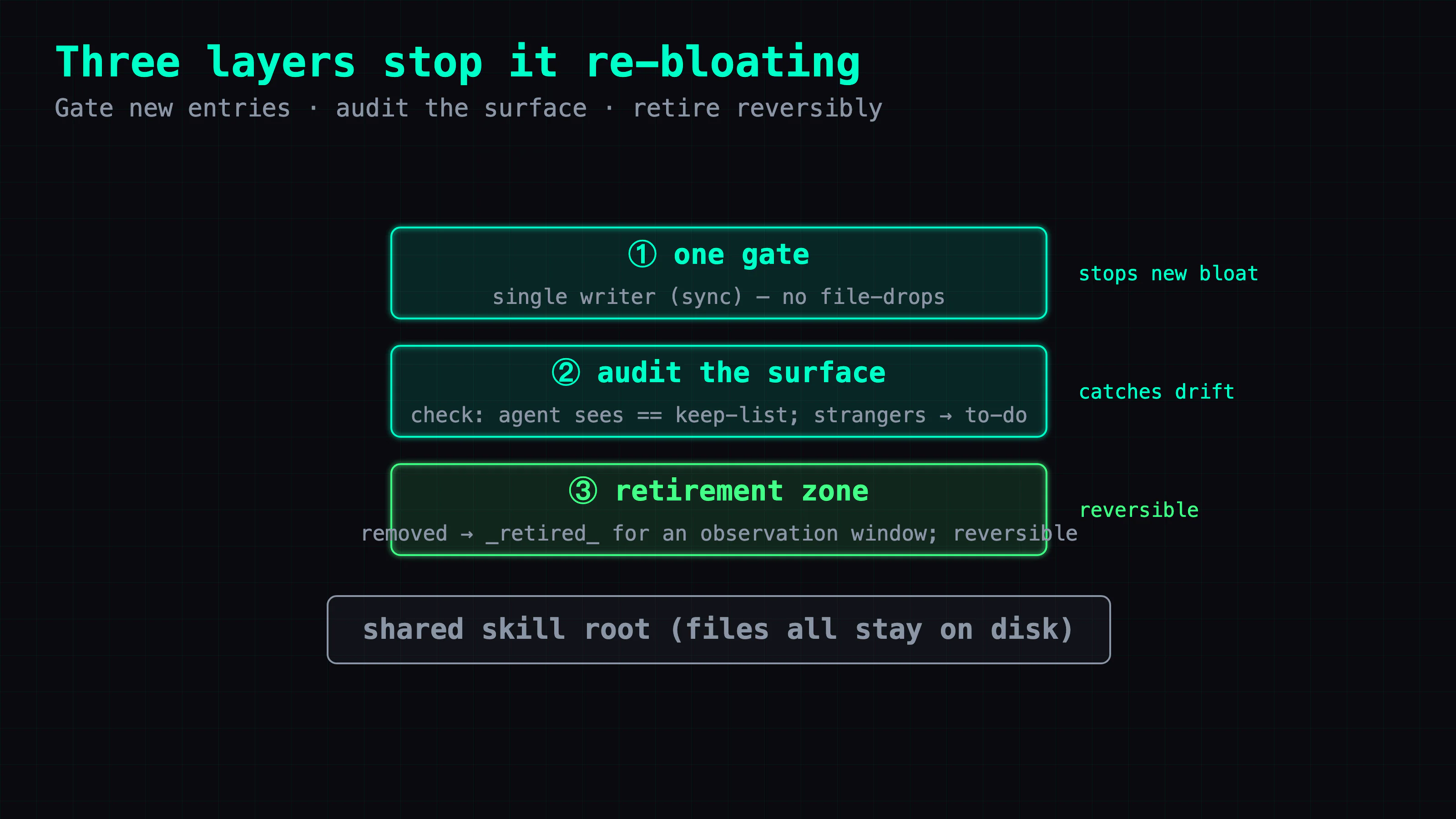
The shape is deliberately the same one this whole series keeps arriving at: a single gate, an audit that catches drift, and a reversible teardown — because "193 things loaded themselves and nobody noticed" is the exact failure a gate-plus-audit exists to prevent.
What you gain by slimming down
- The budget stays under 2%, so descriptions stay whole. The skills you actually use load with full, un-clipped descriptions — discoverability restored. That was the entire point; the token savings are a bonus.
- Sessions got cheaper. A canary session dropped to ~10k tokens of skill overhead from the truncating-193 state. Every session, every day, for free.
- Skills can't silently re-accumulate. With a gate and an audit, going back to 193 requires walking past a check that names the stranger. The pile can't grow behind your back.
- Nothing's lost. Allowlist, not delete; retirement zone, not
rm. The full toolset is on disk; this agent just sees the 7 that matter to it.
That's the design. If you just want to apply it, the checklist at the end is the whole thing. If you want the messy version — how the cut actually went, and the ghost I found in my most-used skill — read on.
How the cut actually went — and the ghost in my most-used skill
Below is the execution and what it turned up. None of it is required to apply the design; skip to the takeaways if you just want the shape.
The prequel: a "skill" my blog file had been calling for months didn't exist
Before the budget cut, I ran an audit of the whole skill fleet — and the scariest finding wasn't bloat, it was rot in the skills I use most. My blog skill, one of my most-run files, referenced a webwright skill to generate cover images. That skill's entire directory didn't exist. It was a phantom reference — the blog skill pointed at a tool that had been deleted, while the correct method sat un-synced in a different skill. Nobody noticed for months, because everyone walks the well-trodden path; the ghost lived on the side-road nobody takes.
Same audit, same lesson, twice more: a clink(gemini) call that was simply dead (Google had killed the free tier out from under it), and a set of "gate" skills whose frontmatter claimed they were wired into the blog pipeline — except a grep showed nothing actually called them. They ran the built-in simplified version; the external skills were orphans. The audit's list of "zero-trigger skills" looked like a should-I-delete-this list. It was really a this-is-broken-and-nobody-noticed list — 21 of 33 skills hadn't fired in 30 days, and at least one of those wasn't unused; it was unwired.
That's why the governance matters more than the cut. Skills don't just pile up; they quietly diverge from what they claim to do. A skill you never watch is a skill whose wiring has already drifted.
Stealing three patterns, passing on two
When I studied mattpocock's skills repo, the discipline was in what I didn't take. I stole three structural patterns — the thin-shell/deep-engine split, a shared CONTEXT.md glossary, and an explicit disable-model-invocation flag to separate "user runs this" from "the model may auto-trigger this" (so you stop stuffing trigger words into descriptions). I passed on two: its ticket ecosystem — it overlaps mine, and two sources of truth is worse than one — and its npx skills add install channel, which would let external code walk straight into the harness, violating the exact gate I'd just built. Adopting a tool wholesale would have undone the afternoon's work. Take the patterns, not the package.
A side note: don't dispatch a one-line edit
One more thing fell out of this. I'd started by handing the whole change — two config values and a one-line rule — to a background agent as a ticket. It ran for twenty minutes. My own rule is that engineering execution gets dispatched, but a "commander doesn't do the work" rule isn't a license to outsource vi. A one-line config edit with a diff you can eyeball and a backup you can restore in a second costs more to dispatch (quota, queue, supervision) than to just do and verify. The threshold isn't "is it code?" — it's "is there investigation, or cross-file logic?" A one-liner is neither.
Takeaways
Where the time went. Not the cut — the audit. The 193→7 was an afternoon; the value was discovering that "unused" and "unwired" look identical from the outside, and that my most-run skill had been calling a tool that didn't exist. The governance came from taking that seriously, not from counting lines.
Reusable diagnostics. Read a "too many descriptions to fit" warning as a budget overflow, not a nag — the skills you use are being clipped to fit the ones you don't. Treat a zero-trigger list as a maybe-broken list, not a delete list; grep whether the thing that claims to be wired is actually called. And before you adopt an external tool wholesale, check whether its install path violates a boundary you already rely on.
The general principle. An agent's capabilities are a budgeted, shared resource, and visibility needs a gate — an allowlist per consumer, thin shells so each one is cheap, and an audit so the surface can't drift back. The same three-part shape as the rest of this series: one gate, an audit that catches drift, a reversible teardown. Loading more tools doesn't make an agent more capable; making the right tools visible and readable does.
The skill-budget checklist
- Treat skills as a budget. Every auto-loaded skill's description competes for a capped slice of context. When it overflows, descriptions get truncated and discoverability breaks — so cap what loads.
- Allowlist per consumer, don't delete. Give each agent a keep-list of the skills it actually uses; disable the rest (files stay, still invokable). Visibility is per-agent, not a shared free-for-all.
- Thin shell, deep engine. Keep the always-loaded part of a skill to a one-line shell; put the logic in a module loaded on demand. Define recurring nouns once in a shared glossary.
- Gate the root and audit the surface. One writer for the shared skill root; a periodic check that flags any skill the agent shouldn't be seeing.
- Retire, don't delete. Removed skills go to a parked directory for an observation window. Keep every cut reversible until nobody's missed what was removed.
That closes the loop the series opened: knowledge, state, tasks, memory, collaboration — and now the agent's own toolset — all governed the same way. A gate, an audit, a reversible teardown. Not because the models can't be trusted, but so you never have to.
FAQ
- Why does an AI agent loading too many skills hurt it?
- Every skill's description is loaded into the agent's context so it knows the skill exists. That competes for a fixed budget — one of my agents caps skills at 2% of context. Past that, the descriptions get truncated to fit, so the skills you actually use end up with mangled or missing descriptions and the agent stops reaching for them. More skills can mean worse discoverability, not better.
- How do you limit which skills an AI agent can see without deleting them?
- Use an allowlist, not a delete. Codex has a native `[[skills.config]]` mechanism: mark the ones you don't want auto-loaded as disabled and keep a short keep-list. The files stay on disk and can still be invoked explicitly; they just stop consuming the always-loaded budget. I cut one agent's auto-loaded skills from 193 to 7 this way, and the truncation warning disappeared.
- What is a thin-shell skill?
- A skill file split into a one-line shell (the always-loaded part) and a deep engine module (loaded on demand). The shell says what the skill is in a sentence; the real logic lives elsewhere and is pulled in only when the skill actually runs. It keeps the part that competes for the context budget tiny, so you can have many skills without drowning the budget — a deep module behind a simple interface.
- How do you stop an AI agent's skills from re-bloating over time?
- Three governance layers. One gate: a single writer for the shared skill root, so skills can't just appear. An audit: a periodic check of the visibility surface that flags strangers into a to-do list. And a retirement zone: skills you remove go to a parked directory for an observation window before deletion, so every cut is reversible.
Read next
- 2026-07-16[Dev Workflow] The Two Axes That Let a Fleet of AIs Collaborate Without Re-Explaining
Six posts in, my AI setup is really two axes of one system: durable knowledge and live task state, both in plain files. Here's how they converge so different AIs hand off work without re-explaining it or losing it.
- 2026-07-15[Dev Workflow] Why an AI Agent's Memory Needs a Distilled Layer Above Search
Search finds an AI agent's notes but hands back raw material to re-derive each session. I distill ~600 files into canonical claims — the goal is ending re-explanation, not enforcing agreement.
- 2026-07-14[Dev Workflow] From Markdown Search to a Knowledge Graph: How My AI's Memory Grew a Second Layer
My AI's long-term memory is ~600 markdown files in three layers: the files are the source of truth, a search engine makes them findable, and a knowledge graph links them by concept. Here's the design, why each layer exists, and the wrong turns I took building it.
- 2026-07-12[Dev Workflow] Delegating to an AI Coding Agent: The Unit of Work Is a Ticket File, Not a Conversation
How I hand engineering tasks to Codex: self-contained ticket files with machine-checkable acceptance, background execution, three flags I paid for in dead time, and a report-is-not-a-result gate.
Don't miss the next one
Subscribe, and you won't.
One-click unsubscribe anytime.