AI Workflow · part 12
[Dev Workflow] From Markdown Search to a Knowledge Graph: How My AI's Memory Grew a Second Layer
❯ cat --toc
- Plain-Language Version: My AI Took Notes, Then Couldn't Find Them
- Preface
- The shape: three layers, and only one of them is the truth
- Why a folder isn't memory — and what search adds
- Why search isn't enough — and what the graph adds
- What the three layers buy you
- How I actually got here — the wrong turns
- The graph was garbage twice in one afternoon before it worked
- An audit said 82% of my searches were failing. It was wrong.
- I built a better tool and then didn't use it
- The graph bloated into a hairball, and my own index hijacked the results
- Takeaways
- If you're giving an AI agent a markdown memory, this is the order that worked
- Try it on your own notes
TL;DR
My AI's long-term memory is ~600 plain markdown notes, in three layers. The files themselves are the single source of truth. A local search engine (qmd) makes them findable. And a knowledge graph (musubi) sits on top, linking notes by shared concept so I can ask "what else relates to this?" — a question search can't answer. The rule that holds it together: files are canonical, search and graph are rebuildable caches on top, and the arrows only point up. This post lays out that design and why each layer exists first — then, separately, the wrong turns I took building the graph (it was garbage twice in one afternoon before it worked).

Plain-Language Version: My AI Took Notes, Then Couldn't Find Them
I write everything I learn into plain text files — one fact per file, a few hundred of them. My AI assistant reads from that pile so it doesn't ask me the same thing twice.
To let it use the pile, I gave it a search box. That helped, until I noticed the catch: a search box only finds notes that use the same words as your question. Two notes about the same underlying problem, described differently, never show up together — even though they belong together.
A "knowledge graph" fixes that. It's a map, drawn automatically, of which notes are about related things — connected by ideas, not by matching words. This post is the design of that three-layer memory: what each layer is, why it's there, and what it buys me. The messy part — how I built it wrong a couple of times first — is at the end, clearly marked, so it doesn't get in the way of the shape.
Preface
Think of it like a workshop. First you need shelves so nothing's on the floor — that's storage. Then you need to find a specific tool fast — that's search. But the thing that actually makes a workshop feel like yours is knowing that the jig on shelf three and the bit in drawer nine are for the same job, even though nothing labels them that way. That last part isn't storage and it isn't search. It's a map of relationships, and you build it in your head over years.
Part 6 of this series handed you the tools — a search engine and a graph — as a way to stop burning tokens. This post zooms out to the architecture behind them: where the files, the search index, and the graph fit, and why each one exists. I'll lay out the design first, then — separately, at the end — the wrong turns I took getting there.
The shape: three layers, and only one of them is the truth
Here's the whole system in one picture. My memory is a folder of markdown files. Sitting on top of it are two things that make the files usable — a search index and a graph — but neither of those is the memory. The files are. The other two are derived, and I can delete and rebuild them any time.
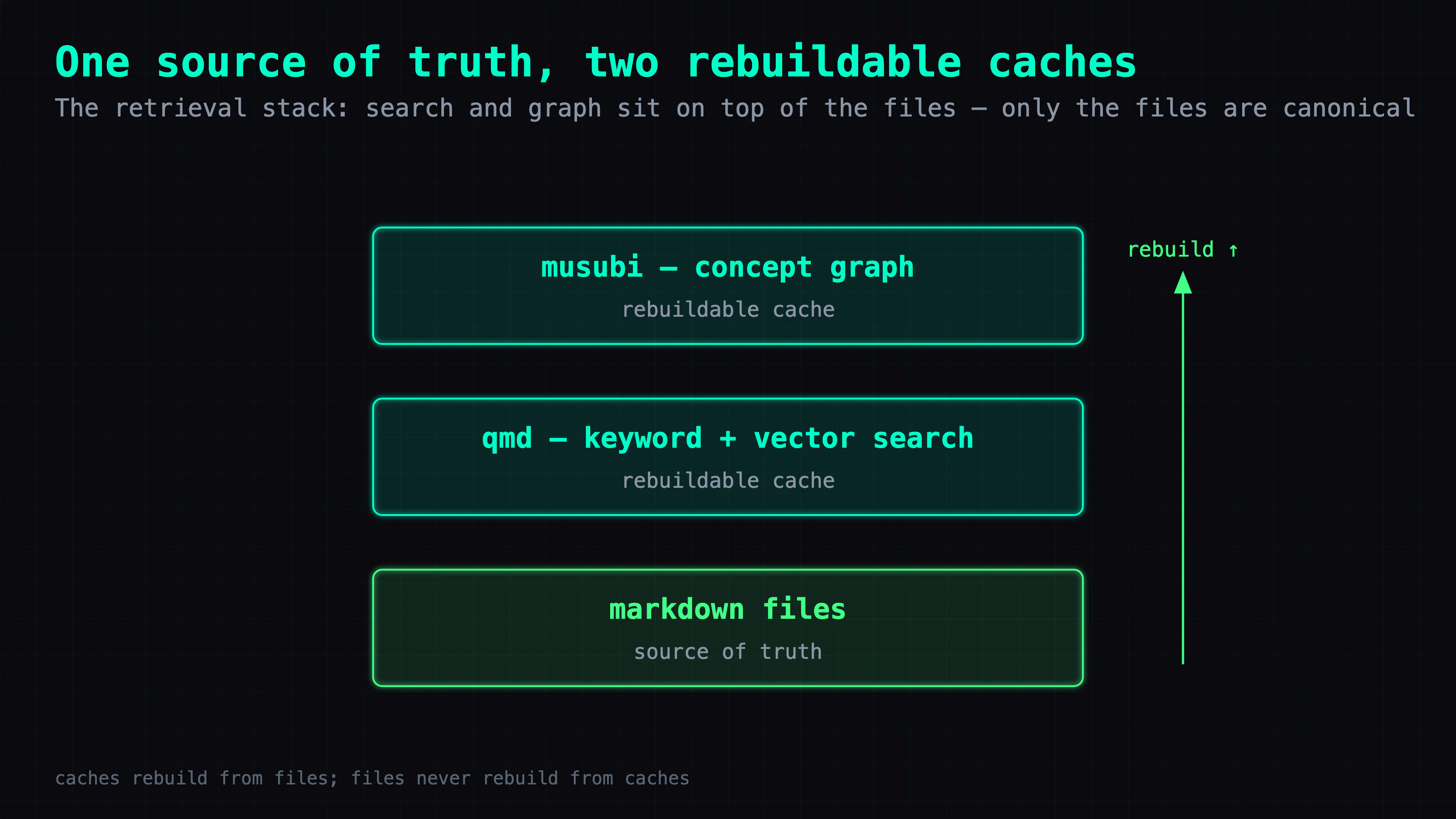
- The files — one fact per markdown file, a few hundred of them. This is the only layer that's the source of truth.
- qmd — a local search engine over those files: keyword (matches words, ~30ms) and vector (matches meaning, ~2s).
- musubi — a graph on top that links notes by shared concept, so you can ask what's related, not just what matches.
Everything after this is why each of those two upper layers had to exist. Neither replaced the layer below it; each answered a question the layer below couldn't.
Why a folder isn't memory — and what search adds
The moment your agent has a memory, you hit one problem: it rediscovers things it already knows. New session, clean context, and it re-derives the same fix it wrote down three weeks ago — because a folder of markdown isn't retrieval, it's just a folder.
That's the job qmd does. It makes the pile findable — keyword for exact terms, vector for meaning when you don't know the exact words. Once it's wired in as a first-class tool (one the agent sees in its toolset and reaches for on its own), "query your memory before you work" becomes automatic; on an ordinary day the agent runs dozens of lookups without me thinking about it. The pile becomes memory.
But search has a ceiling, and the ceiling is the reason for the next layer.
Why search isn't enough — and what the graph adds
Here's the distinction that matters. Search finds a note you're looking for. It can't answer what else is related to the note in front of you. "Find it" and "connect it" are different problems, and search only does the first.
You feel the gap the moment two notes belong together but don't share words. I have a note about "Ollama keeping models resident in memory" and another about "vLLM crashing on startup." Same root cause — one 128GB pool getting overcommitted — but almost no shared vocabulary. Search for either one and the other never surfaces. The connection is real; it's just conceptual, and a search index doesn't encode it.
A graph does. The construction is low-tech: every note is a node, you draw an edge between two notes whenever they're about the same concept, and once it's built you can traverse it — walk from a note to its neighbors. Now "what's adjacent to this?" is a real query, and so is "which notes are isolated, or going stale?" — questions a search box fundamentally can't answer.
One design decision made all of this safe to add: I didn't move anything into Obsidian or any other app. The markdown files stayed the source of truth; the graph is a layer on top that never edits them. I left the files where they were; the graph never edits them. That's the split that keeps the whole thing reversible.
What the three layers buy you
Put together, the design has four properties I'd keep in any memory system:
- The layers are additive, not replacements. The graph didn't replace search; search didn't replace the files. Each sits on the one below and answers a question it couldn't: files store, search finds, the graph connects.
- Only the files are canonical. The search index and the graph are caches. The arrows point one way — caches rebuild from files, files never rebuild from caches — so I can throw either cache away and regenerate it without losing anything.
- No lock-in. It's plain markdown in a folder. Move machines, change tools, and you rebuild the index and the graph from the files in a couple of commands.
- Each layer earns its place. I didn't design three layers up front. I had a folder, hit a wall, added search; hit another wall, added a graph. If a layer isn't answering a question the one below it can't, it shouldn't exist.
That's the system. If that's what you came for, the checklist at the bottom is the whole thing in five lines. What follows is how I actually got here — worth reading for the traps, skippable if you just want the design.
How I actually got here — the wrong turns
Everything below is the messy path to the design above: the versions that didn't work, and what each one taught me. None of it is required to use the system — skip to the takeaways if you just want the shape.
The graph was garbage twice in one afternoon before it worked
You'd think the hard part is building the graph. The hard part is building it wrong fast enough to learn what a good edge even is. I got three versions in one afternoon, and the only thing that changed between them was my answer to one question: what makes two notes worth connecting?
v1 — edges from embedding similarity. I connected notes whose text embeddings (a note squashed into a string of numbers; close numbers mean similar text) were close. The result was a hairball — a tangle with no visible structure. My .py, .swift, and .tsx files dominated the graph, because two Python files are naturally similar as text whether or not they're related as knowledge. __init__.py came out as a hub. To see any structure I had to crank the similarity threshold to 0.90 — a tell that embedding distance is a bad edge metric here. 602 nodes, 142K edges, no signal.
v2 — markdown only, edges from shared concepts. I dropped everything but the markdown — about 291 files at that point — and drew edges from concept co-occurrence: two notes linked if they mention the same concept. Cleaner, but now 102 notes (35%) were isolated islands, because my concept dictionary was too narrow to catch what they were about.
v3 — wider concepts, weighted, with a fallback. I tripled the concept dictionary, added path-derived concepts, and let embedding similarity act only as a fallback where concepts came up empty. That did it: zero islands, ~7,000 edges, five real clusters. And the clusters told me something my folders didn't — my collection tags did not match the actual structure of the knowledge. Trading notes I'd filed together scattered across three different clusters. One concept, api, showed up in 172 of those 291 notes: a "god concept" so generic it linked everything to everything and carried no signal — the graph equivalent of a stopword like "the," "is," or "of." It had to be dropped for the rest to mean anything.
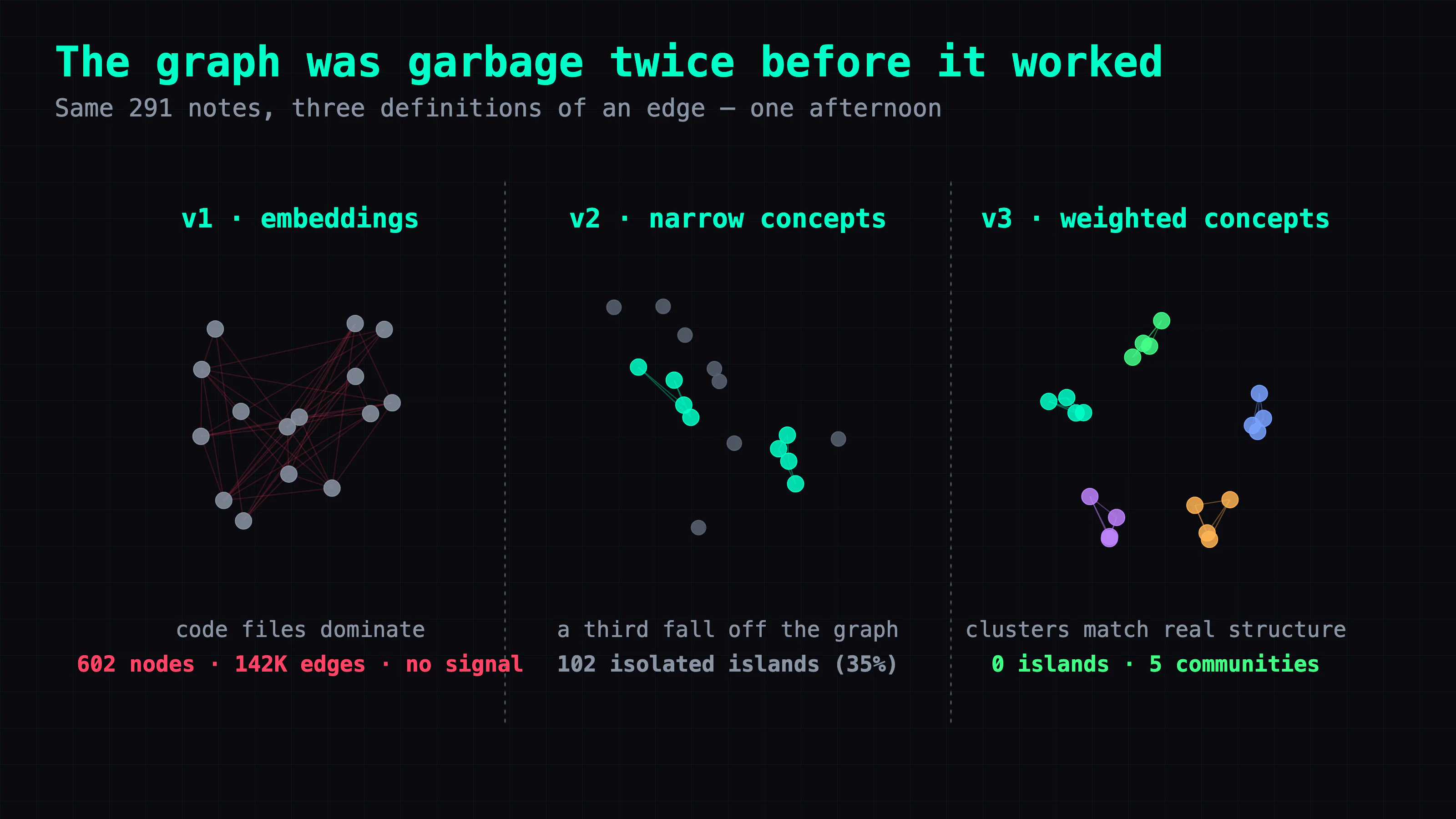
The fix wasn't a smarter algorithm. It was a better definition of what counts as an edge.
An audit said 82% of my searches were failing. It was wrong.
Early on I opened a dashboard for my own memory and read that 82% of my queries scored "low." The obvious reading — the one I had — is that my knowledge base was full of holes, and I should go write the missing notes.
That reading was wrong, and the way it was wrong is worth keeping. Keyword scoring necessarily comes up near-empty on a long, natural-language question, because you're asking in a sentence and it's matching tokens. The same queries scored around 0.7 on vector search. When I actually checked, only two notes were genuinely missing. The 82% wasn't a knowledge gap — it was an artifact of which retrieval method I was measuring. (The fix is now a rule: an empty keyword result, or a query longer than about four words, auto-retries on vector.) Before you act on a retrieval metric, check whether it's a property of the method rather than the data.
I built a better tool and then didn't use it
Here's the one that annoyed me most. Once the graph worked, it was plainly better than plain search for "what's related to this?" Then I watched myself keep reaching for the old search box inside Claude Code and barely touching the new thing.
The reason had nothing to do with quality. qmd was exposed to the agent as a first-class tool it could see in its schema (the "what tools do I have" list an agent reads at the start of every turn); musubi was "just a CLI." An agent reaches for what's listed in its schema, not for what's in my shell history — it doesn't know a command exists unless the interface tells it. The tool was more useful and less discoverable, and discoverability won every time. The fix was ~150 lines: wrap musubi as an MCP server (the standard way to register an external tool into that toolset) so the agent could see it. The lesson generalizes: the last step of building something for an agent isn't making it good, it's making it visible.
The graph bloated into a hairball, and my own index hijacked the results
Months of daily notes later, the live graph had ballooned to ~1,272 notes across every collection I index and over 200,000 edges — average degree in the hundreds. A hairball again, but for the opposite reason: too much real connection, not too little.
The specific failure was almost funny. I'd written an orientation doc — a hand-maintained index meant to help agents find their way around. That doc became the single biggest hub in the graph, with a degree over 1,100, because it references everything. So a search for one specific note started returning the index above the note itself: the graph's "boost neighbors of a hit" mechanism lifted a meta-doc (a file that describes the knowledge base, not knowledge itself) over the answer it was supposed to point to. The fixes were ranking discipline: direct hits sort ahead of graph neighbors, meta-docs get downranked unless you name them, the neighbor boost is capped, and mirrored duplicates collapse to one canonical copy — 1,272 raw nodes down to 993. If that sounds like Part 11 — a system's self-description drifting from what it's doing — it's the same shape, one layer down. A graph over your knowledge needs governance as much as the knowledge does.
Takeaways
Where the time went. Not building the graph — building it twice wrong. The whole first afternoon was really one discovery: embedding similarity is a terrible edge metric for a mixed corpus of code and prose, because code is self-similar regardless of meaning. The signal that worked was concept co-occurrence with the too-common concepts weighted down — which is just IDF, rare concepts carrying more weight than frequent ones. I arrived at it the hard way.
Reusable diagnostics. When a metric looks like a knowledge gap (82% "low"), check whether it's an artifact of the method before you act on it. Stopword your "god concepts" — any concept in more than half your notes is connecting noise, not signal. Ship the MCP server: a tool the agent can't see in its schema won't get used, however good it is. And watch your meta-docs — an index over the graph can quietly become its loudest hub and outrank the answers.
The general principle. The layers are additive, not replacements. Files are the source of truth; search and graph are rebuildable caches stacked on top, and the arrows only point up. Each layer got forced on me by the one below it hitting a wall — store, then find, then connect. There's a third wall waiting — even good retrieval hands you back raw material, and re-deriving what it means every time is its own tax — but that's the next post.
If you're giving an AI agent a markdown memory, this is the order that worked
- Files first. One fact per file, plain text. This is the only layer that's the source of truth; everything else rebuilds from it.
- Add search, and know its ceiling. Keyword for exact terms, vector for meaning. When a query is a long sentence, fall back to vector automatically — and don't trust a keyword-based "coverage" number.
- Add a graph when you need traversal, not just lookup. Build edges from shared concepts, not embedding similarity, and stopword the concepts that are in everything.
- Make it visible. If an agent is the user, the tool isn't done until it's an MCP tool.
- Govern the graph. Rank direct hits over neighbors, downrank the maps you drew of it, and dedupe mirrors — or your own index will drown the answers.
Try it on your own notes
The graph half is musubi — open source, MIT, runs locally, and needs no AI service to build the graph (it's deterministic concept-matching, no LLM). Install it and point it at a folder of markdown:
# install once, then run it on your own notes
uv tool install git+https://github.com/coolthor/musubi
musubi init                 # interactive — try the bundled demo, or point it at your notes
musubi build --source ~/your-notes
musubi neighbors "docker"   # a keyword or note title from your own notes
It also ships musubi benchmark, to measure the token savings on your corpus rather than trusting mine, and musubi mcp — a stdio server you register with Claude Code so the agent sees musubi as a first-class tool (the discoverability fix from earlier). The search half is qmd. The repo — and a star, if it earns one — is at github.com/coolthor/musubi.
Next in this series: why searching your notes still isn't enough — and the distilled layer I put above both.
FAQ
- What is a knowledge graph over markdown notes, in plain terms?
- It's a precomputed map of which notes are about related things, drawn by shared concepts rather than shared words. Each note is a node; an edge means two notes talk about the same concept. You can then ask 'what's adjacent to this note?' and surface connections keyword search would never reach, plus health signals like 'which notes are isolated or stale?'
- Why isn't keyword search enough for an AI agent's memory?
- Keyword search only finds notes that use the same words as your query. Vector search fixes part of that by matching meaning, but neither can answer 'what else is related to this note?' — two notes about the same root cause in different vocabulary stay invisible to each other. That's a traversal problem, not a search problem, and it's what a knowledge graph solves.
- Should I move my notes into Obsidian to get a knowledge graph?
- I didn't, and I'd think twice before you do. My plain markdown files stayed the single source of truth; the search index and the graph are both rebuildable caches layered on top that never touch the files. Moving to a vault would have relocated the data without adding retrieval power, and locked it into one app.
- What's the point of layering files, search, and a graph instead of just one system?
- Each layer answers a question the one below it can't: files store, search finds, the graph connects. Keeping them separate means the files stay the only source of truth and the search index and graph are rebuildable caches — you can throw either away and regenerate it, and nothing is locked into one tool or machine.
Read next
- 2026-07-15[Dev Workflow] Why an AI Agent's Memory Needs a Distilled Layer Above Search
Search finds an AI agent's notes but hands back raw material to re-derive each session. I distill ~600 files into canonical claims — the goal is ending re-explanation, not enforcing agreement.
- 2026-07-17[Dev Workflow] Your AI Agent's Skills Are a Context Budget: Cutting 193 to 7
One of my AI agents was auto-loading 193 skills into a 2% context budget, silently truncating every description. The fix was visibility governance, not deletion — an allowlist, thin-shell skills, and three layers that stop it re-bloating.
- 2026-07-16[Dev Workflow] The Two Axes That Let a Fleet of AIs Collaborate Without Re-Explaining
Six posts in, my AI setup is really two axes of one system: durable knowledge and live task state, both in plain files. Here's how they converge so different AIs hand off work without re-explaining it or losing it.
- 2026-04-13Claude Code Burning Through Tokens? 8 Fixes to Make Sessions Last 10x Longer
You just started using Claude Code and the context window keeps filling up. Here's where the tokens actually go, what you can do about it, and how to make Claude remember things without re-reading everything.
Don't miss the next one
Subscribe, and you won't.
One-click unsubscribe anytime.