Kandinsky 6.0 Pro on an RTX 5090: lip-synced English dialogue works, Chinese isn't quite there yet
❯ cat --toc
- Why I tried it: a video model that moves the mouth to match the words
- Kandinsky 6.0 makes video and audio in one pass, and the dialogue goes in the prompt
- English came out word-for-word; Chinese is understandable, with an accent
- What you need to run it on an RTX 5090
- bf16 takes 206.7 s per clip, NVFP4 takes 141.5 s
- My NVFP4 build looks nearly identical to bf16
- Lite gets English right and garbles Chinese
- Deep dive: install commands and the NVFP4 conversion
- A separate ComfyUI 0.38.2 worktree, so the main install stays untouched
- The official nodes block the Lite distilled checkpoint
- pip stalled on big wheels; uv and an offline wheel fixed it
- SageAttention took the first bf16 run from 277 s to 206.7 s
- The NVFP4 conversion: comfy-quants, kand6 branch
- The first conversion failed at save_file
- Checking the output
TL;DR
Kandinsky 6.0 Pro (29B, MIT) makes a 5-second clip with 44 kHz audio and lip-synced speech in one pass. On an RTX 5090, English dialogue came out word-for-word correct and the mouth timing looked natural. Chinese was understandable, with an accent and a few wrong words. Clip time: 277 s in bf16, 206.7 s with SageAttention, 141.5 s median with an NVFP4 copy I made along the way (60.3 GB down to 20.1 GB, on Hugging Face). Lite (3B) handled English but garbled Chinese.
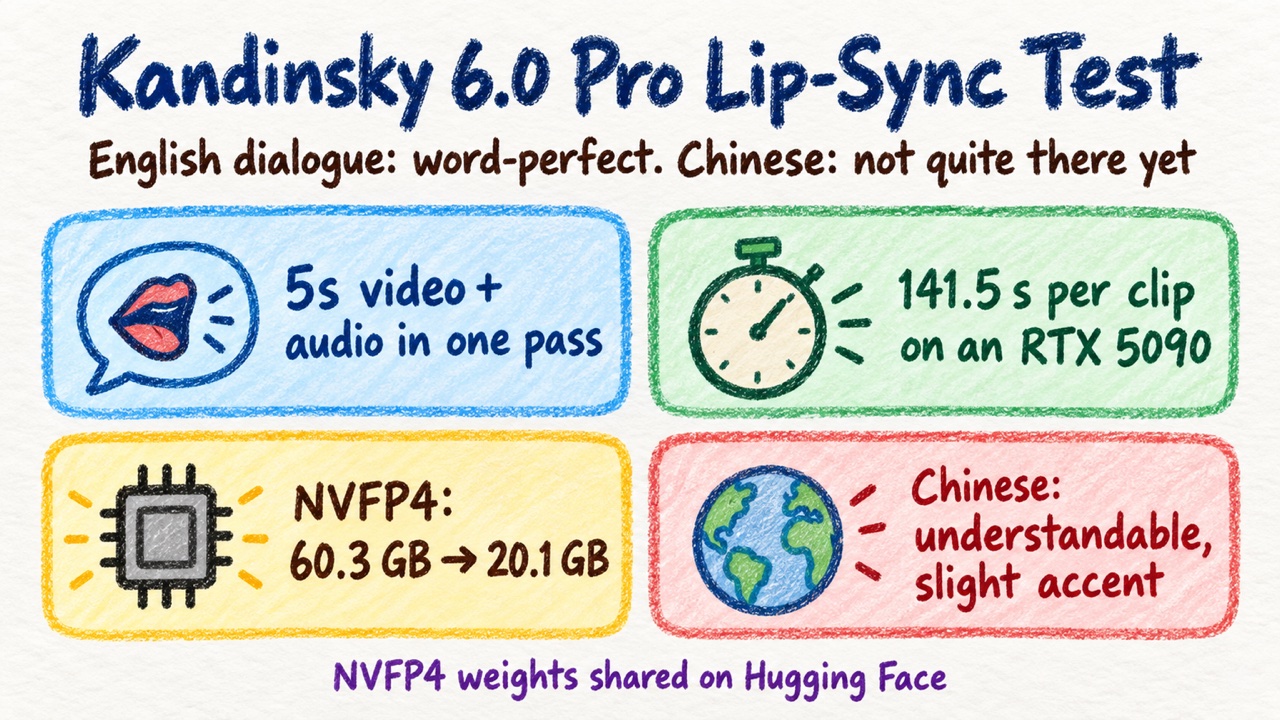
The short version: one prompt, a woman in Hanfu says the line in English, then in Chinese.
Why I tried it: a video model that moves the mouth to match the words
Kandinsky 6.0 was open-sourced on 2026-10-06. I saw the release news and ran a quick test on my RTX 5090. The part I cared about was lip-sync: you write a line of dialogue, and the model generates the video and the voice together, with the mouth moving in time.
The short answer: English is great, Chinese isn't quite there, but it isn't bad either.
Along the way I quantized the Pro model to NVFP4 so it runs faster on a 32 GB card. I uploaded it so the next person doesn't have to redo it.
Kandinsky 6.0 makes video and audio in one pass, and the dialogue goes in the prompt
Kandinsky 6.0 comes in two sizes: Lite (3B) and Pro (29B), both MIT-licensed. Each pass produces a 5-second clip plus 44 kHz audio, lip-sync included. It does text to video+audio and image+text to video+audio. A separate super-resolution model can upscale to 1920×1080.
The design has two streams: one for video and a newly trained one for audio, and they attend to each other (bidirectional cross-attention, meaning each stream looks at the other at every layer). That's why the mouth timing lines up with the sound. Text goes in through Qwen2.5-VL 7B plus CLIP-L. Video uses the HunyuanVideo VAE (the part that compresses frames into a small latent space and back). Audio uses the MMAudio VAE and a BigVGAN vocoder.
The paper (arXiv 2610.05608) has a human evaluation against Kling 2.6, Veo 3.1 Fast, MiniMax H3, Seedance 2.0, LTX 2.5 and Kandinsky 5.0 Pro, and claims speech quality is especially competitive. I didn't check the win rates in the PDF, so I'm not quoting numbers.
A prompt has two parts. The video caption describes the scene, and the spoken line goes inside it, wrapped in <S> and <E>. A separate audio caption describes the voice and the ambience. This is the one I used:
Medium close-up of a beautiful young Chinese woman in traditional Hanfu, pale blue silk with embroidered sleeves, hair in an elegant bun with a jade hairpin, standing in a quiet classical garden courtyard with a wooden pavilion behind her. The camera is static. She looks straight into the camera, smiles gently and says: <S>Welcome to AI Muninn. Here's today's AI news.<E> Soft afternoon light, photorealistic, shallow depth of field.
A clear, warm young female voice speaking English at a calm pace, quiet garden ambience with soft birdsong.
For the Chinese run I changed only two things: the line inside <S>…<E> became 「歡迎來到 AI Muninn,今天帶你看最新的 AI 消息。」 ("Welcome to AI Muninn, today I'll show you the latest AI news"), and "English" in the audio caption became "Mandarin Chinese".
The official ComfyUI workflow expands short prompts with Qwen3.5 by default (a "beautifier" step). I wrote full English captions myself and turned it off.
English came out word-for-word; Chinese is understandable, with an accent
I ran each clip through Whisper large-v3-turbo to check the spoken words. Whisper only tells you what was said, not whether the mouth matches. The lip-sync judgment is mine, from watching the clips: in the English ones, the timing looks natural.
English. Both bf16 and NVFP4 were word-for-word correct. The only miss was the made-up word "Muninn", heard as "Munnin" or "Manin". Unmute the clip; it starts muted.
Pro distilled, NVFP4, English line, seed 42. Unmute to hear it.
Chinese. The paper says the training captions were written in Russian and English, and RL prompts were picked in either language with equal probability. Chinese isn't mentioned anywhere. Even so, it's understandable. It sounds like a foreign speaker, with a few wrong words. Here is what Whisper heard:
| Run | Whisper transcript | What it says |
|---|---|---|
| Written line | 歡迎來到 AI Muninn,今天帶你看最新的 AI 消息 | Welcome to AI Muninn, today I'll show you the latest AI news |
| Pro bf16 | 欢迎来到AI慕您,请演带您看最起的AI消息 | "Welcome to AI" right; the middle is off; "latest" became a different word |
| Pro NVFP4 | 欢迎来到AI母您,今天带你看最起的AI消息 | "Welcome to AI" right; "today I'll show you" right; "latest" still wrong |
"Welcome to AI" is correct in both. The word for "latest" (最新) came out as 最起 in both. NVFP4 got "today I'll show you" right, but that's one run each, so I can't claim quantization improved the Chinese. The simplified characters are Whisper's default output, not something the model chose.
Pro distilled, NVFP4, the same scene with the Mandarin line. Unmute to hear the accent.
What you need to run it on an RTX 5090
My machine: RTX 5090 (32 GB), 61.6 GB of system RAM, Windows.
- ComfyUI 0.38.0 or newer. The official nodes require it. My main ComfyUI is 0.37 with a full MiniMax-H3 node set I didn't want to break, so I made a separate 0.38.2 git worktree with its own venv on port 8189. The old one keeps 8188. Commands are in the deep dive.
- The official
kandinsky6nodes. Search for them in ComfyUI Manager, or copy the repo'scomfyui/folder intocustom_nodes/kandinsky6/. - The models. The workflow has a "Download models" button, or follow the manual table in the node README. You need the Pro distilled transformer (60.3 GB), Qwen2.5-VL 7B plus CLIP-L, the HunyuanVideo VAE, the MMAudio audio VAE (
v1-44.pth) and the BigVGAN vocoder. - SageAttention. A faster attention kernel; ComfyUI picks it up automatically once installed. Skip it and the same clip takes 277 s instead of 206.7 s.
Sampling settings: Pro distilled uses 10 steps, CFG 1.0, audio VAE scaling 0.417. "Distilled" means a version trained to get there in far fewer steps. The non-distilled model needs 50 steps at CFG 5.0 and is much slower.
I ran my own API version of the workflow, with the same nodes and settings: 864×480, 121 frames (24 fps, about 5 s), seed 42.
bf16 takes 206.7 s per clip, NVFP4 takes 141.5 s
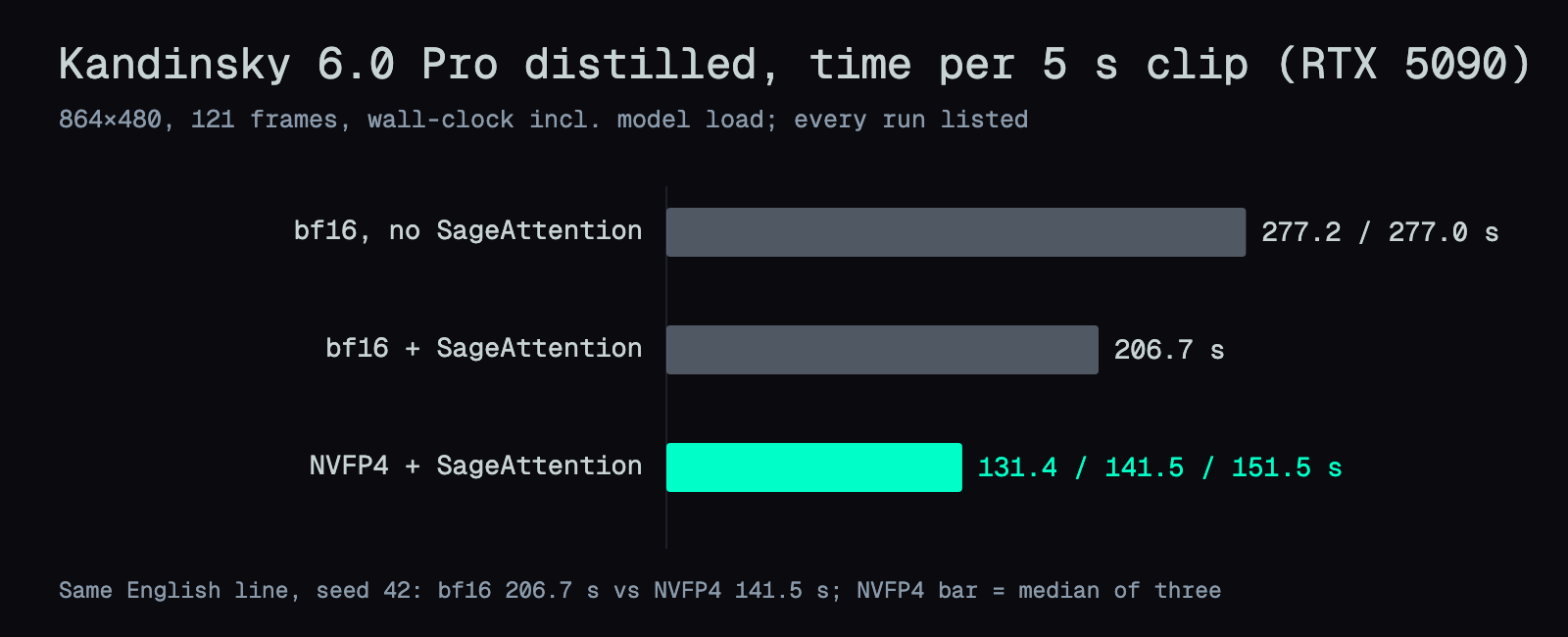
Every number here is wall-clock, from submit to saved file, with model loading included. All at 864×480, 121 frames. I only compare the model against itself: same Pro distilled checkpoint, bf16 versus my NVFP4 copy. With the same English line, seed 42 and SageAttention on, bf16 took 206.7 s and NVFP4 took 141.5 s. The 277 s row is bf16 before I installed SageAttention, kept for reference.
| Setup | Time per clip |
|---|---|
| Pro distilled bf16, no SageAttention | 277.2 / 277.0 s |
| Pro distilled bf16 + SageAttention | 206.7 s |
| Pro distilled NVFP4 + SageAttention | 131.4 / 141.5 / 151.5 s |
The three NVFP4 runs used different lines and seeds: English seed 42 (141.5 s), Chinese seed 42 (131.4 s) and English seed 7 (151.5 s).
Why bf16 is slow: the 60.3 GB model doesn't fit in 32 GB. ComfyUI 0.38 stages weights in and out as it runs (the log shows 57486MB Staged). Moving those weights is where the extra time goes.
My NVFP4 build looks nearly identical to bf16
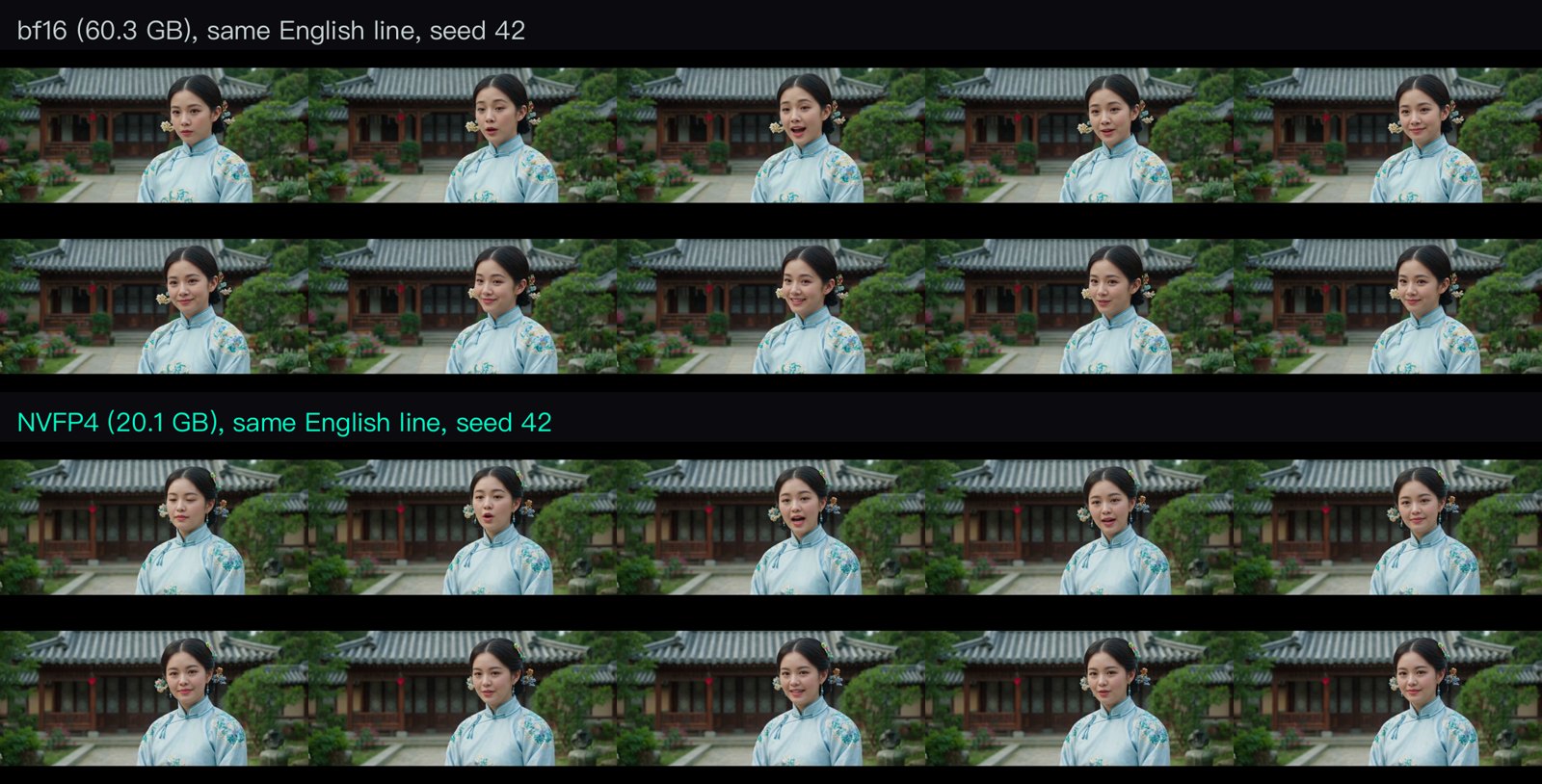
NVFP4 is a 4-bit number format that newer NVIDIA GPUs compute natively. bf16 had to stream 60 GB through the card on every run, so I converted the model first and kept testing on that. The conversion took 59 s.
Same seed, same English line: composition, costume, background and the timing of the mouth opening are nearly identical. Some small face details differ, but there's no added noise. That surprised me a little, because my earlier NVFP4 conversion of Qwen-Image 2.1 came out muddy.
The weights: coolthor/Kandinsky-6.0-Pro-distill-5s-NVFP4.
To use it: it loads natively in ComfyUI 0.38.2 with no node changes. Drop the file into models/diffusion_models/, pick it in Load Diffusion Model, and leave everything else as is.
kabachuha had already released an int8 version on Hugging Face, which needs ComfyUI PR #16825. When I checked on 10-08, I didn't see an NVFP4, fp8 or GGUF version.
Lite gets English right and garbles Chinese
Lite is the 3B model. The official nodes block Lite distilled, so only the regular 50-step mode runs (no SageAttention): 488.7 to 498.7 s per clip. English came out correct. Chinese didn't. Whisper heard 微信来就爱一门呢 今天大家试试AAI什么系. That is unrecognizable.
Lite, regular 50-step, the Mandarin line. Unmute: this one is garbled.
For lip-sync, I'd use Pro distilled.
Deep dive: install commands and the NVFP4 conversion
You can skip this section without missing anything you need to use the model. It's the full record for anyone reproducing the setup, or for an AI reading this page on someone's behalf.
A separate ComfyUI 0.38.2 worktree, so the main install stays untouched
The official Kandinsky nodes need 0.38.0 or newer. Instead of upgrading my 0.37 install in place and risking the H3 nodes, I made a git worktree at v0.38.2 with its own venv (PowerShell):
git -C C:\Users\coolt\ComfyUI fetch --tags origin
git -C C:\Users\coolt\ComfyUI worktree add --detach C:\Users\coolt\ComfyUI-k6 v0.38.2
python -m venv C:\Users\coolt\venv-k6
C:\Users\coolt\venv-k6\Scripts\python.exe -m pip install torch==2.13.0 torchvision torchaudio --index-url https://download.pytorch.org/whl/cu130
git clone --depth 1 https://github.com/kandinskylab/kandinsky-6 C:\Users\coolt\k6-src
Copy-Item -Recurse C:\Users\coolt\k6-src\comfyui C:\Users\coolt\ComfyUI-k6\custom_nodes\kandinsky6
It runs on port 8189; the old install keeps 8188. To undo: git worktree remove and delete the venv.
The official nodes block the Lite distilled checkpoint
Loading the Lite distilled checkpoint fails in the official node's register.py with:
Distilled K6 Lite checkpoints are not supported.
So Lite runs in regular mode only: 50 steps, CFG 5.0, audio scaling 0.5302. This is a node limitation, not a broken model.
pip stalled on big wheels; uv and an offline wheel fixed it
On Windows, pip stalled twice at 0 bytes while downloading large wheels from PyPI. curl fetched the same files without trouble. I switched to uv and installed SageAttention from an offline wheel:
uv pip install --python C:\Users\coolt\venv-k6\Scripts\python.exe sageattention-2.2.0+cu130torch2.10.0andhigher.post6-cp310-abi3-win_amd64.whl triton-windows==3.7.1.post27
Smoke test:
import torch, sageattention
q = torch.randn(1, 8, 256, 128, dtype=torch.float16, device="cuda")
print(sageattention.sageattn(q, q, q).shape)
SageAttention took the first bf16 run from 277 s to 206.7 s
The first bf16 runs took 277.2 and 277.0 s. Installing SageAttention was the only change, and the next run took 206.7 s. One NVFP4 smoke run came in at 211.9 s, but I didn't record whether SageAttention was active for it, so I left it out of the chart.
The NVFP4 conversion: comfy-quants, kand6 branch
The tool is Comfy-Org/comfy-quants. I used kabachuha's kand6 branch, commit 4b96626. Config:
model:
  family: kandinsky6
  dtype: bf16
  components:
    transformer: quantize
    text_encoder: keep_bf16
    vae: keep_bf16
    audio_vae: keep_bf16
quant:
  algorithm: nvfp4
  target_dtype: nvfp4
  scale:
    granularity: block
    axis: in_features
    method: amax
  rounding: nearest_even
  modules:
    include:
      - "visual_transformer_blocks.*"
      - "video_text_transformer_blocks.*"
      - "audio_text_transformer_blocks.*"
    exclude:
      - "visual_transformer_blocks.0.*"
      - "visual_transformer_blocks.1.*"
      - "visual_transformer_blocks.58.*"
      - "visual_transformer_blocks.59.*"
  fallback:
    on_error: keep_bf16
This quantized 1,840 Linear layers: 1,792 in the visual blocks, 24 in the video-text blocks, 24 in the audio-text blocks. Visual blocks 0, 1, 58 and 59 stay bf16, following LTX-2's official NVFP4 release; the first and last layers are more sensitive to precision. Norms and biases are copied as-is.
| Source (bf16) | Output (NVFP4) | |
|---|---|---|
| Size | 60,344,993,576 bytes | 20,094,169,424 bytes (18.71 GiB) |
| Tensors | 4,471 | 9,991 |
The tensor count goes up because each quantized Linear gets a weight_scale and a weight_scale_2. The conversion took 59.26 s, and the converter process peaked at 49.33 GiB (Windows working set).
That peak fits on a 61.6 GB machine because the exporter reads tensor by tensor from disk (safe_open(..., device="cpu")) and never loads all 60 GB at once.
The first conversion failed at save_file
The first save_file failed because NumPy was missing from the venv, so nothing was written. Installing it with uv fixed the retry.
Checking the output
The output key names match what the official ComfyUI node expects, so no renaming was needed. ffprobe on the smoke video shows 121 frames and 44,100 Hz audio, and the ComfyUI log shows native nvfp4 mixed-precision ops.
FAQ
- Can Kandinsky 6.0 Pro speak Chinese?
- Sort of. In my test, a Mandarin line was understandable but had a foreign accent and a few wrong words: Whisper heard the opening 'Welcome to AI' correctly, but 'latest' came out as a different word in both runs. The paper describes training captions in Russian and English and never mentions Chinese. English lines came out word-for-word correct. The smaller Lite model's Chinese was unrecognizable.
- How long does Kandinsky 6.0 Pro take per clip on an RTX 5090?
- For a 5-second clip at 864x480 (121 frames) with the distilled Pro model, timed from submit to saved file including model loading: 277 s in bf16 without SageAttention, 206.7 s in bf16 with SageAttention, and a median of 141.5 s with an NVFP4 copy plus SageAttention (three runs: 131.4, 141.5, 151.5 s).
- Does the 60 GB Kandinsky 6.0 Pro model run on a 32 GB card?
- Yes. The distilled Pro transformer is 60.3 GB in bf16 and doesn't fit in 32 GB of VRAM, but ComfyUI 0.38 stages weights in and out while it runs, which costs time. Converting it to NVFP4 cuts the file to 20.1 GB (18.71 GiB) and brought my clip time down to a 141.5 s median on an RTX 5090.
- How do you write spoken dialogue in a Kandinsky 6.0 prompt?
- Put the spoken line inside the video caption, wrapped in <S> and <E>, for example: She smiles and says: <S>Welcome to AI Muninn.<E> Then write a separate audio caption that describes the voice and the background sound, such as a clear, warm young female voice speaking English, with quiet garden ambience.
Read next
- 2026-09-03[Benchmark] From OOM to 8.6 minutes: a MiniMax-H3 config stack for one RTX 5090
MiniMax-H3 at native 1344x768 on a single RTX 5090: 15 seconds of video in 518 s. What KJNodes chunking, torch cu130 and the NVFP4 kernels are each worth.
- 2026-08-04[Benchmark] Running MiniMax-H3 on one RTX 5090: four files, 31.7 GB, 175s per talking clip
Beginner walkthrough for MiniMax-H3, the 33B model that generates video and stereo audio in one pass. Full precision is 115 GB; quantized it fits one RTX 5090. What to download, where it goes, how to prompt it.
- 2026-08-31[Benchmark] Ten effect embeddings for MiniMax-H3 — 10 MB that buys you bullet time, fire breath and a full year of seasons
Ten community effect embeddings for MiniMax-H3, tested at native 1344x768 on one RTX 5090. What each one actually does, the prompt shape that lets them work, and the placement rule that decides whether they fire at all.
- 2026-08-06[Benchmark] Twice as Fast: MiniMax-H3 on an RTX 5090, 625s Down to 314s
Three stacked changes took a 15-second 1080p MiniMax-H3 render from 625s to 314s on one RTX 5090: 14 steps, SageAttention 2.2.0, and RTX VSR replacing Real-ESRGAN.
Don't miss the next one
Subscribe, and you won't.
One-click unsubscribe anytime.