FastH3 on an RTX 5090: a 5-second talking clip in under a minute, 2.9x faster than MiniMax-H3
❯ cat --toc
- Why I tried it: my everyday talking-clip model is slow
- FastH3 is MiniMax-H3 distilled to 8 steps, plus sparse attention
- Running it in ComfyUI takes two templates and one new model file
- At 1344×768, FastH3 took 58.6 s on average and the original H3 took 167.3 s
- At 480p it's under 20 s per clip, and Trim saves about 2 s
- Mandarin survived the step cut; only the made-up name slipped
- Image-to-video keeps an illustrated style
- A modded 2080 Ti runs it in 149.9 s, but VSA doesn't kick in
- Deep dive: how I measured, and what happened on the 2080 Ti
- How each run was timed
- The node graph (V2, image-to-video)
- What changed for the baseline
- The full 768p table, with seeds
- The attention backend barely matters on the 5090
- Turning VSA off on the 5090 costs little at 480p
- Proving the 2080 Ti silently falls back to dense attention
- ComfyUI 0.37 made the 2080 Ti about 4x slower, so it stays on 0.31
TL;DR
FastH3, an 8-step distilled MiniMax-H3, made a 5-second 1344×768 talking clip in 57.4 and 59.8 s on my RTX 5090 in stock ComfyUI. Original H3 at its default 20 steps took 166.3 and 168.2 s: about 2.9x. Mechanism: 20 steps cut to 8 by distillation, plus sparse attention (VSA) that keeps 10% of the attention blocks. Mandarin survived; Whisper only missed the made-up name. Caveat: VSA needs an RTX 30 or newer card. On a 2080 Ti it falls back silently.
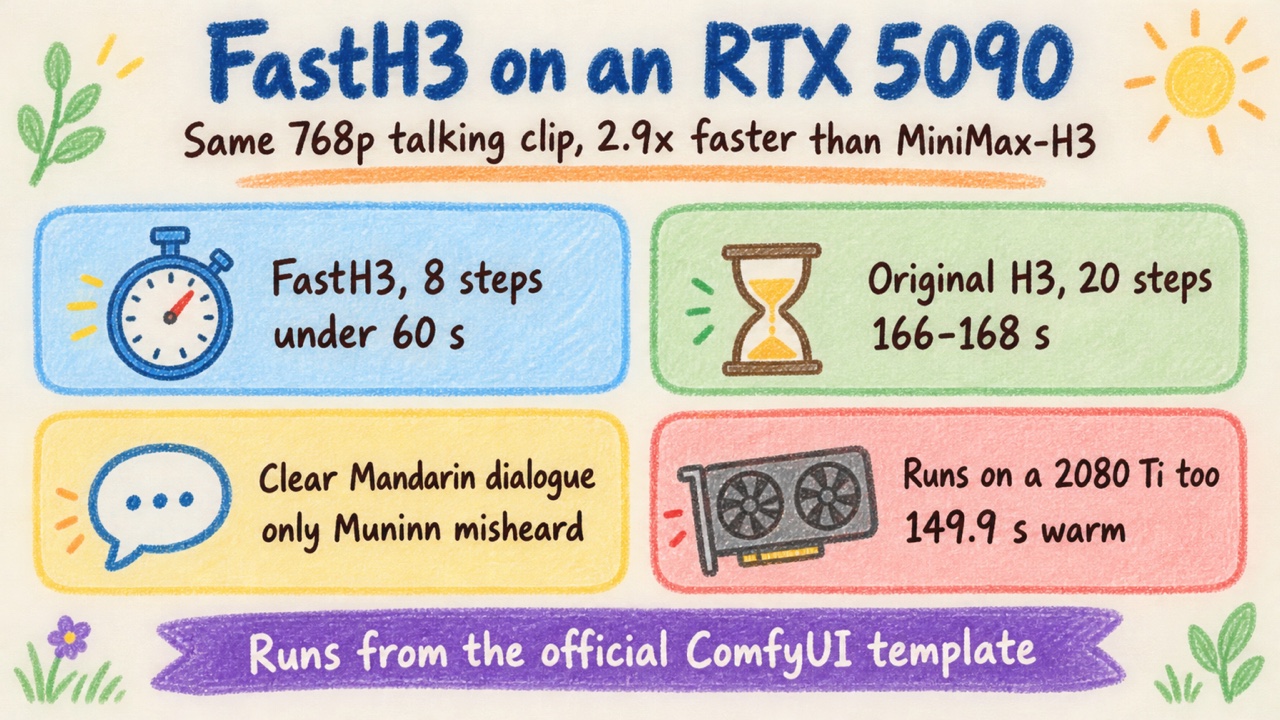
The short version: how long FastH3 takes to make a talking clip
Why I tried it: my everyday talking-clip model is slow
MiniMax-H3 is what I use for short talking clips. You give it an image and a line of dialogue, and it returns video plus audio with the lips matching the line. It's also slow. On my RTX 5090, an 864×480, 5-second clip at 10 steps takes 72 to 82 s warm. That's why I run 10 steps, even though the official ComfyUI H3 text-to-video template defaults to 20.
So when FastH3 came out, I had two questions. Is it really that fast inside the ComfyUI install I already use? And does Mandarin dialogue survive the step cut? I also tried it on my modded 22 GB RTX 2080 Ti.
The short answers: yes, about 2.9x faster than the default; yes, Mandarin holds up; and the 2080 Ti runs it, but without the sparse-attention speedup.
FastH3 is MiniMax-H3 distilled to 8 steps, plus sparse attention
FastH3 comes from UCSD's Hao AI Lab. It's MiniMax-H3 distilled with DMD2 from 20 steps to 8. Distillation here means training a version of the model to reach a similar result in far fewer denoising steps.
The second speedup is VSA (Video Sparse Attention). Instead of computing attention across every video token, it computes it only over the most relevant fraction. The ComfyUI template keeps 10%.
It comes in two versions:
- V2 keeps all 50 transformer blocks. The ComfyUI NVFP4 file is 13.6 GB: FastVideo/FastVideo-FastH3-8-Step-V2-NVFP4-Comfy.
- Trim drops the 8 least important blocks, leaving 42. NVFP4 file 11.9 GB: FastVideo/FastVideo-FastH3-Trim-Comfy. The authors say Trim loses some detail in busy scenes and recommend V2 when quality matters.
It supports text-to-video and first/last-frame image-to-video. The V2 and Trim checkpoints tested here don't include a distilled Ref2VA (a reference image that keeps a character's identity); FastVideo has a separate distilled Ref2VA model, which I didn't test. The license is the MiniMax H3 Community License, which has regional restrictions.
The official numbers on an RTX 5090, 5 s with audio: at 832×480, V2 takes 14.8 s and Trim 13.4 s; at 1344×768, V2 takes 38.6 s and Trim 35.4 s. Those are warm, end-to-end (text encode, 8 denoising steps, video and audio decode, MP4 out), the median of two runs on each of two prompts. They were measured on the team's own engine, FastVideo (Apache-2.0), which officially supports Linux and WSL. I ran ComfyUI instead.
Running it in ComfyUI takes two templates and one new model file
No custom nodes. ComfyUI ships two official templates: video_fastvideo_fasth3_t2v.json and video_fastvideo_fasth3_i2v.json.
My setup: RTX 5090 (32 GB), Windows, ComfyUI 0.37.0. It's the same install I already run H3 in. The templates need the BlockSparseAttention and MiniMaxH3SigmaShift nodes. 0.37.0 has both; my other machine, on 0.31, lacks BlockSparseAttention.
Files:
- The FastH3 file (V2 or Trim) goes into
models/diffusion_models/. - The text encoder and VAEs are shared with the original H3. If you already run H3, you have them:
qwen3vl_32b_minimax_h3_nvfp4_awq,minimax_h3_video_vae_fp16,minimax_h3_audio_vae_fp32.
I left the template settings as they were:
steps:               8
sampler:             res_multistep
scheduler:           simple
MiniMaxH3SigmaShift: video 10, audio 3
BlockSparseAttention: vsa, keep 10%
attention backend:   comfy kitchen
The dialogue goes in the scene description. By H3 convention, Chinese lines are written in Simplified characters:
... says in clear standard Mandarin Chinese, "欢迎来到 AI Muninn,今天带你看最新的 AI 消息。"
The line means "Welcome to AI Muninn, today I'll show you the latest AI news."
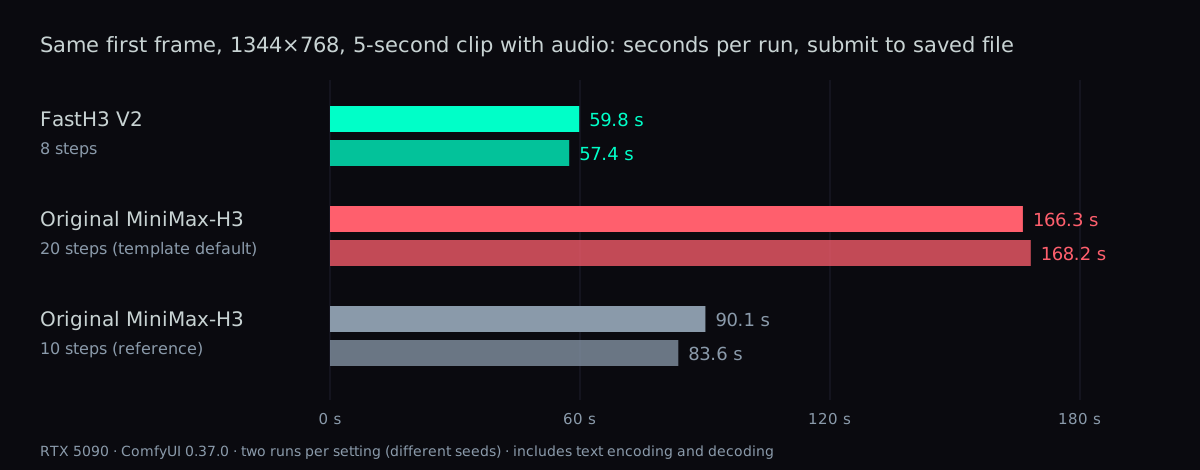
At 1344×768, FastH3 took 58.6 s on average and the original H3 took 167.3 s
This is the main test. Same first frame at 1344×768, same Mandarin line, 5 s (124 frames), warm, two seeds each. Times run from submit to saved file, including text encoding and decoding.
| Model | Steps | Seed A | Seed B |
|---|---|---|---|
| FastH3 V2 | 8 | 59.8 s | 57.4 s |
| Original H3 (template default) | 20 | 166.3 s | 168.2 s |
| Original H3 (my usual) | 10 | 90.1 s | 83.6 s |
The average ratio against the 20-step default is 2.85x, so about 2.9x. Against the 10 steps I normally run, FastH3 is about 1.5x faster. I list that row for reference only, since 10 steps isn't the official default.
That 2.9x combines both changes: 20 steps down to 8, plus VSA. The original H3 has no VSA to turn on, so there's no way to split the two inside this comparison. The original H3 file was minimax_h3_fl2va_pruned_nvfp4.
I judged quality by watching the clips, not with a metric. Both look usable to me.
FastH3 V2, 8 steps, 1344×768: 57.4 s. Muted by default; unmute to hear the line.
Original MiniMax-H3, 20 steps, same first frame and line: 168.2 s. Muted by default; unmute to hear it.
At 480p it's under 20 s per clip, and Trim saves about 2 s
Text-to-video at two resolutions, 124 frames, two runs each. Read the V2 and Trim columns side by side:
| Resolution | V2 | Trim |
|---|---|---|
| 832×480 | 18.7 / 18.7 s | 16.8 / 16.8 s |
| 1344×768 | 52.8 / 50.8 s | 45.6 / 45.5 s |
Trim saves about 2 s at 480p and 5 to 7 s at 768p. For shorts I lean toward V2: 2 s is a small price for all 50 blocks.
The very first clip after starting ComfyUI (480p, V2) took 28.0 s. Every other number here is warm.
Against the official figures, ComfyUI is 3 to 4 s slower at 480p and 10 to 14 s slower at 768p. That's a different engine (FastVideo vs ComfyUI), not a misconfiguration. I didn't install FastVideo this time.
Mandarin survived the step cut; only the made-up name slipped
To check the dialogue, I transcribed the audio with Whisper (OpenAI's open-source speech-to-text model). Muninn is the blog's made-up name, so no model has a reason to know it.
| Run | Whisper transcript |
|---|---|
| Written line | 欢迎来到 AI Muninn,今天带你看最新的 AI 消息。 |
| V2, 480p text-to-video | 欢迎来到AI Money,今天带你看最新的AI消息 |
| Trim, 480p text-to-video | 欢迎来到AI Money,今天带你看最新的AI消息 |
| V2, mascot image-to-video | 欢迎来到AI Mooning… (rest of the line correct) |
Image-to-video keeps an illustrated style
I also used the blog's mascot as a first frame: a 480×832 portrait illustration. The illustration style stays intact while she blinks and talks. V2 took 24.0 s and Trim 19.0 s. Both numbers include swapping the model in.
FastH3 V2, image-to-video from a 480×832 mascot illustration: 24.0 s including the model swap. Muted by default; unmute to hear her.
A modded 2080 Ti runs it in 149.9 s, but VSA doesn't kick in
My RTX 2080 Ti is a modded 22 GB card on ComfyUI 0.31. I ran the Trim int8 file (18.9 GB) at 832×480, 124 frames: 189.4 s cold, 149.9 s warm. The Mandarin was occasionally off by a character or two.
One catch: VSA does not work on a 2080 Ti. Its kernel requires sm_80 or newer, meaning Ampere (RTX 30 series) and later; the 2080 Ti is sm_75. On ComfyUI 0.37, the BlockSparseAttention node doesn't raise an error. It silently falls back to normal (dense) attention, and the video still renders. So on an older card, don't assume the speedup is on just because the node is in the graph.
Deep dive: how I measured, and what happened on the 2080 Ti
You can skip this section without missing anything you need to run FastH3. It's the full record for anyone reproducing the numbers, or for an AI reading this page on someone's behalf.
How each run was timed
I built an API-format workflow from the official template and sent it with a Python script. The timer starts at POST /prompt, and the script polls /history until the job is done. That window includes text encoding, the 8 steps, video and audio decode, and saving the MP4. It excludes downloading the file. Each run's elapsed time and arguments went into a JSON file.
The node graph (V2, image-to-video)
UNETLoader               fastvideo_fasth3_8step_v2_pruned_nvfp4.safetensors
MiniMaxH3SigmaShift      shift_video 10.0, shift_audio 3.0
ModelAttentionBackend    comfy kitchen attention
BlockSparseAttention     selection vsa, keep_percent 10.0, start_percent 0.2, end_percent 1.0
CLIPLoader               qwen3vl_32b_minimax_h3_nvfp4_awq.safetensors (type minimax)
MiniMaxH3ImageToVideo    1344x768, length 124, first_frame = LoadImage
KSamplerSelect           res_multistep
BasicScheduler           simple, steps 8
SamplerCustomAdvanced -> VAEDecode + VAEDecodeAudio -> CreateVideo (24 fps) -> SaveVideo
What changed for the baseline
For the original H3 runs, I swapped the model to minimax_h3_fl2va_pruned_nvfp4.safetensors, removed the SigmaShift, attention backend and BlockSparseAttention nodes, and set steps to 20 (or 10). With no SigmaShift node, the original H3 uses its default values. Everything else in the graph stayed the same.
The full 768p table, with seeds
| Model | Steps | Seed | Time |
|---|---|---|---|
| FastH3 V2 | 8 | 51 | 59.8 s |
| FastH3 V2 | 8 | 52 | 57.4 s |
| Original H3 | 20 | 61 | 166.3 s |
| Original H3 | 20 | 62 | 168.2 s |
| Original H3 | 10 | 51 | 90.1 s |
| Original H3 | 10 | 52 | 83.6 s |
The attention backend barely matters on the 5090
I tried the backend options on V2, 480p text-to-video:
| Backend | Time |
|---|---|
| comfy kitchen (template default) | 19.7 / 18.8 s |
| SageAttention | 18.7 / 18.8 s |
| PyTorch | 20.9 s |
All three land within 2 s, so I kept the default. My unmeasured guess at why: VSA takes over after the first 20% of denoising (start_percent 0.2), so the dense backend only runs the early part.
Turning VSA off on the 5090 costs little at 480p
On Trim, 480p, I removed BlockSparseAttention and ran it again:
| VSA | Time |
|---|---|
| On | 17.7 / 17.6 s |
| Off | 19.3 / 17.9 s |
The difference is small at 480p. It's probably larger at higher resolution, but that's a guess; I didn't measure 768p with VSA off.
Proving the 2080 Ti silently falls back to dense attention
To test VSA on the 2080 Ti, I set up a separate ComfyUI 0.37.0 on that machine. The BlockSparseAttention node exists and runs with no error. The only log line is:
VSA: extra_tokens ignored
That line only shows the node was applied to the model. It doesn't show the sparse kernel ran. So I checked the conditions directly in Python:
torch.cuda.get_device_capability(0)            # (7, 5)
comfy_kitchen.sol_attn_is_available("cuda:0")  # False
The underlying requirement text is sol_attn: requires sm_80+ (cp.async, INT8 MMA). In nodes_sparse_attention.py, when sol_attn_is_available() returns False, the node falls back to dense attention. It runs with verbose=False, so no warning is printed.
The final check: the same seed with and without VSA. The MD5 of every decoded frame was identical (240f06206ad0da4a33981c5051351705).
ComfyUI 0.37 made the 2080 Ti about 4x slower, so it stays on 0.31
ComfyUI 0.37 ran much slower on the 2080 Ti. With torch 2.6.0, comfy-kitchen 0.2.35 failed with:
ValueError: infer_schema(func): Parameter stride has unsupported type list[int]
I switched to torch 2.7.1+cu126 with triton 3.3.1. That fixed the import, but SageAttention 1.0.6 then failed to compile on triton 3.3.1 / sm_75, and ComfyUI printed:
Error running sage attention: PassManager::run failed, using pytorch attention instead.
So the clip ran on PyTorch attention: 595.0 and 570.0 s at 480p, against 149.9 s on 0.31 with SageAttention. That's about 4x slower, with no VSA gain to offset it, since the card can't use VSA anyway.
On 0.31, clips with SageAttention on and off both looked fine to my eye. Without SageAttention, the same 480p clip took 212.3 and 194.9 s.
FAQ
- How fast is FastH3 on an RTX 5090 in ComfyUI?
- For a 5-second (124-frame) 1344x768 image-to-video clip with a Mandarin line, FastH3 V2 at 8 steps took 59.8 s and 57.4 s, timed from submit to saved file. The original MiniMax-H3 at its template default of 20 steps took 166.3 s and 168.2 s on the same card, which works out to about 2.9x. At 832x480 text-to-video, V2 took 18.7 s and Trim took 16.8 s.
- Do I need custom nodes to run FastH3 in ComfyUI?
- No. ComfyUI ships official templates, video_fastvideo_fasth3_t2v.json and video_fastvideo_fasth3_i2v.json, and they use built-in nodes. They need BlockSparseAttention and MiniMaxH3SigmaShift, which ComfyUI 0.37.0 has; my 0.31 install lacks BlockSparseAttention. The text encoder and VAEs are the same files the original MiniMax-H3 uses.
- Does Mandarin dialogue still work after FastH3 cuts the steps to 8?
- Yes, in my test. I ran each clip through Whisper: V2, Trim and an image-to-video run all transcribed the line correctly except the made-up name Muninn, which came out as Money or Mooning. On a modded RTX 2080 Ti the Mandarin was occasionally off by a character or two.
- Should I use FastH3 V2 or Trim?
- Trim drops 8 of the 50 transformer blocks, and the authors say it loses detail in busy scenes. In ComfyUI on an RTX 5090 it saved about 2 s at 832x480 (16.8 s vs 18.7 s) and 5 to 7 s at 1344x768 (45.5 s vs 50.8 to 52.8 s). I use V2 for shorts, since 2 s is a small price for all 50 blocks.
- Does FastH3 run on an RTX 2080 Ti, and does VSA speed it up there?
- It runs: a modded 22 GB 2080 Ti made an 832x480, 124-frame clip in 149.9 s warm with the Trim int8 file on ComfyUI 0.31. VSA does not help, because its kernel needs sm_80 or newer and the 2080 Ti is sm_75. On ComfyUI 0.37 the BlockSparseAttention node silently falls back to normal attention, with no error and identical output frames.
Read next
- 2026-10-08Kandinsky 6.0 Pro on an RTX 5090: lip-synced English dialogue works, Chinese isn't quite there yet
I ran Kandinsky 6.0 Pro on an RTX 5090: English dialogue came out word-perfect, Chinese was accented but understandable, and NVFP4 cut a clip to 141.5 s.
- 2026-09-03[Benchmark] From OOM to 8.6 minutes: a MiniMax-H3 config stack for one RTX 5090
MiniMax-H3 at native 1344x768 on a single RTX 5090: 15 seconds of video in 518 s. What KJNodes chunking, torch cu130 and the NVFP4 kernels are each worth.
- 2026-08-31[Benchmark] Ten effect embeddings for MiniMax-H3 — 10 MB that buys you bullet time, fire breath and a full year of seasons
Ten community effect embeddings for MiniMax-H3, tested at native 1344x768 on one RTX 5090. What each one actually does, the prompt shape that lets them work, and the placement rule that decides whether they fire at all.
- 2026-08-04[Benchmark] Running MiniMax-H3 on one RTX 5090: four files, 31.7 GB, 175s per talking clip
Beginner walkthrough for MiniMax-H3, the 33B model that generates video and stereo audio in one pass. Full precision is 115 GB; quantized it fits one RTX 5090. What to download, where it goes, how to prompt it.
Don't miss the next one
Subscribe, and you won't.
One-click unsubscribe anytime.