Troubleshooting · part 1
[Troubleshooting] HuggingFace download stuck at 0 bytes on Windows — Xet, Python 3.13, ai-toolkit
❯ cat --toc
- Plain English: the environment broke before training even started
- Preface
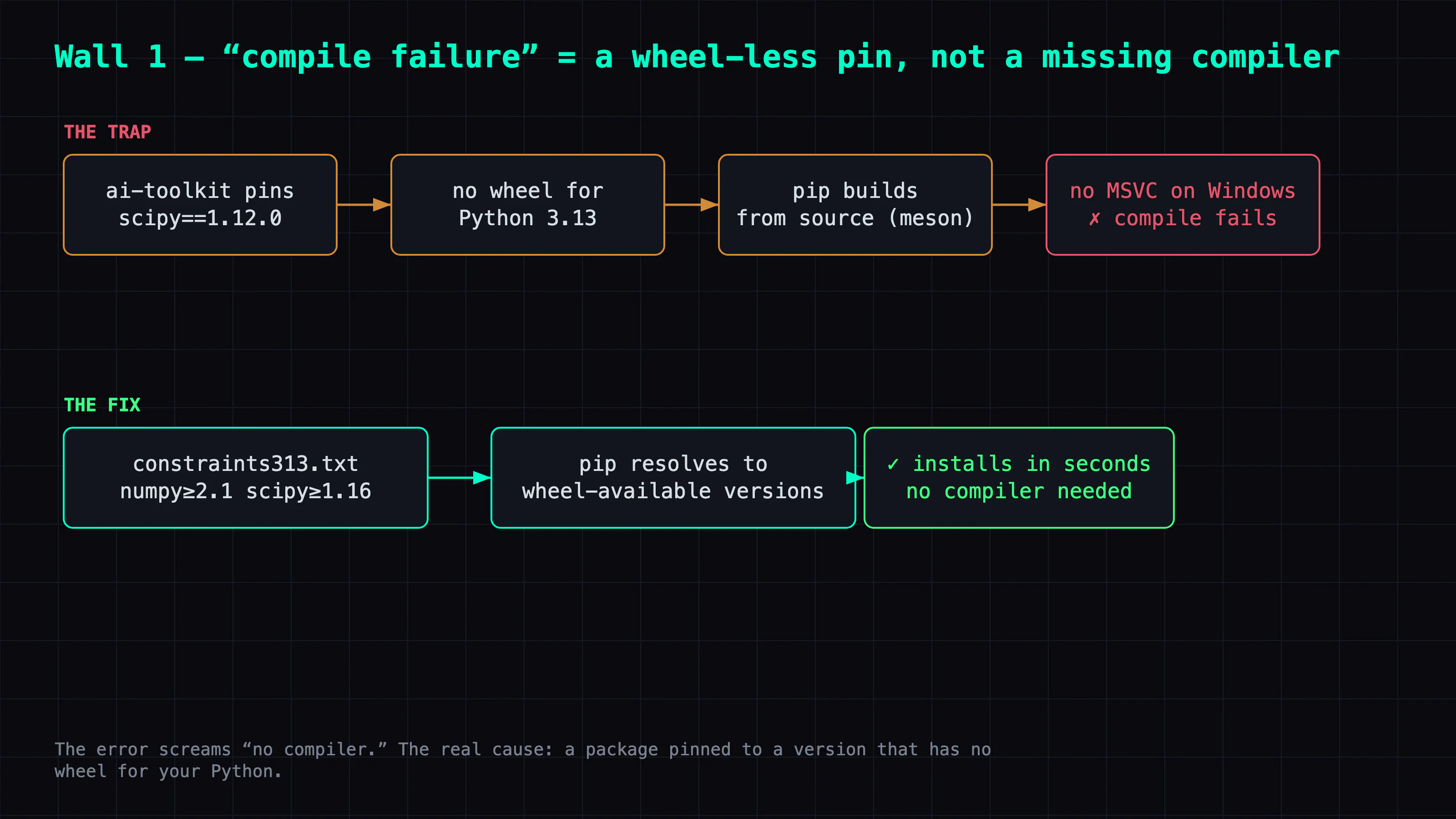
- Wall 1: Python 3.13 dependency hell — the culprit is missing wheels, not your code
- Wall 2: HuggingFace download stuck at 0 bytes — the detective work
- Wall 3: ssh disconnect killed the training — keep it alive with a scheduled task
- Takeaways
TL;DR
Before I could actually train a Wan 2.2 LoRA on Windows + RTX 5090 with ai-toolkit, I hit three walls: Python 3.13 dependency hell (old scipy/numpy with no wheels → source-build failure, fixed with a constraints file), a HuggingFace download frozen at 0 bytes (huggingface_hub 1.x's Xet parallel download hangs on Windows; HF_HUB_DISABLE_XET=1 + per-file download to get around it), and ssh disconnect killing the process (survived via a scheduled task with an interactive token). Every one's error pointed the wrong way. This post walks through the diagnosis and fix for each.

Three walls before training even starts.
Plain English: the environment broke before training even started
I wanted to train an AI character on my own 5090 (the full story is here). Before the actual training started, just "get the environment running and the model downloaded" cost me three separate fights — and none of the error messages pointed at the real culprit. I'm documenting how I debugged all three, to save the next person who hits the same walls a few hours.
Preface
Before a training script can run, you have to get the environment working first. On a "too new" combination — Windows + the latest Blackwell GPU + Python 3.13 — a lot of packages' assumptions don't match reality, and the errors they throw usually point the wrong way. This is a chain of "the error says A, the culprit is B" stories.
Platform: Windows, RTX 5090 (Blackwell, sm_120), Python 3.13, driven over ssh. Most of it applies if you swap the GPU/Python for something else.
Wall 1: Python 3.13 dependency hell — the culprit is missing wheels, not your code
pip install -r requirements.txt blows up on the first try:
..\meson.build:1:0: ERROR: Unknown compiler(s): [['icl'], ['cl'], ['cc'], ['gcc'], ...]
error: metadata-generation-failed
meson is scipy/numpy's build system — it's trying to compile from source, and there's no MSVC compiler on Windows. But why compile at all? Because ai-toolkit pins old scipy==1.12.0, and old scipy has no prebuilt wheel for Python 3.13, so pip grabs the source and builds it.
Worse, pip's backtracking drags numpy down too: scipy 1.12.0 in turn wants an old numpy (numpy<1.29), and that old numpy has no Python 3.13 wheel either, so numpy starts compiling as well. (Old pins like albumentations==1.4.15, kept around for augmentation, just make the resolution messier.)
The fix isn't to install a compiler — it's to stop pip from building from source. A constraints file pins numpy/scipy to a wheel-available range, forcing pip to find a solution that uses modern versions, and relaxing the old pins that were only there for augmentation:
printf 'numpy>=2.1\nscipy>=1.16\n' > constraints313.txt
pip install -r requirements_relaxed.txt -c constraints313.txt
The lesson: on Windows + a new Python, nine times out of ten a "compile failure" doesn't mean you need to install a compiler — it means a package is pinned to a wheel-less old version. Relaxing it to a wheel-available version is the real fix. Also, copy a known-good torch combo (I copied ComfyUI's torch 2.11.0+cu128), and verify torchao's uint4 quantization runs on torch 2.11 + Blackwell on its own before going further.
Wall 2: HuggingFace download stuck at 0 bytes — the detective work
Environment installed, training launched, then frozen at:
Fetching 3 files: 0%| | 0/3 [00:00<?, ?it/s]
The process is alive, but the blobs folder is 0 bytes and doesn't move. Step by step:
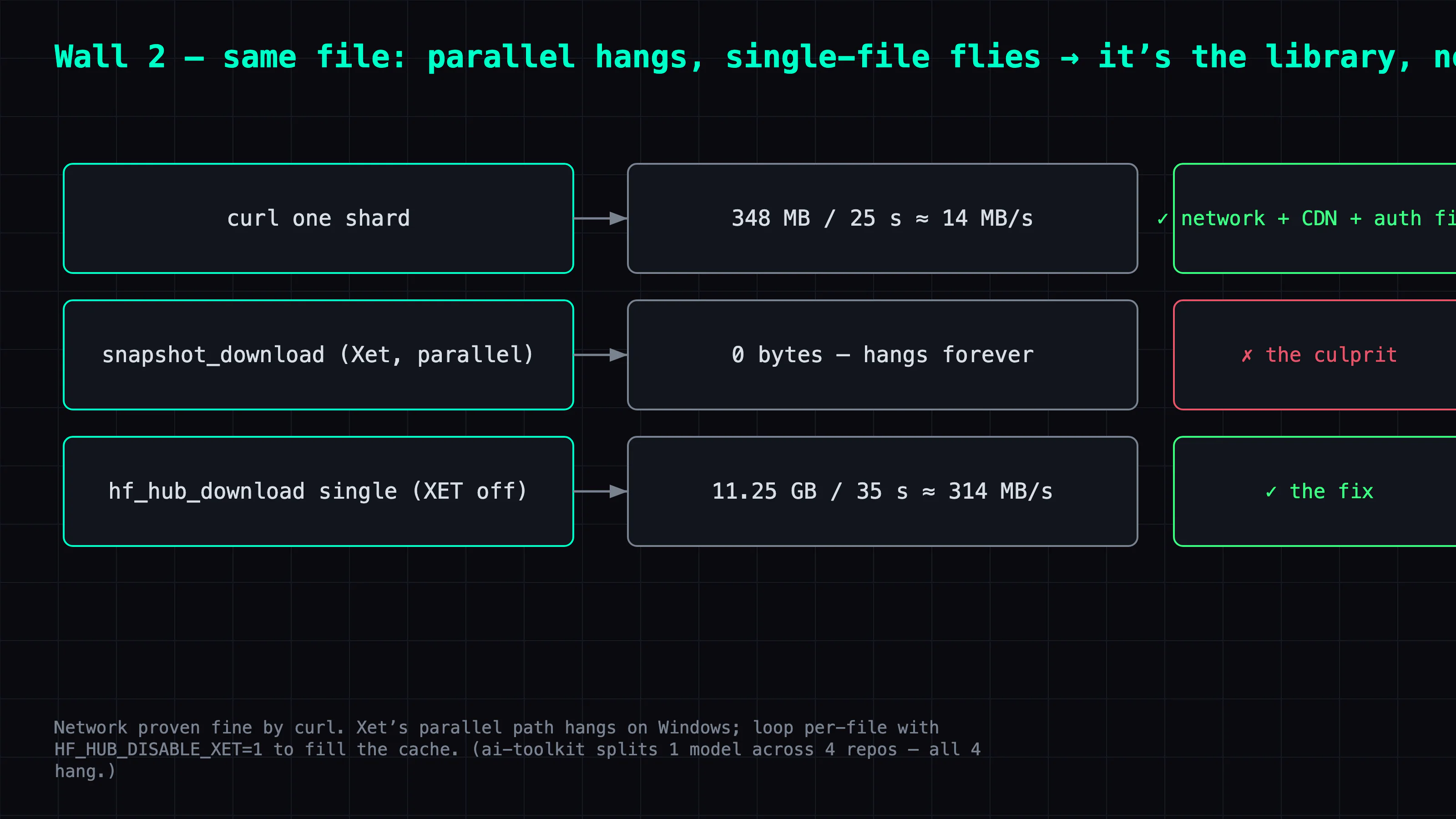
1. Rule out the network. curl a shard directly:
curl.exe -sL -m 25 -o test.bin "https://huggingface.co/<repo>/resolve/main/<shard>.safetensors"
# 348 MB in 25 seconds ≈ 14 MB/s
Network, CDN, auth all fine. The API responds instantly too. So it's not "can't reach it."
2. Narrow it down. huggingface_hub 1.x switched to httpx and auto-installed hf-xet (the Xet protocol). The error traceback shows xet_file_data — it's on the Xet path.
3. The decisive test. Set HF_HUB_DISABLE_XET=1 and hf_hub_download a single shard:
import os; os.environ["HF_HUB_DISABLE_XET"] = "1"
from huggingface_hub import hf_hub_download
# 11.25 GB in 35 seconds ≈ 314 MB/s — blazing
The culprit: snapshot_download (the parallel, multi-threaded download that from_pretrained uses) hangs at 0 bytes on Windows, while single-file download is fine. It's Xet's parallel download hanging on this machine.
The fix: bypass snapshot, fill the cache with a per-file loop, so when training launches it finds everything cached and skips the broken parallel fetch:
import os
os.environ["HF_HUB_DISABLE_XET"] = "1"
from huggingface_hub import list_repo_files, hf_hub_download
for f in list_repo_files(repo):
    hf_hub_download(repo, f)   # one file at a time, reliable
Extra trap: ai-toolkit splits one model across four HuggingFace repos (transformer, accuracy-recovery adapter, text encoder, VAE), and each one hits the same Xet hang — all of them need pre-caching the same way. The logs don't name which repos these are, so you have to read the source to find them.
Wall 3: ssh disconnect killed the training — keep it alive with a scheduled task
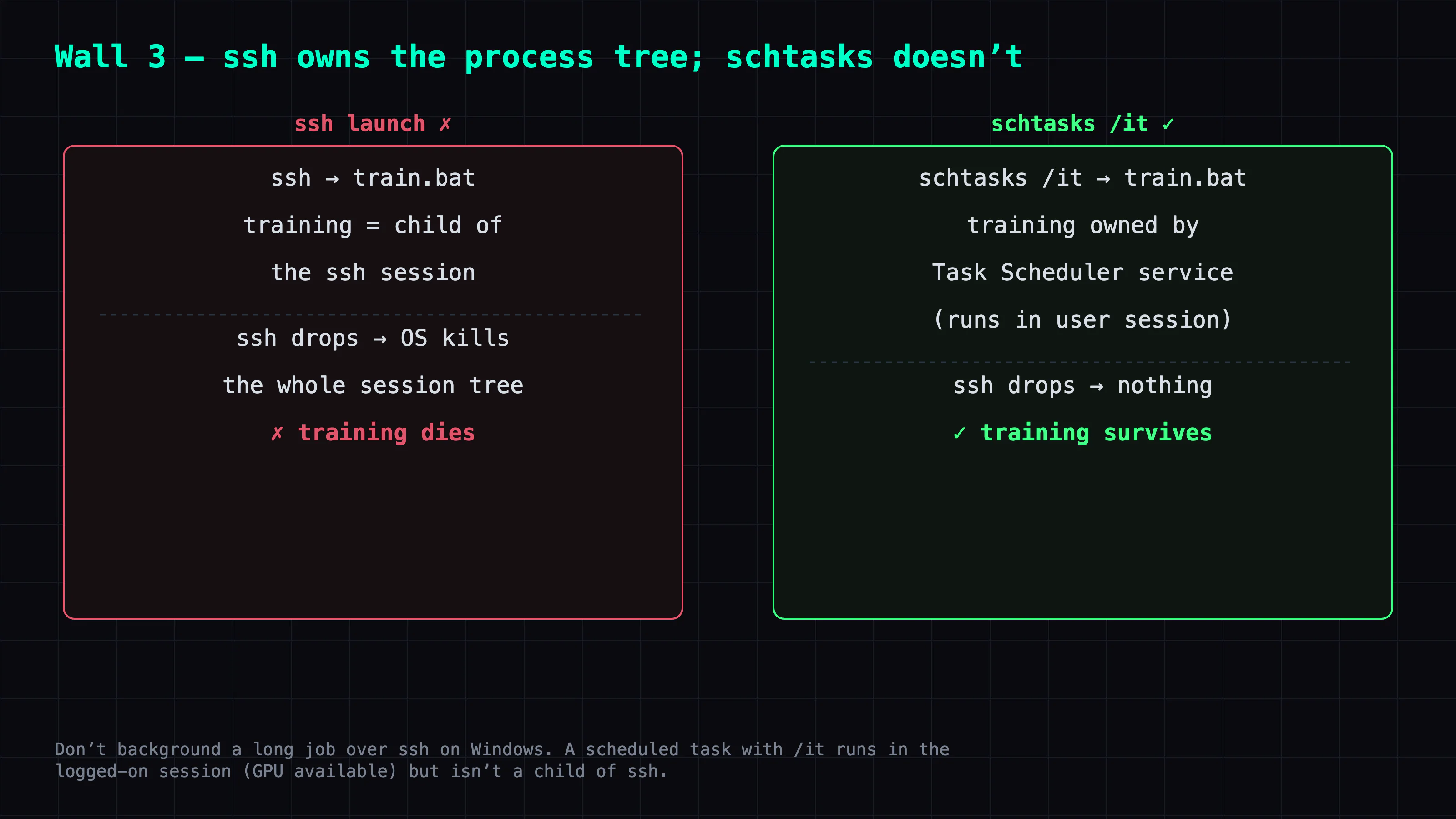
Training is a long-running job, so I launched it from ssh and wanted it to run in the background. But Windows OpenSSH can take the whole session process tree down on disconnect (at least with the default config on my box) — the moment ssh drops, training dies.
The fix is not to launch from ssh directly, but to use a scheduled task (schtasks) with the /it interactive token:
schtasks /create /tn LoraTrain /tr "C:\path\train.bat" /sc once /st 00:00 /ru user /it /rl highest /f
schtasks /run /tn LoraTrain
/it runs the task in the user's logged-on interactive session (so the GPU is available), while the task is owned by the Task Scheduler service rather than hanging off the ssh session — so it survives the disconnect. The same trick works for keeping ComfyUI alive.
Takeaways
Three walls, three cases of "the error points the wrong way":
- The biggest time sink was the Xet one — because curl works fine, it's tempting to chase a "network problem," but the culprit is the library's parallel download. Diagnostic rule: confirm the bottom layer works with the dumbest tool (curl) first, then work your way up the stack layer by layer to find which one is broken.
- What carries over: on Windows + a new Python, a "compile failure" ≈ a package pinned to a wheel-less old version (relax the version, don't install a compiler); to keep a long job alive on Windows, use a schtasks interactive token, not an ssh background launch.
- One-line lesson: on a "too new" platform (latest GPU + latest Python + a library the vendor just rewrote), what you're fighting isn't training — it's the environment. Verifying each layer on its own before going forward is faster than reverse-engineering it from error messages later.
The training itself and the result — that character who changes clothes, changes style, and moves — are in the Character LoRA series. This post is purely the fight with the environment along the way.
FAQ
- HuggingFace download stuck at 0 bytes — how do I fix it?
- huggingface_hub 1.x's Xet parallel download hangs at 0 bytes on Windows. Set HF_HUB_DISABLE_XET=1 to force plain HTTPS download; if it still stalls, use a per-file hf_hub_download loop instead of snapshot_download.
- Why does an ssh-launched training run die when I disconnect?
- Windows OpenSSH can take down the whole session process tree on disconnect (it does under the default config). Launch via a scheduled task (schtasks) with the /it interactive token so it runs in the logged-on user session and survives the disconnect.
- Why does installing ai-toolkit on Python 3.13 keep failing to compile?
- ai-toolkit's pinned old scipy/numpy have no prebuilt wheels for Python 3.13, so pip tries to compile from source and fails without MSVC. Use a constraints file forcing numpy>=2.1 and scipy>=1.16 to wheel-available versions.
Read next
- 2026-09-13[Benchmark] Roll cheap, then enhance the keeper: NVIDIA's two-stage MiniMax-H3 + LTX-2.5 pipeline explained
NVIDIA's Sol-H3 two-stage recipe on an RTX 5090: MiniMax-H3 drafts at 672×384 in 25.5 s, LTX-2.5 refines only the take you keep. Downloadable ComfyUI workflow.
- 2026-09-11[Benchmark] LTX-2.5 vs MiniMax-H3 on one RTX 5090: 29s vs 81s for the same Chinese dialogue clip
LTX-2.5 and MiniMax-H3 on one RTX 5090, same Simplified Chinese line: 28.67s vs 81.22s end to end, both at CER 0%. Files, params, VRAM ceiling.
- 2026-09-06[Benchmark] Two characters in one shot: MiniMax-H3 Ref2VA takes multiple reference images
Ref2VA is the only MiniMax-H3 mode that takes several reference images. Two characters, 243 frames, 437 s on one RTX 5090, and CER 6.8% on the dialogue.
- 2026-09-03[Benchmark] From OOM to 8.6 minutes: a MiniMax-H3 config stack for one RTX 5090
MiniMax-H3 at native 1344x768 on a single RTX 5090: 15 seconds of video in 518 s. What KJNodes chunking, torch cu130 and the NVFP4 kernels are each worth.
Don't miss the next one
Subscribe, and you won't.
One-click unsubscribe anytime.