Character LoRA · part 1
[LoRA] Train your own AI character on an RTX 5090 — one image to a usable character
❯ cat --toc
- The plain version: teach the model one specific person, then generate her from text
- Preface
- What I wanted: a flexible character that changes clothes, scenes, and style
- One reference image → a 28-shot character sheet → a LoRA
- Generating her from text: LoRA on vs off
- New clothes, new poses, new style — still the same person
- Straight from text to an animated clip
- What I learned: identity and style are two separate axes
- Takeaways
TL;DR
I trained my first character LoRA on my own RTX 5090 from a single reference image — a silver-haired winged angel I call Hina. Pipeline: one image → 28 generated character-sheet shots → ai-toolkit 4-bit training (a 14B Wan 2.2 squeezed into 32GB) → a usable checkpoint in ~1.3 hours. The result is one fixed character I can re-outfit, re-stage, restyle, and animate — all driven by plain text, zero cloud bill. This post is the whole path from zero to working; the debugging and the advanced knobs get their own posts.
The plain version: teach the model one specific person, then generate her from text
Most image models have amnesia. Ask for a silver-haired girl today, ask again tomorrow, and you get two different people. A character LoRA teaches the model to recognize one specific person. Once it's trained, you put her name in the prompt and the model draws the same person — and you're free to change her clothes, the scene, the pose, even the art style. She stays herself.
The character here is Hina, a silver-haired angel with white wings. The video above is what came out when I typed one line of text — "her, anime style, running through Tokyo at night." No starting image, nothing pre-made.
Preface
If a generative model is an artist, its handicap is memory. Hire it to draw a silver-haired girl twice and you get two strangers. A character LoRA hands that artist a reference sheet — this is what she looks like — so it draws the same person every time.
This is the first post in a series on training your own characters locally. No cloud service and no API bill. The whole thing runs on my RTX 5090, and the stack has no content filter. This post covers getting from one image to a working character. The things that broke along the way — HuggingFace downloads hanging, Windows dependency hell, training getting killed mid-run — go in a separate Troubleshooting series. How to dial in style, realism, and identity is the next post here.
What I wanted: a flexible character that changes clothes, scenes, and style
The goal was concrete: a flexible character. The same person, but I can put her in different outfits, different poses, different scenes — and swap the art style too: photoreal, anime, video. Everything is allowed to change except who she is.
I picked Wan 2.2 over a pure image model because it's a video model to begin with, so characters stay consistent through heavy motion. The end goal was a character that moves, not just stills.
One reference image → a 28-shot character sheet → a LoRA
No real photos in the training set. I had exactly one reference image, so I used Z-Image Turbo locally (img2img off that reference) to generate a 28-shot character sheet — the same person in different outfits and poses.
The trick is to deliberately vary the clothes and poses while keeping the face, hair color, and wings constant. During training, the model learns the constant part as identity and treats the varying part as adjustable.
Training runs on ai-toolkit. The real constraint is memory: Wan 2.2 (A14B) is a two-expert MoE — two ~14B experts, ~27B total, ~14B active per step — and a single expert in bf16 is 28GB, so with the optimizer it won't fit in 32GB. The fix is 4-bit (uint4) training with an accuracy-recovery adapter to claw the precision back, plus training one expert at a time while the other sits on the CPU. That gets a 14B training run comfortable on a 5090: a usable checkpoint in about 1.3 hours, a full 2500-step run in ~2.2.
No captions, either. All 28 images share a single trigger word (I used Yuneth), and training binds that word to the character — "trigger-only" training, which is simpler and lighter on VRAM. So the character is Hina, but the word that triggers her in a prompt is Yuneth.
Generating her from text: LoRA on vs off
The most direct check after training: same prompt, same seed, LoRA on vs off.
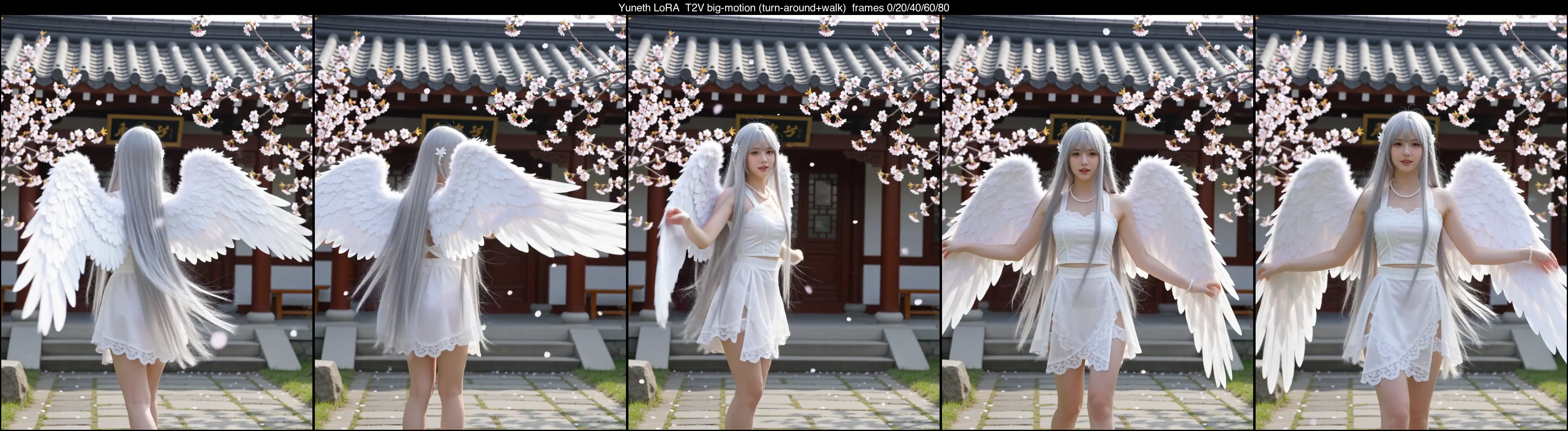
With it off, "silver-haired angel" gets you a silver-haired angel — a new face every time. With it on, you get Hina — and this is heavy motion (turning to show her back, turning around, walking at the camera). That spin is exactly the case that usually smears a character's face, and hers stays stable.
New clothes, new poses, new style — still the same person
This is where a flexible character earns its keep. Swap the outfit and scene in the prompt, keep the person:
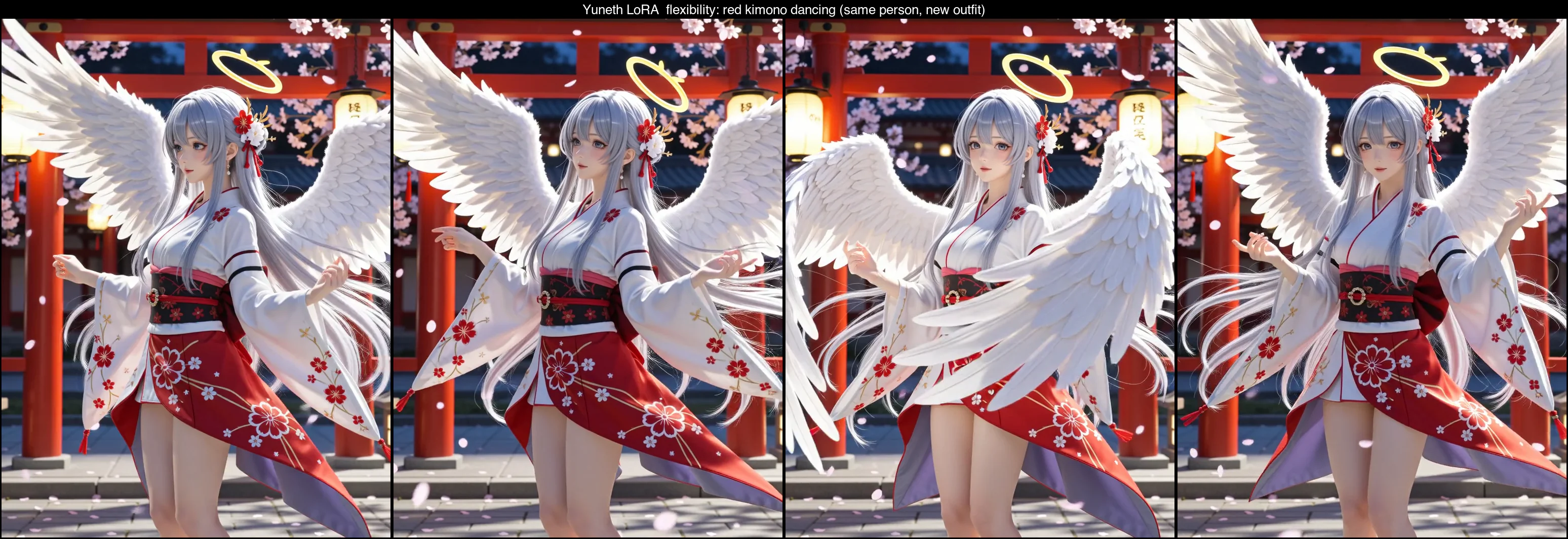
Red kimono, torii gate, dancing — none of that was in the training set, but the face, the silver hair, and the wings are still Hina.
You can even swap the art style. Stack a retro-90s-anime style LoRA and she goes from semi-real to hand-drawn cel animation:
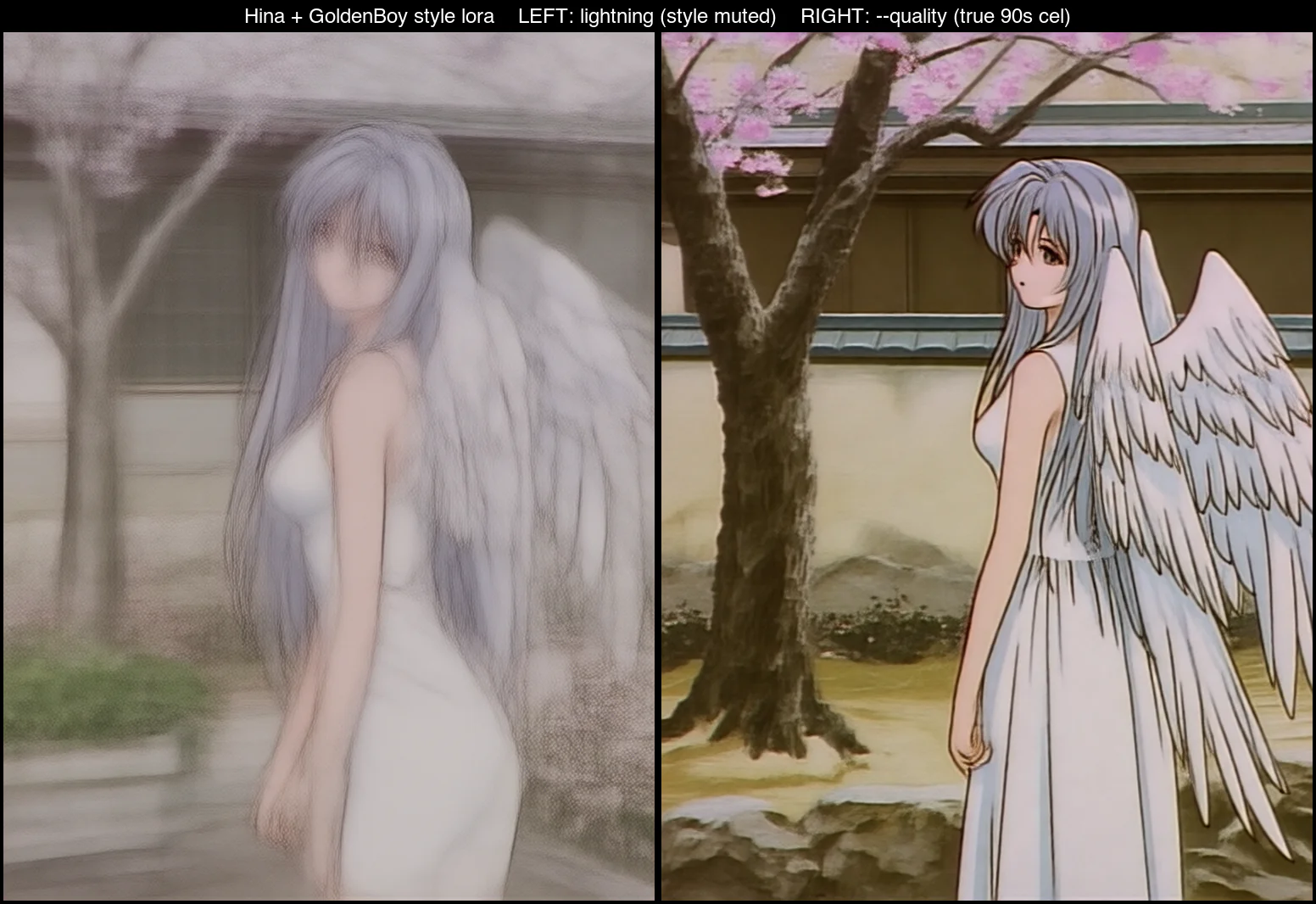
Worth noting: this stack has no content filter, and the training set included nude references, so the character's body is consistent and NSFW generation works too. I'm not showing it here, but local-and-uncensored is one of the bigger differences from a cloud service.
Straight from text to an animated clip
Then stack it all: the character LoRA, the anime style LoRA, and one line of text — that's the clip at the top, Hina in anime style sprinting through neon-lit Tokyo at night.
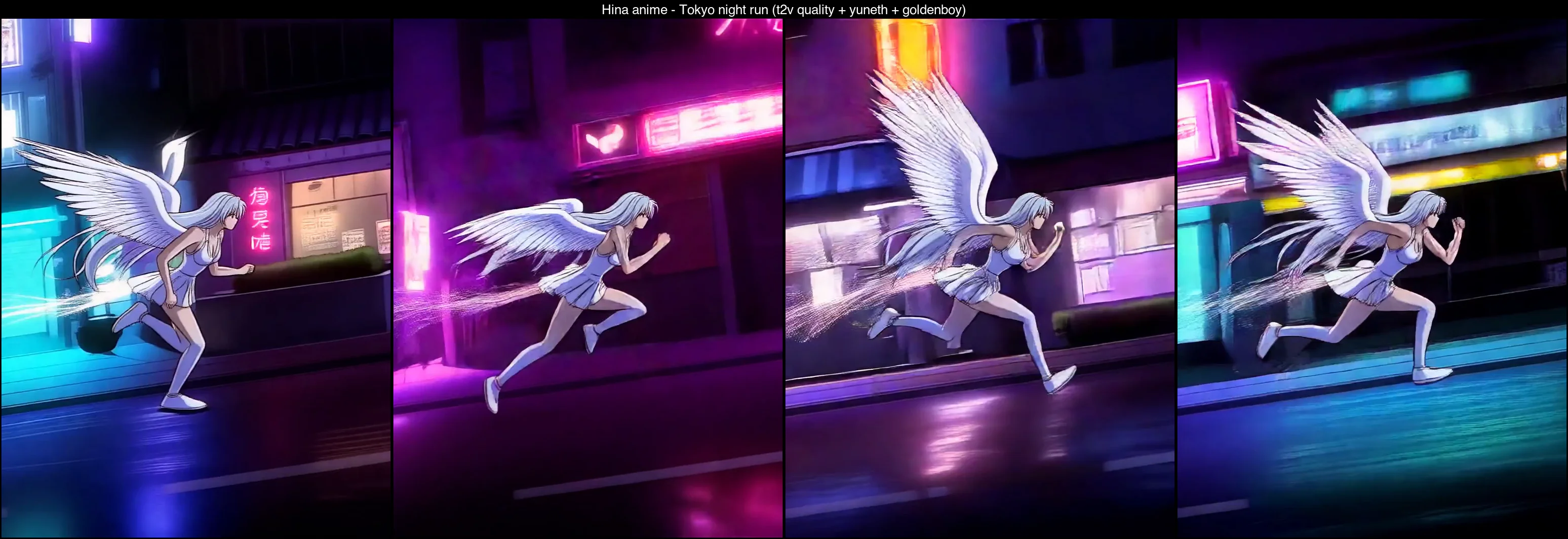
No starting image, pure text. The anime style, the character's identity, the Tokyo-at-night mood, the running motion — all of it in one shot. It took about 14 minutes; high-quality video has a cost, but the cost isn't a cloud bill, a watermark, or a filter.
What I learned: identity and style are two separate axes
The one idea that mattered most: "who she is" and "what style she's rendered in" are independent axes.
The character LoRA only owns who — face, hair, wings. Style, clothes, and scene are a different axis, controlled by the prompt and a style LoRA. That's why the same Hina can be photoreal, anime, in a kimono, in any scene — still the same person.
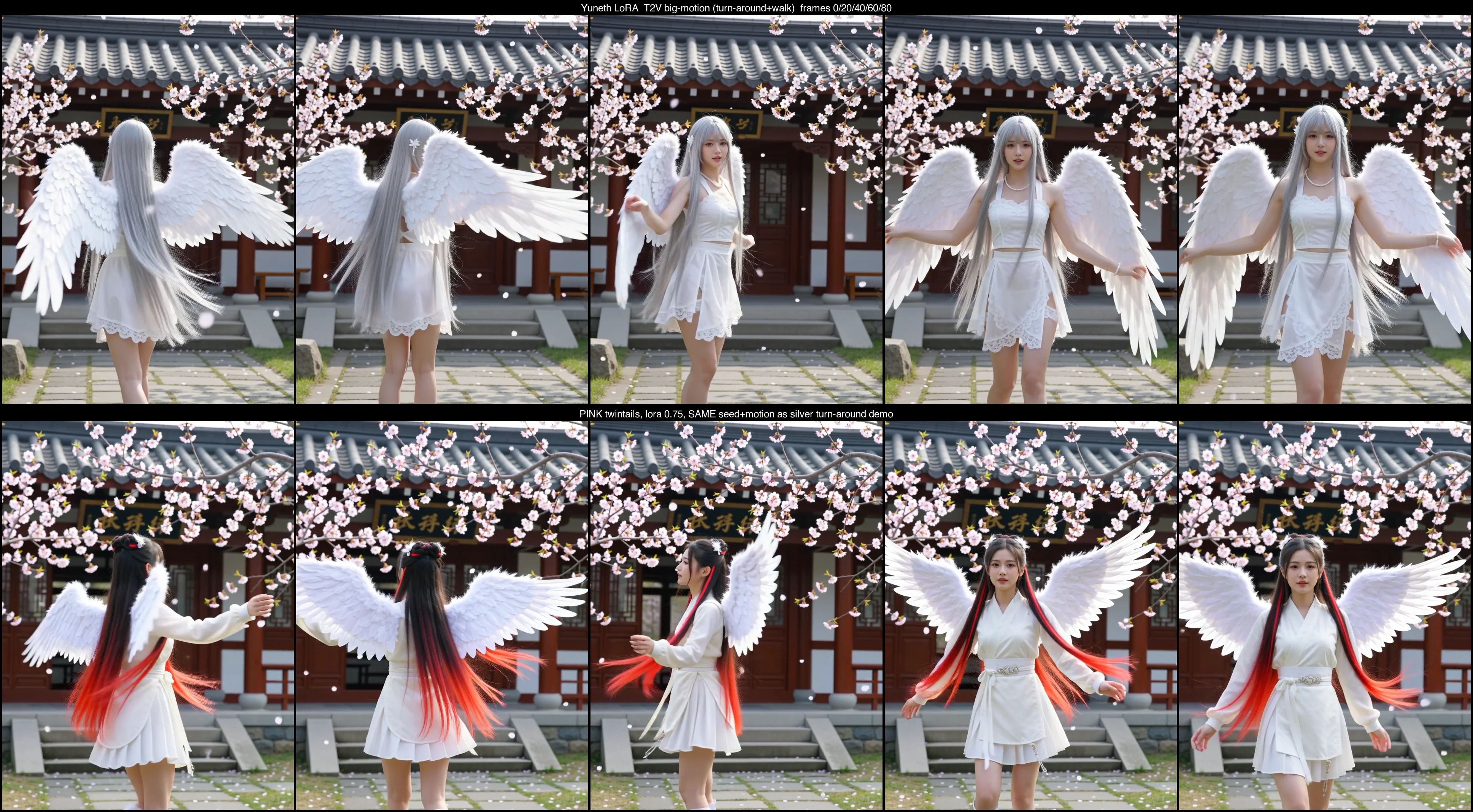
You can even lock the motion and change only the look: same seed plus the same motion description, and the trajectory stays nearly identical while the hair color changes. There's a whole set of knobs behind that — how hard the trigger word binds, how strong the style is, the realism-vs-speed tradeoff — and those are the next post's subject.
Takeaways
From one reference image to a fixed character that changes clothes, changes style, moves, and runs on my own machine — the whole path with no cloud, no bill, no filter. That's what makes local generation interesting to me: not "saving a subscription," but training a character that's only yours and dropping her into any frame you want.
What's next in this series:
- Next post (Part 2): the character-LoRA control panel — why lightning flattens style and texture, when to spend full steps, how to stack a style LoRA, and why the trigger word alone won't hold the look. Turning "it works" into "I control it precisely."
- Troubleshooting series, Part 1: the things that broke — the HuggingFace download stuck at 0 bytes and how I tracked it down, Python 3.13 + Blackwell dependency hell on Windows, keeping a training run alive after an ssh disconnect, and the lesson of the machine falling asleep when the run finished.
FAQ
- How many images do you need to train a character LoRA?
- 20 to 30 identity-consistent images is enough. I started from a single reference and generated a 28-image character sheet locally (varied outfits and poses) to use as the training set — no real photos.
- Can a 32GB RTX 5090 train a 14B Wan 2.2 model?
- Yes, but you train in 4-bit (uint4) and only one expert at a time. Full bf16 won't fit. ai-toolkit's 24GB recipe runs comfortably on a 5090 — about 1.3 to 2.2 hours.
- How do you use the trained LoRA?
- Drop it into ComfyUI's loras folder, load it at generation time, and put the character's trigger word in the prompt. From there, plain text generates that character in any scene, any style, or as video.
Read next
- 2026-06-28[LoRA] The character-LoRA control panel: dialing in style, realism, and identity
Once your character LoRA is trained, how do you control it? Why lightning flattens style, when to spend full steps, how to stack a style LoRA, and why the trigger word alone won't hold the look.
- 2026-09-13[Benchmark] Roll cheap, then enhance the keeper: NVIDIA's two-stage MiniMax-H3 + LTX-2.5 pipeline explained
NVIDIA's Sol-H3 two-stage recipe on an RTX 5090: MiniMax-H3 drafts at 672×384 in 25.5 s, LTX-2.5 refines only the take you keep. Downloadable ComfyUI workflow.
- 2026-09-11[Benchmark] LTX-2.5 vs MiniMax-H3 on one RTX 5090: 29s vs 81s for the same Chinese dialogue clip
LTX-2.5 and MiniMax-H3 on one RTX 5090, same Simplified Chinese line: 28.67s vs 81.22s end to end, both at CER 0%. Files, params, VRAM ceiling.
- 2026-09-06[Benchmark] Two characters in one shot: MiniMax-H3 Ref2VA takes multiple reference images
Ref2VA is the only MiniMax-H3 mode that takes several reference images. Two characters, 243 frames, 437 s on one RTX 5090, and CER 6.8% on the dialogue.
Don't miss the next one
Subscribe, and you won't.
One-click unsubscribe anytime.