Character LoRA · part 2
[LoRA] The character-LoRA control panel: dialing in style, realism, and identity
❯ cat --toc
- Plain English: you trained the character; now learn how to direct it
- Preface
- The control panel: what each knob does
- Lightning flattens style and texture — drop it for realism
- The trigger word alone won't hold the look — describe the features
- Swapping style: stack a style LoRA, but at full steps
- Strong base priors fight the character LoRA — one general rule
- A trigger-only side effect: uniform attributes get baked into identity
- Takeaways
TL;DR
A trained character LoRA is the starting line; the skill is in the control panel: the seed locks motion and composition, the prompt controls the look, LoRA strength decides how hard you assert identity, and a style LoRA at full steps swaps the art style. Three traps to avoid: lightning flattens style and texture (drop it for realism), the trigger word alone won't hold the look (the prompt must describe features), and strong base priors (Western-leaning nudity, flat 2D) fight the character LoRA — the fix for all three is full steps + higher strength + explicit prompting. This is part two of the Character LoRA series.
Plain English: you trained the character; now learn how to direct it
The last post taught a character to the model. But "can generate it" and "generates it accurately" are different things — with the same LoRA, the wrong knob settings give you a 3D plastic person, or no character at all. This post takes each knob apart: which one controls motion, which controls the look, which controls style, and how to dodge the three most common traps.
Preface
Training burns a person's appearance into the model. Generation is directing an artist who recognizes that one person. Recognizing her doesn't mean you know how to direct her — you need to know which line controls the pose, which controls the lighting, and which parameter decides how much it listens to you. This is that directing manual.
Picking up from the last post: I trained a silver-haired angel (Hina to the world, Yuneth as the prompt trigger), running on my own RTX 5090. Every command goes through my own local-wan skill (ComfyUI + Wan 2.2), but the underlying ideas apply to any Wan 2.2 character LoRA.
The control panel: what each knob does
The whole map first, then each item:
| Knob | Controls |
|---|---|
| Seed | Motion and composition. Same seed + same motion text → motion barely changes |
| Prompt | The look: hairstyle, clothes, scene, and the style trigger word |
| LoRA strength | How hard to assert features that are already baked into identity |
| Style LoRA | Art style (pair it with full steps) |
| Full steps vs lightning | Realism / letting the LoRA and style hold vs speed |
Lightning flattens style and texture — drop it for realism
The most common complaint: "why does it look like 3D animation?" The culprit is the lightning 4-step distillation LoRA. It compresses generation down to 4 steps for speed (~100 seconds for a 5-second clip), but it comes at the cost of softer texture and lost detail — most visible on photoreal skin (I tested it: full steps bring back pores and depth; lightning stays soft). For flat anime/cel art the gap is small — lightning can even look crisp — so don't assume it always turns the image into "3D plastic." What it really costs you is realistic texture.
And how big the quality hit is depends on your workflow: in i2v (when you feed a start image — the actual character-video workflow), the start image anchors the subject and composition, so dropping lightning just resolves a bit more skin detail — a mild difference. The "night and day" impression actually comes from t2v (generating from pure noise), where dropping lightning swaps the sampler too and regenerates the whole frame — subject and composition change completely. So for everyday i2v, lightning is fine; only drop it when you're chasing maximum photoreal texture.
The fix is to drop lightning and use full steps (in my skill it's --quality: 20 steps, cfg 5, plus realism prompt terms). Compare using the same start image and seed for the cleanest read (⚠️ without a start image, dropping lightning changes the whole composition — even who's in frame — not just the texture):
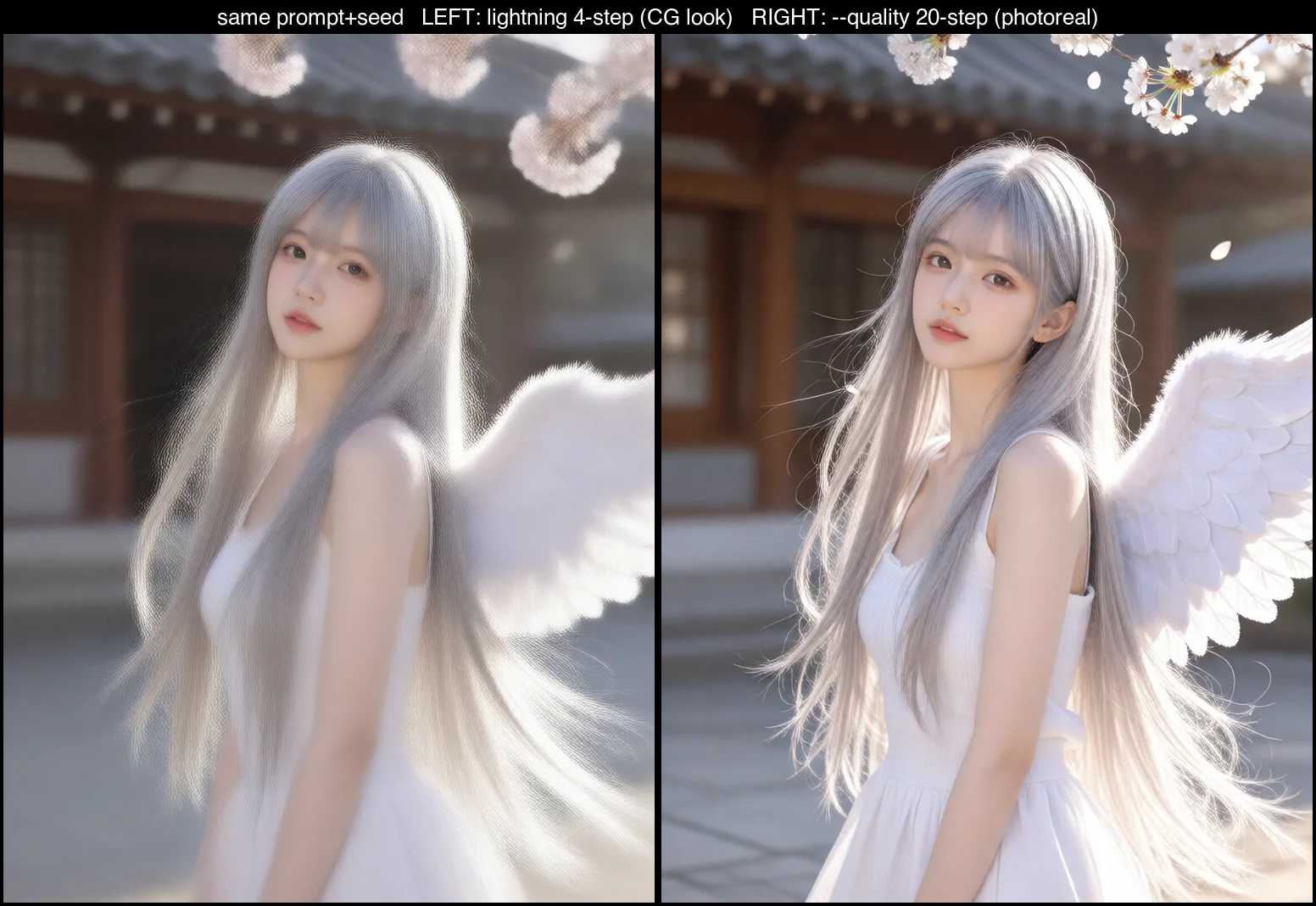
The cost is 5 to 8 times slower — a 5-second clip goes from 100 seconds to 8–12 minutes. So in practice: stills always at full steps (a single still is only ~20 seconds, no reason not to), and draft videos on lightning to try compositions, final cuts at full steps.
The trigger word alone won't hold the look — describe the features
I hit this one watching another agent run a real test. Its prompt was just "Yuneth walking under cherry blossoms" — the command was completely correct, but the output was a random black-haired woman with no wings, not Hina at all.
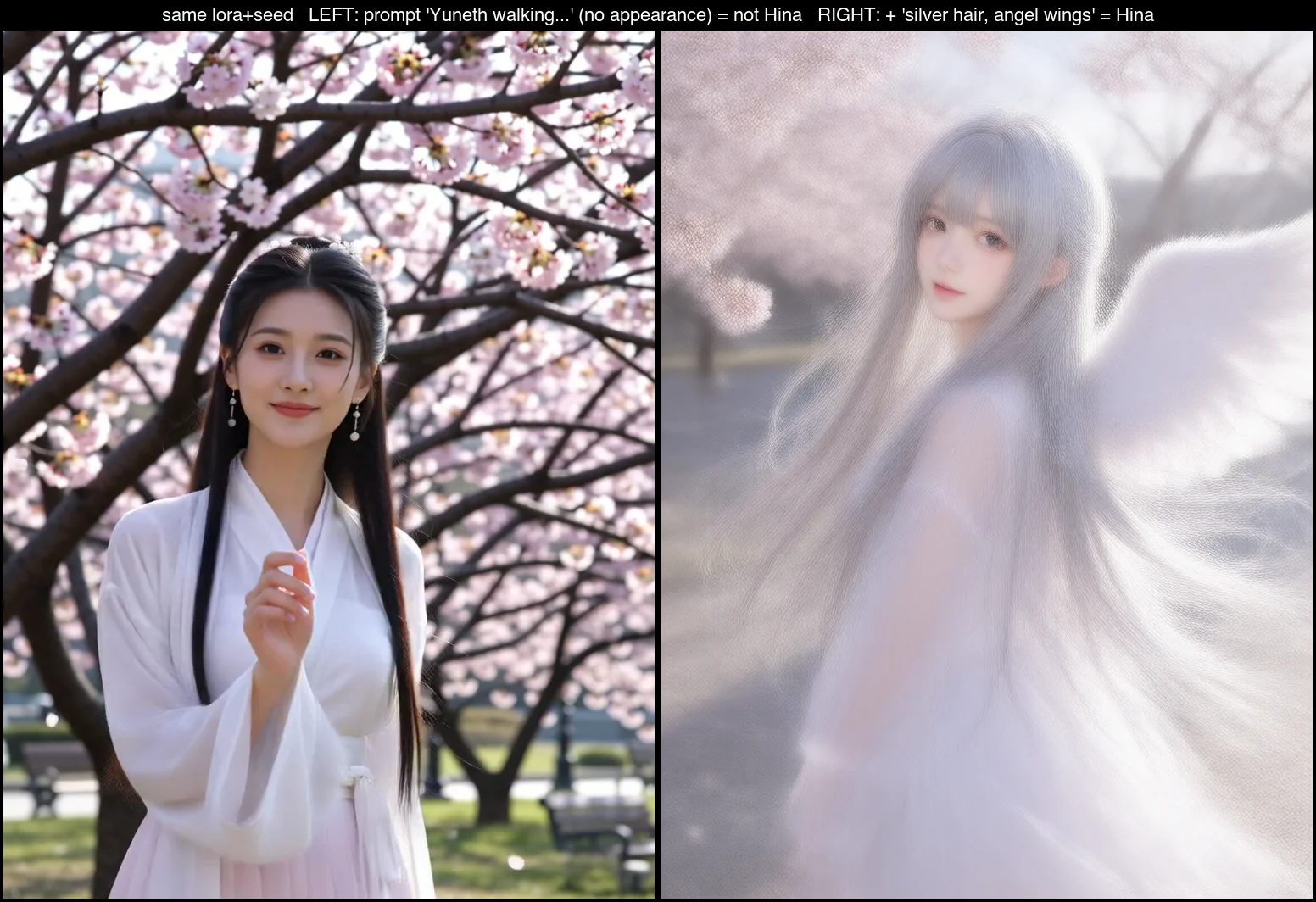
The reason: a trigger-only LoRA (one trigger word bound to the whole character, no captions) binds appearance to the trigger weakly, and weaker still under lightning. Same seed — just add "long silver hair, large white angel wings" back to the prompt and Hina returns instantly.
Rule: when you use a character LoRA, always describe her defining features in the prompt — don't just drop the trigger word. The trigger locks "this is the person," the description draws the person; you need both.
Swapping style: stack a style LoRA, but at full steps
Style is a completely separate axis from identity. Two ways to change it: prompt style terms (lightweight, but Wan is a realism-leaning video model, so prompts alone can't reach flat 2D), or stacking a style LoRA (much stronger, able to overcome Wan's realistic pull).
A style LoRA is the same kind of node as the character LoRA — you just chain it on. But pair it with full steps — otherwise lightning flattens the style again:
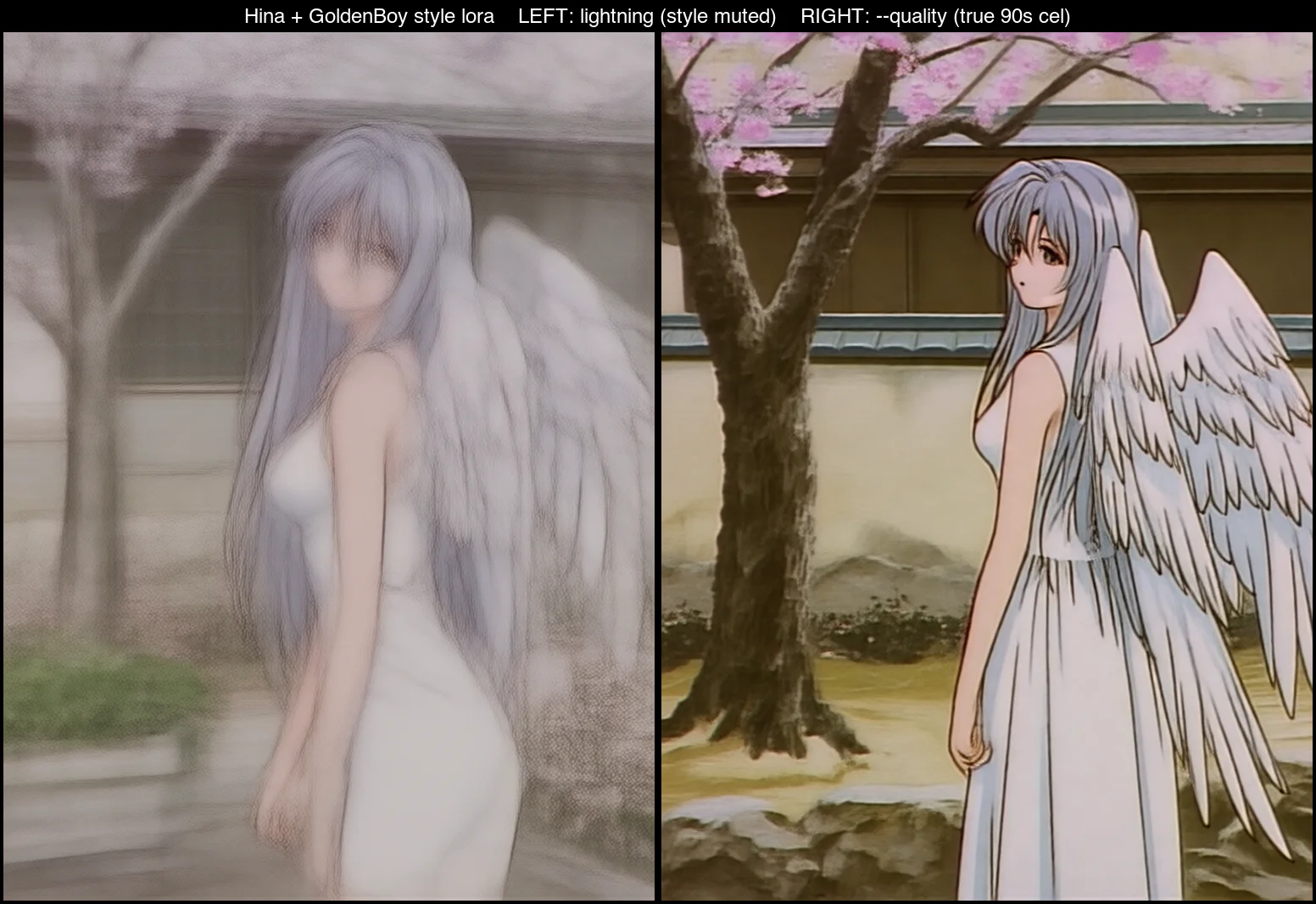
When you stack, the character and the style fight (both modify the same weights), so balance the strengths: usually character around 0.8, style around 1.0. If the style is too weak, raise the style LoRA strength; if the character starts drifting, raise the character LoRA strength.
Strong base priors fight the character LoRA — one general rule
Two seemingly unrelated symptoms are actually the same thing:
- NSFW drifts Western: Wan's nude training data leans Western, so "nude" pulls the face and body toward Caucasian and washes out the character's East-Asian features.
- Flat 2D won't budge: Wan is a realistic video model, and prompts alone struggle to reach flat cel shading.
Both are the base model's own strong prior fighting the character LoRA. Same fix: full steps + higher character strength (1.0→1.1) + explicit prompting (for realistic NSFW, add Japanese, East Asian; for flat 2D, stack a style LoRA). Push the model hard toward what you want; don't let its default aesthetic take over.
A trigger-only side effect: uniform attributes get baked into identity
One last thing worth knowing: trigger-only training treats whatever is identical in every training image as part of the identity. All 28 of my training images were silver-haired → silver got baked into "who she is." The result is that changing her hair color later fights the LoRA: you have to drop character strength to around 0.7 to move it, and it comes out as a gradient, not clean.
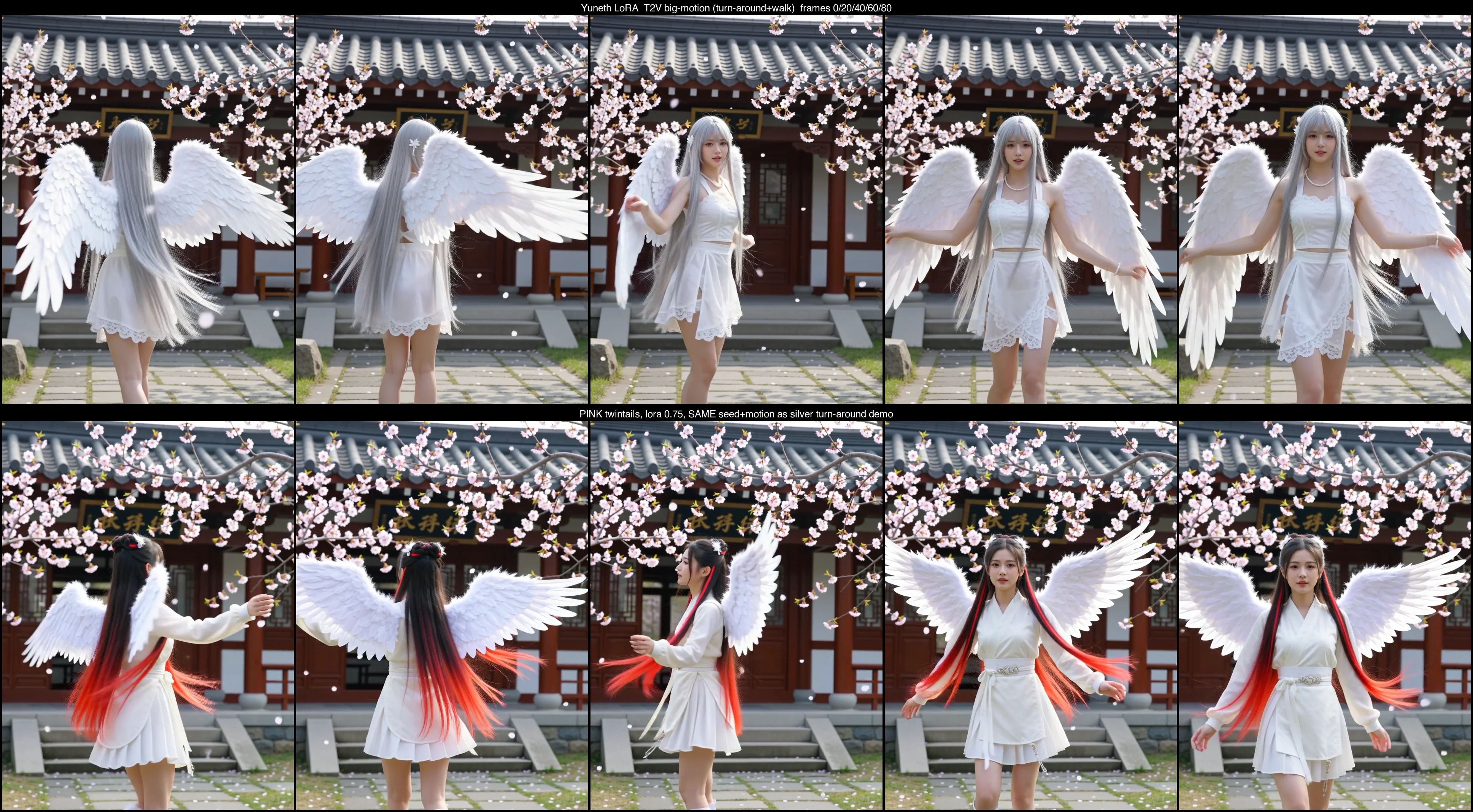
The general rule: if you want an attribute to be freely changeable later, vary it in the training set (want to change hair color → mix in different hair colors). Only put what's truly constant into "identity." If the character is supposed to be silver-haired anyway, baking it in is exactly right.
Takeaways
The move from "it can generate the character" to "I can control it precisely" comes down to one rule: identity, style, and motion are three independent axes, each with its own knobs. The seed locks motion, the prompt plus LoRA strength manages identity, and a style LoRA at full steps manages style. When output is wrong, ask "which axis's knob did I turn wrong" instead of blaming the LoRA.
The next series covers the things that broke during training itself — HuggingFace downloads hanging, Windows dependency hell. That's the Troubleshooting series, kept separate from this "how to use it" post.
FAQ
- Why does my character LoRA output look like 3D animation?
- The culprit is the lightning 4-step distillation LoRA — it trades texture for speed, so output goes plastic and CG-like. For realism, drop lightning and use full steps (20 steps, cfg 5).
- Why isn't my character showing up even though I used the trigger word?
- A trigger-only LoRA binds appearance to the trigger word only weakly (weaker under lightning). You have to describe the character's defining features in the prompt — hair color, hairstyle — not just drop the trigger word.
- Can a character LoRA change art style?
- Yes. Style is a separate axis, controlled by prompt style terms or a stacked style LoRA. But stack it at full steps (quality mode) — lightning flattens the style otherwise.
Read next
- 2026-06-18[LoRA] Train your own AI character on an RTX 5090 — one image to a usable character
Train a Wan 2.2 character LoRA on your own RTX 5090 from a single reference image. Then generate the same person from text — new outfits, scenes, art styles, even video. No cloud, no bill.
- 2026-09-14[Video] MiniMax H3 Super Acceleration on a DGX Spark: 2x native cold, 3.14x warm
Drafting with MiniMax-H3 and refining with LTX-2.5 takes 118.8 s on a DGX Spark against 237.7 s native, and 73.3 s warm. Full ComfyUI setup, and the version set it needs.
- 2026-09-14[Benchmark] Two-stage MiniMax-H3 + LTX-2.5 on a 2080 Ti: 1344x768 with audio in 165s
A modded RTX 2080 Ti 22G renders 1344x768 with audio in 165 s using MiniMax-H3 to draft and LTX-2.5 to refine. Six departures from the Blackwell workflow.
- 2026-09-13[Benchmark] Roll cheap, then enhance the keeper: NVIDIA's two-stage MiniMax-H3 + LTX-2.5 pipeline explained
NVIDIA's Sol-H3 two-stage recipe on an RTX 5090: MiniMax-H3 drafts at 672×384 in 25.5 s, LTX-2.5 refines only the take you keep. Downloadable ComfyUI workflow.
Don't miss the next one
Subscribe, and you won't.
One-click unsubscribe anytime.