DGX Spark · part 41
[Benchmark] Running MiniMax-H3 on a DGX Spark — and why NVIDIA VSR is off the table for now
❯ cat --toc
- The plain version: some things cannot be installed, because there is nothing to install
- Fix the upscaler first, the sampler second
- The machine and the model: MiniMax-H3 makes the picture and the sound in one pass
- Step one: stop the resident model to free up the memory
- Step two: launch with --cache-none, or your benchmark reports 0.00 seconds
- Step three: five files, and NVFP4 is real hardware here
- Step four: 14 steps, 960x540, and upscale to 1080p
- Where 997 seconds actually go: sampling 56%, upscaling 32%, everything else 12%
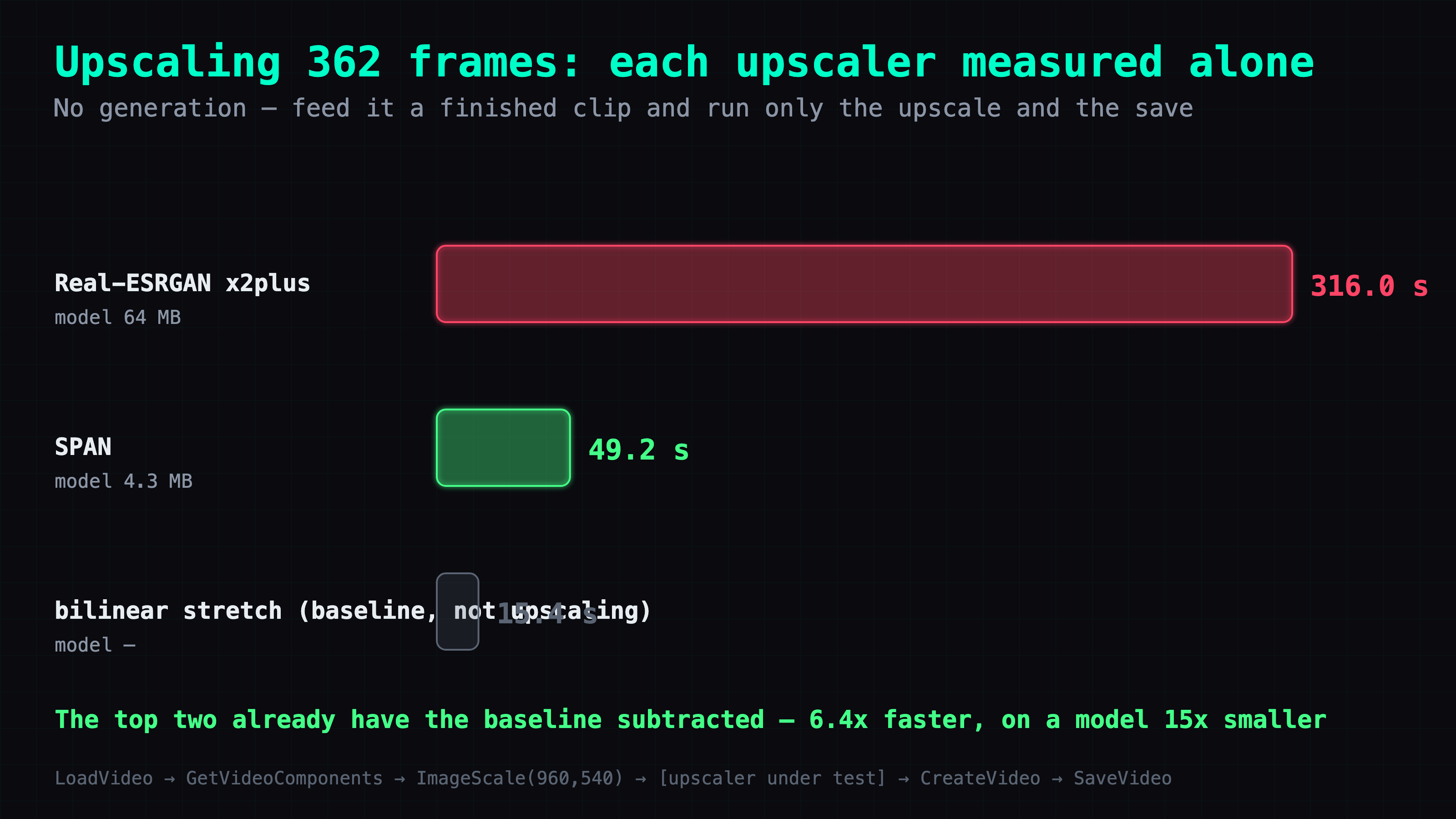
- SPAN upscales the same 362 frames 6.4x faster than Real-ESRGAN
- The full ladder: 1,477 s down to 741 s, half the time for two switches
- The same clip on three machines: 314 / 741 / 1,383 seconds
- Video Super Resolution cannot be installed on aarch64, and NVIDIA says there is currently no plan to change that
- Three traps specific to this machine
- SageAttention 2.2.0 installs on sm_121 and aarch64 straight from the wheel
- Deep dive: the calls I got wrong
- 1. Measuring the upscaler without running the pipeline
- 2. The negative-103-second VAE
- 3. I got the VSR verdict right with the wrong yardstick
- 4. I lost a flag while measuring the SPAN total
- 5. Re-running it, I took the whole machine down
- Loose ends
TL;DR
Fifteen seconds of 1080p with its own audio, generated on a DGX Spark: 741 s, down from 1,477. The biggest single win was not the sampler — it was the upscaler nobody profiles. Replacing Real-ESRGAN with SPAN took 282.3 s (22.3%) off the total, from a model 15x smaller. One 997 s run splits three ways: sampling 56%, upscaling 32%, everything else 12%. The caveat is a hard one: NVIDIA's own Video Super Resolution cannot run here, because nvidia-vfx ships x86_64 wheels only and an NVIDIA engineer has said on the forum there is currently no plan to change that.
🔊 Sound on. 1920×1080, 362 frames, 15.08 seconds; the picture and the audio come out of the same computation. This clip is what the DGX Spark produced with the config in this article.
The plain version: some things cannot be installed, because there is nothing to install
If you write software, you carry an assumption you probably never notice: as long as you are willing to do the work, the feature exists. Wrong version, upgrade it. Missing dependency, add it. Worst case, pull the source code and build it yourself. Everything is reachable if you are stubborn enough.
Precompiled vendor binaries break that assumption, and they break it completely.
A CPU architecture is the instruction set a chip understands. Most computers use x86_64, the Intel and AMD one. Phones, Apple Silicon Macs and this machine use ARM. Compiled code does not carry across: a program built for one will not run on the other, and the fix is to compile it again for the architecture you have.
Except compiling it again requires having the source. NVIDIA's video upscaler does not ship as source. It ships as finished binaries, and the vendor decides in advance which architectures get built. They built x86_64. They did not build ARM, and they have said they do not plan to.
So this is not a difficult install. There is nothing to install, nothing to build, and no amount of stubbornness that gets around it. Most of the time you never notice, because most of the time somebody already built the thing for your machine. The one time you do notice, it is a wall with no door.
Fix the upscaler first, the sampler second
When a suitcase comes in over the airline limit, everyone repacks the clothes. The clothes are what you can see. The heavy thing is usually a pair of boots at the bottom that nobody thought to weigh.
I spent two days on step counts and attention kernels — the clothes — and never once put a stopwatch on the upscaler sitting at the end of the graph. When I finally did, it was 32% of the render.
The sibling article runs the same model on a single RTX 5090, where three stacked switches halved the time. This one is a DGX Spark, which is a different machine in the two ways that matter here: it has one pool of memory shared between CPU and GPU, and it has an ARM CPU, which takes the best switch from that article permanently off the table. Fifteen seconds of 1080p video with its own audio track now takes 981 seconds, down from 1,477.
The machine and the model: MiniMax-H3 makes the picture and the sound in one pass
The machine is a DGX Spark: a GB10 chip, 128 GB of unified memory on the spec sheet and 121 GB that free -g will actually hand you (one pool of RAM that the CPU and the GPU both allocate from, rather than system RAM plus separate video memory), an aarch64 CPU, and sm_121 as its compute capability — NVIDIA's per-generation capability number, in this case the Blackwell generation.
The model is MiniMax-H3, 33B parameters. The thing that makes it worth the trouble is that it generates the video and its audio in a single forward pass, meaning one trip through the model produces both. Lip sync is not something you align afterwards with a separate tool; it is inherent, because the mouth and the sound were computed together.
Everything below is the working configuration, in the order you would do it.
Step one: stop the resident model to free up the memory
The Spark has a language model running on it as a service. Before anything else, stop it:
systemctl --user stop ds4-mia-v053-0731-8000.service
This step cannot be skipped, and it is not housekeeping. Unified memory means there is one pool: the resident model holds about 85 GB of it, MiniMax-H3 peaks at about 72 GB, and 85 + 72 is more than 121. On a machine with separate video memory you would get away with this, because the language model would be sitting in a different place. Here they are competing for the same bytes.
Watch it drain before you continue:
free -g    # before: 116 / 121 used
           # after:    4 / 121 used
Step two: launch with --cache-none, or your benchmark reports 0.00 seconds
~/comfy-venv/bin/python ~/ComfyUI/main.py \
  --listen 127.0.0.1 --port 8188 \
  --cache-none --use-sage-attention
(--use-sage-attention turns on SageAttention, a drop-in replacement for the attention kernels that runs faster. Once it is installed, it is just this flag.)
--cache-none is required, not optional, and it is required for a reason that will otherwise waste an afternoon. ComfyUI keys its execution cache on node inputs. Resend the same prompt with the same seed and the entire graph hits cache and reports 0.00 seconds — no error, no warning, just a spectacular number. Benchmark without that flag and you will measure the cache.
--use-sage-attention switches the attention implementation to SageAttention. More on why that is worth 20% further down.
Step three: five files, and NVFP4 is real hardware here
Five downloads, each into its own directory under ~/ComfyUI/models/:
| File | Directory |
|---|---|
minimax_h3_fl2va_pruned_nvfp4.safetensors | diffusion_models/ |
qwen3vl_32b_heretic_minimax_h3_nvfp4.safetensors | text_encoders/ |
minimax_h3_video_vae_fp16.safetensors | vae/ |
minimax_h3_audio_vae_fp32.safetensors | vae/ |
2xNomosUni_span_multijpg.safetensors | upscale_models/ |
Two of those need a word. The text encoder is the part that turns your prompt into numbers the video model can condition on. And there are two VAEs — a VAE being the encoder/decoder pair that converts between real pixels or audio samples and the compressed space the model actually works in — because the video and the audio are two independent outputs, each with its own compressed space.
NVFP4 is a 4-bit number format — the same weights in far less space, at some cost in precision. What matters here is that this chip understands it natively. You can see it at startup: nvfp4 appears in the Native ops line, which means real hardware instructions rather than software emulation. So the quantised build saves time here, not just disk space. Do not assume the same on a non-Blackwell card, where NVFP4 only saves disk space.
Step four: 14 steps, 960x540, and upscale to 1080p
The sampler is res_multistep with the simple schedule, 14 steps, 24 fps, length 362 frames — which is 15.08 seconds. Generate at 960x540 and upscale to 1920x1080. Spectrum is enabled at its author's defaults; it is the community node pack for H3 (ComfyUI-Spectrum-MiniMax-H3) and it takes over the sampling stage.
Two of those numbers are choices rather than defaults.
Why 14 steps and not the template's 20. Twenty is conservative in the way shipped defaults usually are. Fourteen measured 14.5% faster on this machine, 1,477 s down to 1,263.5 s, and I could not see a quality difference. There is a gap in that judgement and I have not closed it: what I compared was the picture. This is a talking pipeline, and I never put 14 steps and 20 steps side by side and listened to the dialogue. I shipped 14.
Why 960x540 plus an upscale, rather than native 1080p. Because it is cheaper, and in the opposite direction from how it sounds. On a roughly 5-second test clip at 20 steps with the same seed, native 1344x768 took 637 s, while generating at 960x540 and upscaling 2x with ESRGAN took 349.9 s — 1.82x faster, with a larger output frame. The sampling canvas shrinks far more than the upscaler costs.
⚠️ That comparison is a short clip at 20 steps, not the same job as this 15-second 14-step pipeline. Read it for direction, not for seconds.
Where 997 seconds actually go: sampling 56%, upscaling 32%, everything else 12%
The first move in optimising this was not to change anything. It was to find out where the time goes. Read the middle row of this table — that is the one nobody profiles.
| Stage | Seconds | Share |
|---|---|---|
| Sampling (14 steps) | 558 | 56% |
| Real-ESRGAN upscale | 316 | 32% |
| Load + VAE decode + audio/video encode | 123 | 12% |
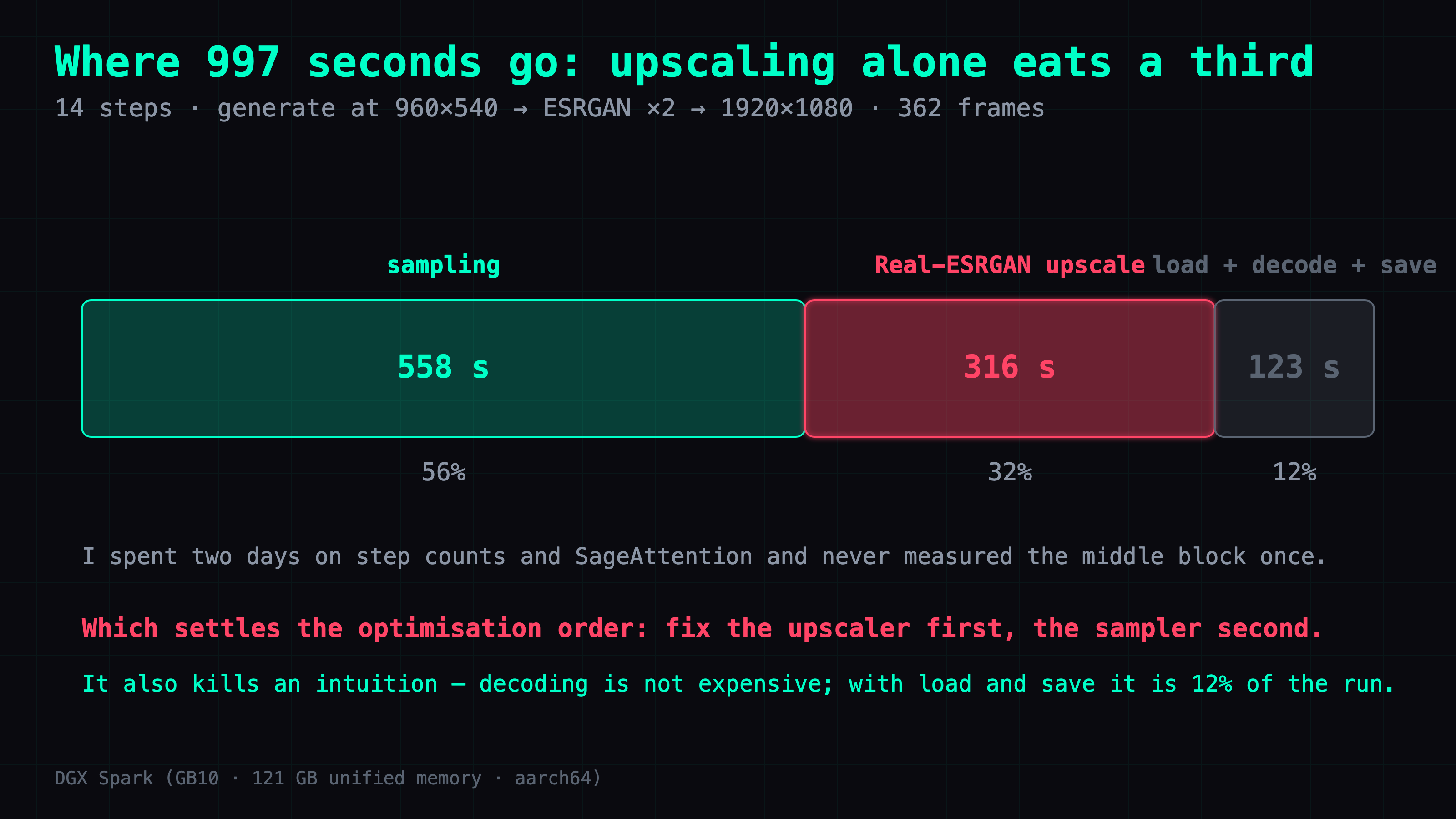
Upscaling alone eats a third of the run, and across two days of tuning step counts and swapping in SageAttention I never measured it once.
The bottom row kills a common intuition too. "VAE decode is expensive" is wrong here: model loading, both VAEs and the video encode add up to 123 s together, less than half of what the upscaler costs on its own.
So: fix the upscaler first, the sampler second.
SPAN upscales the same 362 frames 6.4x faster than Real-ESRGAN
NVIDIA's Video Super Resolution cannot be installed on this machine at all — evidence for that in the next section — so instead of the vendor path I went to the lightweight architectures supported by spandrel, a library that loads a wide range of upscaling model formats, and picked SPAN.
Same 362 frames, 960x540 to 1920x1080, on the same machine. The column to read is the middle one:
| Upscaler | Seconds | Model size |
|---|---|---|
| Real-ESRGAN x2plus | 316.0 | 64 MB |
| SPAN | 49.2 | 4.3 MB |
| Bilinear stretch (baseline) | 15.4 | — |
That last row is not an upscaler competing with the other two — it is the floor. Reading 362 frames, resizing them and writing them back costs 15.4 s no matter what you use, so I subtracted it from the first two rows. What is left in those rows is what the upscaler itself costs.
6.4x faster, from a model 15x smaller.
The full ladder: 1,477 s down to 741 s, half the time for two switches
Every row below is measured except the last one. Compare rows two and four — they differ in exactly one thing, the upscaler.
| Steps | SageAttention | Upscaler | Total |
|---|---|---|---|
| 20 | off | Real-ESRGAN | 1,477 s |
| 14 | off | Real-ESRGAN | 1,263.5 s |
| 14 | on | Real-ESRGAN | 1,010 s |
| 14 | off | SPAN | 981.2 s |
| 14 | on | SPAN | 741.0 |
Rows two and four: 1,263.5 down to 981.2, a saving of 282.3 s (22.3%) from swapping the upscaler and nothing else.
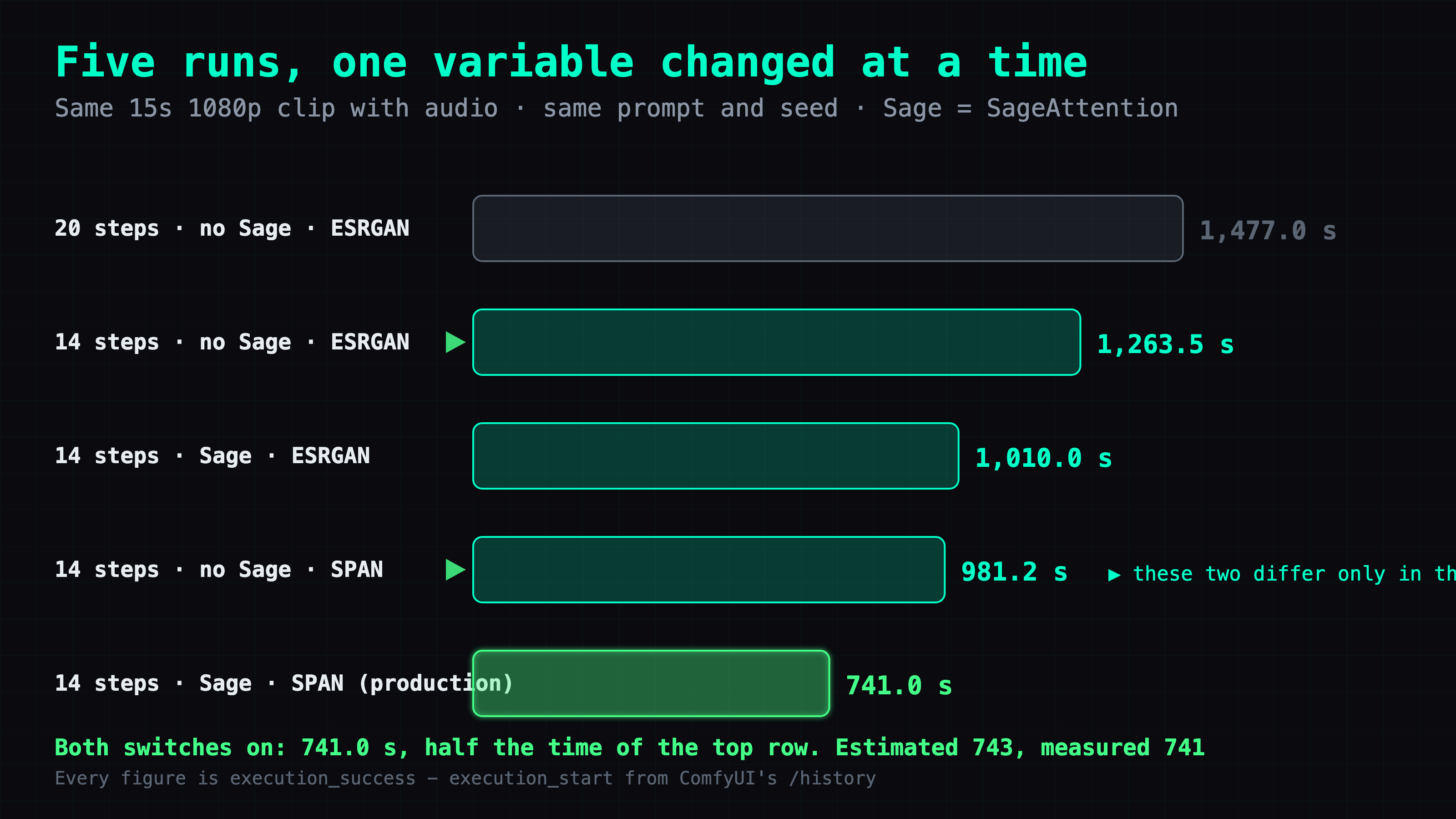
The bottom row is the production configuration, both switches on. For a while that cell was an estimate — multiply the two savings and you land near 743 s — and an estimate does not belong in a column of measurements. So I went back and ran it: 741.0 s, with execution_cached=0 so nothing was served from cache. The estimate was off by two seconds.
I later ran the same configuration once more to change the dialogue, and got 731.0 s. So run-to-run spread on this cell is about 1.4% — do not read a few seconds as a signal.
That run's output is the clip below. I gave it a line from this article to say:
🔊 Sound on. The actual output of the production configuration — 14 steps, SageAttention, SPAN; this run took 731.0 seconds. The dialogue is in Simplified Chinese, because Traditional characters make H3 fall apart mid-sentence.
Episode 5 in the second half is the story of why that measurement took so long to happen.
One more gap worth knowing about before you copy this: I compared SPAN and Real-ESRGAN output on a phone screen and could not tell them apart. I have not compared them side by side on a large display. I kept the Real-ESRGAN files in place, so switching back costs one node change.
The same clip on three machines: 314 / 741 / 1,383 seconds
Same model, same 15.08-second 362-frame 1920x1080 clip with audio, each machine running the config I actually ship on it:
| machine | released | config | seconds | vs 5090 |
|---|---|---|---|---|
| RTX 5090 | 2025 | 14 steps · SageAttention · RTX VSR | 314.0 | 1.0x |
| DGX Spark (GB10) | 2025 | 14 steps · SageAttention · SPAN | 741.0 | 2.4x |
| Modded RTX 2080 Ti 22G | 2018 | 20 steps · SageAttention · RTX VSR | 1,383 | 4.4x |
Eight years of hardware is worth 4.4x on this particular job — and all three finish.
⚠️ This is not a single-variable comparison. It is three shipped configs. The biggest mismatch is step count: the 2080 Ti run is 20 steps while the other two are 14. Going 20 to 14 measured 14.5% faster on the GB10, so the 2080 Ti would be quicker at 14 — I have not run it.
Video Super Resolution cannot be installed on aarch64, and NVIDIA says there is currently no plan to change that
Four layers, each one enough on its own.
The wheel does not exist. A wheel is the prebuilt package format pip installs. pip download nvidia-vfx fails on aarch64. NVIDIA's own index carries exactly two platforms: x86_64 Linux (manylinux_2_27_x86_64.manylinux_2_28_x86_64) and Windows amd64. Nothing for ARM.
The source is public, but building it gets you a loader with nothing to load. I had this layer wrong at first; this is the corrected version.
NVIDIA does publish Maxine-VFX-SDK, so "there is no source" is simply false. But open nvvfx/src/NVVideoEffectsProxy.cpp and you see what that source is:
#define nvLoadLibrary(library) dlopen("lib" library ".so", RTLD_LAZY)
static const HINSTANCE NvVfxLib = nvLoadLibrary("NVVideoEffects");
... nvGetProcAddress(getNvVfxLib(), "NvVFX_CreateEffect");
Every API call is a dlopen plus a dlsym. What is public is a shim. The effects themselves live in libNVVideoEffects.so, which is closed, ships only inside the wheel, and only for x86_64. Compile the shim for aarch64 and it will happily go looking for something this platform does not have.
Unpacking the x86_64 wheel shows what the shim is reaching for: I unpacked the x86_64 wheel to check. nvidia_vfx-0.1.0.1-cp312-abi3-manylinux_2_27_x86_64.whl is 597 MB and 39 files, and zero of them are compilable sources. What is inside is libnvinfer.so.10 (TensorRT, NVIDIA's inference runtime), libnvidia-ngx-vsr.so.1.8.2 (45 MB, which is VSR itself), a set of libnpp*.so.12 image-processing libraries, and five .py files that are a thin binding layer over the binaries. The other repo, NVIDIA-Maxine/nvidia-vfx-python-samples, is sample applications — a different thing again from the SDK source above, and neither one contains the effect implementations.
Withholding it is the design, not an oversight. I went looking for libnvidia-ngx-vsr.so on the machine itself, in case the driver shipped it. It is nowhere. What does exist is /usr/lib/aarch64-linux-gnu/libnvidia-ngx.so.580.159.03, and that is the loader, not the feature. Quarkslab's reverse engineering of this stack states it flatly: on Linux the libnvidia-ngx-dl{feature}.so files are "not publicly provided". ⚠️ They were looking at older NGX driver files rather than this wheel, but it matches what I found on the machine — the driver ships the loader, the feature comes from somewhere else, and that somewhere else is x86_64 only. The driver ships the thing that would load VSR, and does not ship VSR. That is not a missing install. That is the design.
Officially, there is no plan. An NVIDIA employee posting as aniculescu answered the DGX Spark forum thread "No nvidia-vfx wheel for DGX Spark" (2026-04-01) with "There is currently no plan to add NVIDIA VFX support on Spark". That thread started exactly the way mine did — someone installed Comfy-Org/Nvidia_RTX_Nodes_ComfyUI on a Spark and hit the missing wheel, filed as GitHub issue #9.
Sort this out before you go searching. Four NVIDIA products have confusingly similar names, and only one of them is the thing in this section:
- Maxine / Video Effects SDK, the
nvidia-vfxpackage — Linux and Windows, x86_64 only. This is the one. - RTX Video Super Resolution — a consumer driver feature, no batch API to call.
- RTX Video SDK — Windows only.
- Maxine NIM, now branded AI for Media — a separate release line that runs on cloud, datacenter and workstation.
Three traps specific to this machine
Memory can only be read with free -g. GB10's nvidia-smi returns [N/A] in the memory column. That is not broken and it is not zero: with unified memory there is no separate block of video memory to report, so there is no number to print. I stared at nvidia-smi for a while assuming it was a permissions problem.
Swapping ComfyUI instances means waiting for memory to actually drain. After killing an instance holding 72 GB, do not kill it and sleep 10 before starting the next one. That 72 GB will not have been released yet, and the new instance loading on top of it pushes the machine into an out-of-memory kill. Poll free -g until there is genuinely enough free, then start. This is episode 5 below, and it cost me the machine for five minutes.
Do not add LD_LIBRARY_PATH=/usr/local/cuda-13.2/compat. The pip build of torch does not need it. I tested it as a single variable and it changed nothing except the number of things that could go wrong.
SageAttention 2.2.0 installs on sm_121 and aarch64 straight from the wheel
The community advice for sm_121 is that you have to build SageAttention v3 with compute_121a. That was not my experience. Version 2.2.0 installs directly from the wheel under torch 2.13.0+cu130 on this machine and works.
It takes 20.1% off the full pipeline (1,263.5 s to 1,010 s), or 31.6% if you compare like for like against the stage it actually touches. The RTX 5090 in the sibling article measured 18.8% for the same change, so two different chips agree on the rough size of the win.
Deep dive: the calls I got wrong
The rest of this is the working record: five episodes of what I expected, what I did, and where the expectation turned out to be wrong. Skip it and the configuration above still works.
1. Measuring the upscaler without running the pipeline
What the problem was. A 997-second total. I knew the upscaler was part of it and had no idea how big a part.
What I expected to do about it. Run the whole pipeline twice, swap the upscaler between runs, subtract. That is 34 minutes for the first answer, and another 34 for every candidate after it.
What I actually did. The upscaler eats decoded frames and does not care how those frames were produced. So skip generation entirely and feed it a finished clip:
LoadVideo -> GetVideoComponents -> ImageScale(960,540)
          -> [upscaler under test] -> CreateVideo -> SaveVideo
Whether it worked. It worked. Three variants measured in 15 minutes instead of an afternoon: bilinear 15.442 s, Real-ESRGAN 331.466 s, SPAN 64.626 s.
Where that expectation was wrong. I believed that measuring one stage requires running the whole pipeline. It does not. Any stage that does not care about its upstream can be lifted out and weighed on its own, and a ComfyUI graph is full of nodes like that — the constraint was in my head, not in the graph.
2. The negative-103-second VAE
What the problem was. I wanted the time distribution and had only the total.
What I expected to do about it. Subtract the two pieces I knew from the total. I put the cold model load — reading 38 GiB of weights off disk the first time — at 211 s from memory, not measurement; sampling comes straight out of the logs; whatever was left is "VAE plus upscale plus encode", about 228 s.
What I actually did. Used the trick from episode 1 to measure Real-ESRGAN directly instead of leaving it inside that lump.
Whether it worked. It failed, and it failed loudly. Real-ESRGAN alone measured 316 s, which is more than my estimate for the entire remainder. Subtract it and the VAE stage comes out at negative 103 seconds. I handed the table to Codex to fill in and it refused to write that number down, on the grounds that the 228 s estimate and this direct measurement cannot both be true. That was the right call. The wrong version would have been printing a negative number with a "possible measurement error" footnote; the right one is declaring the two datasets mutually exclusive and resolving the contradiction before either goes in a table.
Where that expectation was wrong. The decomposition method itself was fine. The broken part was the 211 s cold-load estimate — never measured, and holding up the entire table. One directly measured cell invalidates a table built on estimates, and the question to ask is not "which number do I like" but "can these two coexist".
3. I got the VSR verdict right with the wrong yardstick
What the problem was. Does the GB10 support NVIDIA's Video Super Resolution or not?
What I expected to do about it. Read the official support list. One lookup, done.
What I actually did. Read the old Maxine SDK's install_feature.sh, which lists only datacenter cards (T4, A2, A10, A16, A40, L4, L40, A100, H100), and concluded GB10's compute capability was out of range.
Whether it worked. Right conclusion, wrong reason. The current nvidia-vfx wheel supports Turing through Blackwell — I later installed it successfully on a 2018 RTX 2080 Ti. Compute capability was never what blocked GB10. The CPU architecture was. From the same round of checking I also got a fact flatly wrong in the other direction: I wrote that "GX10's driver 580.159.03 falls just short of 580.82", when 580.159 is greater than 580.82. The driver requirement had actually passed.
Where that expectation was wrong. I treated "check the support list" as one action when it is two separate questions: which list, and which release line. A wrong yardstick that happens to hand you the right conclusion is worse than a wrong conclusion, because you keep the wrong understanding — and the wrong understanding is what fails you on the next machine. I carried it to the 2080 Ti and got that one backwards.
4. I lost a flag while measuring the SPAN total
What the problem was. The post-SPAN total was still an estimate (997 minus 267, about 730) and I wanted a measured number.
What I expected to do about it. Run the pipeline once.
What I actually did. Wrote a script that stops the inference server, starts ComfyUI, submits the workflow and reads the timestamps back from /history, which is ComfyUI's completed-job endpoint.
Whether it worked. It produced 981.243 s, and I nearly filed it. Then I read the startup banner and saw Using pytorch attention. My script was missing --use-sage-attention, so 981 is the number for PyTorch's built-in attention (SDPA), not for the production configuration. Compared against 1,010 s — the run that did have SageAttention on — it would have said "SPAN only saves 3%". The correct comparison is 1,263.5 s, the Real-ESRGAN baseline that also had no SageAttention: 282.3 s, 22.3%, which agrees with the 267 s predicted back when I measured the upscaler on its own.
Where that expectation was wrong. I believed a control run needs "same job, same seed". What actually has to match is the whole launch command. One missing flag put the two runs on two different attention implementations, and that difference is worth 20% — bigger than the 22% I was trying to measure. Machines with less automation are more exposed to this, because every launch is typed by hand and hands drop flags.
5. Re-running it, I took the whole machine down
What the problem was. Episode 4 had to be run again, this time with the flag.
What I expected to do about it. Kill the old ComfyUI, wait a moment, start the new one.
What I actually did. The script ran pkill and then sleep 10.
Whether it worked. It failed, and this is the expensive one. The old instance held about 72 GB of unified memory, ten seconds is nowhere near enough for the kernel to reclaim that, and loading the new instance on top drained the machine to the point where the kernel started killing processes to get memory back. The process it picked was tailscaled, which is how I reach this machine, so my SSH session dropped for four and a half minutes. The cascade also took out user@1000.service, the per-user session manager. /run/user/1000 disappeared with it, so every systemctl --user command returned "Failed to connect to bus" and the inference server could not be restarted at all. The fix:
sudo systemctl reset-failed user@1000.service
sudo systemctl start user@1000.service
That brings the runtime directory back and the inference server starts normally again.
Where that expectation was wrong. I believed releasing 72 GB takes a fixed amount of time, so a fixed sleep 10 covers it. It takes a variable amount of time, and the only correct way to write that step is a loop that polls free -g until enough is free. There is a second thing I had wrong: I assumed the kernel kills the process holding the most memory. It does not necessarily, and here it picked the one process that was my only way into the machine.
Loose ends
- Cache-DiT is measured but not deployed. It is a caching layer for diffusion transformers and it took 9.3% off (996.956 s to 903.990 s). A dry run confirmed it touches neither torch nor triton and coexists with Spectrum. It is sitting in a quarantine directory, and deploying it amounts to putting it back.
- Dialogue quality at 14 steps is unverified. I compared the picture only; I never listened to 14 against 20 side by side.
FAQ
- Why can I not install NVIDIA Video Super Resolution on a DGX Spark?
- The nvidia-vfx package publishes wheels only for x86_64 Linux and Windows amd64 — nothing for ARM. NVIDIA does publish the Maxine-VFX-SDK source, but what is public there is a proxy layer that dlopens a closed libNVVideoEffects.so, and that library ships only for x86_64. An NVIDIA engineer has said on the DGX Spark forum that there is currently no plan to add support. This is an architecture limit, not a driver or performance question.
- How much faster is SPAN than Real-ESRGAN for upscaling video frames?
- Upscaling 362 frames from 960x540 to 1920x1080 on a GB10 took 316.0 seconds with Real-ESRGAN x2plus and 49.2 seconds with SPAN, both with the fixed read-resize-save cost already subtracted. That is 6.4 times faster from a model 15 times smaller: 4.3 MB against 64 MB.
- Why does nvidia-smi show N/A for memory on a GB10?
- GB10 uses unified memory, so the CPU and the GPU share one pool and there is no separate block of video memory to report. The column is not broken and it is not zero. Read memory with free -g instead.
- Do I need --cache-none when benchmarking ComfyUI?
- Yes. ComfyUI keys its execution cache on node inputs, so resending the same prompt and seed makes the whole graph hit cache and report 0.00 seconds with no error at all. Without --cache-none you get a number that looks wonderful and means nothing.
- Is it faster to generate at 1080p directly or to upscale from 960x540?
- Upscaling is faster, which is the opposite of what it sounds like. On a roughly 5-second test clip at 20 steps with the same seed, native 1344x768 took 637 s while generating at 960x540 and upscaling 2x with ESRGAN took 349.9 s — 1.82x faster with a larger output. The sampling canvas shrinks far more than the upscaler costs. That comparison is a short clip at 20 steps, not the 15-second 14-step pipeline, so read it for direction only.
- Does SageAttention work on sm_121 and aarch64?
- Yes. SageAttention 2.2.0 installs straight from the wheel under torch 2.13.0+cu130 on a GB10, even though the common advice is that sm_121 needs a v3 build with compute_121a. It took 20.1 percent off the full pipeline, from 1263.5 s to 1010 s.
- How many sampling steps does MiniMax-H3 need?
- The shipped template uses 20. Dropping to 14 measured 14.5 percent faster on a GB10, from 1477 s to 1263.5 s, with no quality difference I could see in the picture. The gap in that check is dialogue: this is a talking pipeline and I never compared speech quality at 14 steps against 20.
Read next
- 2026-09-14[Video] MiniMax H3 Super Acceleration on a DGX Spark: 2x native cold, 3.14x warm
Drafting with MiniMax-H3 and refining with LTX-2.5 takes 118.8 s on a DGX Spark against 237.7 s native, and 73.3 s warm. Full ComfyUI setup, and the version set it needs.
- 2026-09-14[DGX Spark] Two hard power-offs, reproduced on purpose — the fix, and why we turned it off again
A DGX Spark cut power twice under sustained video generation. I reproduced it on purpose, logged the curve off-box, and stopped it with a 2200 MHz clock cap.
- 2026-06-01[Benchmark] NVFP4 shrinks a video model 33% on a DGX Spark — with zero speed gain
NVFP4 took a distilled Sulphur 2 (LTX-2.3) video model from 29 to 19.5 GB on a GB10 DGX Spark with no quality loss and — since video is compute-bound — no speed gain (if anything a hair slower).
- 2026-11-04[DGX Spark] DGX Spark and GX10 prices in Taiwan: up 80% in a year, flat since August
GB10 prices in Taiwan, Nov 2025 to Nov 2026: ASUS GX10, MSI EdgeXpert and DGX Spark up 47-80%. Cheapest ways to buy, the 64GB model, RTX Spark vs GB10.
Don't miss the next one
Subscribe, and you won't.
One-click unsubscribe anytime.