AI Agent Life, from Zero · part 12
[Agent 101 #12] Reach your home AI agent from anywhere: Muninn, a private iOS app over iroh P2P
❯ cat --toc
TL;DR
Hermes is great while you're at your desk. Step outside and it's gone. Bridging through Telegram works, but it's a setup chore, it isn't your own interface, and every message hops through a third-party server. Muninn is an iOS app built for Hermes: give your agent one command, scan a QR, and your phone connects straight to your home machine — over an encrypted iroh P2P tunnel with no server in the middle. The TestFlight public beta is open: tap one link on an iPhone and install.
The problem: your assistant can't leave the house
You've got Hermes running. It searches, runs tasks, pings you with updates — as long as you're sitting at the machine.
Walk out the door and it's gone.
Not literally gone — you just can't reach it. Earlier in this series we bridged it through a Telegram bot so the phone could send it messages. That works, but a few things bug me about it:
- Setup is a chore. Wiring a bot through a messenger means tokens, webhooks, and an allowlist — change one piece and you redo the rest.
- It's not your app. You're chatting inside Telegram. It looks like you're texting a bot, not using your assistant's app.
- Every message hops through someone else's server. Not unsafe, exactly — just a stranger in the middle of every exchange.
Muninn fixes all three.

Dead-simple install: three steps, five minutes
Before you start, you need:
- An iPhone (iOS 16 or later)
- Hermes already running on your home machine (Part 4 covers it)
Step 1 — install the app. Tap this link and grab Muninn from TestFlight:
Install Muninn via TestFlight →
Tap it → install TestFlight (if you don't already have it) → install Muninn. No form, no handing me your Apple ID, no waiting for me to add you.
Step 2 — have your home Hermes set up the bridge. Tell it (English or Chinese, it doesn't care):
Clone
https://github.com/coolthor/hermes-bridgeinto~/hermes-bridge, run itsinstall.sh, then show me the pairing QR.
Just paste it — Hermes clones the repo and installs the bridge itself, so you don't need to know what the commands do. When it's done, it prints a QR on the computer.
Step 3 — scan to pair. Open Muninn → Connect → scan that QR → type in the short code that pops up on your phone, and you're connected.
Next time you open the app it reconnects on its own — no rescan. The whole thing is one link, one sentence, one QR.
What you can do now
Out of the house, you get the same thing you'd get at the desk:
- Chat — type a message and get a reply, with full Markdown rendering instead of one cramped line.
- Send photos and files — pick straight from your camera roll; hand it documents to work on, or images to look at (the image part only helps if your model can actually see images).
- Voice notes — record a clip and send it; Hermes's built-in speech-to-text transcribes it for the agent.
- Receive its output — images, video, and files come straight back to the phone for preview. (Displaying them is built into Muninn; whether the agent can actually generate images or video depends on your own Hermes setup — you need an image/video model or tool wired in.)
- Switch between agents — if you run several assistants at home, hop between them right in the app.
- It asks before it acts — when an agent wants to do something risky, you get an Allow / Don't Allow prompt on the phone — one tap to approve or block.
- See what it's actually doing, not just chat — the part Telegram can't give you: each agent's conversation sessions, your scheduled jobs (cron), and the board (Running / Blocked / Done, see Part 13) — all visible from the phone.
The interface is a Claude-style message list: each message stands on its own with a timestamp. It reads like an assistant app, not a chat room.
How it works (skip this if you don't care)
This is just the explanation of why it's cleaner than a bot — nothing here to configure.
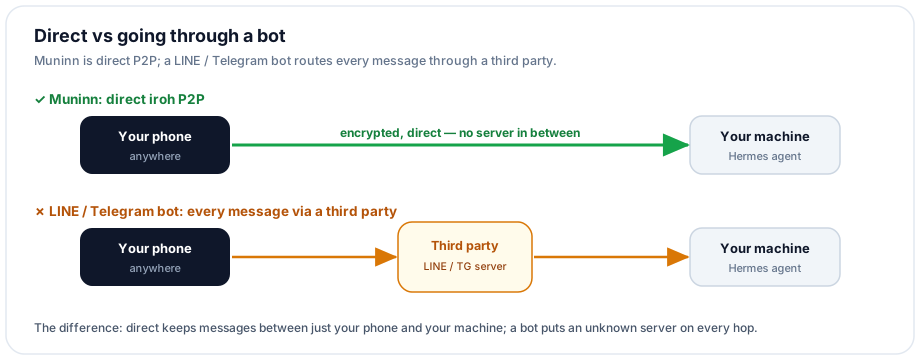
In short: Muninn is direct; a bot is a relay. With a LINE or Telegram bot, every message goes to their server first, then gets forwarded back to your machine. Muninn connects your phone and your home machine directly, peer to peer (P2P) — no third party in between.
The transport is iroh, a P2P library: every node has its own identity (a NodeId), and the connection is end-to-end encrypted and authenticated between those two identities — nothing routes through a cloud. iroh first reaches the peer through a public relay while it tries to hole-punch a direct path; it upgrades to direct when that works, and falls back to the relay (one extra hop, still works) when it doesn't. Having IPv6 (5G usually does) makes the direct upgrade far more likely — in my own testing, 5G got a direct path even behind CGNAT (carrier-shared IP).
What if someone else scans your QR? Nothing. The QR is a time-limited invite, not a key: after scanning, you still have to type the code shown on your phone before your NodeId joins the allowlist. A stranger's phone presents a different NodeId you never approved, so a grabbed QR is useless.
⚠️ Pairing a device gives it access to your assistant, which can run commands on your computer. Pair only your own devices.
Done with Muninn? Here's how to remove it
It's as easy as installing — just tell Hermes.
Unpair a single phone
The fastest way is right in the Muninn app: tap the gear (top-right) and unpair the agent. It also tells your machine to drop that device from the allowlist.
To do it from the computer, or clear every paired phone at once, tell Hermes:
List the phones paired with hermes-bridge, then remove my old one.
It runs the bridge's scripts/run-bridge.sh list / revoke to take that NodeId off the allowlist.
Remove the bridge completely
Stop hermes-bridge, then delete
~/hermes-bridgeand~/.hermes-bridge.
That clears the binary, the allowlist, and the key. Then just delete the Muninn app from your phone.
Heads up: this is early — it's just me and Claude building it, and the app's UI is currently in Traditional Chinese (English is on the list). If something's missing or breaks, tell me. How fast it improves depends on how much time and energy I've got left 😄 You don't have to just take my word for it, though: the half that runs on your machine (the bridge) is open source — the code's on GitHub — so you can read exactly what it does.
After this, your assistant stops being stuck at home and travels with you. There's no third-party server in the path — just your phone and your home machine, encrypted end to end.
FAQ
- What is iroh, and do I have to set anything up?
- No. iroh is the layer that lets two devices punch through NAT and talk directly, peer to peer — think of it as the thing that gets your phone and your home machine to shake hands without a middleman. install.sh handles it; you never see it, you just see the connection work.
- Once I have Muninn, can I drop LINE and Telegram?
- Yes. Muninn is a dedicated app for Hermes — its own chat UI, image and file transfer, voice. It does more than a Telegram bot, and it's the same app whether you're at home or away. No third-party messenger relaying your conversations anymore.
- What happens if someone else scans my pairing QR?
- Nothing. The QR is a time-limited invite, not a key. Your phone's NodeId only joins the allowlist after you confirm it, so a stranger's phone presents a different NodeId you never approved — a grabbed QR is useless.
Read next
- 2026-06-24[Agent 101 #13] See what your fleet of AI agents is doing — from your phone: Muninn adds a Kanban board
Hermes has a built-in Kanban, but on your phone all you get is Telegram's plain text. Muninn now pulls that board onto the phone: Running / Blocked / Done columns — who's working on what, which card got blocked — at a glance. Zero backend, pure P2P.
- 2026-07-21[Agent 101 #16] Hermes config health check: 5 silent gotchas that make your assistant act weird
Part 11 said a haywire assistant is usually a broken car (tools, config, memory), not a dumb engine (the model). This is that checklist: a context_length set at the wrong level silently compresses early, Qwen thinking left on runs 10x slower, an MCP tool that connects but every call fails, and a sib running a different model than you think. Five real config gotchas, each with a check you can hand to your agent to run on itself, plus the fix.
- 2026-07-01[Agent 101 #15] Hermes /learn: I had a local 27B write its own reusable skill
Hermes has a /learn command that turns 'something you just did' into a reusable skill — a SKILL.md. I wired it into my own fleet: one Kanban card, a local 27B running on a modded 2080 Ti, and about 3 minutes later it handed back a clean, spec-compliant skill — plus two implementation details the docs don't spell out (slash command vs. dispatch, and where skills actually live). A plain-language walkthrough of what /learn does, how to use it, and where its limits are.
- 2026-06-29[Agent 101 #14] One spec, three assistants, three Tetris games: a Hermes Kanban dispatch test
After raising a fleet of assistants, I gave them the same one-line 'make a Tetris game' spec — no details at all — one card each, and let them each write a web Tetris in a single shot. I touched zero lines of game code; I only published the result. The surprise: from that one line, the Hermes harness plus a local model I tuned myself (on a modded 2080 Ti) filled in things I never asked for — a ghost piece and wall-kick — in one shot. You can play all three.
Don't miss the next one
Subscribe, and you won't.
One-click unsubscribe anytime.