Ask AI Right · part 8
[Ask AI Right #8] How to Hand a Task to ChatGPT So It Runs by Itself: Tell It These Four Things
❯ cat --toc
TL;DR
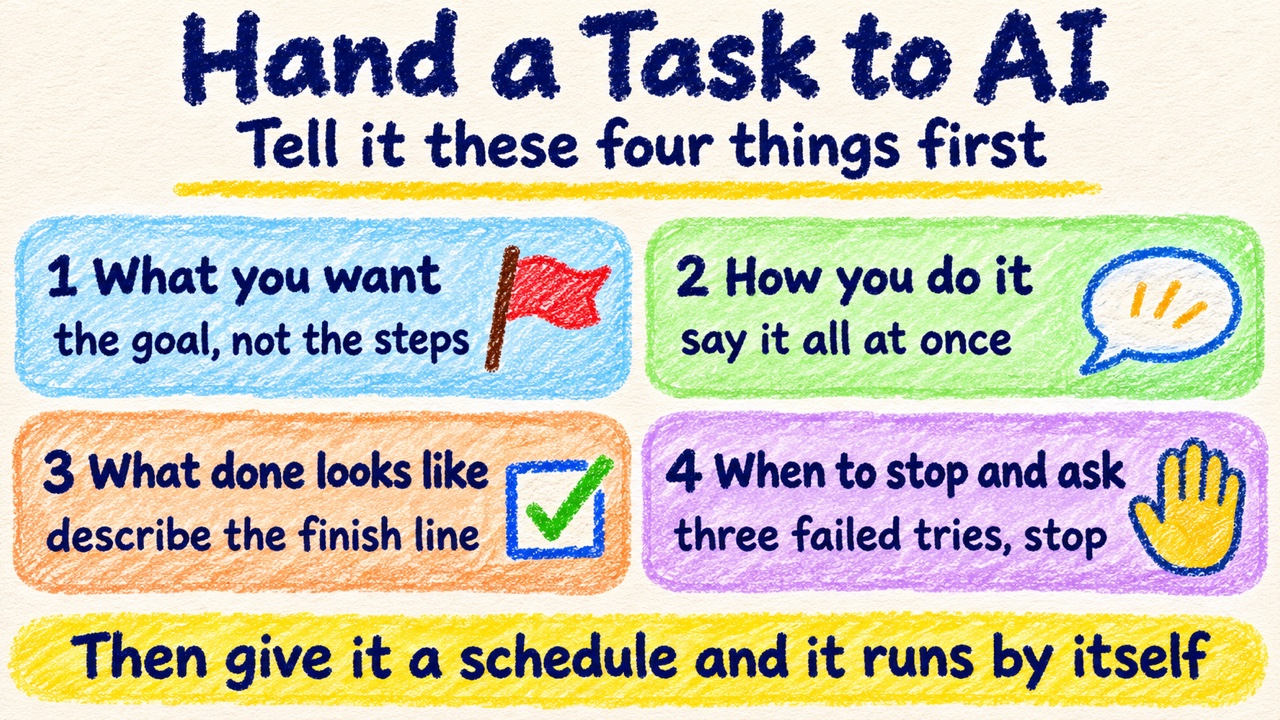
To give ChatGPT a recurring task, tell it four things: what you want at the end, how you usually do it, what finished looks like, and when to stop and ask you. This post walks through a real one, three AI news items every morning. I said the four things, had it say the plan back, ran it once, then put it on a 9:30 schedule. The trial run caught something I had left unclear: all three stories came from the vendors' own announcements.
Preface
Say you hire a part-timer and leave them alone in your shop for two hours. Before you walk out, you tell them a few things. What has to be finished today. How checkout normally works. What "tidy" looks like when you get back. And: "If someone wants a refund, don't handle it. Call me."
Those four things are also what an AI needs before you hand it a task and walk away.
There is one difference. A new hire who gets confused will ask. An AI usually won't. It makes a guess and keeps going.
The previous post covered what AI is inherently bad at. This post is about a task it can do, and how to brief it so it runs every day without you. The split between a goal and a process comes from an article on automating with an AI bot. I borrowed the idea and tried it in ChatGPT. The job: find me three new pieces of AI news every morning.
Every step below has the prompt I typed. Don't copy them word for word. Swap in your own task.
A note on the screenshots: I did this first in Chinese, then ran the same conversation again in English to get the images here.
1. Start with what you want at the end
Most people open with steps. "Every morning, find AI news, pick three, write summaries."
It will do that. But it doesn't know why you want them, so it has to guess which three to pick, how long to make them, and who it's writing for.
Here is my first message:
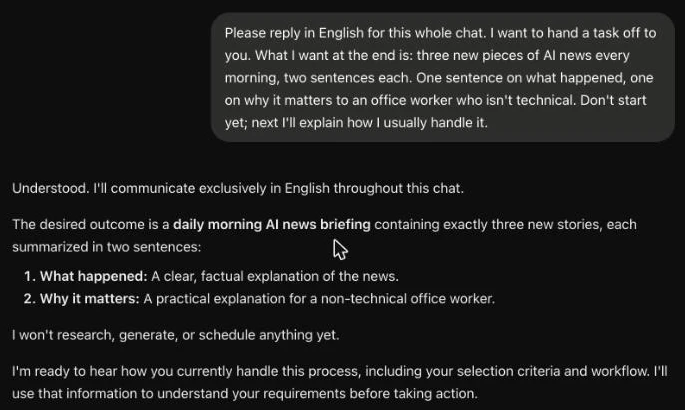
I want to hand a task off to you. What I want at the end is: three new pieces of AI news every morning, two sentences each. One sentence on what happened, one on why it matters to an office worker who isn't technical. Don't start yet; next I'll explain how I usually handle it.
Keep the "Don't start yet." Without it, ChatGPT may go off to find news right away and never hear the rest.
If you can't put the goal into words yet, turn it around:
I want to hand a task off to you, but I can't describe what I want yet. Ask me one question at a time until we can both state the goal.
2. Explain how you usually do it
Next, tell it how you do the job yourself. Don't polish it. Just talk. ChatGPT has a microphone button next to the message box, so you can say it out loud.
Cover your usual order, what you watch for, where the information lives, and which source wins when two of them disagree.
Mine:
Normally I scroll news sites and social media in the morning and open anything about AI. I only read things from the last 24 hours, keep one item per story, and skip vendor promo pieces and sponsored posts. When a news site and the official announcement disagree, I trust the official announcement. Don't start yet. In your own words: what do I want, and how do you plan to do it? Start only after I confirm.
Don't drop the last three sentences.
Its plan had six steps: search, filter by time, remove duplicates, drop promo pieces, cross-check, then pick and rewrite. It also contained two things I never said. It planned to attach a source link to each story, which I wanted and forgot to ask for. And it asked me a question back: what time is "every morning"?
Anything it gets wrong, or has to ask about, shows you where you were unclear.
3. Say what finished looks like, then run it once
AI tends to confuse "I took an action" with "the job is done." Finding three articles doesn't mean they are the three you wanted.
So I described the finish line and asked for one run, with no schedule yet:
That's right. Two more things. What finished looks like: exactly three stories, two sentences each, with a source link. When to stop: if the same approach fails three times to find stories that qualify, stop and tell me where you're stuck and what you tried. Don't pad with old news. Now do today's once so I can see it. Don't schedule anything yet.
The format was what I asked for. Three stories, two sentences each, all with sources.
Then I looked at the sources. All three were the vendors' own announcements, two from Google and one from OpenAI. I had said "skip vendor promo pieces" and also "trust the official announcement," so it used official announcements as the news itself. Left alone, it would have sent me three press releases every morning.
That was my unclear instruction, not its mistake. I added one line:
The format is right. But all three are the vendors' own announcements, and that's on me for being unclear: a story only counts if a news outlet has covered it. Official announcements are only for checking facts. Do it that way next time. No need to redo this one.
4. Tell it when to stop and ask you
The prompt above already includes a stop rule: if the same approach fails three times, stop and tell me where you're stuck.
I add that line because of something that happened on a different job, nothing to do with news. I asked another AI, one I run at home, to write a small game plus its own tests to check that the game worked. All I told it was, "If a test fails, keep fixing it."
One of the tests it wrote was itself wrong, so no change to the game could ever make it pass. It never noticed the test was the problem. It kept changing the game for 272 steps (a step is one action it takes), about 20 minutes. I pointed out the problem once, and it just switched to repeating a different action. In the end I stopped it myself.
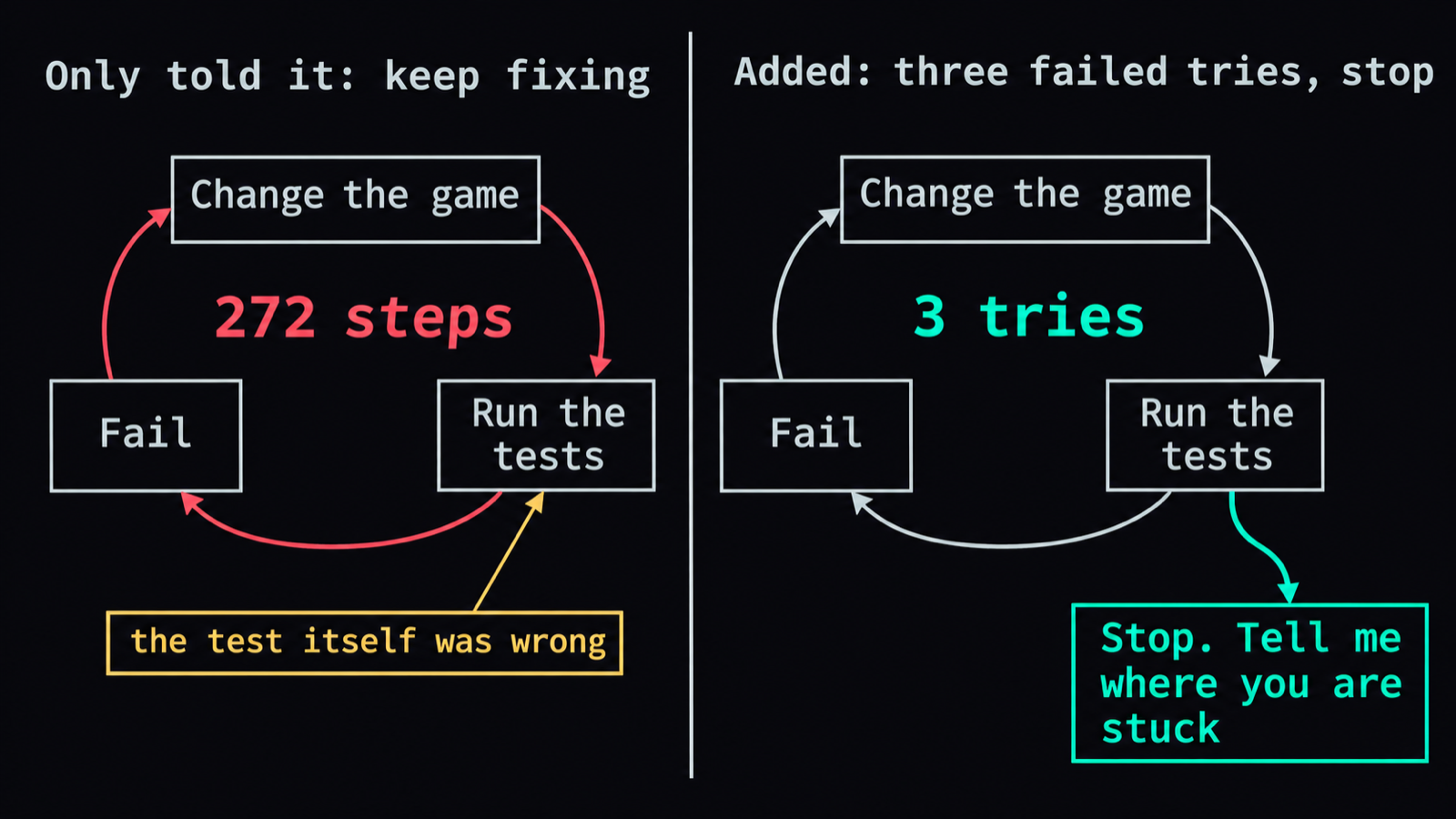
It didn't disobey me.
Besides getting stuck, there is a second case where it should stop and ask: decisions that aren't its to make. I have four standing rules. These always need my OK first: anything that costs money, anything sent out for other people to see, anything deleted or overwritten that can't be recovered, and anything that comes down to my personal taste, like how a title is worded or what content to keep. For anything else that can be undone, it goes ahead and then reports back.
Finally: put it on a schedule
After those four things the task is ready to hand over, but it still runs only when you ask. To make it run by itself, give it a time. ChatGPT calls this a scheduled task.
I test the timer first with something trivial:
Before the real thing, test the timer: in two minutes, tell me what time it is.
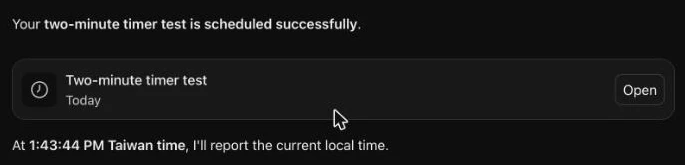
A task card appears in the chat. Two minutes later its status changed to Completed.
Only then did I schedule the real job:
Good. Now put the news task we agreed on onto a schedule: every morning at 9:30. And tell me where I go later to pause or delete it.
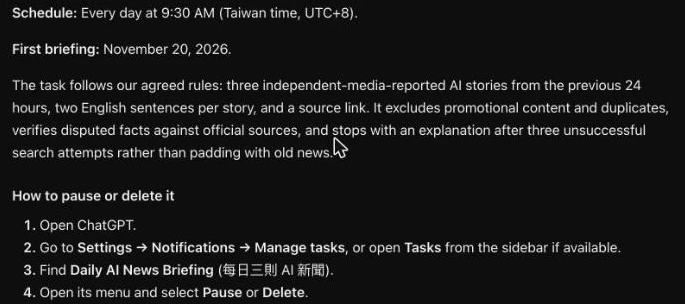
It carried every rule into the task, including the one I added after the trial run.
One last thing: know where the off switch is. In my ChatGPT there's a clock icon in the left sidebar that opens the scheduled list. Each task has a three-dot menu with Pause, Run now, Edit, and Delete.
Two caveats. OpenAI changes which plans include scheduled tasks from time to time, so check OpenAI's help page. And ChatGPT saved my added rule to its memory. When I opened a new chat later, it still applied that rule. To make it forget, delete that memory under Personalization in Settings, and delete the chat where you said it too.
Try one today
Pick something small you repeat every week, where a mistake is easy to undo. Then tell ChatGPT, in this order:
- What I want at the end.
- How I usually do it, and where the information is.
- What finished looks like.
- Stop after three failed tries of the same approach. Ask before spending money, sending anything out, or deleting anything.
- Say it back to me, then do it once while I watch.
- When the result is right, put it on a schedule, and tell me where to turn it off.
FAQ
- How do I get ChatGPT to do a task for me every day?
- Tell it four things in a normal chat: what you want at the end, how you usually do it, what finished looks like, and when to stop and ask you. Have it say the plan back, then have it do the task once while you watch. When the result is right, tell it to run the task every morning at 9:30. It creates a scheduled task and runs it on time from then on.
- Where do I pause or delete a ChatGPT scheduled task?
- In my ChatGPT there's a clock icon in the left sidebar that opens the scheduled list. Every task is listed there, and the three-dot menu beside a task has Pause, Run now, Edit, and Delete. ChatGPT also told me I could ask it in the chat to pause a task. I haven't tried that.
- My AI keeps repeating the same action and won't stop. What do I do?
- Stop it yourself. Don't wait for it to notice on its own. Telling it what is wrong may only make it switch to repeating a different action. Another AI I run went through 272 steps before I stopped it myself, so now I add a rule up front: if the same approach fails three times, stop and tell me where you're stuck and what you tried.
- What should I not let AI decide on its own?
- Four kinds of things should always wait for your OK: anything that costs money, anything sent out for other people to see, anything deleted or overwritten that can't be recovered, and anything that comes down to your personal taste. For anything else that can be undone, it can go ahead and then report back.
Read next
- 2026-04-16[Ask AI Right #7] What AI Does Poorly — Four Landmines to Know Before Using ChatGPT or Claude in 2026
AI is strong, but four things still trip it up in 2026: hallucinations, stale knowledge, short memory, and privacy defaults. Even Anthropic's own lawyers got caught by the first one.
- 2026-04-11[Ask AI Right #4] Why AI Feels Useless to You — Answer Machine vs Collaboration Tool
Same AI, same question, different results. The people who find ChatGPT life-changing and the people who think it's useless are doing completely different things — and the difference is a single mindset shift.
- 2026-04-09[Ask AI Right #2] You Opened AI — Now What Do You Say?
AI isn't Google — you're not searching, you're having a conversation. This article teaches you what to say when you first open ChatGPT, five things you can try right now, and how to adjust when the answer isn't quite right.
- 2026-04-09[Ask AI Right #1] Which AI Should You Use in 2026?
ChatGPT, Claude, and Gemini — the three AI assistants you can start using right now. A no-jargon guide to what each one does best, how much they cost, and how to get started.
Don't miss the next one
Subscribe, and you won't.
One-click unsubscribe anytime.