Ask AI Right · part 3
[Ask AI Right #3] You Don't Know What You Need — Let AI Find It
❯ cat --toc
TL;DR
Most people don't lack the ability to use AI — they don't know which parts of their work can be handed off to AI. The method is simple: describe your daily workflow to AI and let it find the repetitive steps. According to an MIT 2023 study, workers using AI saw an average 37% productivity increase.
Plain-Language Version: Why you think AI isn't relevant to you
AI assistants (ChatGPT, Claude, Gemini) aren't just chatting toys. Their real value is helping you skip the parts of your job you've gone numb to. The problem is, you've been doing them so long you don't even think of them as "things that could be skipped."
This article teaches you one method: let AI tell you which parts of your work you don't actually need to do yourself. No technical background needed — just 5 minutes to describe your day to AI.
Have you ever felt like this?
Your typical workday might look like this:
Open laptop → check email → reply to a few → open project files → make changes based on client feedback → save → rename → export to different formats → send to client → log hours → next project.
You've done this hundreds of times. Each step is "no big deal." Each step "only takes a few minutes." But add them up — how much time do you spend every day on these "no big deal" tasks?
You don't think of it as a problem, because "that's just how work is."
But what if someone told you three of those steps could be done in 30 seconds?
What most people do
Most people ask AI: "What can you help me with?"
AI responds with a list of generic suggestions: "I can help you write articles, translate, make presentations, analyze data..."
You read it and think: "Hm, doesn't really relate to my work." Then you close the tab.
The problem isn't AI's answer. It's your question. You gave it something too vague, so it could only give you something too vague.
A different approach: let AI learn your day
Try this. Open your AI assistant (not sure which? read this), then describe your complete workflow:
"I'm a 3D modeler. Here's my daily workflow:
- Open email, check for client feedback
- Organize their revision requests into a list
- Open Blender, modify the model based on the requests
- After changes, export to .obj, .fbx, and .stl formats
- Name each file with 'ClientName_Date_Version'
- Package and send to client with a note explaining what changed
- Log hours in Excel
Which steps could be done faster?"
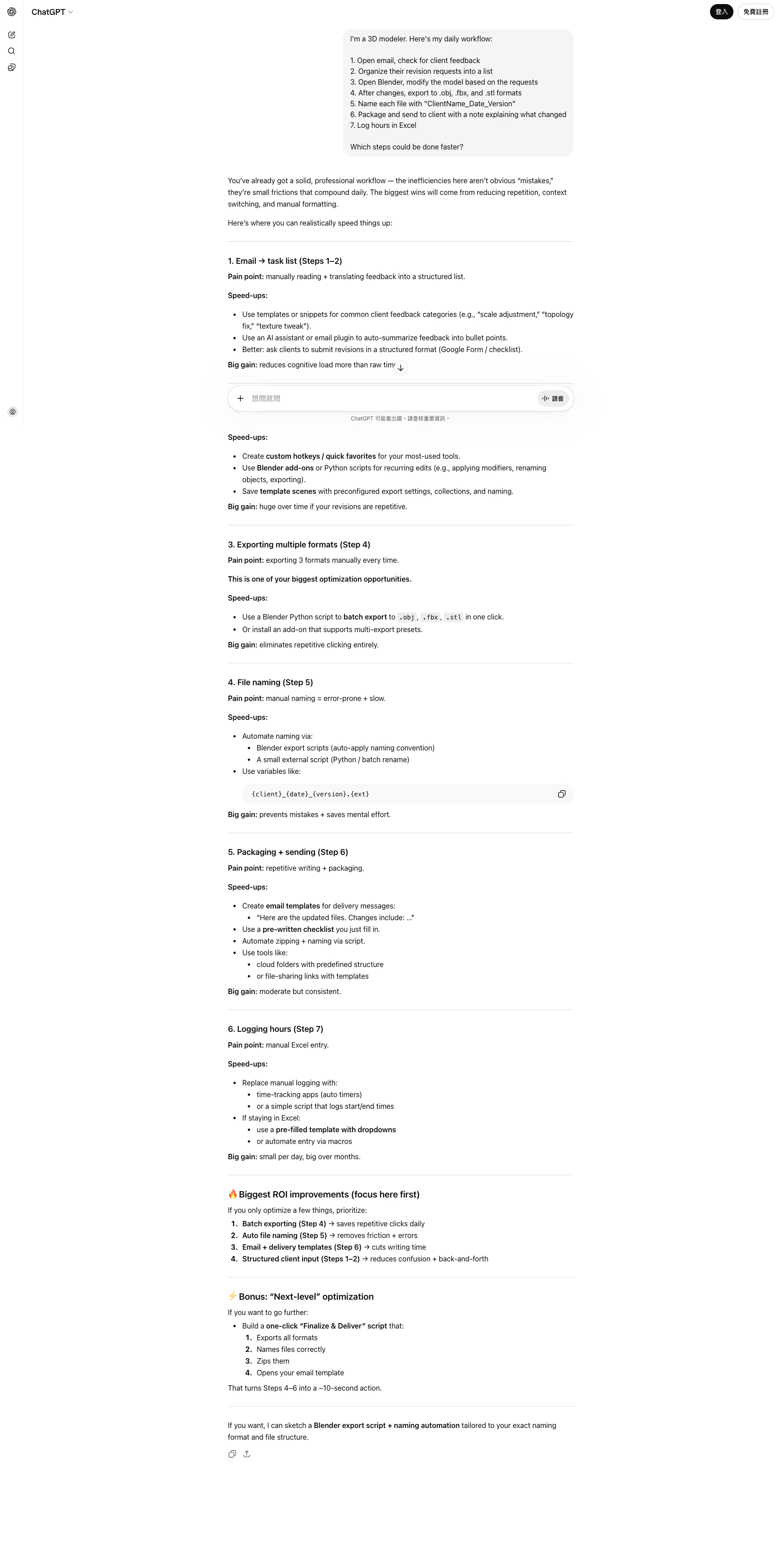
The answer might surprise you. AI won't just say "I can help you write emails." It will specifically point out:
- Step 2: Paste the client email directly to AI — it can organize it into a structured change list
- Step 5: Batch rename tools (macOS Automator or Windows PowerRename) can handle this in one go
- Step 6: AI can write the client reply based on your change notes
- Step 7: Hour logging can be templated and semi-automated
You wouldn't think of these yourself, because you've already accepted them as "part of the job." But AI sees your workflow from the outside — it doesn't have the built-in assumption that "this is just how work should be."
Go deeper: ask "why"
After finding improvable steps, don't stop. Keep asking:
"For step 6, the client reply email takes me 15 minutes every time. Can you write it for me if I give you the change notes?"
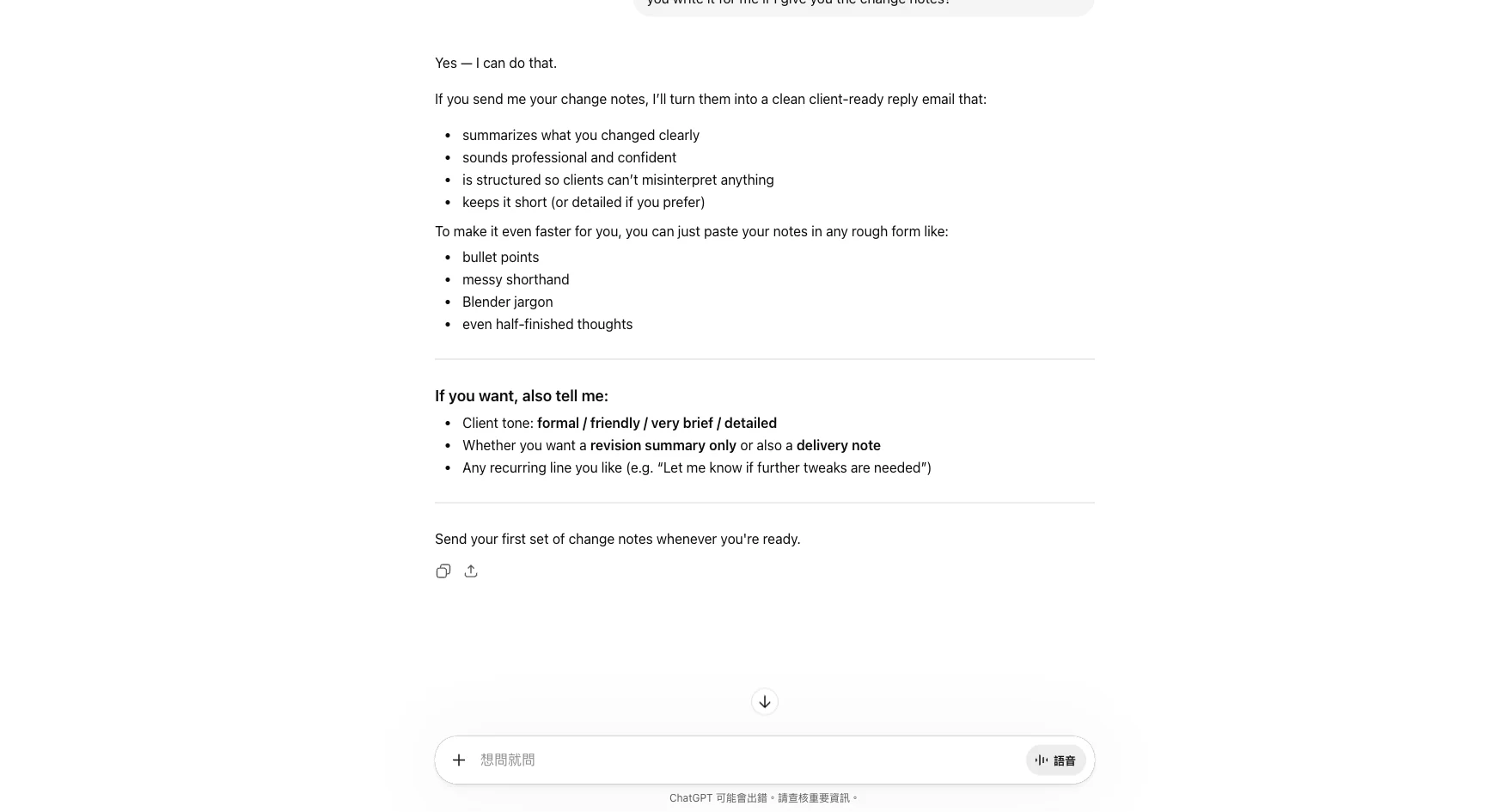
AI will tell you exactly what information it needs, then generate a complete reply email. You just review and send.
15 minutes becomes 2 minutes. That's 13 minutes saved per day. Over 4 hours saved per month.
This isn't AI magic. It's just something you never thought to ask.
Examples for different jobs
Not just designers. Anyone who works at a computer can use this method:
Administrative assistant:
"I summarize 20 emails per day and forward the key points to different people. Is there a faster way?"
Marketer:
"I write 3 social media posts per week and start from scratch every time. Can you give me a few drafts first?"
Accountant:
"At month end, I organize Excel data into a summary report for my boss. Can this be automated?"
Teacher:
"I create one exam per week with multiple choice and essay questions. Can you draft one based on this week's material?"
The question isn't whether AI can do it. It's whether you think to ask.
Your turn
Open your AI assistant right now. Paste this (replace the brackets with your real situation):
"I'm a (your job title). My daily workflow is:
- (first step)
- (second step)
- (third step) ...
Which steps could be done faster? How specifically?"
It doesn't have to be perfect. The more real and specific your description, the more useful AI's suggestions will be.
One sentence from this article
You don't lack AI skills — you lack awareness of which work can be delegated. Describe your day to AI and let it find the opportunities.
Next up: once you've found a need, how do you figure out whether to do it yourself or if a tool already exists?
This is Part 3 of the "Ask AI Right" series. Previous: What to say when you first open AI.
FAQ
- What can AI help with at work?
- AI is best at repetitive text-based work: translating, rewriting, organizing, summarizing, comparing, and drafting. Anything you do daily that can be described in words has a good chance of being done faster with AI.
- How do I know which parts of my job can use AI?
- Write down your daily workflow step by step, then ask AI: 'Which of these steps could be done faster?' It will identify repetitive steps and suggest specific improvements.
- I'm not an engineer. Is AI useful for me?
- Absolutely. Designers, admins, marketers, accountants, and teachers all benefit. AI doesn't require coding skills. If your job involves text processing, data organization, or written communication, AI can help. MIT research shows AI users see a 37% productivity increase on average.
- Will AI replace my job?
- AI is more like a very fast assistant, not a replacement. It can shrink 2 hours of tedious work into 20 minutes, but final judgment, taste, and client communication still require you. People who use AI will replace people who don't, but AI itself won't replace people.
Read next
- 2026-04-14[Ask AI Right #6] The Art of Follow-Up Questions — What to Do When the First Answer Is Too Shallow
The first answer AI gives you is a rough draft, not the final answer. Learn 5 follow-up techniques — adding constraints, asking for comparisons, and letting AI ask YOU questions — to get dramatically better results.
- 2026-04-13[Ask AI Right #5] Before You Build It, Ask: Does This Already Exist?
Your first question to AI shouldn't be 'help me do X.' It should be 'is there something that already does X?' This article teaches you how to use AI as a research assistant — finding tools, comparing alternatives, and verifying they're still alive.
- 2026-04-11[Ask AI Right #4] Why AI Feels Useless to You — Answer Machine vs Collaboration Tool
Same AI, same question, different results. The people who find ChatGPT life-changing and the people who think it's useless are doing completely different things — and the difference is a single mindset shift.
- 2026-04-16[Ask AI Right #7] What AI Does Poorly — Four Landmines to Know Before Using ChatGPT or Claude in 2026
AI is strong, but four things still trip it up in 2026: hallucinations, stale knowledge, short memory, and privacy defaults. Even Anthropic's own lawyers got caught by the first one.
Don't miss the next one
Subscribe, and you won't.
One-click unsubscribe anytime.