Ask AI Right · part 4
[Ask AI Right #4] Why AI Feels Useless to You — Answer Machine vs Collaboration Tool
❯ cat --toc
- Plain-Language Version: Why the same AI feels magical to some people and useless to others
- Preface
- The failure case I see over and over
- What went wrong
- The same task in collaboration mode
- The mindset shift, stated plainly
- What it actually looks like
- What this looks like in other jobs
- Why this feels weird at first
- Try this next time
- One sentence
TL;DR
If you think AI is useless, you're probably using it as an answer machine — one question, one final answer, disappointed. The people getting real value use it as a collaboration tool — describe the goal, ask for suggested approaches, solve the hard parts together in small steps. Same AI. Completely different results.
Plain-Language Version: Why the same AI feels magical to some people and useless to others
I keep seeing the same pattern. One person opens ChatGPT and says "it's useless, the answers are always generic." The next person opens the exact same ChatGPT and says "I couldn't imagine working without it now." What changed? Not the AI. Not the question they're trying to answer. The difference is entirely in how they approach the conversation.
This article is about that difference. It's not a list of prompt tricks, it's a single mindset shift — the moment you stop using AI as an answer machine and start using it as a collaboration tool, everything gets better. I'll walk through a real failure case (a botched image generation) to show what each mode looks like in practice.
Preface
You have a drill at home. You want to hang a picture. Two kinds of people pick up that drill:
Person A holds it up to the wall, pulls the trigger, and hopes a hole appears where they wanted it. When the hole is crooked, they blame the drill. "This drill is useless."
Person B measures where the picture should go, marks the spot with a pencil, taps a small guide hole first, then drills. The hole comes out right. "Best tool I own."
Same drill. Completely different relationships with it. This is also how people use AI.
The failure case I see over and over
Here's a scenario I've watched play out too many times. Someone wants to create a photo of a market booth for a small business — maybe a weekend pop-up, maybe an exhibition stand. They open Gemini (or ChatGPT, or Midjourney — doesn't matter), upload a reference photo of a booth they like, and type:
"Generate a photo like this but with my products: handmade soap, cream color, simple wooden shelves."
They press enter. The AI produces an image. It kind of looks like a booth. But the shelves float in mid-air. The proportions are wrong. A customer standing next to the booth is nine feet tall. The soap bars look like bricks.
They type "fix the shelves." The AI produces a different image where the shelves are attached but the roof is now missing. They try again. Different problems. After four or five rounds, they close the tab.
"This AI image thing is useless."
This is answer machine mode in its purest form: one question, expect a final answer, blame the tool when it fails. Nothing about this is the user's "fault" — they're using the tool exactly the way the interface suggests (just type and get a picture). The problem is that the interface lies about what the tool is good at.
What went wrong
The user skipped every step where they would have thought carefully, and handed those steps to the AI. Look at what they actually asked the AI to figure out, all at once:
- What style of booth fits a handmade soap business
- What material the shelves should be
- What physical proportions are realistic
- What lighting makes the product look good
- What color palette matches the reference without copying it
- How to compose the image for Instagram vs. a business card
The AI has to guess at every one of these, simultaneously, from a seven-word description. Of course the result is random.
The real skill that image professionals have isn't "pressing the generate button." It's knowing which decisions matter and making those decisions consciously. When you hand all of them to the AI at once, you're not collaborating with it. You're hoping it reads your mind.
The same task in collaboration mode
Now watch the same person do the same task, but with the mindset shift:
Step 1 — Let the AI look, not draw. They upload the reference photo and say:
"Don't generate anything yet. Look at this reference photo and tell me: what's the layout, what materials are the shelves made of, what's the color palette, what style would you say this is, and what's the lighting doing?"
The AI responds with an actual analysis: Scandinavian minimalist booth, light oak shelves on a metal frame, neutral cream and grey palette, warm directional lighting from the left side, products at eye level with breathing room between each item.
The user just learned five specific things about the reference that they couldn't articulate before.
Step 2 — Describe the difference. They say:
"Great. My setup is different in these ways: my booth is 2 meters wide (not 4), I'm selling handmade soap so products are smaller, I want a warmer wood tone than that one, and it'll be photographed outdoors in natural light — not a studio shot."
Step 3 — Ask the AI to write the instructions, not the image. Here's the key move:
"Based on everything we just discussed, write me a detailed image-generation instruction (the text I'll paste into Gemini to make the actual image). Include the layout, materials, lighting, proportions, and photography style. Make it specific enough that the result will be physically plausible."
The AI writes a 150-word instruction that includes all the details that were implicit before. The user reads it, sees "metal frame 80cm from the ground" and thinks "oh, I'd rather it be wood" — so they edit that one line.
Step 4 — Generate. They paste the edited instruction into Gemini. The first image comes out reasonable. They tweak two more details and the third image is usable.
Four messages. One usable image. And the user stayed in control of every decision that mattered.
The mindset shift, stated plainly
Answer machine mode: "AI, give me X." Expect X. Get something wrong. Ask for "X but better." Repeat until quitting.
Collaboration mode: "AI, I want to produce X. Before you try, help me figure out what information you actually need to do this well." Then hand over the parts one by one.
The difference is who's driving the process. In answer-machine mode, the AI is in charge and you're evaluating its outputs. In collaboration mode, you're in charge and the AI is doing the specialized thinking at each step.
This isn't about being smarter, or writing better prompts, or knowing any tricks. It's about refusing to hand the AI a steering wheel you should be holding yourself.
What it actually looks like
I tested both modes on ChatGPT with the same task — "write me an Instagram post for my new coffee shop" — to show the contrast.
Answer machine mode: one sentence, one shot.
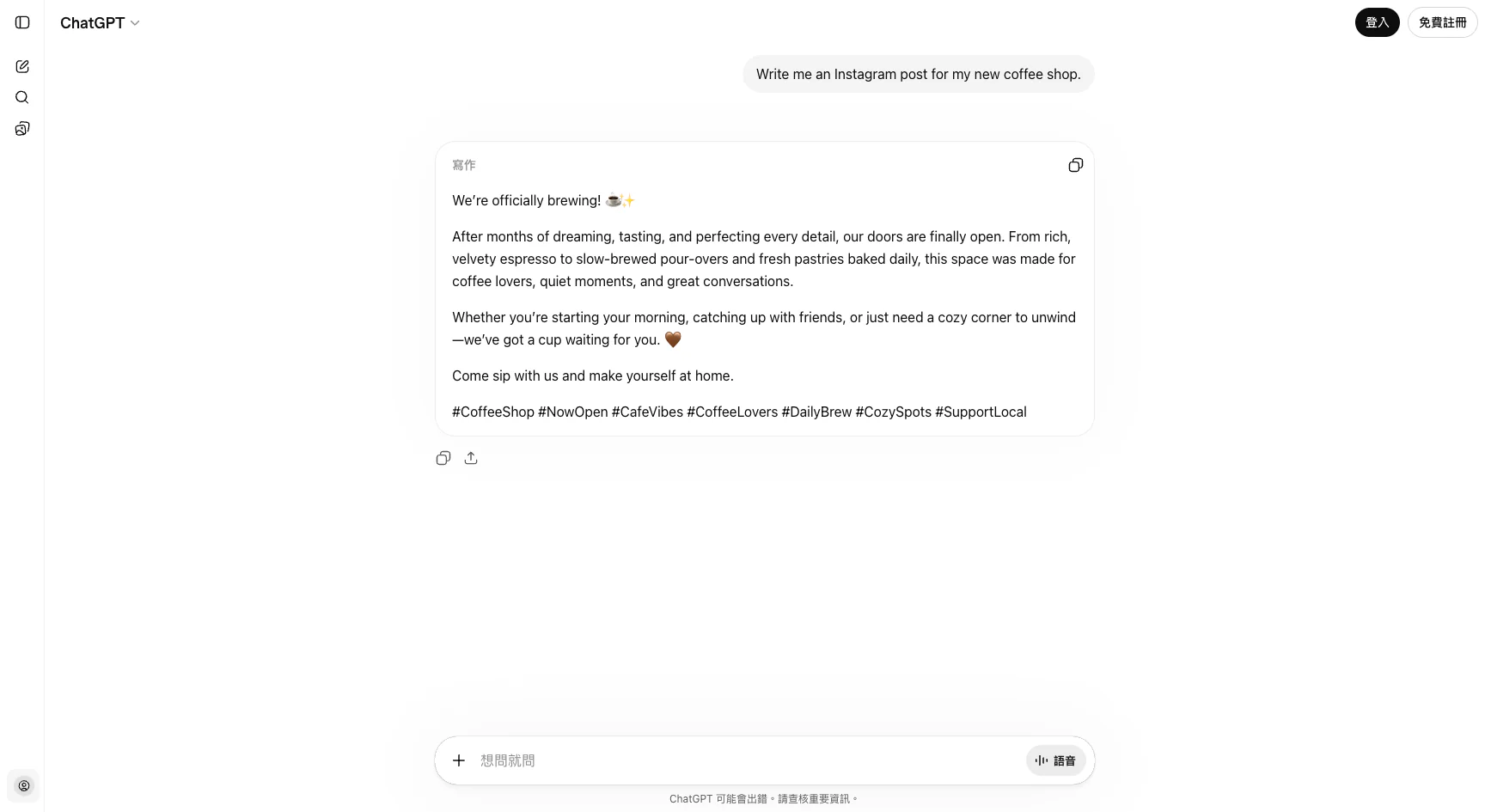
The response reads fine in isolation. But notice what's actually there: cream-colored lighting, handpicked beans, "a moment of gentleness in a busy day," generic hashtags. It's a template. You could swap in literally any coffee shop's name and the post would work identically. The AI had nothing to say about your shop because you told it nothing about your shop.
Collaboration mode: ask the AI to ask me first.
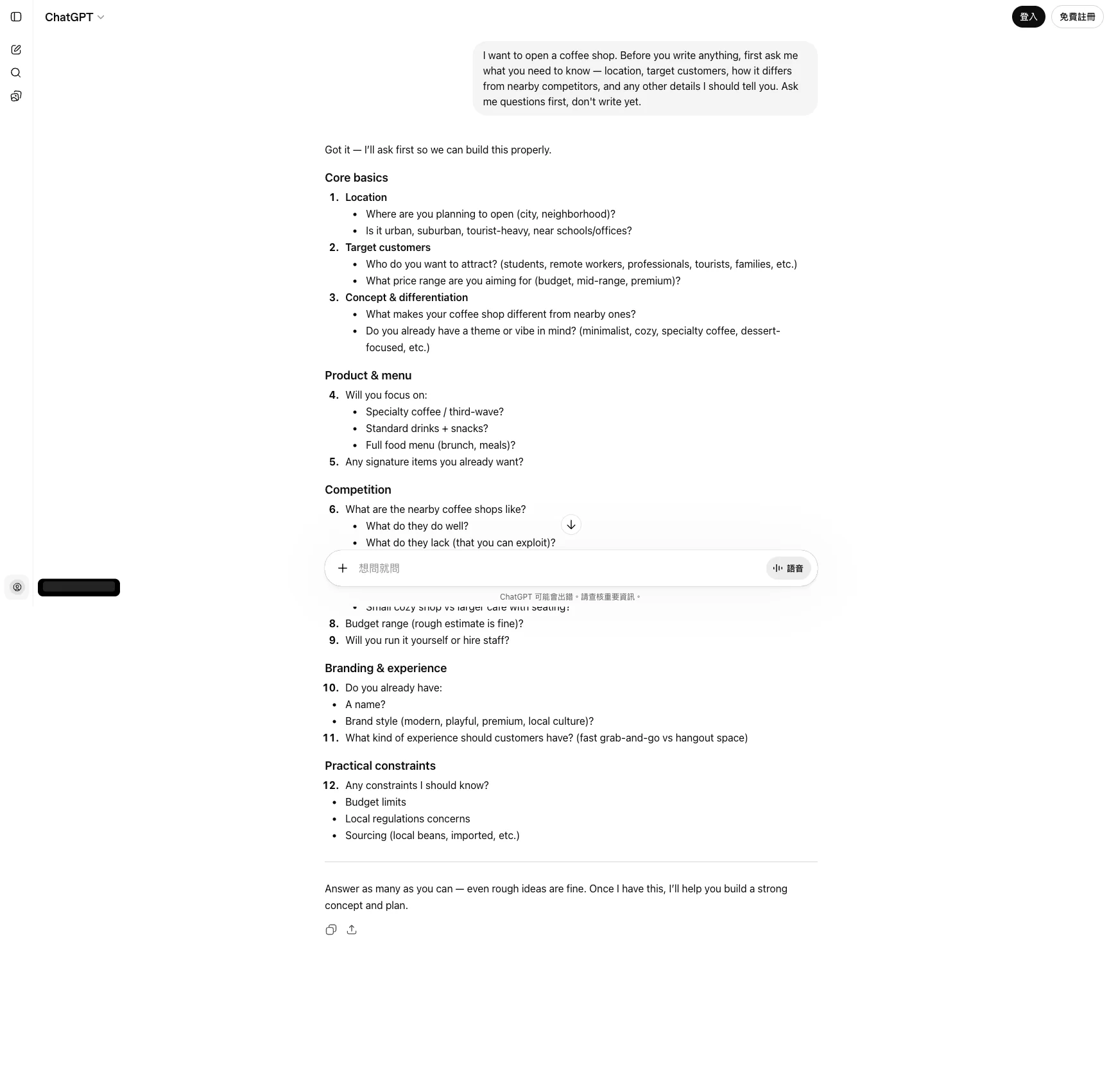
Same AI. Same underlying task. But this time the AI refuses to write anything until it has enough to work with — and it lays out eight categories of questions covering location, target customers, concept and differentiation, product and menu, competition, operations, branding, and practical constraints. You answer the parts you care about, skip what doesn't apply, and only then ask for the post. The result will be specific to your actual shop because the AI finally has the background it needed.
Same model. Same question. Two completely different conversations.
What this looks like in other jobs
Marketing — writing a social post:
- ❌ "Write me an Instagram post about my new coffee shop."
- ✅ "I'm opening a coffee shop. Before you write anything, ask me what you need to know about the location, audience, and what makes this shop different from others nearby."
Admin — handling a tricky email:
- ❌ "Reply to this complaint email for me."
- ✅ "Here's a complaint email. Before drafting a reply, help me think through: what does this customer actually want, what are our options for responding, and what are the trade-offs of each?"
Development — debugging code:
- ❌ "Why is this code broken?" (pastes 500 lines)
- ✅ "Here's code that crashes with error X. Before guessing the fix, what questions should I answer about the context so you can narrow down the real cause?"
Teaching — making a lesson plan:
- ❌ "Make me a 60-minute lesson plan about photosynthesis."
- ✅ "I need to teach photosynthesis to 7th graders in 60 minutes. Ask me what I already know about the students, what they've learned before, and what success looks like to me — then propose a structure."
In every case, the "bad" version is shorter and feels faster. The "good" version adds one or two turns of back-and-forth before any real output, and the result is dramatically better.
Why this feels weird at first
The first time you try collaboration mode, it feels slower. You're used to typing one question and getting one answer. Now you're typing a question and the AI is asking you questions back. Isn't that the AI being lazy?
No. The AI asking you questions is the AI refusing to guess. When it guesses, you throw the result away. When it asks, you spend 30 seconds giving it the background information it would have taken 500 guesses to figure out on its own.
Anthropic's own guide to working with Claude describes this as giving the model "enough information to act thoughtfully." The exact same principle applies to ChatGPT, Gemini, and every other model. These tools are genuinely good at specialized subtasks. They're genuinely bad at reading your mind.
Try this next time
Next time you open an AI assistant and feel the familiar "ugh, this thing is useless" reaction, pause. Instead of asking it to fix its answer, try this instead:
"I want to do X. Before you give me the final answer, what information would you need from me to do this really well? Ask me your questions first."
Read its questions. Answer them honestly. Then ask for the output.
You'll be surprised how often the "useless" AI becomes helpful in the space of two messages. It wasn't the AI that changed. It's that you finally started collaborating with it instead of demanding answers from it.
One sentence
If AI feels useless to you, stop asking it for answers and start asking it what it needs to know — the moment you let the AI ask you questions first, everything else works better.
Next up: what happens when you do get an answer but it's too shallow? The art of follow-up questions.
This is Part 4 of the "Ask AI Right" series. Previous: You don't know what you need — let AI help you find it.
FAQ
- Why do some people find ChatGPT amazing while others think it's useless?
- The difference isn't the AI or the question — it's the mindset. People who treat AI as an 'answer machine' ask one question, expect a final answer, and give up when it's wrong. People who treat AI as a 'collaboration tool' describe their goal, ask for suggested approaches, and work through the problem together in small steps. Same AI, completely different results.
- What does 'collaboration mode' actually look like in practice?
- Instead of asking 'write me a marketing post for my shop,' you ask 'I want to promote my shop on Instagram — what information should I give you first so the post actually works?' The AI then asks you about your audience, tone, product, and platform. You give it context piece by piece, and it drafts something that fits. You stay in control of the direction; the AI handles the parts you don't want to.
- Why does asking AI for the final answer directly often fail?
- Because your question usually has hidden background details that only you know — your audience, your constraints, your preferences, the stuff you already tried. A one-shot 'give me X' message forces the AI to guess all of that, and it guesses wrong. Collaboration mode surfaces those hidden details before the AI commits to an answer.
- Is collaboration mode slower than just asking for the answer?
- A little slower for the first try, dramatically faster overall. Answer-machine mode looks fast because you typed one sentence, but you throw away most results. Collaboration mode takes three or four messages, but the output is usually usable immediately. On real tasks, I've seen collaboration cut total time by more than half.
Read next
- 2026-04-16[Ask AI Right #7] What AI Does Poorly — Four Landmines to Know Before Using ChatGPT or Claude in 2026
AI is strong, but four things still trip it up in 2026: hallucinations, stale knowledge, short memory, and privacy defaults. Even Anthropic's own lawyers got caught by the first one.
- 2026-04-10[Ask AI Right #3] You Don't Know What You Need — Let AI Find It
Most people don't struggle with using AI — they struggle with knowing what to use it for. This article teaches you a simple method to let AI identify the repetitive parts of your workday you've stopped noticing.
- 2026-04-09[Ask AI Right #2] You Opened AI — Now What Do You Say?
AI isn't Google — you're not searching, you're having a conversation. This article teaches you what to say when you first open ChatGPT, five things you can try right now, and how to adjust when the answer isn't quite right.
- 2026-04-09[Ask AI Right #1] Which AI Should You Use in 2026?
ChatGPT, Claude, and Gemini — the three AI assistants you can start using right now. A no-jargon guide to what each one does best, how much they cost, and how to get started.
Don't miss the next one
Subscribe, and you won't.
One-click unsubscribe anytime.