LLM Deep Dive · part 6
[LLM Deep Dive] A quantization lab: what quantization is, how it works, where the error comes from
❯ cat --toc
- Introduction
- What quantization is: fewer bits holding the same numbers
- How to use it: pick a format, follow one weight, see where it breaks
- Error source two: how coarse a step is, decided by the group's largest value
- Error source three: the scale is an approximation too
- What "reconstruct" actually means at inference
- What you can cite, and what is only illustrative
- Deep dive: why these numbers can be trusted
- Where to click first
TL;DR
A quantization lab: pick INT8, FP8, INT4 or FP4, pick one of four weights, and watch it go through scale, encode, store, reconstruct. Two findings. With -15.875 in the group, one INT4 step spans 2.2679, so 0.375 and -0.875 both round to 0 — two of four weights gone. And the weight that sets the scale comes back as -15.874999523162842: 15.875 / 7 is not representable in FP32, so the ruler is quantized too. How real quantizers fight outliers is Part 1's subject, not this one.
Introduction
Quantization fits on one line, and the ONNX QuantizeLinear spec writes it out: divide the value by a scale, round to the nearest representable level, clamp. Dequantization multiplies back. The spec carries a zero_point offset as well; everything here is symmetric, so that term is 0 and never shows up. Nothing in there is hard to read.
Naming where the error enters is harder. Rounding is the obvious answer, and it is incomplete. The part that gets skipped is the scale — where it comes from, and what it costs.
So I built something clickable: model.ai-muninn.com/en/quantization/. Pick a format, follow one weight through four steps, read the error at the end. What follows is what the lab shows: what quantization is, how it runs, and the three places the error comes from — two of which I had not understood before building it.
What quantization is: fewer bits holding the same numbers
Model weights are floating point. In BF16 each one takes 16 bits. Quantization stores the same numbers in fewer bits — 4 bits each at INT4.
The lab does that accounting in groups of 64 weights:
| Storage | |
|---|---|
| 64 BF16 weights | 128 bytes |
| 64 INT4 weights | 32 bytes |
| + 1 shared scale (FP32) | 4 bytes |
| Total | 36 bytes |
A 71.9% saving. The lab's cube is the same arithmetic in 3D: change format and its 64 blocks re-encode into a smaller volume.
The cost sits in the bit count. Four bits give you 16 combinations, and the symmetric range used here spans -7 to 7 — 15 levels, trading -8 away for symmetry around zero. A weight that used to be any float now has to land on one of those 15. Anything that does not land on one gets moved to the nearest.
How to use it: pick a format, follow one weight, see where it breaks
The page opens on BF16 and nothing happens. That is deliberate. BF16 is the format the weights are already in, so there is no scale to compute and nothing to encode.
Click INT8, FP8, INT4 or FP4 and a four-step lesson appears:
- Compute the group's scale. The group's maximum absolute value divided by what the format can hold.
- Convert the weight into something the format can hold. An integer code, or the nearest level the format's bit layout allows.
- Show what is actually stored. Not the number you typed — the code, plus the one scale the group shares.
- Reconstruct and compare. Multiply the stored code back by the scale, put the result next to the original, and read the difference.
Error source one is that rounding: a weight that does not land on a level gets moved to the nearest one. Everyone knows that one. The next two sections are the other two, and I had not thought about either before building this.
Four number buttons — 0.375, -0.875, 4.25, -15.875 — switch which weight is traced. All 64 teaching weights share one scale, which is what makes the buttons worth pressing: you are not changing the setup between clicks, only which weight you follow through it.
First run: INT4, trace 0.375.
Error source two: how coarse a step is, decided by the group's largest value
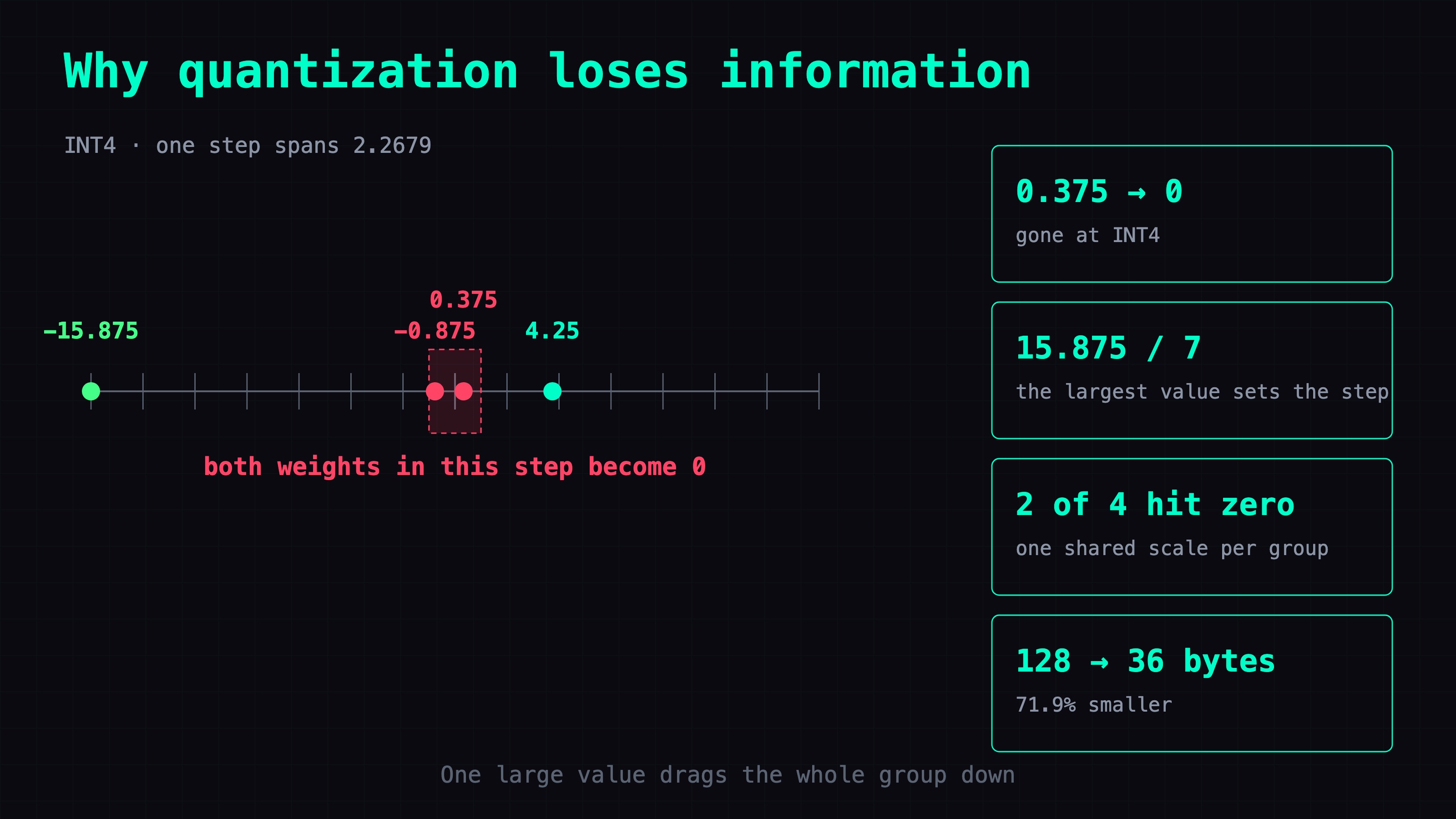
The teaching group holds four values: -15.875, -0.875, 0.375 and 4.25. The first is an order of magnitude above the rest.
INT4 has seven steps each way, so the scale is the group's maximum absolute value over that limit:
scale = 15.875 / 7 = 2.2679
One step spans 2.2679. Run 0.375 through it:
0.375 / 2.2679 = 0.165 -> rounds to 0
-0.875 does the same. Two of the four values are gone.
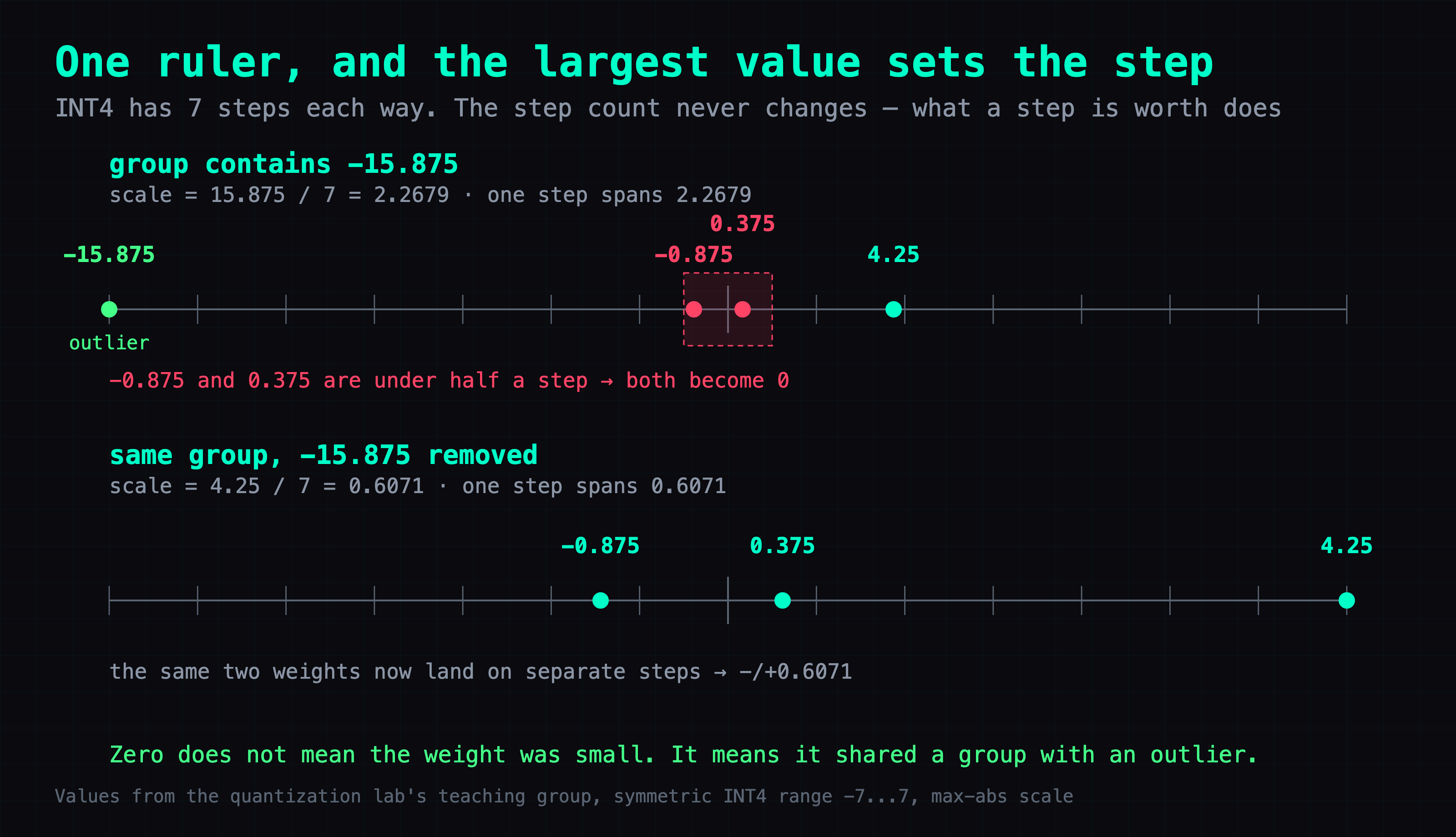
Take -15.875 out of the group and nothing about 0.375 changes. The group max becomes 4.25, the scale becomes 0.6071, and 0.375 reconstructs as 0.6071 — still wrong, but no longer zero. What changed was not the weight. It was which group it shares.
Outliers are the subject of Part 1. What quantization algorithms actually do covers why they are the enemy, and how K-quant super-blocks and TurboQuant's rotation each handle them. I am not re-deriving that here. What the lab adds is that you can click it and watch the weight go.
Error source three: the scale is an approximation too
A weight sitting exactly on a tick should reconstruct perfectly. And the group's maximum should be the safest value in the set: it defines the scale, and its code is exactly the format limit.
Pick INT4 and trace -15.875. It reconstructs as -15.874999523162842, off by 4.77e-7.
The rounding step is not where that came from. -15.875 / 2.267857... = -7, exactly, with nothing to round. The error is in the ruler. 15.875 / 7 cannot be represented in FP32, so the scale that actually gets stored is 2.267857074737549. Multiply the code -7 by that number and you cannot land on -15.875, because the number you are multiplying by is not 15.875 / 7.
The same weight shows the same 4.77e-7 under FP8 and FP4.
The magnitude is too small to matter for anything. What it corrects is the mental model: rounding is not the only source of error. The ruler used to reconstruct has itself been quantized.
What "reconstruct" actually means at inference
Step 4 is called reconstruction, which invites a fair question. If every use of the model restores the weights to BF16, don't the savings come straight back?
No.
With weight-only quantization the weights do get converted back to floating point for the multiply. What does not happen is a full BF16 copy of the model being built first. Dequantization is fused into the matmul kernel and runs tile by tile, so the complete BF16 weight tensor never exists in memory at once. The capacity and bandwidth savings hold at inference time.
This path shows up in the performance posts on this site without being explained as a concept. The line NVFP4 weights → Marlin dequant → BF16 → BF16 GEMM in the NVFP4 Triton patch post is exactly it: dequant is a stop inside the kernel, not a pass that unpacks the whole model.
So step 4 in the lab is an instrument. You need the original and the restored value side by side or there is no error to measure at all. It is not a cost paid per token.
(The page quantizes weights only. Activations stay floating point, and quantizing those too is a separate topic for another time.)
What you can cite, and what is only illustrative
Citable, because they are computed:
- the scale
- the reconstructed values
- the error
- the bytes
The byte math is in the table at the top, and the shared scale is already counted in it.
Illustrative only, not to be quoted as measurement:
- box sizes do not track tensor dimensions
- cache cell counts are not measured
- animation speed is unrelated to real speed
- the colored routing lines come from a fixed seed
Where a number is not verified the lab prints "not verified" rather than 0, because a 0 reads like a measurement someone took.
Deep dive: why these numbers can be trusted
Skip this section if you only want to use the lab.
node verify.cjs runs 53 checks, and they test data consistency rather than looks:
- every finite FP4 E2M1 encoding must match
- FP8 E4M3FN subnormal and NaN encodings must match
- ties-to-even must hold on both sides of zero
- the scale must use its stored FP32 value, not the theoretical one, when picking integer codes
That last check is where the 4.77e-7 above comes from. Let the tests accept the theoretical scale and the error disappears from the page — and what disappeared would be something real.
One coincidence in the teaching group is worth knowing before you read the INT8 tab. INT8 shows exactly zero error on all four values, because 15.875 / 127 = 0.125 exactly and all four values are multiples of 0.125. The lab labels this as deliberately chosen teaching data. It must not be read as INT8 being lossless.
Where to click first
Open the lab, pick INT4, and trace 0.375. Watch it become 0 at Step 2.
Then trace -15.875, the weight that sets the scale for all 64. Its integer code is -7, the INT4 limit, and it still comes back as -15.874999523162842.
FAQ
- What does the quantization lab actually show?
- A page at model.ai-muninn.com/en/quantization/ that walks one weight through one format. It opens on BF16 with nothing happening, because BF16 is the format the weights are already in. Click INT8, FP8, INT4 or FP4 and a four-step lesson appears: compute the group's scale, convert the weight into something the format can hold, show what is actually stored, then reconstruct and compare against the original. Four number buttons switch which weight is traced. No login, bilingual.
- Does every inference convert the weights back to BF16?
- With weight-only quantization the weights do get converted back to floating point for the multiply, but the model is not restored to a full BF16 copy first. Dequantization is fused into the matmul kernel and runs tile by tile, so the complete BF16 weight tensor never exists in memory at once, and the capacity and bandwidth savings hold at inference time. The line NVFP4 weights -> Marlin dequant -> BF16 -> BF16 GEMM in the NVFP4 Triton patch post is exactly this. Step 4 in the lab is an instrument for measuring error, not a cost paid per token.
- If a weight lands exactly on a tick, is it recovered exactly?
- No. Trace -15.875 at INT4 and it reconstructs as -15.874999523162842, off by 4.77e-7 — and that weight is the group maximum, so it defines the scale and its integer code is exactly the format limit. The rounding step is exact: -15.875 / 2.267857... = -7 with nothing to round. The error comes from the scale. 15.875 / 7 cannot be represented in FP32, so what gets stored is 2.267857074737549, and multiplying the code back by that number cannot land on the original. The same weight shows the same 4.77e-7 under FP8 and FP4.
- Why do two of the four teaching weights become 0 at INT4?
- Because they share a group with an outlier. The group holds -15.875, -0.875, 0.375 and 4.25. INT4 has seven steps each way, so the scale is 15.875 / 7 = 2.2679 and one step spans 2.2679. Then 0.375 / 2.2679 = 0.165, which rounds to 0, and -0.875 does the same. Remove -15.875 and the group max becomes 4.25, the scale becomes 0.6071, and 0.375 reconstructs as 0.6071 — still wrong, but not zero. What changed was not the weight, it was which group it shares.
- How much does INT4 actually save on 64 weights?
- 64 INT4 weights are 32 bytes, plus one FP32 scale at 4 bytes, for 36 bytes. The same 64 weights in BF16 are 128 bytes. That is a 71.9% saving with the shared scale already counted in.
- Why does INT8 show zero error on all four values?
- Coincidence in the teaching data. 15.875 / 127 = 0.125 exactly, and all four values are multiples of 0.125, so every one of them lands on a tick and the stored scale is exact. The lab labels the group as deliberately chosen teaching data. It must not be read as INT8 being lossless.
- Which numbers on the lab page can I cite?
- Citable: the scale, the reconstructed values, the error, and the byte counts — those are computed. Illustrative only: box sizes do not track tensor dimensions, cache cell counts are not measured, animation speed is unrelated to real speed, and the colored routing lines come from a fixed seed. Where a number is not verified the lab prints not verified rather than 0, because a 0 reads like a measurement someone took.
Read next
- 2026-09-16[LLM Deep Dive] What actually happens inside one transformer layer — four real models, four data flows
A cube you pull apart into layers. What model.ai-muninn.com shows for Qwen3-30B-A3B, Qwen3-8B, Qwen3.8-Flash-Next and DeepSeek-V4.1-Flash, and how to read it.
- 2026-07-23[LLM Deep Dive] Surgical GGUF Quantization: Quantize Only the Tensors You Choose
A GGUF isn't uniform precision. Inspect per-tensor types, then quantize only the tensors you choose with llama-quantize — pin every other family back to its own type so it copies through untouched, and never stack requant error.
- 2026-04-15[LLM Deep Dive] What Quantization Algorithms Actually Do: From Q4_K_M to TurboQuant
How does Q4_K_M fit a 14B model into 4 bits without ruining it? Not by 'cutting off 75%' — but through three layers: K-quant super-blocks, TurboQuant random rotation, and a 1-bit JL sign sketch. A mechanism walkthrough without the equations.
- 2026-07-22[LLM Deep Dive] The Best Free Open-Source Model for a Single 24GB GPU? My Pick Is ThinkingCap-Qwen3.6-27B
Got one 24GB consumer GPU (or a modded 2080 Ti 22G)? My current top free open-source pick is Huihui-ThinkingCap-Qwen3.6-27B-abliterated: Q4_K_S ~16GB, half the thinking tokens, ~38 tok/s with MTP, almost never refuses, all Apache-2.0.
Don't miss the next one
Subscribe, and you won't.
One-click unsubscribe anytime.