LLM Deep Dive · part 4
[LLM Deep Dive] Surgical GGUF Quantization: Quantize Only the Tensors You Choose
❯ cat --toc
- In plain English: quantization isn't one flat switch
- Why you can quantize at all, and why it saves space
- A GGUF holds four precisions
- Which tensors to touch: high-precision and frequently-moved
- Gotcha: the base type quantizes everything, not just the tensors you name
- The fix: pin every other family back to its own type, then dry-run the count
- The one rule: never re-quantize what's already quantized
- Takeaways
TL;DR
A GGUF you downloaded as "Q4_K_M" is not 4-bit everywhere — it's a per-tensor precision table. Poolside's Laguna Q4_K_M holds four precisions across 814 tensors: F16 attention, Q4_K/Q6_K experts, F32 router and norms. So you can quantize surgically: touch only the tensors you choose and byte-copy the rest. This is the how-to — inspect per-tensor types with llama-gguf, target the still-high-precision F16 attention, and pin every other family back to its own type (the base type quantizes everything by default, so an unpinned family gets dragged up and re-quantized). Dry-run the converted count, and nothing already-compressed gets a second approximation stacked on it.

In plain English: quantization isn't one flat switch
Here's the idea for a friend who doesn't do this for a living. People say "I ran the 4-bit version" as if quantization were a single lever — chop every number in the model down to 4 bits and hope it still works. It isn't, and the file you already downloaded proves it.
A model is a huge pile of numbers (the "weights"). Quantization means storing those numbers with fewer bits each — like saving a photo as a smaller JPEG. Fewer bits, smaller file, a little quality lost. The thing almost nobody notices is that the popular "Q4_K_M" download is not 4 bits everywhere. Inside one file, different parts are stored at different precision on purpose: some in full 16-bit, some in 4-bit, some in between. It's less "a 4-bit model" and more "a document where the important paragraphs are printed at full resolution and the rest is compressed."
Once you see the file that way, a nicer option opens up. You don't have to re-compress the whole thing to change it. You can reach in, re-save only a few chosen parts at a different precision, and copy everything else through untouched. That's what this article is: how to look inside a GGUF, decide which few tensors are worth touching, and change only those — without wrecking quality.
Why you can quantize at all, and why it saves space
Before the how-to, the two "why"s — because they decide everything that follows.
Why you can quantize at all. Neural-net weights are noisy and highly redundant; they don't need full 16-bit precision to do their job. Rounding each weight to a small set of discrete levels (4-bit means 16 levels) adds a tiny error per weight — and, critically, those errors mostly cancel out across a layer and across the whole network. It's the MP3 trick: drop the frequencies your ear can't hear and the file gets much smaller while the difference stays barely audible. The clever machinery that makes 4 bits usable rather than lossy — K-quant super-blocks, rotating outliers flat, sign sketches — is the subject of Part 1 of this series, so I won't re-derive it here. For this article you only need the consequence: rounding is cheap because the errors wash out.
Why it saves space. A weight file's size is basically params × bits-per-weight ÷ 8. Going from 16-bit to 4-bit is about 4× smaller, full stop. Concretely: Laguna S 2.1, a 118B-parameter model, would be roughly 235GB at full F16; Poolside's official Q4_K_M is about 75GB (70 GiB) — under a third of the size, which is the difference between "needs a server rack" and "a consumer GPU plus a lot of RAM has a shot."
So quantization is a trade: a little quality for a lot of space (and the bandwidth and speed that follow from moving less data). And here's the part the "I ran the 4-bit version" framing hides — the trade doesn't have to be one flat price. A GGUF is priced per tensor. You can pay full 16-bit for the parts that matter and 4-bit for the parts that don't, all in the same file. Which means the interesting question isn't "what bit-width?" — it's "which tensors, at which precision?"
A GGUF holds four precisions
You can see the per-tensor pricing directly. llama-gguf (a small inspection tool that ships with llama.cpp) will read the header and list every tensor with its name and type — a "tensor" here is just one named weight matrix in the model:
llama-gguf laguna-s-2.1-Q4_K_M.gguf r n
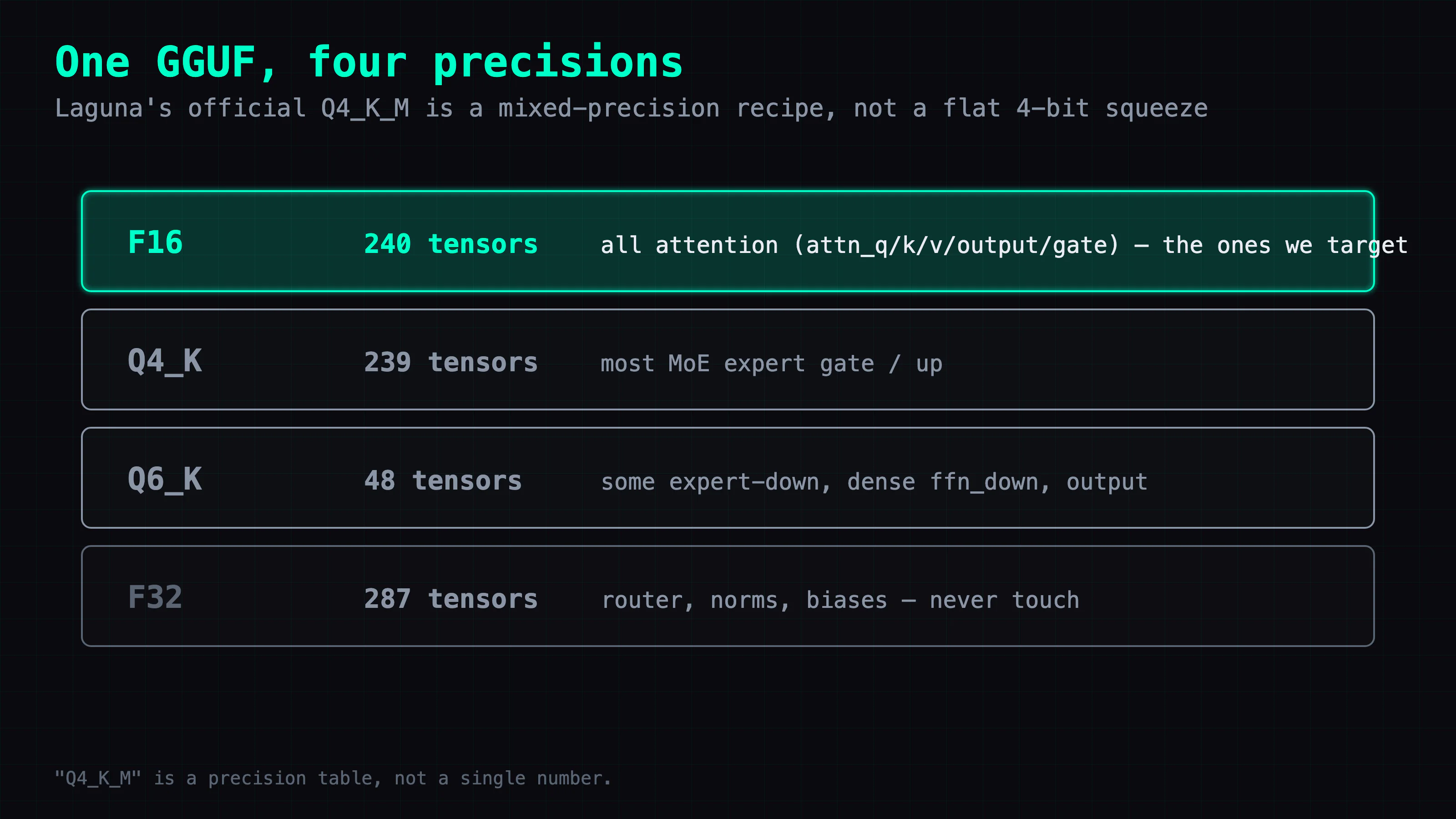
The r means read; the n skips the tensor-data check (not the data itself) — so it walks the header and lists every tensor's name and type without validating the multi-gigabyte payload. (For a pure metadata dump, llama.cpp's gguf_dump.py is even lighter.) Run it on Laguna's official Q4_K_M and you get 814 tensors spanning four different precisions:
| Precision | Count | What it holds |
|---|---|---|
| F16 | 240 | All of attention — attn_q/k/v/output/gate, 48 layers × 5 |
| Q4_K | 239 | Most MoE expert gate/up projections |
| Q6_K | 48 | Some expert-down, dense ffn_down, output head |
| F32 | 287 | Router, norms, biases |
The row that matters is the top one: every attention weight matrix in this "Q4" file is actually full F16, and those 240 tensors total about 5.2 GiB. (The attention norms are F32, not part of the 240.) "Q4_K_M" is a precision table, not a single number. (MoE = Mixture-of-Experts; the model has many "expert" sub-networks and a small "router" that picks a few per token — Laguna's experts are the Q4_K/Q6_K bulk, the router is F32.)
Which tensors to touch: high-precision and frequently-moved
Now the design decision. You have four precisions in front of you; which do you touch? Two rules narrow it down fast.
Rule one: don't touch what the quant author deliberately kept high. Those 287 F32 tensors — the router, the norms, the biases — are small and disproportionately sensitive. Whoever built this GGUF left them at full precision on purpose, because compressing them craters quality while reclaiming almost no space. Leave them alone. Same logic protects the experts that are already Q4_K/Q6_K — more on that in the last section.
Rule two: target the tensors that are both high-precision AND frequently moved. This is where the F16 attention becomes the obvious candidate. On a hybrid-offload box — where the model is too big for VRAM, so most weights live in system RAM and stream to the GPU — attention runs on every single token and is still sitting at F16. Converting it F16 → Q8_0 (roughly half the bytes) cuts the data that has to cross the CPU-to-GPU bus each token. That's not just a smaller file; on that topology it's a faster model. This is exactly the trick I used to run Laguna 118B on one 2080 Ti — the measured payoff there was −2.45 GiB (2.63 GB) and about +7% decode.
So the goal is narrow and specific: convert only the 240 F16 attention weights to Q8_0, and pass everything else through byte-for-byte. Not "re-quantize the file" — re-quantize five tensor families and copy the other 574. Which sounds like a one-liner. It nearly cost me the afternoon.
Gotcha: the base type quantizes everything, not just the tensors you name
Here's the counterintuitive part. llama-quantize's final positional argument is the base type — the default target for every quantizable tensor in the file. --tensor-type doesn't mean "touch only these"; it adds overrides on top of that default.
So if you naively set the base to Q8_0 and override attention:
# base Q8_0 tries to make EVERY quantizable tensor Q8_0
llama-quantize \
  --tensor-type '^blk\.[0-9]+\.attn_(q|k|v|output|gate)\.weight$=Q8_0' \
  laguna-s-2.1-Q4_K_M.gguf out.gguf Q8_0 24
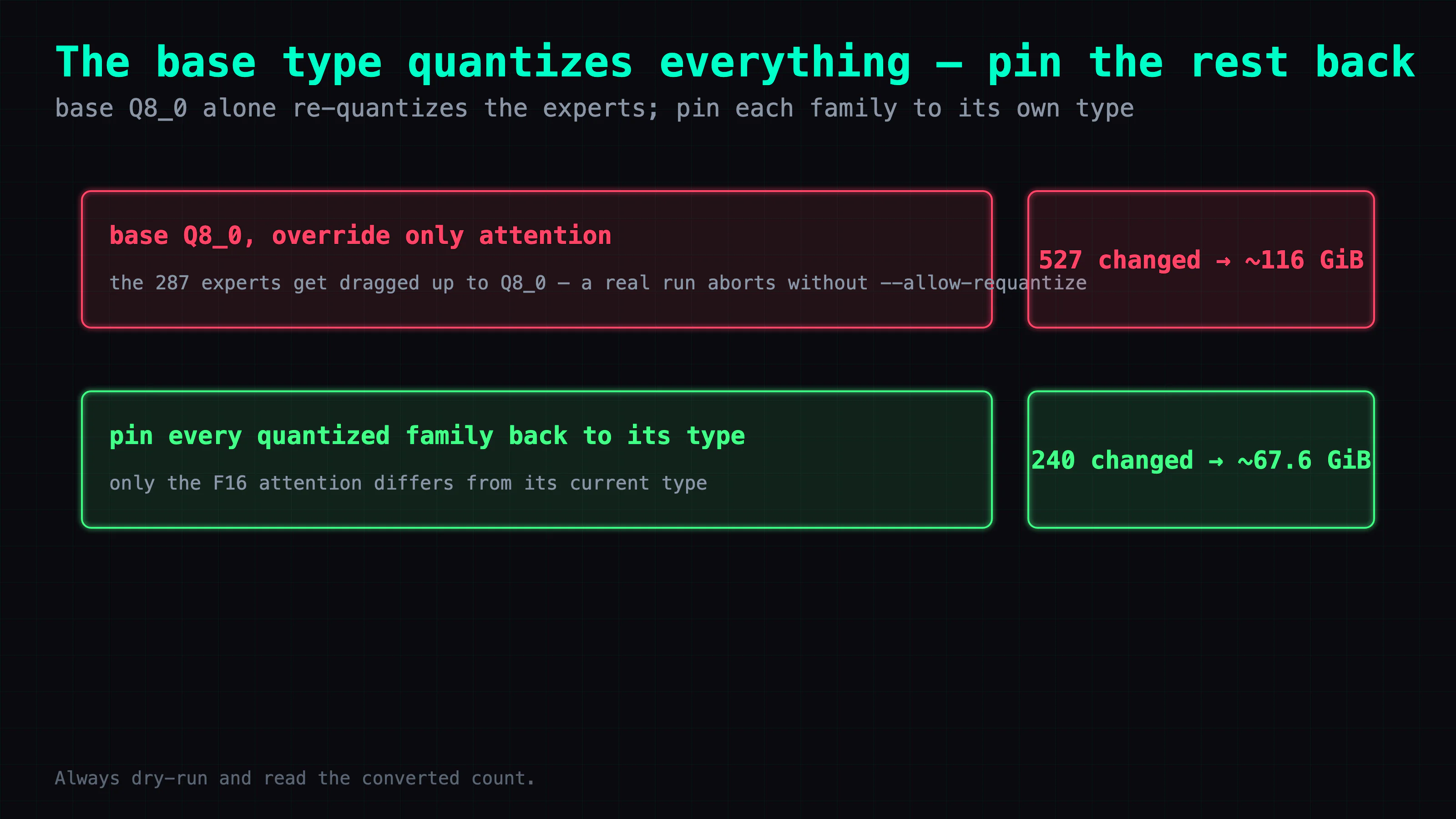
The dry-run reports 527 tensors to convert (240 attention plus all 239 Q4_K and 48 Q6_K experts dragged up to Q8_0), and the output balloons to 119,227 MiB (~116 GiB). Your attention override was redundant; what actually happened is the experts got re-quantized from Q4/Q6 up to Q8 — bigger, and carrying a second layer of quantization error.
And if you actually run it (not --dry-run) without --allow-requantize, the command aborts with requantizing from type q4_K is disabled. That's not llama.cpp being difficult — it's protecting you, flagging that you're about to re-quantize already-compressed experts.
The fix: pin every other family back to its own type, then dry-run the count
The real recipe keeps Q8_0 as the base (for the attention it converts) but pins every already-quantized family back to its current type with explicit --tensor-type overrides. When a tensor's target type equals its current type (cur == new), llama.cpp takes the copy path and preserves it byte-for-byte; only the 240 F16 attention tensors actually differ, so only they convert.
llama-quantize \
  --token-embedding-type Q4_K \
  --output-tensor-type Q6_K \
  --tensor-type '^blk\.[0-9]+\.attn_(q|k|v|output|gate)\.weight$=Q8_0' \
  --tensor-type '^blk\.(0|1|2|3|4|5|8|11|14|17|20|23|26|29|32|35|38|41|42|43|44|45|46|47)\.ffn_down=Q6_K' \
  --tensor-type 'ffn_down=Q4_K' \
  --tensor-type 'ffn_gate=Q4_K' \
  --tensor-type 'ffn_up=Q4_K' \
  laguna-s-2.1-Q4_K_M.gguf laguna-s-2.1-attnQ8.gguf Q8_0 24
Three things earn a note:
Q8_0base, experts pinned back to Q4_K/Q6_K. Now the 239 Q4_K and 48 Q6_K tensors have a target type identical to their current type, socur == newand they're byte-copied, not re-quantized. The F32 norms and router aren't quantizable anyway and copy through too.- Order matters. The pattern that pins specific layers'
ffn_downto Q6_K must come before the broadffn_down=Q4_K, because llama.cpp uses the first matching pattern. Reverse them and the Q6 layers get grabbed by the Q4 rule. - Do not add
--allow-requantize. Once every family is pinned, no already-quantized tensor needs converting, so you never hit that guard. Leaving it off means an incomplete set of pins makes the real run abort loudly, instead of silently re-quantizing an expert family. (The--dry-runitself doesn't abort — it just shows an unexpected conversion count, e.g. 527 instead of 240.)
Put --dry-run right after the executable to preview, and confirm two numbers: the dry-run should print 240 size … -> … conversion lines (one per converted tensor; the other 574 print as unchanged — the CLI gives no aggregate count, so count the lines), and the summary model size 71687.10 MiB → quant size 69180.90 MiB (~70.0 GiB → 67.6 GiB, ~2.45 GiB / 2.63 GB saved). Both right? Drop --dry-run and run it for real — on an EPYC 7402 at 24 threads the whole 118B took about 155 seconds, most of it disk I/O copying 574 tensors, not math.
The result is a surgically-modified GGUF: attention now Q8_0, everything else bit-identical to the file you started from.
The one rule: never re-quantize what's already quantized
--allow-requantize is a flag, not a suggestion to use it freely. There's one rule that governs all of this, and it's the reason llama.cpp blocks requantization by default:
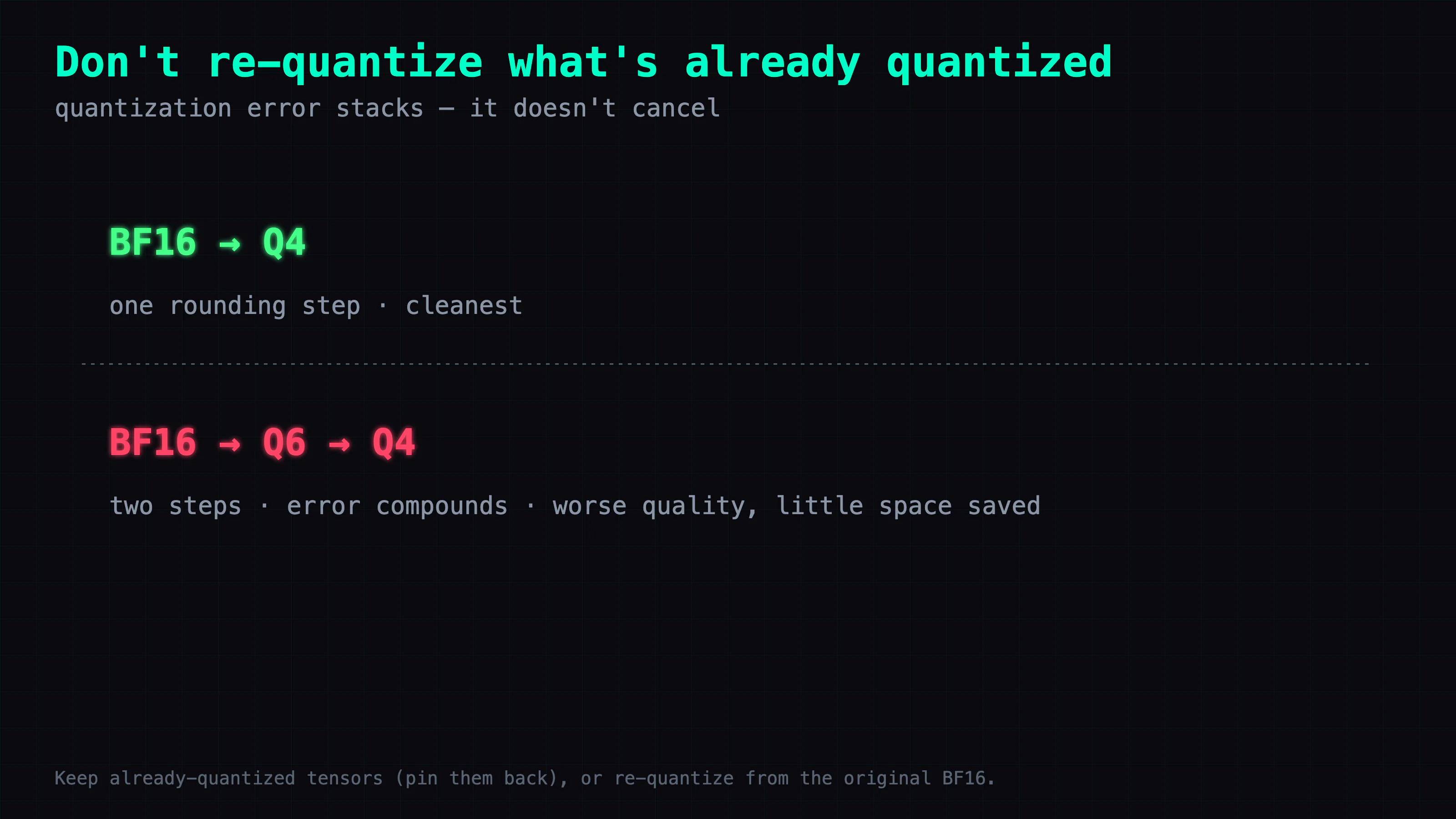
Quantization error stacks. It doesn't cancel.
Recall the whole reason quantization works: rounding errors mostly wash out across a layer. That holds when you round once, from the original high-precision value. It stops holding the second time. Take an expert that's already Q6_K and drop it to Q5 or Q4 — you're now approximating a value that was already an approximation. The two rounding errors don't cancel; they compound. Quality falls more than the bit-width change suggests, and — because Q6→Q4 on already-compressed weights reclaims very little — you pay that quality for almost no space.
That's why the whole recipe above is careful to touch only the F16 attention. F16 is still high precision, so F16 → Q8_0 is a single clean rounding step. The Q4_K and Q6_K experts are pinned back to their own types — target equals current, so llama.cpp byte-copies them instead of re-quantizing — precisely so no second approximation lands on them.
Two practical corollaries fall out of the one rule:
- To save space on a finished GGUF: target the tensors still at high precision (here, the F16 attention), and byte-copy everything already compressed.
- To experiment or compress harder: don't grind an existing Q4_K_M down further. Quantize once, from the original BF16 weights, choosing your per-tensor recipe up front. One clean rounding step from the source beats two stacked steps from a finished quant every time.
Takeaways
Where the time went. Not the algorithms — the tool's mental model. --tensor-type reads like "touch only these," but the base positional type is the real default: it targets every quantizable tensor, and my overrides only added to it. A base of Q8_0 didn't surgically convert attention — it tried to drag all 527 quantizable tensors up to Q8_0, re-quantizing the experts and ballooning the file. The dry-run's converted count (527, not the 240 I wanted) is the only thing that caught it before I burned minutes producing a bigger, worse file. For any selective quantize, read the converted count every time — it's what stands between "I changed the tensors I meant to" and "I quietly re-quantized half the model."
Reusable diagnostics. Run llama-gguf model.gguf r n on any GGUF before you touch it. Most files sold as "Q4" are mixed precision, and the per-tensor type list tells you two things at a glance: what still has room to shrink (the high-precision tensors) and what you must not touch (the parts the author deliberately kept high, and anything already quantized). That one command turns "the 4-bit model" back into the precision table it always was.
The general principle. Quantization is a per-tensor decision, not a whole-model switch. The space (and, on an offload box, speed) lever is the tensors that are both still high precision AND frequently moved — convert those and copy the rest. And whatever you do, never stack a second approximation on an already-quantized tensor: round once, from the source.
Also in this series — LLM Deep Dive
- Part 1: What Quantization Algorithms Actually Do: From Q4_K_M to TurboQuant — the mechanism behind why 4 bits works at all: K-quant super-blocks, rotating outliers flat, and a 1-bit sign sketch.
- Field report using this trick: Running a 118B Coding MoE on ONE 22GB 2080 Ti — where the attention-Q8 recipe from this article earned −2.45 GiB and about +7% decode on a hybrid-offload box.
FAQ
- Is a Q4_K_M GGUF really 4-bit everywhere?
- No. Q4_K_M is a per-tensor precision recipe, not a single bit-width. Poolside's Laguna S 2.1 Q4_K_M holds four precisions across its 814 tensors: 240 F16 (all of attention), 239 Q4_K (most MoE experts), 48 Q6_K (some down-projections and the output head), and 287 F32 (router, norms, biases). Run `llama-gguf model.gguf r n` and it prints every tensor's name and type — most 'Q4' files you download are mixed precision like this.
- Why did my selective quantize balloon the file instead of shrinking it?
- Because the final positional argument to `llama-quantize` is the base type — the default for every quantizable tensor — and `--tensor-type` only adds overrides on top of it. Set the base to `Q8_0` to convert attention and you also drag every Q4_K/Q6_K expert up to Q8_0, re-quantizing them: the file grows (Laguna went to ~116 GiB) and picks up a second layer of error. The fix is to keep `Q8_0` as the base but pin every already-quantized family back to its current type with `--tensor-type`; when target equals current, llama.cpp byte-copies instead of converting, so only the F16 attention actually changes. Always `--dry-run` and read the converted count first.
- Can I re-quantize a Q4_K_M GGUF to make it smaller?
- You can, but you usually shouldn't. Quantization error stacks — it doesn't cancel. Dropping an already-Q6_K expert down to Q4 approximates an already-approximated value, so quality falls more than you'd expect while you save almost no space. To save space, target the tensors still at high precision (here, the F16 attention) and pin every other family back to its current type so llama.cpp byte-copies them untouched. To compress harder, quantize once from the original BF16 weights, not from a finished Q4_K_M.
Read next
- 2026-09-20[LLM Deep Dive] A quantization lab: what quantization is, how it works, where the error comes from
A clickable INT4 / FP8 / FP4 lab: one outlier drops two of four weights to zero, and the scale itself is quantized, so the group maximum is off by 4.77e-7.
- 2026-07-22[LLM Deep Dive] The Best Free Open-Source Model for a Single 24GB GPU? My Pick Is ThinkingCap-Qwen3.6-27B
Got one 24GB consumer GPU (or a modded 2080 Ti 22G)? My current top free open-source pick is Huihui-ThinkingCap-Qwen3.6-27B-abliterated: Q4_K_S ~16GB, half the thinking tokens, ~38 tok/s with MTP, almost never refuses, all Apache-2.0.
- 2026-09-16[LLM Deep Dive] What actually happens inside one transformer layer — four real models, four data flows
A cube you pull apart into layers. What model.ai-muninn.com shows for Qwen3-30B-A3B, Qwen3-8B, Qwen3.8-Flash-Next and DeepSeek-V4.1-Flash, and how to read it.
- 2026-04-15[LLM Deep Dive] What Quantization Algorithms Actually Do: From Q4_K_M to TurboQuant
How does Q4_K_M fit a 14B model into 4 bits without ruining it? Not by 'cutting off 75%' — but through three layers: K-quant super-blocks, TurboQuant random rotation, and a 1-bit JL sign sketch. A mechanism walkthrough without the equations.
Don't miss the next one
Subscribe, and you won't.
One-click unsubscribe anytime.