LLM Deep Dive · part 5
[LLM Deep Dive] What actually happens inside one transformer layer — four real models, four data flows
❯ cat --toc
- Introduction
- How to use it: pick a model, expand the layers, click a region
- One layer is six steps, not three
- Two Norms per layer, 97 weight sets in a 48-layer model
- 48 x 128 = 6,144 expert FFNs, 8 of them per token
- Weighted merge, then +②: two nodes, 0 trainable parameters
- DeepSeek-V4.1-Flash: 4 of 40 layers produce the shared KV
- Qwen3.8-Flash-Next: 36 Gated DeltaNet layers and 12 QSA
- What you can cite, and what is only illustrative
- Deep dive: why these numbers can be trusted
- Where to click first
TL;DR
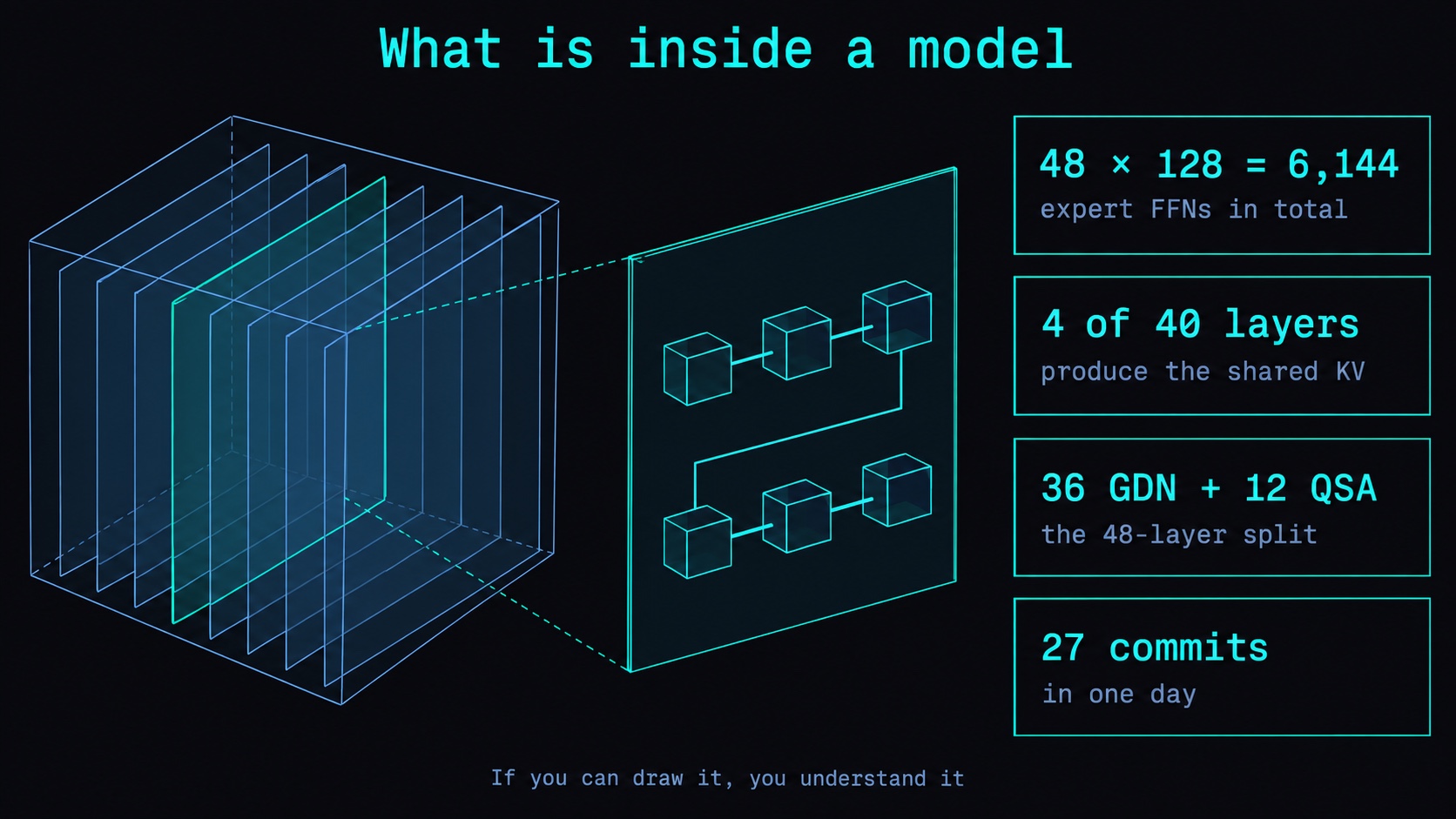
model.ai-muninn.com draws four open models as a cube you pull apart: pick a model, expand it into its decoder layers, click a layer, click a region. Two things it makes hard to ignore. Qwen3-30B-A3B carries 48 x 128 = 6,144 expert FFNs, all resident inside its 61.06 GB BF16 total, with 8 used per token. DeepSeek-V4.1-Flash has 40 layers and only 4 of them — 3, 9, 15, 21 — produce the shared compressed KV that 34 layers read. Caveat: parameter and layer counts come from pinned configs, but box sizes, cache cells and routing lines are drawn for teaching, not measured.
Introduction
I can recognise a bicycle from across the street. Ask me to draw one from memory and the chain ends up somewhere no chain can go. Transformer layers are like that. Everyone has seen the block diagram. Very few people can draw where the residual actually reconnects.
So I built a site that draws it: model.ai-muninn.com. Four open models, no login, bilingual. This article is about what it shows and how to read a model with it.
How to use it: pick a model, expand the layers, click a region
The model picker sits top left. Four models, each with its layer count on the card:
| Model | Layers | Type |
|---|---|---|
| Qwen3-30B-A3B | 48 | MoE |
| Qwen3-8B | 36 | Dense |
| Qwen3.8-Flash-Next | 48 | hybrid attention |
| DeepSeek-V4.1-Flash | 40 | 20 causal encoder + 20 decoder |
Then three clicks:
- Click the cube. It pulls apart into a stack of slices. The slice count is the decoder layer count, so Qwen3-8B gives you 36 slices and DeepSeek-V4.1-Flash gives you 40.
- Click again to enter one layer. Inside, the layer is broken into its functional regions rather than one box labelled "decoder layer".
- Click any region. The right panel streams an explanation of what that region does, its parameter count, and the BF16 equivalent in GB.
A layer stepper sits next to the model, so you can hold one region in view and walk forward through the stack watching it change.
Start with Qwen3-30B-A3B and walk one layer end to end. It is the model where the count that surprises people is largest.
One layer is six steps, not three
Most diagrams show three things: Attention, FFN, an arrow. The tool draws six, because six is what executes:
Input -> Norm 1 -> Attention -> +① -> Norm 2 -> MoE/FFN -> +② -> next layer
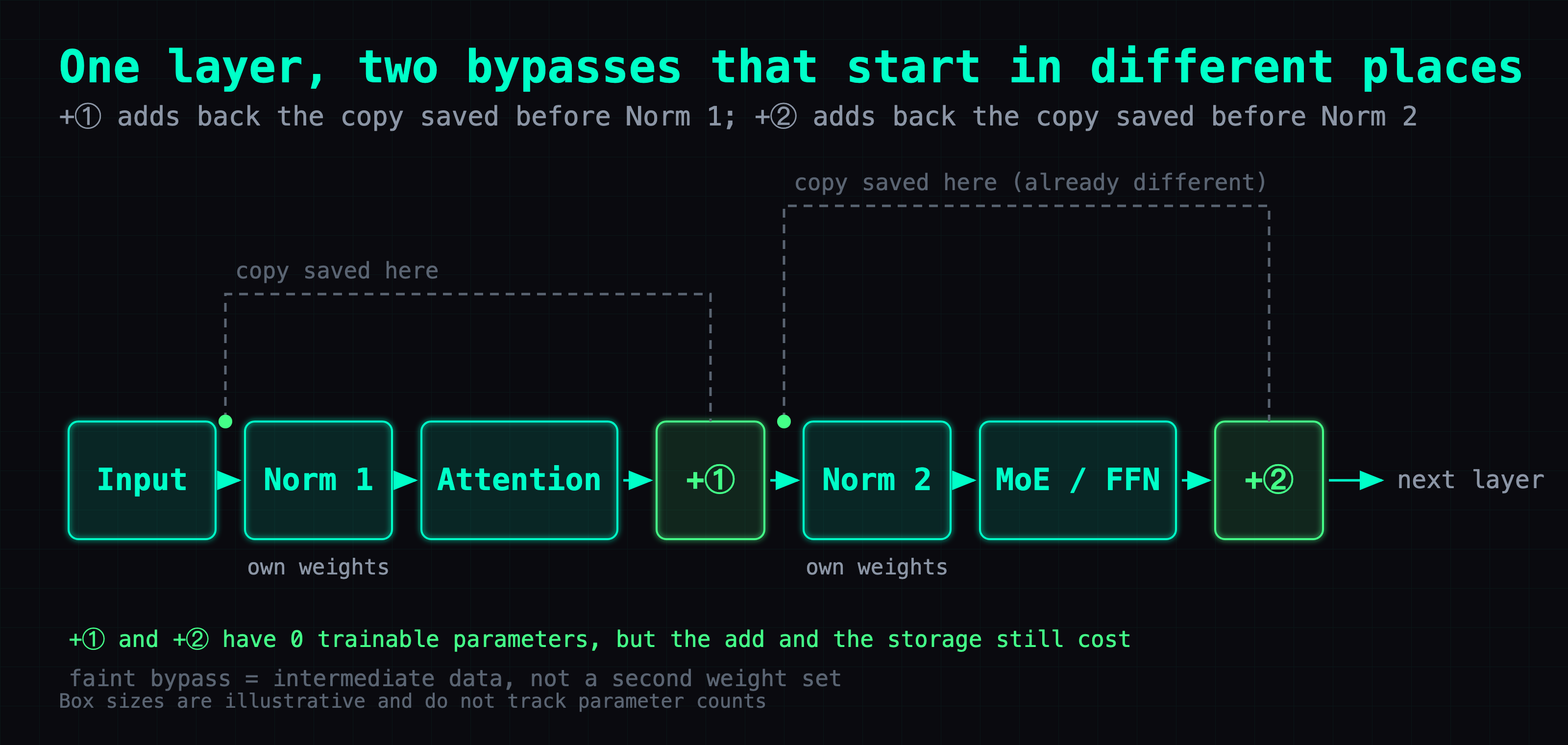
The two nodes usually left out are +① and +②, and they are not the same operation run twice. +① adds Attention's output back onto the copy of the data saved before Norm 1. +② adds the MoE output back onto the copy saved before Norm 2. Those two saved copies hold different data, because Attention and +① both ran between them.
The figure makes the offset visible: the two faint bypass lines leave the main path at different points. Click either + node on the site and the panel names which copy that node adds back.
Two Norms per layer, 97 weight sets in a 48-layer model
Norm 1 and Norm 2 are two separate clickable boxes, and each reports its own parameter count: 2,048 each in Qwen3-30B-A3B, 4,096 each in the dense Qwen3-8B. They are two independent sets of RMSNorm weights, and they receive different data because Attention and the first residual add sit between them.
Both are instantiated per layer. Across 48 layers that is 96 sets of RMSNorm weights, not one normalization recipe reused. The Final Norm outside the layer stack is a third role with its own count, which brings the model to 97 weight sets.
48 x 128 = 6,144 expert FFNs, 8 of them per token
Open Qwen3-30B-A3B, step into a layer, click the Experts region. That layer holds 128 experts and routes top-8 per token. Across 48 layers: 48 x 128 = 6,144 expert FFNs, all resident in the file. The model totals 30,532,122,624 parameters, 61.06 GB in BF16, and on any given token most of that 61 GB is experts the Router did not select.
Two things about that region before you cite it. The large grid in the UI does not map one cell to one expert, and the 8 colored markers on it are a routing sample for that layer rather than a trace. The parameter accounting is real: the number printed on the Experts region is the weight total for that layer's 128 experts, derived from the published config.
Experts are not pre-assigned by subject. There is no math expert and no translation expert. Each one is trained, and the Router scores them against the intermediate data arriving on this pass.
Weighted merge, then +②: two nodes, 0 trainable parameters
The tool keeps these apart, in this order. The weighted merge multiplies each of the 8 expert outputs by the proportion the Router assigned it and sums them into one new intermediate representation. +② then adds that onto the copy saved before Norm 2.
Collapse them into one node and the question "where do the proportions come from" has nowhere left to live. They are this pass's data from the Router, not weights owned by the merge node. Both nodes report 0 trainable parameters, and 0 parameters is not free: the multiply runs, the add runs, and the intermediate has to be stored.
DeepSeek-V4.1-Flash: 4 of 40 layers produce the shared KV
The backbone is 40 layers, 20 causal encoder plus 20 decoder. Step through them with the Attention region open and the same region keeps changing shape, because those 40 layers split four ways by where their KV and their index come from.
Read this part carefully, because the name invites the wrong reading: every backbone layer still builds its own local-window KV. That is not shared. The four layer types differ in how they handle the shared compressed KV.
| Kind | Layers | Shared compressed KV | Index |
|---|---|---|---|
| SWA | 2 | none, local window only | none |
| Full | 4 | produces it | builds its own |
| Reindex | 4 | takes another layer's | recomputes its own |
| Reuse | 30 | takes another layer's | takes another layer's |
Only 4 of 40 layers produce the shared compressed KV, at one-based positions 3, 9, 15 and 21. Thirty-four layers read it — 30 take the index along with it, 4 recompute their own — and the 2 SWA layers never touch it.
The Reindex layers sit at 25, 29, 33 and 37. They take the shared compressed KV and recompute their own index, which means KV and index have separate lifetimes in this model. Step to one of those layers and the KV-building part drops out of the diagram, leaving only the index recompute.
You cannot tell which behavior a layer uses from the config field names alone. It comes out of Attention.__init__, _compress_kv, _compress_topk_idxs and Indexer in inference/model.py at the pinned revision. _compress_topk_idxs is the function that decides recompute versus reuse.
Qwen3.8-Flash-Next: 36 Gated DeltaNet layers and 12 QSA
48 layers, and not one attention type repeated 48 times. The pattern is 3 Gated DeltaNet layers then 1 QSA layer, repeated 12 times: layers 1, 2, 3 are GDN, layer 4 is QSA, layers 5, 6, 7 are GDN, layer 8 is QSA, and so on to 36 GDN plus 12 QSA.
Step forward a few layers with the Attention region open and the diagram swaps. GDN runs old state, update, new state, readout, and the new state carries forward to the next token. QSA uses an indexer to pick a small subset of historical KV and reads only those.
What you can cite, and what is only illustrative
Citable, because it is derived from pinned official configs:
- parameter counts
- layer counts
- expert counts and top-k
- the BF16 equivalent size
The two original Qwen3 models are the strongest case here: their published totals reconstruct exactly from per-layer parameters times layer count, plus Embedding, plus Final Norm, plus Output.
Illustrative only, and not to be quoted as measurement:
- box sizes do not track tensor dimensions or parameter ratios
- cache cell counts are not measured
- animation speed is unrelated to real speed
- the routing lines are a fixed-seed teaching illustration
One item deserves its own line. Which 8 of 128 experts the Router actually picked can never be drawn accurately. A config gives you how many exist and how many are chosen; which ones depends on live intermediate data, and only an inference trace tells you that.
Where a number is not verified the site prints "not verified" instead of 0, because a 0 reads like a measurement someone took.
Deep dive: why these numbers can be trusted
Skip this section if you only want to use the site.
Every model is read at a pinned revision, not at main:
- Qwen3.8-Flash-Next config:
de4b8e4d43b917e7706784d8bb445c9af86a3540 - DeepSeek-V4.1-Flash config:
dba1be0a40aa45a94ad051997016db3960a90277
Each lives in its own HuggingFace repo. The Flash-Next implementation is pinned to Transformers commit bd15bc95a89e728bbc1224084eb3b5829428c353 — that is a commit, not the v4.51.3 tag, and the two are different objects. The two original Qwen3 models use their official configs plus the qwen3_moe implementation at the v4.51.3 tag.
The reason for pinning is mundane. Configs change upstream. Reading main would silently redraw the diagram with nobody noticing.
node verify.cjs runs 35 checks, and they test data consistency rather than looks:
- the two original models' parameter totals must reconstruct exactly
- every visible region must have an explanation in every locale
- layer navigation must advance exactly one layer, and only the last layer may reach Output
- the merge and residual nodes must never be counted into any weight subtotal — their parameter field is 0, and the test stops that 0 being added into any subtotal
What is not done: the newer two models' full parameter counts are unknown or partial. Lookup, vision and MTP branch tensors are not individually verified, so the UI shows the official approximate figure or "not verified" rather than passing a known subtotal off as an exact total. And the BF16 equivalent is parameter count times 2 bytes in decimal GB — not a quantized download size, and not runtime memory, since it excludes KV cache, activations and workspace.
The site itself was written by Codex (gpt-6-astra), 27 commits in one day, v1 through v16.
Where to click first
Open model.ai-muninn.com, pick Qwen3-30B-A3B, and walk one layer end to end — Norm 1, Attention, +①, Norm 2, Experts, weighted merge, +② — watching that +① and +② add back two different copies.
Then switch to DeepSeek-V4.1-Flash and step to layers 3, 9, 15 and 21. Those are the only four of the 40 that produce the shared compressed KV.
FAQ
- What does model.ai-muninn.com actually show?
- Four open models drawn as a cube you pull apart: Qwen3-30B-A3B (48-layer MoE), Qwen3-8B (36-layer Dense), Qwen3.8-Flash-Next (48-layer hybrid) and DeepSeek-V4.1-Flash (40 layers). Expand the cube into its decoder layers, click one layer to see its functional regions, click a region to get what it does plus its parameter count and BF16 equivalent. No login, bilingual.
- Which numbers on the site can I cite, and which are only illustrative?
- Citable: parameter counts, layer counts, expert counts and top-k, and the BF16 equivalent size, all derived from pinned official configs. The two original Qwen3 models' totals reconstruct exactly from per-layer parameters times layer count plus Embedding plus Final Norm plus Output. Illustrative only: box sizes do not track tensor dimensions or parameter ratios, cache cell counts are not measured, animation speed has nothing to do with real speed, and the routing lines are a fixed-seed teaching illustration. Where a number is not verified the site prints not verified rather than 0, because a 0 reads like a measurement.
- Why does a transformer layer have two Norms instead of one?
- Because they are two independent sets of RMSNorm weights that receive different data. Norm 1 and Norm 2 are separate clickable boxes on the site, each reporting its own parameter count: 2,048 each in Qwen3-30B-A3B, 4,096 each in the dense Qwen3-8B. Attention and the first residual add run between them, so what reaches Norm 2 is not what reached Norm 1. Both are instantiated per layer, so a 48-layer model carries 96 in-layer sets, plus the Final Norm outside the stack as a third role.
- Does Qwen3-30B-A3B really hold 6,144 expert FFNs?
- Yes. 128 experts per layer times 48 layers is 6,144, all resident in the file. Routing is top-8 per token. The model totals 30,532,122,624 parameters, 61.06 GB in BF16, and on any given token most of that 61 GB is experts the Router did not select.
- Are MoE experts specialised by subject?
- No. There is no math expert and no translation expert. Each expert is trained, and the Router scores them against the current intermediate data. Which 8 of 128 got picked can never be drawn from a config file — the config tells you how many exist and how many are chosen, and only an inference trace tells you which.
- How many DeepSeek-V4.1-Flash layers produce the shared KV?
- 4 of 40 produce it, at one-based positions 3, 9, 15 and 21. Thirty-four layers read it: 30 Reuse layers take the index along with it, and 4 Reindex layers at 25, 29, 33 and 37 take the KV but recompute their own index. The 2 SWA layers use only a local window and no index. Every backbone layer still builds its own local-window KV — that part is not shared. The four layer types differ in how they handle the shared compressed KV.
- What is the attention pattern in Qwen3.8-Flash-Next?
- Three Gated DeltaNet layers then one QSA layer, repeated 12 times across 48 layers: 36 GDN plus 12 QSA. Layers 1, 2, 3 are GDN, layer 4 is QSA, layers 5, 6, 7 are GDN, layer 8 is QSA, and so on. Step through the layers on the site and the Attention region swaps to a different diagram at every fourth layer.
- Is the BF16 figure the download size?
- No. It is parameter count times 2 bytes, expressed in decimal GB. It is not a quantized download size and not runtime memory — it excludes KV cache, activations and workspace.
Read next
- 2026-09-20[LLM Deep Dive] A quantization lab: what quantization is, how it works, where the error comes from
A clickable INT4 / FP8 / FP4 lab: one outlier drops two of four weights to zero, and the scale itself is quantized, so the group maximum is off by 4.77e-7.
- 2026-04-15[LLM Deep Dive] What Quantization Algorithms Actually Do: From Q4_K_M to TurboQuant
How does Q4_K_M fit a 14B model into 4 bits without ruining it? Not by 'cutting off 75%' — but through three layers: K-quant super-blocks, TurboQuant random rotation, and a 1-bit JL sign sketch. A mechanism walkthrough without the equations.
- 2026-07-23[LLM Deep Dive] Surgical GGUF Quantization: Quantize Only the Tensors You Choose
A GGUF isn't uniform precision. Inspect per-tensor types, then quantize only the tensors you choose with llama-quantize — pin every other family back to its own type so it copies through untouched, and never stack requant error.
- 2026-07-22[LLM Deep Dive] The Best Free Open-Source Model for a Single 24GB GPU? My Pick Is ThinkingCap-Qwen3.6-27B
Got one 24GB consumer GPU (or a modded 2080 Ti 22G)? My current top free open-source pick is Huihui-ThinkingCap-Qwen3.6-27B-abliterated: Q4_K_S ~16GB, half the thinking tokens, ~38 tok/s with MTP, almost never refuses, all Apache-2.0.
Don't miss the next one
Subscribe, and you won't.
One-click unsubscribe anytime.