[Benchmark] Inkling's Variable Loop on an RTX 5090: 48 Layers of Depth from 24, and 39/46/46 of 60 at 1, 3 and 5 Passes
❯ cat --toc
- What Inkling is
- The problem the loop solves: depth without twice the weights
- The research model adds a dial: pick the pass count
- How to set the pass count
- Results on the 5090: 39, 46 and 46 right at 1, 3 and 5 passes
- Head-to-head with MiniCPM-V 4.7 on my always-on 2080 Ti
- Which quant I ran, and would a smaller one be faster?
- Deep dive: real-task check, harness fixes, and measurement notes
- Default thinking used up the short output limits
- Tool calls came back as unparsed text
- Two harness bugs this run exposed
- Measurement notes
TL;DR
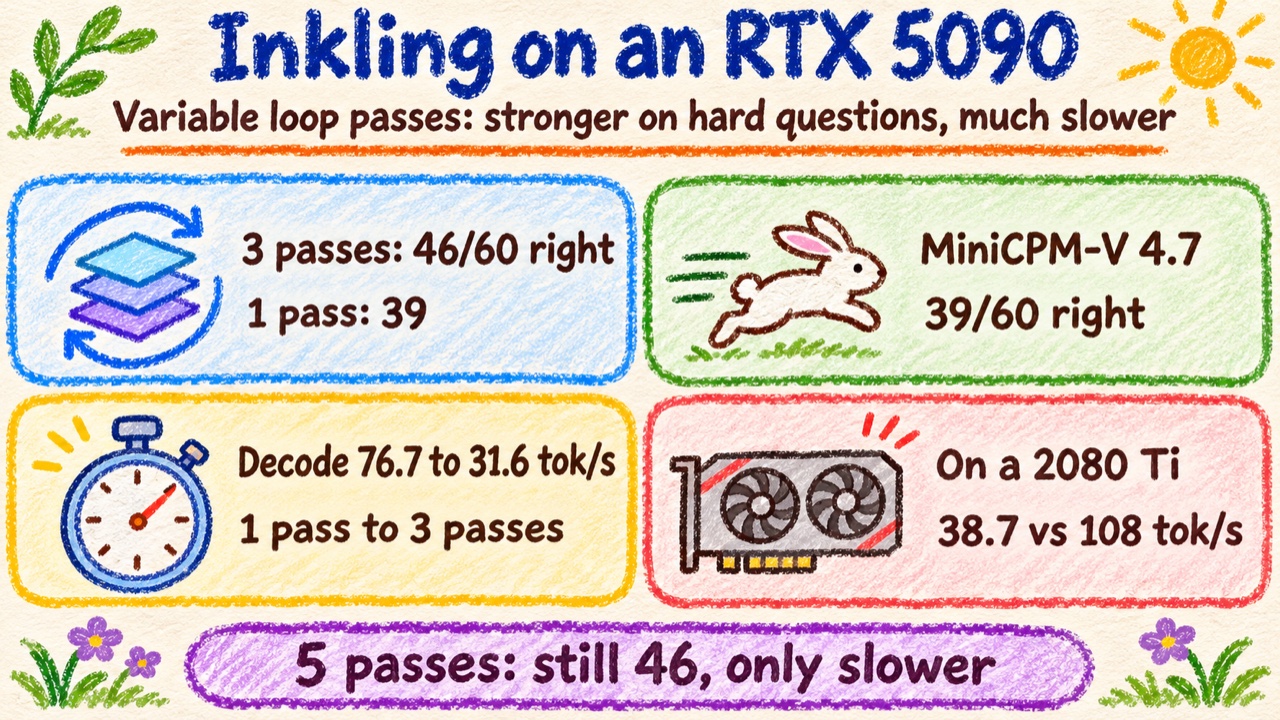
Thinking Machines' Inkling 2 Mini has 24 physical layers, but its middle 12 run three times with the same weights, so each token gets 48 layers of depth from a roughly 20 GB checkpoint that fits on a 32 GB card. The research model, TML-d24-varloop-research, lets you pick 1 to 5 passes. On an RTX 5090 it got 39 of my 60 hard math and reasoning questions right at 1 pass, 46 at 3, and 46 at 5, leveling off after 3, as most of the official benchmarks do. The cost is speed. On the 2080 Ti where I keep MiniCPM-V 4.7 always on, Inkling at 3 passes decodes at 38.7 tok/s, about a third of MiniCPM-V 4.7's 108. That's the price of 7 more right answers.
What Inkling is
Thinking Machines released Inkling 2 Mini on November 20. Hugging Face's launch post describes it as built for local AI setups. It's a mixture-of-experts model: each layer has 128 experts, and each token is routed to 8 of them. That gives 26.4B parameters in total, with 3.4B listed as active per token. Because the middle layers run three times, the model card counts that as about 5.4B effective active parameters per token in Inkling 2 Mini. It takes text and images as input, writes text, supports a context of up to 1M tokens, and is licensed Apache 2.0.
The weights ship in the precision they were trained in, NVFP4 and MXFP8 for the experts and BF16 for the rest, about 20 GB in all. There's nothing to quantize, and it fits on a 32 GB GPU or a 32 GB Mac.
What sets it apart from other models is the loop.
The problem the loop solves: depth without twice the weights
A transformer works layer by layer, each one refining the output of the one before. More layers usually means a stronger model, but every layer is another set of weights to store, so the file and the memory footprint grow with it. On your own hardware, memory is usually the first wall you hit.
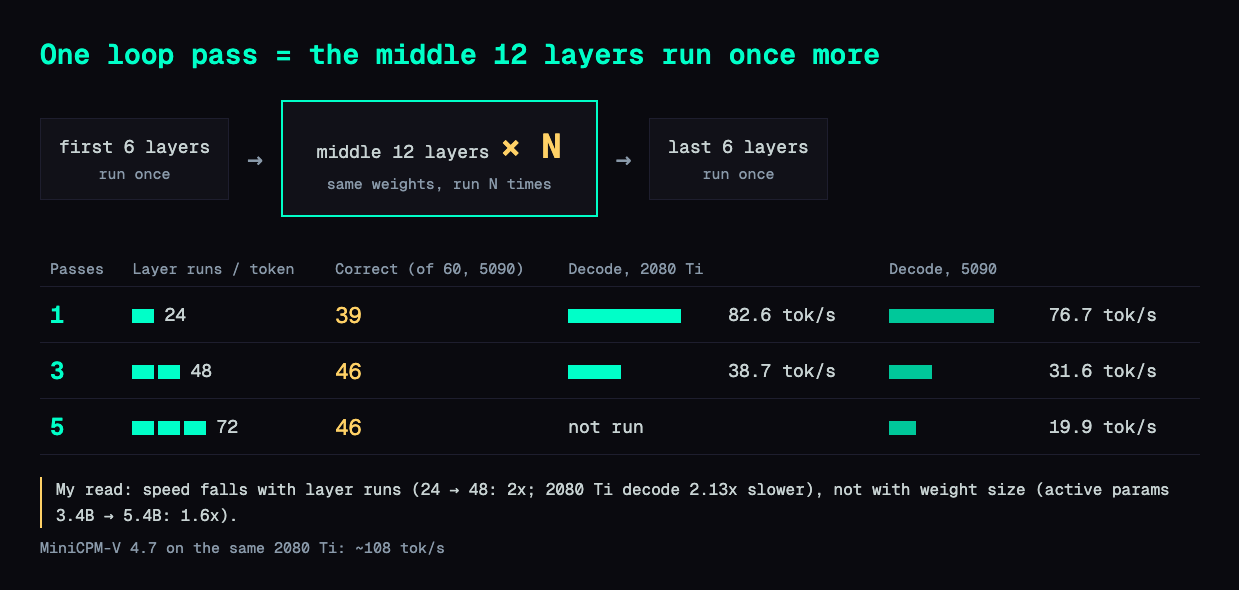
Inkling 2 Mini reuses its middle 12 layers instead. It physically has 24 layers. The first 6 run once, the middle 12 run three times with the same weights, and the last 6 run once. That's 48 layer runs per token, the same as the larger Inkling 2 Small. Each pass starts from the output of the first 6 layers and reads what the previous pass produced. A small gate decides how much of each to keep, so every pass refines the one before it.
The loop saves weights, not compute. All 48 layer runs still happen, and each pass keeps its own KV cache. Sharing weights shrinks the checkpoint, but it doesn't by itself make inference any faster.
The research model adds a dial: pick the pass count
Thinking Machines also released a research sibling the same day, TML-d24-varloop-research. The architecture is the same, but you choose how many times the middle section runs when you load it, anywhere from 1 to 5. 1 pass is 24 layer runs per token, 3 passes is 48, and 5 passes is 72. Each extra pass adds about 1.0B effective active parameters per token: 3.4B at 1 pass, 5.4B at 3 and 7.4B at 5. The file stays the same size.
That turns "smarter or faster" into a load-time setting on a single file. The research model was trained at 1 to 5 passes, but mostly at 3, and post-trained at 3. Its model card reports scores at every pass count, and on most benchmarks the biggest jump is from 1 to 2 passes, with smaller or mixed gains after 3. There are exceptions: BrowseComp keeps climbing from 65.7% at 3 passes to 71.0% at 5. On SWE-bench Verified, for example, 1 to 5 passes score 56.3%, 76.5%, 78.7%, 79.3% and 79.6%. The card warns that because training favored 3 passes, other pass counts may be underrated, and that the research model's later training differs from Inkling 2 Mini's, so the two shouldn't be compared directly. All the tests in this post use the research model.
Hugging Face's post says 1 or 2 passes run a lot faster with possibly slightly lower quality, but they didn't evaluate it in depth. That's what I wanted to measure on my own hardware: how many more right answers each pass buys, and how much speed it costs.
How to set the pass count
RTX 5090, vLLM. The research model ships in its training precision: NVFP4 experts in the first 20 layers, MXFP8 experts in the last four, BF16 for the rest, about 19.5 GB. It needs no further quantization and fits on a 32 GB card. I used the Inkling vLLM image and set the pass count with --hf-overrides. This is my actual command under WSL2, minus a counting patch I mounted to verify the loop count and some cache paths. On native Linux you'd swap the two WSL lines for --gpus all.
docker run --rm --name inkling-trial-server --network host --ipc host \
  --device /dev/dxg -v /usr/lib/wsl:/usr/lib/wsl:ro \
  -e LD_LIBRARY_PATH=/usr/lib/wsl/lib:/usr/local/cuda/lib64 \
  -v /root/inkling-varloop-2026-11-22:/root/inkling-varloop-2026-11-22 \
  vllm/vllm-openai:inkling-2-mini /root/inkling-varloop-2026-11-22/weights \
  --served-model-name inkling-varloop --port 9498 \
  --max-model-len 36864 --max-num-seqs 32 --gpu-memory-utilization 0.93 \
  --reasoning-parser inkling --no-enable-prefix-caching --enforce-eager \
  --language-model-only \
  --hf-overrides '{"text_config":{"loop_num_passes":3}}'
RTX 2080 Ti 22G, llama.cpp. I used the ggml-org GGUF TML-d24-varloop-research-IQ4_NL.gguf: 17.6 GB, IQ4_NL experts in the first 20 layers, Q8_0 for the last four layers' experts and everything else, loop control in F32. I built llama.cpp from master (commit afe77e18) for sm_75 and set the pass count with --override-kv:
llama-server -m TML-d24-varloop-research-IQ4_NL.gguf \
  --host 127.0.0.1 --port 18122 -ngl 99 -fa on -t 24 --jinja \
  -np 4 -c 147456 -ctk q8_0 -ctv q8_0 -b 1024 -ub 256 --fit off \
  --override-kv inkling2_loop.loop.count=int:3
That used 21,296 MiB of the card's 22 GB. Weights, a 36,864-token context for each of 4 slots, and a q8_0 KV cache all fit without offloading.
To confirm the override actually changed something, I sent the same prompt with the same seed at 1 and 3 passes. The outputs differed, and decode dropped from 81.6 to 37.9 tok/s. On the 5090 I also counted calls into the looped layers: 1 and 3 per token. One more thing to know: by default the model writes out its reasoning before the answer, which matters for the real-task results in the Deep dive.
Results on the 5090: 39, 46 and 46 right at 1, 3 and 5 passes
The test set is 60 hard questions: 30 competition math and 30 reasoning, temperature 0, up to 32,768 output tokens. All 60 ran to completion on the 5090 at each pass count. Read the "Correct" column first, then the speed column next to it.
| Passes | Correct (of 60) | Avg output tokens | Decode, 1 stream | Total time, summed per question |
|---|---|---|---|---|
| 1 | 39 | 9,871 | 76.7 tok/s | 141 min |
| 3 | 46 | 8,388 | 31.6 tok/s | 272 min |
| 5 | 46 | 7,702 | 19.9 tok/s | 390 min |
Going from 1 to 3 passes gained 7 correct answers and the model wrote 15% fewer tokens. It still took about twice as long, because decode speed fell by more than half. 5 passes matched 3 on score and took 43% longer. That matches most of the model card: little left to gain past 3 passes.
Head-to-head with MiniCPM-V 4.7 on my always-on 2080 Ti
Then I put it up against a model doing a real job. My modded RTX 2080 Ti 22G runs MiniCPM-V 4.7 35B-A3B as an always-on local model; I set that up in an earlier post and upgraded its llama.cpp recently. Most of what goes to that card is short: classify this, score that, rewrite a headline. Its job is to answer fast, about 108 tok/s for a single request.
In an earlier run on the 2080 Ti at its usual quant, MiniCPM-V 4.7 got 39 of the same 60 right, with the same grader and 32,768-token limit. Decode on the 2080 Ti is single-request, median of 9 runs:
| Model on the 2080 Ti 22G | Hard questions correct (of 60) | Decode, 1 stream |
|---|---|---|
| Inkling research, 1 pass (IQ4_NL) | 39 (measured on the 5090) | 82.6 tok/s |
| Inkling research, 3 passes (IQ4_NL) | 46 (measured on the 5090) | 38.7 tok/s |
| MiniCPM-V 4.7 35B-A3B | 39 | about 108 tok/s |
At 3 passes, where its score peaks, Inkling is 7 answers ahead and runs at 36% of MiniCPM-V 4.7's speed. At 1 pass it ties on score and is still 24% slower. The product Inkling 2 Mini always runs 3 passes, so the same 48 layer runs per token apply to it. I'd expect similar speed, though I didn't measure it.
The 2080 Ti accuracy runs were cut off by a time limit (41 questions at 1 pass, 18 at 3), so the scores above come from the 5090. On the 18 questions the 2080 Ti finished at 3 passes, it got 14 right, the same count the 5090 got on those 18. The IQ4_NL quant didn't visibly hurt.
So MiniCPM-V 4.7 stays on the always-on card. Short jobs need a fast reply, and it gives one at 108 tok/s. Inkling is worth starting when the question is hard enough that 7 more right answers out of 60 matter more than a slower answer, and the 5090 is the better place for it.
I also tried Inkling on a small set of my real tasks. That attempt mostly measured interface problems, not ability, so it's in the Deep dive below. On seven incident-diagnosis replays, scored on the answer each model actually delivered, three of Inkling's ended in that interface failure and delivered nothing gradable. It still came to 10 of 21 against MiniCPM-V 4.7's 9 of 21, at a median 202 s per case against 102 s.
Which quant I ran, and would a smaller one be faster?
The 5090 ran the native NVFP4/MXFP8/BF16 checkpoint with no requantization. The 2080 Ti ran IQ4_NL at 17.6 GB, which already fits entirely in 22 GB.
A smaller quant would make the file smaller. I don't think it would make the 2080 Ti much faster. This is an estimate from two measurements, not a test of a smaller file:
- Going from 1 to 3 passes raises active parameters per token from 3.4B to 5.4B, 1.6x.
- It doubles layer runs per token, 24 to 48, 2x.
- Measured decode on the 2080 Ti fell from 82.6 to 38.7 tok/s, 2.13x.
The slowdown tracks the layer count, not the amount of weight data. If decode on this card were limited by reading weights, a 1.6x increase in weights read should cost about 1.6x. It cost more than 2x. My read is that most of the time per token goes to running each layer rather than reading its weights, but I haven't profiled it, so treat that as a hypothesis.
The 5090 numbers point the same way. It has nearly 3x the 2080 Ti's memory bandwidth, yet at 1 pass it decoded slower (76.7 against 82.6 tok/s). It also ran with --enforce-eager, which turns off CUDA graphs and makes every layer launch cost more. Different framework and quant, so treat that as a hint, not proof.
To match MiniCPM-V 4.7 at 3 passes, Inkling on the 2080 Ti would need to go 2.8x faster. I don't expect a quant change to get anywhere near that.
If you want to try anyway, Unsloth publishes Inkling 2 Mini GGUFs from 7.8 GB (UD-IQ1_S) to 22.9 GB (UD-Q8_K_XL). Their table puts UD-Q2_K_XL at 9.1 GB with the same top token as Q8 91.6% of the time, against 97.7% for UD-IQ4_XS at 15.7 GB. Two notes from their README. The Mainline_Support files that keep NVFP4 scales need a llama.cpp build with PR #32704, which merged upstream on November 21; without it the second and third passes lose their expert scales and the output is wrong. And the DSpark draft model that ships with these GGUFs (0.4 GB, for speculative decoding) needs Unsloth's own llama.cpp build for now, since upstream PR #32218 is still open. Speculative decoding cuts the number of full model steps per token, so it's the speed lever I'd try first. I haven't tested it.
Deep dive: real-task check, harness fixes, and measurement notes
Skip this section if you only want the results; nothing above depends on it. It records what broke when I pointed Inkling at real work, and the details behind each number.
Default thinking used up the short output limits
My real-task set has 20 short text jobs taken from production: classification, news scoring, short Chinese-to-English labels, data extraction, and headline rewrites. Each job has the output token limit it uses in production: 250 for classification, 850 for scoring, 900 for rewrites, 1,800 for translation, 4,500 for extraction.
The answers I compared against came from whichever model does that job today, run with thinking off. I ran Inkling with its default thinking on, same prompts, same limits. The reasoning and the final answer share one token budget, and the reasoning won: 17 of 20 answers at 1 pass and 16 of 20 at 3 passes hit the limit. On one classification question, 248 of the 250 tokens were reasoning and the final answer was empty.
| Short jobs (20) | Machine check passed | Usable as-is (blind review) |
|---|---|---|
| Inkling, 1 pass | 3 | 1 |
| Inkling, 3 passes | 4 | 1 |
| Production models, thinking off | 12 | 4 |
So "1 of 20" measures the setup, not the model. A fair rerun would turn thinking off, or test a higher limit separately. I didn't run it, because the speed gap had already settled the decision.
Tool calls came back as unparsed text
The other categories need tools: two code-patch tasks, seven incident replays, and two rule-file edits, run through a coding agent with read and bash tools. Inkling passed the tool smoke test (one read and one bash call in 12.6 s). On longer tasks, after 3 to 30 tool calls, the final reply was an unexecuted tool-call string instead of a call. vLLM reported no error and the agent saw a normal stop. One rule-file task ended after 9 tool calls with just this:
bash"}}
Another, after 11 calls (I shortened my local path to <bank>):
bash"name":"bash","args":{"command":"find <bank>/runs/inkling-p3/C2 -name \"*size*inventory*\" ..."}}
The server ran with --enable-auto-tool-choice --tool-call-parser inkling --reasoning-parser inkling, sampling at the model's default temperature 1.0. I couldn't tell whether the parser missed a valid format or the model emitted a broken one, so I count its ability on those tasks as untestable, not as zero. The incident replays below are the one place I report a score anyway, on what was actually delivered, so the failed replays count as zero there. Of the seven incident replays, four finished cleanly. Graded blind against MiniCPM-V 4.7 on root cause (0–2) and safe fix (0–1), the full set came to 10 of 21 against 9 of 21. Two replays got full marks from Inkling; none did from MiniCPM-V 4.7.
Two harness bugs this run exposed
Both were in my test harness, not in Inkling:
- A tool timeout left children running. The agent's
bashtool killed only the parent shell on timeout. Afind | grep | headpipeline kept running and held stdout open. It now kills the whole process group. A 1-second probe ends in 1,007–1,011 ms with no leftovers. - The sandbox could read the answer key. On its first attempt at one rule-file task, Inkling's
findreached that case's historical answer file and read two lines of it. I voided that run, blocked every path outside the candidate's own workspace, and reran it in a fresh session. Only the rerun counts.
Measurement notes
- 5090 runs used
--enforce-eager. No CUDA graphs, no torch.compile. These are the numbers for this configuration, not the framework's ceiling. - Decode is (completion tokens − 1) divided by the time from first to last content chunk, including reasoning tokens. Median of 9 single-stream runs (3 Chinese, 3 English, 3 code).
- Time per pass count: I use the sum of per-question seconds (141 / 272 / 390 min). The 1-pass suite wall clock was undercounted after a resumed run dropped 488.7 s, and the suites ran at different concurrency (4 streams at 1 pass, 2 at 3 and 5), so wall clocks don't compare.
- Questions all three pass counts got right (35): average output 3,288 / 2,472 / 3,028 tokens at 1 / 3 / 5 passes, average time 48 / 81 / 153 s.
- 2080 Ti software: llama.cpp master
afe77e18, CUDA sm_75, Release. That build already includes PR #32704 (GitHub's compare view shows it 13 commits ahead of the merge, 0 behind). My GGUF also had no NVFP4 tensors, and both cards scoring 14 of the same 18 at 3 passes says the output was sane. - 2080 Ti 4-stream decode at 3 passes: 12.9 / 15.2 / 21.7 / 19.9 tok/s per stream. In one 4-stream run, 3 streams produced 512 tokens with no visible content. I didn't track down why.
FAQ
- What is Inkling's loop, and what problem does it solve?
- Inkling 2 Mini has 24 physical layers. The first 6 and last 6 run once and the middle 12 run three times with the same weights, so each token goes through 48 layer runs. You get a deeper model without storing twice the weights: the checkpoint is about 20 GB and fits on a 32 GB GPU. It saves weights, not compute: all 48 layer runs still happen, so sharing weights doesn't by itself make inference faster. The research model, TML-d24-varloop-research, lets you set 1 to 5 passes at load time.
- How do I change the number of loop passes in TML-d24-varloop-research?
- In vLLM, start the server with --hf-overrides '{"text_config":{"loop_num_passes":3}}'. In llama.cpp, use --override-kv inkling2_loop.loop.count=int:3. The model was trained with 1 to 5 passes and post-trained at 3. The product model, Inkling 2 Mini, always runs 3.
- Is 3 loop passes worth it over 1?
- On my 60-question math and reasoning set, on an RTX 5090: 1 pass got 39 right, 3 passes 46, 5 passes 46. Per-stream decode fell from 76.7 to 31.6 to 19.9 tok/s. 3 passes buys 7 more correct answers at roughly half the speed. 5 passes only costs time.
- Will a smaller GGUF quant make Inkling faster on a 2080 Ti?
- Probably a little, not a lot. I didn't run a smaller quant, so this is an estimate. Going from 1 to 3 passes raises the weights read per token 1.6x but cut my 2080 Ti decode 2.13x, closer to the 2x layer count than to the weight increase. A smaller file shrinks the weights, not the layer count.
Read next
- 2026-11-17[Benchmark] Qwen3.8-27B on One RTX 5090 With QEngine: 359 tok/s on Code, and Why It Won't Build for a 2080 Ti
QEngine runs Qwen3.8-27B on one RTX 5090 under WSL2 at 358.5 tok/s on code and 109.1 on Chinese. On a 2080 Ti the build fails: its BF16 kernels need sm_80.
- 2026-11-11[Benchmark] FP16 vs Q8 on RTX 5090: Qwen2.5-7B Generates at 188.75 tok/s
FP16 vs Q8_0, Q6_K and Q4_K_M on one RTX 5090: measured prompt speed, generation speed, VRAM, perplexity and KL divergence, with raw results.
- 2026-08-18[Junk-Tier Big Models #5] Qwen3.8-27B on a 2018 22GB card: 30 tok/s, and it one-shot a 3D scene
A modded 22GB RTX 2080 Ti runs Qwen3.8-27B at 30-31 tok/s with 128K context. The full llama.cpp command, the MTP flags, and the thinking-budget trap.
- 2026-11-22[Benchmark] Upgrading llama.cpp on an RTX 2080 Ti: Carry Chunked Prefill Forward and Short Requests Finish in 5.4 s
llama.cpp b11588 to b12595 on a modded 2080 Ti 22G: decode up to 10% faster, but short requests took 16.8 s until I ported chunked prefill. Now 5.4 s.
Don't miss the next one
Subscribe, and you won't.
One-click unsubscribe anytime.