LLM 101 · part 3
[LLM 101 #3] How to Choose an AI Model: Gemma vs Llama vs Qwen vs Mistral (2026)
❯ cat --toc
- The short version: pick what your computer can run
- Don't start with the spec sheet
- Step 1: How big is your parking space? (Memory)
- A quick memory rule of thumb
- Step 2: Sedan or truck? (Size vs. quality)
- How fast is "fast enough"?
- How much does speed actually vary?
- Estimating speed yourself
- Step 3: Pick a brand (Gemma, Llama, Qwen)
- Quantization: same model, smaller file
- Worked example: I have a 16 GB Mac. What should I pick?
- Bottom line
TL;DR
Choosing a model is like buying a car: check your parking space (memory) first, then decide sedan or truck (model size), then pick a brand (Gemma, Llama, Qwen). One formula: parameters (B) × 0.6 ≈ required GB of memory. 8 GB RAM → 7B, 16 GB → 14B, 32 GB → 30B.
The short version: pick what your computer can run
If you open Ollama's model library, you'll see hundreds of AI models with names that get longer by the day: Gemma 4 E4B, Llama 3.3 70B, Qwen3-Coder 480B-A35B. Each one claims to be great, but can your computer even run it? And if it can, which one is right for you?
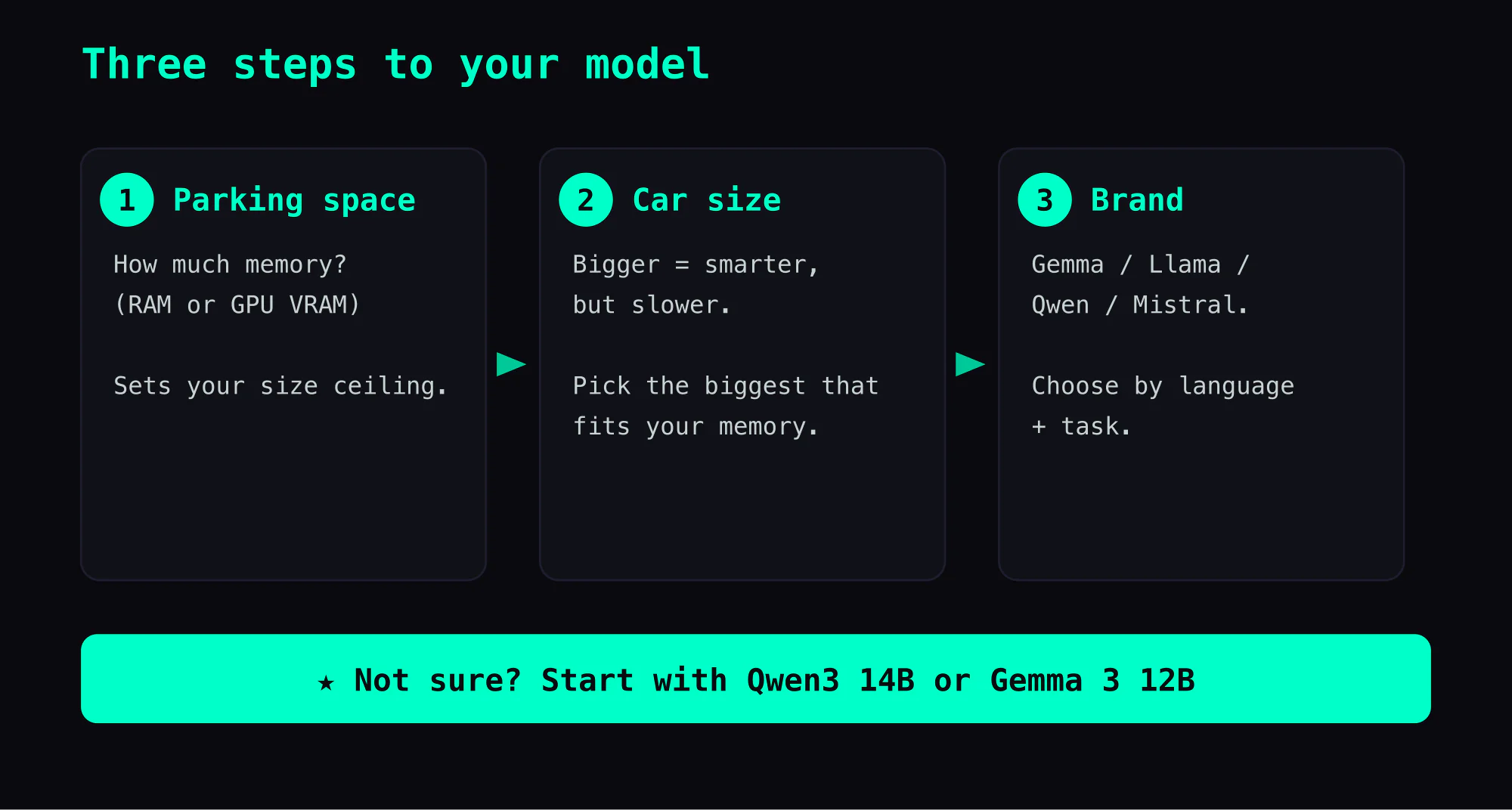
It's exactly like buying a car. You wouldn't go test-drive a Ferrari before checking if it fits in your garage. Same with AI models: first figure out what your computer can handle, then pick the best one within that range.
Last article, we covered the four different "body types" of AI models. This one teaches you how to narrow down hundreds of models to the right one in three steps.
Don't start with the spec sheet
You walk into a dealership with 500 cars. Each one has a spec sheet: horsepower, torque, fuel economy, 0-60 time. You're not a race car driver. You just need something for your commute.
How do you choose?
Most people don't start with horsepower. You start with: how big is my parking space? What's my budget? Am I mostly on highways or city streets?
Choosing an AI model works the same way. Don't let the spec sheets intimidate you. Three steps is all you need.
Step 1: How big is your parking space? (Memory)
This is the most important step, because the best model in the world is useless if it can't run on your machine.
AI models need to be loaded into memory to run. Bigger model = more memory needed. "Memory" here means:
- If you have a dedicated GPU (NVIDIA RTX series) → look at the GPU's own memory (called VRAM — separate from your computer's RAM, typically 8-24 GB)
- If you're on a Mac → look at your RAM (Mac memory is shared between CPU and GPU, so all of it can be used for models)
- If you're on a regular laptop → look at RAM, minus what the OS uses (usually 60-70% available)
A quick memory rule of thumb
The B in model names stands for Billion parameters. To estimate memory usage:
Parameters (B) × 0.6 ≈ Required GB of memory
This assumes you download the compressed version (we'll explain "quantization" later — for now just remember this number). Some examples:
| Model size | Memory needed (approx.) | What computer |
|---|---|---|
| 1-3B | 1-2 GB | Phone, low-end laptop |
| 7B | 4-5 GB | 8 GB laptop |
| 14B | 8-9 GB | 16 GB laptop or Mac |
| 30B | 18-20 GB | 32 GB Mac or 24 GB GPU |
| 70B | 40-45 GB | 64 GB+ or pro GPU |
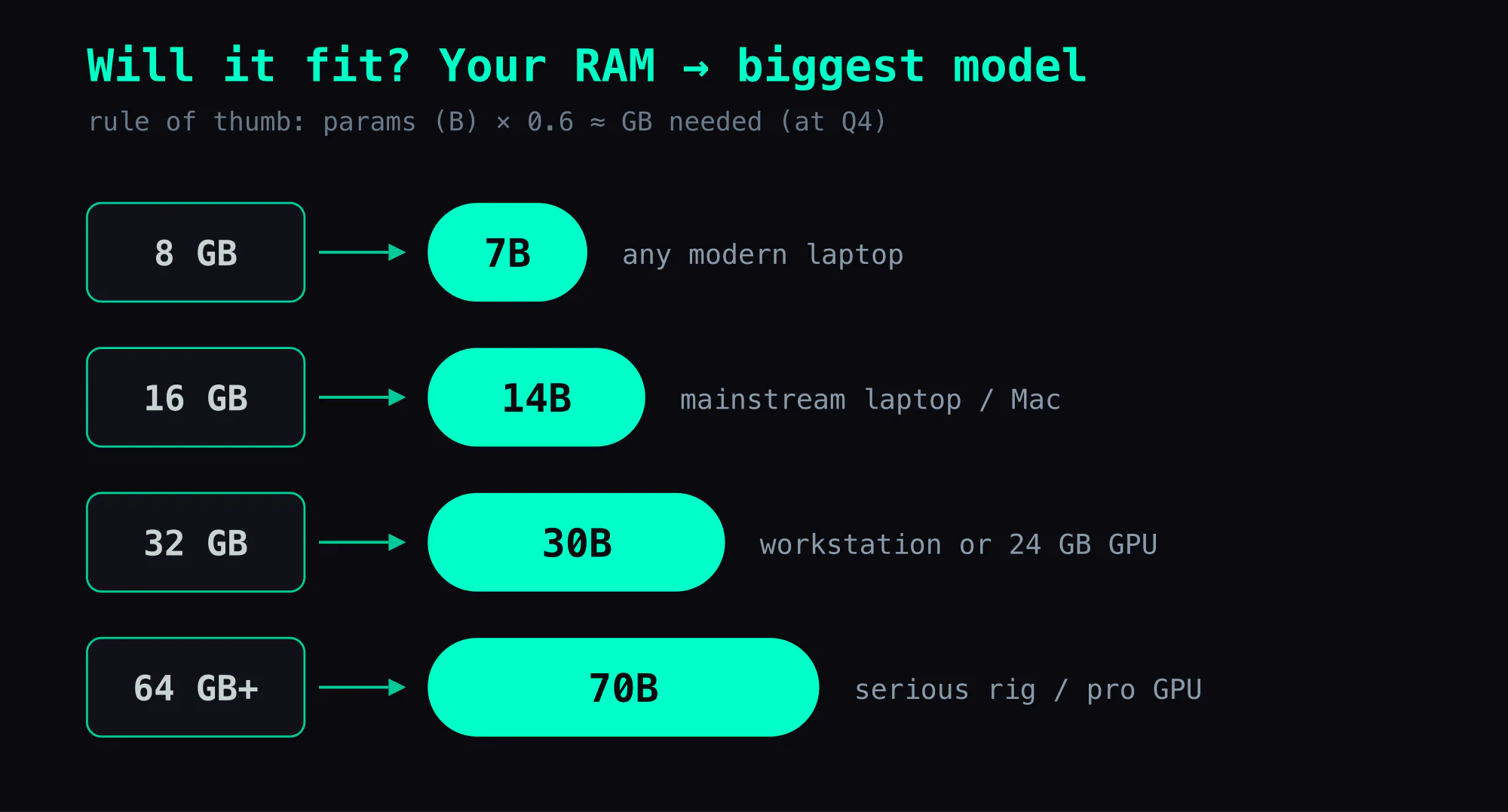
How much memory does your computer have? That's your parking space. Once you know this, move to the next step.
Step 2: Sedan or truck? (Size vs. quality)
After confirming your memory limit, you'll find several models that "fit in the garage." Now comes the tradeoff:
Bigger model = smarter, but slower
A 30B model usually answers much better than a 7B — better comprehension, cleaner logic, less hallucination. But it's also much slower.
As a rough rule of thumb, doubling a model's size tends to improve quality by something like 10-20% while cutting speed by more than half — a heuristic, not a law, since a well-trained smaller model can beat a sloppy bigger one. (You can compare models head-to-head on the Chatbot Arena leaderboard.)
How fast is "fast enough"?
When AI answers a question, text appears word by word — it doesn't show up all at once. This speed is measured in "words per second" (technically tok/s — tokens per second, where one token is roughly one word, sometimes just part of a longer one).
A useful reference: your reading speed is about 4-5 words per second. If AI outputs slower than you can read, you'll feel it "lagging."
According to BentoML's inference performance research and community benchmarks, speed tiers feel like this:
| Words/sec | How it feels | Car analogy |
|---|---|---|
| < 5 | Slower than you can read, want to quit | Gridlock traffic |
| 5-12 | Noticeably waiting, tempted to switch tabs | City traffic, barely tolerable |
| 12-30 | Some waiting but acceptable | Regular roads, fine |
| 30-50 | Comfortable, feels like chatting | Highway, recommended target |
| 50-80 | Fast, streaming text feels natural | Express lane |
| 80+ | Can't tell the difference anymore | Airplane, but you just need to commute |
How fast is ChatGPT? As a rough reference (early 2026): the big cloud chatbots stream at roughly 50 words/sec, and the fastest hosted models — like Gemini Flash — clear 200. On your own hardware, aiming for 30+ words/sec feels about like ChatGPT.
How much does speed actually vary?
I benchmarked different model sizes on my own machines to give you a feel:
| Computer | Model size | Speed (words/sec) | Feel |
|---|---|---|---|
| High-end GPU (RTX 5090) | 3B (small) | 310 | Instant |
| High-end GPU (RTX 5090) | 8B (medium-small) | 202 | Instant |
| Desktop workstation (128GB) | 8B (compressed) | 50 | Comfortable chat |
| Desktop workstation (128GB) | 31B (large) | 7 | Waiting, barely usable |
| MacBook Pro (32GB) | 31B (tuned) | 13 | Acceptable |
| MacBook Pro (32GB) | 31B (default settings) | 1.5 | Unusable |
Notice the last two rows — same computer, same model, but different software settings caused an 8x speed difference. Settings matter, but that's an advanced topic (details here if you're curious).
Estimating speed yourself
Thanks to reader marqd114 for suggesting this addition.
AI runs models in two phases, each with a different bottleneck:
- Writing the answer (word by word) — limited by how fast data can move through memory (called memory bandwidth)
- Reading your question (before it starts answering) — limited by raw computing power (called compute)
What you're usually waiting for is generation, so start here:
Generation speed (decode):
words/sec ≈ memory bandwidth (GB/s) ÷ model size (GB)
| Hardware | Bandwidth | Running 14B Q4 (~9 GB) | Running 31B Q4 (~19 GB) |
|---|---|---|---|
| MacBook Pro M1 Max | 400 GB/s | ~44 words/sec | ~21 words/sec |
| RTX 5090 | 1,792 GB/s | ~199 words/sec | ~94 words/sec |
| DGX Spark (GB10) | 273 GB/s | ~30 words/sec | ~14 words/sec |
These are theoretical ceilings — real-world speed is typically 60-80% of this. But it's still useful for estimating how fast a model will run on your machine.
Prompt processing speed (prefill):
words/sec ≈ compute (TFLOPS) × utilization ÷ parameters (B) × 500
This means: stronger GPU and smaller model = faster prompt reading. Utilization is typically 40-60%.
| Hardware | Compute (FP16) | Utilization | Reading 14B | Reading 70B |
|---|---|---|---|---|
| MacBook Pro M1 Max | 10.4 TFLOPS | ~50% | ~185 words/sec | ~37 words/sec |
| RTX 5090 | 209 TFLOPS | ~50% | ~3,732 words/sec | ~746 words/sec |
| 10× A100 | 3,120 TFLOPS | ~46% | ~51,171 words/sec | ~10,234 words/sec |
Prompt processing is usually much faster than generation, so the "waiting" you feel is mostly the generation phase.
Note: Some models use an MoE ("Mixture of Experts") design — you'll see A4B or A3B in the name. They switch on only a small slice of the model for each word, so they run faster than their full size suggests. For example, Qwen3.5-35B MoE hits 47 words/sec on DGX Spark because only ~3B of its parameters are active per word.
Key takeaway: when choosing a model, don't just look at size — look at how fast your computer can run it. A medium model at 40 words/sec feels much better than a large model at 5 words/sec.
So how to choose?
- Daily chat, translation, writing → Pick the biggest model your memory allows. Quality > speed when you're asking one question at a time.
- Coding, debugging → Go bigger. Code quality differences between small and large models are stark — 7B often writes code that runs but has logic bugs.
- Real-time chat, quick Q&A → Pick medium size. The sweet spot for speed/quality balance is usually 14-30B.
- Very limited resources (8 GB or less) → Pick 7B, no hesitation. Today's 7B models are smarter than 70B models from two years ago.
Step 3: Pick a brand (Gemma, Llama, Qwen)
Once you've decided on a size, you'll find several brands at that size. Like deciding between Toyota, Honda, and Tesla after settling on a mid-size sedan.
The major AI model brands in 2026:
| Brand | Made by | Best at | Chinese | Main sizes (on Ollama) |
|---|---|---|---|---|
| Gemma 3 | Multilingual, multimodal | Good | 1B, 4B, 12B, 27B | |
| Gemma 4 | Newest, edge + workstation tiers | Good | E2B, E4B, 12B, 26B-A4B (MoE), 31B | |
| Llama 3.x | Meta | English, biggest community | Fair | 1B, 3B (3.2); 8B, 70B, 405B (3.1/3.3) |
| Qwen3 | Alibaba | Chinese, coding, reasoning | Best | 0.6B, 1.7B, 4B, 8B, 14B, 30B-A3B (MoE), 32B, 235B-A22B (MoE) |
| Mistral | Mistral AI | Efficiency, European languages | Fair | 7B (Mixtral variants are separate entries) |
| Phi-4 | Microsoft | Small-model champion | Fair | 14B |
Recommendations:
- Mostly Chinese → Qwen3 or Gemma 3
- Mostly English → Llama 3.x or Gemma 3
- Coding → Qwen3 or Qwen3-Coder
- Very limited memory (≤ 8 GB) → Gemma 3 4B or Llama 3.2 3B
- Not sure → Start with Qwen3 14B or Gemma 3 12B — best value for the Chinese-speaking world
Quantization: same model, smaller file
You may have noticed the same model comes in many "versions": Q4_K_M, Q8_0, FP16. These are quantization levels — like the difference between MP3 128kbps, 320kbps, and FLAC for music files.
| Level | Size | Quality | Plain English |
|---|---|---|---|
| FP16 | Largest | Best | FLAC — lossless, but huge |
| Q8 | ~Half of FP16 | Nearly lossless | MP3 320kbps — can't tell the difference |
| Q4 | ~1/3 of FP16 (≈3.3x smaller) | Slight loss | MP3 128kbps — good enough for daily use |
| Q2 | Smallest | Noticeable loss | 64kbps — you can hear it |
Pick Q4 for daily use. Real Q4 files are roughly one-third the size of the FP16 original (the theoretical "4x smaller" doesn't quite hold because some parts of the file can't be compressed that far), with quality loss that most users can't feel. The memory formula above already assumes Q4.
Want better quality? Go Q8. But memory usage doubles — make sure your "parking space" can fit it.
Worked example: I have a 16 GB Mac. What should I pick?
Walk through the steps:
- Memory: 16 GB, minus OS leaves about 10-12 GB usable
- Model size limit: 10 GB ÷ 0.6 ≈ 14-16B range
- Use case: Daily chat + occasional coding
- Language: Mostly Chinese
Recommendation: qwen3:14b (Q4 version, ~9 GB)
One command in Ollama:
ollama run qwen3:14b
Don't like it? Try Gemma 3:
ollama run gemma3:12b
Try both, ask the same question, compare answers. Keep whichever you prefer.
Bottom line
Check your parking space (memory), pick the car size (parameters), then choose the brand. If unsure, start with Qwen3 14B or Gemma 3 12B.
Next up: what is quantization? What's the actual difference between Q4, Q8, and FP16?
This is Part 3 of the "LLM 101" series. Previous: Four AI model architectures.
FAQ
- How do I know how big an AI model is?
- Look for the B number in the name — e.g. 7B means 7 billion parameters. More parameters = smarter but more memory. 7B needs about 4-5 GB, 70B needs about 40 GB. Quick estimate: multiply the B number by 0.6 — a 7B model needs about 4-5 GB for the compressed model, plus a little extra for the conversation itself.
- What if my computer doesn't have enough memory?
- Three options: 1) Pick a smaller model (7B or 14B), 2) Use a quantized version (Q4 is roughly one-third the size of the original — about 3.3x smaller in real files), 3) If you have a dedicated GPU, use its VRAM instead. Rough ceilings: 8 GB RAM → 7B, 16 GB → 14B, 32 GB → 30B. These are conservative — exact fit depends on your free memory and how much conversation history you give the AI.
- Which is better — Gemma, Llama, or Qwen?
- Each has strengths. Google's Gemma is balanced and multilingual, Meta's Llama has the largest English ecosystem, Alibaba's Qwen is best for Chinese and strong at coding. At the same size, try Qwen (best Chinese) or Gemma (most balanced) first.
- What do Q4, Q8, FP16 mean in model names?
- These are quantization levels — compression ratios for model files. FP16 is original quality (largest, slowest), Q8 is light compression (nearly lossless), Q4 is heavy compression (~3.3x smaller in real files, slight quality drop). Think MP3 128kbps vs 320kbps vs FLAC. Q4 is fine for daily use.
Read next
- 2026-04-17[LLM 101 #6] Why Run AI on Your Own Computer? It's Not a Cheaper ChatGPT — It's a Different Tool
Local AI isn't a budget ChatGPT. It's a knowledge extractor, private code assistant, and offline tool. Monthly power cost ~$1.20 vs ChatGPT Plus $20. This guide has a decision table for when to use which.
- 2026-04-10[LLM 101 #4] What Is Quantization? Q4, Q8, FP16 Explained
Q4_K_M, Q8_0, FP16 — the same model comes in a dozen versions and the names look like hieroglyphs. This guide explains what quantization actually does, why it doesn't ruin the model, and which level to pick.
- 2026-04-14[LLM 101 #5] Context Window — How Much Can AI Read at Once?
AI forgets what you said 20 messages ago. It's not broken — its desk is full. This guide explains context windows, why conversations go stale, and how to work around the limit.
- 2026-04-07[LLM 101 #1] Ollama vs vLLM: Two Ways to Run AI on Your Own Computer
Ollama is a microwave — one command and you're chatting with AI. vLLM is a professional oven — 30% faster, handles multiple users, but takes real setup. A zero-jargon guide to choosing between them.
Don't miss the next one
Subscribe, and you won't.
One-click unsubscribe anytime.