Z-Image Turbo · part 1
[Field Guide] Z-Image Turbo — choosing the right config (1.37× faster, 44% less RAM)
❯ cat --toc
- Plain-language version: what is Z-Image Turbo and why this bench exists
- Why this benchmark exists
- Test stack
- Environment
- Six configs
- Inference settings (fixed across configs)
- What I measured
- Results
- Warm latency (N=10 mean ± std)
- Cold latency
- Model working set (ComfyUI process RSS peak, idle subtracted)
- Six warm samples (same prompt, same seed=42)
- Recommended combo
- Methodology caveats
- Contrast with the LLM result in Part 19
- Related reading
TL;DR
DGX Spark GB10, six Z-Image Turbo quant configs measured with N=10 isolated GPU. NVFP4 transformer hits 5.50s warm (versus BF16 7.55s — 1.37× speedup). All three FP8 paths are slower than BF16 (8.19–8.45s). Recommended combo: NVFP4 transformer + qwen_3_4b FP8 mixed encoder. Disk 10.4 GB (~49% smaller, roughly half BF16's 20.6 GB). Working set 11.5 GB vs BF16 20.6 GB (44% smaller). Warm time matches NVFP4+BF16 encoder. ⚠️ The weight_dtype=fp8_e4m3fn cast path does not save RAM — for actual memory savings you need a natively quantized file. The "why" is deferred to the next article.
Plain-language version: what is Z-Image Turbo and why this bench exists
Z-Image Turbo is an open-source image generation model released by Alibaba's Tongyi-MAI team in late November 2025 (Apache 2.0 per the official repo's LICENSE; check there for canonical terms). The distilled variant generates images in just 8 sampling steps. This article uses the Comfy-Org repack — the upstream weights restructured into ComfyUI's split_files/ layout, with extra NVFP4 transformer and FP8 mixed encoder quants included.
If you are new to quantization — what FP8 / NVFP4 / BF16 are, why fewer bits saves memory, why fewer bits sometimes runs slower — start with the primer:
- LLM 101: What is quantization? Q4, Q8, FP16 — what's the difference — the entry-level explainer
- One level deeper (algorithm layer): LLM Deep Dive: What quantization algorithms actually do, from Q4_K_M to TurboQuant
The short version: image generation uses the same FP8 / NVFP4 / BF16 formats as LLMs, the same .safetensors file format. Only the inference backend differs — LLMs run on vLLM / SGLang, image generation runs on ComfyUI + comfy_kitchen.
DGX Spark is NVIDIA's desktop AI workstation (around USD 3,000), built on a GB10 GPU with 128 GB unified memory and 273 GB/s of memory bandwidth. I ran six Z-Image Turbo quant combos on this box, measured speed and VRAM, and produced one copy-pasteable best-config table.
Why this benchmark exists
When the community debates NVFP4 versus FP8, the default assumption is "fewer bits, faster inference." That assumption breaks on GB10. In Part 19: NVFP4 is a trap on GB10 I showed FP8 beats NVFP4 by 32% on the LLM side (Qwen 3.6 35B via vLLM).
Does the same thing happen on the image generation side? A diffusion transformer's forward pass and an LLM's autoregressive decode have very different memory access patterns, so the LLM result does not transfer. You have to measure.
Test stack
Environment
- Hardware: DGX Spark (GB10 / SM12.1, 128 GB unified, 273 GB/s LPDDR5x)
- OS: Ubuntu, NVIDIA driver 580, CUDA 13.0
- ComfyUI: 0.20.1, PyTorch 2.10.0+cu130, comfy_kitchen 0.2.8
- Isolated GPU: vllm-gx10 LLM stopped (
docker stop qwen-abliterated) freeing 70 GB before bench - Idle VRAM: 41 GB (system + ComfyUI + buffer cache)
Six configs
| Label | Transformer file | weight_dtype | Encoder file |
|---|---|---|---|
| BF16+BF16 (baseline) | z_image_turbo_bf16.safetensors (12.3 GB) | default | qwen_3_4b.safetensors (8.0 GB) |
| FP8cast e4m3fn | same (BF16 source) | fp8_e4m3fn | same as BF16 |
| FP8cast FAST | same | fp8_e4m3fn_fast | same as BF16 |
| FP8scaled Kijai | z-image-turbo_fp8_scaled_e4m3fn_KJ.safetensors (5.7 GB) | default | same as BF16 |
| NVFP4+BF16 | z_image_turbo_nvfp4.safetensors (4.5 GB) | default | same as BF16 |
| NVFP4+FP8e (recommended) | NVFP4 | default | qwen_3_4b_fp8_mixed.safetensors (5.6 GB) |
NVFP4 transformer and FP8 mixed encoder come from the official Comfy-Org/z_image_turbo repo. The FP8 scaled file is from Kijai/Z-Image_comfy_fp8_scaled, a community pre-quantized variant that ships with weight_scale tensors and routes through a different ComfyUI pipeline than the cast paths.
Inference settings (fixed across configs)
KSampler: steps=8, cfg=1.0, sampler=res_multistep, scheduler=simple
ModelSamplingAuraFlow: shift=3
Latent: EmptySD3LatentImage 1024×1024
Negative: ConditioningZeroOut (FLUX-family convention; an empty CLIPTextEncode is wrong)
CLIPLoader: type=lumina2 (Z-Image rides on the Lumina2 pipeline)
What I measured
- Warm latency: same prompt + same seed; one cold load to bring the model into VRAM, then ten consecutive warm runs, wall-clock recorded each time
- Peak VRAM: a background thread polls ComfyUI's
/system_statsevery 200 ms and tracks the max - Cold latency: time of the first run (disk to RAM plus JIT compile)
Results
Warm latency (N=10 mean ± std)
| Config | Warm mean ± std | Min | Max | vs BF16 |
|---|---|---|---|---|
| BF16+BF16 | 7.55 ± 0.01s | 7.54s | 7.57s | 1.0× baseline |
| FP8cast e4m3fn | 8.27 ± 0.10s | 8.15s | 8.46s | 0.91× ❌ slower 0.72s |
| FP8cast FAST | 8.45 ± 0.01s | 8.45s | 8.47s | 0.89× ❌ slowest |
| FP8scaled Kijai | 8.19 ± 0.04s | 8.14s | 8.24s | 0.92× ❌ slower 0.64s |
| NVFP4+BF16 | 5.50 ± 0.07s | 5.44s | 5.58s | 1.37× ✅ |
| NVFP4+FP8e (recommended) | 5.52 ± 0.10s | 5.43s | 5.74s | 1.37× ✅ |
Three observations:
-
NVFP4 transformer is the genuine winner. Warm 5.50s, std 0.07s. The 2.05s gap versus BF16 7.55s is far larger than the 0.07s std on either side — the worst max-min comparison still differs by 1.86s. The 1.37× speedup is solid.
-
All three FP8 paths are slower than BF16. This is the surprise.
fp8_e4m3fn_fastis even 0.18s slower than the standard cast — I expected the "fast" flag to dispatch the real FP8 matmul kernel (torch._scaled_mm) and gain something, but it adds the most overhead instead. Kijai's pre-quantized version (with weight_scale tensors) is slightly faster than the cast variants but still 0.64s behind BF16. -
Encoder quantization barely affects warm time. NVFP4+BF16 encoder versus NVFP4+FP8 mixed encoder is 5.50s versus 5.52s, well inside the std band. Z-Image encodes the prompt once per image, so encoder size has almost no impact on inference latency.
Cold latency
| Config | Cold (s) |
|---|---|
| BF16+BF16 | 60.9 |
| FP8cast e4m3fn | 47.2 |
| FP8cast FAST | 24.6 |
| FP8scaled Kijai | 21.4 |
| NVFP4+BF16 | 12.5 |
| NVFP4+FP8e | 16.3 |
Mostly determined by file size (BF16 12.3 GB > FP8 5.7 GB > NVFP4 4.5 GB). NVFP4 cold at 12.5s is 5× faster than BF16's 60.9s — a meaningful win on every restart.
Model working set (ComfyUI process RSS peak, idle subtracted)
| Config | RSS peak | Working set (− idle ComfyUI 0.98 GB) | vs BF16 |
|---|---|---|---|
| BF16+BF16 | 21.62 GB | 20.64 GB | 0 (baseline) |
| FP8cast e4m3fn | 21.62 GB | 20.63 GB | ±0 (no saving!) |
| FP8cast FAST | 21.68 GB | 20.69 GB | ±0 (no saving!) |
| FP8scaled Kijai | 15.95 GB | 14.97 GB | -5.67 GB |
| NVFP4 + BF16 | 14.75 GB | 13.76 GB | -6.88 GB |
| NVFP4 + FP8 ⭐ (recommended) | 12.50 GB | 11.52 GB | -9.12 GB (44% smaller) |
Two surprises:
weight_dtype: fp8_e4m3fndoes not save memory. The cast path loads the full BF16 file (12.3 GB) first, then casts in-memory to FP8 — process RSS ends up identical to plain BF16. Theweight_dtypeflag only changes the compute path, it does not change how much memory the model actually occupies.- Only natively quantized files actually save memory (NVFP4 transformer / FP8scaled Kijai / FP8 mixed encoder). These ship pre-compressed on disk and stay compressed in memory.
- NVFP4 + FP8 mixed encoder working set lands at 11.52 GB, 44% smaller than the BF16 baseline of 20.64 GB.
(An earlier version of this post quoted "70 GB peak VRAM" numbers — those came from ComfyUI's /system_stats vram_used, which is system-wide and includes OS, Linux page cache, and other processes. They were not just the ComfyUI process model footprint. The correct metric is process RSS peak, which is what the table above now reports.)
Six warm samples (same prompt, same seed=42)
Prompt: a photorealistic portrait of a young woman with long flowing black hair, soft natural lighting, gentle smile, sitting in a coffee shop, depth of field, highly detailed eyes





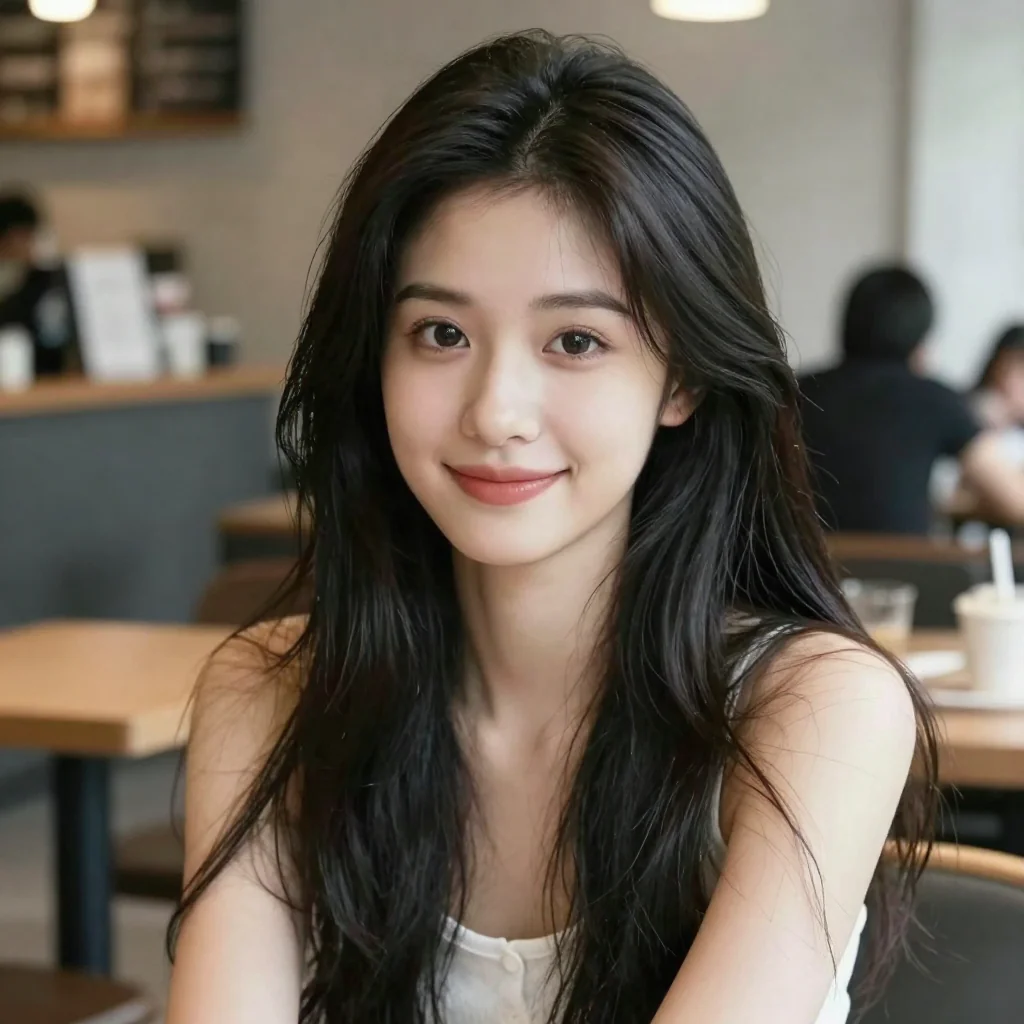
By eye, all six portraits hold up — hair, eyes, the coffee-shop background. But a photorealistic human portrait is one of the gentler prompts for FP4 quantization. Whether complex Chinese prompts, text rendering, dense detail, or anime style hold up will be answered in Part 2 by an LPIPS + CLIPScore quantitative test.
Recommended combo
NVFP4 transformer + qwen_3_4b FP8 mixed encoder + ae VAE
| Axis | Value |
|---|---|
| Warm time | 5.52s / 1024×1024 image |
| Speedup vs BF16 | 1.37× |
| Cold start | 16.3s |
| Model working set RSS | 11.52 GB (BF16 baseline 20.64 GB, 44% smaller) |
| Disk | 4.5 + 5.6 + 0.34 = 10.44 GB |
| Disk savings vs BF16 | ~49% (BF16 total 20.64 GB) |
Download:
HF_REPO=https://huggingface.co/Comfy-Org/z_image_turbo/resolve/main

# transformer
curl -L -o models/diffusion_models/z_image_turbo_nvfp4.safetensors \
  $HF_REPO/split_files/diffusion_models/z_image_turbo_nvfp4.safetensors

# text encoder (FP8 mixed)
curl -L -o models/text_encoders/qwen_3_4b_fp8_mixed.safetensors \
  $HF_REPO/split_files/text_encoders/qwen_3_4b_fp8_mixed.safetensors

# vae
curl -L -o models/vae/ae.safetensors \
  $HF_REPO/split_files/vae/ae.safetensors
ComfyUI workflow JSON template (POST directly to /prompt):
{
  "1": {"class_type": "UNETLoader", "inputs": {
    "unet_name": "z_image_turbo_nvfp4.safetensors",
    "weight_dtype": "default"}},
  "2": {"class_type": "CLIPLoader", "inputs": {
    "clip_name": "qwen_3_4b_fp8_mixed.safetensors",
    "type": "lumina2", "device": "default"}},
  "3": {"class_type": "VAELoader", "inputs": {"vae_name": "ae.safetensors"}},
  "11": {"class_type": "ModelSamplingAuraFlow", "inputs": {"model": ["1", 0], "shift": 3.0}},
  "4": {"class_type": "CLIPTextEncode", "inputs": {"text": "<your prompt>", "clip": ["2", 0]}},
  "5": {"class_type": "ConditioningZeroOut", "inputs": {"conditioning": ["4", 0]}},
  "6": {"class_type": "EmptySD3LatentImage", "inputs": {"width": 1024, "height": 1024, "batch_size": 1}},
  "7": {"class_type": "KSampler", "inputs": {
    "model": ["11", 0], "seed": 42, "steps": 8, "cfg": 1.0,
    "sampler_name": "res_multistep", "scheduler": "simple",
    "positive": ["4", 0], "negative": ["5", 0],
    "latent_image": ["6", 0], "denoise": 1.0}},
  "8": {"class_type": "VAEDecode", "inputs": {"samples": ["7", 0], "vae": ["3", 0]}},
  "9": {"class_type": "SaveImage", "inputs": {"images": ["8", 0], "filename_prefix": "zimage"}}
}
Easy traps:
CLIPLoader.typemust belumina2(Z-Image piggybacks on the Lumina2 pipeline; there is no standalonez_imagetype)- Must wire in the
ModelSamplingAuraFlow shift=3patch — without it, sampling does not converge - Latent uses
EmptySD3LatentImage, notEmptyFlux2LatentImage - The download commands above place files directly under
models/{diffusion_models,text_encoders,vae}/, so the workflow'sunet_name/clip_name/vae_nameare bare filenames (no subdirectory). If you keep the HFsplit_files/...substructure when downloading, prefix the workflow paths withsplit_files/diffusion_models/...accordingly
Methodology caveats
The N=10 dataset is publication-grade, but it has limits:
- Single prompt, single seed for latency. Different prompts hit different attention patterns, but quantization paths affect transformer/encoder kernels independently of prompt content, so the single-prompt result should generalize for latency. (Quality is a different story — Part 2.)
- No quality measurement here. Part 2 will run LPIPS + CLIPScore on six prompts across multiple seeds.
- No mechanism analysis. Why is FP8 slower than BF16? Why is NVFP4 faster than both? Part 3 digs through the ComfyUI ops.py and comfy_kitchen kernel dispatch logic.
- GB10 is unique.
vram_usedhere is unified memory, not the dedicated VRAM you would see on a discrete GPU. The same configs on RTX 5090 / B200 may give very different numbers.
Contrast with the LLM result in Part 19
Part 19 conclusion: on the LLM side (Qwen 3.6 35B under vLLM), NVFP4 was 32% slower than FP8. FP8 always wins.
This article: on the image generation side (Z-Image Turbo under ComfyUI), NVFP4 is 33% faster than FP8, and FP8 is even slower than BF16.
The conclusion is reversed. But this is not a head-to-head NVFP4 versus FP8 verdict on the same hardware — the LLM trap was specific to vLLM's Marlin kernel quality on SM12.1, while image generation runs on PyTorch + comfy_kitchen, an entirely different backend. The conclusion depends on the stack and workload, not on GB10 itself.
Why those two paths handle quantization so differently — and end up with opposite speed conclusions — is the subject of Part 3, which digs into ComfyUI's ops.py and comfy_kitchen kernel dispatch.
Related reading
FAQ
- How fast is Z-Image Turbo on DGX Spark GB10?
- 1024×1024, 8 step, N=10 isolated GPU: BF16 baseline 7.55s warm, NVFP4 transformer 5.50s warm (1.37× speedup). All three FP8 transformer paths (cast standard, cast fast, Kijai pre-quantized) are 0.6–0.9s slower than BF16.
- Recommended Z-Image Turbo quant combo on DGX Spark?
- **NVFP4 transformer + qwen_3_4b_fp8_mixed encoder**. Warm 5.52s (same tier as NVFP4+BF16 encoder, but disk 2.4 GB smaller). Model working set RSS 11.5 GB (versus BF16 baseline 20.6 GB — 44% smaller). Disk total 10.4 GB (versus BF16 ~20.6 GB — about half, ~49% smaller).
- Why is FP8 transformer slower than BF16?
- All three FP8 paths are slower: weight_dtype=fp8_e4m3fn loses 0.72s, fp8_e4m3fn_fast loses 0.90s, Kijai pre-quantized scaled loses 0.64s. The mechanism deep dive is Part 3; this article only reports measured numbers.
- Does Z-Image quantization break image quality?
- This article only covers speed and VRAM. Quality testing is Part 2 — LPIPS + CLIPScore on 6 prompts × 4 configs × 3 seeds. Visual inspection of six warm samples shows no obvious portrait artifacts, but photographic prompts are the easiest stress test for FP4 quantization. Cannot extrapolate to text rendering, dense detail, or anime style.
Read next
- 2026-05-04[Field Guide] Z-Image Turbo — does choosing a faster config hurt quality? LPIPS + CLIPScore answer
Does Z-Image Turbo quantization break image quality? Two-axis benchmark — LPIPS (perceptual distance vs BF16) + CLIPScore (image-text alignment) — across 6 prompts × 4 configs × 3 seeds = 72 samples. Result: NVFP4 produces images that look different from BF16, but no measured regression in this sample — all 4 configs land within ±0.04 std on CLIPScore, smaller than the noise floor. Production users should re-verify with their own prompt set.
- 2026-05-30NVFP4 is 1.5× FP8 on a DGX Spark — but it's compression, not the FP4 cores
On a GB10 DGX Spark, NVFP4 beats FP8 by ~1.5× for single-stream decode on a dense model. But the win is bandwidth (smaller weights), not the FP4 tensor cores — the fastest path never touches them.
- 2026-04-21[Benchmark] NVFP4 Is a Trap on GB10: FP8 Wins by 32% (vLLM + SGLang Tested)
NVFP4 should be faster than FP8 — fewer bits, less bandwidth. On DGX Spark's GB10 (SM121), it's 32% slower. Root cause: missing hardware instruction. Dual-engine proof with vLLM and SGLang.
- 2026-06-05[Benchmark] NVFP4 Weight-Only Quantization Taxes Chinese ~2x Harder Than English (gemma-4-12B)
I benchmarked BF16 vs FP8 vs NVFP4 weight-only on gemma-4-12B across English (MMLU) and Traditional Chinese (TMMLU+) on a DGX Spark. FP8 is near-lossless on both; NVFP4 drops Chinese ~6pp but English only ~3pp.
Don't miss the next one
Subscribe, and you won't.
One-click unsubscribe anytime.