DGX Spark · part 7
Gemma 4 26B-A4B on DGX Spark: 52 tok/s with NVFP4, skip the 31B
❯ cat --toc
- Plain-English version: what Gemma 4 is, and what 52 tok/s means
- Why I tested this in the first place
- Phase 0: Why Not the 31B Dense?
- The Model: bg-digitalservices NVFP4
- Deployment: One Docker Command
- Benchmark Results
- vLLM vs Ollama on the Same Model
- Takeaways
- The real time sink
- What carries to other hardware
- The underlying math
- Deployment Checklist
TL;DR
Gemma 4 26B-A4B NVFP4 runs at 52 tok/s on DGX Spark (GB10) via vLLM 0.19, using only 16.5 GB of model memory and leaving 82 GB for KV cache. The 31B dense variant is 7.5x slower — don't bother.
Updated July 2026 — Still works: 26B-A4B NVFP4 on vLLM, ~52 tok/s on GB10. Changed: NVIDIA's official NVFP4 weights (
nvidia/Gemma-4-26B-A4B-NVFP4) shipped 2026-04-30 — you no longer need the community quant or thegemma4_patched.pyshim. Current pick: the official NVIDIA weights on stock vLLM.
Plain-English version: what Gemma 4 is, and what 52 tok/s means
Gemma 4 is an open-weights AI model Google released in April 2026. Open weights means you can download it and run it on your own machine — no payment to Google, and it works fully offline. It chats, writes code, and answers questions like ChatGPT, except it lives on your hardware.
It ships in two flavors: a 31B dense model (31 billion parameters, all of them working on every token), and a 26B-A4B model that holds 26 billion parameters but fires only ~3.8 billion of them per token. That second kind is a Mixture of Experts (MoE) — picture a 260-person company where only 38 people show up for any given task and the rest stay home. Far less data moves per step, so it runs far faster. For the wider dense-vs-MoE decision, see the broader guide to choosing between model families.
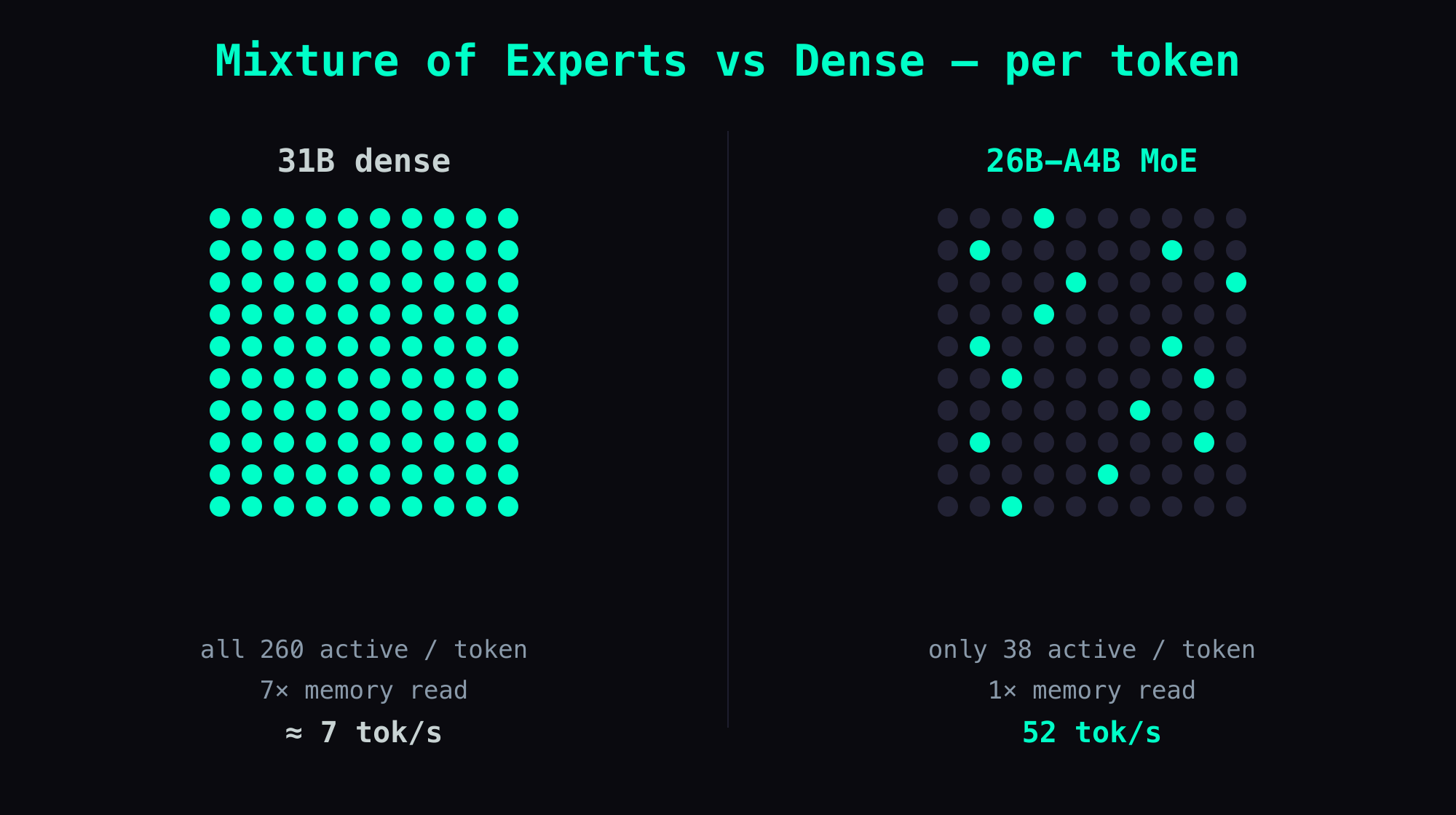
So what does 52 tok/s (tokens per second) actually feel like? A token is roughly ¾ of an English word, so 52 tok/s is about 40 words a second landing on screen — comfortably faster than you read, so a reply feels instant. The 31B dense version musters about 7 tok/s on the same box: you watch it crawl out word by word, slower than your own reading speed.
I ran both on an NVIDIA DGX Spark (a ~$3,000 desktop AI box). The rest of this post is the decision, the deployment, and every gotcha in between.
Why I tested this in the first place
The wrong model at the right quantization is still the wrong model. A 31B dense model on a 273 GB/s memory bus will always lose to a 26B MoE with 4B active parameters, no matter how cleverly you pack the weights.
This picks up from Part 6: 30W Power Safety Mode, where the GX10 was stable on Qwen3.5-35B FP8 at 47 tok/s. Google dropped Gemma 4 on April 2, and vLLM 0.19 shipped the same day with the SM121 NVFP4 fixes that had been broken since March. So I tested.
Phase 0: Why Not the 31B Dense?
My first instinct was to try nvidia/Gemma-4-31B-IT-NVFP4, NVIDIA's official quantized checkpoint. Community benchmarks on the NVIDIA Developer Forums killed that idea fast:
| Model | Format | tok/s on GB10 |
|---|---|---|
| Gemma 4 31B | BF16 | 3.7 |
| Gemma 4 31B | AWQ int4 | 10.6 |
| Gemma 4 31B | NVFP4 | 6.9 |
| Gemma 4 26B-A4B | NVFP4 | ~48 (reported) |
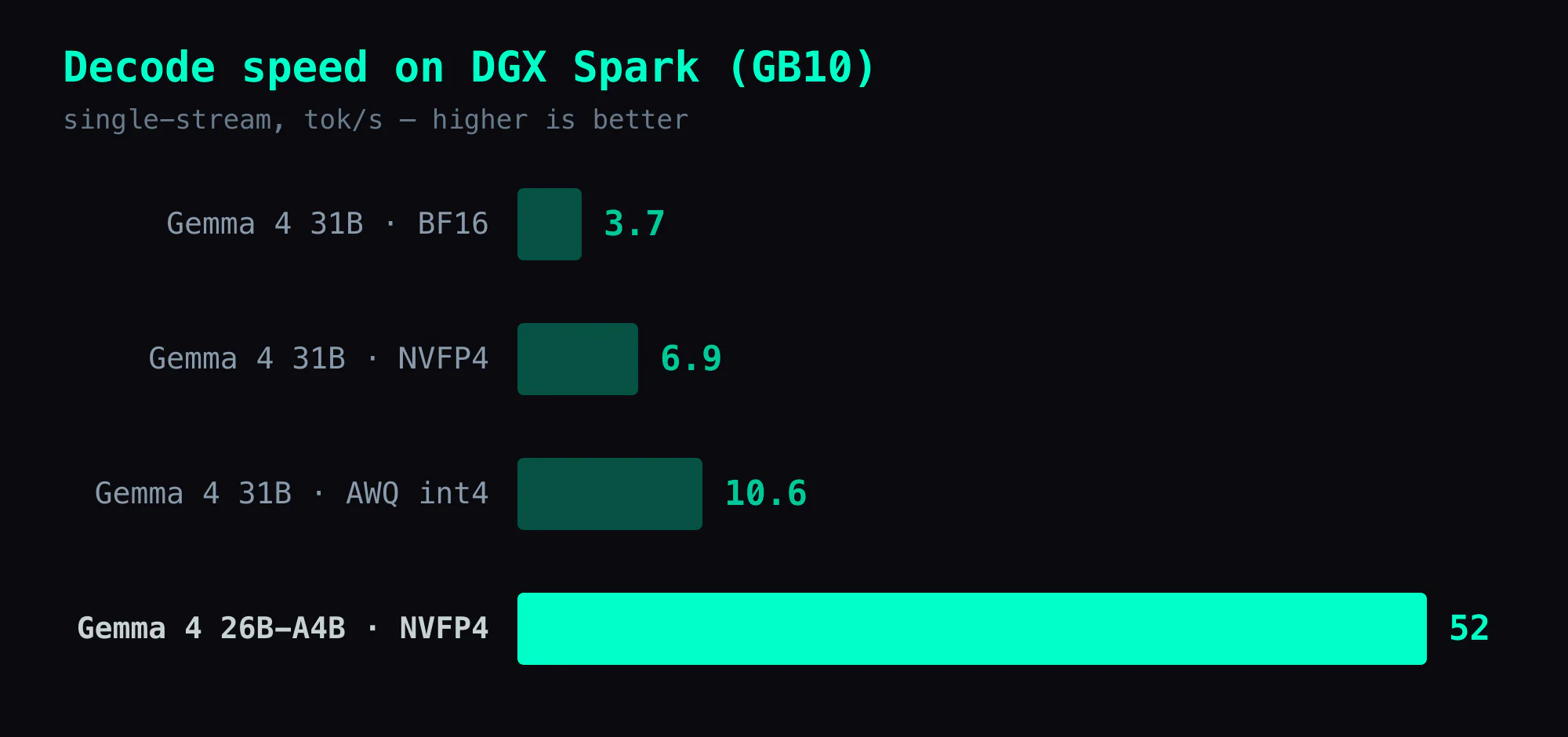
The 31B is dense — all 31 billion parameters are active per token. On GB10's 273 GB/s memory bandwidth, that translates to roughly 7 tok/s regardless of quantization level. The quantization shrinks the model, but the bandwidth cost of reading all weights per token stays proportional.
The 26B-A4B is MoE: 26 billion total parameters, 3.8 billion active. That is the difference between a 7x memory read and a 1x memory read per token.
The Model: bg-digitalservices NVFP4
At launch, NVIDIA's only official NVFP4 checkpoint was for the 31B dense model. For the 26B-A4B MoE I needed a community quantization — bg-digitalservices built one with a custom modelopt plugin, since standard NVIDIA tooling didn't support Gemma 4's fused 3D expert tensor format. (NVIDIA later published an official nvidia/Gemma-4-26B-A4B-NVFP4 on 2026-05-01, after this was written.)
The numbers:
| Metric | BF16 | NVFP4 |
|---|---|---|
| Size on disk | 49 GB | 16.5 GB |
| Tokens/sec | 23.3 | 48.2 |
| TTFT | 97 ms | 53 ms |
| Quality retained | — | 97.6% |
The model ships with a gemma4_patched.py that fixes vLLM's expert_params_mapping — without it, NVFP4 scale keys (.weight_scale, .weight_scale_2, .input_scale) fail to map to FusedMoE parameter names. This is tracked in vLLM issue #38912.
Deployment: One Docker Command
Download the model:
huggingface-cli download bg-digitalservices/Gemma-4-26B-A4B-it-NVFP4 \
  --local-dir ~/models/gemma4-26b-a4b-nvfp4
Start the container:
docker run -d \
  --name gemma4-nvfp4 \
  --gpus all --ipc host --shm-size 64gb \
  -p 8002:8000 \
  -v ~/models/gemma4-26b-a4b-nvfp4:/models/gemma4 \
  -v ~/models/gemma4-26b-a4b-nvfp4/gemma4_patched.py:/usr/local/lib/python3.12/dist-packages/vllm/model_executor/models/gemma4.py \
  vllm/vllm-openai:gemma4-cu130 \
  --model /models/gemma4 \
  --served-model-name gemma-4-26b \
  --host 0.0.0.0 --port 8000 \
  --quantization modelopt \
  --kv-cache-dtype fp8 \
  --max-model-len 131072 \
  --gpu-memory-utilization 0.85 \
  --moe-backend marlin \
  --reasoning-parser gemma4 \
  --enable-auto-tool-choice --tool-call-parser pythonic
The critical flags:
--moe-backend marlin— SM121 (GB10) lacks the tcgen05/TMEM path the native FP4 MoE kernel needs. Without Marlin, the CUTLASS FP4 MoE path runs and produces garbage (NaN scale factors,!!!!!output). Marlin decompresses FP4 weights to BF16 at runtime — slower than native W4A4 but correct.--quantization modelopt— the NVFP4 checkpoint was quantized with NVIDIA modelopt.gemma4_patched.pymount — maps into vLLM's model directory to fix the scale key mapping bug.vllm/vllm-openai:gemma4-cu130— this is the correct image. Thegemma4tag (without-cu130) is actually v0.18.2-dev and crashes withRuntimeError: [FP4 gemm Runner] Failed to run cutlass FP4 gemm on sm120/sm121.
Startup takes about 90 seconds — 84 seconds for weight loading, then torch.compile warmup. The startup log should show:
Using NvFp4LinearBackend.FLASHINFER_CUTLASS for NVFP4 GEMM
Using 'MARLIN' NvFp4 MoE backend
Model loading took 15.76 GiB memory
Available KV cache memory: 81.8 GiB
GPU KV cache size: 714,768 tokens
If the log says CUTLASS_FP4 instead of MARLIN for MoE, the --moe-backend marlin flag was not picked up. Stop and fix.
Benchmark Results
Five sequential runs at 800 tokens each:
| Run | Tokens | Time | tok/s |
|---|---|---|---|
| 1 | 800 | 15.48s | 51.6 |
| 2 | 800 | 15.52s | 51.5 |
| 3 | 800 | 15.51s | 51.5 |
| 4 | 800 | 15.48s | 51.6 |
| 5 | 800 | 15.48s | 51.6 |
Variance: ±0.1 tok/s. Rock solid.
Long output test (1633 tokens): 51.0 tok/s — no degradation at length.
Concurrent load (3 parallel requests, 500 tokens each): 114.6 tok/s aggregate, each request at ~38 tok/s.
vLLM vs Ollama on the Same Model
Ollama has a gemma4:26b GGUF (Q4_K_M, 17 GB). Same architecture, different runtime:
| vLLM NVFP4 | Ollama Q4_K_M | |
|---|---|---|
| tok/s | 52 | 40 |
| Model size | 16.5 GB | 17 GB |
| KV cache available | 82 GB | N/A |
| Concurrent requests | Yes (OpenAI API) | No |
| Tool calling | Yes | No |
vLLM wins by 30%. Both support vision. For the full head-to-head — latency, memory behavior, and when Ollama is actually the better call — see vLLM vs Ollama on the Same Model.
Watch for one Ollama trap: if a vLLM container touched the GPU earlier (even a stopped one), Ollama may load the model split across CPU and GPU — 66% CPU / 34% GPU in ollama ps. Force a full unload first:
curl -s http://localhost:11434/api/generate \
  -d '{"model":"gemma4:26b","keep_alive":0}'
Takeaways
The real time sink
Figuring out the model landscape took longer than the deployment did. The vLLM 0.19 SM121 fixes (#37725 for NVFP4 NaN, #38126 for DGX Spark) made the rollout itself straightforward. The real work was proving the 31B dense wasn't worth attempting and confirming the community NVFP4 checkpoint existed and worked.
What carries to other hardware
- On bandwidth-constrained hardware (GB10's 273 GB/s), always pick MoE over dense. The total parameter count is irrelevant — active parameters determine speed.
vllm/vllm-openai:gemma4andvllm/vllm-openai:gemma4-cu130are different images with different vLLM versions. Tag naming does not imply one is a superset of the other. Always checkdocker imagesto verify.- Ollama won't tell you when it splits weights across CPU and GPU. If the same model does 40 tok/s one session and 16 the next, suspect that split before you blame the model.
The underlying math
Do the napkin math before you spend time on the run. 31B parameters × 2 bytes (BF16) ÷ 273 GB/s = 227 ms per token = 4.4 tok/s theoretical max. No amount of quantization tricks changes the memory bandwidth equation for a dense model on a bandwidth-limited chip.
Deployment Checklist
- Download
bg-digitalservices/Gemma-4-26B-A4B-it-NVFP4(~16.5 GB) - Pull
vllm/vllm-openai:gemma4-cu130(notgemma4) - Unload all Ollama models before starting vLLM (
keep_alive:0) - Mount
gemma4_patched.pyinto the container - Use
--moe-backend marlinand--quantization modelopt - Verify startup log shows
MARLINfor MoE,FLASHINFER_CUTLASSfor dense - Test:
curl http://<your-gx10-ip>:8002/v1/chat/completions
Also in this series: Part 1: Ollama Benchmark — 8 Models · Part 2: vLLM + Qwen3.5 Setup · Part 5: FP8 KV Cache Repetition Bug · Part 6: 30W Power Safety Mode
FAQ
- How fast is Gemma 4 26B-A4B NVFP4 on DGX Spark?
- 52 tok/s decode, stable across 5 sequential runs (±0.1 tok/s). Long outputs (1600+ tokens) show no speed degradation. Three concurrent requests achieve 114.6 tok/s aggregate throughput.
- Should I run Gemma 4 31B or 26B-A4B on DGX Spark?
- 26B-A4B, without question. The 31B dense variant runs at 6.9 tok/s on GB10 — bandwidth-bound at 273 GB/s. The 26B-A4B MoE (4B active parameters) runs at 52 tok/s with NVFP4 quantization. Same model family, 7.5x faster.
- Does Gemma 4 NVFP4 work on SM121 (GB10) with vLLM 0.19?
- Yes, but only with --moe-backend marlin. SM121 (GB10) lacks the tcgen05/TMEM tensor-core path the native FP4 MoE kernel needs, so the CUTLASS FP4 MoE path crashes on sm120/121 and MoE layers fall back to the Marlin W4A16 backend. Dense layers use FLASHINFER_CUTLASS. The official vllm/vllm-openai:gemma4-cu130 image handles this correctly.
- What is the gemma4_patched.py file and do I need it?
- Yes. The community NVFP4 checkpoint (bg-digitalservices/Gemma-4-26B-A4B-it-NVFP4) requires a patched gemma4.py to correctly map NVFP4 scale keys (.weight_scale, .weight_scale_2, .input_scale) in FusedMoE. Without it, weight loading fails. The patch ships with the model repo.
Read next
- 2026-05-06Liftoff: Gemma 4 hits 670 tok/s aggregate on DGX Spark (108 tok/s single-stream)
Google announced Multi-Token Prediction drafters for Gemma 4 on 2026-05-05. The vLLM PR was opened and approved the same day; a preview Docker image shipped hours later. I tested it on DGX Spark: Gemma 4 26B-A4B-it FP8 + MTP γ=4 hits 108.78 tok/s single-stream (2.66× baseline), 674.28 tok/s aggregate at concurrency=8. One undocumented trap: the drafter pairs with -it, not base.
- 2026-06-01[Benchmark] NVFP4 W4A4 beats FP8 on a DGX Spark MoE: 67 vs 52 tok/s once CUDA graphs fire
On a GB10 DGX Spark, NVFP4 W4A4 went from 23 to 67 tok/s the moment I dropped --enforce-eager — beating FP8 by 29% and saving 16GB. The catch from Part 32 was real, just dense-only.
- 2026-05-01[vLLM] Nemotron 3 Nano on DGX Spark: 74.75 tok/s NVFP4 — 11.5% Past the Public Baseline
Ten days ago I called NVFP4 a trap on DGX Spark GB10. Today the same hardware hits 74.75 tok/s on Nemotron 3 Nano W4A16, beating my own FP8 ceiling and the public 67 tok/s forum number. The 4-layer patch stack, the quant variant choice, and the bandwidth math behind it.
- 2026-04-13[Benchmark] Gemma 4 on DGX Spark — Which Model Should You Pick?
Gemma 4 E2B / E4B / 26B MoE / 31B Dense benchmarked on DGX Spark, RTX 5090, and MacBook Pro. One table with speed, memory, quantization format. Selection guide included.
Don't miss the next one
Subscribe, and you won't.
One-click unsubscribe anytime.